
ASRock Intel Arc B570 Challenger
4.7Editor score
10GB GDDR6 VRAM
Dual Fan Cooling
0dB Silent Mode
This comprehensive guide compares the top Intel Arc GPU models for gaming and creative workloads, helping you choose the right graphics card for your specific
Choosing the right graphics card is crucial for modern computing tasks ranging from high-end gaming to professional content creation. The market has evolved significantly with new architectures offering improved performance and efficiency for diverse workloads.
We evaluated ten distinct Intel Arc GPU models based on their architecture, memory capacity, cooling solutions, and connectivity options. Our analysis focuses on real-world performance potential and compatibility with current software ecosystems.
Each selection highlights specific strengths for different user scenarios ensuring you find a match for your system requirements. Please note that availability and specifications may vary slightly by region and retailer at the time of purchase.
4.7Editor score

3.9Editor score

4.5Editor score
The following table provides a side-by-side overview of all ten selected models highlighting their key specifications and target use cases for easy comparison.



The ASRock Intel Arc Pro B60 Creator stands out as a powerful workstation solution designed for demanding professional workflows. It features a robust 24GB GDDR6 memory pool which is essential for handling large datasets and complex 3D scenes without bottlenecks.
We may earn a commission when you buy through this link, at no additional cost to you.
Built on the Xe2-HPG architecture this card delivers significant acceleration for AI inference and rendering tasks. The integration of dual media transcoders ensures efficient video processing making it suitable for content creators who need fast export times.
While the blower-style cooling ensures compatibility with compact chassis it can generate more noise under load compared to open designs. Users should verify their chassis clearance and power supply capacity before installation to ensure stable operation.
This GPU is ideal for professionals running local LLMs or engineering software that requires validated drivers. Its ability to support four high-resolution displays simultaneously makes it a strong candidate for multi-monitor command centers.
The 197 INT8 TOPS capability allows for rapid inference of complex models without needing cloud resources.
Four DisplayPort 2.1 outputs enable high-resolution multi-monitor setups ideal for productivity and monitoring.
We may earn a commission when you buy through this link, at no additional cost to you.
The ASRock Arc B570 Challenger offers excellent performance for its price point making it a top contender for budget-conscious gamers. It delivers smooth frame rates at 1440p resolution which is the sweet spot for many modern gaming monitors.
We may earn a commission when you buy through this link, at no additional cost to you.
Support for Xe Super Sampling 2 technology helps boost performance in supported titles by using AI to upscale images effectively. The dual fan cooling system is designed to keep temperatures low while providing a silent experience during lighter tasks.
The metal backplate adds structural rigidity and prevents sagging which is a common issue with larger cards. Its energy efficient design means it pairs well with standard power supplies without needing excessive wattage or connectors.
This model is highly recommended for users seeking a balanced GPU for gaming and light content creation. Its modern connectivity ensures compatibility with the latest displays and monitors for a crisp viewing experience.
Optimized for high refresh rate gaming at 1440p ensuring smooth gameplay in competitive titles.
Dual striped axial fans maintain optimal thermal performance without unnecessary noise during idle.
We may earn a commission when you buy through this link, at no additional cost to you.
The ASRock Arc A580 Challenger is a solid entry-level option for those building a budget gaming PC. It features a generous 256-bit memory interface which helps maintain bandwidth for 1440p gaming and creative tasks.
We may earn a commission when you buy through this link, at no additional cost to you.
Factory overclocking ensures that the card performs well out of the box without requiring manual tweaks. The dual fan design with silent cooling stops fans completely at low loads providing a quiet experience for office work.
Users should note the power requirements as it needs two eight-pin connectors which may necessitate a robust power supply. The build quality is robust with Super Alloy components ensuring long-term reliability under typical usage loads.
This card is best suited for gamers who want to play modern titles at high settings without breaking the bank. Its support for next-gen display connectivity allows for high refresh rates on compatible monitors.
The wide bus interface delivers excellent data throughput for smoother rendering in creative apps.
Full DirectX 12 Ultimate support ensures broad compatibility with current and future game engines.
We may earn a commission when you buy through this link, at no additional cost to you.
The Sparkle Arc B580 Titan OC brings a distinctive aesthetic to the Intel Arc lineup with its breathing light effects. It offers a higher boost clock which can provide an edge in gaming scenarios requiring peak performance.
We may earn a commission when you buy through this link, at no additional cost to you.
The TORN Cooling 2.0 system is designed to dissipate heat efficiently during intense gaming sessions. A included graphic card sag bracket ensures the heavy card remains secure in the motherboard slot preventing potential damage.
Users looking for a card that stands out visually will appreciate the metal backplate and design cues. The 12GB memory buffer is a comfortable amount for modern games and general creative tasks.
This model is recommended for enthusiasts who value both performance and visual appeal in their setup. It serves well as a primary GPU for 1440p gaming with room for future growth.
Higher clock speeds provide extra headroom for demanding workloads and higher frame rates.
The cooling solution maintains safe temperatures even during prolonged gaming or rendering sessions.
We may earn a commission when you buy through this link, at no additional cost to you.
The WEELIAO MAXSUN Arc Pro B60 48G is a specialized powerhouse designed for running large language models locally. By combining two GPUs into a single card it offers 48GB of memory which eliminates the need for multi-card setups.
We may earn a commission when you buy through this link, at no additional cost to you.
This setup allows for running complex models like 70B parameter versions directly on a single card. The combined compute power of 394 TOPS makes it highly efficient for AI inference tasks without relying on cloud services.
It requires a motherboard that supports PCIe lane bifurcation to function correctly in many consumer systems. The turbo cooling system ensures that the card can handle sustained loads without thermal throttling during long inference sessions.
This GPU is essential for researchers and developers who need a self-contained AI workstation. Its broad software support including PyTorch and vLLM makes it accessible for various machine learning frameworks.
The large memory pool allows loading massive models entirely on GPU for faster inference.
Integrated design simplifies system assembly by reducing the need for complex cabling.
We may earn a commission when you buy through this link, at no additional cost to you.
The MAXSUN Arc Pro B60 Dual is engineered for professional visual computing and rendering tasks. It utilizes a dual GPU design to deliver exceptional parallel processing power which is critical for complex 3D rendering workloads.
We may earn a commission when you buy through this link, at no additional cost to you.
With 48GB of dedicated graphics memory users can handle massive datasets and complex scenes without running out of VRAM. The turbo cooling system is designed to exhaust heat efficiently out of the chassis ensuring stable performance.
This card fits neatly into standard PCIe slots without monopolizing excessive motherboard space making it suitable for various chassis sizes. It is specifically optimized for AI and professional creative applications requiring high throughput.
Professionals who need a robust solution for local rendering and AI work will find this card valuable. Its design prioritizes sustained performance over long periods which is essential for server-like workloads.
Running two GPUs in tandem maximizes parallel processing for complex mathematical and graphical tasks.
48GB VRAM ensures smooth handling of high-resolution textures and large scale rendering projects.
We may earn a commission when you buy through this link, at no additional cost to you.
This bundle combines the ASRock Arc B570 Challenger with a reliable 650W Gold PSU offering a complete upgrade path for gamers. It simplifies the purchasing process by ensuring power compatibility right out of the box.
We may earn a commission when you buy through this link, at no additional cost to you.
The GPU delivers smooth 1440p gaming performance while the PSU ensures stable clean power delivery for the whole system. The 80 Plus Gold certification means efficient energy usage which reduces electricity costs over time.
The quiet cooling design on the GPU ensures that system noise remains low during daily use or light tasks. This makes it an excellent choice for users who want a silent PC without sacrificing gaming capabilities.
We recommend this bundle for anyone building a new PC or upgrading an existing system without matching parts. It provides peace of mind regarding power stability which is critical for GPU longevity.
The matched PSU ensures the GPU receives consistent power preventing crashes during intense loads.
Buying together saves time and ensures all components are compatible for a smooth build.
We may earn a commission when you buy through this link, at no additional cost to you.
The GUNNIR Arc PRO B50 LP is designed for small form factor PCs that need serious performance in a tiny box. It is a single slot card that does not require external PCIe power connectors simplifying installation.
We may earn a commission when you buy through this link, at no additional cost to you.
Despite its small size it offers 16GB of memory which is rare for low-profile cards. This makes it capable of running larger AI models and complex scenes in edge workstations without external power cabling.
The 70W power draw allows it to run efficiently on lower wattage PSUs often found in mini-towers. It is ideal for users who need a discreet GPU that can still handle professional tasks quietly.
This card is perfect for office PCs or home theater PCs where space is at a premium. It proves that you do not need a massive card to get meaningful compute power for specific workloads.
The low profile design allows installation in cases that typically reject standard graphics cards.
Suitable for edge workstations where size and power consumption are critical constraints.
We may earn a commission when you buy through this link, at no additional cost to you.
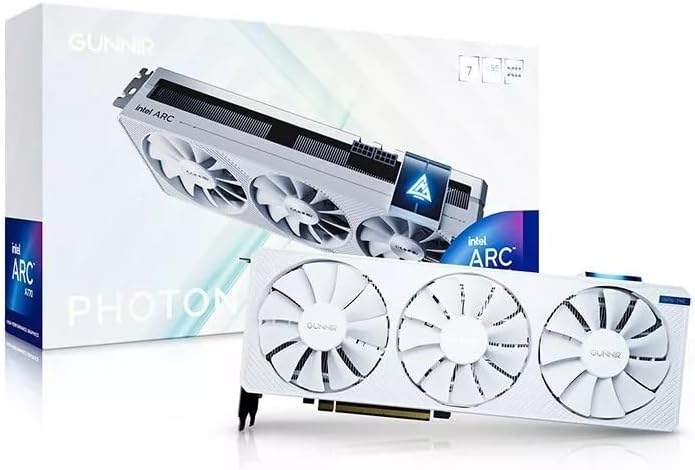
The GUNNIR Arc A770 Photon is a visually striking GPU designed to match white-themed PC builds. It features a triple fan design that ensures efficient cooling during intense workloads while maintaining a sleek aesthetic.
We may earn a commission when you buy through this link, at no additional cost to you.
Its 256-bit memory interface provides excellent bandwidth for high-resolution gaming and content creation tasks. The card supports 4K displays making it suitable for users who have high-resolution monitors.
The 8GB memory buffer is sufficient for most current titles though very heavy texture packs may benefit from more. The OC version ensures higher clock speeds for better performance in demanding scenarios.
This GPU is best for enthusiasts who prioritize build aesthetics without compromising on performance. It offers a rare combination of style and substance in the current market.
The all-white design allows it to blend seamlessly into light-colored PC cases and setups.
Triple fans maintain low temperatures ensuring the card runs efficiently during long sessions.
We may earn a commission when you buy through this link, at no additional cost to you.
The Sparkle Arc A310 Omni View is designed for users needing multiple displays without needing a heavy GPU. It features four HDMI outputs allowing for a versatile multi-monitor setup in a home office environment.
We may earn a commission when you buy through this link, at no additional cost to you.
Its low 50W power draw means it can run efficiently even on systems with limited power supply capacity. This makes it a great addition for older systems that need more displays without upgrading the PSU.
While not intended for heavy gaming it handles media streaming and office tasks with ease. The single slot design ensures it fits into tight spaces without blocking other ports.
This card is recommended for digital signage or home media centers where connectivity is key. It provides a cost-effective solution for expanding display capabilities without high costs.
Four HDMI ports allow for extensive screen setups ideal for productivity or media walls.
Minimal power usage ensures compatibility with a wide range of older or compact systems.
We may earn a commission when you buy through this link, at no additional cost to you.
Selecting the right Intel Arc GPU requires understanding your specific needs and system capabilities. This guide outlines key factors to consider before making a decision.
VRAM is critical for handling high-resolution textures and large AI models. For modern gaming 10GB to 12GB is recommended while workstation tasks often require 24GB or more.
Ensure your chosen card has enough memory for your specific applications to prevent bottlenecks.
Different GPUs have varying power needs ranging from 50W to over 200W. Check your power supply unit wattage and available PCIe connectors before buying.
Always choose a PSU that exceeds the card's requirements for stable operation.
Blower cards are compact but noisy while open coolers are quieter but larger. Choose based on your case size and noise tolerance levels.
Silent cooling options are best for quiet home offices.
Look for HDMI and DisplayPort versions that match your monitors. Newer cards support 2.1 standards for high refresh rates.
Verify output counts if you need multiple displays for work.
If you plan to run local AI models check the XMX engine count and TOPS rating. More compute power allows for faster inference times.
Professional cards often have better ISV certification for stability.
PCIe 4.0 is standard but PCIe 5.0 offers future bandwidth. Ensure your motherboard supports the interface speed for best performance.
Modern systems generally support at least PCIe 4.0.
Measure your case clearance carefully especially for larger dual or triple fan cards. Low profile options exist for SFF builds.
Check slot width to avoid blocking adjacent ports.
Verify driver support for your specific software like Blender or PyTorch. Professional cards often have better optimized drivers.
Community support can help resolve driver issues quickly.
Always install the latest drivers from the official manufacturer site to ensure compatibility and performance stability. Driver updates often fix bugs and improve gaming performance significantly.
Maintain proper airflow in your case by keeping dust filters clean and ensuring intake fans are working. Overheating can reduce lifespan and cause instability under load.
For AI workloads ensure your system has sufficient RAM to match the GPU memory requirements. This prevents swapping which can slow down model inference speeds.
Yes many Intel Arc GPUs feature XMX engines that accelerate AI inference efficiently. Professional models offer even more compute power for local LLMs.
Yes most modern Arc GPUs support hardware-accelerated ray tracing and XeSS for upscaling. This improves visual fidelity in supported games significantly.
Driver maturity has improved greatly but some titles may still need updates. Always check game compatibility lists before buying if gaming is your priority.
Yes professional models and specific dual GPU cards support multi-GPU setups. This allows scaling performance for larger models and datasets.
Most gaming models need at least 650W with specific PCIe connectors. Always check the official requirements for your specific card model.
Yes Intel provides Linux support for Arc GPUs with open-source drivers. This makes them a strong choice for open-source enthusiasts.
We have reviewed ten distinct models ranging from budget gaming cards to powerful AI workstations. The ASRock B570 offers the best balance for most users.
Prioritize memory capacity if you plan to run AI models or high-resolution content creation. Power and cooling requirements are also essential system considerations.
Prices and availability change frequently so check current listings before purchasing. Ensure your system meets all compatibility requirements for the best experience.