
Redragon K617
4.6Editor score
Sixty percent compact layout
Hot swappable switch sockets
RGB lighting effects included
This guide compares the top hot swappable keyboards for gaming and typing, reviewing switch compatibility, build quality, and customization options for every
Hot swappable keyboards let you change switches without soldering. This feature saves time and money while letting you tailor the typing feel to your exact preference for work or play.
We compared ten leading models based on switch support, build materials, connectivity options, and user feedback. Each entry highlights distinct strengths to help you find the right board for your desk setup.
Every pick shows real specifications and verified ratings from users. Prices and stock change often so check the links for the latest offers before you decide on your next mechanical keyboard upgrade.
4.6Editor score

4.7Editor score

4.5Editor score
This side-by-side table lists every model with its key specs and ratings so you can quickly find the board that fits your layout, connectivity, and switch needs.





The Keychron C1 stands out as a top choice for users who want a tenkeyless hot swappable mechanical keyboard that works well with both Mac and Windows systems. It holds a strong rating from users who appreciate its solid construction and the freedom to swap switches without soldering.
We may earn a commission when you buy through this link, at no additional cost to you.
This board features a detachable USB Type C cable and includes extra keycaps for both operating systems. The Gateron G Pro Brown switches provide a tactile feel with a long lifespan, and the double shot ABS keycaps ensure the white backlight shines through clearly.
While the lighting is limited to white and it lacks wireless options, these trade-offs keep the design simple and affordable. The adjustable feet and reliable connection make it a great daily driver for office work or light gaming.
Buy this keyboard if you need a reliable tenkeyless hot swap board that balances features and cost. It is an excellent starting point for anyone looking to customize their typing experience without breaking the bank.
Extra keycaps and layout support make switching between Mac and Windows seamless without extra configuration or software.
Swap any three or five pin MX style switch without soldering to tailor feel and sound to your preference.
We may earn a commission when you buy through this link, at no additional cost to you.
The Logitech G512 X is a premium mechanical gaming keyboard that brings dual swap technology to the table allowing users to switch between magnetic analog and mechanical switches. Its rating reflects strong performance in competitive gaming thanks to TMR sensors and rapid trigger support.
We may earn a commission when you buy through this link, at no additional cost to you.
This board offers eight kilohertz report rates and customizable actuation from zero point one to four millimeters for fine-tuned control. The gasket mount build and PBT keycaps add durability and a satisfying tactile experience during long gaming sessions.
The main trade-off is the reliance on G HUB software for full customization which may be heavy for some users. However, the precision and speed gains are significant for players who need every advantage in fast-paced titles.
Invest in this keyboard if you want cutting-edge analog precision and the flexibility to choose between mechanical and magnetic switches. It is designed for serious gamers who demand the fastest response times and deep customization.
Switch between nine analog switches and mechanical beds to get the perfect feel for different game genres.
Instant re-actuation on analog keys gives you a competitive edge in rhythm and shooter games.
We may earn a commission when you buy through this link, at no additional cost to you.
The Redragon K617 is a compact sixty percent mechanical keyboard that brings hot swap functionality to a budget-friendly price. Its high rating shows that users appreciate the ability to customize switches without spending much or dealing with soldering.
We may earn a commission when you buy through this link, at no additional cost to you.
This board frees up desk space for mouse movement with its tiny layout and includes up to twenty RGB lighting modes. The switches are rated for fifty million keystrokes and work with most three or five pin replacements for easy tuning.
Missing arrow keys and numeric sections can be a hurdle for work tasks but it is ideal for gaming setups. The quiet linear switches and customizable software make it a solid entry point into mechanical keyboards.
Choose this board if you want a small desk footprint and the option to swap switches on a tight budget. It is perfect for gamers who prioritize mouse space and colorful lighting over traditional keys.
The sixty percent layout removes numpad and nav keys to give you more room for mouse swipes.
Stock linear switches keep clicks discreet which is great for shared spaces or late night sessions.
We may earn a commission when you buy through this link, at no additional cost to you.
The Logitech G316 X is a near-instantaneous wireless mechanical gaming keyboard with a unique ninety-eight percent layout that keeps a numpad in a small footprint. Users praise its elite performance and interactive LED dot-matrix display that adds visual flair to any desk.
We may earn a commission when you buy through this link, at no additional cost to you.
It features hot-swappable switches and double shot PBT keycaps for shine resistance. The gasket-mounted structure with sound-dampening layers provides a refined typing experience while the eight kilohertz report rate ensures precise and game-ready response.
The main trade-off is the premium cost and the white-only design which may not suit darker setups. However, the interactive light bar and board controls make it a standout for those who value immersion and convenience.
Buy this keyboard if you want a compact full-size layout with premium features and interactive visuals. It is ideal for gamers who refuse to compromise on performance or style.
The LED dot-matrix display and dial let you control report rate and volume without leaving your game.
Silicone and foam layers make typing quieter and more satisfying with a premium feel.
We may earn a commission when you buy through this link, at no additional cost to you.
The AULA F99 is a tri-mode wireless mechanical keyboard that supports Bluetooth 5.0, 2.4GHz, and USB-C wired connections for seamless switching between up to five devices. Users like its pre-lubed linear switches and the freedom to swap keys without soldering.
We may earn a commission when you buy through this link, at no additional cost to you.
This keyboard features a gasket structure with single key slotting for a softer hand feel. It includes double shot PBT keycaps and a massive 8000mAh battery to support weeks of use on a single charge.
The main trade-off is the average build weight and reliance on software for advanced lighting effects. Still, the multi-device connectivity and solid typing sound make it a versatile choice for work and play.
Get this keyboard if you need a compact wireless board with hot swap features and great battery life. It suits users who switch between devices often and want a quiet typing experience.
Switch between five devices quickly with FN keys for a seamless workflow across PC tablet or console.
Five layers of silencer fill the gaps to reduce noise and improve the overall feel.
We may earn a commission when you buy through this link, at no additional cost to you.
The Redragon K771 is a full-size wireless mechanical keyboard with four extra hotkeys and a creamy gasket mount design. Its rating shows strong appeal for users who want a quiet typing experience with the flexibility to swap switches and color.
We may earn a commission when you buy through this link, at no additional cost to you.
It supports tri-mode connection with Bluetooth and 2.4GHz wireless options. The pre-lubed linear switches reduce scratchiness and the massive battery ensures marathon sessions without constant charging.
The main trade-off is the heavy build due to the large battery and reliance on software for macros. However, the anti-ghosting layout and dedicated controls make it a solid daily driver for work and play.
Buy this keyboard if you want a quiet full-size hot swap board with unique styling and extra keys. It is great for those who need dedicated controls and a creamy typing feel.
Four dedicated keys give you instant access to mute, calculator, lock screen, and desktop.
Five layers of foam and silicone absorb hollow noise for a clean sound.
We may earn a commission when you buy through this link, at no additional cost to you.
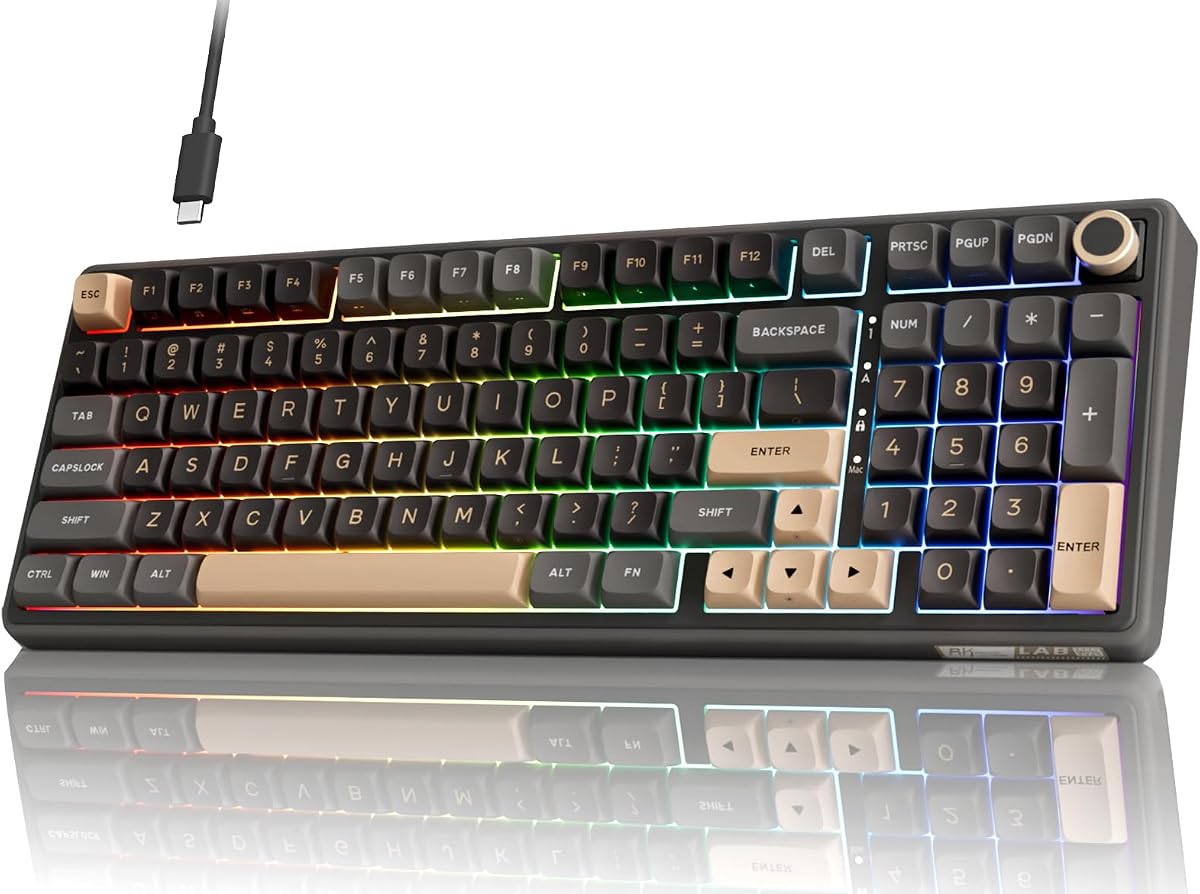
The RK ROYAL KLUDGE R98 Pro is a wired mechanical keyboard with a creamy linear switch and hot-swap sockets that delight users who value a soft sound. Its rating reflects strong satisfaction with the gasket mount and PBT keycaps.
We may earn a commission when you buy through this link, at no additional cost to you.
This keyboard features an MDA profile keycap that fits fingers well for stronger wrapping. It includes a detachable volume knob and supports full customization via the online driver for key remapping and RGB.
The trade-off is the wired-only connection and a simpler RGB palette compared to wireless models. But the creamy feel and compact full-size layout make it a great choice for desk efficiency.
Get this keyboard if you want a smooth and quiet typing experience without sacrificing keys. It is perfect for those who prioritize sound quality and compact layouts.
Pre-lubed cream switches reduce scratchiness for a smooth and pleasant typing experience.
MDA keycaps provide a stronger sense of wrapping for better ergonomics while typing.
We may earn a commission when you buy through this link, at no additional cost to you.
The TECKNET Mechanical keyboard is a tri-mode compact board with hot-swap sockets and a 96% layout. Users praise its Sky switches and five-layer dampening for a soft 'thock' sound at a great value.
We may earn a commission when you buy through this link, at no additional cost to you.
It supports Bluetooth 5.0, 2.4GHz, and USB-C wired modes with ultra-low latency for gaming. The metal frame ensures stability and a full warranty covers the build for long-term confidence.
The main trade-off is limited software support on macOS and basic RGB effects. However, the multi-device connectivity and quiet typing make it a solid choice for mixed workloads.
Buy this keyboard if you want a reliable tri-mode board with hot swap and a great warranty. It is ideal for users who switch between devices frequently.
Switch across five devices with Bluetooth and 2.4GHz for seamless work and gaming transitions.
Five-layer dampening reduces noise and delivers a balanced and satisfying sound.
We may earn a commission when you buy through this link, at no additional cost to you.
The EPOMAKER X Aula F75 MAX is a wireless mechanical keyboard with a custom TFT screen and volume knob. Its rating reflects strong approval for its compact 75% layout and hot-swap capabilities.
We may earn a commission when you buy through this link, at no additional cost to you.
This board features south-facing LEDs for bright RGB and gasket-mount structure for soft typing. The customizable screen shows GIFs and battery status adding unique functionality to your workflow.
The main trade-off is the reliance on software for advanced screen settings and limited wireless polling. Still, the ergonomic kickstand and creamy sound make it a stylish choice for creative users.
Buy this keyboard if you want a compact board with a smart screen and hot swap. It is perfect for those who value visual feedback and typing comfort.
The customizable TFT screen shows battery info and GIFs for a unique desktop experience.
Flex-cut PC plate and gasket mount separate PCB from shell to reduce harsh bottom-out.
We may earn a commission when you buy through this link, at no additional cost to you.
The Keychron K10 HE is a full-size wireless keyboard with Hall Effect magnetic switches and rapid trigger. Its rating shows appeal for users who want advanced actuation tuning and a classic mechanical feel.
We may earn a commission when you buy through this link, at no additional cost to you.
This board lets you adjust actuation from 0.2 to 3.8mm and supports tri-mode connectivity. The wooden sidings and OSA-profile PBT caps give it a refined look and long-lasting durability.
The trade-off is the reliance on magnetic sensors which may not suit everyone who prefers traditional contacts. However, the cross-system compatibility and rapid trigger make it ideal for gamers and programmers.
Choose this keyboard if you want magnetic switch precision with hot-swap support. It is a unique choice for those who prioritize performance and customization.
Enable rapid trigger for instant re-actuation that gives you an edge in fast games.
Designed for Mac and Windows with extra keycaps and remapping support for Linux.
We may earn a commission when you buy through this link, at no additional cost to you.
Choosing the right hot swappable keyboard requires checking a few key factors to match your desk and typing needs.
The size of a keyboard determines how much space it takes on your desk and which keys are available. Common sizes include 60% compact, 75%, 96%, and full-size options with numpads. If you need arrow keys and a numpad for work, choose 75% or higher. Gamers often prefer 60% or 65% for more mouse room.
Choose a layout that supports your daily tasks without wasting desk space.
Hot swappable sockets should support 3-pin and 5-pin MX-style switches so you can swap freely. Look for pre-lubed linear or tactile switches based on whether you want smooth or tactile feedback. Magnetic or Hall Effect switches offer rapid trigger but require specific boards.
Ensure the board supports your preferred switch types and has a reliable socket design.
Build quality affects durability and typing feel. Gasket mounts reduce harsh bottom-out noise while PBT keycaps resist wear better than ABS. A solid frame and silicone padding improve stability and comfort for long sessions.
Prioritize gasket mounts and PBT keycaps for better comfort and longevity.
Connectivity determines how you link your keyboard to devices. Wired USB-C offers stable low-latency performance for gaming. Wireless Bluetooth and 2.4GHz modes allow multiple device pairing for multitasking between work and play.
Pick wireless for flexibility or wired for competitive gaming performance.
Software lets you remap keys and create macros for efficiency. RGB customization adds visual flair but basic lighting may suffice for minimalists. Check cross-platform support if you use Mac and Windows simultaneously.
Choose software that matches your OS and allows easy macro creation.
Wireless boards need large batteries for long use. Look for models with 8000mAh or higher capacity if you plan to work long hours away from a wall. USB-C charging ensures easy top-ups.
Ensure battery life fits your daily usage to avoid frequent recharges.
Comfort features like adjustable feet, kickstands, and ergonomic profiles help prevent strain. A low front height reduces wrist bending and foam or silicone pads cushion typing impact. Consider a board that feels balanced for your hand size.
Prioritize ergonomic design to reduce fatigue during long sessions.
A strong warranty shows the brand stands behind its product. Look for at least one year of coverage and responsive customer service. Check if software updates are regular to ensure long-term compatibility.
Select a brand with clear warranty terms and active support.
To use your hot-swappable keyboard, plug it into your device via USB-C or Bluetooth. Install any companion software to remap keys, create macros, or customize RGB lighting. Familiarize yourself with the FN layer to access secondary functions like volume and brightness.
Cleaning is simple with a keycap puller to remove caps and a brush to clear dust from switches. Use compressed air for deep cleaning and avoid liquids that can damage the PCB. Wipe the case regularly with a dry cloth to prevent grime buildup.
Maintain your switches by gently pressing them to check for consistency. If you change switches, ensure they match the socket type to avoid damage. Keep the board away from liquids and extreme heat to extend its lifespan.
Hot swappable means you can replace the mechanical switches without soldering. This allows you to swap in different switches for different feels and sounds. It is a great way to customize your typing experience easily.
Most hot swappable boards support standard 3-pin or 5-pin MX-style switches. Magnetic and Hall Effect switches require specific boards. Always check the compatibility list before buying new switches.
Yes, wireless hot swappable keyboards with 2.4GHz modes offer low latency for gaming. They also allow you to swap switches for better performance. Wired models still have a slight edge in speed.
Remove the keycaps and use a brush to clean dust from the switches. Use compressed air for deep cleaning and a dry cloth for the case. Avoid liquids to protect the PCB and electronics.
Many hot swappable keyboards offer Mac layout support or extra keycaps. Check the product details to confirm compatibility. Some models allow you to remap keys for Mac use via software.
No, hot swappable sockets let you change switches without soldering. Simply pull out the old switch and insert the new one. This makes customization much easier for beginners.
Gasket mounts provide a softer and quieter typing experience by cushioning the PCB. Plate mounts feel firmer and are often cheaper. Gasket mounts are preferred for comfort and premium sound.
The tenkeyless or 65% layouts are great for beginners. They keep arrow keys and essentials while saving desk space. Start with a layout that fits your daily tasks and comfort.
The best hot swappable keyboards balance customization, build quality, and layout needs. Our top picks include the Keychron C1 for value and the Logitech G512 X for premium features. Each model offers unique strengths for different users.
Prioritize the layout size and switch compatibility that match your daily tasks. Wireless connectivity and battery life matter if you work across devices. A good warranty and clean build ensure long-term satisfaction.
Prices and availability change often so review the links before buying. Choose a board that fits your budget and comfort preferences to enjoy your typing experience.