
Logitech Litra Glow
4.5Editor score
TrueSoft technology
Portable USB powered
Frameless diffuser
Streaming requires professional quality lighting to ensure your audience sees you clearly. A good key light for streaming eliminates harsh shadows and provides even illumination across your face and workspace for a polished look.
We evaluated ten top products based on brightness output, color accuracy, ease of use, and mounting flexibility. Each option was assessed for its ability to enhance video quality during long sessions without causing eye strain or overheating.
Each pick below highlights specific strengths like app control, fanless cooling, or versatile mounting. Remember that availability and specific offers change frequently so always verify details before purchasing your new streaming setup.
4.5Editor score

4.5Editor score
4.7Editor score
As an Amazon Associate we earn from qualifying purchases.
This side by side comparison details the core specifications of each selected lighting unit to help you identify the best fit for your specific streaming environment and budget constraints.


The Elgato Key Light stands out as the top choice for streamers needing reliable studio quality illumination. With a rating of 4.5 stars it delivers 2800 Lumens to light up your entire workspace evenly. Its professional design ensures your face is well lit without harsh shadows during broadcasts.
We may earn a commission when you buy through this link, at no additional cost to you.
Key strengths include the ability to control settings via a desktop app over Wi-Fi. You can adjust brightness and color temperature from sunset amber to arctic blue easily. The 160 OSRAM LEDs produce impressive brightness while generating low heat compared to traditional soft boxes.
While the price is higher than basic options the quality justifies the cost for serious creators. The opal glass face ensures even balanced light that prevents glare on camera. Setup is straightforward and the integration with streaming software adds significant value for efficiency.
This light is perfect for streamers who want a set-and-forget solution that looks professional. It balances power and control effectively making it the best overall choice for enhancing your video quality consistently.
The desktop app allows you to fine-tune settings without interrupting your workflow or reaching for physical controls.
Using OSRAM LEDs means you get high brightness with significantly less heat dissipation than older lighting models.
We may earn a commission when you buy through this link, at no additional cost to you.
For those on a tight budget the Logitech Litra Glow offers exceptional value without sacrificing video quality. It holds a strong 4.5 rating and uses TrueSoft technology to deliver balanced full-spectrum light. This ensures your skin tones look natural and radiant on camera.
We may earn a commission when you buy through this link, at no additional cost to you.
The design focuses on convenience with a USB-powered lightweight build. You can plug it directly into your laptop or desktop for power. The frameless diffuser radiates wide soft light that flatters the subject and eliminates harsh shadows in any setting.
While it may not be as bright as high-end models it is safe for all-day streaming sessions. The adjustable brightness and color temperature help you achieve the right look from warm candlelight to cool blue. The G HUB app adds extra control for presets.
This light is ideal for beginners or those needing a simple plug and play solution. It provides flawless webcam lighting that looks professional while keeping costs low and setup time to a minimum.
This proprietary tech ensures cinematic color accuracy and optimal lighting for video conferencing and meetings.
The 3-way monitor mount allows precise positioning on desktop computers or laptops without taking up desk space.
We may earn a commission when you buy through this link, at no additional cost to you.
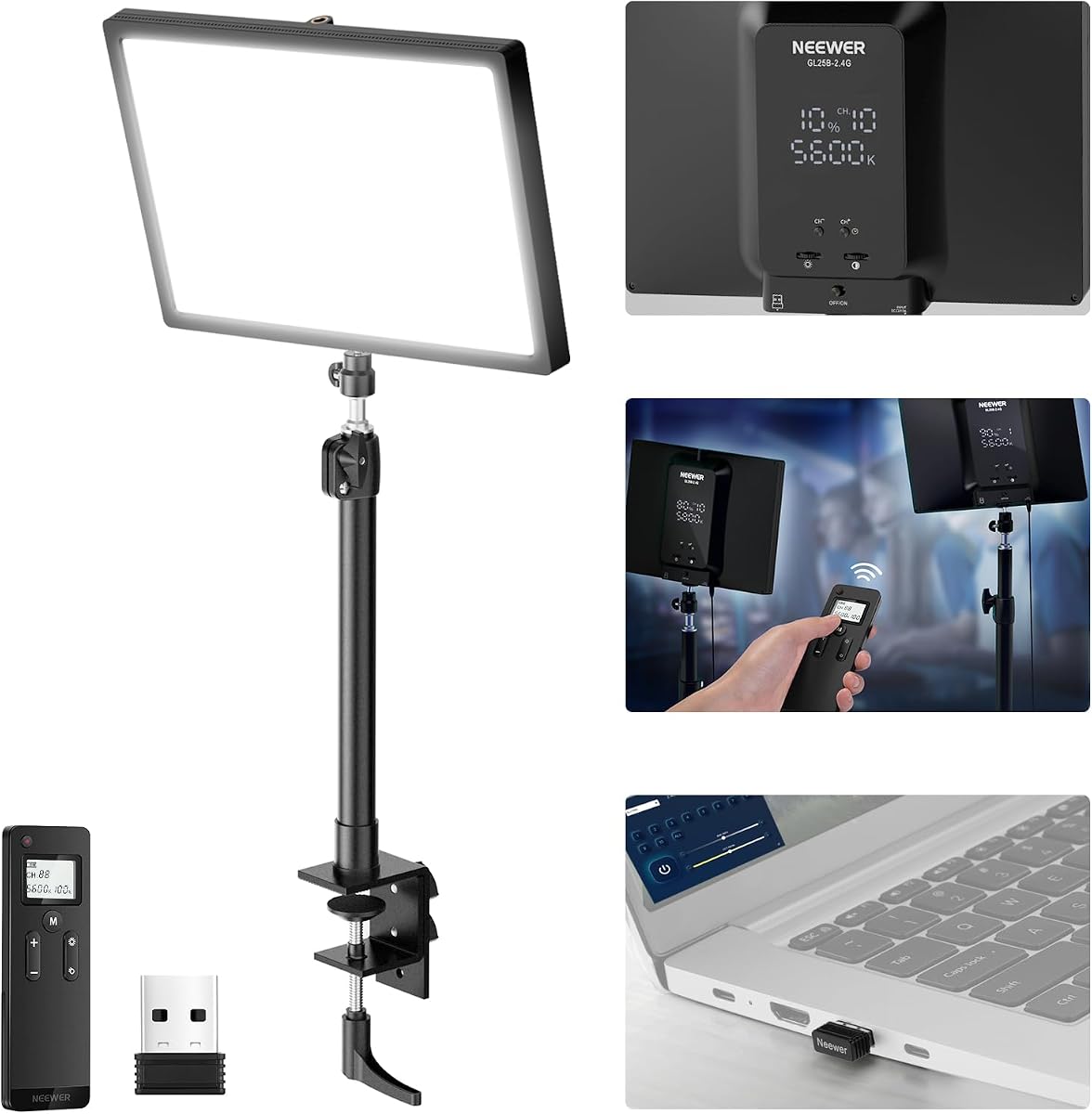
The NEEWER 25W GL25B is a powerhouse for creators seeking professional grade control and color accuracy. With a rating of 4.7 stars it features 176 LEDs behind a white diffuser panel. This setup delivers bright diffused illumination ideal for streaming and video recording.
We may earn a commission when you buy through this link, at no additional cost to you.
A key feature is the 2.4G remote and PC control capabilities. You can manage settings via the Neewer Control Center app without internet. The light maintains a high CRI of 98 plus ensuring precise color rendering that looks true to life on screen.
The fanless cooling system makes it silent which is crucial for immersive audio recording. It runs cool due to thermally conductive materials and edge vents. The adjustable stand and ball head adapter allow flexible positioning for optimal lighting angles.
This option is best for serious streamers who need precise control and quiet operation. It balances high output with user-friendly features making it a top tier choice for a professional studio setup.
Edge lit technology ensures soft bright continuous lighting without harsh shadows or glare on your face.
The 2900K to 7000K range allows stepless adjustments to match any environment or creative need.
We may earn a commission when you buy through this link, at no additional cost to you.
The Elgato Key Light Air MK.2 offers a slim portable design for streamers who move around. It reaches up to 2100 lumens which is 50 percent brighter than the original. The anti-glare illumination flatters every complexion on camera effectively.
We may earn a commission when you buy through this link, at no additional cost to you.
It includes 256 premium LEDs with CRI greater than 94 percent for natural color rendering. Control is flexible with touch and app options via USB or Wi-Fi. You can power it via USB-C or a MagSafe battery ring for total freedom.
While the rating is lower than some competitors it offers unique flexibility with its power options. The Stream Deck support allows you to automate your light settings with a single keypress. This adds significant convenience for live streaming workflows.
This light suits mobile creators or those with limited desk space. It provides enough brightness for quality video while remaining compact and easy to transport between setups.
Power via USB-C laptop PD adapter or battery bank to ensure you never run out of energy.
Stream Deck support lets you control lighting scenes effortlessly without interrupting your stream.
We may earn a commission when you buy through this link, at no additional cost to you.
The Weilisi Desk Ring Light is an excellent choice for home office setups needing compact lighting. It provides uniform diffused light that enhances subject features without creating shadows. The design is ideal for detailed tasks and video conferences.
We may earn a commission when you buy through this link, at no additional cost to you.
Its 360 degree rotating capability lets you adjust angles easily for different positions. The telescoping stand offers flexible height adjustment up to 11.42 inches. A big metal C-clamp ensures stability and saves valuable desk space.
With 10 brightness levels and 3 color temperatures it adapts to various needs. The overhead tripod ring light design makes it versatile for recording and reading. It includes a 5V adapter for reliable power supply.
This light is best for users who need a simple reliable solution for a desk. It keeps the workspace tidy while providing enough light for professional looking video calls and recording.
Rotate any angle to find the perfect direction for your camera or workspace needs.
Non-slip silicone base prevents scratches and keeps the light secure on your desk edge.
We may earn a commission when you buy through this link, at no additional cost to you.
This kit includes two panels allowing you to create a more complete lighting setup. Each panel offers stable output with 356 LED beads. The color temperature range spans 2800K to 6500K for various atmospheres.
We may earn a commission when you buy through this link, at no additional cost to you.
The tripod stands are durable and lightweight aluminum adjustable up to 60 inches. They fold down to 17 inches for easy storage and transport. The thickened light shell acts as a diffusion to soften the light further.
With a high CRI of 97 plus color rendering is precise for photography and video. The dimmable range from 10 to 100 percent helps match different lighting circumstances. USB port allows powering via wall charger or power bank.
This kit is best for creators who need multiple angles or fill lights. It offers versatility for photo studio work and live streaming at a reasonable price point.
Raise the stand up to 60 inches to position lights at various angles for perfect lighting.
Precise color rendering ensures your video looks natural and professional on all screens.
We may earn a commission when you buy through this link, at no additional cost to you.
This set achieves a high rating of 4.8 stars due to its versatile design. It includes gooseneck tubes that rotate to multiple positions. This allows for precise light placement based on your specific streaming needs.
We may earn a commission when you buy through this link, at no additional cost to you.
The control panel features an LCD screen to check brightness and power reliably. Built-in memory function records the last setting for easy reuse. Cooling holes ensure excellent heat dissipation for safe operation during long sessions.
The metal C-clamp fits desks up to 3.3 inches thick. It provides a stable structure that keeps the desktop clean. With 118 high-quality LED beads the light is soft and flicker-free.
This option is best for streamers wanting adjustable desk mounts without stands. It offers a convenient space-saving solution for podcasting and zoom calls with reliable performance.
Rotate tubes to multiple positions to direct light exactly where you need it.
Settings are saved automatically so your light returns to your preferred mode every time.
We may earn a commission when you buy through this link, at no additional cost to you.
The Godox ES45 is designed specifically to minimize eye fatigue during long sessions. Its edge-lit OLED panel delivers glare-free evenly diffused illumination. This ensures smooth glowing skin and a professional on-camera presence.
We may earn a commission when you buy through this link, at no additional cost to you.
It features a unique magnetic remote that attaches to the back of the light. This remote auto-charges when attached so you never need separate batteries. You can adjust brightness and color temperature instantly without reaching behind the light.
The setup includes an extendable clamp stand that attaches securely to desks up to 2 inches thick. It keeps cables hidden for a sleek workspace. You can control multiple units via the app for a full studio look.
This light is ideal for gamers and streamers who need comfort over long periods. It combines smart design with powerful lighting to keep your content looking great without the hassle.
The magnetic remote snaps back to recharge ensuring you always have control within reach.
Edge-lit OLED technology reduces eye strain so you can work comfortably all day.
We may earn a commission when you buy through this link, at no additional cost to you.
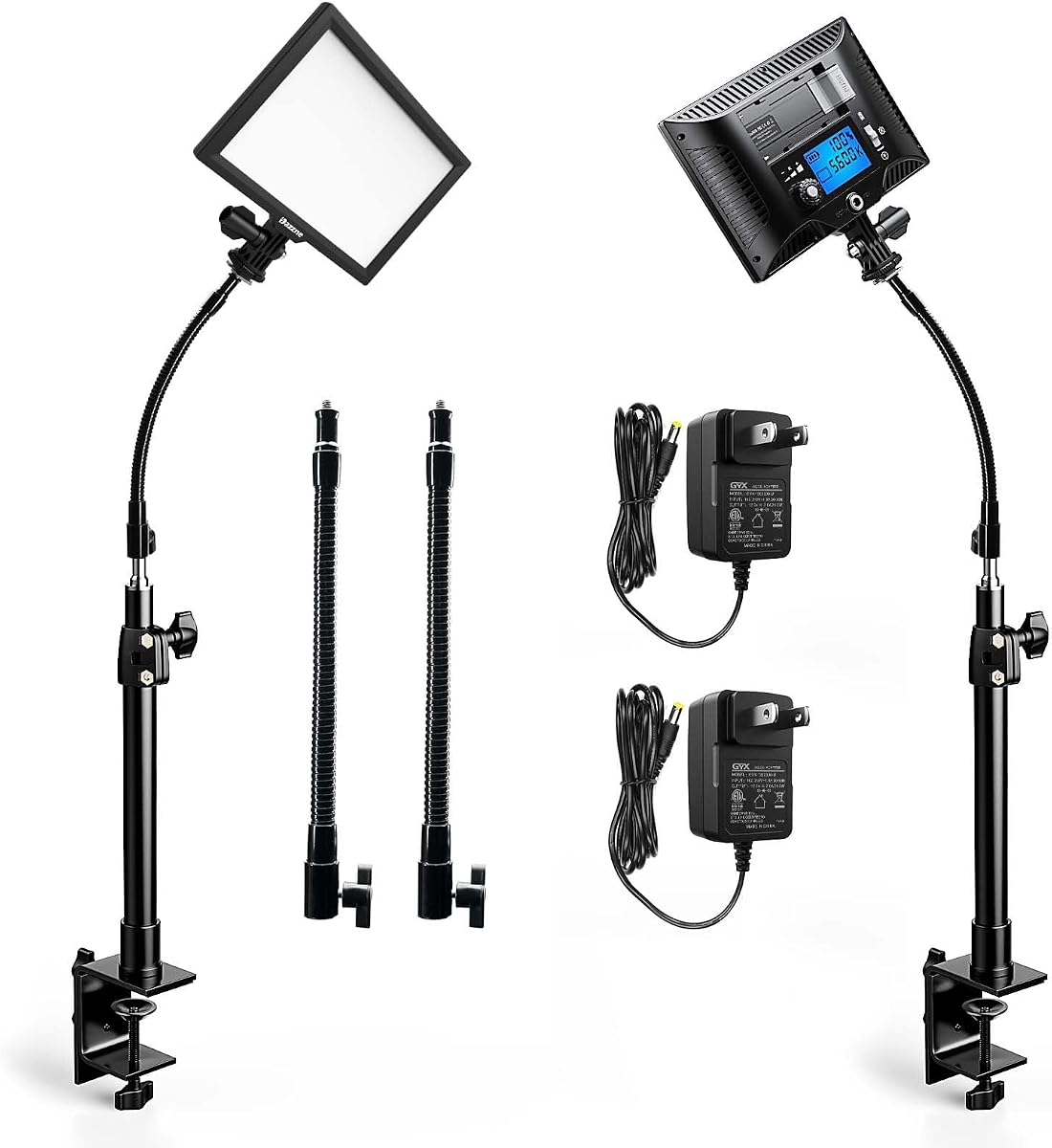
This 2-pack provides an affordable way to build a dual-light setup. It uses gooseneck tubes for flexible angle options similar to softboxes but more stable. Each unit has an LCD display to clearly check brightness and power.
We may earn a commission when you buy through this link, at no additional cost to you.
The 118 high-quality LED beads ensure the light is soft and flicker-free. Color temperature ranges from 3200K to 5600K with dimming from 1 to 100 percent. This allows you to show every detail perfectly from any angle.
Stable output makes it suitable for professional podcast and live streaming needs. The metal desktop brackets fit most desk thicknesses. It keeps your desktop clean while providing continuous illumination for videos.
This kit is perfect for creators wanting redundancy or fill light without spending too much. It offers reliable performance for recording and social media vlogs.
Metal brackets secure the light to your desk providing a stable structure for recording.
Check brightness and color settings accurately on the screen for consistent results.
We may earn a commission when you buy through this link, at no additional cost to you.
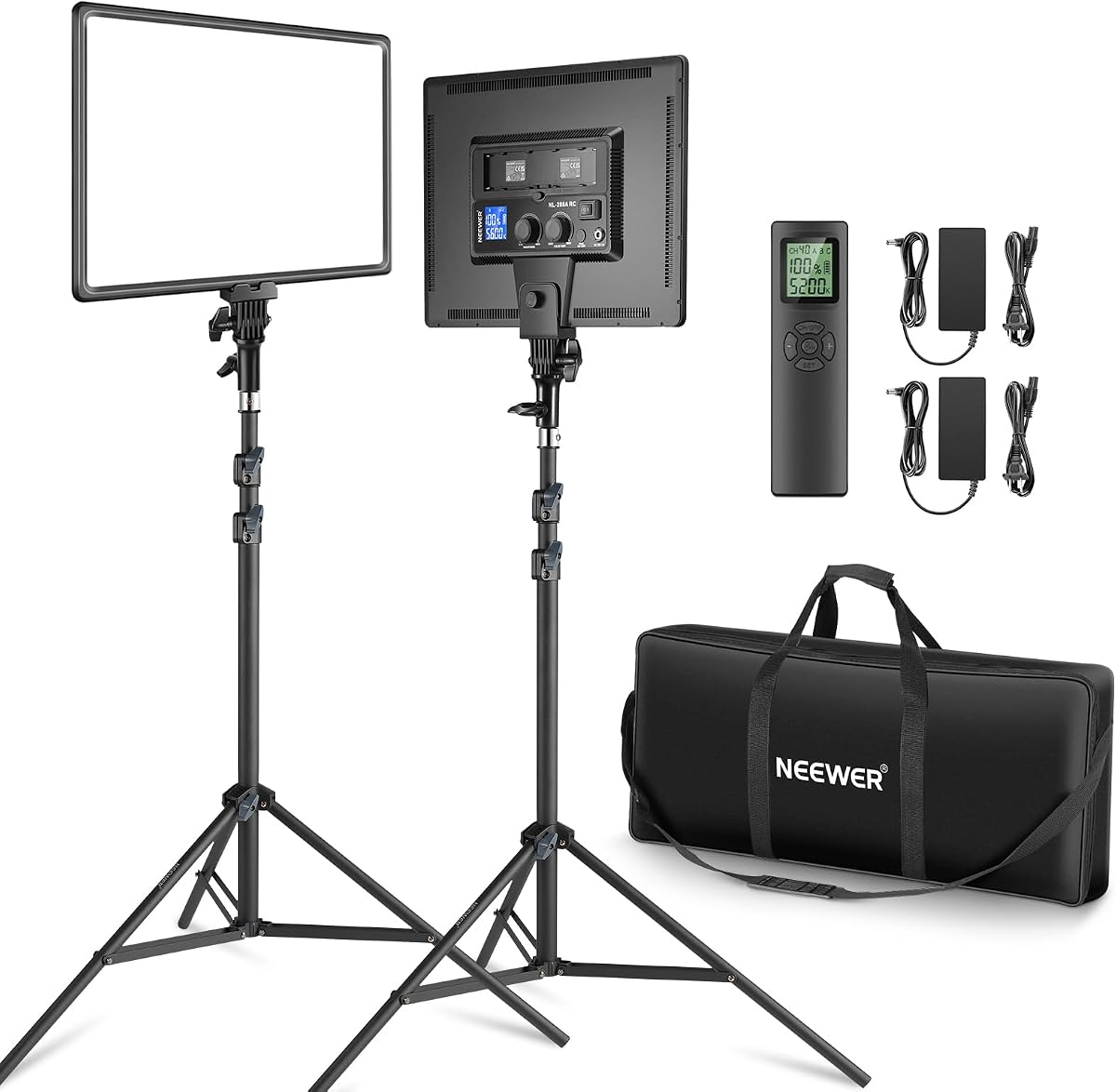
This kit delivers serious power with two 45W panels. Each panel provides 4800Lux brightness which is excellent for large studio spaces. The 18 inch panels are bi-color and dimmable for maximum flexibility.
We may earn a commission when you buy through this link, at no additional cost to you.
Two stable aluminum alloy tripod stands are included to support the panels. You can use AC power or Sony NP-F batteries for on-the-go shooting. The remote control allows easy switching between channels and groups.
With high 97 plus CRI the lighting is continuous and flicker-free. This is ideal for video shooting and makeup broadcasting. It gives you full control over the lighting for your photography needs.
This setup is best for professional studio environments needing maximum brightness. It ensures you have enough light for any task while keeping color accuracy high.
Switch between AC adapter or batteries to keep shooting without interruption.
4800Lux ensures your subject is perfectly lit even in large or dark rooms.
We may earn a commission when you buy through this link, at no additional cost to you.
Choosing the right light requires balancing brightness, color accuracy, and mounting options to fit your specific setup and workflow needs.
Brightness is measured in lumens for total light or lux for light at a distance. Higher values allow you to see clearly without grainy video. Look for at least 2000 lumens for a single key light to fill a room effectively.
Prioritize high brightness to ensure your face stands out against backgrounds.
A good key light offers adjustable color temperature from warm amber to cool blue. This range helps match ambient lighting in your room for consistency. Typical ranges go from 2800K to 7000K.
Adjustable range ensures your light blends naturally with your environment.
CRI measures how accurately a light renders colors. A high CRI of 90 plus is essential for natural skin tones and true color representation. Low CRI lights make people look washed out or unnatural.
Always select a unit with CRI over 95 for professional video quality.
Clamps save desk space while tripods offer flexibility. Choose based on your workspace. Desk clamps keep surfaces clean but tripods allow movement. Ensure the mount fits your table thickness.
Pick a mount that fits your physical workspace constraints.
Lights can get hot during long sessions. Fanless designs use passive cooling which is silent and reliable. Fans help dissipate heat but add noise that can be picked up by microphones.
Opt for fanless or low-noise cooling for audio-sensitive streaming.
Physical buttons, remotes, or apps each offer different convenience. Apps provide precise control and presets. Remotes offer quick adjustments. Physical buttons are simple but might require reaching behind the light.
Consider how you want to adjust settings during live streams.
USB-C or AC power options define how you run the light. USB-C allows portable use with batteries. AC power ensures consistent brightness. Dual options give you more freedom in setup.
Choose power options that support your mobility needs.
Materials affect longevity. Aluminum panels are sturdy and dissipate heat. Plastic may be lighter but less durable. Check for warranties and sturdy stands to prevent tipping.
Invest in durable materials for long-term streaming use.
Place your key light slightly above and to the side of your camera to create natural depth. Aim it directly at your face but ensure it does not cause glare on glasses.
Adjust the brightness and color temperature to match your room's ambient light. This prevents your background from looking too dark or too bright compared to your skin.
Clean the diffuser panel regularly with a soft dry cloth to remove dust. Check mounting clamps weekly to ensure they remain tight and secure on your desk.
A neutral 5600K is often recommended as it mimics natural daylight and makes skin tones look realistic. However, warm settings around 3200K can create a cozier atmosphere for casual chats.
A single key light is sufficient for beginners to look professional. A second light can be used as a fill or hair light to separate you from the background for a more polished look.
Many modern lights support USB-C power which works with high-output power banks. Check the specific power requirements of your model before relying on portable power sources.
Graininess often stems from a camera sensor that cannot handle low light. Increasing brightness helps but ensuring your camera aperture is open and shutter speed is correct is also vital.
Yes, LEDs produce minimal heat and do not emit harmful UV rays. They are designed for prolonged use and reduce eye strain compared to traditional tungsten bulbs.
Position the light slightly higher than your camera level so it angles down at your face. This prevents unflattering shadows under the nose and chin for a smoother look.
The Elgato Key Light, Logitech Litra Glow, and NEEWER 25W GL25B stand out for their unique balance of power and usability across different budgets.
Prioritize color accuracy and dimming capabilities to ensure your face looks professional in every shot regardless of your surroundings.
Always check current availability and shipping details before purchasing to secure your chosen lighting gear quickly.