
ASUS ROG Strix H270F Gaming
4.2Editor score
Dual M.2 slots included
AURA Sync RGB lighting
Optane Memory support
This guide compares the top H270 motherboards for 2026, evaluating features, connectivity, and performance to help you choose the right board for your Intel
Selecting the right motherboard is crucial for any computer build. The H270 chipset offers a balance of performance and features for Intel processors. It supports modern memory and storage options effectively.
We analyzed ten top models based on user feedback and technical specifications. Our comparison focuses on connectivity, expansion slots, and overall build quality. This helps you find a board that fits your needs.
Each pick highlights unique strengths like gaming features or budget value. Prices and availability can change frequently online. Always verify current details before making your final purchase decision today.
4.2Editor score

4.4Editor score

4.0Editor score
This table provides a side-by-side look at the key specifications and features of all ten motherboards reviewed in this guide.




This motherboard stands out for its reliability and balanced feature set. It holds a solid rating from users who value stability in their daily computing tasks.
We may earn a commission when you buy through this link, at no additional cost to you.
The inclusion of dual M.2 slots provides significant storage flexibility for modern builds. The 5X Protection III hardware safeguards ensure long-term durability against electrical surges and other common issues.
While it lacks some of the flashier RGB features found on gaming boards, this trade-off is acceptable for users prioritizing function over form. The safe slots add mechanical strength to the PCIe connections.
This board is ideal for professionals or general users seeking a dependable platform for Intel 6th and 7th Gen processors. It delivers consistent performance without unnecessary bloat.
Dual M.2 slots allow for fast NVMe storage alongside traditional drives, improving overall system responsiveness significantly.
5X Protection III covers power, memory, and other components to prevent damage during unexpected electrical events.
We may earn a commission when you buy through this link, at no additional cost to you.
The ROG Strix line is known for bringing premium gaming features to the mid-range market. This board offers a distinct look and superior audio capabilities compared to standard models.
We may earn a commission when you buy through this link, at no additional cost to you.
FanXpert 4 allows for precise cooling management which is vital during intense gaming sessions. The Safe Slot design ensures your heavy graphics cards remain securely seated without bending the motherboard.
The main trade-off is the cost, which is higher than basic boards. However, users get advanced audio and lighting features that justify the expense for enthusiasts building a visible PC.
Choose this if you want a board that looks great and delivers high fidelity sound for your gaming headset or speakers.
The exclusive SupremeFX S1220A codec with Japanese capacitors delivers clear sound without background noise interference.
FanXpert 4 dynamically calibrates fans to keep temperatures low without excessive noise levels.
We may earn a commission when you buy through this link, at no additional cost to you.
MSI delivers a budget-friendly option that still caters to gamers with specific features. This board provides essential gaming tools without the high cost of premium competitors.
We may earn a commission when you buy through this link, at no additional cost to you.
The Steel Armor slots reinforce the PCIe connection which is crucial for heavy GPUs. Mystic Light Sync allows you to match your case and RAM lighting with simple software controls.
You might notice the audio is less refined than on ASUS boards. However, for a budget build where graphics performance is the priority, this is a minor compromise.
This board is perfect for first-time builders who want a gaming aesthetic and reliable performance for under a standard budget limit.
Gaming LAN with LAN protect helps prevent lag spikes caused by network interruptions.
DDR4 boost technology ensures stable memory performance even with high speed modules.
We may earn a commission when you buy through this link, at no additional cost to you.
ASRock offers a no-frills approach that appeals to users who need connectivity over style. The high number of SATA ports is rare for this chipset generation.
We may earn a commission when you buy through this link, at no additional cost to you.
The layout is straightforward making it easy to install components. This helps beginners avoid mistakes during the assembly process.
While it lacks modern flash features like extensive RGB, it performs its core tasks well. The Z270 chipset support is a unique highlight compared to standard H270 models.
This board is best suited for workstations or home media servers where storage connectivity is more important than gaming aesthetics.
Six SATA3 ports allow for multiple hard drives to be connected without needing extra cables.
The Z270 chipset inclusion provides features typically reserved for overclocking boards.
We may earn a commission when you buy through this link, at no additional cost to you.
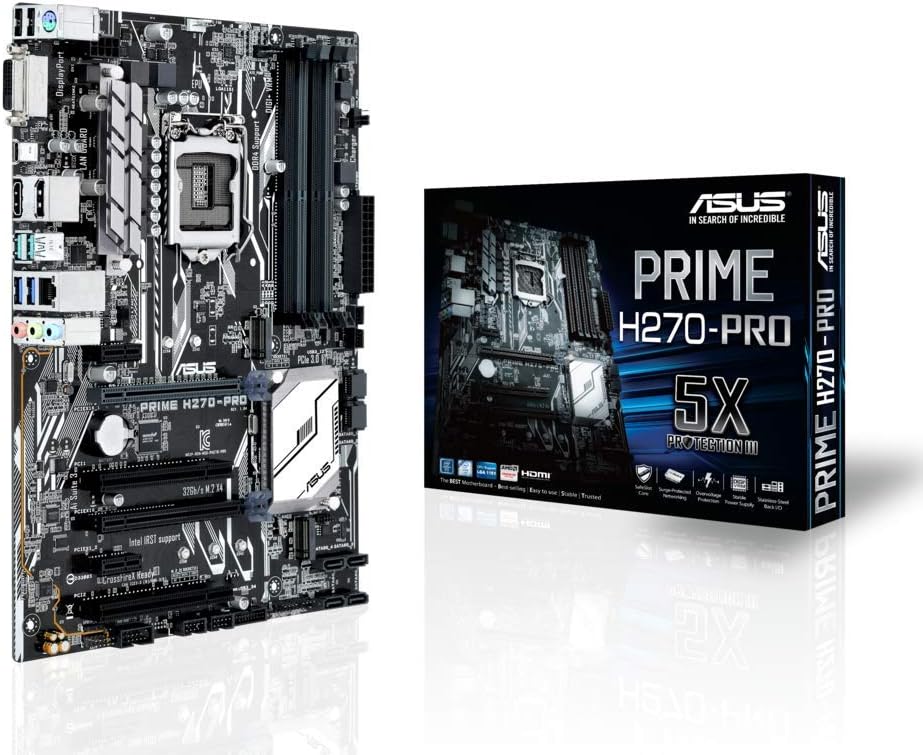
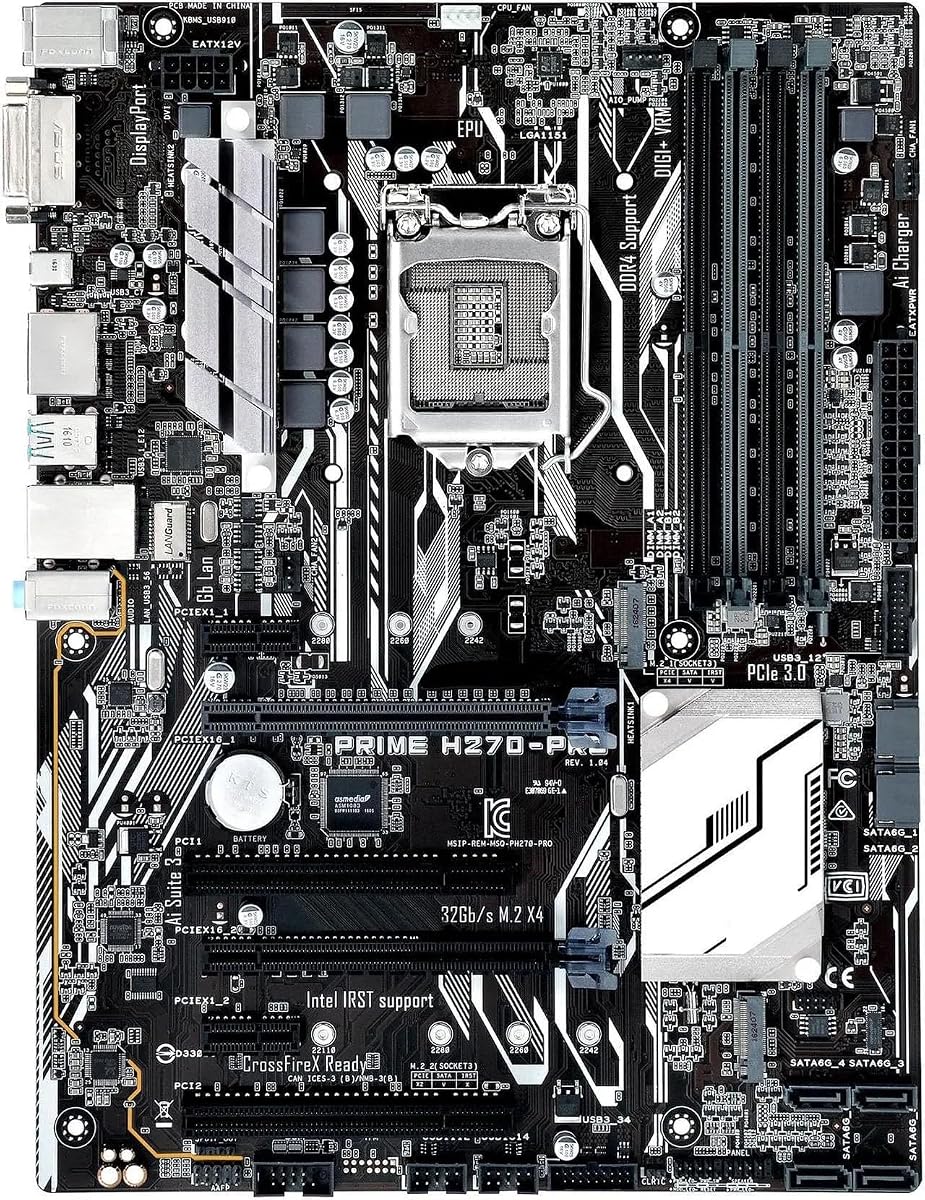
The Prime H270-PRO balances modern connectivity with reliability. It includes USB 3.1 Type C which is a forward looking feature for this era of hardware.
We may earn a commission when you buy through this link, at no additional cost to you.
ASUS 5X Protection III ensures the board withstands daily wear and tear. The comprehensive port selection on the back panel supports various peripherals easily.
It is a solid board but the price might be high compared to other H270 options. You are paying for brand reputation and standard quality assurance.
This is a great choice for office builds or home systems where you need a modern port interface and peace of mind.
The inclusion of USB Type C allows for faster data transfer speeds with newer devices.
Multiple USB and video ports ensure you can connect everything without using adapters.
We may earn a commission when you buy through this link, at no additional cost to you.
GIGABYTE brings its gaming expertise to this H270 board with a focus on networking. The Killer LAN chip is designed to prioritize game traffic over downloads.
We may earn a commission when you buy through this link, at no additional cost to you.
Having four DIMM slots gives you room to upgrade your memory later without replacing the motherboard. This adds significant value for users planning long term usage.
The BIOS interface might feel a bit dated to those used to simpler tools. However it offers all the necessary controls for system tuning and monitoring.
This board is a good middle ground for gamers who need solid networking and memory flexibility without the top tier cost.
Killer E2500 Gaming Network helps reduce latency during online multiplayer sessions.
Four slots allow you to start with 16GB and upgrade to 64GB if needed.
We may earn a commission when you buy through this link, at no additional cost to you.
This listing offers a replacement solution for damaged units. It is designed to fit specific models where the original board might have failed due to contact issues or shorts.
We may earn a commission when you buy through this link, at no additional cost to you.
The power design is optimized for multi-core processors to ensure stable operation. An advanced heatsink is included to help manage thermal output under heavy loads.
Buying a replacement board like this carries more risk than a new retail unit. You should test thoroughly and ensure compatibility with your existing components before final installation.
Use this option if you are looking to repair a system cheaply and have some experience with computer hardware diagnostics.
The advanced heatsink design helps dissipate heat effectively to maintain system stability.
Optimized power layout supports multi-core performance efficiently without unnecessary power draw.
We may earn a commission when you buy through this link, at no additional cost to you.
This board is a generic performance option aimed at budget builders. It supports standard Intel processors and includes essential features like M.2 storage support.
We may earn a commission when you buy through this link, at no additional cost to you.
The claim of 64GB memory support suggests good controller stability which is useful for memory intensive tasks. It fits the standard ATX size for most cases.
Documentation might be sparse compared to major brands so you may need to rely on community forums for help. The build quality is likely functional but basic.
This is a viable choice for a secondary PC or a budget build where saving money is the primary goal.
Support for 64GB of DDR4 allows for running virtual machines or heavy multitasking.
Compatible with a range of i3 and i5 processors for balanced daily performance.
We may earn a commission when you buy through this link, at no additional cost to you.
This is a straightforward motherboard focusing on core functionality. It provides the necessary socket and memory support for older Intel generations.
We may earn a commission when you buy through this link, at no additional cost to you.
It lacks advanced connectivity or special features but serves as a reliable base for a basic system. The layout is simple which reduces installation confusion.
You should expect minimal support from the manufacturer. It is best used by users who are comfortable troubleshooting their own PC builds independently.
Pick this board if you need a basic foundation for a non-gaming system and want to minimize initial hardware costs.
Focuses on providing stable CPU and memory connectivity for everyday computing tasks.
Minimal components mean less cabling is required during the initial setup process.
We may earn a commission when you buy through this link, at no additional cost to you.
This generic board mirrors the specs of popular models at a lower price. It includes M.2 support and high memory capacity which are key for modern systems.
We may earn a commission when you buy through this link, at no additional cost to you.
It is designed to fit into standard ATX cases making it easy to find a home. The support list covers most common 6th and 7th Gen CPUs.
Without a major brand backing you are relying on basic quality control. This makes it suitable for non-critical systems where downtime is less of an issue.
Consider this if you want basic functionality and essential storage support without paying for brand names or extra features.
Includes M.2 support so you can use fast SSDs for your operating system drive.
Allows up to 64GB of DDR4 RAM for future proofing your build capacity.
We may earn a commission when you buy through this link, at no additional cost to you.
Choosing the right motherboard involves understanding several technical factors to ensure compatibility and performance with your specific needs.
The H270 chipset offers a middle ground between basic and high end options. It supports most modern processors but lacks overclocking capabilities found in Z series boards.
Look for boards that maximize the H270 features like multiple M.2 slots and USB 3.1 ports to get the most value.
Ensure the motherboard uses the LGA1151 socket which is required for 6th and 7th Gen Intel Core processors.
Check the CPU support list on the manufacturer website to verify your specific processor is supported before purchasing.
DDR4 memory is standard for these boards. Check the maximum supported speed and capacity to ensure it meets your performance needs.
Some boards support up to 64GB of RAM which is vital for heavy multitasking or virtual machine usage.
Modern builds benefit greatly from M.2 slots for fast SSDs. Check if the board has one or two slots for primary and secondary storage.
SATA port count is also important if you plan to use multiple traditional hard drives for large data storage.
PCIe slots are necessary for graphics cards and other add in cards. Look for sturdy slots often called Safe Slots or Steel Armor for durability.
If you plan to use multiple graphics cards ensure the board supports the necessary bandwidth for your intended use.
The ATX form factor is the standard and fits most cases. It offers the most room for expansion and cooling.
Measure your case dimensions before buying to ensure the board will fit without issues.
USB and video ports on the back dictate your external connectivity. Look for Type C ports if you have newer peripherals.
Video outputs like HDMI and DisplayPort are essential if you plan to use the integrated graphics of your CPU.
Gaming boards often have enhanced audio codecs and gaming LAN chips. These can reduce latency and improve sound quality.
For general use basic onboard audio and network are sufficient and can save you money on the motherboard.
When installing the motherboard place it on a non conductive surface to avoid static damage. Ensure all standoffs in your case match the board layout before screwing it in.
Connect all power cables and headers carefully. The CPU power and main 24 pin connectors must be fully seated for the system to boot correctly.
Keep the system clean by dusting the heatsinks and fans regularly. Overheating can cause instability so ensure good airflow inside your case for longevity.
H270 motherboards support Intel 6th and 7th Gen Core processors using the LGA1151 socket. You should always check the specific CPU support list for your model before buying.
Most modern H270 boards include at least one M.2 slot. Some higher end models like the ASUS Prime H270-PLUS offer two slots for faster storage speeds.
No, the H270 chipset does not support CPU overclocking. You would need a Z series chipset like Z270 to unlock overclocking features.
Yes, H270 motherboards use DDR4 memory slots. They are not compatible with older DDR3 memory modules.
ATX boards are larger and offer more expansion slots. Micro ATX boards are smaller and fit in more compact cases but have fewer slots.
Many H270 boards include USB 3.1 ports including Type C. Check the port specifications to ensure you have the connectivity you need.
You can usually update the BIOS using the USB drive method available in the UEFI setup. Always ensure the system is stable during the process.
Most of these boards are ATX so you should use an ATX case. Check your case manual to confirm it supports ATX size motherboards.
We recommend the ASUS Prime H270-PLUS for its balance of features and reliability. For gamers the ROG Strix H270F offers premium audio and looks.
Prioritize connectivity like M.2 slots and USB ports based on your specific devices. A board with better expansion options will serve you better in the long run.
Always check current prices and availability as they can change quickly. Finding a deal on a high quality model can save you money on your build.