
RedThunder One Handed
4.4Editor score
3ms response speed
35 anti-ghosting keys
RGB backlit modes
This guide compares the top 10 gaming keypads for speed, ergonomics, and customization to help you choose the perfect one-handed controller for your setup.
Gaming keypads offer a compact alternative to full keyboards, designed to enhance performance and ergonomics during intense sessions. These devices focus on essential keys, macros, and specialized inputs for better control.
We evaluated each model based on switch technology, layout efficiency, software customization, and build quality. Our analysis covers wired and wireless options across various price points to suit every gamer.
Each pick highlights specific strengths like analog inputs, Hall Effect switches, or budget-friendly designs. Please note that product availability and pricing may change frequently over time.
4.4Editor score

4.4Editor score

4.3Editor score
Here is a side-by-side comparison of the ten top-rated keypads, highlighting key specifications to help you find the right match for your gaming needs.




The Redragon K585 stands out as a versatile option for gamers seeking affordability without sacrificing features. With a solid 4.4-star rating, it delivers a tactile experience suitable for both gaming and productivity tasks.
We may earn a commission when you buy through this link, at no additional cost to you.
Its standout feature is the ability to swap switches without soldering, allowing users to customize the feel of their keypad. The seven onboard macro keys enable instant combos, perfect for MMOs and MOBAs requiring quick ability rotations.
While the software is necessary for deep customization, the included wrist rest and USB pass-through add practical value. The build feels sturdy, though some users may find the layout takes time to get used to.
This keypad is ideal for budget-conscious gamers who want customization options. It balances performance and cost effectively, making it a top recommendation for those building a custom battlestation.
Users can replace the default switches with almost any 3-pin or 5-pin switch to tailor the tactile feel.
Seven onboard keys allow binding multiple commands for rapid execution during intense gameplay moments.
We may earn a commission when you buy through this link, at no additional cost to you.
For gamers prioritizing speed and simplicity, the RedThunder One Handed keypad delivers impressive performance. Its built-in game chip ensures a fast 3ms response speed, making it responsive for competitive titles.
We may earn a commission when you buy through this link, at no additional cost to you.
The 35-key layout is fully anti-ghosting, ensuring every input registers correctly during complex button combinations. It operates on a plug-and-play basis, removing the hassle of installing extra drivers for basic functionality.
The RGB lighting offers seven color options with static and breath modes, adding a touch of style without overwhelming complexity. While macro recording is available, it requires pressing specific function keys which may feel slightly clunky.
This device is perfect for casual gamers or those needing a secondary device for macros. Its low cost and reliable performance make it a strong contender for entry-level setups.
No driver installation is required, allowing immediate use across Windows and Mac systems right out of the box.
The small size saves desk space and makes it easy to carry to LAN parties or travel with your PC.
We may earn a commission when you buy through this link, at no additional cost to you.
The AZERON Gaming Keypad offers a unique approach to one-handed input with its Hall Effect analog thumbstick. Designed for premium users, it allows for analog movement control in compatible games, bridging the gap between keyboard and controller.
We may earn a commission when you buy through this link, at no additional cost to you.
With 30 mappable inputs, users can configure keyboard, mouse, or macro commands for each key. The adjustable parts ensure a custom fit, while the software provides deep customization for lighting and thumbstick settings.
While the price is significantly higher than standard keypads, the innovation justifies the cost for enthusiasts. The thumbstick eliminates drift and allows precise aiming or movement not possible with standard WASD keys.
This device is best suited for competitive gamers or those seeking a truly unique control scheme. Its premium build and advanced features make it a standout option for high-end setups.
Supports 360° analog movement and can function as a mouse, offering versatile control options.
Adjustable parts ensure a perfect fit for various hand sizes, improving comfort during long sessions.
We may earn a commission when you buy through this link, at no additional cost to you.
The Razer Tartarus V2 is designed for gamers who value comfort and integration within the Razer ecosystem. Its mecha-membrane switches provide tactile feedback while maintaining a soft cushion suitable for long gaming sessions.
We may earn a commission when you buy through this link, at no additional cost to you.
The 8-way directional thumbpad allows for more natural movement controls, perfect for console-oriented players. Fully programmable keys via Razer Hypershift enable complex commands to be executed with ease.
RGB lighting syncs with popular games and hardware via Razer Chroma, creating a cohesive visual setup. While the price is high, the build quality and software support are top-tier for enthusiasts.
This keypad is ideal for Razer hardware owners looking to expand their setup. It balances comfort, functionality, and aesthetic integration well for immersive gaming experiences.
Mecha-membrane switches offer a soft touch with tactile feedback suitable for extended use.
An 8-way thumbpad provides natural movement controls without needing traditional WASD keys.
We may earn a commission when you buy through this link, at no additional cost to you.
The Redragon K585 PRO brings wireless freedom to one-handed gaming with versatile connectivity options. Supporting both Bluetooth and 2.4GHz, it allows users to place the keypad anywhere on their desk without cables.
We may earn a commission when you buy through this link, at no additional cost to you.
Battery life is impressive, offering up to 20 hours of continuous play on a single charge. The magnetic wrist rest detaches easily, allowing for a smaller footprint when needed.
Switch swapping is still available without soldering, maintaining the customization appeal of the wired version. The software supports custom macro sequences and lighting effects for deep personalization.
This model suits gamers who prefer a clean desk setup. Its reliability and ease of use make it a top choice for wireless enthusiasts in the Redragon family.
Dual connectivity modes allow seamless switching between devices and wireless freedom on the desk.
15 to 20 hours of play ensure you can game for days without needing to recharge.
We may earn a commission when you buy through this link, at no additional cost to you.
The Keychron C0 HE targets competitive FPS players with its rapid trigger Hall Effect switches. These magnetic switches allow adjustable actuation, enabling ultra-low latency and instant key reset for faster response.
We may earn a commission when you buy through this link, at no additional cost to you.
Its web-based configurator simplifies customization without requiring software installation, appealing to macOS and Windows users alike. The 8K polling rate ensures your inputs are registered immediately during competitive play.
The layout supports essential commands within reach, making it ideal for MMO and MOBA control. RGB lighting is per-key and fully customizable through the browser interface.
This keypad is a premium choice for competitive gamers demanding precision. The combination of high polling rate and web-based tools makes it efficient for esports setups.
Keys reset instantly upon release, allowing for quicker counter-strafing and rapid movement.
Browser-based settings allow customization without installing drivers, keeping your system clean.
We may earn a commission when you buy through this link, at no additional cost to you.
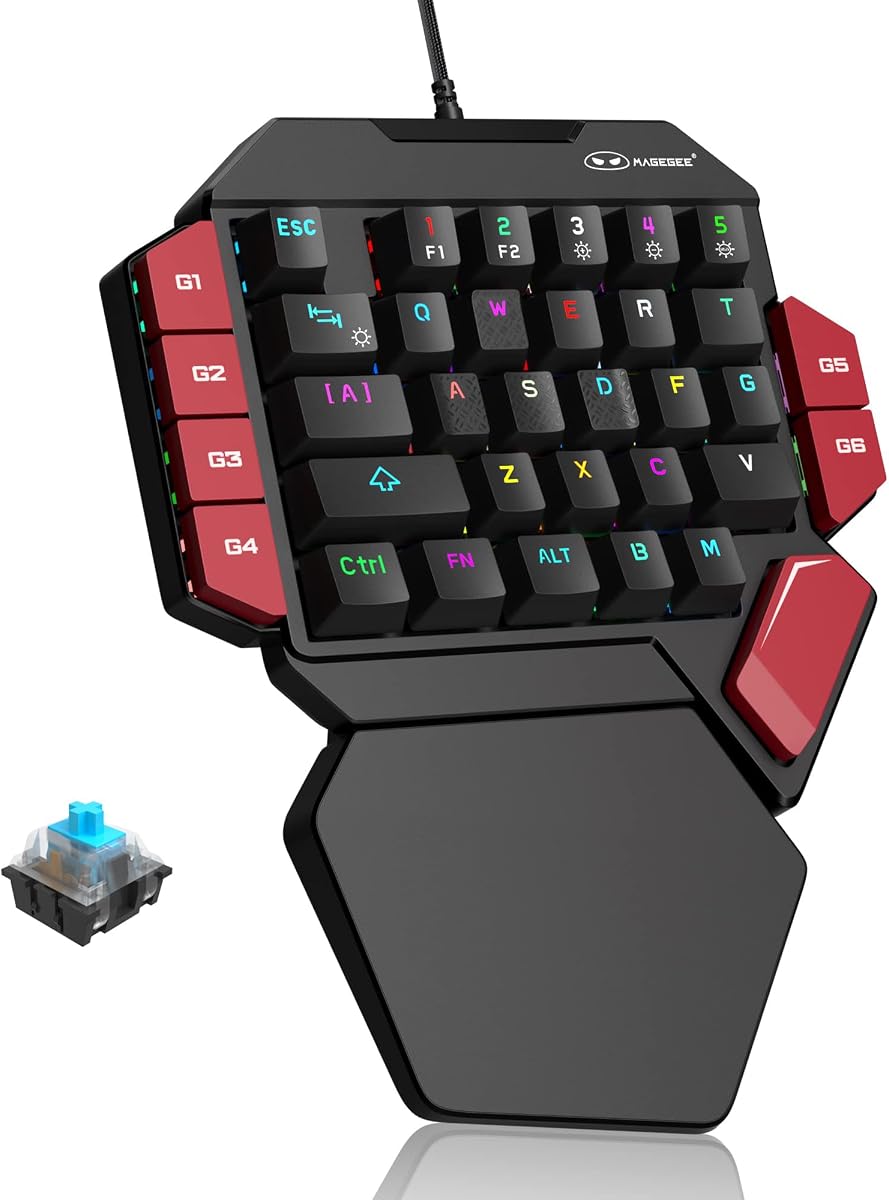
The MageGee One Handed offers a mechanical typing experience in a compact form. Its blue switches provide a crisp, loud click that gives satisfying tactile feedback for both gaming and typing tasks.
We may earn a commission when you buy through this link, at no additional cost to you.
With six macro recording keys, users can customize commands easily using function key combinations. The RGB backlighting allows multiple modes to be toggled quickly to match your personal style.
The ergonomic design includes a big palm rest to reduce fatigue during use. It connects directly via USB, ensuring compatibility with multiple operating systems without needing drivers.
This is a solid choice for those who prefer mechanical feedback. It delivers value through reliability and satisfying keystrokes at an entry-level price point.
Blue switches provide a crisp paragraph feel and strong mechanical action for precise input.
Six macro keys allow quick recording and clearing of complex command sequences.
We may earn a commission when you buy through this link, at no additional cost to you.
The AJAZZ AK029 saves 60% desk space with its ultra-compact 29-key design. It features Bingyu Hall Effect switches with zero debounce delay, ensuring every tap registers instantly for tournament-grade performance.
We may earn a commission when you buy through this link, at no additional cost to you.
With an 8KHz polling rate and SOCD support, it provides a competitive edge for fast-paced games. The web driver allows full customization without installation, keeping your setup streamlined.
The aluminum-reinforced build ensures stability, while the 20 RGB modes add visual flair. It is ideal for FPS players needing minimal hand movement and maximum speed.
This keypad is perfect for those wanting a specialized competitive edge. Its high polling rate and compact size make it a favorite for serious gamers.
Switches eliminate physical contact issues, ensuring consistent performance with zero dead zones.
The 29-key layout frees mouse space for low-sensitivity gameplay without sacrificing macros.
We may earn a commission when you buy through this link, at no additional cost to you.
This variation of the Razer Tartarus V2 offers similar ergonomic benefits and programmable keys. The mecha-membrane switches provide a balance of tactile feedback and comfort for long sessions.
We may earn a commission when you buy through this link, at no additional cost to you.
With 32 programmable keys, users can tailor the keypad to their specific game requirements. The lighting system allows for synchronization with other Razer products for a unified setup.
While details are minimal, it follows the established design of its predecessor. It is a solid option for those already invested in the Razer ecosystem looking to expand.
Ideal for dedicated Razer fans, this model maintains the high build quality and software support expected from the brand. It remains a reliable choice for immersive gaming.
Syncs with Razer hardware and software for a cohesive gaming setup experience.
Designed to reduce hand fatigue while keeping essential controls easily accessible.
We may earn a commission when you buy through this link, at no additional cost to you.
The Redragon RM104 introduces a multifunction smart knob for audio and lighting control. With tri-mode wireless connectivity, it offers flexibility to connect via Bluetooth, 2.4GHz, or USB-C.
We may earn a commission when you buy through this link, at no additional cost to you.
The massive 4000mAh battery ensures long-lasting performance without frequent recharging. It supports customizable software to assign macros and remap commands tailored to your games or apps.
While it resembles a full keyboard, its features fit well within the one-handed workflow for some users. The RGB lighting and knob interaction add a unique layer of convenience.
This device is best for users wanting wireless convenience and smart controls. Its long battery and versatile connection make it a reliable choice for various setups.
Adjust volume and cycle RGB modes with a single intelligent knob for smoother operation.
Switch between Bluetooth, 2.4GHz, and USB-C for seamless connectivity across devices.
We may earn a commission when you buy through this link, at no additional cost to you.
Selecting the right gaming keypad involves evaluating switch types, layout, and connectivity to match your specific needs.
Switch type determines tactile feel and response speed. Mechanical switches like Blue offer loud clicks, while Hall Effect magnetic switches provide precise adjustable actuation. Membrane options are softer and quieter for comfortable extended use.
Choose switches that match your preference for sound and tactile feedback.
Key counts range from 29 to 42 keys. Fewer keys save space and simplify macros, while more keys allow complex command mapping. Consider how many shortcuts you need for your preferred game genres.
Select a layout that balances essential controls with desk space.
Macro support enables recording complex command sequences. Look for dedicated macro keys or software that allows deep customization. This feature is crucial for MMOs and MOBAs requiring quick ability rotations.
Ensure the device supports macro recording for your specific games.
Ergonomic designs reduce hand fatigue during long sessions. Padded rests and adjustable features help maintain a natural hand position. Comfort is key to preventing strain during extended use.
Prioritize devices with wrist rests or adjustable parts for comfort.
Connectivity options include wired USB, Bluetooth, or 2.4GHz wireless. Wired offers the lowest latency, while wireless reduces cable clutter. Dual-mode devices provide flexibility for different environments.
Choose connectivity based on your need for speed versus convenience.
RGB lighting allows customization through various modes and colors. Some devices sync with other peripherals for unified effects. While not essential, lighting adds visual appeal to your setup.
Select a model with lighting options that match your aesthetic.
Software support allows deep customization of macros and lighting. Web-based configurators are convenient as they require no installation. Ensure the software works with your operating system.
Check for software tools that offer intuitive configuration options.
Build quality affects durability and stability. Aluminum plates and gasket mounts provide rigidity. Look for high-quality keycaps and materials that ensure longevity.
Invest in sturdy construction to ensure the device lasts over time.
Begin by installing any necessary drivers or software to configure key mappings. Connect the device via USB or pair it via Bluetooth for wireless use.
Customize your macros and key assignments based on your favorite game requirements. Experiment with RGB lighting settings to match your setup preferences.
Clean the keypad regularly with a soft cloth to remove dust. Avoid liquid spills and store it in a dry place when not in use.
Gaming keypads are designed for specific workflows rather than general typing. They excel in providing macro access and ergonomics for left-hand inputs. For full typing needs, a standard keyboard is superior.
Most modern keypads support both Windows and macOS. Always check compatibility details before purchasing. Software configuration may differ slightly between operating systems.
Some models like the Redragon K585 allow you to swap switches easily. This customization lets you change the tactile feel without soldering. Verify the specific device supports this feature before buying.
Macros allow you to record a sequence of commands and execute them with one key. This reduces fumbling during gameplay. Setup usually requires using the provided software or hardware combinations.
Hall Effect switches are great for competitive FPS due to rapid trigger. Mechanical switches offer satisfying tactile feedback. Membrane switches are better for quiet and comfortable use.
Quality wireless models with 2.4GHz connections have minimal latency. Bluetooth may have slightly more lag. Wired connections remain the fastest option for competitive gaming.
Most keypads offer multiple RGB modes and color choices. Software allows syncing with other gear. Some devices let you map specific colors to keys.
Many models feature detachable wrist rests to save space. This allows flexibility depending on your desk setup. Check the product details for specific mounting features.
We have explored ten distinct gaming keypads ranging from budget-friendly to premium models. Each offers unique features like analog inputs or Hall Effect switches.
Prioritize your specific gaming needs when choosing. Competitive players should focus on polling rates while casual gamers may prefer ergonomic comfort.
Please verify current pricing and availability before purchasing. Product updates occur frequently, so checking recent reviews ensures you get the best value today.