
CORSAIR RM1000e (2025)
4.7Editor score
ATX 3.1 and PCIe 5.1 ready
Fully modular design
105°C rated capacitors
This guide compares the top 1100W power supplies for high-performance gaming PCs and workstations, evaluating efficiency, noise, reliability, and modern ATX
Choosing the right power supply is critical for system stability. A 1100W PSU ensures enough headroom for demanding CPUs and GPUs without throttling or crashes under heavy load conditions.
We evaluated ten top models based on efficiency ratings, build quality, modular design, and compliance with latest ATX 3.1 and PCIe 5.1 standards for future-proofing your next PC build.
Each pick highlights key strengths and weaknesses to help you decide. Remember that stock levels and pricing fluctuate frequently, so verify current availability before finalizing your purchase online.
4.7Editor score

5.0Editor score

4.7Editor score
The table below provides a direct side-by-side comparison of all ten selected power supplies. Reviewing these specs helps identify which unit best matches your specific power needs and build requirements.




The Dell 1100W EPP PSU is a robust unit originally designed for server environments but adaptable for high-end custom builds requiring significant power delivery.
We may earn a commission when you buy through this link, at no additional cost to you.
Its Platinum rating ensures minimal energy waste, while the 1100W capacity provides ample headroom for multi-GPU setups without overtaxing the unit during peak loads.
The main trade-off is physical compatibility; unlike standard consumer PSUs, this unit requires specific mounting points often found in Dell PowerEdge chassis or custom adapter kits.
If you have the space and adapters, this represents the best value for raw wattage, delivering enterprise-grade stability for demanding workstation applications.
The Platinum certification means over 90% efficiency under load, reducing heat output and electricity costs significantly compared to standard Bronze units.
Built to server standards, the internal components are rated for continuous high-load operation, ensuring longevity even in always-on workstation environments.
We may earn a commission when you buy through this link, at no additional cost to you.
This renewed Dell unit offers a rare opportunity to access high-wattage server-grade power at a fraction of the cost of brand-name consumer alternatives.
We may earn a commission when you buy through this link, at no additional cost to you.
With 1100W capacity and modular cabling, it supports complex builds while keeping cable clutter manageable in large cases designed for high-end components.
The main consideration is the renewed status; ensure the seller provides adequate testing to guarantee stability and reliability for your specific hardware configuration.
For budget-conscious builders needing maximum power capacity, this unit delivers outstanding value, balancing efficiency and output without breaking the bank.
Achieving 1100W output at this price point is exceptional, especially with Platinum efficiency, making it a top contender for value-focused projects.
The modular cable design simplifies installation, allowing you to use only necessary cables for a cleaner airflow and aesthetic build environment.
We may earn a commission when you buy through this link, at no additional cost to you.
The RM1000e brings next-gen standards like ATX 3.1 and PCIe 5.1 support, ensuring compatibility with upcoming graphics cards without needing adapter dongles.
We may earn a commission when you buy through this link, at no additional cost to you.
Its 1000W rating balances capacity and efficiency, handling high-end gaming workloads effortlessly while maintaining low noise levels even during intense sessions.
While it lacks the raw 1100W output, the modern design and robust construction make it a smarter long-term investment for most gamers and creators.
If you prioritize standards compliance and brand reliability over raw wattage surplus, this unit delivers premium performance with excellent stability.
This unit meets Intel's latest ATX 3.1 standard, handling transient power spikes from next-gen GPUs safely without risking system instability.
A 120mm rifle bearing fan with optimized curves ensures whisper-quiet operation, keeping your focus on performance rather than background noise.
We may earn a commission when you buy through this link, at no additional cost to you.
This RM1000x model stands out for its native 12V-2×6 connector, eliminating the need for adapters when connecting the latest NVIDIA RTX 50 Series cards.
We may earn a commission when you buy through this link, at no additional cost to you.
Cybenetics Gold certification guarantees excellent efficiency, meaning less wasted electricity and heat generation while maintaining stable power for critical components.
The embossed cables look great but may require careful routing; however, their flexibility allows for neat cable management in most mid-tower chassis designs.
Ideal for those wanting direct PCIe connectivity without adapters, this unit offers a premium blend of efficiency, stability, and modern compatibility features.
The native 12V-2×6 connector ensures safe and direct power delivery to next-gen GPUs, reducing connection points that could fail under high load.
Embossed cables provide a sleek look and better flexibility compared to traditional mesh, enhancing build quality without compromising electrical integrity.
We may earn a commission when you buy through this link, at no additional cost to you.
The Toughpower GF A3 delivers a True 600W 12V rail capacity, perfectly matching the demands of next-gen graphics cards for stable and efficient power.
We may earn a commission when you buy through this link, at no additional cost to you.
Backed by a 10-year warranty, it offers long-term peace of mind, signaling Thermaltake's confidence in its internal components and build quality standards.
While it supports ATX 3.1 and PCIe 5.1, its design focuses on pure performance, making it suitable for workstations requiring consistent high-voltage delivery.
Choose this unit for robust warranty protection and high 12V rail capacity, ensuring your system remains stable during extended rendering or gaming sessions.
A 10-year warranty covers major component failure, protecting your investment and ensuring you aren't left stranded by unexpected hardware issues.
The single 12V rail design simplifies cable management and provides consistent power distribution, reducing the risk of uneven load imbalances.
We may earn a commission when you buy through this link, at no additional cost to you.
The ROG Strix integrates GaN MOSFET technology for up to 30% better efficiency, alongside patented voltage sensing that prioritizes power delivery to the GPU.
We may earn a commission when you buy through this link, at no additional cost to you.
This intelligent approach ensures smoother gameplay and unwavering performance, especially critical when running demanding simulations or high-refresh-rate gaming.
While the price is higher than standard consumer units, the advanced internal tech justifies the cost for enthusiasts seeking top-tier electrical performance and safety.
For those building a high-end gaming rig, this unit delivers exceptional stability, efficiency, and premium build quality that stands out from standard offerings.
Gallium Nitride components reduce internal resistance and heat, enabling a more compact design and higher efficiency under heavy electrical loads.
The intelligent voltage stabilizer detects demand spikes instantly, ensuring consistent power delivery that prevents micro-stuttering during critical gaming moments.
We may earn a commission when you buy through this link, at no additional cost to you.
This model strikes a perfect balance between modern connectivity and proven reliability, offering native 12V-2×6 support without the complexity of older adapters.
We may earn a commission when you buy through this link, at no additional cost to you.
Cybenetics Gold certification ensures efficient power use, reducing electricity bills and internal heat compared to standard Bronze-rated competitors.
The fully modular design simplifies airflow management, allowing for cleaner builds that run cooler and look more professional in transparent chassis cases.
For most users seeking reliability with modern features, this RM1000x delivers exceptional value and performance that meets current and future power demands.
Gold efficiency means up to 90% of power is used for actual work, reducing wasted energy as heat and keeping your system cooler.
Modular cables ensure you only connect what you need, improving airflow and reducing clutter inside the PC case for better thermal performance.
We may earn a commission when you buy through this link, at no additional cost to you.
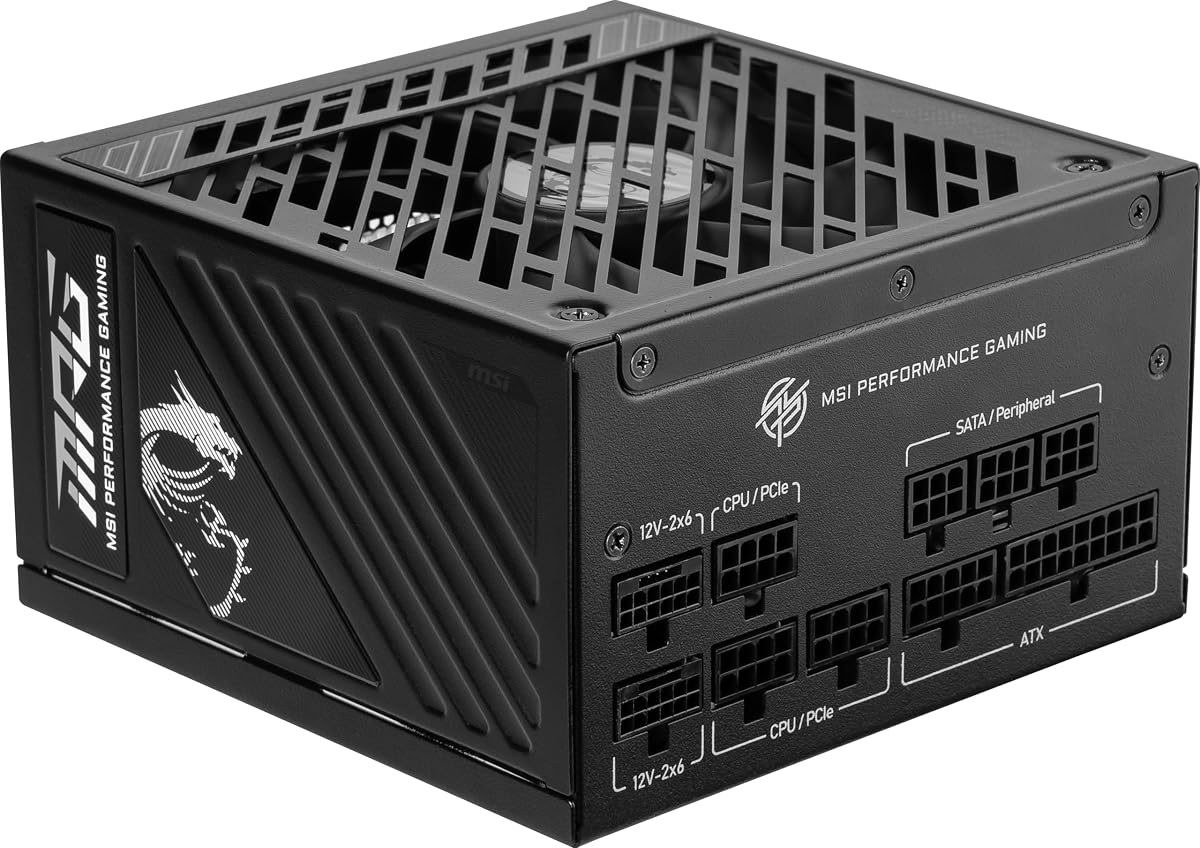
This MSI unit stands out for its use of server-grade 105°C capacitors, ensuring high thermal tolerance and longevity under demanding operational conditions.
We may earn a commission when you buy through this link, at no additional cost to you.
With dual 12V-2×6 connectors, it provides direct support for multiple next-gen GPUs without requiring adapters, simplifying complex multi-GPU configurations.
A 10-year warranty adds significant value, protecting your investment against component failure while offering confidence in the internal build quality.
Choose this for reliability and component quality over flashy features, making it ideal for long-term builds where stability and durability are paramount.
Server-grade capacitors are rated for higher temperatures and longer lifespans, ensuring consistent performance even during extended periods of use.
Embossed jacket cables offer improved flexibility, making routing easier and reducing sharp bends that could stress electrical connections over time.
We may earn a commission when you buy through this link, at no additional cost to you.
The Power Zone 2 is engineered for silence, featuring a Zero RPM mode that keeps the fan off during light loads for near-silent computing experiences.
We may earn a commission when you buy through this link, at no additional cost to you.
Certified for 94% energy efficiency, it delivers reliable power while wasting minimal electricity, making it eco-friendly and cost-effective over long-term use.
The large 140mm fan ensures efficient cooling with minimal noise, allowing the unit to remain whisper-quiet even when running demanding applications.
If noise is your primary concern, this unit delivers exceptional acoustic performance without sacrificing reliability or compliance with modern ATX standards.
During light loads, the fan stops spinning completely, eliminating noise and ensuring a peaceful environment during browsing or office work.
Specially designed fan blades reduce turbulence, resulting in smoother airflow and less mechanical noise compared to standard cooling solutions.
We may earn a commission when you buy through this link, at no additional cost to you.
The C1000 Core combines modern aesthetics with essential features like ATX 3.1 compliance and a whisper-quiet FDB fan with Zero RPM capability.
We may earn a commission when you buy through this link, at no additional cost to you.
Gold certification provides solid efficiency, balancing cost and performance effectively for users wanting a clean build without premium pricing.
While it lacks some advanced features of higher-end units, it offers reliable power delivery and quiet operation suitable for mainstream gaming builds.
For users prioritizing design and standard performance, this unit delivers a balanced package that meets modern requirements without unnecessary complexity.
FDB fans reduce friction significantly, resulting in quieter operation and longer lifespan compared to standard sleeve bearing fan designs.
ATX 3.1 certification ensures compatibility with next-gen GPUs and transients, providing a stable foundation for future hardware upgrades.
We may earn a commission when you buy through this link, at no additional cost to you.
Selecting the right power supply requires balancing wattage, efficiency, and safety standards to match your specific hardware needs and future upgrade plans.
For high-end builds with multiple GPUs, ensure the PSU provides at least 1100W continuous power to handle peak loads without throttling.
Calculate your total system draw using online calculators, then add a buffer of at least 200W to accommodate future upgrades and efficiency margins.
Look for 80 Plus Gold or Platinum certifications to minimize energy waste and heat generation during operation.
Higher efficiency translates to lower electricity bills and cooler internal temperatures, protecting your other components from thermal stress.
Modern units compliant with ATX 3.1 standards include native connectors like 12V-2×6 for new GPUs, eliminating dangerous adapters.
Ensure your PSU explicitly supports PCIe 5.1 to guarantee stable power delivery to the latest graphics cards under high transient loads.
Fully modular PSUs allow you to connect only necessary cables, reducing clutter and improving airflow within the case.
Non-modular units force you to leave unused cables inside the case, which can restrict airflow and look unprofessional in visible builds.
Check for high-quality components like Japanese capacitors and robust protection circuits like OVP, SCP, and OCP.
A warranty of at least 7 to 10 years signals manufacturer confidence and ensures long-term reliability for your system investment.
Consider fans with Zero RPM modes or fluid bearings for quieter operation during light loads or gaming sessions.
Noise ratings in dBA indicate how loud the unit will be; values below 30 dBA are ideal for silent or low-noise environments.
Verify the number of PCIe and SATA connectors available to match your current hardware and future expansion needs.
Limited connector counts may restrict adding additional storage drives or graphics cards without purchasing expensive adapters or splitters.
Always ensure the unit includes critical protections like Over Voltage Protection and Short Circuit Protection to save your hardware.
These safeguards prevent damage to components in case of electrical surges or internal failures, ensuring your expensive PC remains safe.
Always power down the system and unplug the PSU from the wall outlet before making any internal connection changes to ensure safety.
Route cables neatly using the modular design to improve airflow and prevent hotspots within the computer chassis during long sessions.
Periodically clean dust from the PSU vents with compressed air to maintain cooling efficiency and prevent overheating during peak usage.
ATX 3.1 certification ensures the PSU meets modern standards for transient power spikes and includes native connectors for next-gen graphics cards. It guarantees higher stability and safety for newer hardware configurations.
Only if you have multiple high-end graphics cards or extreme CPU workloads. Most single-GPU builds operate efficiently with 850W to 1000W. Check your specific hardware requirements before purchasing higher wattage.
Modular PSUs allow you to connect only necessary cables, reducing clutter and improving airflow. This leads to better cooling performance and a cleaner, more professional build aesthetic.
Platinum-rated units offer slightly higher energy efficiency compared to Gold, reducing electricity costs and heat output. For most users, Gold is sufficient, but Platinum is ideal for always-on workstations.
A long warranty indicates build quality and protects your investment against early failure. Look for at least 7 to 10 years of coverage to ensure peace of mind for your power supply.
Transient spikes are sudden power demand surges from GPUs that can exceed rated power. A PSU with high transient tolerance like ATX 3.1 handles these safely without shutting down or damaging components.
Yes, but you must ensure the dimensions fit and you have the correct mounting brackets or adapters. Always check connector compatibility and voltage requirements before installing a server unit in a standard chassis.
Whether you need the raw power of the Dell units or the modern features of the Corsair and ROG models, there is a 1100W option for every build requirement and budget.
Prioritize efficiency and ATX 3.1 compliance to future-proof your system against upcoming hardware releases and ensure your investment remains relevant for years.
Always check current stock levels and pricing before purchasing, as availability fluctuates frequently for high-demand power supply units in the current market.