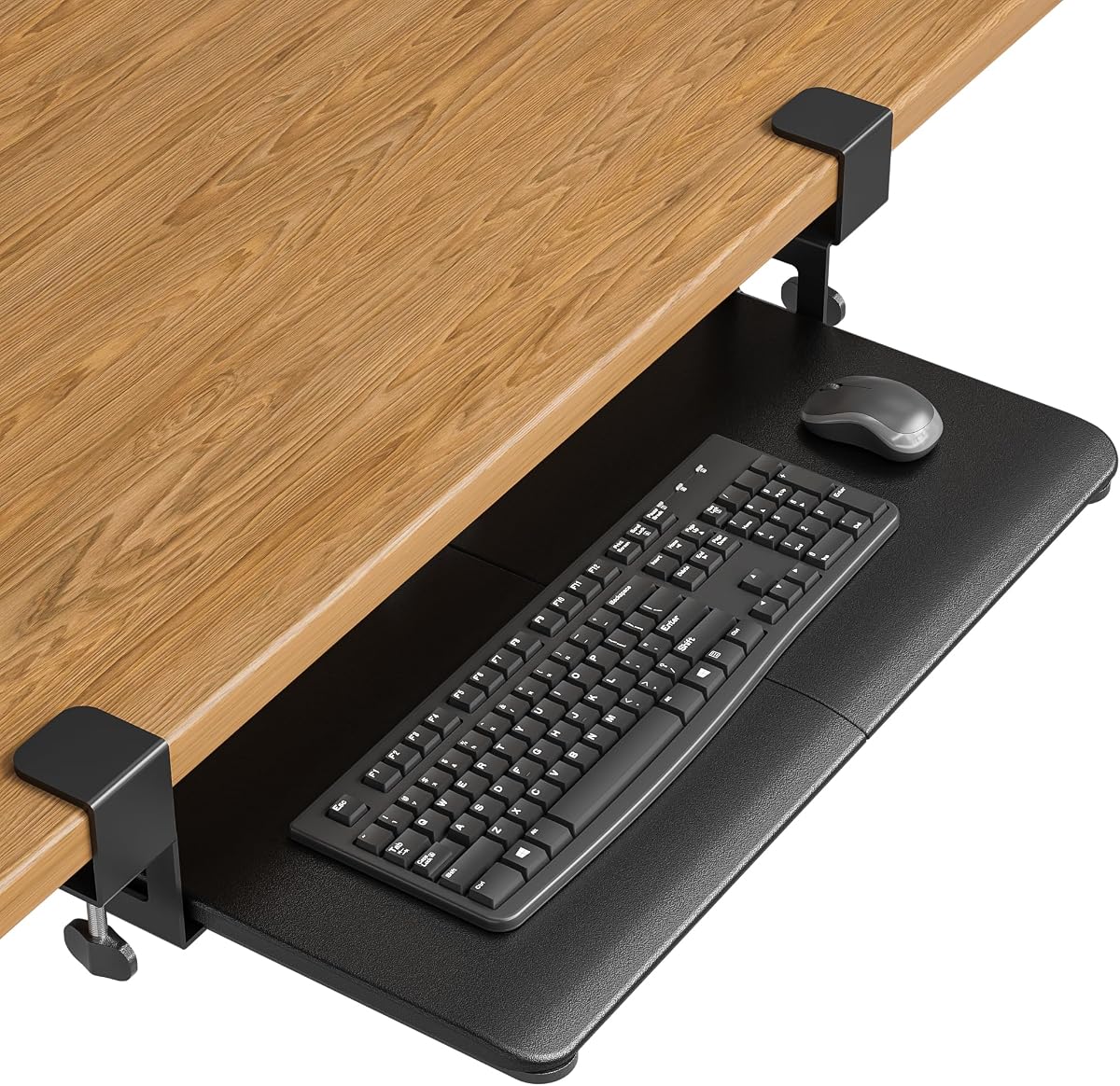
BONTEC Under Desk Keyboard Tray
4.4Editor score
No-drill installation process
Supports up to 11 lbs
Space-saving under desk design
Finding the right clamp on keyboard tray can transform your workspace by freeing up valuable desk space. These under desk solutions allow you to position your keyboard and mouse at a comfortable height, reducing strain on your wrists and shoulders during long work sessions.
We compared ten top rated models based on build quality, installation ease, and ergonomic features. Each product was evaluated for desk compatibility, weight capacity, and overall value to help you find the perfect fit for your office or home setup.
This guide provides detailed insights into each pick, highlighting key strengths and potential limitations. Remember that product availability and pricing can change frequently, so check the latest offers before making your final purchase decision today.
4.4Editor score

4.4Editor score

4.3Editor score
As an Amazon Associate we earn from qualifying purchases.
The following table provides a side-by-side comparison of all ten selected models. Use this quick reference to compare dimensions, weight limits, and unique features across the entire lineup.


The VIVO Black Clamp-on keyboard tray stands out as a top choice for ergonomic efficiency. With a 4.4 rating, users appreciate its ability to reclaim desk space while maintaining a sturdy build quality.
We may earn a commission when you buy through this link, at no additional cost to you.
This model features a 26.8 by 11 inch platform that holds your keyboard and mouse securely. The sturdy C-clamps attach to desks up to 1.25 inches thick without damaging the surface, ensuring a tight fit.
While it offers great value, note that it does not work with beveled edges. The extension is limited to 8.5 inches, which may be tight for larger mouse setups.
Overall, this tray is ideal for standard office desks needing space optimization. It provides the comfort and stability required for long typing sessions without complex installation.
The tray slides completely under the desk when not in use, freeing up surface area for monitors and documents.
Lowering your keyboard reduces wrist strain and promotes a more neutral typing posture throughout the day.
We may earn a commission when you buy through this link, at no additional cost to you.
This VIVO model offers superior height adjustment, making it versatile for users of different sizes. The tray can be set to five different height points, allowing precise ergonomic alignment.
We may earn a commission when you buy through this link, at no additional cost to you.
It includes a keyboard wrist pad and mouse rest, which adds immediate value. The larger surface area accommodates standard keyboards and additional accessories like calculators or notebooks.
The split tray design allows for flexible positioning of the mouse separate from the keyboard. However, this might take some getting used to if you prefer a unified surface.
Choose this if you need extra height customization or have a thicker desk. The included accessories make it a complete solution for comfort right out of the box.
The height adjustment feature ensures you can find the perfect typing angle regardless of your chair or desk height.
Having a wrist pad and mouse rest included saves money and ensures comfort from the very first day of use.
We may earn a commission when you buy through this link, at no additional cost to you.
The rotating feature of this VIVO tray is unique, offering 360 degrees of movement. This allows you to tuck the tray away completely when not in use.
We may earn a commission when you buy through this link, at no additional cost to you.
With a single clamp, installation is simpler than models requiring dual clamps. The 11 pound weight capacity supports most standard keyboards and mice without issue.
Note that the 360 degree rotation requires 32 inches of clearance to spin freely. If your desk is surrounded by walls, this feature might be limited.
Ideal for users who need to swap desk space dynamically, this tray offers a distinct advantage. It is great for shared workspaces where desk real estate changes often.
Rotate the tray out of the way to create more room for large projects or meetings.
The single clamp design reduces hardware and steps, making setup faster and more straightforward.
We may earn a commission when you buy through this link, at no additional cost to you.
BONTEC offers an affordable option without sacrificing essential features. With a 4.4 rating, it delivers strong performance for the price point.
We may earn a commission when you buy through this link, at no additional cost to you.
The platform measures 25.6 by 11.8 inches, providing ample room for full-size keyboards and mice. It attaches to desks up to 1.97 inches thick securely.
Installation is drill-free, using sturdy C-clamps with protective pads to prevent scratches. However, ensure your desk has a flat underside for proper mounting.
This tray is a great choice for budget-conscious shoppers needing reliable ergonomics. It balances cost and function effectively for standard home office setups.
You get essential ergonomic benefits at a lower price, making it accessible for more users.
The included protective pads ensure your desk surface remains pristine while supporting the weight.
We may earn a commission when you buy through this link, at no additional cost to you.
This premium VIVO model adds tilt adjustment, a feature missing in standard trays. You can choose from nine settings ranging from 10 degrees positive to negative.
We may earn a commission when you buy through this link, at no additional cost to you.
The swivel clamps rotate 90 degrees independently, making corner desks easy to mount. Side brackets allow for desired clearance under the desk for leg comfort.
While it costs more, the ergonomic flexibility justifies the price for heavy users. The 3.4 inch desk thickness compatibility is generous for thick wood desks.
Select this if you want the most control over typing angles. It is perfect for users with specific posture requirements or corner desk setups.
Fine-tune the angle of your keyboard to match your natural hand position, reducing strain.
The independent clamps allow you to fit the tray into L-shaped workstations seamlessly.
We may earn a commission when you buy through this link, at no additional cost to you.
This specific VIVO tray is built for L-shaped or corner workstations. The swivel clamps rotate to fit the geometry of corner desks easily.
We may earn a commission when you buy through this link, at no additional cost to you.
The 26.8 by 11 inch platform supports standard keyboards while leaving room on the desk for other items. Clamps rotate 90 degrees independently for custom placement.
It shares many features with the standard model but focuses on corner utility. Ensure your desk thickness does not exceed 1.25 inches for a proper fit.
Ideal for home office corners, this tray maximizes utility in tight spots. It helps keep your keyboard off the main desk surface without sacrificing workspace.
Specifically engineered to fit the angles of modern office furniture perfectly.
Keep your main desk clear for paperwork while keeping typing tools accessible below.
We may earn a commission when you buy through this link, at no additional cost to you.
This VIVO model adds a practical pencil drawer to the standard keyboard tray. The 17 inch drawer provides space for pens, USB drives, and small office supplies.
We may earn a commission when you buy through this link, at no additional cost to you.
The tray extends a maximum of 8.5 inches, and combined with the drawer, it reaches 18.5 inches total. This ensures easy access to everything you need.
It maintains the 11 pound weight capacity and sturdy clamps of other VIVO trays. The drawer keeps your under-desk area tidy and functional.
Choose this if you want integrated storage without extra boxes. It is great for users who need a dedicated place for small items near their typing area.
The built-in drawer keeps your tools close but hidden, reducing visual clutter.
Perfect for storing cables, pens, or sticky notes that often get lost on desks.
We may earn a commission when you buy through this link, at no additional cost to you.
This tray features a generous 20 by 11.8 inch surface, ideal for those needing room to maneuver. The 2.76 inch desk thickness compatibility is among the best in this review.
We may earn a commission when you buy through this link, at no additional cost to you.
An upgraded slide mechanism ensures smooth extension and retraction. The back baffle prevents the keyboard from sliding off during intense typing or gaming sessions.
It requires 25.9 inches of space for installation, so measure carefully before buying. The dual clamps provide stability without scratching your desk.
Great for users with thicker desks or those who prefer a flat board design. It balances simplicity with practical features for daily use.
Accommodates a wider range of desk types, including those with thicker surfaces.
The back baffle and dual clamps ensure the tray stays stable during use.
We may earn a commission when you buy through this link, at no additional cost to you.
This desk extender can function as a keyboard tray or extra storage. The foldable design saves space when you don't need the extra surface area.
We may earn a commission when you buy through this link, at no additional cost to you.
It supports up to 44 lbs, making it strong enough for heavy printers or speakers in addition to keyboards. The clamp range from 0.5 to 3.5 inches is very versatile.
While it works as a tray, it is not optimized for ergonomic typing angles like dedicated trays. It is better for general surface expansion.
Consider this if you need flexible desk surface options. It is useful for users who switch between typing and other tasks needing more space.
Use it as a keyboard tray or expand your desk for other heavy equipment.
Fold it out of the way when not in use to keep the desk open.
We may earn a commission when you buy through this link, at no additional cost to you.
Mount-It! stands out with a lifetime warranty, offering long-term peace of mind. The tray is designed for smooth daily use with a neutral typing position.
We may earn a commission when you buy through this link, at no additional cost to you.
It fits desks up to 2.2 inches thick and includes a wide 27 by 11 inch platform. The slide-out design keeps the desktop clear when not in use.
Note that it does not work with glass desks, so check material compatibility. The US-based support team is ready to assist with setup or returns.
This is a reliable choice for those prioritizing warranty and support. The solid build quality ensures it lasts through years of office use.
The warranty covers defects, ensuring you are protected for the life of the product.
Access to US-based specialists can resolve issues quickly without international delays.
We may earn a commission when you buy through this link, at no additional cost to you.
Choosing the right tray requires understanding your desk's dimensions and your ergonomic needs. This guide covers the key factors to consider before purchasing.
Measure your desk's edge to ensure the clamps can reach. Most trays fit up to 1.5 inches, but some models handle thicker surfaces up to 3 inches. If your desk is very thick, look for extended clamp options.
Always check the maximum thickness specification before buying to avoid installation issues.
Your keyboard and mouse need enough room to move comfortably. A tray should be at least 22 inches wide to accommodate a full-size keyboard. Depth is also critical; ensure you have enough under-desk space.
Confirm the tray's width and depth fit your existing setup and clearance.
C-clamps are standard and easy to install without drilling. Some models use a single clamp for flexibility, while others use dual clamps for stability. Ensure the clamp material is sturdy enough to support the weight.
Select a mechanism that balances ease of installation with long-term stability.
Look for trays that allow height or tilt adjustments. These features help align your wrists with your elbows, reducing strain. A standard tray is good, but adjustable ones offer better health benefits.
Prioritize models with tilt or height settings for better posture over time.
The tray must support your keyboard and mouse without sagging. Most options hold around 11 pounds, which is sufficient for standard gear. Heavier mechanical keyboards may require checking limits.
Verify the weight limit matches your equipment to prevent instability.
Many trays are incompatible with beveled or rounded desk edges. This is a common issue that can prevent mounting. Check your desk edge shape against the product requirements.
Avoid trays that explicitly exclude your desk edge style to save time.
Most modern trays are no-drill, saving you from damaging furniture. Ensure the hardware is included and instructions are clear. Complex setups might require help, so check tool needs.
Look for simple tools and hardware to ensure you can install it alone.
First, measure your desk thickness and surface area before purchasing. This ensures the tray will fit and slide smoothly under your workspace.
Second, install the clamps tightly using the provided hardware. Check that the tray does not wobble when you push or pull it.
Third, adjust the height and angle to a comfortable level for your wrists. Regularly clean the slide rails with a dry cloth to maintain smooth movement.
Most modern trays use protective pads to prevent scratches. However, if you overtighten clamps or use them on delicate surfaces, minor marks might occur. Using the provided pads correctly usually avoids damage.
Generally, no. Glass desks lack the solid edge needed for clamps to grip securely. Some models explicitly state incompatibility with glass. You may need a different mounting style for glass surfaces.
Check the maximum thickness spec for the tray. If your desk exceeds this, the clamps may not reach. Look for models designed for thicker desks or consider alternative mounting solutions.
Most trays require basic tools and take under 30 minutes. Instructions are usually clear. If you have steady hands, you can do it alone. No drilling is typically required.
It depends on the width. Standard trays are about 22 inches wide. If your split keyboard is wider, check the tray dimensions. A wider platform may be needed for split setups.
Use a dry cloth to wipe dust from the rails. Avoid liquids that might corrode metal parts. Regular cleaning keeps the motion smooth and extends the life of the hardware.
We reviewed 10 models ranging from budget-friendly to premium ergonomic options. The VIVO MOUNT-KB05E and Mount-It! are strong contenders for general use.
Prioritize your desk thickness and space constraints first. Ergonomic adjustments like tilt are vital if you type for long hours daily.
Remember to check current prices and availability before buying. Your perfect tray should balance comfort, space, and cost for your specific setup.