
64GB exFAT32 USB 3.0 Flash Drive
4.5Editor score
USB 3.0 C Adapter Included
Highly Textured Metal Design
Lifetime Support Service Team
This guide compares the top exfat USB flash drives for 2026, evaluating speed, durability, and compatibility to help you choose the right storage.
Finding the right exfat USB flash drive is essential for modern data storage needs across multiple devices. Whether you need to move large files between Mac and Windows or store media on a car stereo, exfat ensures seamless compatibility without size limits.
We evaluated ten top-rated models based on transfer speeds, build quality, and real-world performance. Our analysis focuses on drives that maintain reliability under stress while offering the versatility required for professionals and everyday users alike.
Each pick highlights specific strengths like dual connectivity or rugged protection. Note that availability and pricing fluctuate frequently, so always check the current listing before making your final purchase decision for the best value.
4.5Editor score

4.7Editor score

4.6Editor score
The following table provides a side-by-side comparison of all ten selected drives, highlighting their key specifications to help you quickly identify the model that fits your specific storage requirements.



This drive offers exceptional value for users needing reliable storage across different systems. With a 4.5 star rating, it proves its worth through consistent performance and essential accessories included right out of the box.
We may earn a commission when you buy through this link, at no additional cost to you.
The included USB C adapter ensures you can connect to modern laptops and phones without extra dongles. The textured metal casing not only looks professional but also helps dissipate heat during large file transfers.
While write speeds are standard for this price point, the read speeds are impressive for quick access to documents and media. The lifetime support service team adds peace of mind for long-term usage.
If you are looking for an affordable solution that works everywhere without needing extra adapters, this is the ideal pick. It balances cost and functionality perfectly for students and casual users.
The included USB C adapter bridges the gap between older USB A ports and newer USB C devices seamlessly.
The twill design on the metal body provides an anti-slip grip while enhancing thermal performance during use.
We may earn a commission when you buy through this link, at no additional cost to you.
SanDisk continues to be a trusted name in storage with this Ultra Flair model. Its 4.6 rating reflects user satisfaction with speed and build quality. It is designed for fast data movement and secure file storage.
We may earn a commission when you buy through this link, at no additional cost to you.
The metal casing is both stylish and functional, offering protection against physical damage. The included password protection feature uses AES encryption to keep sensitive data safe on any computer.
While it lacks a USB C connector, the USB 3.0 speed is sufficient for most daily tasks. You may need to download software to enable full encryption features on Mac systems.
This drive is perfect for professionals who need to carry important files securely. It delivers a solid balance of speed, security, and style for everyday use.
Encrypt your private files with 128-bit AES encryption to protect sensitive data from unauthorized access.
Transfer full-length movies in under thirty seconds thanks to the optimized read speed technology.
We may earn a commission when you buy through this link, at no additional cost to you.
The Samsung BAR Plus stands out as a top performer in our list with a 4.7 star rating. It offers high-speed transfers and a rugged design that protects your data in various environments.
We may earn a commission when you buy through this link, at no additional cost to you.
Its metal casing is waterproof, shock-proof, and magnet-proof ensuring data integrity even under harsh conditions. The integrated keyring makes it easy to attach to keys or bags to avoid loss.
At 400MB/s read speeds it significantly reduces wait times when accessing large video files. The five-year limited warranty provides long-term assurance of its reliability and quality.
For users who prioritize speed and durability above all else, this is the best overall choice. It is ideal for creatives and professionals who move large files regularly.
Withstand water, shock, temperature extremes, and magnets without losing data integrity in challenging environments.
Move gigabytes of data in seconds using the latest USB 3.1 standard optimized read technology.
We may earn a commission when you buy through this link, at no additional cost to you.
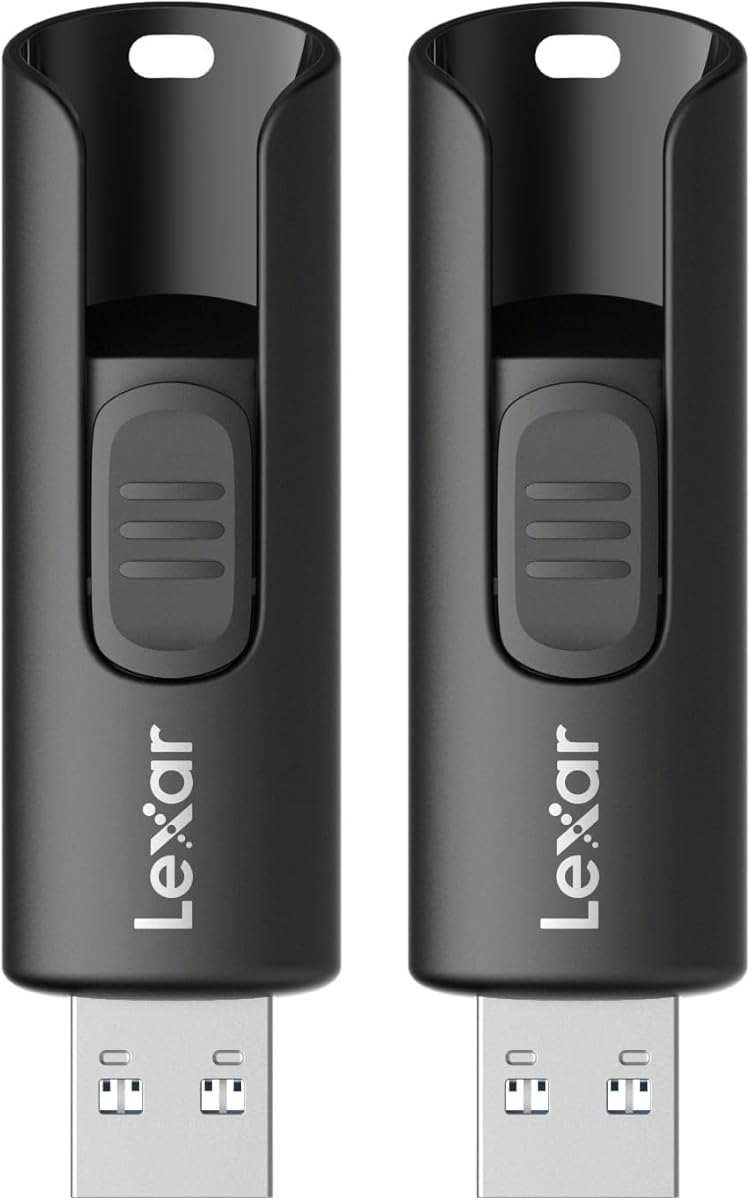
Buying two drives at once is practical for backups or sharing. This Lexar 2-pack has a 4.6 rating for reliability and convenience. Each drive features a retractable cap to protect the connector from damage.
We may earn a commission when you buy through this link, at no additional cost to you.
The lightweight design makes it easy to carry in a pocket or bag. You can create a password-protected safe to hide sensitive files securely on the drive.
While read speeds are decent for daily tasks, write operations are slower compared to premium models. The security feature ensures deleted files cannot be easily recovered.
This pack is excellent for families or small teams needing multiple storage options. It balances utility and security well for general file transfers and backups.
Create a password-protected safe and securely erase files so they cannot be recovered after deletion.
The push-button retractor allows you to hide the USB connector instantly to prevent accidental damage.
We may earn a commission when you buy through this link, at no additional cost to you.
This dual drive offers both USB-A and USB-C connectors for universal compatibility. With a 4.5 star rating, users appreciate the fast performance and compact form factor that needs no cables.
We may earn a commission when you buy through this link, at no additional cost to you.
The metal housing provides excellent protection for the connectors during travel. You can back up photos from iOS and Android devices directly using the free Lexar app.
Write speeds are impressive for a drive in this category allowing quick transfers to your phone or laptop. The cable-free design keeps everything simple and accessible on the go.
If you need to transfer files between computers and mobile devices constantly, this drive is the best tool. It simplifies your workflow with reliable dual connectivity options.
Transfer files between smartphones and computers easily with dedicated USB-A and USB-C connectors on one drive.
Use the Lexar App to back up photos and videos from your mobile device directly to the drive.
We may earn a commission when you buy through this link, at no additional cost to you.
This drive set features a simple LED light to show when data is being transferred. With a 4.5 rating it offers basic functionality at an affordable price point for general use.
We may earn a commission when you buy through this link, at no additional cost to you.
The LED light helps you know when it is safe to remove the drive without using software. Each drive comes with a lanyard to keep it attached to your bag or keyring.
Performance is limited by USB 2.0 speeds which are slower than modern standards. However the default exFAT format ensures compatibility with both Windows and Mac systems.
Choose this if you need simple storage for backups or school files. It provides basic convenience with visual feedback for safe data handling.
The built-in LED light indicates data transfer status so you know when it is safe to eject.
Factory formatted as exFAT to ensure seamless compatibility with Windows and Mac operating systems immediately.
We may earn a commission when you buy through this link, at no additional cost to you.
This premium drive delivers extreme speeds with 1000MB/s read performance for fast workflows. With a 4.6 star rating it is designed for professionals handling large video projects daily.
We may earn a commission when you buy through this link, at no additional cost to you.
The dual USB-C and USB-A connectors allow flexible transfer between laptops and phones. A premium metal build ensures durability while maintaining a sleek appearance on your desk.
The included Memory Zone app helps organize and backup files automatically on your device. Encryption technology provides an extra layer of security for your valuable creative work.
If you need maximum speed and capacity for professional use this is the top pick. It justifies the cost with unmatched transfer rates and premium construction.
Achieve transfer speeds up to 1000MB/s to meet tight deadlines with your large media files.
Use the Memory Zone app for swift auto backup and easy retrieval of your files across devices.
We may earn a commission when you buy through this link, at no additional cost to you.
The TEWENE drive features an innovative clip design that keeps it secure on your bags. With a 4.3 star rating it offers good value for users needing portable storage with unique features.
We may earn a commission when you buy through this link, at no additional cost to you.
The clip makes it easy to attach to keychains or backpack straps while carrying around. A USB C adapter is included for easy on-the-go data transfer across devices.
Read speeds are solid at 85MB/s making it efficient for general file transfers. The support team is available to help with any quality issues that may arise.
For those wanting a practical attachment method to avoid losing drives this is a good option. It balances portability with connectivity for students and travelers.
The exclusive clip design allows you to securely attach the drive to bags or laptops easily.
Enjoy fast data speeds with USB 3.1 Gen 1 technology for smooth video and file transfers.
We may earn a commission when you buy through this link, at no additional cost to you.
This drive offers high-speed reading with a durable zinc alloy shell for protection. With a 4.4 star rating users appreciate its robust build and fast data transfer capabilities.
We may earn a commission when you buy through this link, at no additional cost to you.
The zinc alloy construction resists falling and abrasion during daily use. Double-head protective covers keep both USB-A and USB-C ports safe when not in use.
At 550MB/s read speeds it outperforms many standard USB 3.0 drives for large files. It supports most systems including Windows Mac and Android with a plug and play setup.
For users needing a tough and fast drive for heavy usage this is a strong contender. Its metal build offers reliability for daily storage and transfers.
Transfer high-resolution photos and videos fast with read speeds up to 550MB/s for quick access.
The high-grade zinc alloy shell provides excellent shock resistance and heat dissipation for better data protection.
We may earn a commission when you buy through this link, at no additional cost to you.
The FIT Plus is designed to stay plugged in with its exceptionally compact profile. With a 4.7 star rating it combines high capacity with a durable waterproof and shock-proof design.
We may earn a commission when you buy through this link, at no additional cost to you.
Its small size lets you plug it directly into laptops without blocking other ports. The seamless fit with a keyring prevents loss while ensuring it stays accessible for quick transfers.
With 256GB of space you can store thousands of photos and files comfortably. The drive is built to last with protection against water, magnet, and temperature extremes.
If you want a drive that stays hidden in a port this is the best choice. It offers high capacity and reliability in a tiny form factor.
The seamless fit design lets you plug it directly into devices without blocking nearby ports or cables.
Protect your data against water, shocks, and magnets with a rugged body built for reliability.
We may earn a commission when you buy through this link, at no additional cost to you.
Choosing the right exfat USB flash drive requires looking beyond storage size to ensure compatibility and speed match your needs.
The exFAT file system is essential for drives larger than 32GB as it supports large file sizes without the restrictions of FAT32. It works seamlessly with Windows, Mac, and many Linux systems, making it the best choice for users who swap drives between devices.
Always verify that the drive comes pre-formatted or is easy to reformat to exFAT before purchasing.
Read speeds determine how fast you can open files, while write speeds control how quickly you save data to the drive. USB 3.0 and newer standards offer significantly faster transfers than USB 2.0, which is critical for handling large video or photo files.
Look for read speeds above 100MB/s to ensure smooth performance during everyday tasks.
Traditional drives have USB-A connectors, but modern laptops increasingly use USB-C. Dual drives or drives with included adapters provide flexibility for both types of ports without needing extra cables.
If you use both new and old devices, choose a dual connector or adapter-included model.
Metal housings offer better heat dissipation and protection against drops than plastic cases. Some models also feature waterproof and shock-proof designs for rugged outdoor use.
Prioritize metal builds if you plan to carry the drive daily in a bag or pocket.
Many drives include password protection or hardware encryption to secure sensitive data. This feature prevents unauthorized access if the drive is lost or stolen.
Ensure the software for encryption is compatible with your operating system before buying.
Choose a size based on your storage needs such as 64GB for documents or 512GB for media. Larger drives cost more but offer better value per gigabyte for extensive libraries.
Consider buying a larger capacity drive if you frequently handle videos or high-resolution photos.
A solid warranty indicates manufacturer confidence in the product. Some brands offer a 5-year warranty while others may offer lifetime support.
Check the manufacturer reputation for honoring claims if the drive fails unexpectedly.
Some drives come with keychains, lanyards, or caps to prevent loss. These small additions can make a big difference in long-term usability.
Look for included accessories that match how you plan to transport the drive daily.
Always use the Safely Remove Hardware option in your operating system before unplugging the drive to avoid data corruption.
Keep the connectors clean and dry to ensure reliable contact and prevent short circuits during use.
Store the drive in a protective case or slot when not in use to avoid physical damage or bending.
exFAT supports files larger than 4GB, unlike FAT32, and works across Windows and Mac without needing extra software. This makes it ideal for modern storage drives that need to move large video files between different computers seamlessly.
Yes, USB 3.0 drives are much faster with read speeds up to 10 times quicker than USB 2.0 models. This speed difference is most noticeable when transferring large batches of files or high-resolution media.
Yes, many modern drives feature USB-C connectors to plug directly into Android phones and newer laptops. Some also support OTG (On-The-Go) connections when using adapters for broader smartphone compatibility.
Most new drives come pre-formatted as exFAT or NTFS. If you use a Mac or Linux system, you might need to reformat to exFAT for full read and write access.
You can enable password protection or hardware encryption if your drive supports it. Always keep important files backed up on your main computer as well to avoid loss if the drive fails.
Flash drives generally last several years with normal use. However, frequent writes and physical stress can reduce their lifespan. Regularly backup data and replace drives if they show signs of failure.
Yes, exFAT formatted drives are fully compatible with Mac computers for both reading and writing. You may need to install specific software to use encryption features on macOS.
We identified top options ranging from budget-friendly dual-connectivity drives to premium high-speed models. The Samsung BAR Plus stands out for speed, while the SanDisk Extreme PRO leads in raw performance.
When making your choice prioritize compatibility and speed over storage size to ensure the drive works smoothly with all your devices. Security features are also vital if you handle sensitive files regularly.
Always check current pricing before purchasing as costs fluctuate frequently. The best value often comes from balancing reliability with the specific features your workflow demands.