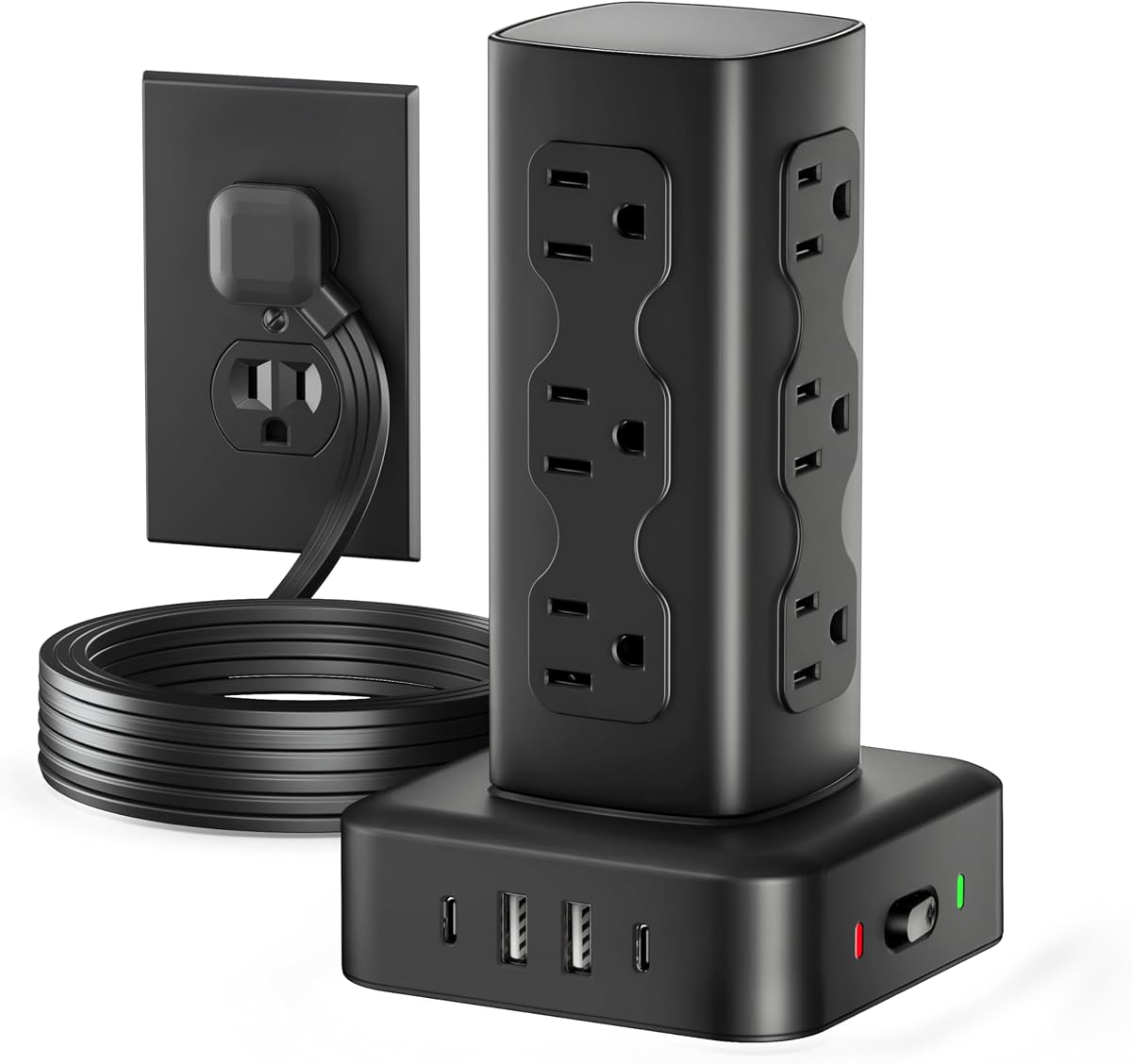
Power Strip Tower with 12 AC Outlets & 4 USB Ports
4.7Editor score
12 Wide AC Outlets
2000 Joule Surge Protection
Ultra Thin Flat Plug Design
Discover the top 10 Charging Tower options for October 2026. We compare safety, outlet counts, USB speeds, and cord length to help you pick the perfect power
Finding the right power solution for your modern workspace can be challenging with so many devices needing constant energy. A charging tower offers a vertical, space-saving design that consolidates multiple outlets and USB ports into one tidy unit. This guide helps you select the best option for your home or office setup.
We evaluated ten leading charging towers based on safety certifications, outlet spacing, USB charging speeds, and cord length. Our analysis focuses on real-world usability, including how well they fit behind furniture and protect against surges. Each product was reviewed for build quality and customer feedback.
Every pick in this list highlights unique strengths like fast charging capabilities or retractable cords. We also note potential trade-offs to ensure transparency. Please remember that product prices and availability can change frequently, so verify current details before making your final purchase decision online.
4.7Editor score

4.7Editor score

4.7Editor score
This side-by-side comparison breaks down the key specifications of each charging tower to help you visualize differences in capacity and design features quickly.


The Kakyanill Charging Station stands out as a versatile solution for modern power needs. With a solid 4.5 rating from verified users, this tower combines space-saving design with robust connectivity options. It effectively transforms a single wall socket into a comprehensive hub for dozens of electronic devices.
We may earn a commission when you buy through this link, at no additional cost to you.
This tower features nine AC outlets spaced generously to accommodate large adapters without blocking neighbors. The eight USB ports include both Type-A and Type-C options for charging smartphones and tablets simultaneously. A 15A circuit breaker and fire-resistant shell provide essential protection against surges and overheating incidents.
While the retractable cord is convenient, the mechanism requires some force to rotate fully. Additionally, the USB-C ports do not support high-speed fast charging for laptops. These trade-offs are acceptable for most home users who prioritize outlet count and physical design over extreme charging speeds.
Ideal for dorm rooms or home offices, this tower keeps cables organized and accessible. Its vertical footprint minimizes desk usage while maintaining easy access to all outlets. If you need a reliable power strip that looks neat and charges multiple devices, this model is a strong recommendation.
The 6-foot retractable cord allows you to pull out exactly the length needed and rotate it back to store it neatly.
At just 0.35 inches wide at the plug, this tower fits snugly behind desks and furniture without causing obstructions.
We may earn a commission when you buy through this link, at no additional cost to you.
The JACKYLED Power Strip Tower excels in control and protection features that premium users appreciate. Its 4.7 rating reflects high satisfaction among customers managing complex setups. The inclusion of individual switches for each layer adds a level of management not found in standard power strips.
We may earn a commission when you buy through this link, at no additional cost to you.
With twelve widely spaced AC outlets, this tower handles bulky gaming consoles and monitor adapters easily. Six USB ports include two Type-C connections for efficient device charging. The 1050J surge protection rating shields expensive electronics from voltage spikes common in older buildings.
One minor drawback is that USB ports share a total output current, which might slow down charging if many devices are plugged in. Also, the price is higher than basic models. However, the added safety and convenience features justify the investment for many users.
This tower is perfect for media centers or desks with multiple high-demand devices. The retractable cord ensures you can position it exactly where needed without messy wires. If you value precise power management and surge safety, this model delivers exceptional performance.
Each layer has its own switch, allowing you to turn off specific groups of devices to save energy instantly.
Rated at 1050 joules, this tower actively guards your equipment against damaging power surges and overloads effectively.
We may earn a commission when you buy through this link, at no additional cost to you.
The Olcorife Power Strip offers exceptional value without sacrificing critical safety features. With a 4.7 rating, it appeals to users seeking reliability on a budget. Its design prioritizes outlet capacity and surge protection, making it a practical choice for general household or office use.
We may earn a commission when you buy through this link, at no additional cost to you.
Twelve AC outlets provide ample room for laptops, lamps, and small appliances. The 2000-joule surge protection rating is robust, exceeding many competitors in this price range. A 0.31-inch flat plug ensures the tower sits flush against walls, reducing protrusion behind furniture.
This model lacks individual switches for each outlet, requiring a main power toggle. Additionally, it offers only four USB ports, which may be limiting for heavy users. Despite these limitations, the high outlet count and strong safety specs make it a top budget contender.
Ideal for students or home offices needing many power points, this tower organizes cables efficiently. It is a smart pick if you prioritize outlet quantity and surge safety over advanced USB charging features. For basic power expansion, this unit delivers reliability and performance.
With 2000 joules of protection, this tower safeguards your electronics against power surges better than many other budget models.
The 0.31-inch flat plug design allows this tower to fit neatly into tight spaces behind desks and sofas.
We may earn a commission when you buy through this link, at no additional cost to you.
The Kakyanill 115W Tower is optimized for users needing rapid USB charging capabilities. Its 4.5 rating highlights satisfaction with its charging performance and sturdy build. This model stands out due to its high-wattage USB output, which supports Power Delivery for faster device replenishment.
We may earn a commission when you buy through this link, at no additional cost to you.
Featuring two USB-C ports capable of 65W each, this tower can charge laptops quickly alongside phones. The total 115W USB output ensures sufficient power for multiple devices. A retractable cord and anti-slip feet provide stability and convenience on any desk or nightstand surface.
Users should remove phone cases during fast charging to avoid overheating issues as noted in instructions. Also, it has fewer AC outlets compared to models with twelve sockets. These are manageable constraints for those who rely heavily on USB charging for their tech.
Best for tech-heavy setups or bedrooms, this tower keeps USB devices charged efficiently. It is a solid choice if fast USB charging is a priority. For those needing a compact hub with high-speed USB ports, this model fits the bill well.
The USB-C ports support up to 65W PD, allowing you to charge laptops and tablets at optimal speeds.
A 6-foot retractable cord lets you manage cable length easily and keeps your workspace free of tangles.
We may earn a commission when you buy through this link, at no additional cost to you.
The TenTrend Power Strip Tower prioritizes USB charging capacity above all else. With a 4.5 rating, it serves users who need to charge many USB devices simultaneously without AC outlets. Its standout feature is the massive 230W total USB output, supporting fast charging for laptops and phones alike.
We may earn a commission when you buy through this link, at no additional cost to you.
Eight USB ports include high-wattage Type-C options marked by color coding for quick identification. This design simplifies finding the right port for your device. A slim plug and compact footprint ensure it fits in tight spaces on desks or nightstands without taking up much room.
The trade-off is fewer AC outlets compared to competitors, limiting use for larger appliances. Additionally, the 5-foot cord may not reach distant wall sockets in some rooms. However, for USB-centric setups, this tower offers unmatched charging power in a small package.
Ideal for desks with many peripherals and phones, this tower streamlines USB power needs. If you need to charge multiple tablets and laptops via USB, this is an excellent option. It balances high output with a small physical footprint effectively.
Delivering 230W across USB ports, this tower can charge multiple devices at high speed without slowing down.
Distinct colors on USB ports help you quickly identify high-wattage options for fast laptop and phone charging.
We may earn a commission when you buy through this link, at no additional cost to you.
The TenTrend Flat Plug Tower shines with its exceptionally long extension cord. Rated at 4.7 stars, it appeals to users needing to reach distant power sources without extension cords. The 10-foot cord provides unmatched flexibility for bedroom or living room setups.
We may earn a commission when you buy through this link, at no additional cost to you.
With twelve AC outlets and eight USB ports, it offers significant device capacity. The 0.27-inch flat plug is one of the thinnest available, ensuring it sits flush against walls. This design prevents interference with neighboring outlets behind furniture or headboards.
While the long cord is a major plus, specific surge protection ratings are not highlighted. Also, USB-C output is moderate compared to higher wattage models. Despite these points, the cord length and outlet density make it ideal for hard-to-reach power needs.
Best for bedrooms or RVs, this tower keeps power accessible from anywhere in the room. Its lightweight build makes it easy to reposition as needed. If reaching a distant outlet is your priority, this tower delivers that flexibility reliably.
The 10-foot pure copper cord allows you to position the tower far from the wall outlet without using adapters.
At 0.27 inches, the ultra thin plug ensures this tower fits in very tight spaces behind furniture.
We may earn a commission when you buy through this link, at no additional cost to you.
The Anker Desktop Charger is built for efficiency on a desk surface. With a 4.7 rating, it is known for reliable performance and brand trust. This model sacrifices wall outlet count for superior USB charging speeds, ideal for powering laptops directly via USB-C.
We may earn a commission when you buy through this link, at no additional cost to you.
Two USB-C ports support up to 100W individually, allowing fast charging for power laptops without separate bricks. The tower includes three AC outlets for monitors or speakers. Its solid base prevents tipping, ensuring stability during active use on crowded desks.
This tower is less ideal for wall mounting due to fewer AC outlets and a fixed cord. It focuses on desk organization rather than room coverage. For users wanting to replace bulky laptop chargers with a cleaner solution, this model is unmatched.
Best for professionals with high-power laptops and phones, this tower streamlines desk wiring. It is a great choice if you prioritize charging speed and safety. If your main need is laptop charging from a USB-C port, this is a top pick.
With 100W USB-C output, this tower can charge most modern laptops efficiently without needing a wall adapter.
Weighing nearly 20 ounces, the heavy base keeps the tower steady on your desk even when plugging in multiple devices.
We may earn a commission when you buy through this link, at no additional cost to you.
This generic 10FT Tower offers a balanced mix of capacity and reach. Rated at 4.5, it is designed for families needing to charge many devices across a room. The dedicated 20W PD port ensures iPhones and Androids get fast charging without adapters.
We may earn a commission when you buy through this link, at no additional cost to you.
Twelve AC outlets accommodate lamps and printers, while the 10-foot cord reaches distant sockets easily. Wide spacing prevents adapter blockage, keeping all ports usable. The flame-retardant housing adds a layer of safety for long-term household use.
With only five USB ports, users might need to share charging speed among multiple devices. Also, there are no individual switches for each outlet. These constraints are minor for general use but worth noting for power-heavy setups.
Ideal for living rooms or large dorms, this tower serves as a central charging station. Its length and outlet count make it versatile for various room layouts. If you need a simple, long-reach tower for family devices, this model works well.
The 20W PD USB-C port provides fast charging specifically for phones, reducing the need for separate phone chargers.
Outlets are spaced widely to ensure large adapters fit without blocking adjacent power sources on the tower.
We may earn a commission when you buy through this link, at no additional cost to you.
This 6FT Power Strip Tower focuses on reliable outlet spacing and safety. With a 4.7 rating, it is praised for fitting many devices without physical interference. The 1800-joule surge protection ensures robust defense against voltage spikes common in residential wiring.
We may earn a commission when you buy through this link, at no additional cost to you.
Twelve AC outlets are spaced to allow bulky plugs to sit side by side. Four USB ports provide basic charging for phones and tablets. The ultra-thin flat plug ensures the tower lies flat against walls, saving space in narrow areas behind furniture.
The USB port count is lower than some competitors, which might limit simultaneous device charging. The cord length is standard at 6 feet, suitable for most bedside or desk placements. Overall, this tower excels in physical design and protection ratings.
Best for bedside tables or office corners, this tower keeps devices organized safely. It is a great choice if outlet spacing is a priority. For those needing a reliable surge protector with wide spacing, this model is highly recommended.
Outlets are designed with extra space between them, allowing large plugs to fit without blocking other ports.
An integrated reset switch lets you quickly restore power or cut it off in case of an electrical overload.
We may earn a commission when you buy through this link, at no additional cost to you.
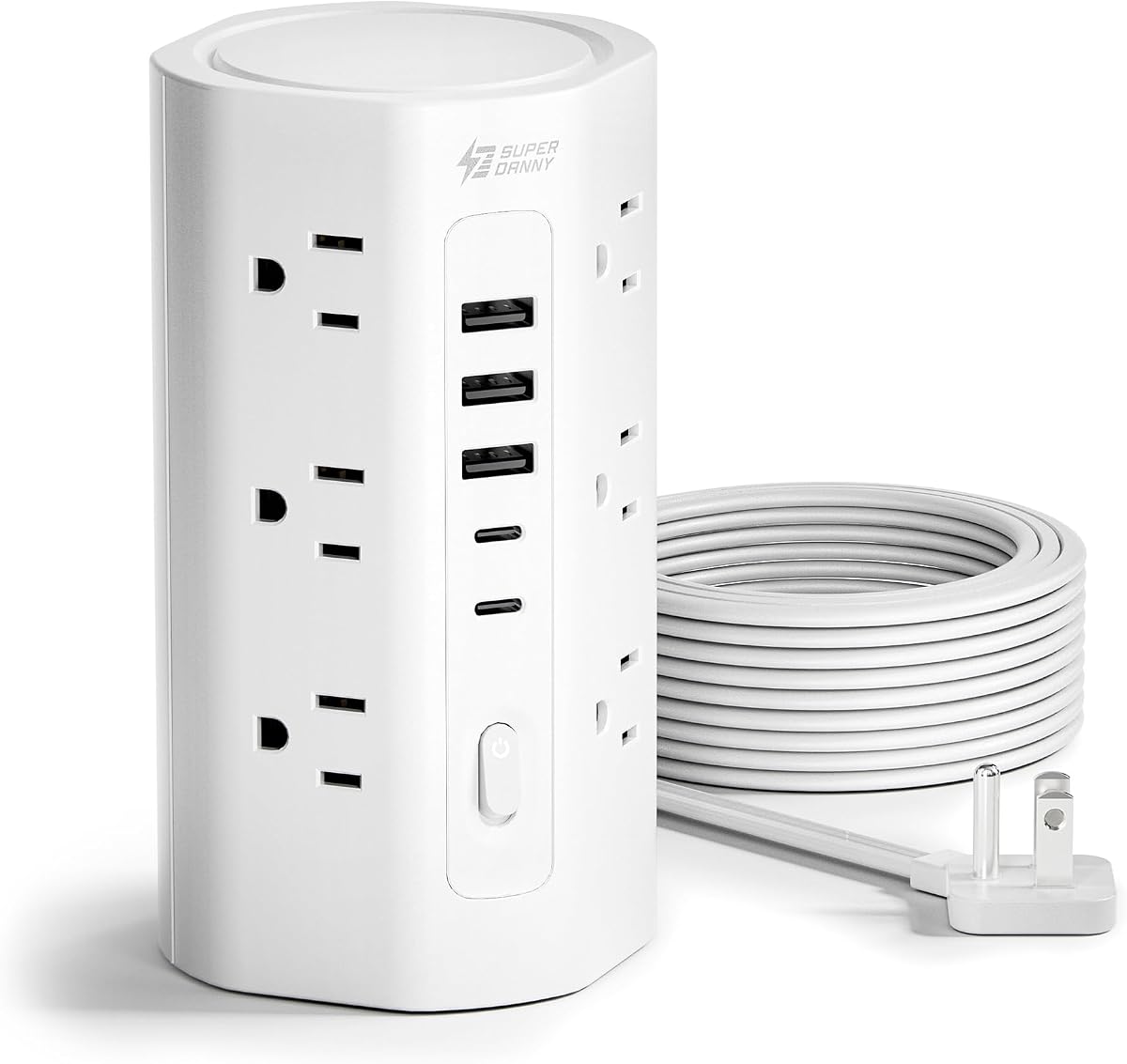
The SUPERDANNY Tower provides excellent value with its long cord and outlet count. Rated at 4.7, it is a favorite for users needing to power devices from a distance. The 10-foot cord ensures you can reach far without needing additional extension solutions.
We may earn a commission when you buy through this link, at no additional cost to you.
It includes twelve AC outlets and five USB ports, covering most daily needs. The 1700-joule surge protection offers strong safety for connected electronics. A 0.31-inch flat plug design lets it sit flush against walls, making it ideal for tight corners or under desks.
USB charging speeds are moderate, not designed for fast laptop charging. Also, there are no individual switches for each outlet. However, the combination of long cord length and high outlet count makes it a strong value proposition for home use.
Ideal for living rooms or bedrooms with distant sockets, this tower delivers flexibility and capacity. It is a great pick if you need reach and power points without paying premium prices. If cord length is your main requirement, this model is worth considering.
The 10-foot cord lets you place the tower far from the outlet, giving you freedom in room setup.
With a thin flat plug, this tower fits easily behind furniture without sticking out or causing obstructions.
We may earn a commission when you buy through this link, at no additional cost to you.
Selecting the right charging tower involves considering outlet count, USB capabilities, and safety features to match your specific power needs.
Consider how many devices you need to plug in simultaneously. A tower with 12 AC outlets is ideal for offices, while 6 to 9 may suffice for bedrooms. Ensure outlets are widely spaced so large adapters do not block neighboring ports.
Look for towers with enough outlets to grow with your needs without cluttering your desk space.
Check the total USB output and whether it supports fast charging. Towers with dedicated USB-C ports are better for laptops, while basic USB-A ports work for phones. Ensure the total amperage meets your simultaneous charging needs.
Choose a tower with high-wattage USB ports if you rely on quick charging for multiple devices.
Surge protection shields your electronics from voltage spikes. Look for joule ratings of at least 1000J for basic protection, but 2000J is better for expensive equipment. Ensure the tower includes overload and short-circuit protection as well.
Always verify that the tower offers comprehensive safety certifications like UL or FCC for reliable protection.
The length of the extension cord determines where you can place the tower. A 6-foot cord suits desks, while 10 feet is better for floor placement or distant outlets. Flat cords help prevent tripping hazards and keep floors tidy.
Select a cord length that reaches your wall outlet comfortably without requiring extra extensions.
A flat or right-angle plug allows the tower to sit closer to the wall, preventing it from blocking adjacent outlets. This is crucial for spaces behind sofas or desks where space is tight. Verify the plug thickness to ensure it fits your wall plate.
Opt for an ultra-thin flat plug if you plan to hide the tower behind furniture regularly.
Measure your available space to ensure the tower fits without crowding other items. A compact footprint is useful for nightstands. Check for rubber feet or a weighted base to prevent tipping when multiple heavy plugs are attached.
Prioritize a stable base to avoid accidents, especially if children or pets are present in the room.
Features like individual switches, retractable cords, or LED indicators add convenience. Individual switches help manage power to specific devices, saving energy. Retractable cords keep the area neat when the tower is not in use.
Decide if these extra features justify the cost based on your organization and power management habits.
Always choose a tower with UL or FCC certification to guarantee it meets safety standards. A warranty can provide peace of mind against defects. Check customer support availability for troubleshooting if issues arise with the unit.
Never compromise on safety certifications, as they indicate rigorous testing for electrical hazards and reliability.
Place the charging tower on a stable, flat surface away from water sources to ensure safety. Avoid placing it under rugs or furniture where heat might build up, as overheating can damage the unit or connected devices.
Plug the tower into a grounded wall outlet and distribute your devices evenly across the AC and USB ports. Do not overload the tower beyond its rated wattage, as this can trigger safety shut-offs or cause overheating.
Regularly inspect the cord and outlets for signs of wear or damage. Keep the tower clean by dusting it occasionally with a dry cloth, and do not use wet cleaners on electrical components.
While a charging tower expands your power options, it does not replace wall outlets but rather multiplies them. It is ideal for desks or nightstands where space is limited. However, it relies on a single wall outlet, so if your main breaker has issues, the tower will not help.
Many modern charging towers support laptops via high-wattage USB-C ports. Models with 65W or 100W USB-C output can power most ultrabooks. For heavy gaming laptops, check the specific wattage requirements to ensure the tower provides enough power.
Yes, surge protection is vital to shield sensitive electronics from voltage spikes. It prevents data loss and hardware damage from power fluctuations. Investing in a tower with high joule ratings ensures your devices remain safe during storms or grid issues.
Most towers support between 12 to 18 devices simultaneously depending on the model. The total wattage limit usually ranges from 1250W to 2000W. Ensure your combined device load does not exceed this limit to avoid safety shutdowns or damage.
Charging towers may generate some heat during normal operation, especially when charging multiple devices. However, they should not get too hot to touch. If the tower feels unusually warm, disconnect devices and check if the outlet is overloaded.
Most towers include fast-charging USB ports compatible with modern smartphones. Look for models with USB-C PD support for the best speed. Ensure the total USB output matches your needs if you charge multiple phones at once.
No, these towers are designed for indoor use only and lack weatherproofing. Using them outdoors exposes them to moisture and temperature extremes that can damage electronics or cause electrical hazards. Always keep them in dry, indoor environments.
AC ports provide standard electrical power for plugs, while USB ports deliver low-voltage DC power for direct charging. AC ports are better for high-power devices like monitors, while USB ports are convenient for phones and tablets without adapters.
We have reviewed ten top-rated charging towers that offer excellent solutions for managing modern power needs. Whether you prioritize fast USB charging, long cords, or high outlet counts, there is a model here to fit your specific requirements.
Consider your specific use case and space constraints when making your choice. If you need maximum outlet capacity, the models with 12 sockets are ideal. For laptop users, those with high-wattage USB-C ports are the best fit.
Remember to verify current availability and details before purchasing since offers may change. Investing in a reliable tower now will save you from clutter and safety risks in the long run.