
ARCTIC P9 PWM PST
4.5Editor score
Wide RPM Range
High Static Pressure
Included Cable Splitter
This guide compares the top 92mm case fans for cooling performance, noise levels, and reliability to help you choose the right airflow solution for your PC
Selecting the right cooling solution is critical for maintaining optimal system performance and longevity. Nine two millimeter fans offer a compact footprint that fits tightly into modern chassis without sacrificing significant airflow capacity or static pressure capabilities.
We evaluated ten leading models based on their bearing technology, PWM control, noise output, and overall build quality. Each product was assessed for its ability to handle heat dissipation in compact cases, CPU coolers, and specialized applications like NAS units.
Every selection highlights specific strengths such as silent operation, high static pressure, or customizable aesthetics. Keep in mind that pricing fluctuates regularly, so verify current availability before making your final purchase decision for your unique setup.
4.5Editor score

4.8Editor score

4.8Editor score
The following table provides a side-by-side overview of specifications and key features across all ten selected models to help you quickly identify the best fit for your specific cooling needs.


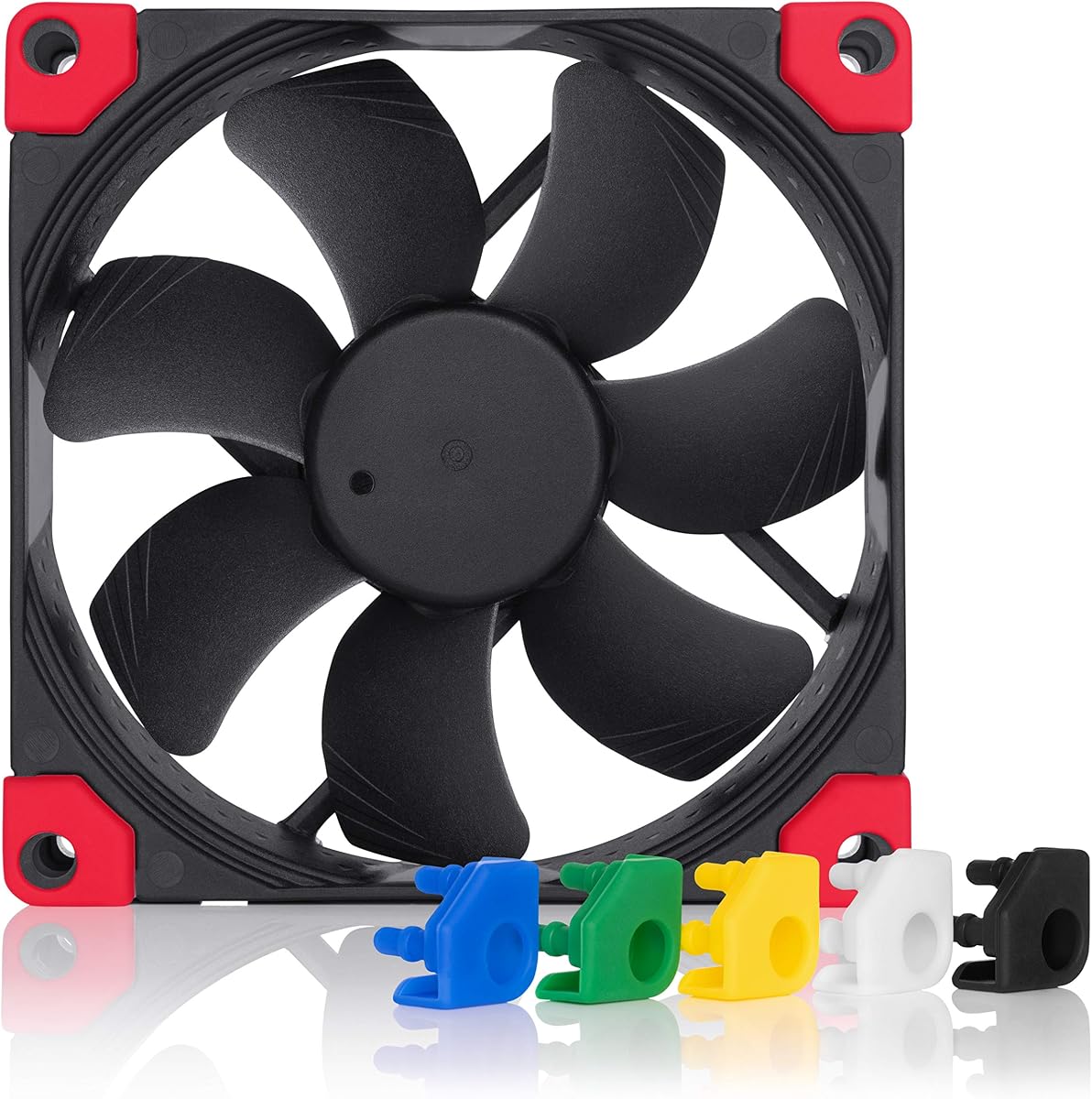


The Noctua NF-A9 PWM stands out as the premier choice for users prioritizing silence and reliability. With a stellar rating of 4.8, this fan delivers balanced performance for compact cases and specialized cooling needs.
We may earn a commission when you buy through this link, at no additional cost to you.
Its Flow Acceleration Channels and Advanced Acoustic Optimisation frame ensure high static pressure without sacrificing acoustic comfort. The 4-pin PWM interface allows for precise speed control, optimizing thermal performance based on real-time system loads.
While the price is higher than budget alternatives, the inclusion of anti-vibration mounts and a low-noise adaptor adds significant value. The fan is designed to last over 150,000 hours, making it a long-term investment for any build.
Ideal for enthusiasts and professionals seeking a balance of cooling power and near-silent operation, this fan is highly recommended. Its proven track record and robust construction make it a top contender for high-end projects.
The frame is engineered to minimize resonances and reduce operating noise significantly across all speed ranges.
These channels on the blade tips increase pressure and efficiency, delivering better cooling per watt of power.
We may earn a commission when you buy through this link, at no additional cost to you.
The ARCTIC P9 PWM PST offers exceptional value for budget-conscious builders who still demand performance. With a rating of 4.5, it provides a wide RPM range and robust cooling capabilities at a fraction of the cost of premium models.
We may earn a commission when you buy through this link, at no additional cost to you.
Its high static pressure design ensures efficient cooling even when air resistance is high, making it suitable for radiators and heat sinks. The 0dB mode allows the fan to stop completely at low temperatures, ensuring absolute silence during idle periods.
Despite its low price, the fan includes a 4-pin splitter for daisy-chaining, which simplifies cable management. The alloy/lubricant bearing developed in Germany helps reduce friction and maintain smooth operation over extended periods.
This fan is perfect for those looking to maximize airflow without breaking the bank. While not as silent as premium options, its versatility and cost-effectiveness make it a top choice for budget builds.
Below 5% PWM signal, the fan stands still, providing a silent idle experience when system temperatures are low.
The included 4-pin socket allows you to connect multiple fans to a single header for simplified wiring.
We may earn a commission when you buy through this link, at no additional cost to you.
This chromax.black.swap edition delivers premium performance with a sleek black design and a slim 14mm profile. Rated 4.8, it is ideal for tight spaces where space constraints are a primary concern without sacrificing cooling efficiency.
We may earn a commission when you buy through this link, at no additional cost to you.
The HS-PWM version provides automatic speed control via the motherboard, ensuring optimal noise levels under load. The self-adhesive anti-vibration pads are swappable, allowing users to customize the look of their setup with various colors.
Despite being thinner, the AAO frame system maintains high efficiency and low noise levels. The 2500 RPM speed range ensures ample cooling power for CPU coolers that require a low-profile solution to fit under RAM or case constraints.
Perfect for ITX builds or systems with limited vertical clearance, this fan stands out for its blend of aesthetics and functionality. Its reliability and design flexibility make it a strong choice for high-end custom setups.
The Chromax.black.swap edition comes with adhesive pads in multiple colors for a truly personalized build experience.
At just 14mm thick, this fan fits into low-profile cases where standard 25mm fans cannot fit.
We may earn a commission when you buy through this link, at no additional cost to you.
The Noctua NF-A9x14 PWM is a standard slim version of the popular A-series fan. With a 4.8 rating, it provides excellent airflow and noise performance for users who need a low-profile solution without the chromax customization options.
We may earn a commission when you buy through this link, at no additional cost to you.
Its SSO2 bearing ensures long-term stability and minimal vibration during operation. The 14mm thin design is perfect for compact CPU coolers where space is limited, maintaining high efficiency despite its small form factor.
While it lacks the swappable pads of the chromax edition, the classic brown and cream aesthetic remains a hallmark of Noctua's design language. The PWM control allows for fine-tuned speed adjustments based on thermal demands.
This fan is recommended for builds requiring strict clearance limits. Its consistent performance and durable construction make it a reliable choice for system integrators and DIY enthusiasts alike.
Designed specifically for 14mm clearance, this fan ensures compatibility with low-profile coolers and tight cases.
The advanced blade shape optimizes airflow efficiency and reduces noise levels significantly compared to standard blades.
We may earn a commission when you buy through this link, at no additional cost to you.
Thermalright offers a strong competitor with the TL-P9, combining affordability with solid cooling performance. Rated 4.7, this fan is designed to handle both case cooling and CPU heatsink duties effectively.
We may earn a commission when you buy through this link, at no additional cost to you.
The S-FDB bearings are developed to minimize noise while extending the lifespan of the fan. Four vibration damping pads are integrated into the corners to reduce resonance and prevent rattling during high-speed operation.
Its 7-blade design is optimized for balanced airflow and reduced noise. While it may not offer the static pressure of specialized high-performance fans, it is more than capable for general case ventilation and moderate cooling loads.
Ideal for budget builds looking for quiet cooling, this fan is easy to install and works well with standard motherboard headers. It is a great alternative for those who want premium features without the premium price tag.
Sealed Fluid Dynamic Bearings ensure smooth operation and minimize noise compared to standard sleeve bearings.
Soft silicone feet and damping pads reduce friction and noise transmission to the chassis during operation.
We may earn a commission when you buy through this link, at no additional cost to you.
The ARCTIC P9 Silent is tailored for users who prefer a fixed-speed solution with minimal noise. Rated 4.6, it operates at a consistent 1900 RPM, ensuring steady airflow without the need for active speed control.
We may earn a commission when you buy through this link, at no additional cost to you.
Its bearing technology, developed in Germany, reduces friction and prevents excessive heat buildup. The high static pressure makes it a suitable choice for cooling radiators or densely packed components where airflow resistance is high.
Because it lacks PWM, the speed is constant. However, the low noise level at this speed makes it ideal for passive setups or environments where consistent cooling is more important than variable speed curves.
This fan is perfect for those seeking simplicity and reliability. Its robust construction and silent operation make it a practical choice for everyday computing and general-purpose cooling applications.
Fixed speed operation eliminates the complexity of PWM control, ensuring consistent cooling performance at all times.
Designed to push air through dense fins and radiators efficiently, ensuring effective cooling even in restricted airflow paths.
We may earn a commission when you buy through this link, at no additional cost to you.
This fan brings Noctua's reliable cooling to a modern black aesthetic. Rated 4.8, it features the same high-performance blades and frame as the standard version but offers a distinct visual appeal for dark-themed builds.
We may earn a commission when you buy through this link, at no additional cost to you.
The chromax.black.swap edition comes with adhesive anti-vibration pads in six different colors, allowing for personalization. The semi-passive operation ensures the fan stops at 0% PWM for absolute silence during idle periods.
The 2000 RPM speed range and flow acceleration channels deliver superior cooling without excessive noise. The frame is designed to minimize turbulence, ensuring efficient airflow through restrictive components like radiators or heatsinks.
Ideal for users who want top-tier performance with a stylish look, this fan is a solid investment. The included color options make it a versatile choice for custom PC builds.
The all-black design blends seamlessly with modern black components and cases, offering a cohesive look.
The fan stops completely when the temperature is low, providing a silent experience during light workloads.
We may earn a commission when you buy through this link, at no additional cost to you.
The TL-9015B offers a slim 15mm profile combined with high rotational speed for aggressive cooling. Rated 5.0, it is designed to fit into tight cases while still providing substantial airflow for thermal management.
We may earn a commission when you buy through this link, at no additional cost to you.
With a maximum speed of 2700 RPM, it delivers high airflow and static pressure. The four vibration damping pads help maintain quiet operation, even at higher speeds, making it suitable for both case and CPU cooling tasks.
Its compatibility with downward coolers and standard cases makes it a versatile option. The 4-pin PWM control allows for precise adjustments, ensuring you only use the necessary speed to meet thermal requirements.
Ideal for compact builds needing high performance, this fan balances slim design with powerful cooling capabilities. It is a great option for those needing to maximize cooling within a tight footprint.
Despite being only 15mm thick, the fan maintains high RPM speeds to deliver effective cooling in tight spaces.
Rubber pads around the corners reduce noise transmission, keeping the system quiet even at higher speeds.
We may earn a commission when you buy through this link, at no additional cost to you.
The NF-A9 FLX is designed for users who want maximum flexibility without PWM control. With a 4.7 rating, it offers three distinct speed settings via low-noise adaptors, making it easy to tune for specific acoustic requirements.
We may earn a commission when you buy through this link, at no additional cost to you.
Its 3-pin interface allows for direct power from the PSU or motherboard headers. The included adaptors reduce speed to 1600, 1250, or 1050 RPM, allowing for silent operation at the lowest setting if needed.
The fan's A-series blades and frame ensure efficient airflow even at reduced speeds. The anti-vibration mounts and adapters are included, ensuring a quiet installation that minimizes resonance within the chassis.
This fan is perfect for silent builds where manual tuning is preferred. Its versatility and high-quality construction make it a reliable choice for quiet systems that do not require automated control.
Low-noise adaptors allow you to manually set the fan speed to match your desired balance of cooling and silence.
At its lowest speed of 1050 RPM, the fan operates at just 17.1 dB(A), providing near-silent cooling.
We may earn a commission when you buy through this link, at no additional cost to you.
The ARCTIC P9 Max is engineered for maximum cooling performance, rated at 4.6. With an RPM range extending up to 4300, it delivers the highest static pressure and airflow among the options reviewed, ideal for demanding thermal scenarios.
We may earn a commission when you buy through this link, at no additional cost to you.
Its fluid dynamic bearing ensures a long service life and silent operation at lower speeds. The high static pressure design makes it exceptionally effective for radiators and high-resistance heat sinks where airflow is critical.
At maximum speed, the fan generates significant noise, but this is necessary to achieve the stated airflow and pressure figures. The 0dB mode ensures that it can remain completely silent when the system is cool and demands are low.
This fan is best suited for high-performance builds that require aggressive cooling. If you need to push the limits of thermal performance, the P9 Max offers the necessary power and reliability to get the job done.
With 6.17 mmH2O static pressure, this fan can push air through the tightest heatsinks and radiators effectively.
FDB technology ensures long life and quiet performance at lower speeds while handling high torque at max RPM.
We may earn a commission when you buy through this link, at no additional cost to you.
Selecting the right fan requires balancing performance metrics with noise tolerance and physical constraints. This guide breaks down the key factors to consider before making a purchase decision.
Static pressure refers to a fan's ability to push air through restrictive components like radiators, heatsinks, and dust filters. If your fan will be mounted in front of a heat exchanger or behind a dense filter, prioritize static pressure ratings. Airflow, measured in CFM, is the total volume of air moved and is more relevant for open case ventilation.
Look for fans with high static pressure specs if you are cooling CPU coolers or liquid radiators. For general case exhaust, prioritize high airflow to ensure efficient heat dissipation throughout the chassis.
PWM fans use a 4-pin connector to allow the motherboard to control speed dynamically. This enables silent idle states and responsive cooling during load spikes. FLX fans use a 3-pin connector and typically rely on voltage control or manual adapters to adjust speed.
Choose 4-pin PWM models for modern motherboards that offer fan curve control. This ensures the fan spins up only when necessary, maximizing both cooling performance and acoustic comfort.
The bearing type dictates the lifespan and noise level of the fan. Fluid Dynamic Bearings (FDB) and SSO2 bearings are known for durability and quiet operation, often lasting over 150,000 hours. Sleeve bearings are cheaper but may wear out faster and become louder over time.
Opt for bearings like SSO2 or FDB to ensure long-term reliability. This reduces the risk of premature failure and maintains a quiet environment for your PC.
92mm fans come in various thicknesses, typically 15mm or 25mm. A 25mm fan provides better airflow due to larger blade sweep, while a 15mm fan is essential for low-profile coolers or tight cases. Always measure your available space before purchasing.
Ensure your case or cooler supports the fan's thickness. A 15mm fan can often fit in spaces meant for 25mm ones with adapters, but the reverse is not possible without physical modification.
Noise is measured in decibels (dB(A)), with lower values indicating quieter operation. Most premium fans stay under 25 dB(A) even at full speed. However, note that noise perception is subjective and depends on the environment.
Aim for a noise rating under 23 dB(A) for near-silent operation. Consider fans with PWM stop features for absolute silence during idle periods when cooling demand is low.
While function is paramount, appearance matters for many builders. Standard fans often come in brown or black, while chromax editions offer swappable colors. RGB lighting is less common in 92mm sizes due to space constraints.
Choose a model with swappable pads if you want to match your build. Black designs blend better with modern dark cases, while traditional styles suit vintage or neutral builds.
Premium fans usually include anti-vibration mounts, screws, and adapters. Vibration mounts are crucial for reducing noise transfer to the chassis. Adapters can reduce speed for quieter operation or adapt pins for different connectors.
Check the box contents before buying. A complete kit saves time and ensures a secure, quiet installation without needing to source extra parts from elsewhere.
Price generally reflects build quality and bearing technology. Budget options offer good value for basic cooling, while premium models justify their cost with longevity and superior acoustic performance. Warranty periods vary from one year to five or more.
Invest in a model with a strong warranty to protect your purchase. While cost is a factor, reliability and noise levels often make premium fans a better long-term investment for silent builds.
Begin by measuring your available clearance to ensure the fan fits. For slim coolers, select 14mm or 15mm thickness models; otherwise, standard 25mm fans are suitable. Use a ruler to check for interference with RAM or cables during installation.
Connect the fan to the motherboard header. For 4-pin PWM fans, plug into a header labeled CPU_FAN or SYS_FAN. For 3-pin fans, ensure the pin alignment matches the header to avoid short circuits. Use Y-cables if multiple fans need to share one header.
Secure the fan with anti-vibration mounts if provided. These rubber grommets reduce noise transmission and vibration. If using standard screws, tighten evenly to prevent warping. Avoid overtightening, which can damage the motor or blades.
Not directly. You need an adapter frame or a dedicated 92mm mount. Some cases have removable panels to accommodate different fan sizes, but standard mounts are size-specific. Always check your case manual before attempting installation.
PWM stands for Pulse Width Modulation. It allows the motherboard to control fan speed by rapidly switching power on and off. This ensures precise speed control, better efficiency, and automatic quieting when the system is idle.
Yes, many ITX cases use 92mm fans for CPU cooling or rear exhaust due to limited space. Always verify dimensions, as some ITX cases support both 120mm and 92mm mounts depending on the specific model and clearance.
Yes, premium fans often feature better bearings, quieter operation, and longer lifespans. If noise is a priority or you plan a long-term build, investing in high-quality fans is worth the extra cost for reliability.
Use anti-vibration mounts, ensure secure installation, and configure your BIOS fan curves for lower speeds during idle. Using PWM control allows the fan to stop completely at low temperatures, reducing noise significantly.
3-pin fans allow voltage control, while 4-pin fans allow PWM speed control. 4-pin fans offer more precise control and can stop completely for silence. 3-pin fans work on both headers but lack full speed modulation.
Yes, some fans like the ARCTIC P9 PWM PST come with a cable splitter. You can connect multiple fans to a single header to save ports, but ensure the header can handle the total current draw to avoid damage.
High-quality fans with FDB or SSO2 bearings can last over 150,000 hours. This translates to years of reliable operation in normal conditions. Cheaper models may have shorter lifespans depending on bearing quality.
We reviewed ten top models ranging from budget-friendly options to premium silent performers. Whether you need the silent precision of Noctua or the raw performance of ARCTIC P9 Max, each option offers distinct advantages for specific cooling needs.
Prioritize factors like static pressure, bearing type, and noise levels to ensure the fan meets your performance expectations. For ITX builds or tight coolers, slim designs are essential, while standard profiles offer better airflow for general ventilation.
Prices and stock fluctuate regularly, so check the latest offers before finalizing your purchase. With the right choice, you can achieve optimal thermal performance without sacrificing the acoustic comfort of your workspace.