
ASUS TUF Gaming A16 Laptop
4.5Editor score
AMD Ryzen 7 Processor
RTX 4050 Graphics
144Hz Display Screen
Choosing the right gaming laptop for Baldurs Gate 3 requires balancing powerful graphics, fast processors, and vivid displays to handle its detailed fantasy world smoothly.
We analyzed ten top-rated models focusing on hardware specs, display quality, and cooling systems to ensure you get the best experience for this demanding role-playing game.
Each pick below highlights key strengths and trade-offs so you can decide quickly while noting that pricing and availability may shift based on current market conditions.
4.5Editor score

4.8Editor score

4.3Editor score
As an Amazon Associate we earn from qualifying purchases.
This side-by-side comparison highlights the essential specifications and unique strengths of each laptop to help you find the perfect machine for your gameplay needs.


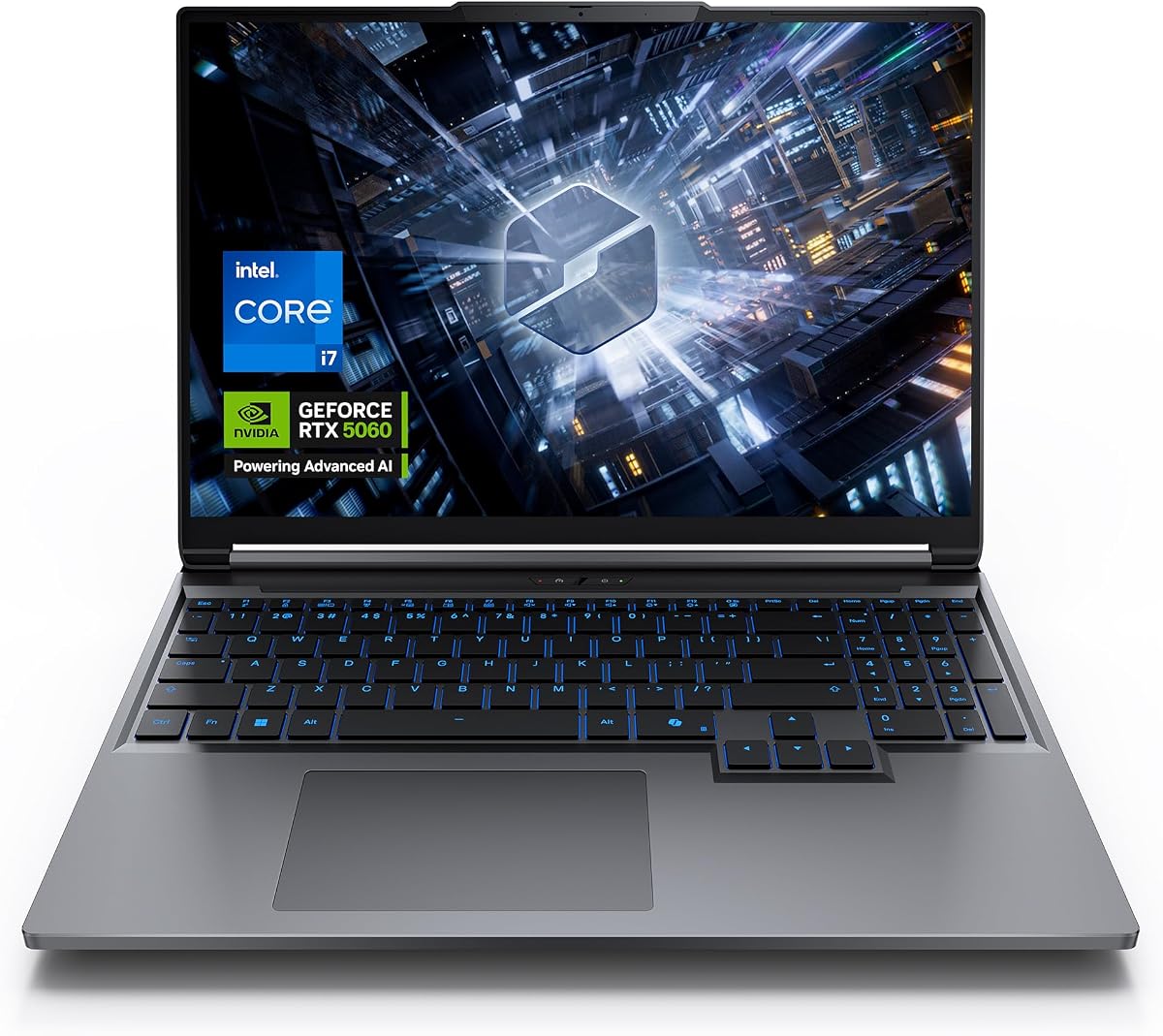

This Alienware model stands out as a premium option for Baldurs Gate 3 with its stunning WQXGA display and powerful Intel processor handling complex scenes smoothly.
We may earn a commission when you buy through this link, at no additional cost to you.
The 32GB DDR5 memory ensures seamless multitasking while the RTX 5060 GPU delivers crisp visuals and smooth frame rates during intense combat sequences in the game.
While the price is on the higher end and battery life could be better, the performance and display quality make it worth the investment for dedicated gamers.
If you prioritize visual fidelity and raw performance for immersive RPG gameplay this laptop offers a top-tier experience that balances power with reliable Dell engineering.
The WQXGA resolution provides sharp details essential for exploring the intricate environments of Baldurs Gate 3 without sacrificing performance.
With 32GB of RAM you can run background apps alongside the game without any noticeable slowdowns or lag issues.
We may earn a commission when you buy through this link, at no additional cost to you.
The ROG Strix G16 delivers peak performance with its RTX 5070 Ti GPU and Intel Core Ultra 9 processor ensuring Baldurs Gate 3 runs at maximum settings effortlessly.
We may earn a commission when you buy through this link, at no additional cost to you.
Its 240Hz Nebula display offers incredibly smooth motion and deep contrast which enhances the immersive storytelling and visual effects found in this rich RPG title.
The high cost and weight are notable downsides but for those seeking the absolute best graphical fidelity and speed the hardware justifies the premium investment.
Gamers who demand top-tier specs and plan to use the laptop primarily for desktop gaming will find this model unmatched in raw power and display quality.
The RTX 5070 Ti enables ray tracing and high frame rates making fantasy worlds look incredibly lifelike during gameplay sessions.
ROG Intelligent Cooling keeps temperatures low during long play sessions maintaining consistent performance without throttling issues.
We may earn a commission when you buy through this link, at no additional cost to you.
This ROG model strikes a strong balance between power and price making it an ideal choice for playing Baldurs Gate 3 with high fidelity visuals.
We may earn a commission when you buy through this link, at no additional cost to you.
The 165Hz display and RTX 5060 GPU deliver smooth gameplay while the 16GB DDR5 RAM supports smooth multitasking for most gamers during sessions.
Although 16GB RAM might be a limit for heavy multitasking the overall performance and build quality make it a very capable machine for RPG fans.
If you want a reliable gaming laptop with excellent cooling and screen quality this model offers great value for the price point it provides.
The 165Hz refresh rate ensures fluid motion which is perfect for tracking fast action in combat scenarios without motion blur.
Wi-Fi 7 support guarantees fast and stable internet connections crucial for online multiplayer features in modern gaming experiences.
We may earn a commission when you buy through this link, at no additional cost to you.
The Aurora 16X combines a powerful Intel processor with an RTX 5060 GPU making it a capable machine for running Baldurs Gate 3 at high settings.
We may earn a commission when you buy through this link, at no additional cost to you.
Its 2.5K display with 180Hz refresh rate provides crisp visuals and smooth motion which enhances the immersive storytelling of this popular role-playing game.
While the base memory might benefit from an upgrade the laptop supports expansion allowing you to tailor it to your specific gaming and multitasking needs.
For users seeking a blend of performance and portability this laptop offers a solid option that handles demanding titles well without being overly bulky.
The 2.5K resolution brings game environments to life with sharp details that improve the visual experience during exploration.
Dual fans and large heat pipes keep the system cool ensuring stable performance during extended gaming sessions without overheating.
We may earn a commission when you buy through this link, at no additional cost to you.
This Nitro model leverages AI technology and a 32GB memory configuration to handle Baldurs Gate 3 efficiently while supporting modern streaming and multitasking demands.
We may earn a commission when you buy through this link, at no additional cost to you.
The 180Hz display ensures smooth visual transitions during combat and the RTX 5060 GPU provides reliable graphics performance for a rich and detailed gaming experience.
While the build might feel standard compared to premium brands the sheer amount of RAM and fast refresh rate make it a strong contender for performance gamers.
If you value raw specs and memory headroom over premium materials this laptop offers an excellent platform for playing complex RPGs with high multitasking ability.
AI driven features help optimize frame rates and visual quality for a smoother experience in demanding game environments.
With 32GB of DDR5 RAM you can keep many apps open alongside the game without worrying about memory limitations.
We may earn a commission when you buy through this link, at no additional cost to you.
The GIGABYTE A16 offers a slim form factor with solid performance making it easy to carry while still delivering smooth gameplay for Baldurs Gate 3.
We may earn a commission when you buy through this link, at no additional cost to you.
Its AMD Ryzen 7 processor and RTX 5060 GPU provide enough power to run modern titles well and the GiMATE AI interface simplifies system management tasks.
While port selection is limited and battery life is average the lightweight design and strong performance make it a great choice for gamers on the go.
If you need a portable laptop that does not compromise too much on power this model provides a great blend of mobility and gaming performance.
The slim chassis and light weight make it easy to transport to cafes or friends homes for local gaming sessions.
GiMATE provides an intuitive interface for managing system settings and performance modes without needing complex manual tweaks.
We may earn a commission when you buy through this link, at no additional cost to you.
The msi Cyborg 17 provides a large 17.3 inch screen which enhances immersion while playing Baldurs Gate 3 with plenty of room to view the game world.
We may earn a commission when you buy through this link, at no additional cost to you.
Powered by an Intel Core 7 processor and RTX 5060 GPU it handles game mechanics smoothly and the unique design adds a distinct look to your setup.
Although it is heavier than other options and has average battery life the large screen and solid performance make it a good choice for home gaming.
If you prioritize screen size and immersive visuals over portability this laptop offers a comfortable platform for long gaming sessions in a fixed location.
The 17.3 inch display offers more real estate for viewing details in the game and enhances the feeling of being in the world.
Shared pipe thermal design helps dissipate heat efficiently ensuring stable performance during long periods of gameplay.
We may earn a commission when you buy through this link, at no additional cost to you.
This GIGABYTE model features an RTX 5070 GPU which provides excellent graphical power for Baldurs Gate 3 ensuring smooth frame rates and high visual fidelity.
We may earn a commission when you buy through this link, at no additional cost to you.
The slim chassis and high refresh display add to the appeal and the GiMATE AI interface simplifies managing settings and performance for a better experience.
While the CPU is an older model the strong GPU ensures gaming performance remains high and the laptop remains a good option for visual focused gamers.
If you prioritize graphics performance and portability this model delivers the power needed for modern titles without adding bulk to your gaming setup.
The RTX 5070 GPU enables high quality visuals and smooth performance in demanding games like Baldurs Gate 3 without lag.
The thin design makes it easy to fit into bags and carry around while still delivering desktop level gaming performance.
We may earn a commission when you buy through this link, at no additional cost to you.
The TUF Gaming A16 offers a budget friendly option that still runs Baldurs Gate 3 well thanks to its solid processor and fast refresh rate display.
We may earn a commission when you buy through this link, at no additional cost to you.
Its RTX 4050 GPU delivers reliable performance for most gamers and the durable build quality ensures it can withstand regular use and travel to events.
While the graphics are lower than premium options and storage is smaller these trade-offs are acceptable for those looking for an affordable gaming experience.
If you want a reliable and affordable laptop that handles modern games well this model offers excellent value for the money it costs to buy.
This laptop offers solid performance at an affordable price making it accessible for students and budget conscious gamers.
TUF durability standards ensure the laptop can handle daily use and travel without risking internal components easily.
We may earn a commission when you buy through this link, at no additional cost to you.
The HP Victus 15.6 combines strong specs with an impressive user rating making it a trusted choice for those seeking reliable performance in Baldurs Gate 3.
We may earn a commission when you buy through this link, at no additional cost to you.
Its 32GB DDR5 RAM and 1TB SSD support smooth multitasking and large game libraries while the RTX 4050 GPU handles graphics requirements effectively for most players.
Although the graphics card is mid-range the overall package of speed and storage makes it a great value for gamers who need a versatile machine.
If you want a well-rounded laptop with plenty of memory and storage this model offers a balanced experience that supports gaming and daily tasks.
With 32GB of RAM you can run multiple background apps without slowing down the game performance or overall system speed.
The 1TB SSD provides plenty of space for installing multiple games and storing projects or media files easily.
We may earn a commission when you buy through this link, at no additional cost to you.
Selecting the ideal laptop requires balancing key specs like GPU power and RAM to ensure smooth gameplay and high visual fidelity.
For a game as detailed as Baldurs Gate 3 you need a dedicated GPU like the RTX 5060 or higher to handle ray tracing and high textures smoothly.
Look for models with at least an RTX 5060 to ensure the game runs at high settings without stuttering or lag during complex scenes.
A fast CPU ensures that game logic and physics run smoothly even when many characters and effects are on screen at once.
Choose laptops with Intel Core i7 or AMD Ryzen 7 processors to handle the game demands and multitasking without slowdowns.
Baldurs Gate 3 benefits from ample RAM to keep textures and world data loaded for seamless exploration and combat.
Opt for at least 16GB of DDR5 RAM but 32GB provides extra headroom for streaming or running background apps while playing.
A good screen with high resolution and fast refresh rate enhances immersion and ensures smooth motion during fast-paced battles.
Look for at least a 144Hz refresh rate and Full HD+ resolution to keep visuals sharp and responsive throughout your gaming sessions.
Effective cooling keeps the system stable during long play sessions preventing overheating that can cause performance drops or noise.
Choose models with advanced cooling solutions like vapor chambers or multiple fans to maintain performance during extended game marathons.
Modern connectivity like Wi-Fi 7 and multiple USB ports ensures you can connect peripherals and stay online for multiplayer features easily.
Check that the laptop has enough ports for your mouse headset and external displays to avoid needing extra dongles or hubs.
While gaming drains battery quickly a decent charge time helps if you plan to use the laptop for school or work between gaming sessions.
Look for models with efficient power management and decent battery capacity if you need to use it unplugged occasionally for work.
A sturdy build ensures the laptop can withstand regular use and travel which is important if you plan to take it to friends homes.
Consider models with durable materials and a solid hinge design to protect the internal components during movement and daily use.
Place the laptop on a hard flat surface to allow air vents to function properly and prevent overheating during intense gaming sessions.
Keep the software drivers updated regularly to ensure the best performance and compatibility with the latest game patches and features.
Clean the keyboard and screen gently with appropriate microfiber cloths to avoid scratches and keep the device looking new over time.
Most modern gaming laptops with a dedicated GPU can run it but smoother performance requires at least an RTX 5060 and 16GB RAM for high settings. Lower specs may need settings adjustments to maintain stable frame rates during gameplay.
A 15 to 16 inch screen is ideal for balancing portability and immersion while a 17 inch display offers better visibility for detailed environments. Choose based on whether you need to carry it often or use it mostly at home.
Yes having more RAM helps the game load assets faster and run smoother especially if you multitask or use mods that require additional memory. 16GB is a good base while 32GB offers extra headroom for heavy usage.
The GPU is critical because it handles graphics rendering and effects that make the game world look detailed and realistic. A strong GPU ensures better visuals and smoother performance even when the action gets complex.
Gaming typically drains battery faster so expect two to four hours of use depending on the load and power settings. Most gamers prefer using the device plugged in for consistent performance and uninterrupted play sessions.
Some older models may run the game at lower settings but newer GPUs like the RTX 50 series offer much better performance and features. Consider upgrading if you want high fidelity visuals and smoother gameplay experience.
We reviewed ten strong models ranging from budget friendly options to high performance machines ensuring there is a laptop for every gamer and budget range.
Prioritize GPU power and RAM capacity to ensure smooth gameplay and choose a display that matches your need for immersion versus portability.
Remember that prices may change so verify current specs and deals before purchasing to get the best value for your specific gaming requirements today.