
CENMATE Aluminum 4 Bay
4.3Editor score
Aluminum alloy build with fan
Supports up to 80TB
USB A/C 3.0 interface
Finding the right JBOD enclosure is essential for expanding your storage without complex RAID setups. These direct attached storage units allow you to connect multiple drives independently, offering flexibility for backups and media libraries.
We compared ten top models based on connection speed, drive capacity, cooling efficiency, and ease of use. Each product was analyzed for its ability to handle large drives while maintaining stable performance under heavy workloads.
Each pick highlights key strengths and limitations to guide your decision. Prices and availability fluctuate frequently, so check current listings before purchasing to ensure you get the best value for your storage expansion project.
4.3Editor score

4.2Editor score
4.1Editor score
As an Amazon Associate we earn from qualifying purchases.
The following table provides a side-by-side comparison of all ten evaluated models. It highlights key specifications such as bay count, interface type, maximum capacity, and unique features to help you quickly identify the right fit for your storage needs.




The TERRAMASTER D4-320 stands out as a top choice for users needing fast, flexible external storage. With a rating of 4.2, it delivers reliable performance for backups and media tasks.
We may earn a commission when you buy through this link, at no additional cost to you.
Its USB 3.2 Gen2 interface offers speeds up to 10Gbps, enabling quick transfers of large files. The enclosure supports four drives up to 30TB each, totaling 120TB of capacity without requiring complex setup.
While it lacks RAID features, the plug-and-play design ensures compatibility across Windows, Mac, and Linux. The tool-free trays and push-lock mechanism make swapping drives easy without extra equipment.
Ideal for professionals and enthusiasts needing scalable storage, the D4-320 balances speed and convenience. Its efficient cooling and quiet standby mode make it suitable for office environments.
With USB 3.2 Gen2, this enclosure reaches up to 10Gbps, ensuring quick access to large media libraries and backup sets.
Supporting drives up to 30TB each, users can expand their storage to 120TB total, meeting growing data needs over time.
We may earn a commission when you buy through this link, at no additional cost to you.
The CENMATE Aluminum 4 Bay offers exceptional value for users seeking affordable expandable storage. Rated at 4.3, it combines durability with straightforward functionality for home and office use.
We may earn a commission when you buy through this link, at no additional cost to you.
Its aluminum alloy build provides effective heat dissipation, while the included fan keeps drives cool under sustained loads. It supports both 2.5 and 3.5 inch drives, accommodating various storage needs.
Although limited to USB 3.0 speeds, it delivers reliable performance for general file transfers and backups. The tool-free design simplifies drive installation without requiring additional tools or technical knowledge.
Budget-conscious buyers will appreciate its balance of cost and capability. While noise may be a concern in quiet spaces, its robust build and wide compatibility make it a solid entry-level choice.
The aluminum alloy casing helps dissipate heat efficiently, protecting drives and ensuring stable performance during extended use.
Priced competitively, this model provides reliable multi-drive storage access without the higher cost associated with premium enclosures.
We may earn a commission when you buy through this link, at no additional cost to you.
The IO CREST 8-Bay enclosure provides substantial storage capacity for users managing large data collections. With a 4.0 rating, it offers reliable performance for multi-drive setups without complex configurations.
We may earn a commission when you buy through this link, at no additional cost to you.
Each drive features an independent switch, allowing selective power management to save energy and reduce heat. The steel housing ensures durability, while the smart fan adjusts speed based on thermal conditions.
Although limited to USB 3.0 speeds, it supports SATA drives up to 24TB each, enabling up to 192TB total capacity. This makes it ideal for archival storage and media servers requiring extensive space.
Users prioritizing capacity over speed will find this model well-suited. Its straightforward design and robust build make it a practical choice for expanding storage in both professional and home environments.
Independent switches for each bay allow users to power specific drives on or off, offering flexibility and energy efficiency.
With support for drives up to 24TB, this enclosure can house up to 192TB of data, ideal for large media or backup projects.
We may earn a commission when you buy through this link, at no additional cost to you.
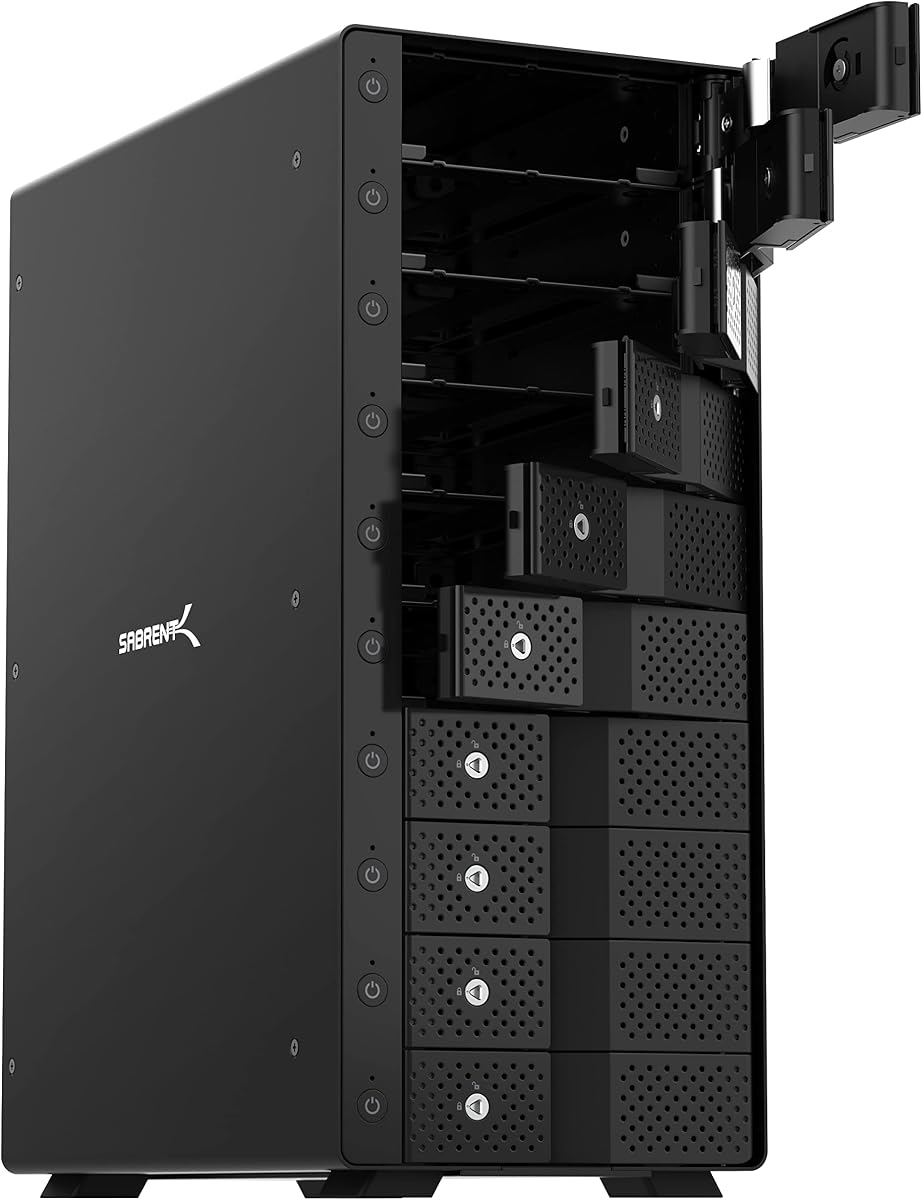
The SABRENT 10-Bay enclosure is a premium solution for users needing extensive storage capacity and fast transfer speeds. Rated at 4.1, it excels in performance and convenience for demanding workflows.
We may earn a commission when you buy through this link, at no additional cost to you.
Its tray-less design allows quick drive insertion without tools, while each bay has an independent switch for power control. The aluminum build houses dual cooling fans to maintain optimal operating temperatures.
With USB 3.2 Gen 2 support, it delivers up to 10Gbps speeds, making it suitable for transferring large media files efficiently. It supports up to 200TB total capacity using 20TB drives.
Professionals managing massive media libraries or enterprise backups will benefit from its scalability and speed. Despite the higher cost, its robust features and secure design justify the investment for serious storage needs.
USB-C 10Gbps connectivity enables fast file transfers, reducing wait times when working with large video or photo files.
Each bay's independent power switch allows users to manage active drives, optimizing energy use and system flexibility.
We may earn a commission when you buy through this link, at no additional cost to you.
The QNAP TR-004 combines the simplicity of DAS with the flexibility of hardware RAID options. With a 4.2 rating, it offers versatile storage solutions for both standalone and NAS-integrated use.
We may earn a commission when you buy through this link, at no additional cost to you.
Users can choose between RAID 0, 1, 5, or JBOD modes via hardware switches, providing data redundancy or speed as needed. Its USB-C connection ensures compatibility across Windows, Mac, and Linux systems.
While primarily designed for QNAP NAS expansion, it functions well as independent external storage. Lockable bays add security, though compatibility is limited to specific NAS models and QTS versions.
QNAP ecosystem users seeking scalable storage will find this model invaluable. Its hybrid capabilities allow it to adapt to various workflows, balancing performance with data protection in a single device.
Built-in RAID support provides data redundancy and performance benefits without requiring separate hardware or complex software setup.
Seamlessly expands QNAP NAS capacity, making it ideal for users already invested in the QNAP storage ecosystem.
We may earn a commission when you buy through this link, at no additional cost to you.
The QNAP TL-R1200C-RP is designed for enterprise environments needing extensive rack-compatible storage. With a 4.1 rating, it provides robust capacity and reliability for server room deployments.
We may earn a commission when you buy through this link, at no additional cost to you.
Its 12 drive bays support large SATA drives, while the redundant power supply ensures continuous operation even if one unit fails. USB 3.2 Gen 2 delivers high-speed data access for demanding applications.
Built for standard rackmount installation, it integrates smoothly into existing IT infrastructure. This model is ideal for IT admins managing large datasets across networks or cloud backups.
Organizations prioritizing uptime and scalability will benefit from its professional-grade design. While it requires dedicated rack space and a higher budget, its reliability and expandability make it a top enterprise choice.
Dual power supplies ensure continuous operation during power failures, critical for enterprise environments requiring high availability.
Standard rackmount form factor enables easy integration into server racks, optimizing space and management in data centers.
We may earn a commission when you buy through this link, at no additional cost to you.
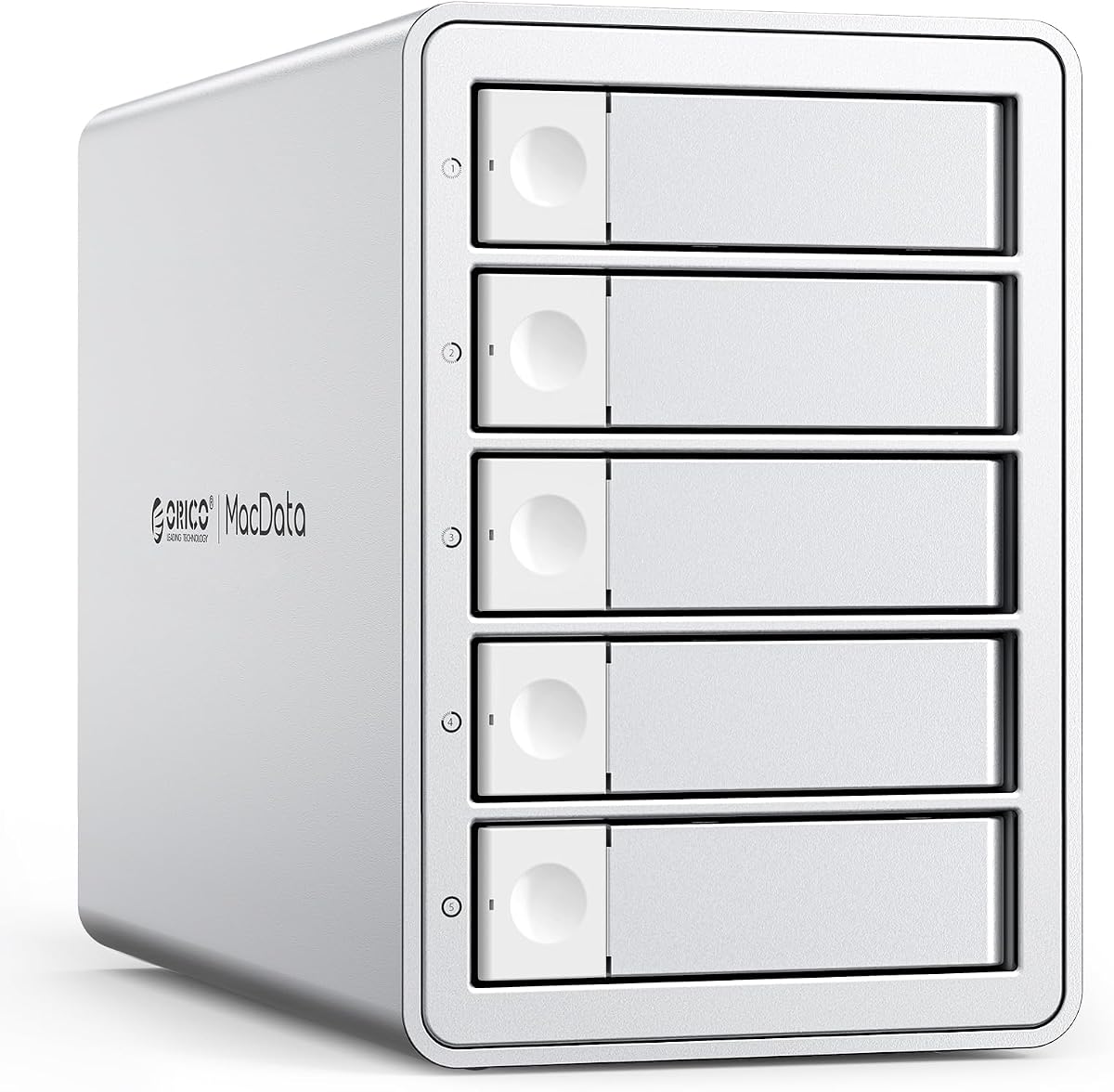
The ORICO 5 Bay RAID stands out with its extensive RAID modes and strong user satisfaction. Rated at 4.7, it offers versatile configurations for performance, redundancy, or independent drive use.
We may earn a commission when you buy through this link, at no additional cost to you.
Its hardware controller supports RAID 0, 1, 3, 5, 10, JBOD, Clone, and Clear modes. The built-in 150W power supply ensures stable operation for multiple high-consumption drives without external adapters.
Users can expand storage up to 110TB using 22TB drives, making it ideal for large video editing projects or media libraries. The aluminum shell and silent fan keep temperatures controlled during heavy workloads.
Workstation users needing flexibility and capacity will appreciate its robust feature set. While USB 3.0 limits transfer speed, its stability and RAID options make it a compelling choice for professional storage expansion.
Eight hardware RAID modes allow users to customize storage performance and redundancy based on specific workflow requirements.
Built-in 150W power ensures consistent voltage for all drives, preventing instability during intensive multi-disk operations.
We may earn a commission when you buy through this link, at no additional cost to you.
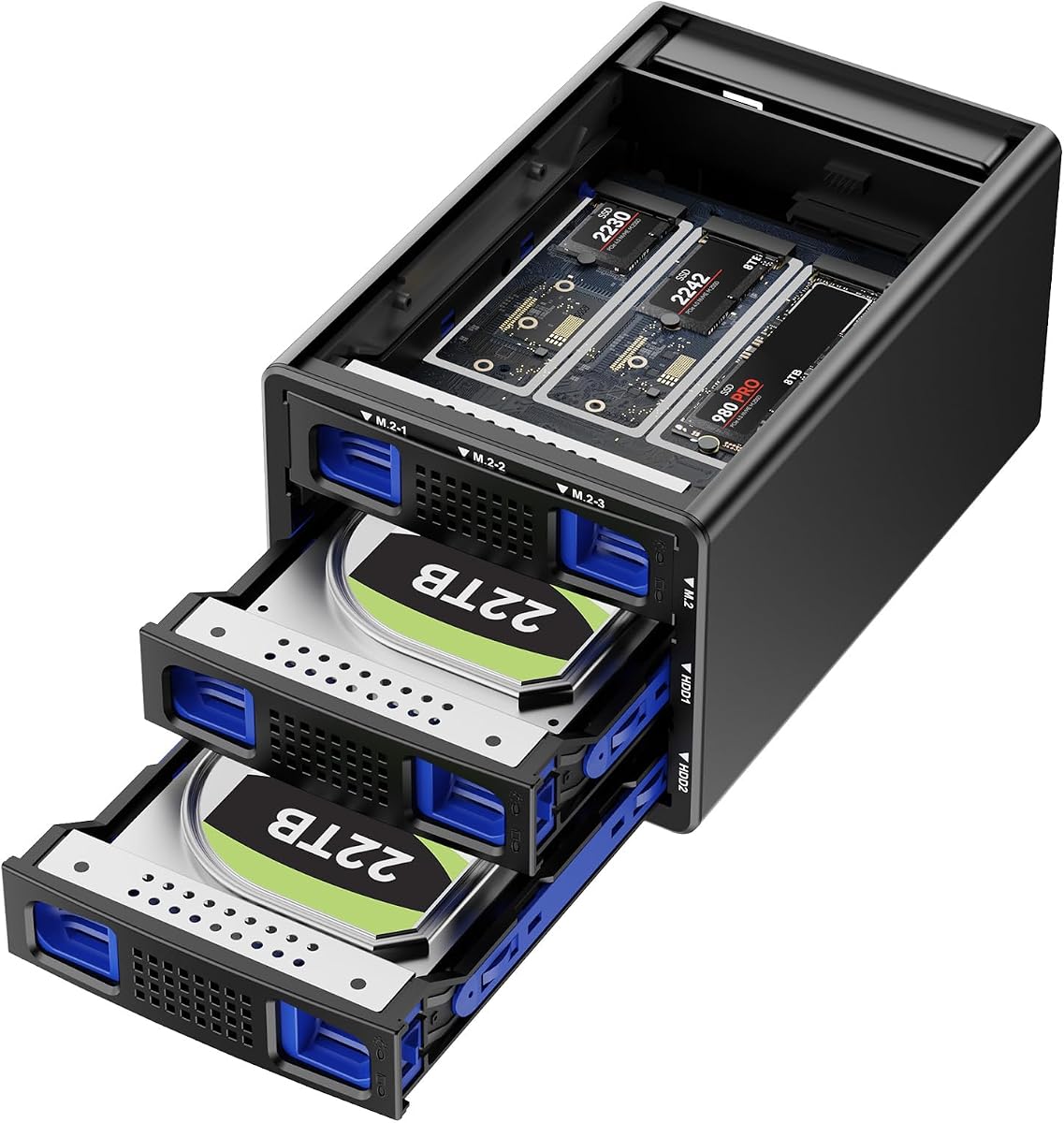
The Hybrid HDD + NVMe enclosure offers a unique solution combining traditional SATA drives with fast NVMe SSDs. With a 4.6 rating, it appeals to users seeking both capacity and speed in one device.
We may earn a commission when you buy through this link, at no additional cost to you.
It supports two 3.5-inch SATA drives and three M.2 NVMe SSDs, enabling up to 68TB total capacity. The USB 3.2 Gen 2 interface ensures speeds up to 10Gbps when not in RAID mode.
Aluminum construction and silent fans provide reliable cooling, while tool-free trays simplify installation. Users can switch between RAID, JBOD, or normal modes for flexibility in data management.
Creative professionals needing fast access and large storage will find this innovative design appealing. Although setup requires attention to drive types, its hybrid approach offers unmatched versatility in this price range.
Supporting both SATA HDDs and NVMe SSDs allows balancing speed and capacity in a single enclosure for diverse storage needs.
USB 3.2 Gen 2 ensures high-speed data transfer, maximizing the performance potential of NVMe drives in hybrid setups.
We may earn a commission when you buy through this link, at no additional cost to you.
The ORICO 4 Bay RAID provides extensive configuration options for users needing customizable storage solutions. Rated at 4.3, it supports eight RAID modes for redundancy, speed, or independent drive access.
We may earn a commission when you buy through this link, at no additional cost to you.
It accommodates up to 88TB total capacity using 22TB drives, ideal for high-definition video and large project files. The built-in 150W power supply ensures stability across multiple drives without external adapters.
Safety locks protect against accidental drive ejection, and the aluminum alloy design aids cooling. Its cross-platform compatibility makes it a reliable choice for various operating systems and work environments.
Users seeking versatility and reliability will appreciate its feature set. While speed is limited by USB 3.0, its flexible modes and robust build make it a practical option for backup and expansion tasks.
Eight RAID modes provide flexibility to prioritize speed, redundancy, or storage independence based on specific user needs.
Aluminum alloy construction combined with safety locks ensures secure, durable storage for valuable data in professional settings.
We may earn a commission when you buy through this link, at no additional cost to you.
The OWC Mercury Elite Pro Quad focuses on high-speed performance with universal drive compatibility. With a 3.7 rating, it delivers strong transfer speeds but may have mixed user experiences.
We may earn a commission when you buy through this link, at no additional cost to you.
Its USB 3.2 interface supports up to 947MB/s, making it suitable for demanding creative workflows requiring rapid data access. Universal bays accommodate both 2.5 and 3.5 inch drives.
Though SOFTRAID software is not included, the hardware supports flexible configurations. It connects via USB-C and works with Thunderbolt 3 systems, ensuring compatibility with modern Mac and Windows computers.
Users prioritizing raw transfer speed will find its interface advantageous. While reliability ratings vary, its performance specifications make it a viable choice for those needing fast external storage access.
USB 3.2 10Gb/s bandwidth ensures fast data transfers, supporting professional workflows requiring quick file access.
Support for multiple drive sizes and types provides flexibility to use existing storage hardware in a unified enclosure.
We may earn a commission when you buy through this link, at no additional cost to you.
Selecting the right JBOD enclosure depends on several factors including capacity needs, interface speed, and operational requirements. This guide covers the essential aspects to consider before purchasing.
Determine how many drives you need to connect now and in the future. Higher bay counts like 8 or 10 provide room to grow but increase cost and footprint. Ensure each bay supports your chosen drive sizes, typically 3.5-inch or 2.5-inch SATA drives.
Choose a bay count that matches your current storage needs while leaving room for expansion without requiring a replacement enclosure later.
USB 3.2 Gen 2 with USB-C offers the fastest speeds at 10Gbps, ideal for large file transfers and media workflows. USB 3.0 at 5Gbps is sufficient for general backups and lighter use. Confirm your computer has compatible ports to utilize the enclosure's maximum speed.
Opt for USB 3.2 Gen 2 if you need high transfer speeds, but verify your system ports support it to avoid performance bottlenecks.
Multiple drives generate significant heat, so efficient cooling is critical to prevent throttling or drive failure. Look for enclosures with built-in fans, ventilation, and thermal sensors that adjust fan speed based on temperature.
Prioritize models with active cooling and adequate airflow to ensure long-term drive health during extended use periods.
Materials like aluminum alloy or steel provide better heat dissipation and physical protection compared to plastic. Check for solid construction and secure drive mounting mechanisms such as trays or locks to prevent accidental ejection.
Invest in a sturdy enclosure to protect your drives from physical damage and maintain consistent thermal performance over time.
High-bay enclosures often require more power than USB can provide, so external power adapters are common. Built-in power supplies can reduce cable clutter but may add to the unit's weight. Ensure the power rating matches your drive count and type.
Verify power requirements match your usage scenario to ensure stable operation across all connected drives under load.
Ensure the enclosure works across your operating systems without requiring special drivers. Some models offer additional features like RAID management software, but verify compatibility with your devices before purchase.
Choose a model that supports your OS ecosystem and provides the features you need without complex setup.
Hot-swappable enclosures allow replacing drives without powering off the system, improving convenience for frequent changes. Look for tool-free designs that simplify insertion and removal of drives.
Prioritize hot-swap capability if you need to frequently add or replace drives without interrupting system operation.
Prices vary widely based on features, bay count, and brand reputation. Balance cost against the performance and reliability you require. Higher-end models offer better cooling and faster interfaces but may exceed budget for basic needs.
Evaluate features against price to find a model that meets your requirements without unnecessary expense.
Start by installing your drives into the enclosure's bays following the manufacturer's instructions. Secure drives properly using trays or locking mechanisms to ensure good contact and prevent movement during operation.
Connect the enclosure to your computer using the appropriate cable and power supply. Allow your operating system to recognize the drives before accessing them to avoid data corruption during initial setup.
Regularly monitor temperatures and clean dust from ventilation areas to maintain optimal cooling. Periodically back up important data since external drives can fail unexpectedly, regardless of enclosure quality.
JBOD stands for Just a Bunch of Disks and allows each drive to operate independently without combining them into a single logical volume. RAID combines multiple drives for improved performance or redundancy, but JBOD provides more flexibility for individual drive access and management.
Yes, most JBOD enclosures support mixing different drive sizes such as 2.5-inch and 3.5-inch drives within the same unit. Each drive appears as a separate volume in your operating system, allowing independent use without combining their capacities.
Most JBOD enclosures are plug-and-play and work without additional software on modern operating systems. Some models may offer optional management tools, but basic functionality like file access works natively on Windows, Mac, and Linux.
Safely remove a drive by first using your operating system's eject function to ensure all data operations are complete. Power down the enclosure or use individual drive power switches if available before physically removing the drive to prevent data loss.
Enclosures can run hot due to multiple drives operating simultaneously or insufficient ventilation. Ensure fans are functioning, vents are clear of dust, and the enclosure is placed in a well-ventilated area to maintain safe operating temperatures.
Yes, JBOD enclosures are well-suited for backups since each drive operates independently. This allows you to store backup sets on individual drives without relying on RAID configurations, simplifying recovery and management of archived data.
JBOD enclosures typically last several years with proper care, though lifespan depends on build quality and usage patterns. Keeping the enclosure clean and well-ventilated helps extend its operational life and protects the drives inside from overheating.
Some JBOD enclosures can be noisy due to cooling fans, especially under heavy load. Models with sound-dampening features or variable fan speeds tend to be quieter, making them more suitable for office or home environments.
The top picks highlight diverse options from budget-friendly models like CENMATE to premium solutions like SABRENT. Each offers unique benefits depending on your storage capacity needs and performance requirements.
Prioritize factors such as interface speed, cooling efficiency, and build quality when making your final decision. Consider whether you need RAID capabilities or simple independent drive access to match your workflow.
Always check current prices and product availability since they can change frequently. Ensuring compatibility with your existing systems will help you get the most value from your chosen JBOD enclosure.