
V-one Wired USB Gaming Controller
4.2Editor score
Plug and play
Multi-mode support
Vibration feedback
Discover the top joysticks for Windows 11. We compare flight sticks, gaming controllers, and specialty simulators to help you find the perfect match.
Choosing the right joystick for Windows 11 can transform your gaming experience. Whether you fly virtual aircraft or command tanks, precision matters. This guide reviews ten models built for compatibility and performance on modern PCs.
We evaluated each product based on build quality, button layout, and software support. Compatibility with Windows 11 was a primary filter. We also considered ergonomics and value to ensure every pick delivers real utility for sim enthusiasts.
Each entry shows key specs, pros, cons, and ideal use cases. Our goal is clarity so you can decide quickly. Note that stock and availability change often, so verify details before purchasing your next controller.
4.2Editor score

4.4Editor score

4.0Editor score
The following table compares all ten products side by side. Focus on compatibility, button count, and special features to find the fit for your setup and preferred simulation types.






The PXN 2113PRO is an entry-level flight stick designed for PC users. It supports Windows 11 and offers a realistic fly experience without a high cost. Its vibration feature adds feedback during flight maneuvers.
We may earn a commission when you buy through this link, at no additional cost to you.
It includes 12 programmable buttons and a throttle for full control. The right moves are easy with rapid fire triggers and an 8-way hat switch. Setup guides help map keys in Microsoft Flight Simulator directly.
Some users report driver issues on non-standard PCs. Vibration strength depends on driver settings to feel noticeable. Still, for budget pilots, it delivers essential axes and controls effectively.
Choose this if you want an affordable entry into flight sims. It fits small desks with suction cups and handles basic training flights well.
Custom adjustments and keyboard mapping allow tailored control schemes for different aircraft types.
Follow the manual steps to configure the joystick within game options for instant play.
We may earn a commission when you buy through this link, at no additional cost to you.
The T-Flight Hotas One offers true hands-on flying with precision controls. It is designed for immersive flight simulator gameplay on PC and Xbox. Its modular design allows separate use on a desk or lap.
We may earn a commission when you buy through this link, at no additional cost to you.
Adjustable resistance ensures smooth aircraft control during takeoff and landing. Multiple buttons allow customization across commercial jets and combat missions. The rudder pedals can be added via the S.M.A.R.T. system.
Some report stiff buttons initially. It may require a break-in period for optimal feel. However, the detachable throttle makes it versatile for different setups.
This model suits beginners and seasoned enthusiasts alike. Its ergonomic design delivers precise control across all aircraft categories effectively.
Responsive triggers and hat switches enable detailed aircraft handling during complex maneuvers.
Add rudder pedals for enhanced steering precision in detailed simulation environments.
We may earn a commission when you buy through this link, at no additional cost to you.
The V-one Wired USB is a versatile gamepad supporting Windows 11 and Android. It requires no drivers for most modes. Vibration feedback enhances gaming without extra costs.
We may earn a commission when you buy through this link, at no additional cost to you.
It supports Xinput and Dinput modes for different platforms. A turbo function allows rapid fire for specific games. The cable length suits most desks and consoles.
Not ideal for high-end sim titles. It focuses on general gaming. Still, its multi-mode support makes it a great backup controller.
Buy this for casual play or as a secondary input. It covers many devices without extra adapters.
Works with PC, Steam, Android, and PS3 for broad device support.
Enhance repetitive actions with one-touch rapid fire options.
We may earn a commission when you buy through this link, at no additional cost to you.
This entry-level joystick features a unique point of view button for easy camera control. It offers 3 axis and 4 buttons for complete control in simple games. The ergonomic handle ensures optimal gaming comfort.
We may earn a commission when you buy through this link, at no additional cost to you.
Perfect for beginners needing basic axes. The POV button helps in flight sims and third-person shooters. It is easy to connect and use without software.
It lacks advanced programmability. Not for complex sim setups. But it serves well for casual titles.
Choose this for straightforward gaming tasks requiring minimal inputs.
Quick camera shifts enhance immersion in dynamic gaming scenes.
Enlarged rests support longer play sessions comfortably.
We may earn a commission when you buy through this link, at no additional cost to you.
The Sidewinder Precision 2 delivers 16 programmable functions for precise control. Its rotating handle allows rudder control. A 146 degree throttle ensures complete control from the joystick.
We may earn a commission when you buy through this link, at no additional cost to you.
Save game commands into specific controller profiles for quick changes. This reduces setup time for multiple games. USB ensures plug-and-play ease on compatible systems.
It lacks modern driver support for Windows 11. Some may face compatibility hurdles. Still, it remains a favorite among veterans.
Ideal for classic flight sims on modern systems.
Rudder control without a separate pedal setup is possible.
Download specific profiles for tailored control schemes.
We may earn a commission when you buy through this link, at no additional cost to you.
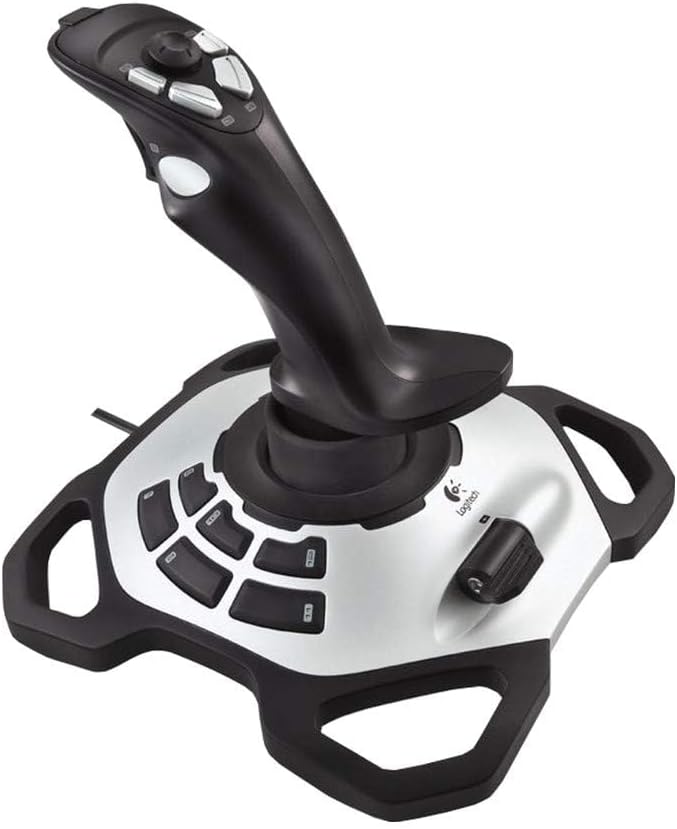
The Extreme 3D Pro is known for its durability and precision. It features 12 programmable buttons and a separate throttle lever. This setup helps achieve accurate flight control without complexity.
We may earn a commission when you buy through this link, at no additional cost to you.
Thumb buttons offer quick access to key actions. The handle is ergonomic for extended sessions. Software allows mapping for various sim titles.
It can be heavy on smaller desks. The cord might limit placement options. However, build quality remains strong.
Great for intermediate sim pilots seeking stability.
Long-lasting components ensure reliability over years of use.
Easy access to critical flight controls during maneuvers.
We may earn a commission when you buy through this link, at no additional cost to you.
The VOYEE controller offers upgraded trigger buttons and sensitive sticks for quick responses. It provides automatic vibration feedback for games. The ergonomic design ensures comfort during long play.
We may earn a commission when you buy through this link, at no additional cost to you.
A 7.2ft cord allows flexible positioning away from the PC. It works well for general gaming on Windows 11. Setup requires no extra steps.
Not designed as a full flight stick. But it is a great backup for non-sim titles. Quality is solid for the price.
Buy for casual gaming on desktop or laptop.
Quick inputs without delay help in fast-paced scenarios.
Design fits hands comfortably for extended use.
We may earn a commission when you buy through this link, at no additional cost to you.
Built for Farming Simulator 25, this joystick delivers precise control for tractors. Hall Effect sensors ensure accuracy. Up to 33 inputs allow full machinery management without a keyboard.
We may earn a commission when you buy through this link, at no additional cost to you.
Ambidextrous design adapts to left or right setups. Magnetic sensors eliminate drift for reliable control. It works with racing wheels for full cockpit setups.
It is specialized for farming games. Not for flight. However, for that genre, it is unmatched.
Pick this for heavy machinery simulation on Xbox or PC.
Magnetic technology ensures long-term precision without wear.
Flexible setup suits different user preferences easily.
We may earn a commission when you buy through this link, at no additional cost to you.
The X56 offers military-grade precision with over 189 programmable controls. Hall-effect sensors deliver accurate axes. RGB lighting helps you see buttons in dark setups.
We may earn a commission when you buy through this link, at no additional cost to you.
Ideal for VR where button feel matters. The 4-spring system allows adjustable stick force. Twin throttles give precise throttle lock options for advanced pilots.
It requires significant desk space and power. Price is high but features match. Great for serious sims.
Invest this for professional flight simulations.
Total control over every function without relying on keyboard.
Controls under fingers help navigate sets with ease in VR.
We may earn a commission when you buy through this link, at no additional cost to you.
The T.16000M FCS offers superior precision with H.E.A.R.T technology. It includes 16 action buttons with Braille-style identification. Ambidextrous design adapts to your hand preference easily.
We may earn a commission when you buy through this link, at no additional cost to you.
TARGET software allows creating specific mapping profiles. This reduces setup time. The 8-way hat switch and rudder twist add full control.
It lacks a dedicated throttle lever. You might need a separate unit. But the stick itself is top tier.
Buy for serious flight sim pilots needing accuracy.
Precision level does not decrease over time.
Load specific mapping profiles for each game.
We may earn a commission when you buy through this link, at no additional cost to you.
Selecting the right joystick involves understanding your needs and PC setup. Here are key factors to consider before purchasing a flight stick or controller.
Ensure the joystick lists Windows 11 as a supported OS. Some models require specific drivers or software to function correctly on modern systems. Always check the product details before buying.
Count the available buttons and axes. Flight sims often need many programmable inputs. Look for hats, throttles, and twist axes to ensure enough control.
A solid base and sturdy materials prevent movement during intense gameplay. Check for suction cups or weights that keep the device stable. Durability matters for long-term use.
Most flight sticks need software to map buttons. Ensure the manufacturer provides drivers for Windows 11. Good software lets you save profiles per game.
A comfortable grip reduces fatigue. Test the handle shape or read user reviews. The stick should fit your hand well without cramping fingers.
Decide your spending limit. Entry-level sticks start under $50 while premium models exceed $200. Match your budget to your simulation needs.
Consider if you need pedals or a separate throttle. Some sticks are part of a larger ecosystem. Plan ahead to avoid buying extra gear later.
Vibration or force feedback adds immersion. Check if the model supports these features. Not all sticks have strong haptic responses.
Connect the joystick to a USB 2.0 port before starting the game. Windows usually detects it automatically. If drivers are needed, install them from the official website.
Calibrate the device using the Windows Game Controller settings. This ensures axes respond correctly. Map buttons within the game options menu for best control.
Keep the device clean from dust and spills. Store it in a dry place when not in use. Avoid placing heavy items on top to prevent damage.
Most of these models explicitly list Windows 11 compatibility. Check the product details for driver support. Many older sticks work via generic USB drivers.
Many sticks are plug and play for basic use. But for full features like customization, you may need specific drivers from the manufacturer.
Yes, many support general gaming. Some are optimized for flight sims. Check if they support Xinput for broader game compatibility.
It stands for Hall Effect AccuRat Technology. It ensures precise control without wear over time. It uses magnetic sensors instead of mechanical parts.
Most sticks do not include rudder pedals. Some expandable systems support separate pedal purchases. Check the product description for bundle details.
Models like the X56 are designed with VR in mind. They offer precise controls under fingers. Ensure the game supports the device before buying.
Several models have ambidextrous designs. You can swap components to fit your hand. Check the product specs for modular options.
The ten options above cover a range of needs from casual to pro flight simulation. The Thrustmaster T.16000M FCS offers top precision while the V-one provides value.
Prioritize compatibility and ergonomics to avoid frustration. Budget wisely based on the features you actually need. Don't overspend on unused extras.
Always check current prices and availability before finalizing your purchase. Deals vary and stock changes frequently. Enjoy your virtual flights with the right setup.