
ASRock Intel Arc A380 Challenger ITX
4.3Editor score
Compact 2-slot ITX design
6GB GDDR6 memory
AV1 hardware encode support
This guide compares the top GPUs for small form factor PCs, evaluating performance, size, and compatibility to help you build a powerful compact gaming system.
Finding the right graphics card for a small form factor PC requires balancing performance with physical constraints. Not every GPU fits into mini ITX cases or low profile chassis without modification or compromise on cooling capabilities.
We evaluated ten leading graphics cards based on their dimensions, power efficiency, and raw performance metrics. Each product was analyzed for its compatibility with compact builds and its ability to handle modern workloads effectively.
Each pick highlights key specifications and real world use cases to guide your decision. Please note that availability and pricing fluctuate frequently so verify current details before finalizing your purchase for your build.
4.3Editor score

4.5Editor score

4.8Editor score
This side-by-side comparison lists all ten graphics cards to help you quickly identify the best fit for your specific small form factor build requirements and budget constraints.


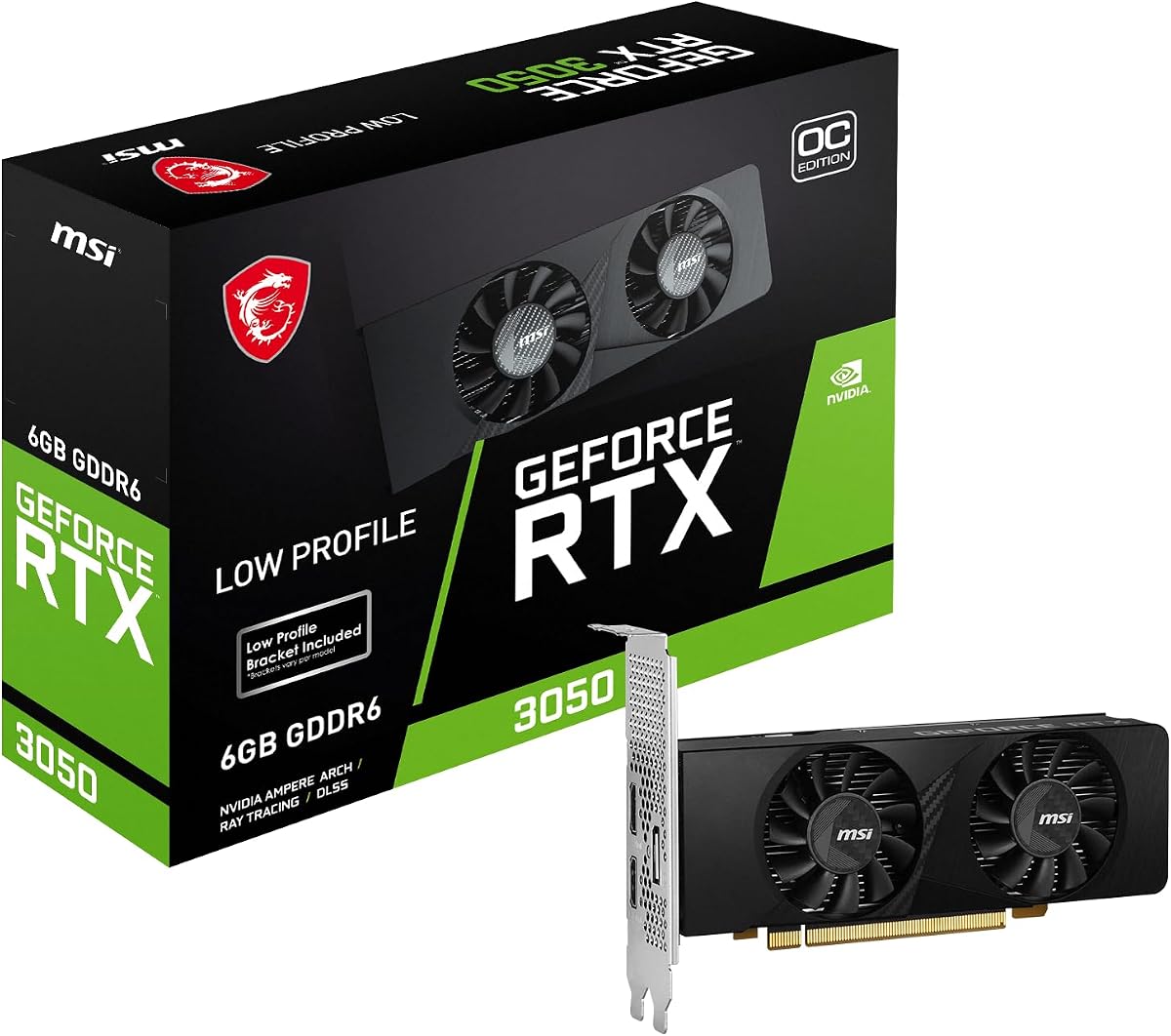


This graphics card is a strong contender for small form factor builds requiring reliable performance in a compact space. It holds a solid rating due to its balanced feature set and physical design tailored for mini chassis.
We may earn a commission when you buy through this link, at no additional cost to you.
The NV Ampere architecture provides efficient power usage while supporting DLSS for improved frame rates. Its 6GB GDDR6 memory and PCI Express 4.0 interface ensure smooth operation in modern titles without bottlenecking the system.
While it lacks the raw power of higher end models, the slim profile makes it ideal for ITX cases. The trade off is acceptable for users prioritizing size and efficiency over ultra high resolution gaming.
Buyers seeking a budget friendly GPU that fits tight spaces will find this model highly suitable. It delivers consistent performance for entry level gaming and general productivity tasks in SFF systems.
The slim low profile design measures 6.65 by 2.71 inches allowing it to fit easily into many mini ITX cases without interference.
It features HDMI 2.1 and DisplayPort 1.4a interfaces supporting multi monitor setups and high resolution output for versatile display configurations.
We may earn a commission when you buy through this link, at no additional cost to you.
MSI delivers a robust option for SFF enthusiasts with this low profile card. It stands out for its slightly higher clock speeds and dependable build quality suitable for daily use.
We may earn a commission when you buy through this link, at no additional cost to you.
The 1492 MHz boost clock and 6GB GDDR6 memory handle esports titles and creative apps well. Its low profile form factor ensures it clears chassis limits while maintaining thermal efficiency.
Users might find the VRAM limiting for modern AAA titles at high settings. However, for productivity and lighter gaming workloads it remains a trustworthy choice for compact rigs.
This card is perfect for office upgrades or small gaming builds where space is critical. It balances performance and size effectively making it a top recommendation for low profile needs.
Factory overclocked speeds provide a noticeable performance uplift over reference models helping maintain higher frame rates in demanding scenarios.
Two HDMI 2.1a outputs allow easy connection to modern monitors or TVs for immersive media consumption without additional adapters.
We may earn a commission when you buy through this link, at no additional cost to you.
This card brings next generation technology to small form factor builds with its Blackwell architecture and GDDR7 memory. It sets a new standard for performance in compact spaces.
We may earn a commission when you buy through this link, at no additional cost to you.
The 12GB memory and 2.5 slot design allow for high fidelity gaming while maintaining compatibility with larger mini ITX cases. Axial-tech fans ensure heat is managed efficiently despite the dense environment.
The cost is significant and might not fit tight budgets. Additionally, case clearance must be verified carefully due to the dual fan width requirement which limits some ultra slim chassis options.
Enthusiasts wanting flagship performance in a small case should consider this model. It offers future proofing and top notch cooling making it a premium choice for serious builders.
12GB of GDDR7 memory provides vastly improved bandwidth for high resolution textures and complex scene rendering in modern games.
Phase-change thermal pads and axial tech fans work together to lower temperatures ensuring sustained performance during long gaming sessions.
We may earn a commission when you buy through this link, at no additional cost to you.
This professional grade card excels in CAD and modeling tasks within tight chassis constraints. It is specifically designed for business environments requiring reliable and efficient compute power.
We may earn a commission when you buy through this link, at no additional cost to you.
The single slot design and low power draw make it perfect for compact workstations. With four Mini DisplayPort outputs it supports multi screen setups for enhanced productivity without taking up much space.
Gaming performance is not the primary focus so expect limited utility in recreational titles. Its strength lies in professional workflows where stability and precision are valued over high frame rates.
Buyers needing a compact GPU for engineering or graphic design will find this unit highly effective. It delivers reliable performance for business applications with minimal power overhead.
Four Mini DisplayPort outputs allow connection to multiple high resolution screens ideal for multitasking and data visualization workflows.
At 50W power consumption this card runs cool and quiet making it suitable for silent office environments without active cooling needs.
We may earn a commission when you buy through this link, at no additional cost to you.
This Intel Arc card offers impressive value for builders on a tight budget needing a dedicated GPU for small cases. Its AV1 encoding support is a standout feature for content creators.
We may earn a commission when you buy through this link, at no additional cost to you.
The 0dB Silent technology ensures the fan stops at low temps making it truly silent during light tasks. With 6GB memory it handles modern games adequately for entry level systems.
Driver support has improved significantly but some older titles may still see performance hiccups. The trade off is minimal given the low cost and physical footprint for budget constrained builds.
Those looking for a cheap and quiet solution for an HTPC or mini PC should look here. It provides essential modern features without breaking the bank in a compact package.
Industry first AV1 encode accelerates video creation workflows offering better efficiency than older codec standards for streaming and editing.
The fan stops completely at low temperatures ensuring zero noise during idle or light usage for a truly quiet computing experience.
We may earn a commission when you buy through this link, at no additional cost to you.
This dual fan variant of the 3050 ensures better airflow in compact chassis compared to single fan models. It maintains the low profile requirement while offering enhanced thermal management.
We may earn a commission when you buy through this link, at no additional cost to you.
The custom PCB and optimized trace routing contribute to stable operation and longevity. Users appreciate the MSI Center software for real-time monitoring and tuning without third party tools.
While the price is slightly above single fan versions the cooling benefit justifies the cost for sustained performance. It is a solid choice for those prioritizing temperature stability.
Buyers wanting a quiet and efficient GPU for a small home theater PC will find this model suitable. It balances performance and noise levels effectively for general use cases.
Two fans and a large heatsink ensure cool operation which prevents throttling during intensive tasks in confined spaces.
Exclusive MSI Center software allows real-time monitoring and optimization of the card settings for better user control and performance tuning.
We may earn a commission when you buy through this link, at no additional cost to you.
This high end card brings the power of the Blackwell architecture into smaller cases. With 12GB of GDDR7 memory it is built to handle demanding modern gaming workloads effectively.
We may earn a commission when you buy through this link, at no additional cost to you.
The WINDFORCE cooling system is engineered to maximize airflow while staying compact. Combined with PCIe 5.0 it ensures you are ready for the next generation of hardware compatibility and bandwidth.
The price tag is high and fits only the highest end builds. Also verify your case supports the card dimensions as high performance cooling still requires specific space allowances for installation.
Enthusiasts needing maximum performance in a small footprint should choose this card. It offers a powerful blend of speed and physical design for advanced SFF configurations.
PCIe 5.0 support delivers double the bandwidth of PCIe 4.0 enabling faster data transfer for next generation graphics and compute tasks.
WINDFORCE Cooling features optimized blades to increase air pressure and lower temperatures ensuring stability under heavy gaming loads.
We may earn a commission when you buy through this link, at no additional cost to you.
This card offers a solid middle ground with the latest Blackwell architecture and 8GB of GDDR7 memory. It is designed for enthusiasts who want modern features without the flagship price.
We may earn a commission when you buy through this link, at no additional cost to you.
The TORX Fan 5.0 provides high pressure airflow to keep temperatures low in compact cases. A nickel plated copper baseplate ensures efficient heat capture from the GPU for better thermal management.
While it is powerful users must ensure their specific case supports the physical dimensions. It is a great balance for those needing performance for 1440p gaming in a smaller build.
Gamers seeking a reliable and modern GPU for small form factor systems should consider this option. It delivers excellent performance per watt with efficient cooling technologies.
TORX Fan 5.0 stabilizes airflow to reduce noise and improve cooling efficiency for a quiet yet powerful thermal solution.
A nickel plated copper baseplate captures heat quickly moving it to the heat sinks to maintain stable performance during long sessions.
We may earn a commission when you buy through this link, at no additional cost to you.
This card serves as an entry level professional solution for small workstations needing display output power. It fits easily into virtually any case due to its low profile design.
We may earn a commission when you buy through this link, at no additional cost to you.
With support for a single 5K display or four 4K screens it meets the needs of graphic designers and engineers. The low power usage ensures stability without stressing the power supply.
While it is older in technology it remains reliable for basic CAD and design tasks. For modern gaming it falls short but that is not its intended use case for professionals.
Buyers needing a quiet and efficient card for business use will find it practical. It offers reliable connectivity and low power draw suitable for office environments.
Connect to up to four 4K displays or one 5K monitor ensuring flexible workspace configurations for professional productivity.
Maximum power consumption of 50W allows operation without high power draw which is ideal for systems with limited cooling.
We may earn a commission when you buy through this link, at no additional cost to you.
This card stands out for its massive 16GB of GDDR6 memory making it ideal for texture heavy gaming in small cases. It delivers high performance while maintaining a compact footprint.
We may earn a commission when you buy through this link, at no additional cost to you.
The 0dB technology ensures silence during light gaming loads which is perfect for home theater setups. Dual BIOS switching allows users to toggle between quiet and performance profiles easily.
The size is slightly larger than true low profile cards so case clearance is critical. It offers significant raw power for users who prioritize texture quality over strict chassis fit.
Gamers needing high VRAM for modern titles should look to this model. It provides excellent longevity and performance for those willing to manage size constraints carefully.
16GB of GDDR6 memory handles ultra high resolution textures and complex scenes ensuring smooth performance in demanding games.
Toggle between Quiet and Performance BIOS profiles to adapt the card to different usage scenarios and thermal needs.
We may earn a commission when you buy through this link, at no additional cost to you.
Selecting the right graphics card for a small form factor PC involves balancing physical dimensions with performance needs to ensure compatibility and efficient operation.
Always verify the length width and height of the GPU against your specific case manual. Even cards marketed as low profile may vary slightly in bracket design or fan housing.
Measure your available space and choose a card that leaves room for airflow and cables to prevent overheating or fitting issues.
Check the wattage of your power supply and ensure it meets the GPU requirements. Many SFF cases use low wattage PSUs that cannot support high end cards without upgrades.
Opt for cards with lower power draw if you plan to avoid upgrading your power supply for a seamless upgrade experience.
Higher VRAM helps maintain performance in modern titles and high resolution tasks. Consider 8GB or more for future proofing especially if you plan to play demanding games.
Memory bandwidth affects texture loading speeds so higher speeds generally translate to smoother gameplay in complex scenes.
Small cases trap heat so efficient cooling is vital. Look for models with advanced fans or passive cooling features to maintain silence without thermal throttling.
Noise levels matter in quiet builds so check reviews regarding fan spin and acoustics during load.
Ensure the GPU has the ports you need for your monitors such as HDMI or DisplayPort. Newer cards often support higher resolutions and refresh rates out of the box.
Multiple outputs are useful for multi-monitor setups so count your display needs before buying a single port model.
Establish a clear budget range to narrow down options efficiently. Prices vary widely between entry level and high end models impacting overall build cost.
Balance the cost against performance gains to get the best value for your specific use case.
Install the GPU carefully ensuring it locks into the PCIe slot properly before securing it to the case with screws. Use the correct standoffs to avoid shorting the card on the motherboard.
Connect all power cables securely and manage cables to maximize airflow inside the compact chassis. Use zip ties to route wires away from fans and heat sinks.
Regularly clean dust from fans and heatsinks using compressed air to maintain cooling performance. Check software drivers frequently for updates to ensure compatibility and stability.
Physical dimensions and case clearance are the most critical factors because if the card does not fit you cannot use it regardless of performance. Always measure your case length and height before purchasing to ensure a proper fit.
Not necessarily as many low profile GPUs are designed to work with standard PSUs. However, ensure your unit provides enough wattage and the correct connectors for your chosen graphics card to avoid instability.
Yes, many low profile GPUs offer strong gaming performance for entry to mid level systems. They fit in compact cases and deliver adequate frame rates for esports and general titles.
Check the product specifications for length width and height then compare them to your case manual. Look for clearance notes regarding radiator or drive bays that might limit GPU space.
It depends on power and physical constraints. Always verify wattage limits and physical dimensions before upgrading to avoid needing additional case or power supply changes.
Higher VRAM helps with high resolution textures and future proofing. It allows for longer lifespan of the card as games demand more memory over time.
This guide highlighted ten top GPUs ranging from budget friendly options to high end premium cards suitable for compact builds. Each option offers unique benefits regarding size and performance for various user needs.
Prioritize physical dimensions and power requirements to ensure your new GPU fits seamlessly into your setup. Balancing cost and performance will help you achieve the best gaming or workflow experience.
Always verify current pricing and availability as these values fluctuate frequently. Review your case compatibility again before ordering to guarantee a successful build and installation.