
Canon PIXMA TR4720
3.9Editor score
Affordable wireless 4-in-1 design
Auto document feeder included
Alexa smart reorder support
Discover the top all in one printer with fax models for 2026. This guide compares features, speed, and value to help you find the perfect multifunction device
Finding the right all in one printer with fax can streamline your workflow significantly. These devices combine printing, scanning, copying, and faxing into one compact unit. They are ideal for home offices and small businesses needing reliable communication tools without clutter.
We evaluated ten leading models based on performance, connectivity, and cost efficiency. Our analysis includes ink systems, scan quality, and fax capabilities. Each product offers unique strengths tailored to different workload demands and budget constraints.
Every pick highlights key specs and real-world usability factors. Note that prices and availability change frequently. Always verify current offers before purchasing to ensure you get the best value for your specific office setup requirements today.
3.9Editor score

4.0Editor score

4.3Editor score
This table provides a quick side-by-side overview of all ten selected models. Compare core specifications like print speed, ink type, and tray capacity to identify which device aligns best with your daily office tasks.






The HP OfficeJet Pro 9125 stands out as a top choice for offices needing reliable fax capabilities. With a solid 3.9 rating, it delivers professional color documents efficiently. Its standout quality lies in the integration of HP AI for precise layout management.
We may earn a commission when you buy through this link, at no additional cost to you.
This model offers robust features like dual-band Wi-Fi and a 250-sheet tray for high-volume tasks. Security is enhanced through HP Wolf Pro Security which protects against cyber threats. The Instant Ink trial helps manage ongoing supply costs effectively over time.
One trade-off is the cartridge chip restriction which limits third-party ink options. However, this ensures consistent print quality and security compliance. The AI features reduce wasted pages which balances the supply constraints for most users.
Business users seeking speed and security should prioritize this device. It handles heavy workflows well while maintaining professional output standards. For offices needing fax and robust data protection, this remains a strong recommended choice in 2026.
HP AI removes unwanted content from web pages and emails automatically saving paper and effort.
HP Wolf Pro Security bolsters network defense keeping your office data safe from digital threats.
We may earn a commission when you buy through this link, at no additional cost to you.
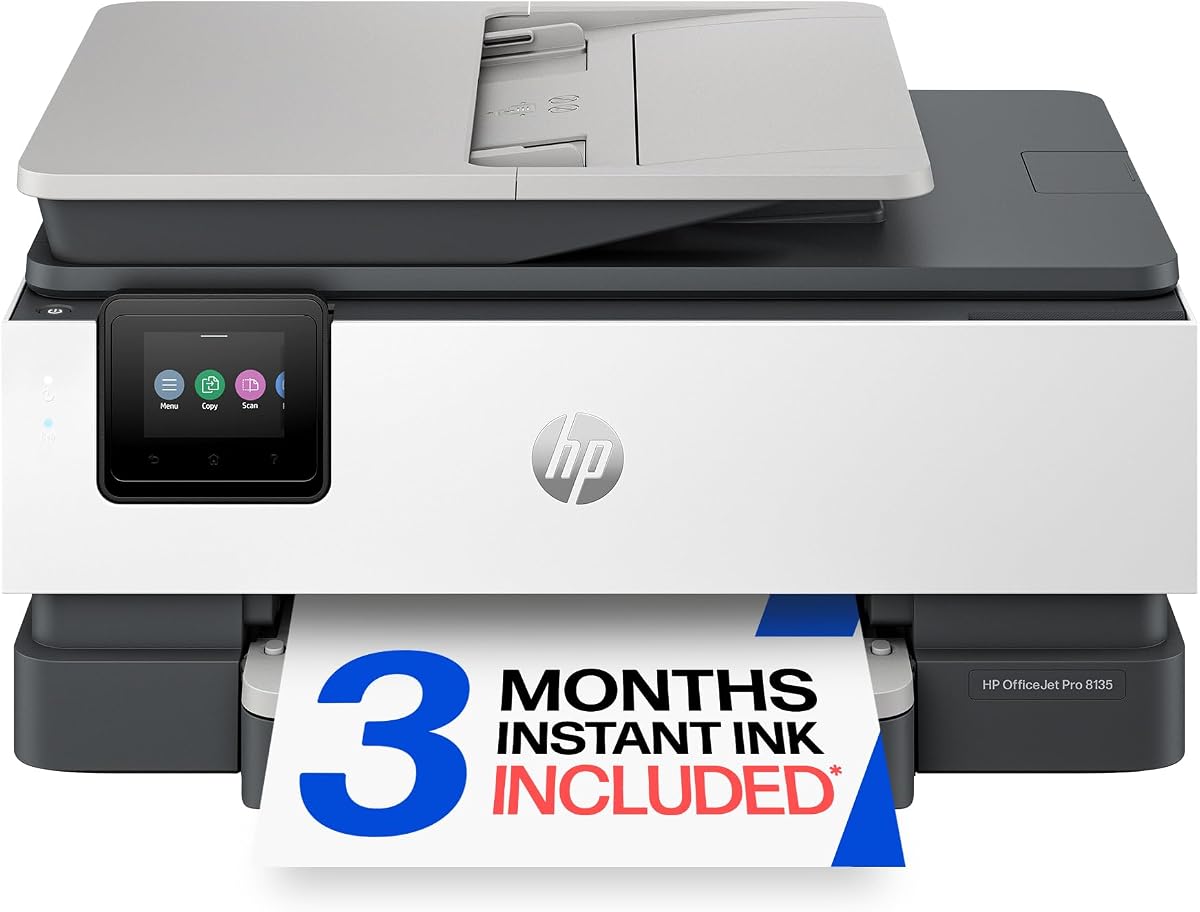
The HP OfficeJet Pro 8135 offers a balanced solution for home offices needing fax functionality. Rated 3.9 stars it handles business documents with professional quality. It stands out for affordability while maintaining essential features like AI formatting.
We may earn a commission when you buy through this link, at no additional cost to you.
Users benefit from a 225-sheet tray and auto document feeder for daily tasks. The HP app allows convenient printing and faxing directly from smartphones. Instant Ink included trial helps manage supply needs for the first three months.
Color printing is slower at 10 ppm compared to black which may affect heavy color work. However, for typical office reports this remains acceptable. The AI features ensure web pages print cleanly without awkward layouts.
Remote workers and small home offices will find this model practical. It balances cost and performance effectively for moderate workloads. Prioritize this if you need fax and wireless printing under a tight budget.
The HP app enables printing scanning and faxing directly from your phone with ease.
Over 45 percent recycled plastic content reduces environmental impact without compromising durability.
We may earn a commission when you buy through this link, at no additional cost to you.
The Epson EcoTank ET-4800 redefines cost efficiency with its Supertank system. Rated 3.8 it eliminates tiny cartridges for high-capacity ink bottles. This model is ideal for high volume users needing fax without frequent supply changes.
We may earn a commission when you buy through this link, at no additional cost to you.
Micro Piezo Heat-Free Technology ensures sharp text and vibrant color photos. It handles virtually any paper type well. The flatbed scanner offers high-resolution document capture for copying or faxing needs.
While print speed is lower than laser models it saves money over time. Initial cost is higher but amortizes quickly for heavy users. The eco-friendly design reduces landfill waste significantly compared to traditional inkjets.
Organizations printing hundreds of pages weekly should consider this option. It balances long-term savings with quality output. Choose this if you prioritize supply cost over rapid single-page speeds.
Ink bottles refill tanks easily eliminating cartridge waste and reducing long term costs.
Unique Micro Piezo tech produces sharp text without wasting energy during printing.
We may earn a commission when you buy through this link, at no additional cost to you.
The HP OfficeJet Pro 8125 provides a budget-friendly entry for fax capable home printers. With a 3.9 rating it handles standard documents well. It features a phone-like interface for intuitive navigation and quick setup.
We may earn a commission when you buy through this link, at no additional cost to you.
This unit supports auto document feeder and duplex printing for efficiency. The Instant Ink trial helps manage costs initially. HP AI ensures emails and web pages print precisely without wasting paper.
Color speeds lag behind black which is typical for this class. Security is basic compared to higher models but sufficient for home use. It remains reliable for moderate daily printing volumes.
Students and remote workers on a budget will appreciate this choice. It delivers essential functions without extra bloat. Select this if fax and wireless connectivity are your main requirements.
A large color touchscreen makes navigating menus and fax jobs simple and fast.
HP AI removes unwanted content ensuring your printed documents look professional and clean.
We may earn a commission when you buy through this link, at no additional cost to you.
The HP Smart Tank 7603 stands out for its exceptional ink capacity. Rated 3.9 it includes up to three years of ink right out of the box. This is perfect for high volume users who want to avoid frequent supply runs.
We may earn a commission when you buy through this link, at no additional cost to you.
The mess-free refill system allows easy ink replenishment without spills. It supports auto document feeder and fax features. Wireless and mobile printing capabilities ensure seamless connectivity for diverse devices.
The initial investment is higher but yields significant savings over time. Its footprint is larger than standard printers so space planning is needed. But for consistent daily printing this offers unmatched convenience.
Small businesses or heavy home users benefit most from this model. It eliminates worry about running out of ink unexpectedly. Choose this if longevity and supply convenience are your top priorities.
Get up to 8000 color pages or 6000 black pages from the included ink tanks.
Plug bottles directly into tanks for mess-free refilling without squeezing or spilling ink.
We may earn a commission when you buy through this link, at no additional cost to you.
The HP OfficeJet Pro 9135 delivers the fastest performance in this lineup. Rated 4.0 it offers 25 ppm black printing. Ideal for offices with urgent document needs it combines speed with fax capability effectively.
We may earn a commission when you buy through this link, at no additional cost to you.
Single-pass duplex scanning saves time on multi-page documents. The 4.3-inch touchscreen simplifies complex tasks like fax scheduling. Dual 250-sheet trays ensure you rarely need to reload paper manually.
Cost is higher but justified by productivity gains. Security features protect sensitive corporate data during transmission. HP AI optimizes layouts to reduce manual adjustments before sending jobs.
Professionals handling high-volume workflows will appreciate the efficiency. It balances speed with professional quality for business use. Select this if throughput and reliability are critical for your daily operations.
Scan both sides of documents simultaneously saving significant time on large file sets.
Navigate complex menus and fax settings quickly with a 4.3-inch color touch display.
We may earn a commission when you buy through this link, at no additional cost to you.
The Canon PIXMA TR4720 is the most affordable option with fax support. Rated 3.9 it offers essential functions for home use. Its compact size makes it perfect for small desks with limited space.
We may earn a commission when you buy through this link, at no additional cost to you.
Alexa integration allows voice commands for ink notifications and reordering. This convenience ensures you never run out unexpectedly. Auto document feeder handles simple fax jobs efficiently without manual feeding.
Speed is moderate but adequate for occasional printing needs. Tray capacity is lower than larger models which limits batch jobs. However, for light users this provides reliable connectivity and quality.
Home users needing a basic fax-capable device should consider this. It balances cost with essential productivity features. Prioritize this if budget and space are your main constraints today.
Connect to Alexa for automatic ink reorder notifications when supplies run low.
Space-saving footprint fits easily into small home offices or living spaces.
We may earn a commission when you buy through this link, at no additional cost to you.
The Canon PIXMA TR8620a excels in producing photo-quality outputs. Rated 4.0 it supports Airprint and Android printing easily. The Micro SD slot allows direct photo printing without computer connections.
We may earn a commission when you buy through this link, at no additional cost to you.
Alexa integration provides smart reorder options for ink supplies. Auto document feeder simplifies fax and copying tasks. Two paper trays offer flexibility for different document and photo paper needs.
Setup can be intricate but the features justify the effort. Print speeds are balanced for home and small office use. This unit is versatile for mixed text and image work.
Users needing occasional photos alongside fax services should choose this model. It delivers visual quality alongside essential business functions. Select it if photo printing matters alongside standard document tasks.
Print directly from Micro SD cards without needing a computer connection.
Produces high-resolution color prints suitable for photos and marketing materials.
We may earn a commission when you buy through this link, at no additional cost to you.
The HP OfficeJet Pro 8139 offers a unique one year Instant Ink trial. Rated 4.0 it ensures supply coverage for a full year. Ideal for users wanting predictable ink costs without immediate commitment.
We may earn a commission when you buy through this link, at no additional cost to you.
It includes essential security features like HP Wolf Essential. The AI tools optimize document formatting to reduce waste. Fax and scanning functions remain robust for daily home office needs.
After the trial a monthly fee applies unless canceled. This long-term cost should be considered when budgeting. However the initial free year provides significant value for many users.
Professionals needing stable ink coverage should choose this model. It balances supply convenience with security and speed. Prioritize it if you want long-term supply flexibility and performance.
Subscribe to Instant Ink and get one year of free coverage for your needs.
HP Wolf Security bolsters protection keeping your network safe during transmission.
We may earn a commission when you buy through this link, at no additional cost to you.
The Brother MFC-L2820DW is a premium laser choice for text-heavy workflows. Rated 4.3 it delivers sharp monochrome documents quickly. Ideal for offices focusing on black and white documents and faxing.
We may earn a commission when you buy through this link, at no additional cost to you.
Refresh subscription trials offer savings on genuine toner. Its compact design saves desk space without sacrificing features. Secure connections support multiple devices including wireless and Ethernet options.
Color printing is not supported which limits use for graphics. But for text documents the speed is unmatched. Maintenance costs are lower compared to inkjet systems over time.
Businesses needing rapid text output should choose this model. It prioritizes efficiency and reliability for standard office tasks. Select this if color is not required and speed is critical.
36 ppm speed ensures rapid document production for busy office environments.
Compact footprint fits into small workstations while delivering full functionality.
We may earn a commission when you buy through this link, at no additional cost to you.
Selecting the right all in one printer with fax involves evaluating several key factors to ensure it meets your specific needs. This guide explores the most important aspects to consider.
Print speed determines how quickly your documents are produced. Look for models that offer speeds matching your daily workflow. Faster speeds are essential for high-volume offices.
Prioritize models with at least 20 ppm for efficient operations.
Inkjet models use cartridges while tank systems use refillable bottles. Tank systems reduce long-term costs but may have higher upfront prices. Choose based on your budget and volume needs.
Tank systems offer better value for high-volume printing users.
Fax features should include clear transmission and easy setup. Ensure the model supports digital faxing and auto document feeders. These features streamline sending multiple pages.
Look for auto document feeder support to reduce manual effort.
Wi-Fi and Ethernet options are crucial for multi-device access. Dual-band support ensures stable connections in crowded networks. Consider mobile app support for remote printing.
Verify dual-band Wi-Fi is included for reliable network performance.
Paper tray capacity affects how often you must reload paper. For busy offices select models with at least 250 sheets. Larger trays reduce interruptions during peak work periods.
Choose units with 250-sheet trays to minimize manual refills.
Office printers often handle sensitive documents. Models with HP Wolf Security or similar features protect data during transmission. This is vital for compliance and privacy.
Opt for models with built-in security protocols for data protection.
A touchscreen simplifies navigation and fax settings. Look for phone-like interfaces that are intuitive. This reduces training time for staff members.
Select models with large color touchscreens for ease of use.
Consider both initial price and ongoing ink costs. Subscription services like Instant Ink may offer savings. Calculate long-term expenses to find the best value.
Compare ink costs and subscription fees before finalizing your choice.
Set up the printer using the provided app and connect it to your Wi-Fi network. Ensure the fax line is properly connected if using traditional lines. Verify settings via the touchscreen interface.
Regularly clean the scanner glass to maintain fax and copy quality. Use a soft lint-free cloth for the exterior surfaces. This prevents dust buildup and jams.
Monitor ink levels and subscribe to delivery services to avoid running out. Replace cartridges or refill tanks according to manufacturer recommendations. Proper care ensures longevity and consistent performance.
Yes most modern all in one printers with fax support mobile faxing. The HP app allows you to send and receive faxes directly from your phone. Ensure your device is connected to the same network.
Most models in this list support duplex scanning which helps with sending multi-page faxes. Check specific model specs to confirm if single-pass duplex is available. This feature speeds up document handling.
No subscriptions are not strictly required but many models offer trials like Instant Ink. These services help manage supply costs effectively. You can cancel them anytime based on your usage needs.
The Brother MFC-L2820DW is ideal for high-volume text due to laser speed. For color needs the HP OfficeJet Pro 9135 offers robust performance. Tank models like the Epson EcoTank reduce costs over time.
Yes all listed models support Airprint and Mac connectivity. Download the required drivers or use the cloud printing features provided. Ensure your network settings allow seamless integration with macOS.
If the fax line is disconnected the device may not send faxes directly. Some models support digital fax over email if configured properly. Always check your settings for alternative sending methods.
Most models have clear guide paths shown on the touchscreen. Open the designated cover and remove the stuck paper gently. Follow the on-screen instructions to reset the device successfully.
Yes most models include a one year limited warranty from the manufacturer. This covers defects and operational issues during the first year. Extended options may be available for purchase separately.
We reviewed ten top all in one printers with fax to help you decide. The HP OfficeJet Pro 9135 and Brother MFC-L2820DW lead in speed and quality. Budget options like the Canon PIXMA TR4720 offer great entry value.
Consider your primary needs like color output or monochrome speed before buying. Fax capabilities combined with wireless support ensure flexibility for remote work. Prioritize security features if handling sensitive documents.
Remember that prices fluctuate so check current deals before purchasing. Verify the warranty terms and ink trial details carefully. Making an informed choice ensures you get a device that fits your workflow.