
E1000 Heat Shrink Label Maker, Wire Label Maker Waterproof-Labels
4.4Editor score
Heat shrink tape support
Three cable modes
USB C power option
This comprehensive guide compares the top label maker for network cables to help you choose durable, compliant, and efficient tools for professional wire
Network cable labeling is critical for maintaining organized and safe electrical and data infrastructure. A reliable label maker ensures every wire is clearly identified, reducing troubleshooting time and preventing costly errors during installation or maintenance phases.
We evaluated ten top-rated devices based on durability, print quality, tape compatibility, and ease of use. Each product was assessed against industry standards for network cabling, focusing on features that matter most to technicians and DIY enthusiasts alike.
Each pick highlights unique strengths, from budget-friendly options to industrial-grade printers. Note that availability and features may vary by region. Always check the latest product details before purchasing to ensure compatibility with your specific cabling needs.
4.4Editor score

4.6Editor score
4.3Editor score
This side-by-side comparison highlights key specifications across all ten selected label makers. Use this table to quickly identify which device offers the best balance of portability, print resolution, and tape options for your network cabling tasks.


The Makeid P31S stands out as the top choice for network cable labeling due to its industrial-grade thermal transfer technology. It produces sharp, smudge-proof labels that resist oil, water, and extreme temperatures, making it ideal for demanding environments.
We may earn a commission when you buy through this link, at no additional cost to you.
Its compliance with ANSI and TIA/EIA-606-A standards ensures your labeling meets professional requirements for electrical and datacom installations. The device supports over 30 label sizes and prints up to 100 labels per minute, significantly boosting productivity.
While the P31S offers PC software for bulk data imports and complex layouts, this might require initial setup time for users accustomed to standalone devices. However, the 2600 mAh battery provides up to 90 days of standby use, minimizing downtime.
For network technicians and IT professionals who need reliable, compliant, and high-volume labeling, the P31S is the recommended choice. Its durability and feature set justify the investment for long-term projects and ongoing maintenance work.
The P31S meets ANSI and TIA/EIA-606-A standards, ensuring your network labels are consistent, recognizable, and meet professional safety requirements.
Using thermal transfer technology, this printer creates labels that last up to ten years, resisting harsh conditions like moisture, UV exposure, and abrasion.
We may earn a commission when you buy through this link, at no additional cost to you.
The E1000 offers exceptional value for network installers seeking an affordable yet capable label maker. It comes with both heat shrink and flexible ID tapes, addressing two common labeling needs right out of the box.
We may earn a commission when you buy through this link, at no additional cost to you.
Its QWERTY keyboard allows for quick text entry, similar to a computer, which speeds up the labeling process during busy job sites. The device also reduces tape waste by printing multiple labels efficiently, saving money over time.
While it lacks some advanced software capabilities found in higher-end models, its straightforward operation makes it perfect for basic to intermediate tasks. The option to power it via USB C adds flexibility when batteries run low.
If you need a reliable, no-fuss label maker that handles heat shrink tubes effectively without breaking the bank, the E1000 is an excellent choice for DIYers and small teams.
Included heat shrink and flexible ID tapes allow you to label both wires and cables with secure, durable solutions tailored to different environments.
The E1000 saves up to 22 inches of tape per batch, reducing waste and lowering overall material costs for large-scale labeling projects.
We may earn a commission when you buy through this link, at no additional cost to you.
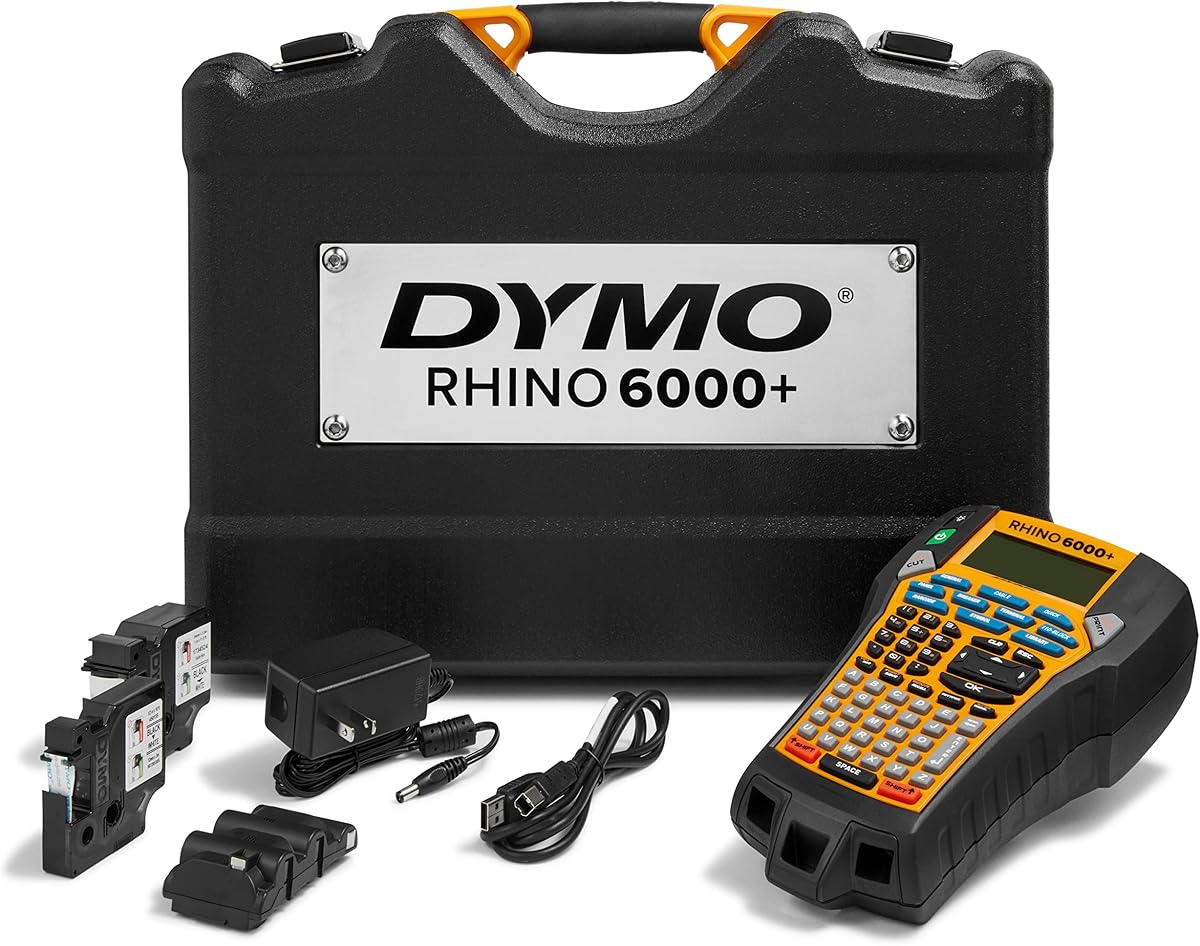
The DYMO Rhino 6000 is built for professionals who require precision and heavy-duty performance. It connects to PC software for designing complex layouts, barcodes, and multi-line labels ideal for detailed network documentation.
We may earn a commission when you buy through this link, at no additional cost to you.
Its hot keys automatically format text, saving time during repetitive labeling tasks. The inclusion of a hard carry case ensures protection for the device and accessories during transport to remote job sites.
Although it is bulkier than handheld alternatives, the Rhino 6000's robust construction and rechargeable battery make it suitable for all-day use. It meets ANSI and TIA/EIA-606-B standards, ensuring compliance in regulated environments.
For network engineers needing advanced design capabilities and rugged reliability, the Rhino 6000 delivers the tools necessary to maintain organized and professional labeling systems across large infrastructures.
Connects to DYMO ID software for creating complex label layouts, barcodes, and bulk imports that standalone devices cannot handle efficiently.
The hard carry case protects the device from drops and impacts, ensuring your tool remains functional even in demanding worksite conditions.
We may earn a commission when you buy through this link, at no additional cost to you.
The Brother P-touch PTH111 excels in office and electrical panel labeling tasks. Its one-touch keys for cable wrap, flag, and faceplate simplify common labeling scenarios without requiring complex menu navigation.
We may earn a commission when you buy through this link, at no additional cost to you.
The device produces durable laminated labels that withstand wear and tear, making them suitable for environments where labels are frequently handled or exposed to elements. The 2-line preview screen helps prevent errors before printing.
Its lightweight design and detachable wrist strap enhance portability, allowing technicians to carry it easily across large workspaces. However, it relies on AAA batteries and does not offer a direct USB power option.
For small to medium businesses needing reliable, easy-to-use labeling for electrical and general infrastructure, the P-Touch Pro offers a balanced mix of functionality and durability at a competitive price point.
Dedicated one-touch keys for cable wrap, flag, and faceplate reduce setup time, streamlining electrical panel and network cable labeling tasks.
Prints durable laminated labels that resist water, oil, and abrasion, ensuring clear identification even in challenging environmental conditions.
We may earn a commission when you buy through this link, at no additional cost to you.
The BRADY M210 is designed for straightforward industrial labeling tasks where reliability is paramount. As a handheld device, it fits comfortably in the hand, allowing for precise control during labeling operations.
We may earn a commission when you buy through this link, at no additional cost to you.
Its build quality reflects Brady's reputation for durable industrial tools, ensuring it can withstand daily use in workshop or field environments. While it lacks advanced features like PC connectivity, it performs core functions efficiently.
The compact footprint makes it ideal for tight spaces where larger units would be cumbersome. Users appreciate its simplicity, as it reduces the learning curve and minimizes the chance of operational errors.
For technicians needing a robust, no-frills label maker for routine industrial labeling, the M210 provides dependable performance without the complexity of high-end programmable units.
Its small, ergonomic form factor allows for easy handling in tight electrical enclosures or crowded server racks.
Built to endure harsh industrial conditions, the M210 offers consistent performance even in demanding environments.
We may earn a commission when you buy through this link, at no additional cost to you.
The Epson LW-PX700 stands out for its ability to handle wider tapes, up to 1 inch, which is useful for prominent asset tags or large cable bundles. Its large preview screen ensures you see exactly what the label will look like.
We may earn a commission when you buy through this link, at no additional cost to you.
This model comes with a lifetime warranty, offering long-term peace of mind for users who rely on their tools daily. The inclusion of an AC adapter in the kit adds convenience for stationary labeling tasks.
While slightly heavier than basic handheld models, its versatility in tape types, including heat shrink and industrial tapes, makes it a strong all-rounder. The clear screen saves time and reduces material waste from errors.
For professionals who need wide-label capabilities and reliable support, the LW-PX700 is a solid choice for maintaining organized and compliant labeling across diverse industrial applications.
Print labels up to 1 inch wide for asset tags and large cables, ensuring visibility in industrial and network environments.
Epson backs this model with a full-service lifetime warranty, replacing the unit if it breaks due to regular use.
We may earn a commission when you buy through this link, at no additional cost to you.
The Brady M211 offers a unique mobile-first approach, allowing users to design and print labels using a smartphone app. This connectivity provides flexibility in design and convenience for field technicians who already carry mobile devices.
We may earn a commission when you buy through this link, at no additional cost to you.
Its rugged design meets MIL-STD-810G standards, meaning it can withstand drops and shocks typical of construction or industrial sites. The included belt clip and hard case enhance portability and protection.
While relying on a phone may not suit all environments, the ability to use an app for complex text or barcode generation is a significant advantage. The hard case ensures accessories remain organized and safe.
For mobile workers who value flexibility and modern connectivity, the M211 integrates well into existing workflows, providing durable and convenient labeling solutions on the go.
Connects via Bluetooth to the Express Labels app, enabling complex designs and quick edits directly from your smartphone.
Built to resist 6-foot drops and military-grade shocks, ensuring reliability in tough outdoor and industrial conditions.
We may earn a commission when you buy through this link, at no additional cost to you.
The DYMO Rhino 5200 is praised for its capacity to print multi-line labels, which is essential for detailed asset tags or complex network schedules. Its 5-line display allows users to visualize and edit text before printing.
We may earn a commission when you buy through this link, at no additional cost to you.
Exclusive hot keys automate sizing and formatting, reducing the time needed for repetitive tasks. The device supports Code 39 and Code 128 barcodes, expanding its utility for inventory tracking.
Its highly rated performance stems from a balance of ease of use and professional capabilities. While slightly larger than handheld units, it remains portable enough for most industrial workstations.
For teams that need detailed, multi-line labels with barcode support, the Rhino 5200 delivers consistent quality and efficiency, making it a favorite among industrial professionals.
Print up to five lines per label, ideal for detailed asset tags, equipment schedules, or complex network documentation.
One-touch hot keys automatically size, space, and format text, speeding up the labeling process significantly.
We may earn a commission when you buy through this link, at no additional cost to you.
The VolenGo H1100 features a backlit LCD screen, making it ideal for use in dimly lit server rooms or electrical panels where visibility is key. This design choice prevents eye strain during extended labeling sessions.
We may earn a commission when you buy through this link, at no additional cost to you.
Its 203 DPI printer delivers clear, sharp text, and the included laminated tapes are waterproof and oil-resistant. The device supports three cable modes, enabling quick creation of wraps and flags without complex steps.
With 16 fonts and 100 frames, the H1100 offers customization options for home or office organization. Its lightweight and intuitive interface make it accessible for users of all skill levels.
For those working in low-light environments or needing a user-friendly interface with waterproof labeling options, the H1100 provides a practical and reliable solution.
The illuminated display ensures you can see text and settings clearly, even in poorly lit or dark spaces.
Printed labels are laminated to resist water, oil, and abrasion, ensuring they remain legible in harsh conditions.
We may earn a commission when you buy through this link, at no additional cost to you.
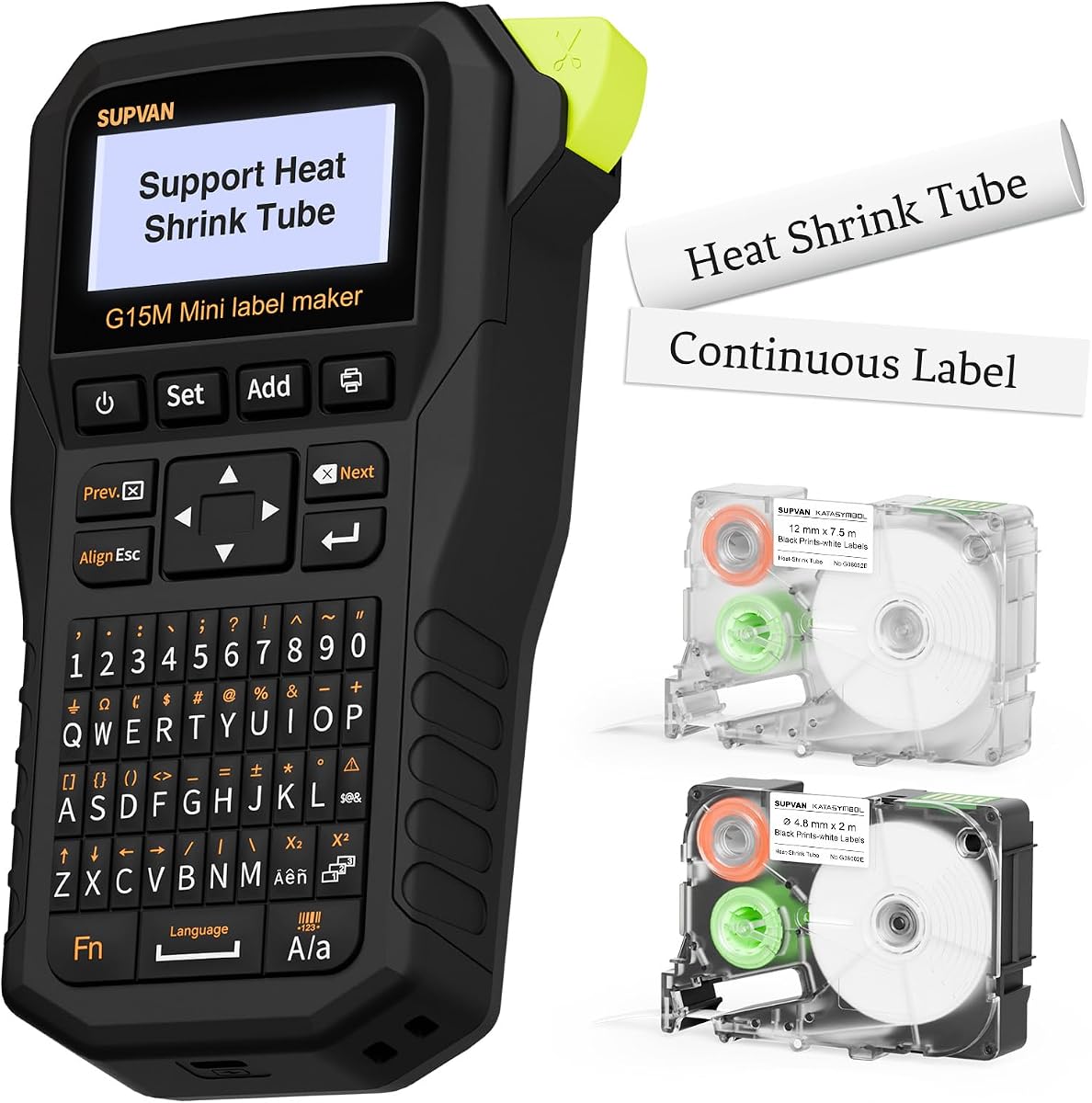
The SUPVAN G15M is designed for portability, weighing just 0.88 pounds and offering a battery that lasts up to three months on a single charge. Its compact size makes it perfect for travel or limited storage spaces.
We may earn a commission when you buy through this link, at no additional cost to you.
It uses thermal transfer technology to create durable, water-resistant labels that can last up to ten years. The device supports heat shrink tubes, making it suitable for wire and cable identification.
Its minimal margin printing saves tape material, improving efficiency for users who print many labels. With options for multiple font sizes and frames, it offers good customization despite its small form factor.
For remote workers or hobbyists needing a lightweight, efficient label maker that can handle heat shrink and durable tapes, the G15M is a versatile and economical choice.
Prints with only a 0.19 inch margin, reducing material waste compared to standard label makers and saving on tape costs.
A 1200 mAh rechargeable battery supports up to three months of use, ensuring readiness for long periods without recharging.
We may earn a commission when you buy through this link, at no additional cost to you.
Choosing the right label maker for network cables requires understanding your specific needs, environment, and compliance requirements. This guide outlines the most critical factors to consider before making a purchase.
High-resolution printers, such as those with 300 DPI, produce sharper text and clearer barcodes. For network environments, durability is crucial; look for thermal transfer technology that creates oil, water, and UV-resistant labels.
Always select a device that produces durable, smudge-proof labels to ensure long-term legibility in challenging conditions.
Network labeling often requires specific tape types, including heat shrink tubes, self-laminating wraps, and flexible nylon. Ensure the label maker supports the widths and materials you need for both wire and equipment tags.
Check that the device is compatible with heat shrink and wrap tapes for comprehensive cable identification.
For professional installations, compliance with standards like ANSI/TIA/EIA-606-A is essential. Verify that the label maker can produce labels that meet these industry requirements for color, font, and symbol usage.
Choose a device certified for ANSI or TIA compliance to ensure your labeling meets industry standards.
Power availability can vary on job sites. Look for models with rechargeable batteries or dual power options (like USB-C). Extended standby times ensure you can work for days without frequent charging interruptions.
Prioritize devices with rechargeable batteries or USB-C support to minimize downtime during projects.
A user-friendly interface reduces errors and speeds up labeling. Features like one-touch keys, QWERTY keyboards, and clear preview screens simplify the process of creating accurate, readable labels.
Select a label maker with intuitive controls and a clear display to streamline your labeling workflow.
If you move between rooms or sites frequently, a lightweight, compact device is essential. Consider models with belt clips or wrist straps to keep your hands free while working in tight spaces.
For mobility, choose a lightweight model with clips or straps to easily carry it across your workspace.
Some advanced label makers offer PC connectivity or mobile app support. This is useful for bulk data imports or complex layouts. However, standalone units are often sufficient for simpler tasks.
Decide if you need PC or mobile connectivity for complex tasks or if a standalone device will suffice.
Evaluate not just the device price but also the cost of consumables like tapes and batteries. A higher initial investment may save money long-term through reduced waste and durable labels.
Consider the total cost of ownership, including tapes, to ensure the best value for your budget.
First, always load the tape correctly according to the manufacturer's instructions. Ensure the tape fits securely in the cassette and that the protective film is removed before printing to avoid jams or uneven prints.
Second, use a consistent labeling strategy for your network. Decide on a naming convention and stick to it across all cables. This ensures that future troubleshooting becomes significantly easier and more efficient.
Finally, store your label maker in a dry, dust-free environment when not in use. Regularly clean the print head with a soft cloth to maintain print quality and extend the life of your device.
Self-laminating wraps and heat shrink tubes are best for network cables. They provide protection against abrasion, moisture, and chemicals while ensuring the label remains attached and legible over time.
Standard office label makers often lack the durability required for industrial wiring. For wiring, choose a device with thermal transfer technology and materials that resist extreme temperatures and oils.
Basic label makers can print simple barcodes like Code 39. However, for complex or bulk barcodes, a device with PC or mobile software support is recommended to generate and import data easily.
Thermal transfer labels typically last up to ten years when used indoors or in sheltered environments. In harsh outdoor conditions, ensure the tape is rated for UV and weather resistance.
300 DPI provides sharper text and more detailed graphics compared to 203 DPI. For network cabling, 300 DPI ensures barcodes and small text remain clear and scannable over time.
Many modern industrial and professional label makers come with rechargeable batteries. Always check product specifications to confirm if the model includes a lithium-ion battery or requires disposable cells.
Turn off the device and remove the tape cassette. Use a soft, lint-free cloth slightly dampened with isopropyl alcohol to gently wipe the print head. Allow it to dry completely before resuming use.
For home projects, TIA compliance is optional but helpful if you plan to sell or upgrade your setup. It ensures your labels follow standard practices that future owners or technicians will understand.
Selecting the best label maker for network cables depends on balancing durability, compliance, and ease of use. The Makeid P31S stands out for its industrial features, while the E1000 offers great value for simpler tasks.
When deciding, prioritize features like thermal transfer durability and tape compatibility to ensure long-lasting labels. Consider your workflow needs, such as mobile connectivity or bulk data imports, to enhance efficiency.
Remember that availability and pricing can change, so verify the latest product details before purchasing. With the right tool, you can maintain a professional, organized, and reliable network infrastructure.