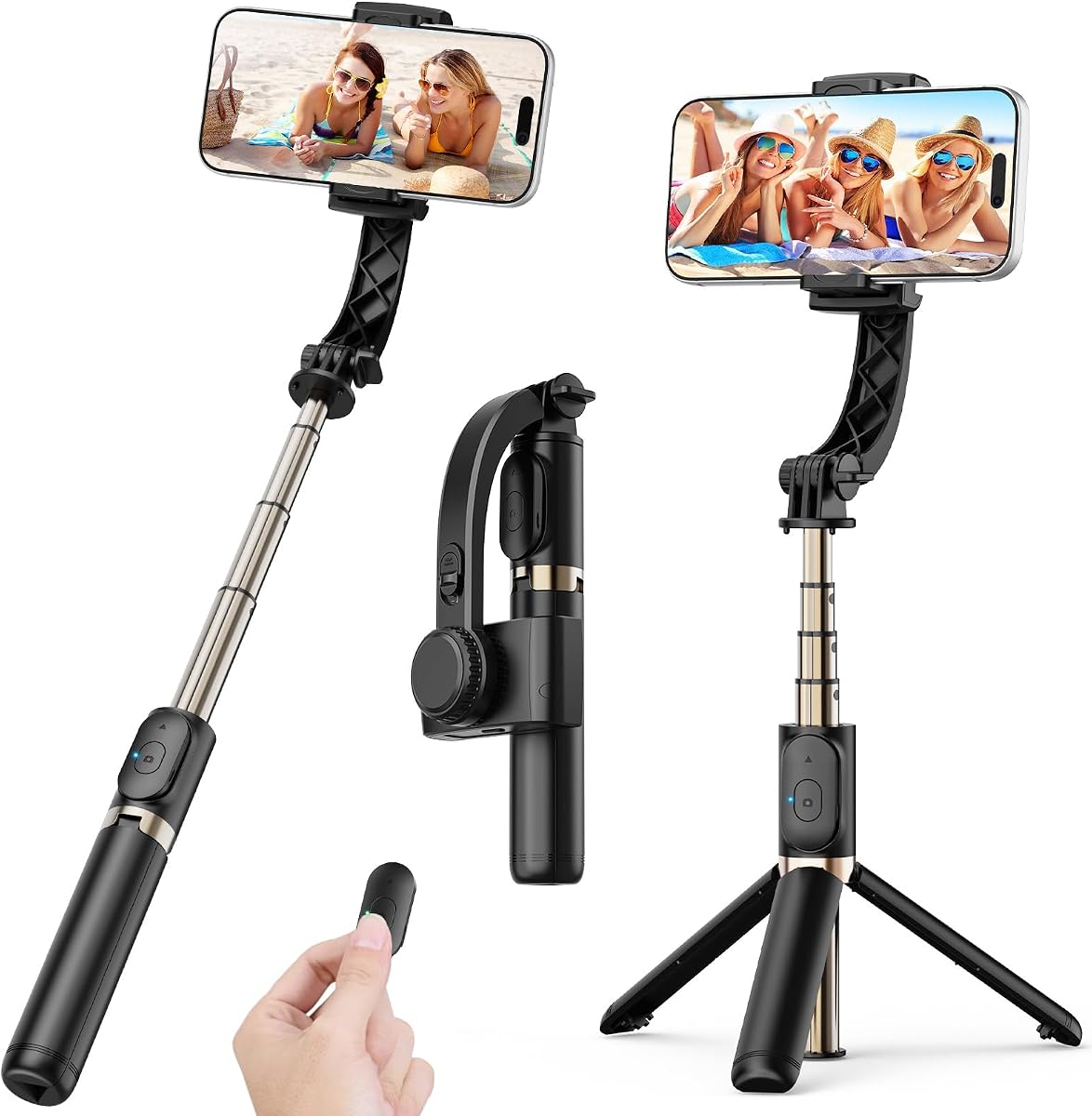
COOVOAMAE Gimbal Stabilizer
4.7Editor score
One-button control operation
Lightweight portable design
Wireless remote included
Finding the right gimbal for your Pixel 10a ensures smooth video quality for any content creator. A good stabilizer eliminates shake and unlocks professional shots. We reviewed the market to find devices that work seamlessly with Android phones.
Our team analyzed stability performance, battery life, and smart tracking features across ten top-rated models. We compared build quality, ease of use, and app compatibility to determine which gimbals deliver the best value for Pixel users seeking reliable support.
Each pick highlights specific strengths like extended runtime or advanced AI tracking. Prices and availability can fluctuate, so check current listings before buying. This list covers everything from budget-friendly options to premium creator kits for versatile mobile filming needs.
4.7Editor score

4.4Editor score

4.5Editor score
As an Amazon Associate we earn from qualifying purchases.
This side-by-side comparison highlights key specifications across all ten selected gimbals to help you evaluate performance and features at a glance.





The DJI Osmo Mobile 8 stands out as the top choice for Pixel 10a users seeking professional stabilization. With a strong 4.4 rating, it combines tracking, audio reception, and lighting into one compact device. This makes it ideal for vloggers who need all-in-one tools.
We may earn a commission when you buy through this link, at no additional cost to you.
Its seamless 360-degree pan rotation allows for immersive shots without losing your subject. The built-in tripod and selfie stick add flexibility for low-angle shots or group videos. Advanced 3-axis stabilization ensures smooth footage even during action sequences.
While the DJI Mimo app has faced Google Play removal, the hardware remains robust. The 10-hour battery life supports extended filming sessions without interruption. The ergonomic grip reduces wrist strain, making it comfortable for long shoots.
Creators looking for premium performance should consider this model despite the price. It offers native tracking that keeps subjects in focus with audio integration. For daily recording and live streaming, it delivers reliable results that justify the investment.
Native tracking with audio ensures your subject stays in focus while capturing clear sound simultaneously.
Shoot for hours with a 10-hour battery and an ultra-comfortable grip that prevents hand fatigue.
We may earn a commission when you buy through this link, at no additional cost to you.
The DJI Osmo Mobile 7 offers a lighter alternative with robust stabilization for creators on the move. Weighing just 300 grams, it is easy to carry and use for extended periods. The 4.4 rating reflects its reliable performance in various scenarios.
We may earn a commission when you buy through this link, at no additional cost to you.
Integrated foldable design and built-in tripod make it perfect for solo creators. ActiveTrack 7.0 tracks subjects across diverse scenarios, keeping focus sharp during movement. Dual-lens enhanced tracking ensures even fast action stays in frame.
However, the app compatibility issues on Google Play may require extra steps for setup. It lacks the advanced lighting features of newer models. Still, its streamlined creativity tools save time when editing and filming.
Travelers and vloggers prioritizing portability will find this gimbal excellent. It balances weight and functionality well for everyday content creation. The long battery life supports full-day shoots without needing frequent recharges.
At just 300 grams, this gimbal is ultra-light with an ergonomic design for extended use.
Dual-lens enhanced tracking keeps your subject in focus even during fast, close-up action.
We may earn a commission when you buy through this link, at no additional cost to you.
The DJI Osmo Mobile 7P brings native tracking and lighting into a compact unit for content creators. Its 4.5 rating highlights user satisfaction with the seamless stability it provides. The multifunctional module packs audio and light features into one unit.
We may earn a commission when you buy through this link, at no additional cost to you.
Pairing with DJI Mimo enables ShotGuides and One-Tap Edit for professional results. The built-in extension rod and tripod offer creative freedom without extra gear. Unfolding powers on the device, making it ready for instant shooting.
While the app has compatibility issues, the hardware design remains highly intuitive. The multifunctional module can deliver extra power to your phone when needed. However, it might add some bulk to the otherwise lightweight gimbal.
Content creators needing a streamlined solution will appreciate this model. It captures wide selfies and steady vlogs with ease. The 10-hour battery supports long sessions, making it a great choice for extended projects.
The multifunctional module integrates tracking, audio reception, and lighting into one compact unit.
Built-in extension rod and tripod let you capture wide selfies and steady vlogs effortlessly.
We may earn a commission when you buy through this link, at no additional cost to you.
The Insta360 Flow 2 Pro is a creator kit designed for advanced mobile filming with AI tracking. It supports native tracking across over 200 apps and pairs with an AI tracker for Android. This makes it versatile for various content styles like YouTube or TikTok.
We may earn a commission when you buy through this link, at no additional cost to you.
Advanced active zoom tracking captures dynamic action up to 15x zoom. Intelligent multi-person tracking ensures your group stays in the shot. The 3-axis stabilization and 360 infinite pan rotation provide professional-grade video quality.
While powerful, the price point is higher than competitors. The built-in tripod, selfie stick, and lighting system add value but increase bulk. Users may find the feature set overwhelming initially but rewarding after mastering it.
Vloggers and filmmakers seeking ultimate features should consider this model. It offers unparalleled freedom with continuous pan rotation. For those needing studio lighting on the go, this gimbal integrates it seamlessly.
Capture dynamic action with precision using 15x zoom tracking for sports and events.
The Ultimate Creator Bundle includes tripod, selfie stick, and integrated lighting for ready-to-use setup.
We may earn a commission when you buy through this link, at no additional cost to you.
The hohem iSteady X3 SE delivers reliable stabilization at a budget-friendly price point. Its 4.2 rating reflects good value for those starting in vlogging. It features upgraded 3-axis stabilization ensuring ultra-smooth footage for dynamic vlogging sessions.
We may earn a commission when you buy through this link, at no additional cost to you.
A detachable magnetic remote lets you control shots from up to 32 feet away. The gimbal folds into a pocket-sized tool weighing only 0.79 lbs. With an 11-hour battery life, you can shoot for long without interruptions.
While it offers strong value, the build materials are less premium than higher-end models. The app is required for advanced features like gesture control. Still, it is beginner-friendly with a short learning curve.
First-time gimbal users seeking affordable quality should choose this option. It is perfect for solo travel moments and family gatherings. The long runtime and remote control provide professional results at an accessible price.
The detachable magnetic remote allows control from up to 32.81 feet away for flexible shooting.
Enjoy 11 hours of continuous operation on a 2-hour charge for full-day shooting.
We may earn a commission when you buy through this link, at no additional cost to you.
The COOVOAMAE Gimbal Stabilizer offers simple and reliable stabilization for basic video needs. With a high 4.7 rating, it is praised for ease of use. Its 1-axis design with built-in gyroscope reduces hand shake significantly for vlogging.
We may earn a commission when you buy through this link, at no additional cost to you.
Operation is app-free with a simple one-button control to switch orientations. Weighing only 0.49 lb, it is easy to carry anywhere. The extendable selfie stick tripod and 360-degree rotating phone holder add creative versatility.
Battery life is limited to 2 hours, which may not suit long shoots. The 1-axis stabilization is less robust than multi-axis models. However, the price makes it a low-risk entry point for beginners.
Those wanting a simple and portable option will appreciate this gimbal. It is perfect for live streaming and action shots on a budget. The detachable remote works up to 32 feet, enhancing flexibility for group videos.
No complicated apps required; simple one-button control switches between horizontal and vertical shooting.
Weighing only 0.49 lb and folding to 7.5 inches, this stabilizer easily fits in any pocket.
We may earn a commission when you buy through this link, at no additional cost to you.
The hohem iSteady V3 Ultra is an AI-powered gimbal that tracks faces, pets, and objects reliably. Its 4.3 rating indicates solid performance for fitness coaches and vloggers. With 360-degree panning, it ensures you stay perfectly in frame.
We may earn a commission when you buy through this link, at no additional cost to you.
A detachable 1.22-inch touchscreen remote allows full control from up to 33 feet away. Upgraded iSteady 9.0 tech keeps your phone steady during walking or running. The built-in fill light lets you adjust brightness remotely for studio quality.
While powerful, the remote adds complexity for users preferring simple setups. The 9-hour battery is good but slightly shorter than some competitors. The 8-inch extension rod enables creative low or high-angle shots easily.
Creators needing advanced tracking and lighting will find this model useful. It simplifies production with intelligent templates in the Hohem Joy app. The compact design folds to 6.3 inches, making it easy to carry anywhere.
Smart motion detection tracks faces, pets, and objects with 360-degree panning to stay in frame.
Adjust brightness and color temp remotely with the built-in fill light for pro lighting quality.
We may earn a commission when you buy through this link, at no additional cost to you.
The hohem iSteady M7 is a premium option with enhanced magnetic AI tracking and a high payload capacity. Its 4.5 rating highlights user satisfaction with its professional features. The 100% boost in pixels ensures precise recognition for sports and travel.
We may earn a commission when you buy through this link, at no additional cost to you.
A detachable 1.4-inch full-color touchscreen allows intuitive control and real-time preview. The built-in aluminum extension rod helps get creative shots from various angles. With up to 3 expansion ports, it supports a wide range of accessories.
The customizable fill light can switch between cool/warm light or RGB light for cinematic atmosphere. It costs more than standard models and may be heavier to carry. However, the flexibility to add accessories is a major advantage for pros.
Serious creators seeking customization will appreciate this powerful gimbal. It delivers smooth tracking without losing a target. The remote control enables hands-off shots from 32 feet away, perfect for solo filmmaking.
Enhanced magnetic AI tracker boosts pixel recognition to 100% for precise subject tracking.
Switch between cool/warm or RGB light and adjust brightness remotely for cinematic effects.
We may earn a commission when you buy through this link, at no additional cost to you.
The DJI OM 5 is a lightweight tool unlocking full smartphone potential for versatile creators. With a 4.4 rating, it provides flawless selfies and smooth automatic tracking. Its portable and palm-sized design makes it ideal for on-the-go filming.
We may earn a commission when you buy through this link, at no additional cost to you.
ShotGuides automatically recognizes your environment and recommends shot sequences with tutorials. The built-in extension rod includes more friends in selfies without a tripod. ActiveTrack 4.0 ensures reliable tracking and smoother camera movements.
Being an older model, it lacks newer AI features and lighting integration. Mounting is magnetic, which simplifies setup but requires compatible clamps. Still, it remains a reliable choice for YouTube and TikTok videos.
First-time users will find this gimbal easy to start using. The powerful 3-axis motor keeps smartphones steady even with external lenses. It balances portability and functionality well for casual content creation.
ShotGuides recognizes your environment and recommends a corresponding shot sequence and tutorial.
Portable and palm-sized, this gimbal unlocks full potential of your smartphone for selfies and video.
We may earn a commission when you buy through this link, at no additional cost to you.
The hohem iSteady M7 features a detachable remote with a 1.4-inch full-color touchscreen for intuitive control. Its 4.5 rating shows user satisfaction with its professional orthogonal 3-axis design. It supports phones up to 14.11 oz for broad compatibility.
We may earn a commission when you buy through this link, at no additional cost to you.
Enjoy uninterrupted shooting with its 12-hour battery life. The reverse charging feature lets it serve as your phone's backup power source. The integrated RGB and CCT fill light can flexibly illuminate front and rear shots.
While expensive, the features support all-day use without needing external power. The 193mm built-in extension pole allows seamless transitions between high and low angles. It is a solid choice for creators prioritizing remote control capabilities.
Travel and YouTube creators seeking a robust gimbal should consider this. The remote allows convenient and intuitive control and real-time preview. Its design ensures smooth movements without needing additional gear for enhanced shooting experiences.
Enjoy 12-hour battery life and reverse charging support to serve as a backup power source.
Built-in 193mm extension pole allows seamless transitions between high and low angles effortlessly.
We may earn a commission when you buy through this link, at no additional cost to you.
Selecting the right gimbal requires considering features that match your filming style and device needs.
Gimbals come with 1-axis, 3-axis, or advanced stabilization. A 3-axis gimbal provides the smoothest footage by correcting pitch, roll, and yaw movements. For professional results, choose a model with at least 3-axis stabilization to eliminate shaky footage effectively.
Prioritize 3-axis stabilization for the best results in video quality.
Battery life determines how long you can shoot without interruption. Look for models offering at least 8 to 10 hours of runtime. Extended battery life supports long travel days or live streaming sessions without the need for power banks.
Choose a gimbal with at least 10 hours of battery for uninterrupted shooting.
Active tracking uses AI to keep your subject in focus. Advanced models offer face, pet, or multi-person tracking. For creators filming solo or in groups, look for native tracking features that work across different apps seamlessly.
Select a gimbal with active tracking to keep your subject in focus automatically.
Lightweight gimbals are easier to carry and use for long periods. Ideally, the device should weigh under 1 pound and fold into a compact size. Portability ensures you can take your gimbal anywhere without burdening your travel bag.
Opt for a lightweight and foldable design for maximum portability.
A detachable remote allows you to control shots without touching the phone. Some remotes include touchscreens for previewing footage. This feature is vital for solo creators who need to set up shots remotely or trigger recording from a distance.
Look for a detachable remote to control shots from up to 30 feet away.
Built-in accessories like extension rods, tripods, and lighting save extra purchases. A tripod lets you set up hands-free videos. Integrated lighting ensures your subject is well-lit in low-light conditions without external gear.
Choose a model with built-in tripod or lighting for added convenience.
Ensure the gimbal works with apps compatible with your Pixel 10a. While some brands require specific apps for tracking, look for native tracking support across platforms. This ensures you can use your favorite filming tools without restrictions.
Verify app support or native tracking compatibility for smooth operation.
Gimbals range from budget-friendly to premium models. Evaluate the features you need versus the cost. Higher-end options offer advanced tracking and lighting, while budget models provide basic stabilization. Balance your needs with your budget before buying.
Assess features versus cost to find the best value for your needs.
To start, mount your phone securely using the magnetic clamp or screw mount. Ensure the gimbal is balanced by adjusting the phone position before turning it on. This prevents motor strain and ensures smooth footage during use.
Calibrate the gimbal before every shoot if possible. Use the app or physical dials to zero out the axes. A properly calibrated device responds better to movements and delivers higher-quality stabilization.
Clean the gimbal and clamp regularly with a soft cloth. Avoid exposing the device to water or extreme temperatures. Store it in its case to protect the motors and ensure longevity of the moving parts.
Most gimbals are designed to fit phones with cases up to a certain thickness. Always check the payload or clamp specifications before mounting. If your case is too bulky, remove it for best balance and performance.
Download the DJI Mimo app from the official website to avoid Google Play issues. Pair the gimbal via Bluetooth, then select the tracking mode within the app. Your phone camera will then lock onto the subject automatically.
Not all gimbals support every app natively. Some require their own proprietary app for advanced features. Look for models offering native tracking compatibility with over 200 apps for better flexibility.
While not strictly necessary, a built-in tripod offers convenience for hands-free shots. It allows you to capture videos without holding the device. This is useful for group photos or solo filming scenarios.
3-axis gimbals correct movement in pitch, roll, and yaw, providing the smoothest footage. 1-axis gimbals only correct pitch, making them lighter but less stable. For professional results, choose 3-axis models.
Charge the battery after every use to maintain optimal health. Avoid leaving it plugged in for days after it is full. Check the battery level before every shoot to ensure you have enough power.
Yes, many gimbals like DJI models offer reverse charging. They have a USB port to connect your phone while shooting. This feature ensures your phone stays powered during long recording sessions.
Many models are designed with beginner-friendly features like one-tap editing. Look for devices with simple controls and tutorials. Most gimbals become intuitive after a few minutes of use.
We reviewed ten top gimbals for Pixel 10a users ranging from budget options to premium kits. The DJI Osmo Mobile 8 leads with advanced tracking and audio features. For budget buyers, the hohem iSteady X3 SE offers strong value.
Prioritize features like battery life and stabilization based on your filming needs. Travelers should focus on lightweight designs while vloggers need integrated lighting or tripod features. Choosing the right tool enhances the quality of your content significantly.
Remember that prices and availability can change quickly. Always check current listings before buying to confirm compatibility and cost. With the right gimbal, your Pixel 10a can capture professional-level videos easily.