
2026 Mac OS Shortcuts Sticker
4.6Editor score
Essential shortcuts at a glance
Zero residue adhesive vinyl
Water repellent matte finish
Finding the right MacBook Neo accessories can significantly enhance your daily workflow and protect your investment. With the new A18 Pro chip model released in 2026, users need specific gear that matches its unique port layout and design specifications perfectly.
We compared ten top-rated products based on compatibility, durability, and user feedback to bring you this curated list. Each item was selected for its ability to address common pain points like port protection, screen privacy, and workflow efficiency for MacBook Neo owners.
This guide details the strengths and weaknesses of each accessory to help you make an informed decision. Please note that product availability and pricing can fluctuate frequently, so always check the current listings before finalizing your purchase to ensure you get the best value.
4.6Editor score

4.7Editor score

4.2Editor score
As an Amazon Associate we earn from qualifying purchases.
The following table provides a side-by-side comparison of the ten selected MacBook Neo accessories, highlighting key specifications and unique features to help you quickly identify the best fit for your specific needs and preferences.



This sticker pack is designed to keep essential macOS shortcuts visible on your palm rest, reducing the need to search for commands online. With a high user rating, it has become a popular choice for those looking to streamline their workflow on MacBook Neo devices.
We may earn a commission when you buy through this link, at no additional cost to you.
The sticker features 52 curated shortcuts grouped by task such as navigation, screenshots, and system functions. The premium vinyl material ensures it is water repellent and fade resistant, while the ultra thin design means it won't interfere with wrist movement during typing sessions.
While it offers significant productivity gains, users should note that it requires careful placement to align correctly with the keyboard. Additionally, those who change their mind might find it tricky to remove if the adhesive bonds too strongly over time.
This accessory is ideal for students and professionals who want to master Mac shortcuts quickly. It is a simple yet effective tool that pays for itself in saved time and reduced frustration when working on your laptop.
By having shortcuts visible at all times, you reduce the cognitive load of recalling complex key combinations for frequently used actions.
The matte vinyl finish is engineered to resist smudges and spills, ensuring the text remains legible even in a messy workspace.
We may earn a commission when you buy through this link, at no additional cost to you.
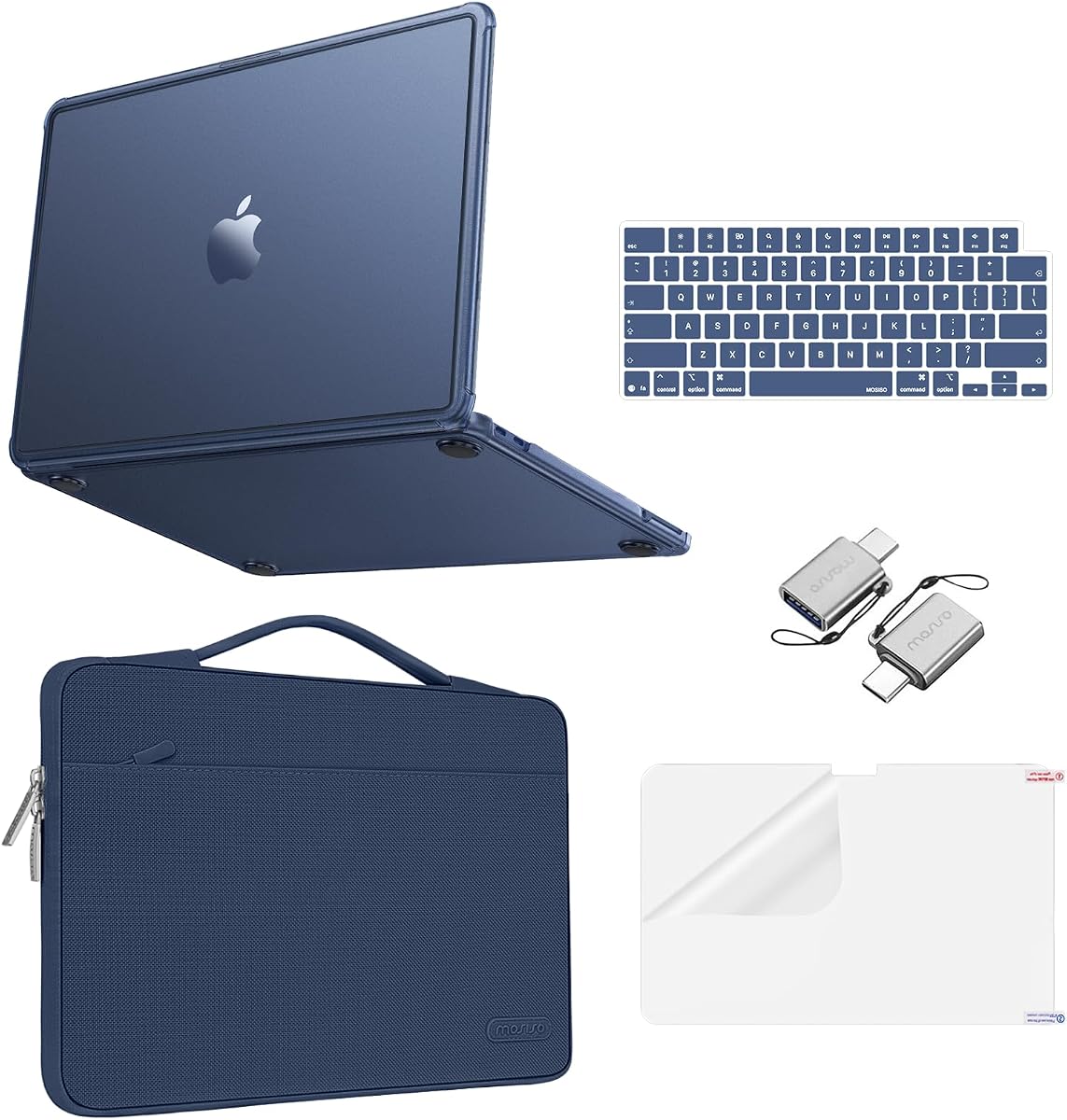
This hard shell case from MOSISO is built specifically for the 13 inch MacBook Neo with the A3404 model number. It offers a complete protection solution including keyboard covers and a screen protector, making it a strong budget-friendly option for new owners.
We may earn a commission when you buy through this link, at no additional cost to you.
The case is made from engineering polycarbonate that resists scratches and maintains a crystal clear appearance without yellowing. Its slim profile adds virtually no bulk while securing the laptop against daily bumps and spills encountered in bags or backpacks.
One trade-off is that the plastic construction can accumulate dust in the edges over time, and the clarity might slightly reduce if subjected to heavy abrasion. However, the included accessories provide extra value that compensates for these minor cosmetic issues.
This kit is perfect for students or travelers who need reliable protection without spending a lot. It ensures your MacBook Neo stays looking new while you focus on work without worrying about accidental damage.
Getting the case, keyboard covers, and screen protector in one package simplifies setup and ensures all critical surfaces are shielded from damage.
The high transparency shell allows the original color of your MacBook to show through, maintaining the aesthetic appeal of the device.
We may earn a commission when you buy through this link, at no additional cost to you.
This matte version of the MOSISO case is designed for users who want a clean look without constant cleaning. It includes a sleeve and full body protection accessories, offering a premium experience for those who value aesthetics and durability equally.
We may earn a commission when you buy through this link, at no additional cost to you.
The engineering matte finish actively repels fingerprints and scuffs, keeping the laptop looking pristine longer than glossy options. The included 360 degree sleeve provides an extra layer of security when carrying the device in transit.
While the matte surface is easier to keep clean, some users might find the texture less smooth than clear plastic. Additionally, the added weight of the sleeve and thicker shell might be noticeable for those carrying it constantly.
This choice is best for professionals who use their laptops in varied environments and want a polished appearance. The combination of the case and sleeve ensures robust protection for daily commutes and office work.
The engineered surface reduces the visible impact of oils and dirt, meaning less time spent wiping down your device to keep it looking new.
The included sleeve adds significant value by protecting the laptop from impacts when it is stored inside a larger bag or briefcase.
We may earn a commission when you buy through this link, at no additional cost to you.
This set features a hard shell case paired with a trendy puffy sleeve, making it a great option for those who want both protection and style. It includes all necessary accessories to protect the screen and keyboard from daily wear and tear.
We may earn a commission when you buy through this link, at no additional cost to you.
The case is engineered to resist cracks and shields the laptop from minor bumps and scratches. The puffy sleeve has a soft interior lining that cushions the device against bumps while traveling, offering a unique aesthetic compared to standard bags.
On the downside, the puffy sleeve might catch on bag straps or add noticeable thickness to a backpack. Also, the aesthetic might not appeal to users who prefer a minimalist or industrial look for their tech gear.
This product is ideal for fashion-conscious users who want their tech accessories to stand out. It provides reliable protection while adding a touch of personality to your daily carry setup.
The puffy quilted design of the sleeve turns a standard accessory into a fashion statement, appealing to users who value style in their tech gear.
The crack-resistant hard shell ensures that the device remains safe from structural damage even if it suffers a drop or impact during travel.
We may earn a commission when you buy through this link, at no additional cost to you.
The EooCoo case is praised for its ultra slim design that adds minimal bulk while offering strong protection. It comes with unique extras like USB adaptors and a keyboard cover, making it a versatile choice for connectivity needs.
We may earn a commission when you buy through this link, at no additional cost to you.
The transparent PC material fully showcases the laptop's design and is durable enough to withstand daily scratches and scuffs. Users appreciate the complete protection it offers including a screen protector that keeps the display free from oil stains and debris.
However, the case does not include a carrying sleeve, so you may need to buy one separately for travel. Some users might also find the hard plastic feels less substantial than thicker rubberized alternatives on the market.
This option is great for minimalists who want to keep the original look of their device. The added adaptors make it a practical solution for office workers who need to connect to older USB devices regularly.
The slim profile ensures that the laptop remains portable without adding significant weight or thickness to your bag or backpack.
The included USB-C to USB-A adaptors save you from buying separate dongles for legacy devices, adding unexpected value to the package.
We may earn a commission when you buy through this link, at no additional cost to you.
This USB C hub offers impressive performance with Thunderbolt transmission speeds and support for high resolution video output. It is a robust solution for users who need to connect multiple high-performance peripherals to their MacBook Neo efficiently.
We may earn a commission when you buy through this link, at no additional cost to you.
The hub supports up to 8K video output and includes a detachable magnetic connector for easy plugging and unplugging. Its aluminum alloy shell helps with heat dissipation, ensuring stable performance even during heavy data transfer tasks.
One important limitation is that it may not fit if your MacBook has a bottom case installed, which can restrict port access. Additionally, the price point is higher than standard hubs due to the advanced features and build quality.
This device is best for power users and creatives who require fast data transfer and high-resolution displays. The ability to charge at 140W ensures your laptop stays powered while using multiple external devices simultaneously.
Support for 8K and 4K high refresh rates makes this hub ideal for video editors and gamers who need smooth and detailed external displays.
The 140W pass-through charging capability means you can use all ports without worrying about your laptop battery draining quickly during tasks.
We may earn a commission when you buy through this link, at no additional cost to you.
This screen protector is designed to keep your data private by blocking side views beyond a specific angle. It is a great tool for professionals working in public spaces like cafes or airports where visual security is a concern.
We may earn a commission when you buy through this link, at no additional cost to you.
The magnetic attachment allows for one-second installation without leaving residue on the screen. It also includes blue light blocking technology which helps reduce eye strain during long working hours in front of the display.
The trade-off is that viewing angles are restricted, meaning you need to sit directly in front to see clearly. Some users also report a slight reduction in screen brightness which might be noticeable in dim lighting conditions.
This accessory is perfect for business travelers who handle sensitive information on the go. The ease of installation makes it convenient to put on and take off as needed during your daily routine.
By limiting the viewing angle to ±30 degrees, this screen ensures that people sitting next to you cannot read your sensitive emails or documents.
The anti-blue light technology is designed to reduce eye fatigue, allowing you to work longer periods without discomfort or strain on your vision.
We may earn a commission when you buy through this link, at no additional cost to you.
The Peslv privacy screen is designed for portability with a removable design and storage clip. It offers high definition clarity while protecting your screen from side views, making it suitable for frequent travelers who prioritize privacy.
We may earn a commission when you buy through this link, at no additional cost to you.
Imported materials ensure high transmission rates and strong magnetic force to keep the screen in place. The matte surface reduces glare which is helpful in bright environments like offices or outdoor workspaces.
Users should ensure the clip or magnetic strip does not interfere with their laptop case for proper fit. Aligning the screen correctly is crucial to avoid gaps that might compromise privacy or visual quality during use.
This product is best for those who move between different locations daily. The inclusion of a storage clip makes it easy to carry the privacy screen safely when not in use.
The advanced material ensures that the screen remains clear and vibrant, maintaining the original visual quality of the laptop display.
The storage clip allows you to attach the screen to your bag or laptop for easy transport, ensuring it is always ready when needed.
We may earn a commission when you buy through this link, at no additional cost to you.
This sticker provides a convenient reference for Mac shortcuts on Air and Pro models. It is a great learning tool for beginners who want to speed up their workflow without searching for commands online repeatedly.
We may earn a commission when you buy through this link, at no additional cost to you.
The laminated vinyl material makes it durable against daily wear. The adhesive is strong enough to stay put during use and can be removed with some effort and cleaning to avoid residue.
It is important to note that this specific sticker is not compatible with the MacBook Neo due to layout differences. Users of the Neo model should look for dedicated stickers like the 2026 Mac OS Shortcuts listed above.
If you are new to the Mac ecosystem this can be a helpful guide to build your skills. It is affordable and designed to help you learn the system faster for better productivity.
The sticker helps beginners learn essential commands faster by keeping them visible, reducing the learning curve of the new operating system.
Lamination ensures the text does not wear off easily, providing a long-lasting reference tool for your daily workflow needs.
We may earn a commission when you buy through this link, at no additional cost to you.
These dust plugs are designed to keep your MacBook Neo ports clean from dust and debris. With a set that includes covers for USB-C, HDMI, and headphone jacks it offers comprehensive protection for your connectivity points.
We may earn a commission when you buy through this link, at no additional cost to you.
The plugs are made of soft silicone which protects the ports from scratches and liquid splashes. They are easy to insert and remove without leaving residue, ensuring they stay clean when not in use.
One minor drawback is that some users find the plugs can fall out over time with frequent handling. However, they remain a cost-effective solution for maintaining the hardware integrity of your laptop.
This kit is essential for any owner who wants to keep their device pristine. It is a simple addition that prevents potential long-term damage to valuable ports and connectors.
Keeping dust and debris out of ports helps prevent connection issues and prolongs the lifespan of your laptop's internal hardware.
The 7 piece pack ensures that every available port on the device is covered, leaving no room for accidental liquid or dust intrusion.
We may earn a commission when you buy through this link, at no additional cost to you.
Choosing the right accessories for your MacBook Neo requires considering your specific workflow needs, protection requirements, and budget constraints. This section breaks down the key factors to help you select items that truly add value.
Always verify the model number A3404 before purchasing cases or accessories designed specifically for the 2026 MacBook Neo. Generic accessories might not fit the unique port layout or dimensions of this new release perfectly.
Checking compatibility first prevents returns and ensures a seamless experience with your device.
Assess how often you travel or work in different environments to determine the level of protection you need. If you carry your laptop frequently a hard shell case and a padded sleeve offer the best defense against drops.
Investing in layered protection is cheaper than repairing hardware damage later in the device's lifespan.
Evaluate your peripheral needs to choose the right hub with the necessary ports for your setup. High-speed hubs are essential for creators using large displays or fast storage drives.
Ensure the hub supports the power delivery requirements of your laptop to avoid battery drain issues during use.
If you work in public spaces a privacy screen is a valuable tool to protect sensitive information from prying eyes. Look for options that block views beyond a standard angle without compromising your own visibility.
A magnetic privacy screen is often easier to remove when you are in a secure private environment.
Dust plugs and port covers help prevent debris buildup that can interfere with connections or cause damage over time. This is a low-cost way to maintain the physical health of your device.
Regularly check your ports to ensure they remain clean and functional for all your connectivity needs.
Decide whether you prefer a clear case that shows off your laptop color or a matte finish that hides fingerprints. The choice often depends on how much time you spend cleaning your device.
Clear cases might yellow over time while matte finishes tend to stay looking new longer without maintenance.
Accessories like shortcut stickers can significantly reduce the time spent searching for commands. This is a small investment that improves daily productivity for both beginners and power users.
Prioritize tools that help you work faster rather than just cosmetic additions to your setup.
Determine your budget early to find accessories that offer the best value within your price range. There are effective options available at low cost that provide essential protection and utility.
Focus on buying the most critical items first such as a case and hub before adding secondary accessories.
To install a hard shell case, align the top cover first and press gently until it snaps into place. Then attach the bottom cover ensuring it fits snugly without gaps to maximize protection against dust and debris.
For magnetic privacy screens, align the magnetic strip with the top bezel of your display and press down lightly. Clean your screen thoroughly before installation to ensure the magnets adhere properly and do not trap dust underneath.
When using USB C hubs, plug them directly into the laptop's Thunderbolt port to ensure full speed performance. Avoid using them with thick cases that might block the connection point to prevent unstable data transfer.
Most of the cases listed are specifically designed for the 2026 MacBook Neo model A3404 and may not fit other sizes. Always check the model number on the back of your device before purchasing to ensure a perfect fit and avoid compatibility issues.
The VENTION hub mentioned is compatible with Windows laptops as well as Mac devices. However, some specific features like magnetic attachment are optimized for the MacBook design so verify the port layout on your specific laptop.
Yes most cases are thin enough to work with privacy screens. However you should ensure the case does not block the magnet strip or clip that attaches the privacy screen to the display bezel.
You can wipe the case with a soft damp cloth to remove dust and fingerprints. Avoid harsh chemicals or alcohol based cleaners as they might damage the plastic material or leave residue on the surface.
The shortcut stickers use premium vinyl adhesive that is removable without residue. If you need to remove it later simply peel it off slowly and clean any remaining residue with a soft cloth and mild soap.
Warranty terms vary by seller and brand so check the specific product page for details. Most reputable sellers offer a satisfaction guarantee or a limited warranty covering defects for a certain period after purchase.
Using cases or protective accessories generally does not void your Apple warranty unless they cause direct damage to the device. However Apple may not cover damage resulting from the accessory such as liquid entering a port.
The selected hubs support up to 140W pass-through charging which is sufficient to charge the MacBook Neo while in use. Ensure the adapter you use with the hub supports this wattage to maintain full performance speeds.
This guide highlights ten top accessories designed to enhance your MacBook Neo experience from protection to productivity. Whether you need a simple sticker or a complex hub there is something for every type of user in this list.
Prioritize accessories that solve your specific pain points such as connectivity or privacy rather than buying everything at once. This approach ensures you get the most value and utility from your investment in the long run.
Remember to check current prices and availability before making your final decision as these factors can change quickly. With the right accessories your MacBook Neo will be ready for any challenge you throw at it.