
M.2 Heatsink Cooler 2280 SSD Double-Sided Heat Sink
4.6Editor score
Aluminum alloy material
Double-sided clip design
Thermal silicone pad included
This guide compares the top M2 2280 SSD Heatsink options for PS5 and PC to help you prevent thermal throttling and maintain peak storage performance.
Modern storage solutions generate significant heat during heavy operations which can lead to thermal throttling and reduced performance. Investing in a quality M2 2280 SSD Heatsink ensures your drive stays cool and runs efficiently even under intense workloads.
We evaluated ten top-rated cooling solutions based on material quality thermal conductivity ease of installation and compatibility with various systems. Each product was analyzed for its ability to maintain safe operating temperatures across different usage scenarios and form factors.
Every pick below highlights key features pros and cons to help you find the right fit for your build. Please note that product availability and pricing may change over time so verify details before making your final purchase decision.
4.6Editor score

4.7Editor score

4.7Editor score
The following table provides a side-by-side comparison of all ten selected cooling solutions highlighting their unique specifications and key attributes to help you make an informed decision.


This affordable M2 2280 SSD Heatsink delivers solid thermal performance for budget conscious builders. It features an aluminum alloy body with a double-sided clip design that secures the heatsink firmly over your NVMe drive. Rated at 4.6 stars it offers reliable cooling without breaking the bank.
We may earn a commission when you buy through this link, at no additional cost to you.
The heatsink is designed to fit both PS5 and standard PC M.2 slots making it highly versatile. The included thermal silicone pad ensures good conductivity between the drive and the metal case. Users report temperature drops of up to twenty degrees under load.
While the finish is simple it provides adequate static elimination and corrosion resistance. The installation process is straightforward and does not require special tools. However the clips may feel less robust compared to premium options.
This is an ideal choice for users who want effective cooling on a tight budget. It protects your SSD from overheating during intensive tasks like gaming or large file transfers. We recommend it for general use and PS5 expansions.
The dimensions and clip design align perfectly with Sony PS specifications for PS5 internal storage upgrades.
The aluminum construction combined with thermal pads effectively moves heat away from the SSD controller.
We may earn a commission when you buy through this link, at no additional cost to you.
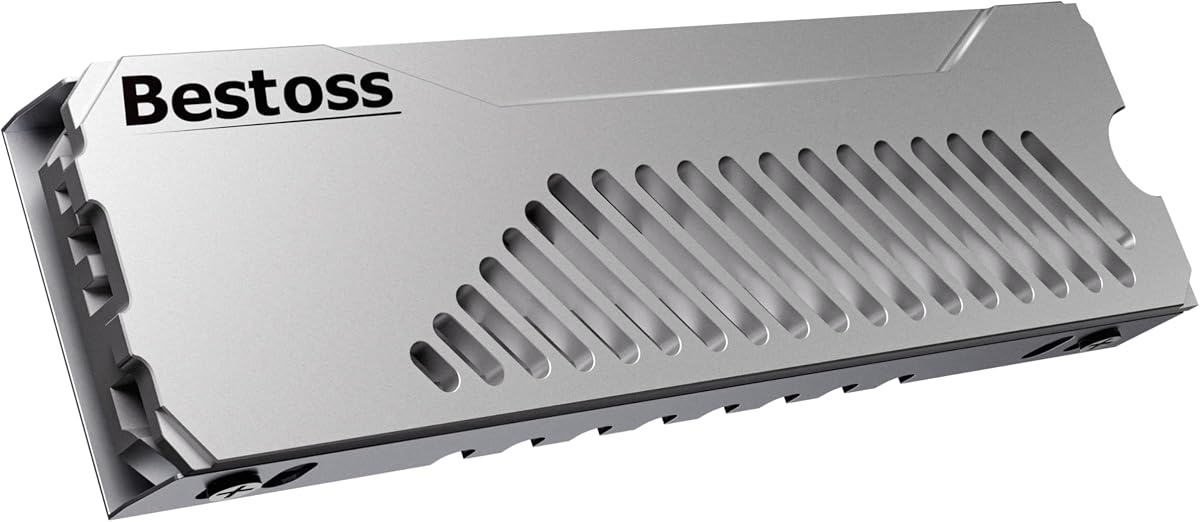
The Bestoss M2 2280 SSD Heatsink features a unique three-sided hollowed-out design to maximize surface area for heat dissipation. It is crafted from lightweight aluminum alloy with a deep matte texture for a sleek look. The pad has a thermal conductivity of up to 3 W mK for efficient transfer.
We may earn a commission when you buy through this link, at no additional cost to you.
Test results indicate temperature differences of 8 to 13 degrees compared to drives without cooling. This helps maintain smooth operation during intensive read/write tasks. The design is compatible with desktop PCs and PS5 for broad usability.
Installation is straightforward using included mounting solutions. The hollow design allows airflow to pass through more effectively than solid blocks. However it may not be as robust as models with heat pipes.
This heatsink is a good middle-ground option for those wanting better airflow without the cost of premium coolers. It effectively prevents thermal throttling in standard setups. Consider it for mid-range builds needing reliable passive cooling.
The hollowed out sections promote better air circulation around the SSD surface.
High conductivity silicone pads ensure minimal resistance between the drive and heatsink.
We may earn a commission when you buy through this link, at no additional cost to you.
This SABRENT heatsink combines copper and aluminum for maximum performance in desktop environments. It is designed specifically for desktop computers and supports both single and double-sided 2280 SSDs. The package includes screws thermal tape and a screwdriver for easy installation.
We may earn a commission when you buy through this link, at no additional cost to you.
The combination of materials leverages copper thermal conductivity and aluminum cost efficiency. Users appreciate the simple mounting process that ensures a secure fit. It helps maintain drive stability during high load scenarios.
While it lacks specific PS5 compatibility it excels in standard PC builds. The included tools make setup accessible for all skill levels. It may be less visually polished than some competitors.
This is a reliable choice for desktop users prioritizing function over form. It provides adequate cooling to prevent throttling in typical workloads. Consider it for straightforward desktop storage upgrades.
Copper provides high conductivity while aluminum keeps weight and cost down.
Included screws and tape simplify the installation process significantly.
We may earn a commission when you buy through this link, at no additional cost to you.
The be quiet! MC1 Pro M.2 SSD Cooler features an integrated heatpipe to ensure efficient heat dissipation even under heavy workloads. It is designed to fit both single and double-sided 2280 modules. The matte black aluminum design offers a clean look that matches modern builds.
We may earn a commission when you buy through this link, at no additional cost to you.
By lowering SSD temperatures it prevents thermal throttling and maintains top performance for longer periods. The simple mounting system allows for quick setup and secure fit. It is highly effective for performance enthusiasts.
The integrated heatpipe is a standout feature that passive conductors lack. The premium finish adds to the visual appeal of the system. However it may be harder to fit in compact cases.
This heatsink is ideal for users seeking high performance and aesthetics. It delivers consistent cooling for demanding tasks. We recommend it for premium PC builds and PS5 expansions.
The heatpipe actively moves heat away from the SSD to the fin array.
Premium matte black aluminum provides a sleek look for visible builds.
We may earn a commission when you buy through this link, at no additional cost to you.
This value 5-pack set includes five aluminum fin-type heatsinks with thermal silicone pads. It is compatible with single and double-sided NVMe SSDs for both desktop and workstation use. The set includes extra screwdrivers and mounting bands for convenience.
We may earn a commission when you buy through this link, at no additional cost to you.
The silicone bands allow for tool-free installation which speeds up setup. The aluminum fins help maintain safe temperatures to prevent performance throttling. This is perfect for builds requiring multiple SSDs.
While the mounting bands are convenient they may be less secure than clips. The construction is simple but effective for standard cooling needs. It lacks the robustness of higher-end models.
This kit is perfect for workstation builds needing bulk cooling solutions. It ensures consistent performance across multiple drives. Consider it for value-focused multi-drive setups.
The five-pack ensures you can cool multiple drives without buying separate units.
Silicone bands simplify the mounting process significantly for quick setups.
We may earn a commission when you buy through this link, at no additional cost to you.
The ARCTIC M2 Pro uses a click mechanism to fix the NVMe SSD between heat sinks without screws or bands. It includes TP-3 thermal pads designed to adapt to height differences on the drive. It meets Sony specifications for PS5 compatibility.
We may earn a commission when you buy through this link, at no additional cost to you.
The additional mass helps dissipate heat faster effectively reducing the risk of thermal throttling. The pads conform well to the controller and RAM for better contact. It ensures reliable performance even under intensive workloads.
The click mechanism is intuitive and secure once aligned correctly. It avoids the risk of losing screws during installation. However precise alignment is key for a proper fit.
This heatsink is excellent for PS5 users seeking reliable cooling. It is also great for PC users preferring a screwless mount. Consider it for streamlined expansion storage.
The fixed design allows quick and tool free mounting for SSDs.
TP-3 pads are high quality and conform to uneven surfaces well.
We may earn a commission when you buy through this link, at no additional cost to you.
This Thermalright heatsink features double-sided heat sink with high performance thermal silicone film for optimum cooling. It is made from aluminum alloy with an anodized sandblasting process to increase heat dissipation area. It supports Type A and B interfaces easily.
We may earn a commission when you buy through this link, at no additional cost to you.
Users report temperature reductions of up to 30 degrees depending on the environment. The clips combine with screws for a tighter fit and enhanced conductivity. It is designed to not interfere with nearby PCIe slots.
The anodized surface provides durability and better thermal handling. The included video tutorials simplify the installation process significantly. However the clips may require some care to adjust properly.
This is a strong choice for users needing high performance cooling on a budget. It handles demanding tasks well. We recommend it for desktop builds with high-speed SSDs.
Cooling on both sides maximizes heat transfer efficiency from the SSD.
Anodized sandblasting increases surface area and durability against corrosion.
We may earn a commission when you buy through this link, at no additional cost to you.
The Thermalright M.2 Pro features an 8mm pure copper heat pipe combined with an aluminum alloy body. It includes a double layer silicone sheet for efficient thermal transfer. The silver gray finish adds a sleek look to internal components.
We may earn a commission when you buy through this link, at no additional cost to you.
This design ensures rapid heat conduction away from the SSD. It is compatible with 2280 drives and partly supports 2260 and 2242 sizes. Testing is strict to ensure consistent quality across units.
The larger heat pipe offers superior cooling compared to standard aluminum blocks. The double layer pad accommodates height differences effectively. It may be slightly larger than other models.
This is an excellent choice for performance enthusiasts. It delivers high efficiency cooling without fans. Consider it for builds needing top tier passive cooling.
The 8mm pipe moves heat faster than passive aluminum fins.
Extra silicone ensures better contact with tall components on the drive.
We may earn a commission when you buy through this link, at no additional cost to you.
This premium heatsink features a 6mm reverse gravity heat pipe and 4500mm2 heat dissipation area. It uses a second-generation Nano Thermal pad with 14.8W/mK conductivity for efficient transfer. The design includes 32 fins and adjustable height screws for stability.
We may earn a commission when you buy through this link, at no additional cost to you.
The reverse gravity pipe allows cooling in any orientation including horizontal or vertical. The Nano pad adapts to uneven surfaces without damaging warranty labels. It prevents throttling effectively during heavy loads.
The build quality is top notch with stainless steel reinforcement. The adjustable screws ensure a secure fit for various SSD heights. It may be more complex to install than simpler models.
This is the ultimate choice for performance enthusiasts and workstation users. It provides the best passive cooling available. Consider it for systems where thermal limits are critical.
The heat pipe works effectively regardless of the case orientation.
Nano silicon grease material offers superior thermal conductivity and protection.
We may earn a commission when you buy through this link, at no additional cost to you.
This Thermaltake cooler combines an aluminum heatsink with an 8000 RPM micro blower fan for active cooling. It includes a 6mm high-performance copper heat pipe and a stainless steel reinforced backplate. It is specially designed for M.2 2280 SSDs.
We may earn a commission when you buy through this link, at no additional cost to you.
The powerful fan ensures heat is actively blown away from the heatsink. This is highly effective for cases with limited airflow. It delivers better thermal performance than passive-only solutions.
While effective the fan requires power and may generate noise. The mounting includes a backplate for rigidity. It may not be suitable for silent builds.
This is a great choice for cases lacking airflow or extreme performance needs. It ensures the SSD never overheats. Consider it for high-end gaming rigs or servers.
The micro fan actively moves heat away from the heatsink.
The stainless backplate adds strength to the overall mounting system.
We may earn a commission when you buy through this link, at no additional cost to you.
Selecting the right cooling solution requires understanding your specific build needs and thermal requirements.
Look for aluminum alloy bodies which offer a balance of weight and conductivity. Copper components increase efficiency but add cost and weight.
Prioritize aluminum for general use and copper for extreme cooling needs.
High quality silicone pads ensure low thermal resistance between the drive and heatsink. Check the conductivity rating in W/mK for better transfer.
Higher conductivity pads reduce heat buildup more effectively than standard ones.
Choose between screws clips or rubber bands based on ease of installation. Screws offer the most secure fit while bands are tool free.
Consider your comfort level with tools when selecting a mounting style.
Ensure the heatsink fits both single and double-sided SSDs if you plan to use high capacity drives. Check compatibility with PS5 if upgrading that console.
Verify dimensions against your motherboard slots to avoid interference with other components.
Heat pipes actively conduct heat to fins allowing for more effective passive cooling. They are especially useful in hot environments.
Include heat pipes for higher performance tiers or hot cases.
Measure available space in your case to ensure the heatsink fits without blocking airflow or other slots. Tall heatsinks may conflict with large GPU coolers.
Check case clearance specs before purchasing to avoid fit issues.
Basic aluminum blocks are affordable and sufficient for most users. Premium models cost more but offer better cooling and aesthetics.
Align your purchase with your budget and performance requirements.
Passive coolers rely on airflow while active ones use fans. Active cooling is necessary for high-traffic cases.
Select active cooling if your case lacks adequate internal ventilation.
Before installation ensure the SSD is powered down and removed from the motherboard slot. Clean any dust from the drive surface to ensure good thermal contact with the pad.
Apply thermal pad carefully aligning it with the controller chip. Press the heatsink down firmly to secure the clip or screw mount properly.
Check periodically for dust buildup on the heatsink fins. Use compressed air to clean the fins and maintain efficient airflow over time.
Not all SSDs require a heatsink as some include built-in cooling. High-performance NVMe drives however often benefit significantly from external cooling to prevent throttling.
Yes most PS5 compatible heatsinks work on PC as they use the same M.2 2280 form factor. Just ensure the dimensions fit your motherboard slot.
Without a heatsink NVMe drives may reach high temperatures and throttle performance. This reduces speeds during long gaming sessions or file transfers.
Use compressed air to blow out dust from the fins gently. Avoid using liquid cleaners that may damage the electronics or pads.
Thermal pads can be reused if they are clean and undamaged. Apply them carefully to ensure no air gaps form between surfaces.
Ensure the thermal pad is properly aligned and the heatsink is mounted tightly. Check that case airflow is adequate to remove the heat.
We have explored ten top options ranging from budget-friendly to premium performance solutions. Each offers unique benefits depending on your specific build needs.
Prioritize compatibility and material quality when selecting your cooling solution to ensure long term stability and performance.
Always verify current availability and pricing before purchasing to ensure you get the best value for your setup.