
HDMI to RF Modulator
5.0Editor score
Includes HDMI cable and power adapter
NTSC format output support
Simple plug and play setup
This guide compares the top ten Coax to HDMI Converter models for connecting legacy devices to modern screens using reliable signal conversion.
Connecting modern HDMI devices to older TVs with coaxial inputs requires a reliable converter. We evaluated ten models to find the best options for signal quality and ease of use.
Our team analyzed technical specs, compatibility, and user feedback to compile this list. Each product was reviewed based on its ability to convert signals without degradation.
Each pick shows key features and ideal use cases for different needs. Please note that prices and availability may change over time as inventory shifts.
5.0Editor score

4.7Editor score

4.4Editor score
This table provides a side-by-side comparison of all ten selected models. We highlight key specifications like resolution support, input types, and included accessories to help you choose.




This BNC to HDMI converter stands out for bridging analog security systems to modern displays. With a 4.7 rating, users appreciate its reliability in converting BNC signals to high-definition video.
We may earn a commission when you buy through this link, at no additional cost to you.
The standout quality is its automatic detection of PAL or NTSC signals. It supports outputs up to 1080P, ensuring clear visuals from CCTV DVRs and analog cameras without manual configuration.
While it is built with durable ABS and offers low heat generation, it is limited to BNC inputs rather than RF. This distinction is vital for users expecting RF to HDMI functionality.
This device is ideal for security setups needing to view feeds on HDMI monitors. If you have analog cameras and a modern TV, this converter offers a stable plug-and-play solution.
The unit automatically recognizes PAL or NTSC formats to simplify setup for mixed legacy systems.
Converters analog feeds to 720P or 1080P HDMI for sharp viewing on modern screens.
We may earn a commission when you buy through this link, at no additional cost to you.
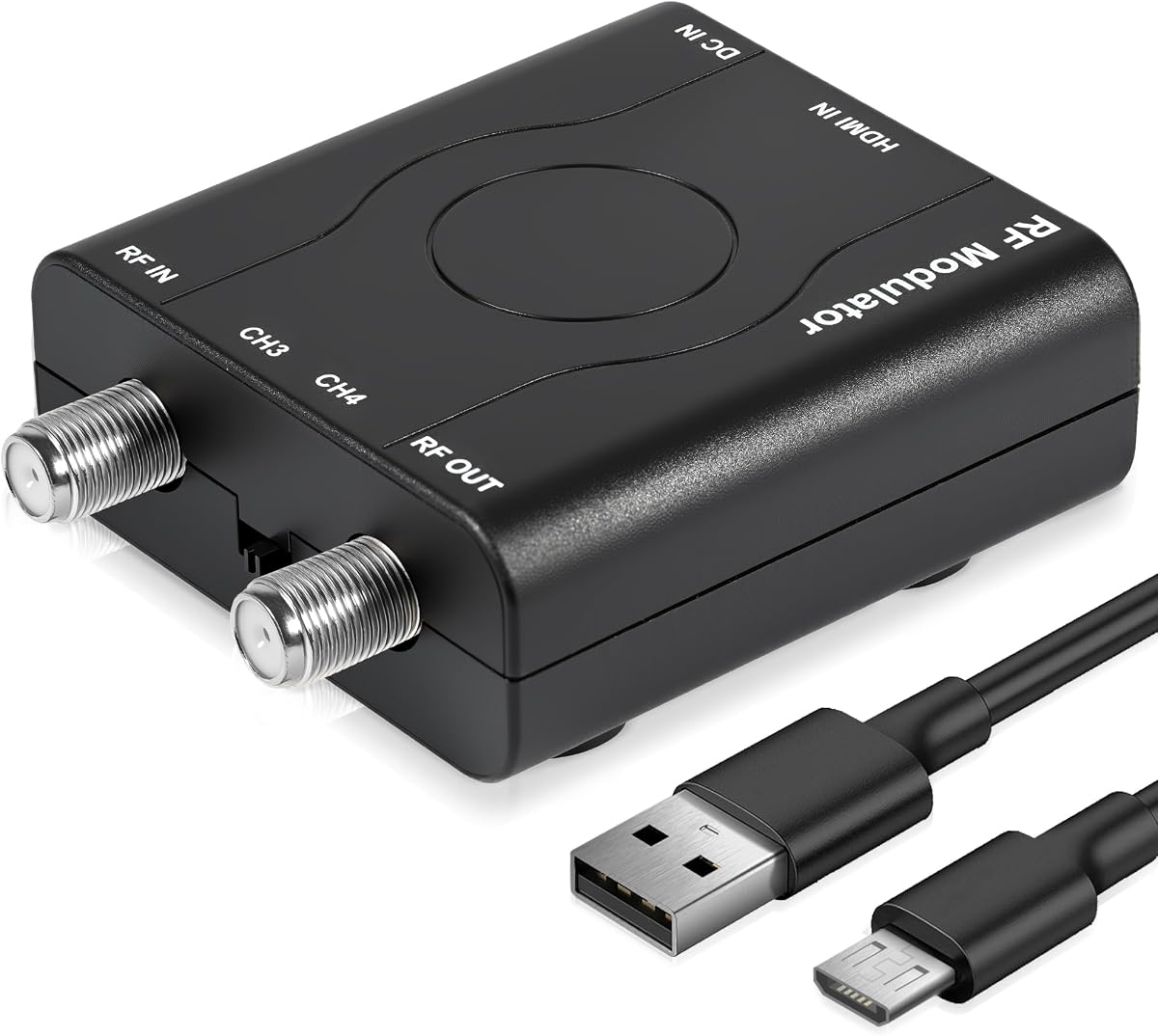
This HDMI to RF modulator offers exceptional value for connecting modern streaming devices to older TVs. It supports inputs like 1080P and outputs to CH3 or CH4 channels.
We may earn a commission when you buy through this link, at no additional cost to you.
Users find the included HDMI cable and power adapter convenient for quick setup. The PLL control ensures stable VHF frequency output which reduces signal noise on older screens.
The limitation is that it only converts HDMI to RF not the other way around. This is acceptable if your goal is to use consoles or boxes on RF-enabled TVs.
This is a top choice for budget-conscious buyers needing HDMI to coax conversion. It works well with streaming sticks and game consoles for retro TV setups.
Requires no drivers or software, making installation quick for non-technical users.
Built-in PLL ensures stable output to prevent channel interference on analog TVs.
We may earn a commission when you buy through this link, at no additional cost to you.
This RF demodulator is designed for converting legacy console signals like Atari or VHS to HDMI. It handles VHF and UHF inputs making it versatile for retro gaming.
We may earn a commission when you buy through this link, at no additional cost to you.
The inclusion of a remote control and support for NTSC and PAL adds flexibility. Users appreciate the range of channels up to 251 which allows for future network compatibility.
However the lower rating suggests some users face signal or setup issues. It may require patience to tune correctly compared to simpler modulators.
This is best for enthusiasts needing to connect old game systems to new displays. If you own retro consoles, this adapter helps preserve them on modern screens.
Compatible with Atari 2600 NES and VCRs for classic gaming on modern TVs.
Allows easy adjustment of channels and settings without needing to access the device.
We may earn a commission when you buy through this link, at no additional cost to you.
The HDM61 modulator is built for seamless integration with game consoles and media players. It supports HDMI 1.4 and HDCP 1.4 ensuring reliable transmission of protected content.
We may earn a commission when you buy through this link, at no additional cost to you.
The ABS construction provides durability and the VHF frequency ensures stability on older CATV systems. It handles resolutions from 480P to 1080P effectively for various sources.
While it does not support reverse conversion it is highly effective for its intended purpose. The lack of drivers simplifies setup for casual users.
This is a solid choice for gamers connecting to legacy TVs. It balances build quality with compatibility for modern HDMI devices and older TV inputs.
Handles protected content streams reliably for gaming and media playback devices.
Constructed from durable ABS material to withstand daily usage and handling.
We may earn a commission when you buy through this link, at no additional cost to you.
This modulator is praised for stable distribution of HDMI signals across multiple displays. It handles streaming media players and laptops making it ideal for hotels or classrooms.
We may earn a commission when you buy through this link, at no additional cost to you.
The step-by-step guide simplifies installation which is often a hurdle for technical setups. A perfect 5.0 rating highlights its reliability in delivering consistent quality.
The cost is higher than basic options but justified by performance. It is best when you need to send one signal to many TVs simultaneously.
Choose this if you need a reliable hub for video distribution. It supports streaming players well ensuring smooth playback on multiple endpoints.
Designed to distribute HDMI signals through coax systems to multiple TVs efficiently.
Compatible with modern streaming players and laptops for versatile usage.
We may earn a commission when you buy through this link, at no additional cost to you.
The HDM61 adapter offers fixed frequencies for reliable channel selection. It works well for CATV systems needing consistent output for daily operation.
We may earn a commission when you buy through this link, at no additional cost to you.
Users highlight the molded ABS shell as a sign of durable manufacturing. The support for HDMI 1.4 ensures it handles modern signal formats smoothly.
It does not offer reverse conversion but focuses on HDMI to RF stability. The lack of remote control is minor given the fixed channel design.
This is a smart pick for stable signal transmission. It is suitable for setups requiring consistent performance without changing channels.
Output fixed frequencies to ensure your TV always finds the signal quickly.
Precision molded ABS shell protects internals for long-term daily use.
We may earn a commission when you buy through this link, at no additional cost to you.
This modulator is built for commercial needs with premium craftsmanship. It supports various resolutions and HDCP 1.4 for high-quality business presentations.
We may earn a commission when you buy through this link, at no additional cost to you.
The included USB power cable simplifies connection in office environments. It is compatible with many devices ensuring versatile usage in commercial setups.
It is reliable but limited to one-way conversion. The fixed channels are sufficient for most static business environments.
Select this for professional presentations on old displays. It offers stable performance and broad compatibility for business needs.
Uses USB power to reduce clutter and simplify connections in office settings.
Works with diverse devices from laptops to DVD players for flexible use.
We may earn a commission when you buy through this link, at no additional cost to you.
This converter stands out by offering both RF and RCA outputs simultaneously. It is ideal for recording content while watching on TV.
We may earn a commission when you buy through this link, at no additional cost to you.
The F type coax input allows connecting external tuners. Users appreciate the compatibility with capture cards for video recording tasks.
The channel switch helps avoid interference with existing players. It supports streaming devices like Apple TV making it versatile for media centers.
Choose this if you need dual connectivity options. It is perfect for users who want to capture content and display it concurrently.
Outputs both RF and RCA signals allowing simultaneous recording and viewing.
Connects easily to capture cards for recording streaming content.
We may earn a commission when you buy through this link, at no additional cost to you.
The Eyoyo converter handles high-resolution inputs up to 8MP. It ensures clear viewing on modern monitors without replacing your existing camera system.
We may earn a commission when you buy through this link, at no additional cost to you.
The metal housing dissipates heat effectively for 24/7 operation. It automatically detects formats so setup remains quick for mixed camera systems.
The loop out feature lets you continue recording on your DVR while viewing on TV. This makes it a practical choice for security setups.
This is the top pick for high-res security monitoring. If you have AHD or TVI cameras this converter provides crystal-clear viewing.
Handles inputs up to 8MP ensuring every detail remains sharp.
Sends signal to DVR for recording while displaying on HDMI.
We may earn a commission when you buy through this link, at no additional cost to you.
This HDMI61 modulator is praised for reliability and simplicity. It features PLL control to ensure stable frequency output for daily viewing.
We may earn a commission when you buy through this link, at no additional cost to you.
Users find the portable design flexible for moving between rooms. The ABS build ensures durability which contributes to its perfect rating.
It supports 1080P input well for high-quality transmission. The lack of advanced features keeps it user-friendly for casual users.
Select this for a reliable everyday converter. It is ideal for anyone needing a quick and stable connection for legacy TVs.
No drivers needed allowing immediate use right out of the box.
Compact design allows easy transport and placement in various spots.
We may earn a commission when you buy through this link, at no additional cost to you.
Choosing the right converter depends on your input source and output needs. This guide outlines key factors to consider before purchasing.
Ensure the device supports the direction you need. Most models convert HDMI to RF but some support RF to HDMI for legacy consoles.
Verify the direction matches your source and display needs.
Look for models supporting 1080P input to preserve quality. Lower resolutions may lead to pixelation on modern screens.
Check the specs to ensure 1080P support.
Identify if your source uses BNC coaxial or RF coaxial. BNC is common for CCTV while RF is common for TVs.
Confirm the input matches your cable type.
Most modulators offer CH3 and CH4 outputs. Ensure your TV can tune to these channels.
Check if your TV supports CH3 and CH4.
Some kits include HDMI cables and power adapters. This reduces extra costs and simplifies setup.
Look for kits with essential accessories.
ABS or metal housings affect durability. Metal dissipates heat better for long-term use.
Choose metal for better heat dissipation.
If using streaming sticks ensure HDCP compliance. Some converters may not support protected content.
Ensure HDCP support for streaming.
Plug and play models avoid driver installation. This is vital for non-technical users.
Prioritize driver-free setup.
Connect the power adapter to the converter and plug it into a wall outlet. Ensure the unit has enough ventilation to prevent overheating.
Plug your HDMI source into the input port and use a coax cable to connect the output to your TV. Turn on your TV and switch to CH3 or CH4.
Periodically clean the ports with a dry cloth to remove dust. Store in a cool place to extend lifespan.
Most work with TVs having coaxial inputs or CH3 CH4 tuning. Check your TV supports these channels before buying.
Yes but you need a demodulator. Ensure the device supports your signal format like NTSC or PAL.
Many support 1080P input but output may be standard. Check specs for HD compatibility.
Yes if HDCP is supported. Some may block protected content so verify HDCP.
Most models are plug and play. Check the manual to confirm driver needs.
Some allow RCA output for capture cards. Look for dual output models.
Conversion reduces quality. Use models with PLL control to minimize interference.
Some models like CCTV converters support 24/7 use. Check thermal specs before continuous use.
The BNC HDMI modulator excels for security systems while the HDM61 offers reliable streaming support. Choose based on your source needs.
Prioritize build quality and resolution support. Ensure the direction matches your source and display to avoid compatibility issues.
Prices and availability change regularly. Check current listings to confirm specifications and deals before buying.