
Spacrea Dual Monitor Stand Riser with Drawer
4.6Editor score
Adjustable length and angle
Includes pen holder and drawer
One piece steel construction
Finding the right dual monitor stand riser for desk can transform your workspace into a more efficient and ergonomic environment. A good riser elevates your screens to eye level, reducing neck strain and freeing up valuable desktop space for other essentials.
We compared ten top-rated models based on stability, storage options, adjustability, and overall build quality. Each product was evaluated for how well it supports multiple monitors while maintaining a clean and organized desk layout for professionals and gamers alike.
Each pick below highlights specific strengths like drawer storage, wireless charging, or adjustable angles. Remember that prices and availability change frequently, so check the current listing before making your final decision to ensure you get the best value possible.
4.6Editor score

4.7Editor score
4.5Editor score
As an Amazon Associate we earn from qualifying purchases.
The following table provides a side-by-side comparison of all ten models to help you quickly identify the features that matter most to your specific workspace needs.


This Simple Trending model stands out as a top choice for those seeking a balance of ergonomic benefits and robust build quality. With a 4.7 star rating, users appreciate its ability to lift monitors to a comfortable viewing height while keeping the desk organized.
We may earn a commission when you buy through this link, at no additional cost to you.
The seven-inch elevation is designed to align screens with your natural line of sight, which helps reduce neck and back strain during long work sessions. The steel legs and thick metal frame provide exceptional stability, capable of supporting up to 100 pounds without wobbling.
While the fixed height works for most standard desk setups, taller users might find it less adjustable than other options. Additionally, while the included mouse pad is a generous bonus, some may prefer a dedicated large pad for specific gaming styles.
For anyone needing a sturdy solution that also offers cooling and extra workspace, this is an excellent pick. It is ideal for professionals and gamers who want to declutter their desk without sacrificing monitor stability or comfort.
Raising your monitors to eye level encourages a neutral spine position, which can significantly reduce fatigue during extended computer use.
The mesh platform allows air to circulate under devices, preventing overheating, while the large mouse pad eliminates the need for a separate surface.
We may earn a commission when you buy through this link, at no additional cost to you.
The Spacrea dual monitor stand is an impressive budget option that does not compromise on functionality. It features an adjustable length mechanism, allowing you to tailor the stand to fit smaller or larger desks comfortably.
We may earn a commission when you buy through this link, at no additional cost to you.
Its one-piece stamped steel construction ensures a stable base that resists deformation over time. The inclusion of a drawer and pen holders adds immediate organizational value, making it perfect for students and teachers who need quick access to supplies.
Although the drawer is handy, it is not large enough for bulky items like notebooks or tablets. Some users might also find the pen holders slightly restrictive if they use a wide variety of writing instruments daily.
This stand is a fantastic choice for anyone looking to optimize their workspace without spending much. It provides essential ergonomic benefits and storage in a sleek design that fits well in home offices.
The adjustable length feature ensures the stand can adapt to your specific desk dimensions, providing a customized fit for dual monitor setups.
With dedicated spaces for pens and a drawer for small items, you can keep your desk surface clear and focused on your work tasks.
We may earn a commission when you buy through this link, at no additional cost to you.
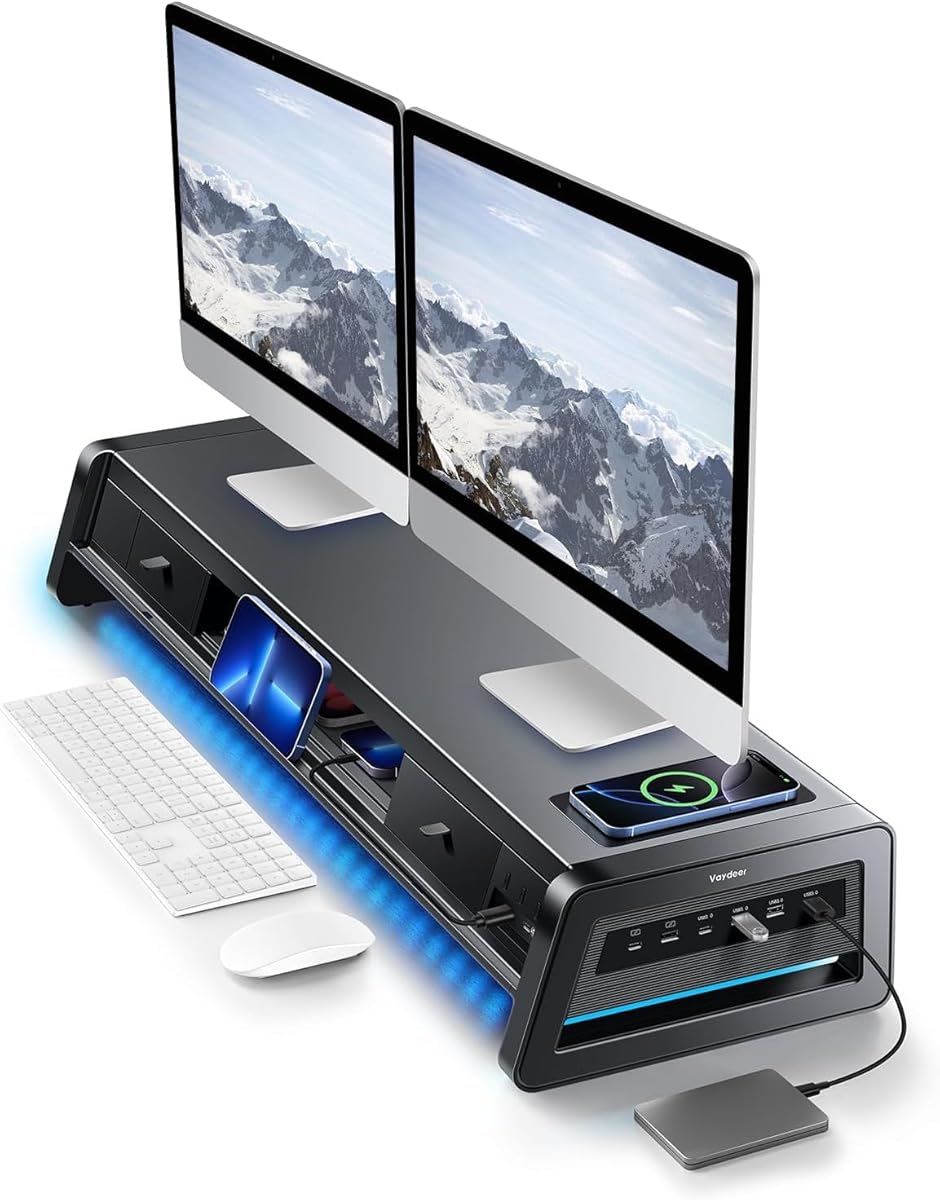
The Vaydeer all-in-one stand is a powerhouse for users who need extensive connectivity and storage. It includes eight USB ports and a wireless charging pad, making it a hub for all your peripherals and mobile devices.
We may earn a commission when you buy through this link, at no additional cost to you.
Its LED light strip adds a touch of ambiance and helps reduce eye strain during low-light conditions. The two drawers offer concealed storage, keeping your desk looking tidy while hiding cables and accessories neatly out of sight.
While the feature set is rich, the price is higher than standard risers, which may not suit budget-conscious buyers. The additional bulk and height might also be too much for very compact desks or minimalist setups.
For tech enthusiasts or professionals with many devices, this stand offers unmatched convenience. It transforms your desk into a fully integrated workstation that supports both productivity and comfort efficiently.
With multiple USB ports and wireless charging, you can keep all your devices powered and connected without cluttering your desk with separate adapters.
The built-in LED light strip creates a softer lighting environment, which can help prevent eye fatigue during long working hours.
We may earn a commission when you buy through this link, at no additional cost to you.
The gianotter dual monitor stand is designed for convenience, offering a ready-to-use solution right out of the box. Its no assembly feature makes it a standout choice for those who want immediate results without any tools.
We may earn a commission when you buy through this link, at no additional cost to you.
Crafted with high-strength metal materials, it provides reliable support for dual monitors while maintaining a sleek profile. The included drawer and magnetic pen holders help keep your workspace tidy, ensuring essentials are always within reach.
The fixed size means it may not adapt to all desk layouts, and the pen holders are designed for standard items only. However, for those prioritizing speed and simplicity, these limitations are minor trade-offs.
This stand is perfect for quick setup scenarios where ease of use is key. It blends functionality with a clean design, making it a strong contender for modern home office environments.
Skip the hassle of screws and tools with a design that allows you to set up your workspace in seconds without any effort.
A patented design ratio ensures the stand remains stable even under heavy loads, providing peace of mind for daily use.
We may earn a commission when you buy through this link, at no additional cost to you.
TAVR offers a versatile monitor stand that can adapt to various desk sizes and configurations. Its adjustable length and swivel end pieces make it a great option for corner desks or unusual room layouts.
We may earn a commission when you buy through this link, at no additional cost to you.
With three open storage spaces, you can organize your keyboard, mouse, and other accessories efficiently. The stand supports up to 44 pounds, ensuring that even heavier monitors remain stable during use.
While the adjustability is a strong point, the assembly process may require some patience. Additionally, the swivel features might need occasional tightening to maintain rigidity over long-term use.
This stand is ideal for users who need flexibility and robust storage. It balances ergonomics with practicality, making it a solid choice for diverse office setups.
The swivel side shelves allow you to angle the stand to fit corner desks, maximizing space efficiency in smaller rooms.
Three spacious compartments provide plenty of room for organizing devices and office supplies without feeling cluttered.
We may earn a commission when you buy through this link, at no additional cost to you.
This 38-inch monitor stand from Simple Trending provides a wide platform that can comfortably hold dual monitors and additional devices like keyboards or printers. The heavy-duty wood construction adds a premium feel to the desk environment.
We may earn a commission when you buy through this link, at no additional cost to you.
Its non-slip suction cups keep the unit firmly in place, even during intense gaming or typing sessions. The setup is straightforward, requiring no tools, which makes it user-friendly for anyone looking to upgrade their desk quickly.
Wood surfaces may require more care than metal to avoid water rings or scratches. Also, the fixed height may not suit users who prefer to adjust their screen elevation frequently based on seating posture.
For a classic look with sturdy performance, this stand is an excellent choice. It combines aesthetic appeal with practical stability, fitting well in traditional or modern office decor.
The high-quality wood boards provide a warm, traditional look that blends seamlessly with various desk styles and office furniture.
Suction cup feet ensure the stand stays fixed to the desk, preventing any unwanted movement while you type or game.
We may earn a commission when you buy through this link, at no additional cost to you.
BONTEC provides a flexible monitor stand with an adjustable length that suits both small and large desks. The swivel side shelves allow for angled configurations, which is particularly useful for corner workstation layouts.
We may earn a commission when you buy through this link, at no additional cost to you.
A white finish gives it a clean look that fits well in bright offices. It includes a dedicated smartphone holder and cable management openings, ensuring your tech stays organized and accessible without adding clutter.
Lighter colors like white can show stains more easily than darker finishes. The smartphone holder might not accommodate larger phones with thick cases, but this is a minor issue for many users.
This stand is a smart choice for those who need customization and style. It balances ergonomic elevation with functional storage options that support daily productivity tasks.
Adjustable length and swivel sides let you configure the stand to match your unique desk shape and monitor positioning needs.
Keep your phone and cables tidy with dedicated slots designed to organize wires and devices efficiently.
We may earn a commission when you buy through this link, at no additional cost to you.
YAOHUOO delivers a large monitor stand capable of supporting two monitors and additional peripherals. With a 38.6-inch length, it provides ample room for a dual-screen setup along with other desk essentials like laptops or TVs.
We may earn a commission when you buy through this link, at no additional cost to you.
The heavy-duty steel footing ensures the unit remains stable even under significant weight, with a capacity of up to 100 pounds. This durability is key for users who place heavy devices on their stands regularly.
While the 10-minute assembly is quick, it requires following instructions carefully to align parts properly. The design is functional rather than stylish, which might not appeal to those prioritizing aesthetics over utility.
This stand is a solid pick for those who need space and strength. It offers a practical solution for large setups without compromising on stability or ergonomic benefits.
The wide surface can hold multiple monitors, laptops, and printers, making it ideal for power users with many devices.
Heavy-duty steel legs provide the necessary support to prevent wobbling, ensuring a secure platform for your equipment.
We may earn a commission when you buy through this link, at no additional cost to you.
Fenge offers a wide monitor stand with two semi-transparent acrylic drawers to keep your desk organized. The 42.5-inch length provides plenty of space for dual monitors and other devices without feeling crowded.
We may earn a commission when you buy through this link, at no additional cost to you.
Constructed with thickened MDF panels and steel footing, it is built to last. The surface is waterproof and resists scratches, making it easy to maintain over time. A central support beam enhances stability for heavy loads.
The assembly process might take longer than some simpler models, and drawer alignment needs attention during setup. However, the storage benefits and robust build quality make these steps worthwhile for many users.
This stand is perfect for those who prioritize organization and space. It combines hidden storage with a strong frame, helping you keep your workspace tidy and functional.
Two frosted acrylic drawers provide concealed storage for supplies, keeping your desk surface clear while maintaining easy access to items.
Waterproof and scratch-resistant panels combined with steel footing ensure the stand withstands daily wear and tear effectively.
We may earn a commission when you buy through this link, at no additional cost to you.
Simple Trending provides a compact yet wide monitor stand that keeps essentials organized. Its 42-inch surface comfortably accommodates two monitors, and the smooth-gliding drawer helps hide away small items for a cleaner look.
We may earn a commission when you buy through this link, at no additional cost to you.
The premium metal frame ensures stability, reducing any wobbling during use. Two side pen holders keep writing tools within reach, which is useful for daily office tasks that require quick access to notes.
The drawer depth is somewhat limited, which may not fit larger items like notebooks. Also, the lower elevation height might not be ideal for taller users seeking a higher viewing angle.
This stand is a practical choice for those who need organization without bulk. It offers a clean, efficient solution for small to medium desk spaces with a focus on usability.
The combination of a hidden drawer and side holders allows you to keep your workspace organized and clutter-free easily.
A premium metal frame delivers reliable support for daily use, ensuring your monitors stay secure even during active sessions.
We may earn a commission when you buy through this link, at no additional cost to you.
Choosing the right stand involves considering several key factors that affect ergonomics, stability, and your workspace organization.
A good dual monitor stand riser for desk should lift your screens to eye level to reduce neck strain. Look for models that offer either adjustable height or a standard height that aligns with your seated posture.
Select a height that allows your eyes to look slightly downward when viewing your screens comfortably.
Ensure the stand can support the weight of your monitors without wobbling. Check the manufacturer's weight capacity and read reviews to confirm real-world stability.
Choose a stand with a sturdy base or non-slip feet to prevent sliding on your desk surface.
Measure your desk space to ensure the stand fits without overcrowding. Some models offer adjustable lengths to accommodate different desk sizes or corner layouts.
Verify the depth and length of the top shelf to hold your monitors securely with room for other items.
Consider if you need drawers, open compartments, or pen holders to keep your desk tidy. Storage options help maintain a clean workspace by organizing accessories out of sight.
Look for hidden drawers or cable management slots to reduce visual clutter on your desk.
Materials like metal or thick wood offer better durability and support than plastic. Metal frames often provide more stability for heavier setups.
Choose a material that fits your aesthetic preferences and ensures long-term use.
Some stands require minimal assembly while others might take more time and tools. Check if the product includes all necessary hardware and instructions for a smooth setup.
Opt for quick assembly models if you want to set up your workspace efficiently without hassle.
Advanced models may include USB ports, wireless charging, or LED lighting. These features can enhance productivity but may come at a higher cost.
Decide if you need extra connectivity or lighting features based on your specific workspace needs.
The design of the stand should match your office decor and personal style. Options range from sleek metal finishes to warm wooden surfaces.
Select a style that complements your room and adds to a cohesive workspace environment.
Place the stand on a flat, stable desk surface to ensure maximum stability. If it has non-slip pads or suction cups, press down gently to secure it in place before loading monitors.
Clean the surface regularly with a soft, dry cloth to avoid scratches or dust buildup. Avoid using harsh chemicals or abrasive materials that could damage the finish or coating of the stand.
Periodically check screws and joints to ensure they remain tight over time. If the stand includes adjustable parts like swivel shelves or drawers, inspect them to maintain smooth operation and proper alignment.
The ideal height depends on your personal ergonomic needs, but generally, a range of 5 to 7 inches is effective. This elevation helps align screens with your eye level, reducing strain on your neck and back during long sessions.
Yes, most stands are designed to hold various monitor sizes as long as the total weight does not exceed the stand's capacity. Always check the dimensions and weight limits before purchasing to ensure compatibility with your setup.
Many modern stands are designed for quick assembly using simple tools or even tool-free methods. However, some models may require basic tools like a screwdriver, so it is good to check the product details beforehand.
Use a soft, slightly damp cloth to wipe down the surface, then dry it immediately. Avoid abrasive cleaners or rough sponges that could scratch metal or wood finishes on your stand.
Most stands are built to support keyboards under the monitors, but check the specific weight capacity. Heavy mechanical keyboards are generally fine as long as the total weight stays within the manufacturer's limits.
Absolutely, these stands work well with laptops as well as monitors. They provide elevation for better viewing angles and leave space underneath for accessories or external keyboards.
Yes, some advanced models include built-in USB ports and even wireless charging pads. These features allow you to keep devices charged and connected without needing extra adapters on your desk.
Check that all screws and joints are tightly fastened. Ensure the stand is placed on a flat surface and that any adjustable parts are locked securely in place to eliminate wobbling.
We have explored ten top dual monitor stand riser for desk options that balance ergonomic design with practical storage solutions. From the versatile Simple Trending models to the feature-rich Vaydeer, there is a fit for various budgets and workspace needs.
When selecting a stand, prioritize stability, adjustability, and storage features that match your daily workflow. A well-chosen riser can significantly improve your posture and keep your desk organized for better productivity.
Remember to check the current prices and availability before buying since these can change frequently. Investing in a quality stand now will pay off in long-term comfort and efficiency for your daily tasks.