
2×2 4k Video Wall Controller
4.6Editor score
HDMI and DVI input support
Eleven splicing modes included
Simple plug and play setup
This guide compares the top HDMI Video Wall Controller models for seamless multi-screen setups, evaluating features like 4K support, audio extraction, and
Creating a stunning multi-screen display requires the right hardware to manage signals effectively. An HDMI Video Wall Controller splits and processes video inputs to drive multiple screens as one cohesive unit. Whether you need this for retail signage or a home theater, choosing a reliable processor ensures smooth performance.
We evaluated ten leading models based on resolution support, display flexibility, and connectivity options. Each unit was assessed for its ability to handle 4K inputs, manage bezel adjustments, and offer robust control methods. This list covers diverse budgets and use cases from simple splits to advanced matrix switching.
Each pick highlights key strengths and ideal applications to help you find the perfect fit. Product availability and specific configurations may shift over time so verify current details before purchasing. These recommendations reflect extensive research into technical capabilities and user feedback across the industry.
4.6Editor score

4.8Editor score

4.2Editor score
The following table provides a quick side by side comparison of all ten top rated models analyzed in this guide. It highlights core specifications and unique capabilities to help you identify the right fit for your specific display needs.

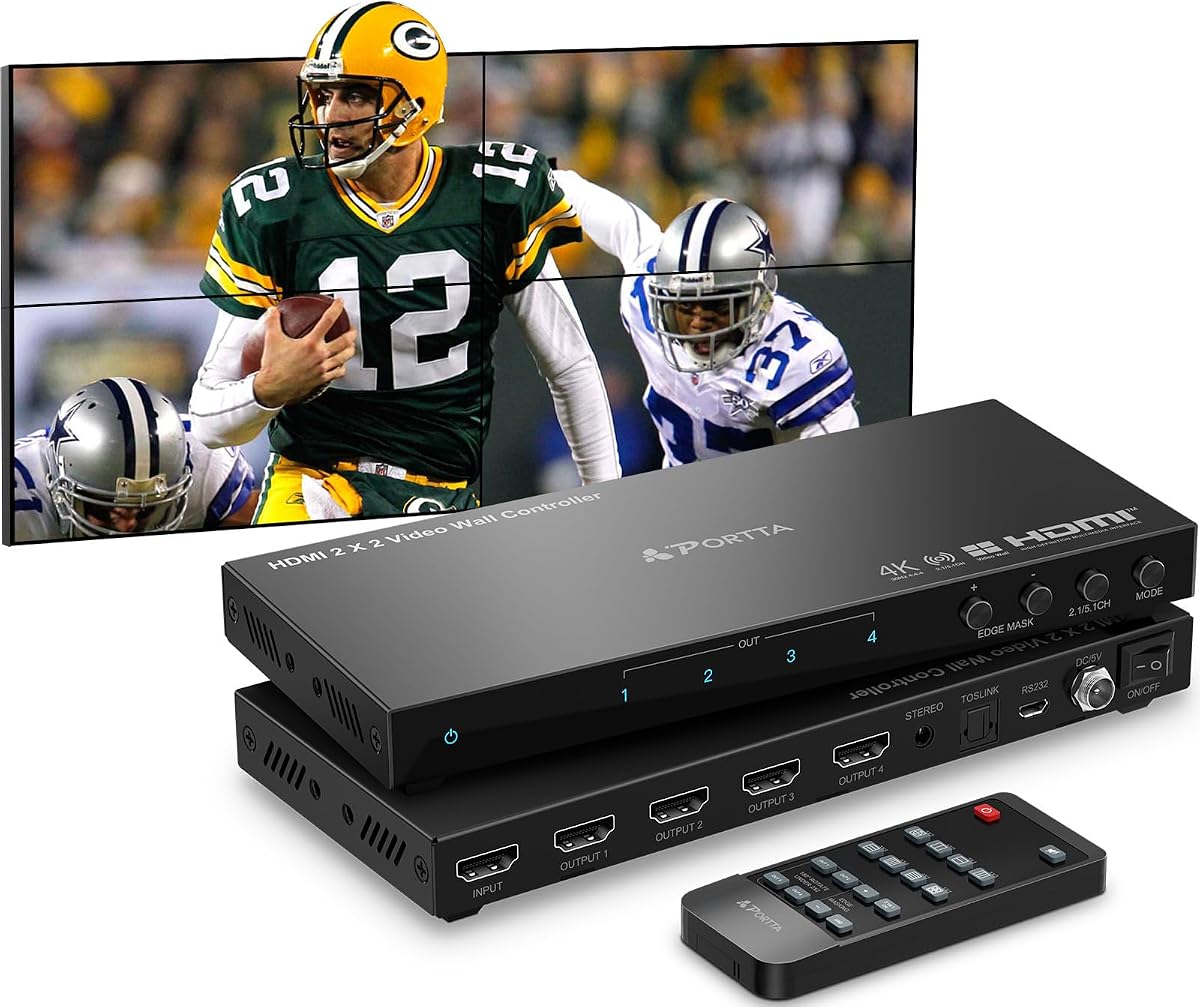


This model stands out for its high rating and balanced feature set ideal for standard 2×2 walls. It processes 4K inputs effectively to drive four 1080p screens with crisp detail. The inclusion of optical audio outputs simplifies connecting external sound systems without extra splitters.
We may earn a commission when you buy through this link, at no additional cost to you.
Users appreciate the flexibility of eight display modes allowing various layouts like 1×4 or 2×1 seamlessly. The edge masking function is particularly useful for reducing the visual impact of bezel gaps in tight setups. Image rotation works well to align content when screens are mounted in non-standard orientations.
While it does not output true 4K on each individual screen it handles 4K source material smoothly for downscaled displays. The lack of advanced web control means manual or RS232 setup is required which might limit remote management scenarios. These trade-offs are acceptable for most small business or home installations.
Buyers seeking a reliable and straightforward solution for four screens will find this processor highly effective. Its strong technical support ensures long-term reliability for critical displays. We recommend this unit for those prioritizing ease of use and solid performance over complex matrix switching features.
The optical SPDIF port allows direct connection to soundbars or receivers for immersive audio.
Switching between horizontal and vertical arrangements is quick without needing hardware changes.
We may earn a commission when you buy through this link, at no additional cost to you.
This controller offers an entry-level solution for creating video walls without a high cost. It supports both HDMI and DVI inputs making it compatible with older equipment common in various setups. The plug and play design means you can start displaying content almost immediately after connecting cables.
We may earn a commission when you buy through this link, at no additional cost to you.
With eleven different splicing modes it provides enough flexibility for most basic display needs. Users can switch configurations quickly using the remote control or physical buttons on the device. The memory function saves your last settings so it returns to the same layout after power cycles.
It does not support advanced features like web control or high-resolution 4K output on every screen. Some users might find the audio output options less robust than premium models. However for small businesses or personal use the value offered is exceptional given the low investment required.
Ideal for first-time buyers or those with tight budgets this unit delivers reliable performance. It works well for digital signage where consistent uptime matters more than advanced switching capabilities. We suggest this model when simplicity and cost-efficiency are the primary concerns for your project.
The ability to use DVI inputs extends the life of older legacy display systems.
Direct button presses allow for quick mode changes even without the remote control.
We may earn a commission when you buy through this link, at no additional cost to you.
This premium unit is designed for users who need advanced features like network control and multiviewing. It handles 4K 60Hz signals smoothly which is critical for high frame rate video content. The web control interface allows for remote management without needing physical access to the device.
We may earn a commission when you buy through this link, at no additional cost to you.
Users can view all four input signals on a single screen using preset multiviewer layouts. This feature is incredibly useful for monitoring multiple security feeds or data sources simultaneously. The ability to upscale or downscale outputs gives you flexibility to match any monitor resolution.
While the performance is top-tier the complexity and cost are higher than basic controllers. Setting up the network connection requires more technical knowledge than plug-and-play units. For general home use these extra features might be unnecessary but they are vital for professional environments.
Best suited for professional installations where remote monitoring and high performance are essential. It delivers professional grade reliability and versatility for demanding video wall applications. We recommend this for facilities managing critical displays that need constant and flexible control.
Configure and monitor the video wall from any browser on the local network easily.
Supports 4K 60Hz input ensuring smooth motion for high quality video playback.
We may earn a commission when you buy through this link, at no additional cost to you.
This controller is a strong choice for modern setups utilizing USB-C sources like laptops. It allows direct connection without needing adapters which simplifies cabling for digital displays. The device supports various rotation angles helping you align screens with precision regardless of mounting orientation.
We may earn a commission when you buy through this link, at no additional cost to you.
Audio extraction is handled well with support for multiple digital formats including Dolby Digital. This ensures that audio quality remains high when routing sound to external systems. The dual voltage power supply makes it a versatile option for international travel or different regions.
While it handles 4K input well it is limited in specific high fidelity modes like HDR10. The lack of web control means it relies on standard methods like remote or RS-232 for operation. These limitations are minor for most standard digital signage or home theater applications.
Ideal for users who need direct USB-C connectivity and flexible power options. The rotation features and audio support make it a reliable choice for diverse display environments. We recommend this model for those needing modern connectivity options without breaking the bank.
Direct USB-C input allows seamless connection to modern laptops without extra dongles.
Supports a wide range of digital audio formats for high fidelity sound output.
We may earn a commission when you buy through this link, at no additional cost to you.
This processor offers eleven distinct display modes giving users exceptional layout flexibility. You can easily switch between standard grids and specific single row or column displays. The edge masking feature allows precise control over image borders to minimize visual gaps.
We may earn a commission when you buy through this link, at no additional cost to you.
Audio extraction is comprehensive with support for both optical and analog outputs. This ensures compatibility with a wide range of external sound systems. The device handles 4K input effectively making it suitable for high quality source content.
Outputs are fixed at 1080p which may be limiting for native 4K monitors. While the setup is intuitive it lacks some advanced remote management options found in higher end units. These factors are acceptable for general use where visual fidelity is key over resolution.
Best for users needing varied display layouts without complex configuration. The detailed image control ensures a polished look for any presentation or signage. We recommend this controller for its balance of usability and feature richness.
Choose from eleven distinct modes to fit your specific display hardware requirements.
Edge masking allows you to hide bezels effectively for a unified look.
We may earn a commission when you buy through this link, at no additional cost to you.
This controller is designed for stable performance with HDMI 2.0 compliance ensuring smooth signal handling. It offers versatile input options including USB-C and HDMI to suit modern devices. The EDID management helps maintain signal stability across different connected displays effectively.
We may earn a commission when you buy through this link, at no additional cost to you.
Users benefit from clear bezel adjustment options that make the wall look more seamless. Optical audio output provides a direct path to external sound systems for better acoustics. Control is flexible with multiple methods including remote and RS-232 for integration.
It focuses on core reliability rather than advanced web features or matrix switching. The output resolution is standard for multi-screen setups which is sufficient for most uses. For users needing consistent performance with varied inputs this unit offers a solid foundation.
Ideal for installations requiring reliable signal management and flexible inputs. The combination of HDMI and USB-C ensures broad compatibility. We recommend this for professional setups needing consistent performance.
EDID management ensures the source sends the correct resolution to the processor.
Works with HDMI 2.0 and USB-C devices for wide source flexibility.
We may earn a commission when you buy through this link, at no additional cost to you.
This matrix offers the added capability of switching between multiple sources which adds value. It supports 4K 60Hz inputs ensuring high quality video handling. The seamless switching feature helps avoid interruptions when changing sources on the wall.
We may earn a commission when you buy through this link, at no additional cost to you.
Users can display content across four screens or switch between different input devices easily. Web control allows for remote management which is useful in larger installations. The device is built for reliable 24/7 operation in demanding environments.
Outputs may be limited to 1080p depending on settings which is a consideration. It is more complex than simple splitters but offers greater flexibility. For those needing source switching this unit provides a good balance of features.
Best for environments needing to swap between multiple inputs seamlessly. It supports high bandwidth inputs and offers robust management tools. We recommend this for professional multi-source setups.
Switch between four inputs without disconnecting cables manually.
Manage the device over a network for easy administration.
We may earn a commission when you buy through this link, at no additional cost to you.
This model stands out for its ability to output true 4K signals on each port. Most controllers downscale to 1080p but this one maintains full resolution across screens. It is ideal for high fidelity displays where clarity is a top priority for viewers.
We may earn a commission when you buy through this link, at no additional cost to you.
The inclusion of USB-C input supports modern laptops without extra adapters. Users benefit from a stable design intended for continuous operation. Setup is quick and straightforward with essential features to manage the display wall.
It offers fewer display modes than some competitors limiting layout options. The remote control is basic but functional for daily adjustments. For those needing high resolution outputs this unit delivers where others may fall short.
Best for premium displays requiring full 4K clarity across the wall. It supports modern inputs and is built for reliability. We recommend this for high-fidelity installations.
Outputs 4K to every screen ensuring no loss of image detail.
Designed to run reliably 24/7 for critical display needs.
We may earn a commission when you buy through this link, at no additional cost to you.
This controller supports direct media playback from USB drives which simplifies content management. You can plug in a drive and have content display automatically without a PC. The auto display function is convenient for standalone signage applications.
We may earn a commission when you buy through this link, at no additional cost to you.
Users benefit from extensive image adjustments like cropping and brightness settings. Remote control extension allows operation from further away in large spaces. It handles 4K inputs efficiently and supports many common file formats.
While powerful it may require careful setup for complex image adjustments. Audio options are present but less robust than dedicated audio extractors. These trade-offs are minor given the convenience of direct media playback.
Best for independent signage using USB drives. It offers robust image controls and remote management. We recommend this for autonomous displays.
Play videos directly from USB without needing a computer connected.
Adjust brightness and crop edges to perfect the visual output.
We may earn a commission when you buy through this link, at no additional cost to you.
This unit is designed to handle six screens which is rare for standard controllers. It supports 4K inputs and outputs making it suitable for large high resolution walls. The flexible layout options allow various configurations like 2×3 or 3×2 easily.
We may earn a commission when you buy through this link, at no additional cost to you.
Users appreciate the USB-C support allowing modern devices to connect directly. It is built for stable operation ensuring minimal downtime in critical setups. The interface is straightforward for managing multiple displays simultaneously.
Setup may be slightly more involved due to the additional outputs. It is best suited for specific grid sizes rather than general purpose use. For six screen walls this controller offers a specialized solution that works well.
Best for larger walls needing six distinct output channels. It supports high resolutions and modern inputs reliably. We recommend this for specialized multi-screen setups.
Designed specifically for six monitor setups with clear grid options.
Maintains 4K quality across all connected screens effectively.
We may earn a commission when you buy through this link, at no additional cost to you.
Selecting the right controller depends on your specific display needs and existing hardware. This guide outlines key factors to evaluate before making a purchase.
Check whether the controller handles true 4K inputs and outputs. Some models downscale to 1080p which may not be ideal for high density pixel needs. Ensure the bandwidth matches your content requirements to avoid signal loss.
Prioritize units that support your source device's maximum resolution.
Look for controllers offering various splicing modes like 2×2 or 1×4. Flexible layouts allow you to adapt to different screen arrangements without replacing hardware. This is essential for multi-purpose installations.
Choose models with multiple preset modes for ease of use.
Verify that the controller supports HDMI and other inputs like USB-C or DVI. Modern laptops may require USB-C connections to function properly with the system. Broad compatibility reduces the need for additional adapters.
Select devices with versatile inputs to support your existing gear.
Consider how you will control the system. Basic units use IR remotes while advanced models offer RS-232 or web interfaces. Remote management is vital for hard-to-reach installations.
Ensure the control method fits your operational environment.
Many video controllers focus on visuals but lack proper audio outputs. Look for units with optical or analog audio extraction ports to simplify sound routing. This prevents the need for separate audio splitters.
Choose models with dedicated audio ports for cleaner setups.
Bezel gaps can be distracting in video walls. Some controllers offer edge masking or cropping to align images perfectly. This feature is key for a professional looking display.
Prioritize units with edge adjustment tools for a seamless look.
If the display runs 24/7 ensure the controller is rated for continuous operation. Check warranty terms and technical support availability to handle any issues quickly. Reliability is crucial for business signage.
Select reputable brands with strong support records.
Basic splitters are affordable while matrix switches cost more. Define your budget early to narrow down choices effectively. You can often find a good balance between features and cost.
Avoid overspending on features you will not use.
Connect your source device to the input port using a high-quality HDMI cable. Ensure the cable is fully seated to prevent intermittent signal issues. Secure the output cables to each monitor or TV screen to maintain stability.
Power on the controller and the connected displays in the correct order. Usually start with the controller before turning on the screens. Use the remote control to select the desired display mode for your setup.
Keep the unit in a well-ventilated area to prevent overheating during long runs. Avoid covering vents or placing it near heat sources. Dust the unit regularly with a soft cloth to maintain optimal performance.
While possible using mixed sizes complicates the layout significantly. Controllers typically expect uniform grids so identical screens are recommended for best results. Different sizes may cause visible misalignment or scaling issues across the wall.
Not all models support 4K output on every port. Many units downscale to 1080p for the individual displays even if the input is 4K. Check the specifications carefully to confirm output capabilities before buying.
Choose a controller with web control or RS-232 support for remote management. These allow you to access settings over a network or serial connection from a separate location. IR remotes are limited by line of sight.
Some modern controllers support direct USB-C inputs allowing easy connection to laptops. This eliminates the need for HDMI adapters. Ensure your controller specifically mentions USB-C support for this feature.
If one screen fails the content may remain visible on the remaining ones depending on the mode. However the overall layout will look broken unless you adjust the settings. Regular maintenance helps prevent sudden failures.
Most models include audio extraction ports but external speakers are usually needed for sound. Optical or analog outputs allow you to connect to an existing audio system. Always verify audio compatibility with your speakers.
Basic units are plug-and-play requiring minimal configuration. Advanced models with matrix switching or web controls may need technical setup. Follow the manual to ensure all cables and settings are correct.
Check the manufacturer's website for firmware updates and instructions. Some units update via USB or network while others use manual commands. Always follow guidelines carefully to avoid disrupting operation.
We have highlighted the top options ranging from budget splitters to premium matrix switches. Each model offers unique strengths for different display needs and budgets. Your choice should align with your specific resolution and connectivity requirements.
Prioritize reliability and resolution support to ensure consistent performance. Features like bezel adjustment and remote control can greatly enhance your experience. Selecting the right hardware makes all the difference in visual impact.
Prices and availability change frequently so verify current details before purchasing. Check for any ongoing promotions or updates to the product lines. Investing in a quality controller ensures your video wall performs well for years to come.