
Adjustable Laptop Stand Portable
4.5Editor score
Affordable price point
Lightweight construction
Sturdy triangle support
Choosing the right laptop ventilation stand is crucial for maintaining device performance and protecting your physical health during long work sessions. Overheating can throttle your system while poor posture leads to chronic discomfort. A quality stand elevates your screen to eye level while allowing air to circulate freely beneath your device.
We evaluated ten top-rated models based on airflow design, build quality, ergonomic adjustability, and portability. Each product was analyzed for how well it dissipates heat, protects your laptop surface, and fits various workspace environments. Our goal is to help you find a stand that balances cooling efficiency with daily usability.
Each pick highlights specific strengths like aluminum construction, foldable designs, or integrated cooling fans. Note that availability and pricing fluctuate frequently so check current listings before purchasing. We focus on durable materials and proven performance to ensure your investment lasts through years of daily use across different laptops.
4.5Editor score

4.5Editor score

4.7Editor score
As an Amazon Associate we earn from qualifying purchases.
This side-by-side comparison outlines the key specifications and unique features of each ranked stand to help you quickly identify the model that best suits your specific cooling and ergonomic needs.



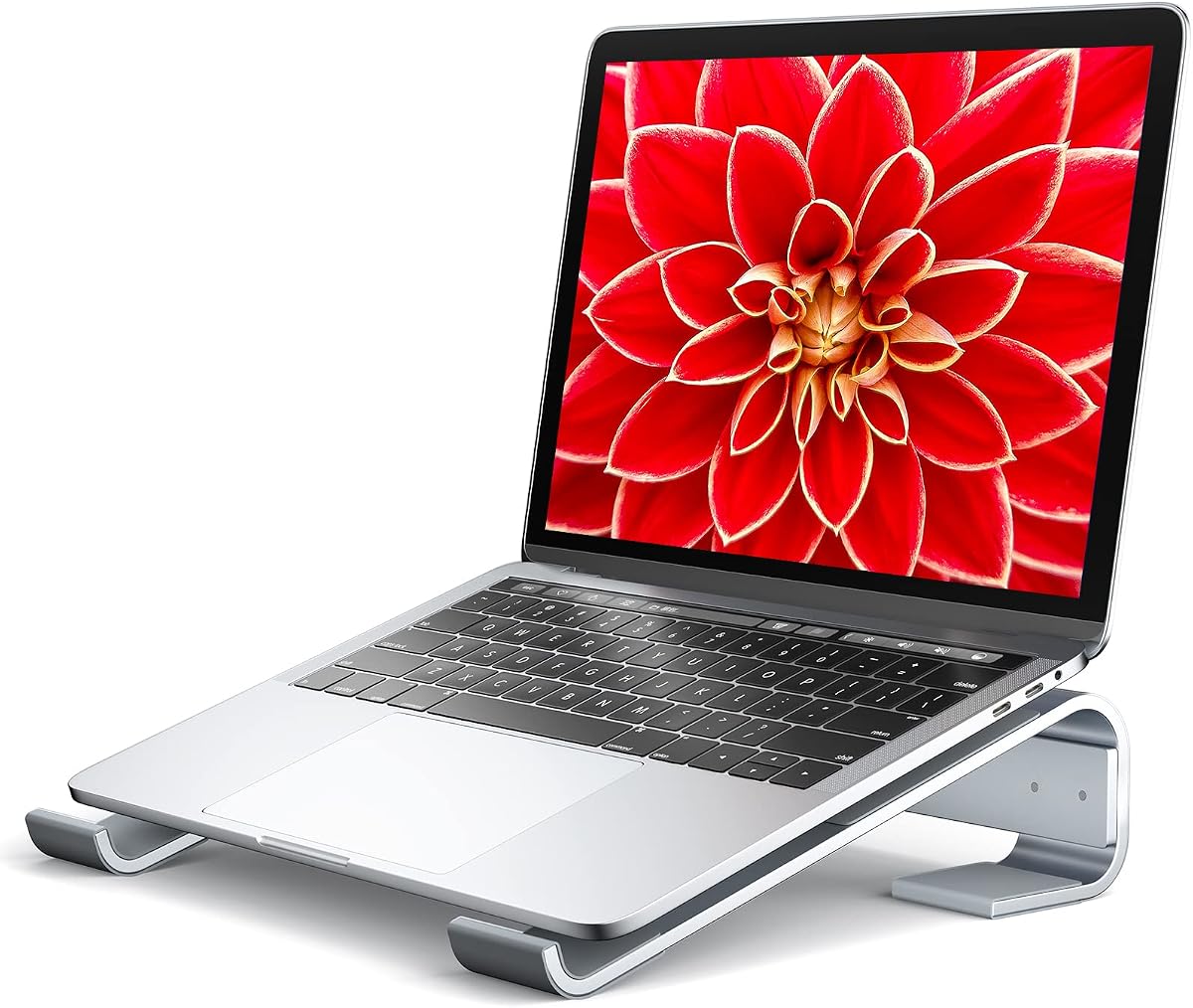

The Tonmom Laptop Stand for Desk offers a versatile solution for elevating your laptop to a comfortable viewing angle while ensuring adequate airflow to prevent overheating. With a solid 4.5 star rating from thousands of verified buyers it has proven itself as a reliable choice for both home office and travel use cases.
We may earn a commission when you buy through this link, at no additional cost to you.
Its standout quality lies in the adjustable height mechanism which allows you to raise your notebook from 2.78 inches up to 6.5 inches across seven distinct levels. This flexibility helps align the screen with your eye line reducing strain on your neck and shoulders during long work sessions. The forward-tilt angle and open design further enhance ventilation allowing heat to escape efficiently rather than being trapped under a flat surface.
While the stand is made of durable materials it does use a mix of plastic and metal components which might feel less premium than all aluminum options. Additionally the black color finish is standard and does not offer much variety for those seeking a specific aesthetic match for their desk setup. These trade-offs are acceptable given the price point and functional benefits.
This stand is ideal for remote workers students and travelers who need an ergonomic setup that fits easily into a backpack. If you prioritize adjustability and cooling performance without breaking the bank this model provides excellent value. We recommend it for anyone looking to improve their posture and protect their laptop from heat buildup.
Adjusting the height to eye level reduces neck flexion and helps maintain a neutral spine position throughout the day.
The open structure allows natural convection to cool the laptop chassis without requiring extra power or fans.
We may earn a commission when you buy through this link, at no additional cost to you.
The Adjustable Laptop Stand Portable is a cost-effective solution for those seeking basic ergonomic elevation and cooling without a high price tag. It has garnered a strong 4.5 star rating by delivering on its core promises of stability and ventilation despite its budget-friendly positioning.
We may earn a commission when you buy through this link, at no additional cost to you.
Its primary strength is its affordability combined with a functional design that elevates your laptop between 4.34 and 6.59 inches. The forward-tilt angle and open design ensure that your device gets ample airflow to stay cool during operation. The triangle support design provides a stable base that prevents wobbling while you type ensuring a secure typing experience.
Users should note that the support bars must be inserted at the same level to ensure balance which requires a bit of care during setup. The height range is slightly less than some competitors which might limit options for very tall users or specific desk configurations. These limitations are minor considering the significant cost savings it offers.
This stand is perfect for students or remote workers on a tight budget who still want the benefits of an elevated workspace. It is also highly portable making it a great companion for digital nomads. We suggest this option if price is your main constraint and you need a reliable basic cooling stand.
Investing in a stand improves posture significantly even at this lower price point without sacrificing basic stability.
Weighing less than half a pound this stand folds flat and slips easily into a bag for on-the-go use.
We may earn a commission when you buy through this link, at no additional cost to you.
The Nulaxy Ergonomic Adjustable Laptop Stand stands out as a premium choice designed for heavy-duty use and superior thermal management. With a high 4.7 star rating it is widely praised for its robust build quality and thoughtful engineering that addresses common issues like wobble and overheating.
We may earn a commission when you buy through this link, at no additional cost to you.
Its standout feature is the engineered dual-support rod mechanism which distributes weight evenly to create a wobble-free typing experience even with heavy devices up to 22 lbs. The unique geometric heat-vent panel on the upper section offers superior airflow compared to solid stands preventing thermal throttling during intensive tasks. This combination of strength and ventilation makes it a top pick for power users.
The main trade-off is the higher price compared to simpler plastic or thin aluminum stands. It is also slightly heavier which might be a minor drawback for those traveling daily with minimal luggage space. However the durability and performance justify the investment for many professionals and gamers who need reliability.
We recommend this stand for users who demand maximum stability and cooling efficiency regardless of budget. It is particularly suitable for those using larger gaming laptops or needing a stable platform for long editing sessions. If you want a premium solution that will last for years this is an excellent choice.
The dual-rod design supports up to 22 lbs making it ideal for heavy gaming laptops and workstations.
The specialized vent panel promotes continuous air circulation to protect components from overheating under load.
We may earn a commission when you buy through this link, at no additional cost to you.
The Kootek Laptop Cooling Pad Cooler Stand combines active fan cooling with an ergonomic stand design making it ideal for gaming or heavy workloads. It has earned a 4.4 star rating for its effective noise reduction and performance in keeping laptops cool during demanding tasks.
We may earn a commission when you buy through this link, at no additional cost to you.
Its primary strength lies in the five built-in fans which provide active airflow to lower internal temperatures significantly. The dual USB hub allows you to connect additional peripherals without taking up ports on your laptop. You can control fans with switches to choose between one or all five running depending on your noise preference.
The reliance on USB power means you must ensure an available port is free which might be inconvenient for some setups. Additionally while the fans are quiet they are not completely silent so sensitive users might notice a slight hum. These trade-offs are acceptable given the enhanced cooling performance.
This stand is perfect for gamers video editors or anyone running CPU-intensive applications for extended periods. It is also great for laptops that tend to overheat easily during summer months. We recommend it if you need active cooling rather than just passive ventilation.
The five fans actively push air through the laptop chassis to rapidly dissipate heat during gaming or rendering.
Built-in USB hub allows you to connect mouse or drives without needing extra adapters or ports.
We may earn a commission when you buy through this link, at no additional cost to you.
The havit HV-F2056 Laptop Cooling Pad is designed to handle larger laptops while maintaining a slim profile for portability. It has received a 4.4 star rating for its ability to provide adequate cooling and stability for big notebooks without adding excessive bulk.
We may earn a commission when you buy through this link, at no additional cost to you.
Its standout feature is the support for 15.6 to 17 inch laptops which are often overlooked by smaller stands. The three ultra-quiet fans ensure a noise-free environment allowing you to focus on your work. The extra USB port design allows you to connect more devices without cluttering your workspace.
The stand only offers two height settings which limits ergonomic customization compared to models with more adjustability. Additionally while the fans are quiet they may not be powerful enough for extreme overclocking or sustained gaming loads. These limitations are acceptable for general use and casual gaming.
We recommend this stand for owners of larger gaming or workstation laptops who need a portable cooling solution. It is suitable for users who prioritize simple setup and reliable cooling over extensive adjustability. If you have a 17 inch laptop this is a solid choice to prevent overheating.
Specially designed to accommodate 15 to 17 inch notebooks ensuring stability and cooling for larger chassis sizes.
The slim design allows you to slip it into a bag easily making it perfect for daily commutes.
We may earn a commission when you buy through this link, at no additional cost to you.
The Amazon Basics Laptop Stand offers a robust aluminum build that combines durability with a high adjustment range for ergonomic positioning. With a 4.6 star rating it is a trusted option for users seeking a reliable stand that can handle everyday wear and tear.
We may earn a commission when you buy through this link, at no additional cost to you.
Its primary strength lies in the sturdy aluminum construction which supports up to 11 lbs providing excellent stability for heavy devices. The height adjustment range allows you to elevate your screen up to 7 inches which helps align it with your eye level effectively. The open hollow design promotes airflow to keep your laptop cool during intensive tasks.
The stand is heavier than plastic options which might be a drawback if you need to carry it every day in a small bag. Additionally it does not include extra USB ports so you will need a separate hub if you need expanded connectivity. These are minor issues given the build quality and price.
We recommend this stand for office workers and students who need a durable solution for a desk setup. It is also suitable for those who prefer the look and feel of metal accessories. If you want a long-lasting stand that offers good adjustability this is a strong candidate.
The aluminum alloy provides high resistance to bending ensuring a wobble-free surface even during vigorous typing.
The hollow design allows air to circulate naturally under the laptop preventing heat from building up underneath.
We may earn a commission when you buy through this link, at no additional cost to you.
The Adjustable Laptop Stand Portable delivers on its promise of being an ultra-lightweight solution for cooling and posture. With a 4.5 star rating it is appreciated by travelers who need a stand that adds minimal weight to their bag.
We may earn a commission when you buy through this link, at no additional cost to you.
Its standout quality is its weight of only 0.49 pounds making it one of the lightest options available. The forward-tilt angle and open design ensure good airflow while you work. The triangle support design provides a stable base that prevents slipping when the pads are correctly placed.
Users must ensure the support bars are at the same level to avoid wobbling which requires attention during setup. The build materials are primarily plastic which feels less sturdy than metal options but remains functional for daily use. These trade-offs are acceptable for the high portability it offers.
This stand is perfect for frequent travelers who need to set up ergonomic workspaces in hotels or cafes. It is also great for students who move between classrooms daily. We suggest this option if you prioritize ease of transport above all else.
Weighing just half a pound this stand adds virtually no load to your bag making it ideal for commuters.
The stand folds flat in seconds allowing you to store it easily in a laptop sleeve or backpack pocket.
We may earn a commission when you buy through this link, at no additional cost to you.
The BESIGN LS03 Aluminum Laptop Stand is a premium fixed-height stand that offers superior build quality and an elegant design. With a top 4.8 star rating it is highly rated for its sturdy aluminum construction and detachable assembly which simplifies transport and setup.
We may earn a commission when you buy through this link, at no additional cost to you.
Its primary strength lies in its detachable design which allows you to disassemble it into three parts for easy storage or shipping. The premium aluminum alloy ensures high durability and a sleek look that matches modern laptops. The open design provides good airflow to keep your device cool during operation.
The height is fixed at 6 inches which offers great ergonomics but lacks the flexibility of adjustable models. This may not suit every desk or user preference. The silver finish is beautiful but may show dust or scratches more visibly over time. These trade-offs are minor for the quality provided.
We recommend this stand for users who want a permanent desk solution with a premium aesthetic. It is also great for those who want a detachable option for easy packing without needing adjustment knobs. If you value looks and build quality this is a top pick.
The stand comes apart into three simple pieces making it easier to pack or move around without bending parts.
The aluminum build offers a modern look that complements MacBook and other premium laptops visually.
We may earn a commission when you buy through this link, at no additional cost to you.
The Soqool Laptop Stand provides a compact yet sturdy metal solution for elevating and cooling your notebook. With a 4.7 star rating it is trusted for its stability and solid aluminum build that ensures your laptop remains secure while typing.
We may earn a commission when you buy through this link, at no additional cost to you.
Its standout quality is the stable triangle support design which distributes weight evenly to prevent any wobbling or sliding. The anti-skid silicone pads ensure that your laptop stays in place and protects the surface from scratches. The aluminum material helps dissipate heat effectively during operation.
The fixed height of 2.6 inches is lower than some other stands which may not be suitable for all ergonomic needs. It is also compact which is great for small desks but may feel small for larger laptops. These trade-offs are acceptable for those prioritizing stability and simplicity.
We recommend this stand for users who need a reliable fixed-height option for a home office. It is also great for students with limited desk space. If you want a simple metal stand that works well without adjustments this is a good choice.
The triangle structure creates a rigid base that prevents rocking even during vigorous typing sessions.
The pads hold your laptop firmly and protect its finish from scratches during use and transport.
We may earn a commission when you buy through this link, at no additional cost to you.
The Aluminum Laptop Stand Riser offers a sleek wedge design that elevates your laptop with a precision-crafted aluminum build. With a 4.6 star rating it is appreciated for its minimalist look and added utility of a built-in measuring ruler.
We may earn a commission when you buy through this link, at no additional cost to you.
Its primary strength is the premium 6061 aluminum alloy construction which ensures durability and heat dissipation. The built-in dual-scale ruler adds a unique convenience for measuring desk space or positioning. The large silicone pads keep your device secure and protect it from scratches.
The wedge design offers a fixed angle which limits adjustability compared to stands with adjustable heights. It also offers less active airflow than open stands which might not be enough for highly demanding tasks. These trade-offs are acceptable for users who value simplicity and compactness.
This stand is perfect for users who want a simple minimalist desk accessory that provides basic ergonomic relief. It is also great for those who appreciate the utility of a ruler. We recommend it for casual users who need a lightweight and compact elevation option.
The laser-engraved ruler on the stand allows you to measure items directly on your desk for convenience.
The low-profile wedge design keeps your laptop raised without taking up much desk space.
We may earn a commission when you buy through this link, at no additional cost to you.
Selecting the right ventilation stand involves balancing ergonomics cooling performance and build quality. Below are key factors to consider before making your final decision.
Adjustable stands allow you to customize the height and angle to match your eye level which is crucial for preventing neck and back pain. Look for stands with multiple level settings or adjustable hinges so you can find a comfortable position for different tasks. A good ergonomic setup should keep your screen top slightly below eye level reducing strain during long use.
Prioritize stands with at least three height levels to accommodate different users or desk setups. This flexibility ensures you can adapt the stand as you move between working and relaxing.
Material choice impacts durability heat dissipation and overall stability. Aluminum stands are generally preferred because metal conducts heat away from your laptop better than plastic. It also provides a sturdier base that reduces wobbling while typing which improves productivity.
Choose stands made from premium alloys like 6061 aluminum for long-term durability. Avoid flimsy plastics that may bend or break under heavy loads over time.
Effective ventilation depends on how much airflow is allowed under your device. Open designs with gaps between support arms let hot air escape while cold air enters. Some models include fans for active cooling which is helpful for gaming or rendering but adds complexity and power needs.
Look for designs that expose the bottom vents of your laptop. This maximizes passive airflow and helps maintain optimal operating temperatures without additional energy consumption.
A stand must support your laptop securely without tipping or shaking. Check the weight capacity to ensure it can handle heavier gaming or business laptops. Triangular supports and wide bases generally offer better stability than narrow or single-arm designs.
Ensure the stand has non-slip pads on both the base and the device holder. This prevents accidental slides that could damage your laptop or disrupt your workflow.
If you travel frequently consider the folded size and weight of the stand. Lightweight models under 1 pound are ideal for backpacks while foldable designs save space in bags. However very light stands may sacrifice some stability so find a balance.
Check the dimensions when folded to ensure it fits your bag. A good portable stand should add minimal bulk while providing full ergonomic support.
Ensure the stand supports your specific laptop size and weight. Most stands accommodate 10 to 15.6 inch laptops but some extend to 17 inches for larger models. Compatibility with thicker or heavier laptops ensures safe usage without risk of damage.
Verify the support arm spacing matches your laptop base. Too narrow may scratch your device while too wide may leave it unsupported at the edges.
Some stands offer extra utilities like built-in USB hubs or cable management. These features can reduce cable clutter and expand connectivity if your laptop has limited ports. However these features may add weight or cost to the product.
Decide if you need extra connectivity or if a simple stand suffices. Extra features are useful for desktop setups but may be unnecessary for portable use.
Ventilation stands range from budget options to premium models. While expensive stands offer better durability and aesthetics budget options can still provide good cooling and stability. Balance cost with features like adjustability and build material to find the best value.
Invest in a mid-range option that offers a balance of quality and price. Avoid the cheapest options if they compromise on stability or material durability.
Place the stand on a flat stable surface to prevent wobbling or tipping. Ensure your laptop sits securely on the support arms with enough contact to prevent slipping.
Adjust the height and angle to align the top of your screen with your eyes. This reduces neck strain and improves posture during long work sessions.
Clean the stand regularly with a dry cloth to remove dust and debris that may accumulate in vents. Avoid using liquids that could damage silicone pads or metal finishes.
Yes an elevated stand allows air to circulate under the chassis which helps dissipate heat. While it won't replace a fan it significantly improves cooling efficiency by exposing intake vents.
Most stands support laptops from 10 to 15.6 inches but larger 17-inch models may need wider supports. Always check the compatibility specs to ensure your device fits securely.
Yes most stands are compatible with MacBooks and include anti-scratch pads. Ensure the stand matches the weight of your MacBook Pro for stable use.
Adjustable stands offer more ergonomic flexibility to suit different desk heights. Fixed stands are simpler and often more stable but lack customization options.
Most standard stands support up to 10 lbs while heavy-duty models hold 20 lbs or more. Check the load capacity to ensure it matches your laptop's weight.
Passive stands don't require power as they rely on natural airflow. Active cooling pads with fans do need a USB connection to operate the fans.
Quality stands include silicone or rubber pads to protect your laptop surface. Ensure these pads are intact and clean to prevent any accidental scratches.
Metal stands like aluminum dissipate heat better and are more durable than plastic. They also provide a sturdier base but may be slightly heavier.
The top picks offer a range of options from the versatile Tonmom stand to the high-capacity Nulaxy model. Each selection balances cooling performance and ergonomics to suit different needs.
Prioritize adjustability and build material if you plan to use the stand daily. A durable aluminum model with multiple height settings provides the best long-term value.
Prices and stock levels change frequently so verify the latest listings before purchasing. Choose the stand that best fits your budget and laptop requirements for optimal results.