
VIVO Pneumatic Arm Quad Ultrawide
4.5Editor score
Pneumatic height adjustment system
Fits up to 49 inch screens
Heavy duty cast aluminum build
This guide compares the top 4 monitor mount with adjustable arms for 2026, evaluating build quality, range of motion, and ergonomic features for multi-screen
Setting up a multi-monitor workstation requires sturdy support that keeps screens secure and accessible. A good 4 monitor mount with adjustable arms frees up desk space while reducing neck strain through flexible positioning options.
We evaluated ten leading quad monitor stands based on build materials, weight capacity, and ease of installation. Our list covers options for budget buyers, professionals needing heavy-duty support, and users seeking premium pneumatic adjustments.
Each pick highlights specific strengths like cable management, tilt ranges, and compatibility with various screen sizes. Note that prices fluctuate frequently so check current listings before finalizing your purchase decision today.
4.5Editor score

4.5Editor score

4.5Editor score
Compare the top ten quad monitor stands side by side to find the perfect fit for your workspace needs and budget constraints.



The WALI Stacked 4 Monitor Mount is a versatile solution for users needing to manage multiple screens efficiently. With a solid 4.5 star rating it stands out for its robust construction and ability to support up to 22 lbs per arm.
We may earn a commission when you buy through this link, at no additional cost to you.
Its fully adjustable arms allow for precise positioning with tilt swivel and rotation options ensuring ergonomic comfort during long work sessions. The integrated cable management system keeps wires organized reducing visual clutter on your desk.
While it is limited to monitors up to 27 inches the range of motion provided by the arms makes up for this constraint. Some users might find the assembly slightly involved but the included hardware and manual guide you through it.
This mount is ideal for office workers or home users who need a clutter-free workspace without compromising on screen placement flexibility. It balances price performance and durability making it a top choice for most quad monitor setups.
The extensive tilt and swivel capabilities help reduce neck strain by allowing users to position screens at eye level.
Lifting monitors off the desk surface frees up valuable workspace for keyboards notebooks or other essential items.
We may earn a commission when you buy through this link, at no additional cost to you.
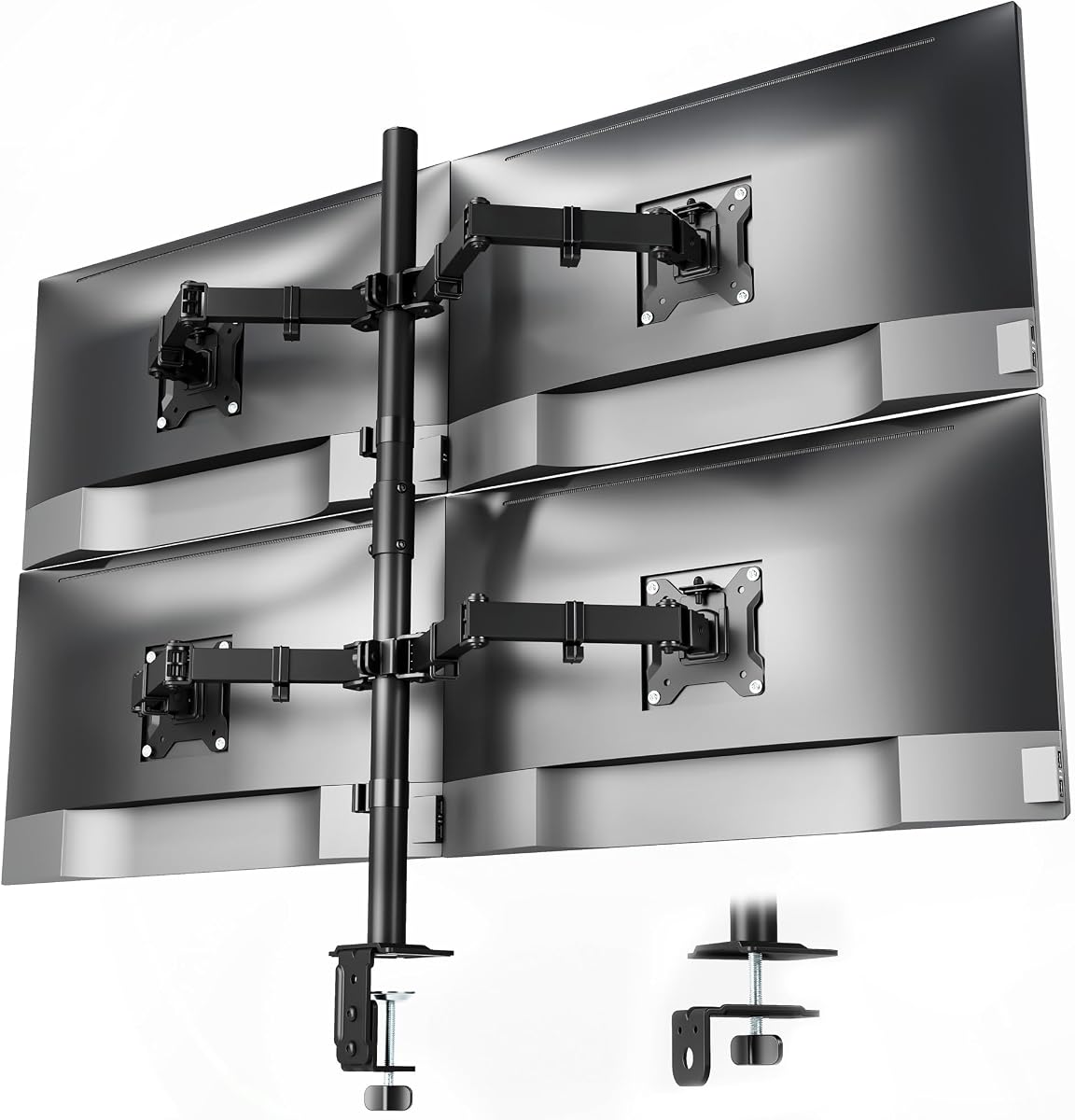
The VIVO Pneumatic Arm Quad Ultrawide mount is engineered for users with large or heavy monitors. Its premium 4.5 star rating reflects its ability to support screens up to 49 inches with individual arms holding up to 44 lbs.
We may earn a commission when you buy through this link, at no additional cost to you.
Pneumatic technology allows for effortless height adjustments so you can reposition screens with a light touch. The cast aluminum construction ensures durability and scratch resistance while the detachable VESA plates simplify mounting.
While the price is higher than standard models the added stability for heavy ultrawide displays justifies the investment. Ensure your desk is sturdy enough to handle the clamp load especially when using heavier screens.
This mount is perfect for professionals or enthusiasts with wide screens who need reliable support and smooth adjustments. It delivers premium performance for complex setups requiring significant weight capacity and flexibility.
Pneumatic springs counterbalance monitor weight allowing instant height changes without manual tightening or loosening.
Designed specifically for ultrawide screens it accommodates sizes up to 49 inches ensuring secure and stable mounting.
We may earn a commission when you buy through this link, at no additional cost to you.
The MOUNT PRO 4 Monitor Mount offers excellent value for users seeking reliable multi-monitor support without a high cost. With a 4.5 star rating it supports monitors up to 32 inches and handles up to 17.6 lbs per arm.
We may earn a commission when you buy through this link, at no additional cost to you.
Its fully adjustable arms provide tilt swivel and rotation options allowing you to customize your viewing angles easily. The extra tall pole supports flexible viewing heights whether you are sitting or standing.
Though it may not offer the heavy-duty build of premium models it performs well for standard desktop displays. The straightforward installation process ensures quick setup without needing specialized tools or extensive technical knowledge.
This mount is an ideal choice for budget-conscious buyers who need a functional quad setup. It balances cost and performance making it accessible for home offices or small workspaces needing organization.
Delivers essential features like full motion and sturdy support at a price point accessible to most users.
An extra tall pole enables adjustable viewing positions suitable for sitting standing or ergonomic workstations.
We may earn a commission when you buy through this link, at no additional cost to you.
The PUTORSEN Quad Monitor Mount is designed for users who want to combine large ultrawide screens with standard monitors. Its 4.5 star rating highlights the robust steel construction and reliable gas spring mechanism.
We may earn a commission when you buy through this link, at no additional cost to you.
The design supports a 49-inch ultrawide on top with three 27-inch monitors below offering a unique multitasking canvas. This layout is ideal for trading setups or complex workflows needing varied screen sizes.
The three-section arm design distributes weight evenly preventing sagging over time. You can also adjust the extension to fit your space tightly without compromising stability during adjustments.
This mount is best suited for professionals needing a mix of screen sizes without cluttering their desk. It offers specialized functionality for those who prioritize layout versatility over uniform screen support.
Accommodates a large ultrawide on top with standard screens below enabling diverse multi-tasking configurations.
Three-section arms spread weight evenly ensuring monitors remain stable and level without sagging.
We may earn a commission when you buy through this link, at no additional cost to you.
The monTEK Quad Monitor Stand offers reliable performance for users needing uniform support across four displays. Rated at 4.5 stars it supports screens up to 32 inches with a consistent 22 lbs capacity per arm.
We may earn a commission when you buy through this link, at no additional cost to you.
Its advanced joint design ensures stability preventing sagging and keeping displays level. Integrated cable organizers help maintain a clean workspace by hiding wires along the arms neatly.
Quick-release VESA plates simplify attaching monitors while the straightforward assembly process allows for fast setup. It fits well in standard office or home settings without requiring specialized desk configurations.
This stand is ideal for users seeking a dependable and simple quad mount. It balances functionality and ease of use making it a solid choice for routine multi-monitor needs.
Advanced joints prevent sagging ensuring monitors remain level and stable during frequent adjustments.
Quick-release VESA plates allow for easy attachment and removal of monitors without tools.
We may earn a commission when you buy through this link, at no additional cost to you.
The MOUNTUP Quad Monitor Stand is designed for quick and easy setup with reliable performance. Its 4.5 star rating reflects smooth assembly and solid construction suitable for screens up to 32 inches.
We may earn a commission when you buy through this link, at no additional cost to you.
The fully adjustable arms allow for full motion positioning including tilt swivel and rotation. Quick-release VESA plates make attaching monitors simple ensuring you can start using the stand quickly.
Cable clips keep wires organized reducing visual clutter on your desk. The company offers a 3-year support warranty which adds confidence in the long-term durability of the product.
This stand is best for users who prioritize ease of installation and customer support. It delivers good value for home offices needing organized and adjustable multi-monitor setups.
Designed for fast assembly allowing users to get their multi-monitor setup running in minutes.
Includes a 3-year support warranty providing added peace of mind for your purchase.
We may earn a commission when you buy through this link, at no additional cost to you.
The VIVO Quad Pneumatic Monitor Mount provides smooth height adjustments for up to four monitors. Rated at 4.4 stars it uses dual pneumatic arms to counterbalance screens ensuring easy positioning.
We may earn a commission when you buy through this link, at no additional cost to you.
The drill-free C-clamp mounting system allows quick installation without damaging your desk. Its heavy-duty steel and aluminum support keeps monitors stable while tension can be adjusted for different weights.
While it is limited to 32-inch screens the pneumatic mechanism makes daily use effortless. The clamp works best on desks up to 3.25 inches thick so verify your desk specifications before buying.
This mount is ideal for users valuing fluid motion and solid build quality. It works well in office settings where frequent screen repositioning is common.
Dual pneumatic springs allow for smooth effortless height adjustments with minimal effort.
Drill-free C-clamp allows fast secure mounting without requiring permanent desk modifications.
We may earn a commission when you buy through this link, at no additional cost to you.
The Pholiten Quad Monitor Arm Desk Mount uses advanced gas spring technology for effortless adjustments. With a 4.4 star rating it supports up to 32 inch screens weighing up to 10kg each.
We may earn a commission when you buy through this link, at no additional cost to you.
The gas spring arms enable smooth forward backward and vertical adjustments reducing strain during setup. Two installation options C-clamp and grommet provide flexibility for different desk types.
While the weight capacity is slightly lower than steel-only models the gas springs offer superior usability for daily adjustments. It saves desk space by lifting screens cleanly off the surface.
This mount is suitable for users needing fluid positioning with standard sized monitors. It balances cost and function making it a practical choice for home or office use.
Advanced gas springs ensure smooth effortless adjustments for enhanced ergonomic comfort.
C-clamp and grommet options allow versatile mounting on most desk types.
We may earn a commission when you buy through this link, at no additional cost to you.
The WALI Quad Monitor Desk Mount offers strong performance with a high 4.6 star rating. It supports monitors up to 32 inches with a robust 22 lbs capacity per arm.
We may earn a commission when you buy through this link, at no additional cost to you.
Its two-stage locking system adapts to both C-clamp and grommet bases ensuring secure mounting. Built-in cable management guides wires along the arms keeping your desk tidy and organized.
The height adjustable pole allows flexible positioning reducing neck strain during long work hours. While assembly may take some time the result is a stable efficient workspace solution.
This mount is ideal for users seeking high weight capacity and space efficiency. It balances performance and organization making it a strong choice for productivity-focused workstations.
Supports up to 22 lbs per arm handling heavier monitors without sagging issues.
Built-in cable guides keep wires tidy and hidden along the mounting arms.
We may earn a commission when you buy through this link, at no additional cost to you.
The VIVO Quad Monitor Mount provides reliable support for home office environments with a 4.3 star rating. It holds monitors up to 32 inches with a weight capacity of 22 lbs per arm.
We may earn a commission when you buy through this link, at no additional cost to you.
Fully adjustable arms allow tilt swivel and rotation helping you find optimal viewing angles. The clamp mounts without drilling protecting your desk surface with included padding.
Its design is straightforward ensuring users can set it up quickly. While it lacks premium features it delivers solid performance for standard home or office setups.
This mount is best for users needing a budget-friendly reliable solution. It offers good value for those prioritizing functionality and desk space recovery.
Provides essential features like full motion and weight capacity at an accessible price.
C-clamp with padding allows secure mounting without permanent desk changes.
We may earn a commission when you buy through this link, at no additional cost to you.
Choosing the right quad monitor mount involves balancing screen size compatibility weight capacity and adjustability to match your workspace needs.
Ensure the mount supports your screens maximum diagonal size most models range from 13 to 32 inches though some high-end units support up to 49 inches.
Check the manufacturer specifications to confirm your specific monitors fit before purchasing to avoid returns.
Each arm has a maximum weight limit typically ranging from 17.6 lbs to 44 lbs depending on the model and build material.
Weigh your monitors and choose a mount with capacity above that number to prevent sagging over time.
Most monitors use VESA patterns of 75x75mm or 100x100mm for mounting verify your screens have compatible holes.
If your monitor lacks VESA holes you may need an adapter which can reduce stability and should be factored into your decision.
Check the clamp or grommet compatibility to ensure it fits your desk thickness most mounts support 0.5 to 3.5 inches.
Thicker desks might need extension pieces or alternative mounting solutions which adds to cost and complexity.
Look for mounts offering tilt swivel and rotation to find ergonomic positions that reduce strain during long work sessions.
Pneumatic or gas spring mechanisms make adjustments smoother and easier compared to manual tightening systems.
Integrated cable clips or channels help keep wires organized and hidden improving the overall look of your workspace.
Proper cable routing prevents tangles and reduces the risk of accidental disconnections during adjustments.
Steel and aluminum are common materials offering durability and resistance to bending under heavy loads.
Premium models often use cast aluminum for better scratch resistance and overall stability.
Check the warranty period provided by the manufacturer as this indicates confidence in product longevity.
Good customer service can help resolve assembly issues or parts replacements efficiently.
Begin by assembling the base and mounting hardware according to the manual ensuring all screws are tightened securely.
Attach the monitor brackets to your screens using the VESA holes and then connect the monitors to the mount arms.
Regularly check the tightening of joints and clamps to maintain stability and prevent drift over time.
Most monitors use either a 75x75mm or 100x100mm VESA pattern for mounting. Check your monitor specifications to ensure compatibility with the mount you choose.
Yes many mounts support curved screens as long as they meet the size and weight requirements. Ensure the mount specifies curved display compatibility in its details.
Prevent sagging by choosing a mount with weight capacity exceeding your monitors total weight. Tighten joints regularly and avoid overloading arms beyond limits.
No most mounts use C-clamp or grommet options that require no drilling. Always check desk thickness compatibility before installation.
Some specialized mounts support ultrawide screens up to 49 inches. Standard mounts usually cap at 32 inches so verify size limits before purchasing.
Use a soft cloth and mild cleaner to wipe down metal parts. Avoid harsh chemicals and periodically inspect screws for tightness.
If your desk exceeds the clamp thickness limit consider using a grommet mount or an extension plate if available. Some models offer adjustable clamps for flexibility.
Some mounts allow docking stations to be integrated into the design freeing desk space. Check specific product features for docking station support.
We highlighted top picks like the WALI Stacked Mount VIVO Pneumatic Arm and MOUNT PRO for their balance of performance and value.
Prioritize weight capacity and adjustability when selecting a mount to ensure long-term comfort and stability.
Prices change frequently so verify current listings and availability before making your final purchase decision.