
ASRock DeskMini X300
4.2Editor score
Compact 1.92L form factor
Supports AM4 socket CPUs
Triple display capability included
Flexible storage options available
This guide compares the top barebone PCs with AMD processors for 2026, evaluating performance, cooling, and connectivity to help you find the perfect mini PC.
Barebone PCs with AMD processors offer a unique blend of power and flexibility for enthusiasts and professionals. These compact systems allow you to customize components like RAM and storage, ensuring your setup meets exact needs without paying for pre-installed parts you might not use.
We evaluated ten leading models based on processing power, thermal management, and port variety. Our analysis focuses on real-world capabilities like gaming, video editing, and office multitasking. Each entry is chosen for its ability to deliver strong value and reliable performance in a small form factor.
Every selection in this list highlights distinct strengths, from budget-friendly options to high-end workstations. Note that availability and stock levels may shift quickly. Always verify current configurations and compatibility before making your final purchase decision to ensure the system fits your specific workflow requirements.
4.2Editor score

4.1Editor score

3.1Editor score
The following table provides a side-by-side comparison of the top ten barebone PCs with AMD processors available in 2026. It highlights core specifications including processor type, memory support, storage options, and connectivity features to help you quickly identify the best fit for your setup.




This AOOSTAR MACO Mini PC stands out with its AMD Ryzen 7 PRO 8845HS processor, which delivers exceptional speed for demanding tasks. It holds a solid 4.0 rating from users who appreciate its compact yet powerful design. The standout quality here is the ability to handle AAA gaming and 4K video editing in a tiny box.
We may earn a commission when you buy through this link, at no additional cost to you.
The processor features 8 cores and 16 threads with a max turbo speed of 5.1GHz. Paired with Radeon 780M graphics, it handles multimedia and gaming without breaking a sweat. The system includes dual DDR5 SO-DIMM slots allowing up to 128GB RAM and supports up to 16TB internal storage via PCIe 4.0 M.2 slots.
While the performance is high, the barebone nature means you must buy RAM and storage separately. The cooling system uses a VC heat spreader which is efficient but might generate some noise under full load. These trade-offs are acceptable given the level of power and port versatility you get in this chassis.
Ideal for gamers and creators who want a desktop-grade CPU in a small frame. You should buy this if you need OCuLink support for external graphics and robust connectivity. It is the top choice for those wanting to build a custom high-performance mini PC.
The inclusion of dual USB4 ports and an OCuLink port ensures you can connect multiple high-resolution displays and external GPUs without bottlenecks.
Crafted with 100% recycled aluminum, the chassis reduces carbon emissions while providing a durable and sleek look for any desk setup.
We may earn a commission when you buy through this link, at no additional cost to you.
The AOOSTAR GEM12+ is a powerful barebone system designed for users who need maximum performance in a small space. It carries a strong 4.5 rating from buyers who have tested its gaming and workstation capabilities. Its key strength lies in its thermal management and high-speed connection options.
We may earn a commission when you buy through this link, at no additional cost to you.
Powered by the AMD Ryzen 7 PRO 8845HS with 16 TOPS AI performance, it handles heavy workloads efficiently. The vapor chamber cooling system transfers heat quickly to ensure sustained performance even during long sessions. It also features a dedicated OCuLink port that operates independently from storage slots.
You must install your own RAM and storage to get this unit running. The OCuLink port is fast but does not support hot-swapping so you need to power off before connecting an external GPU. These limitations are minor given the high throughput and multi-screen support it offers.
Choose this model if you need a mini PC that can drive four 4K displays simultaneously. It is perfect for designers and developers who require multiple monitors and high-speed external graphics access. The premium features justify the cost for professional users.
The dual cooling system with vapor chamber extends machine lifespan by keeping temperatures low even under heavy sustained load.
Adopting advanced VAT architecture cuts power consumption by 5 to 20 percent compared to standard mini computer designs.
We may earn a commission when you buy through this link, at no additional cost to you.
The AOOSTAR GEM12 + PRO offers a compelling mix of performance and customization options for enthusiasts. It holds a 4.1 rating from users who value its flexibility and security features. This model stands out for its fingerprint unlock feature which adds convenience and safety to daily use.
We may earn a commission when you buy through this link, at no additional cost to you.
It features the AMD Ryzen 7 PRO 8845HS which supports up to 128GB RAM and 8TB total storage. The OCuLink port provides 64Gbps bandwidth for external GPUs without using M.2 slots. BIOS modes allow you to switch between silent balanced and performance modes easily.
Since it is a barebone kit you must source memory and storage separately. The fingerprint scanner adds a layer of security that most competitors lack. While the OCuLink requires a power cycle to connect devices the speed and bandwidth make it worth the inconvenience for power users.
This system is best for those who want a secure customizable mini PC for office or gaming use. It suits professionals who need quick access and multi-monitor setups. The included accessories like VESA mounts make it ready for diverse installation scenarios.
Built-in fingerprint recognition simplifies login without complicated passwords enabling quicker and safer access to your device.
Full set of interfaces including HDMI and DP support four screen 4K display for multi-screen office and home theater needs.
We may earn a commission when you buy through this link, at no additional cost to you.
The ASRock DeskMeet X300 is a reliable budget option that brings desktop power to a compact form factor. It has an impressive 4.8 rating from users who value its flexibility and build quality. The main appeal is its ability to host a wide range of AMD CPUs and include a robust power supply.
We may earn a commission when you buy through this link, at no additional cost to you.
It supports AMD AM4 Socket Ryzen processors up to 65W and allows up to 128GB DDR4 memory. The PCIe 3.0 x16 slot allows for significant expansion including dedicated graphics cards. It also features dual M.2 slots and multiple USB ports for versatile connectivity.
You will need to install the CPU and memory yourself which requires some technical skill. The reliance on DDR4 means lower bandwidth compared to newer DDR5 systems but it keeps costs low. This trade-off is acceptable for users on a tight budget who still want expandability.
Buy this if you need a low-cost barebone kit with serious expansion options. It is ideal for IT professionals or hobbyists building a mini PC. The included PSU makes it a complete foundation for a powerful system.
The PCIe 3.0 x16 slot allows for full-size graphics cards or capture cards unlike many mini PC competitors.
A 500W 80+ Bronze PSU is included which is rare for barebone kits and simplifies the build process.
We may earn a commission when you buy through this link, at no additional cost to you.
The MINISFORUM X1 Lite-255 is a versatile mini PC designed for multi-screen work and high-speed data transfer. It carries a 3.9 rating from users who appreciate its connectivity options. The standout feature is the full USB4 port that supports high-speed data and power delivery.
We may earn a commission when you buy through this link, at no additional cost to you.
It uses the AMD Ryzen 7 255 processor with 8 cores and up to 128GB DDR5 support. The USB4 port can handle 40Gbps data transfer and PD 100W power input. It also supports OCuLink for external GPU needs though an adapter plate is required.
You must install RAM and storage separately and the OCuLink adapter adds a small step to setup. The OCuLink port does not support hot swapping which limits flexibility during operation. These issues are balanced by the strong multi-screen and networking capabilities it offers.
Choose this for office setups that need multiple monitors and fast network speeds. It is great for professionals using external drives or docking stations. The comprehensive port selection makes it a solid all-rounder for daily tasks.
Triple display output allows independent HDMI USB4 and DP connections for a productive multi-screen work environment.
The CPU fan uses PCM phase-change material to ensure memory and SSD run at full speed without thermal throttling.
We may earn a commission when you buy through this link, at no additional cost to you.
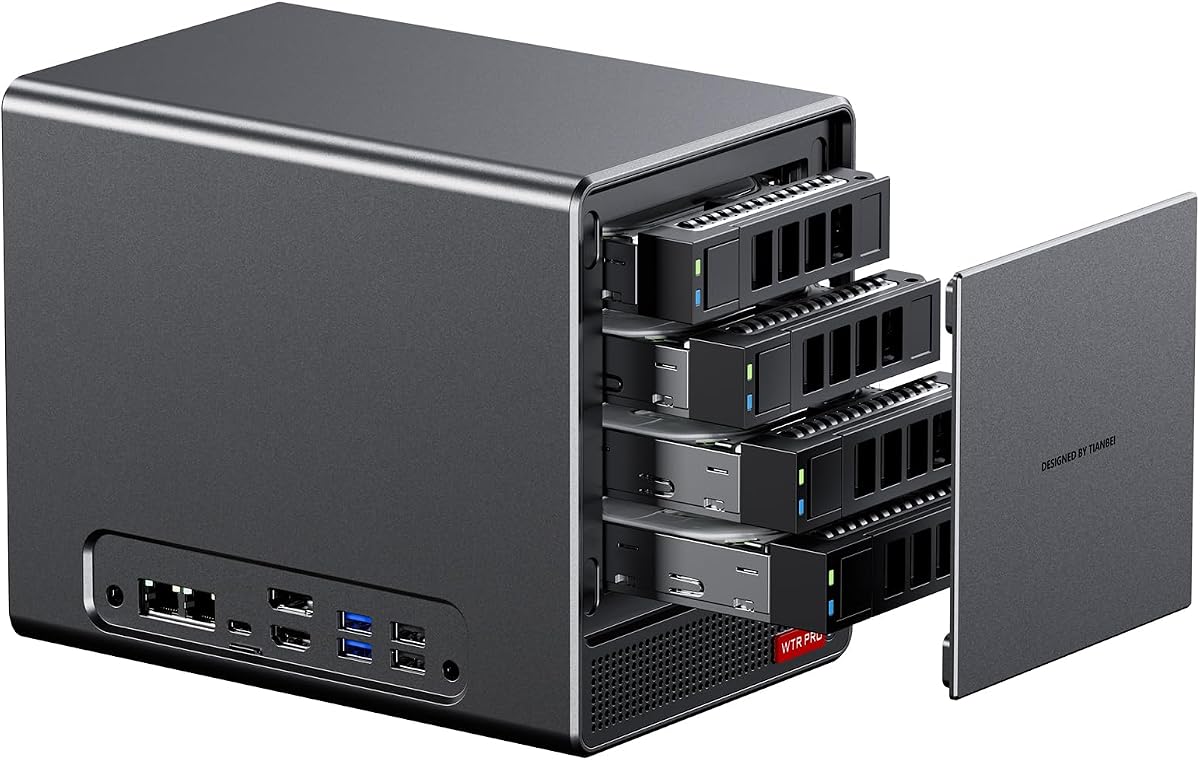
The AOOSTAR WTR PRO is designed specifically for network storage and server tasks. It has a unique design for a barebone mini PC with four bays for hard drives. Users value its ability to run continuously with low power consumption.
We may earn a commission when you buy through this link, at no additional cost to you.
It features the AMD Ryzen 7 5825U processor with 8 cores and 16 threads. The system supports up to 4x 22TB SATA drives plus M.2 NVMe slots. It includes dual 2.5G LAN ports for fast data transfer and network reliability.
This unit is not optimized for gaming but excels in file serving and virtualization. You must buy RAM and drives separately which adds to the initial cost. The low power consumption and dustproof design make it ideal for 24/7 use without much noise.
Ideal for home labs or small businesses needing a private cloud. It suits users building a DIY NAS or soft router. The build quality and cooling ensure stable long-term operation.
4 bays for SATA drives plus M.2 slots allow massive storage capacity up to 88TB for your data needs.
Power consumption ranges from 15W to 25W allowing 24-hour non-stop stable running with minimal energy use.
We may earn a commission when you buy through this link, at no additional cost to you.
The ASRock DeskMini X300 2.5G is one of the smallest barebone kits available. It has a 4.2 rating from users who need a discreet desktop solution. Its tiny size makes it perfect for offices where space is at a premium.
We may earn a commission when you buy through this link, at no additional cost to you.
It supports AMD AM4 Socket Ryzen processors and up to 128GB DDR4 memory. The unit includes dual M.2 slots and 2.5G LAN for fast connectivity. Triple display support via HDMI DisplayPort and D-Sub adds flexibility for monitor setups.
You must buy a compatible CPU separately which requires checking the support list. The use of DDR4 limits memory speed but keeps the system affordable. These constraints are minor considering the extreme compactness and versatility of the chassis.
Buy this if you need a minimal desktop that fits anywhere. It is great for kiosks or thin client setups. The included power adapter and support make it easy to deploy.
The 1.92L volume allows for installation in tight spaces or mounting behind monitors for a clean look.
Dedicated M.2 slot for Wi-Fi Bluetooth modules adds wireless capability to this wired mini PC.
We may earn a commission when you buy through this link, at no additional cost to you.
The ASUS ExpertCenter PN54 pushes boundaries with next-generation AI capabilities. It has a 3.1 rating from early adopters who value future-proof features. The standout feature is its XDNA2 NPU which delivers 50 TOPS for AI tasks.
We may earn a commission when you buy through this link, at no additional cost to you.
Powered by AMD Ryzen AI 300 Series processors it supports up to four 4K displays. The chassis is incredibly thin at 0.6L and supports Wi-Fi 7 for ultra-fast wireless. It includes 6 USB ports and dual 2.5G LAN for robust connectivity.
This system lacks internal RAM so you must install it separately. The new platform might have limited driver support initially. These trade-offs are worth it for users needing high-speed AI and future connectivity standards.
Choose this for advanced AI workloads or enterprise deployments. It suits users who need the latest wireless and processing tech. The toolless design allows easy upgrades and customization.
Cutting-edge XDNA2 NPU with up to 50 TOPS provides 5x faster AI performance than before for dynamic computing.
The 0.6L eco-conscious chassis sets a new standard for thin and light computing performance.
We may earn a commission when you buy through this link, at no additional cost to you.
The AOOSTAR WTR PRO 4+2 Bay is an expanded NAS solution for serious storage needs. It has a 3.7 rating from users who appreciate its flexibility. The design supports 4 SATA drives and 2 M.2 slots for a massive 96TB total capacity.
We may earn a commission when you buy through this link, at no additional cost to you.
It uses the AMD Ryzen 7 5825U processor and supports multiple operating systems like Windows and Ubuntu. Dual 2.5G LAN ports enable high-speed networking and triple 4K display output aids management. It runs on low power and stays cool with large cooling fans.
You must configure Linux settings for SATA link power management to avoid speed reductions. This is a known system-level behavior rather than a defect. The need for manual configuration is minor compared to the storage flexibility it offers.
This is best for home servers or small businesses. It suits users needing massive local storage and virtualization. The comprehensive ports and system support make it a reliable choice.
Supports installation of Windows Ubuntu and OpenWrt for wide application scenarios including soft router use.
Dustproof structure and intelligent fan speed ensure low noise and stable long-duration operation.
We may earn a commission when you buy through this link, at no additional cost to you.
The ASUS ExpertCenter PN54-S1 offers a strong balance of features and cost. It holds a solid reputation among users for reliability and durability. The standout qualities include Wi-Fi 7 support and a tool-free design for easy access.
We may earn a commission when you buy through this link, at no additional cost to you.
It features AMD Ryzen 200 Series processors and Radeon 740M graphics for up to four 4K displays. The chassis is sleek at 34mm thick and supports Wi-Fi 7 for future-proof connectivity. Dual 2.5G LAN ensures fast wired connections for business use.
You must install RAM and storage separately which requires some technical work. The lack of OS means you need your own license or Linux install. These are standard for barebone kits and allow total control over the system.
Buy this if you need a reliable workhorse with modern connectivity. It is great for office environments or home labs. The 3Y warranty adds peace of mind for long-term use.
Enjoy ultrafast connectivity with Wi-Fi 7 and Bluetooth 5.4 for next-generation wireless performance.
Tool-free design allows quick access and easy component upgrades without hassle.
We may earn a commission when you buy through this link, at no additional cost to you.
Selecting the right barebone PC requires careful consideration of several key factors to ensure it meets your needs.
AMD processors come in various architectures like Zen 4 and Zen 3 which determine performance levels. Check if the CPU supports your workload such as gaming or video editing.
Choose newer architecture like Zen 4 for better performance and energy efficiency.
RAM capacity and speed significantly affect multitasking and application performance. Most mini PCs support DDR5 which is faster than DDR4.
Look for systems supporting at least 64GB for heavy tasks and check slot compatibility.
Barebone kits usually lack storage so you must install SSDs yourself. Check for M.2 slot support for speed and capacity.
Prioritize PCIe 4.0 M.2 slots for the fastest data transfer speeds.
Ports like USB4 and OCuLink determine external device capabilities. USB4 supports high-speed data and video while OCuLink is for external graphics.
Ensure the unit has enough ports for your monitors and peripherals.
Thermal performance is critical in compact units to avoid throttling. Vapor chambers are more effective than standard air cooling.
Look for advanced cooling solutions if you plan to run high-performance tasks.
Most barebone kits do not include an OS so you must install one yourself. Check compatibility with Windows or Linux.
Confirm your OS license and installation process before purchasing.
Some units offer PCIe slots for dedicated graphics or capture cards. This is vital for gaming or specialized workflows.
Choose models with PCIe slots if you need dedicated hardware upgrades.
Materials like aluminum offer better heat dissipation and durability. Eco-friendly designs reduce environmental impact.
Select units with metal chassis for longevity and better cooling.
To start using your barebone PC install compatible RAM sticks in the slots and secure the SSDs in the M.2 bays. Ensure all connections are tight before powering on.
Install your operating system using a USB drive and follow the setup wizard. Download all necessary drivers from the manufacturer website for best performance.
Keep the unit in a well-ventilated area to prevent dust buildup. Clean the fans and vents regularly to maintain optimal cooling and performance.
Yes many of the models support external GPUs via OCuLink or USB4 which enables high frame rates. However you should choose units with strong integrated graphics like Radeon 780M for basic gaming without external cards.
No barebone PCs typically exclude RAM and storage to allow user customization. You must purchase compatible DDR4 or DDR5 modules and install them separately.
Yes most models support Windows 10 and 11. You will need to create a bootable USB drive with the OS image and perform the installation yourself.
OCuLink is a high-speed connection standard for external devices like GPUs. It offers faster speeds than USB4 and is ideal for expanding gaming or workstation capabilities.
Most units support up to 64GB or 128GB DDR5 depending on the model. Check the specific product specs to ensure capacity meets your workload requirements.
Basic assembly is required to install RAM and SSDs. If you are comfortable with opening a PC and following instructions the setup is straightforward.
Yes AMD processors use advanced power-saving architectures that keep energy use low. This makes them ideal for always-on servers and office use.
Yes many models support virtualization and multiple drives for NAS use. They are excellent for building private clouds and soft routers.
This guide reviewed ten top barebone PCs with AMD processors offering a mix of power and flexibility. From the versatile AOOSTAR MACO to the compact ASRock DeskMini each system has unique strengths for different users.
When selecting a unit prioritize processor speed and connectivity ports that match your workflow. Ensure the system supports the RAM and storage capacities you need for long-term use.
Always verify current stock and warranty terms before purchase. These systems provide excellent value for those willing to customize their setup.