
MINISFORUM MS-S1 MAX
4.5Editor score
AMD Ryzen AI Max+ 395
128GB LPDDR5x Unified Memory
Dual Unit Cluster Support
This guide compares the top ten dual GPU AI setups for local model inference and training across consumer and enterprise hardware configurations.
Building a dual GPU AI setup requires careful selection of hardware components to ensure efficient model inference and training capabilities.
We analyzed the latest workstation and server configurations to identify systems offering superior compute power and memory bandwidth for artificial intelligence.
Each pick highlights specific strengths and limitations so you can choose the right system while noting that prices change frequently on the market.
4.5Editor score

5.0Editor score

5.0Editor score
The following table provides a side-by-side comparison of key specifications and capabilities across all ten reviewed dual GPU AI systems.


This unique dual GPU card combines two Arc Pro B60 GPUs to deliver massive 48GB VRAM for running large language models locally.
We may earn a commission when you buy through this link, at no additional cost to you.
It achieves a combined 394 TOPS compute power and supports modern standards like PyTorch and vLLM for efficient inference workflows.
While it requires a specific PCIe bifurcation setup, the cost savings compared to enterprise cards make it highly accessible for enthusiasts.
Buyers seeking a high capacity consumer solution for local LLM deployment will find this card unmatched in value and performance.
The 48GB memory pool allows you to run 70B class quantized models without needing external cloud services or additional cards.
Using two PCIe 5.0 x8 lanes allows standard workstations to achieve full bandwidth without server grade motherboards.
We may earn a commission when you buy through this link, at no additional cost to you.
This workstation delivers professional grade performance with two RTX PRO 6000 GPUs and substantial system memory for complex tasks.
We may earn a commission when you buy through this link, at no additional cost to you.
It is preloaded with Windows 11 Pro and tested to ensure reliability for demanding AI training and inference workloads.
The cooling solution is robust with liquid cooling to maintain performance during extended usage periods without throttling.
Organizations needing ready to use professional hardware will appreciate the turnkey nature and support included with this build.
RTX PRO 6000 Blackwell GPUs provide stable drivers and optimized performance for professional AI pipelines.
With 256GB DDR5 RAM you can load large datasets into memory without swapping to slower storage devices.
We may earn a commission when you buy through this link, at no additional cost to you.
This build pairs the latest GeForce RTX 5090 graphics cards with a high end processor for exceptional raw compute speed.
We may earn a commission when you buy through this link, at no additional cost to you.
It includes 256GB of DDR5 memory and fast NVMe storage to handle large datasets and model weights efficiently.
Liquid cooling ensures the system stays stable under load while custom cable management keeps the interior organized.
Advanced users who want maximum consumer hardware performance in a ready made system will find this configuration compelling.
The GeForce RTX 5090 offers top tier performance for AI inference and rendering tasks compared to previous generations.
Eight terabytes of NVMe storage in RAID provides quick access to multiple large models and training data.
We may earn a commission when you buy through this link, at no additional cost to you.
This personal AI desktop supercomputer brings enterprise scale capabilities to your desk with integrated Grace Blackwell architecture.
We may earn a commission when you buy through this link, at no additional cost to you.
Each unit provides 128GB of unified memory enabling you to run large models up to 200 billion parameters locally.
The design focuses on energy efficiency and easy deployment allowing for rapid prototyping without cloud dependencies.
Enterprises looking to augment their existing resources with local high performance computing will benefit from this setup.
With 128GB per unit the system avoids VRAM bottlenecks and accelerates data transfer between CPU and GPU.
Seamless integration with NVIDIA AI tools simplifies development and deployment across different environments.
We may earn a commission when you buy through this link, at no additional cost to you.
This server configuration offers unmatched power for clusters with two EPYC processors and support for up to eight powerful GPUs.
We may earn a commission when you buy through this link, at no additional cost to you.
It features 24 channel DDR5 ECC memory ensuring data integrity for critical AI training and scientific computing tasks.
The rackmount design includes hot swap drives and advanced management software for efficient deployment and ongoing maintenance.
Large organizations requiring maximum density and reliability will find this system essential for their high performance infrastructure.
With 192 cores available the CPU handles massive parallel processing tasks without slowing down GPU operations.
Supporting up to eight GPUs allows you to scale your workload significantly as your models grow in complexity.
We may earn a commission when you buy through this link, at no additional cost to you.
This workstation is built for intensive workflows like surveying and AI with a 32 core Threadripper processor and ECC memory.
We may earn a commission when you buy through this link, at no additional cost to you.
It includes a powerful RTX 5090 with 32GB VRAM to handle graphics and compute tasks efficiently.
The cooling system uses a 360mm liquid cooler to keep temperatures low during heavy usage sessions.
Professionals needing reliable compute power with memory correction for precision tasks will appreciate this configuration.
The 32 core processor excels at multi-threaded tasks essential for data processing and simulation workloads.
Error correcting RAM ensures data integrity which is crucial for scientific research and large dataset processing.
We may earn a commission when you buy through this link, at no additional cost to you.
This workstation delivers massive resources with three RTX PRO 6000 GPUs and 768GB of memory for complex engineering tasks.
We may earn a commission when you buy through this link, at no additional cost to you.
It is designed to handle local LLM training and deep learning models without relying on external cloud latency.
The system comes fully assembled with Windows 11 Pro and undergoes rigorous stress testing for reliability.
Researchers and engineers needing a local server class environment in a desktop form factor should consider this build.
With 768GB of RAM you can process extremely large datasets and complex CAD assemblies without constraints.
Three RTX PRO 6000 GPUs provide extensive VRAM for multi model inference and high fidelity rendering work.
We may earn a commission when you buy through this link, at no additional cost to you.
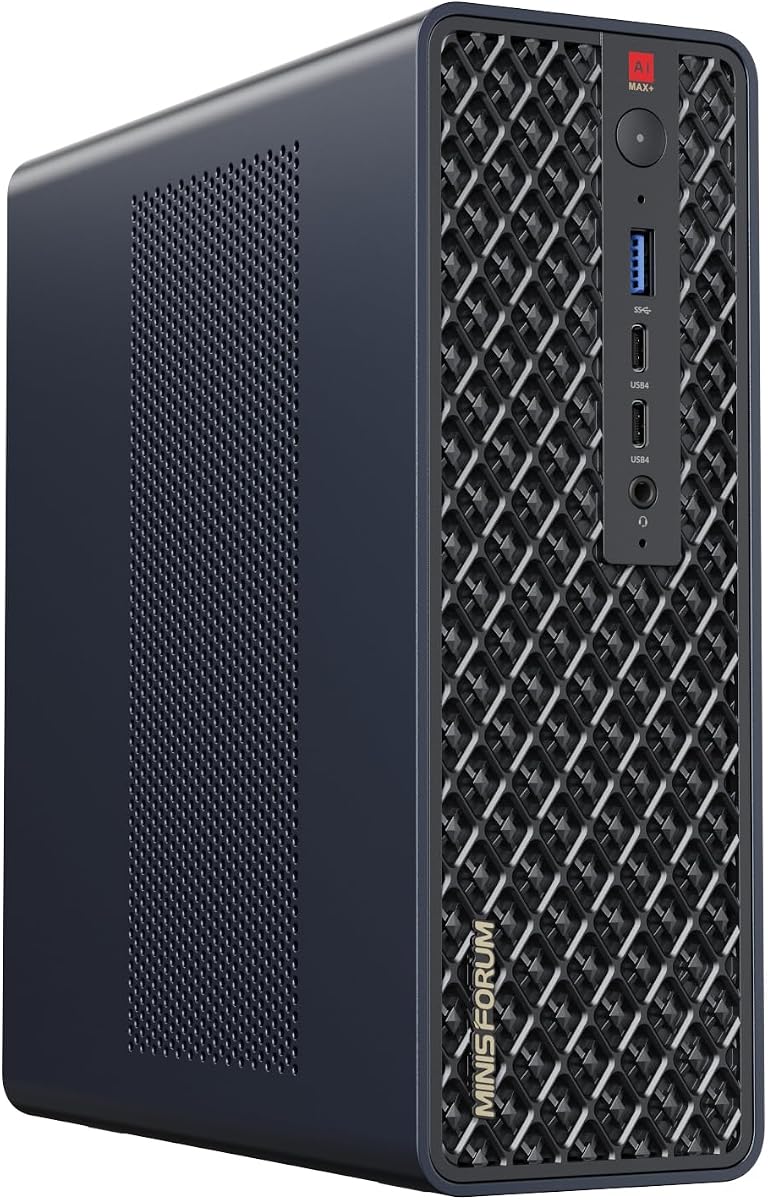
This compact workstation integrates a powerful APU with massive unified memory for efficient AI inference in a small case.
We may earn a commission when you buy through this link, at no additional cost to you.
It supports clustering which allows you to connect multiple units for even larger model capacities locally.
High speed ports like USB4 V2 ensure fast data transfer for external storage or networked workflows.
Users seeking a cost effective and small footprint AI setup will find this unit highly versatile and accessible.
The 128GB LPDDR5x is shared between CPU and GPU eliminating bottlenecks and speeding up data access.
Connecting multiple MS-S1 MAX units enables distributed processing for running larger models than one unit can handle.
We may earn a commission when you buy through this link, at no additional cost to you.
This graphics card provides 96GB of memory to eliminate VRAM bottlenecks for local generative AI and data science pipelines.
We may earn a commission when you buy through this link, at no additional cost to you.
It uses the efficient Max-Q design to deliver high performance while capping power consumption for thermal efficiency.
Engineers and researchers benefit from the reliable ECC memory and enterprise grade drivers for consistent operation.
Upgrading your existing system with this component offers a significant leap in capability for complex visual and AI work.
With nearly 1800 GB/s bandwidth data moves quickly to the GPU allowing for faster inference times.
The power cap ensures the card runs cooler and quieter while still providing top tier performance for tasks.
We may earn a commission when you buy through this link, at no additional cost to you.
This mini workstation brings significant AI power to a small form factor with integrated graphics and unified memory.
We may earn a commission when you buy through this link, at no additional cost to you.
It supports multiple 8K video outputs making it ideal for digital signage or multi monitor productivity environments.
The cooling system uses advanced phase change technology to maintain stable performance even under continuous loads.
Professionals needing a small desktop that can still handle AI tasks and graphics processing will find this useful.
Five video outputs allow you to connect multiple high resolution monitors for detailed engineering or data analysis work.
Dual 10G LAN ports enable fast wired networking which is essential for local model servers and file transfers.
We may earn a commission when you buy through this link, at no additional cost to you.
Selecting the right dual GPU AI setup involves balancing performance budget and specific workload requirements.
Virtual RAM capacity is the most critical factor for running large language models locally because models must fit within memory limits.
Look for systems offering at least 48GB total VRAM to support advanced quantized models without needing external services.
Dual GPU systems demand high wattage power supplies to ensure stable operation under heavy load without unexpected shutdowns.
Choose a PSU rated for 1000W or more depending on the specific GPU models you intend to install.
Ensure your motherboard supports PCIe lane bifurcation so that multiple GPUs can operate at full bandwidth simultaneously.
Check the manual for specific slot configurations to avoid performance bottlenecks during intensive computation tasks.
Efficient cooling is vital for maintaining performance during long training or inference sessions to prevent thermal throttling.
Consider systems with liquid cooling or high airflow cases to keep temperatures stable over extended periods.
Verify that your chosen hardware supports the AI frameworks you use such as PyTorch or TensorFlow through verified drivers.
Enterprise grade cards often offer better support for professional tools and optimized libraries for specific tasks.
Select a chassis and motherboard that allow for future upgrades like additional storage or memory expansion slots.
Planning for growth now can save significant costs compared to replacing the entire system later.
Determine your budget early as dual GPU setups can range from affordable enthusiast builds to expensive enterprise servers.
Prioritize components that offer the best performance per dollar for your specific AI workload needs.
Measure your workspace before buying to ensure the physical dimensions of the system fit comfortably without restricting airflow.
Compact mini workstations are available if space is limited but may offer lower expansion potential than full towers.
Begin by installing the latest drivers and frameworks compatible with your hardware to ensure optimal performance.
Monitor temperatures and power consumption regularly using software tools to maintain system stability during operation.
Keep the interior dust free and ensure air vents are not blocked to prolong the life of your components.
For effective local inference on large models you should aim for at least 48GB of combined VRAM. This allows running 70B parameter class models without relying on cloud services.
Not all motherboards support full bandwidth for multiple GPUs. You need a board that supports PCIe lane bifurcation to ensure both cards perform at peak speeds.
Yes you should use frameworks like PyTorch or vLLM that support multi GPU configurations. Enterprise GPUs often have certified drivers for stability.
Expect to need at least 1000W of power supply capacity to handle the load of two high end GPUs plus the rest of the system.
Local setups offer privacy and no subscription fees but may have higher upfront costs. Cloud is better for intermittent tasks needing massive scale.
Use a case with high airflow and consider liquid cooling for the CPU. Ensure the GPUs are spaced properly to prevent heat recirculation.
Yes if you chose a modular chassis and motherboard. Ensure your power supply has enough headroom for future component upgrades.
Newer mini workstations offer integrated NPUs and unified memory capable of running smaller models locally but are less powerful than full dual GPU towers.
The WEELIAO MAXSUN Arc Pro and APC systems offer excellent balance between consumer accessibility and professional power.
Prioritize VRAM capacity and cooling efficiency to ensure your setup runs smoothly during intensive AI workloads.
Remember to check current availability and pricing before purchasing as hardware costs fluctuate regularly.