
Logitech Brio 101 Full HD
4.4Editor score
Auto-Light Balance technology
Integrated privacy slide cover
Built-in microphone
This guide compares the top 1080p webcams for streaming and meetings, highlighting video quality, audio features, privacy options, and compatibility for 2026.
Finding the right webcam can transform your video calls and streaming sessions. A good 1080p webcam ensures crisp images, clear audio, and reliable performance for both professional and personal use.
We evaluated ten top models based on image quality, microphone performance, privacy features, and ease of setup. Each product offers unique strengths tailored to different needs and budgets.
Every pick below highlights key specs, pros, cons, and ideal use cases. Prices fluctuate, so check current listings before buying. This guide helps you choose confidently.
4.4Editor score

4.6Editor score

4.4Editor score
This side-by-side comparison highlights key specs across all ten models to help you decide quickly. Review image quality, microphone type, and privacy features for your needs.




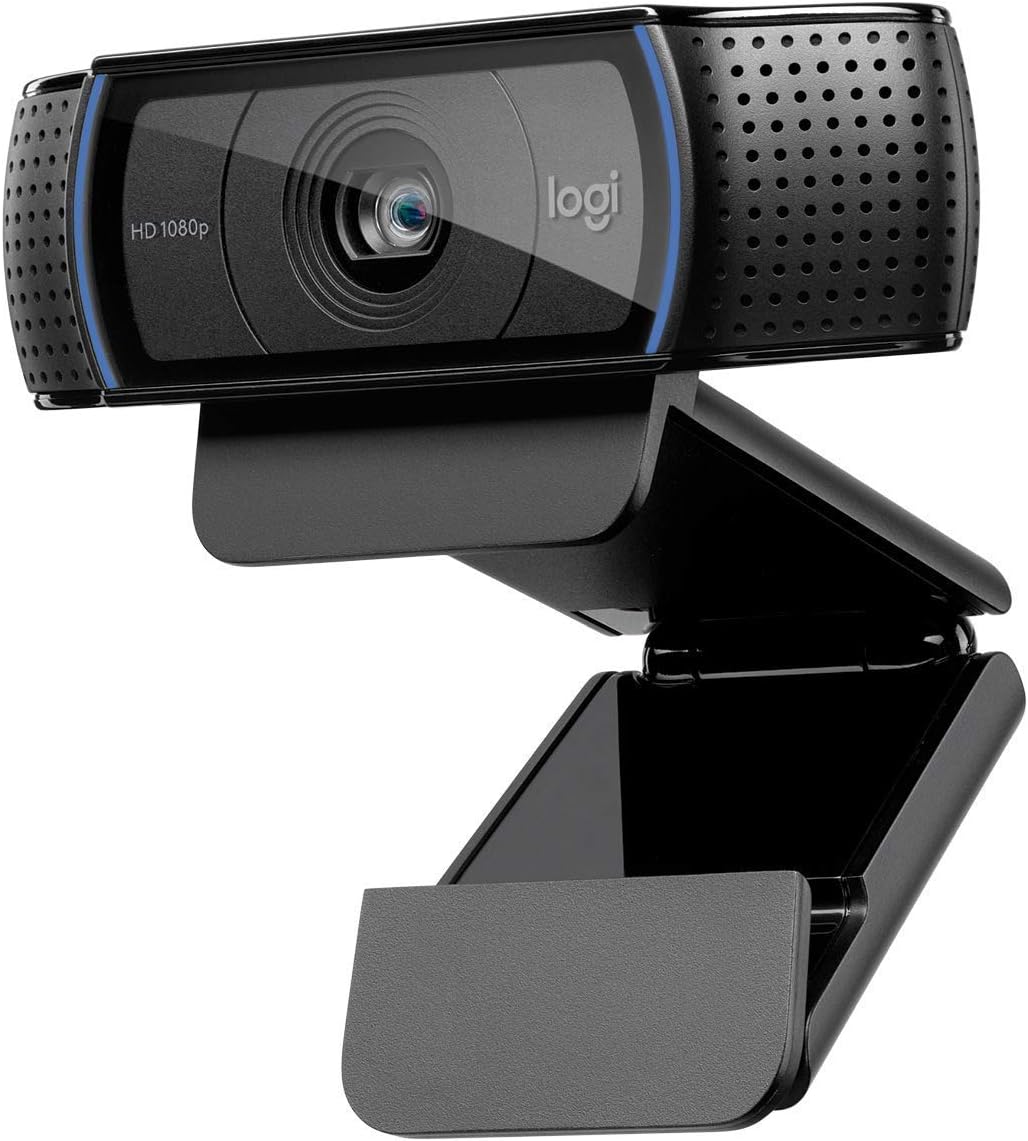


The Logitech C920x HD Pro earns our Editor's Choice for its consistent 1080p performance at 30fps. It balances quality and usability for most users.
We may earn a commission when you buy through this link, at no additional cost to you.
Its HD autofocus ensures sharp focus across the frame, while dual mics deliver natural sound. Light correction helps in dim environments.
The lack of a privacy shutter is a trade-off, but many users prefer the simplicity. Performance remains reliable across platforms.
Buy this if you want a dependable webcam for calls and streaming without extra costs. It stands out for clarity.
The autofocus adjusts quickly to keep you sharp, even if you move around the frame during calls.
Dual microphones capture voice clearly, reducing noise and avoiding the need for a separate mic.
We may earn a commission when you buy through this link, at no additional cost to you.
The Logitech Brio 101 offers the best value for budget buyers needing 1080p resolution. RightLight enhances brightness in poor lighting.
We may earn a commission when you buy through this link, at no additional cost to you.
A privacy slide provides quick protection without extra parts. The built-in mic is functional though not the most immersive.
Trade-offs include fixed focus and simpler audio, which fit low-cost expectations. Video remains clear for calls.
Choose this for basic work or casual streaming where cost matters most. It delivers reliable 1080p quality.
RightLight boosts brightness by up to 50%, ensuring you look balanced even in dimly lit rooms.
The integrated privacy slide covers the lens instantly, giving you control over when you're visible.
We may earn a commission when you buy through this link, at no additional cost to you.
The EMEET S600 stands out as a premium webcam with a Sony sensor and 60fps 1080p. PDAF autofocus tracks you sharply.
We may earn a commission when you buy through this link, at no additional cost to you.
Adjustable FOV at 1080p lets you tailor the frame. Noise filtering keeps audio clean for professional use.
It requires software for some customizations, and pricing is higher than typical 1080p models. Video quality justifies the cost.
Select this for streaming or business where performance matters. It blends 4K sensors with 1080p speed.
At 1080p, this camera delivers 60fps, providing smoother motion than standard 30fps webcams.
Phase detection autofocus locks on quickly and stays steady, even with movement in the room.
We may earn a commission when you buy through this link, at no additional cost to you.
The Logitech C920S adds a privacy shutter to the proven C920 base. It balances security with strong 1080p performance.
We may earn a commission when you buy through this link, at no additional cost to you.
HD autofocus keeps images sharp, and stereo mics capture clean audio. The shutter protects privacy without apps.
It omits the XSplit license, and low-light handling is not exceptional. Still, it ranks high for privacy.
Buy this if security matters alongside image quality. It offers reliable 1080p for work or calls.
The snug privacy shutter covers the lens, giving you peace of mind without extra steps.
Dual microphones capture natural sound, enhancing voice clarity for calls and recordings.
We may earn a commission when you buy through this link, at no additional cost to you.
The Logitech C920e is certified for Microsoft Teams and Zoom, making it ideal for enterprise use. It balances clarity with workplace features.
We may earn a commission when you buy through this link, at no additional cost to you.
The privacy screen covers the lens when needed, and omnidirectional mics ensure clear voice capture. Auto light aids meetings.
The FOV is narrower than others, limiting group views. It lacks 4K, but business needs are well served.
Choose this for team meetings where certification and privacy matter. It performs reliably in office setups.
Certified for major platforms, this webcam ensures seamless integration with work tools like Teams and Zoom.
The flip privacy screen lets you cover or expose the lens, confirming visibility with a glance.
We may earn a commission when you buy through this link, at no additional cost to you.
The EMEET C960 offers a 90-degree wide-angle lens, capturing more of your room for broader calls. It suits groups or multi-person setups.
We may earn a commission when you buy through this link, at no additional cost to you.
Privacy cover protects the lens, and dual omnidirectional mics improve audio. USB-C and USB-A adaptability adds versatility.
Fixed focus and basic audio are trade-offs. Still, it delivers clear 1080p at a budget price.
Buy this for wide views without premium costs. It works well for casual and small business calls.
The 90-degree lens captures more of your room, reducing the need for frequent camera shifts.
Both USB-A and USB-C connections ensure it works with various computers and docks easily.
We may earn a commission when you buy through this link, at no additional cost to you.
The NexiGo N60 delivers 1080p clarity with a 3.6mm glass lens and a privacy cover. It's a budget-friendly pick for daily calls.
We may earn a commission when you buy through this link, at no additional cost to you.
Noise-canceling mic reduces ambient noise, and plug-and-play makes setup quick. Software allows basic control.
It has a fixed focus zone and lacks advanced autofocus. Still, image quality holds up for the price.
Choose this for casual use where cost and clarity matter. It offers solid 1080p without extra software.
A glass lens provides sharper images than plastic, keeping details crisp during calls.
Built-in noise-canceling technology reduces background noise, enhancing voice clarity for recordings.
We may earn a commission when you buy through this link, at no additional cost to you.
The Logitech HD Pro C920 remains a classic choice for 1080p video calling. Its autofocus and dual mics deliver consistent quality.
We may earn a commission when you buy through this link, at no additional cost to you.
It works across platforms and offers easy mounting. The design is mature, lacking newer privacy features.
Trade-offs include no shutter and outdated styling, but performance holds up. It suits basic setups well.
Buy this for simplicity and reliability. It provides proven 1080p video for calls and casual streaming.
The autofocus keeps you sharp across the frame, adapting quickly to shifts in position.
Two mics capture natural audio, reducing noise and improving voice clarity during calls.
We may earn a commission when you buy through this link, at no additional cost to you.
The Logitech Brio 105 is a business-oriented 1080p webcam with RightLight 2 balance and a privacy shutter. It supports remote deployment.
We may earn a commission when you buy through this link, at no additional cost to you.
Auto-Light Balance improves image quality in poor light, ensuring you look professional. Setup is quick via USB.
It lacks advanced 4K features but offers strong value for teams. Privacy and ease of use are key.
Choose this for office or remote work where reliability matters. It delivers clear calls with minimal fuss.
RightLight 2 automatically improves image quality in dim or uneven lighting, so you look balanced.
Compatible with Google Meet and supported by Logitech Sync, it simplifies deployment for companies.
We may earn a commission when you buy through this link, at no additional cost to you.
The Logitech Brio 100 Renewed offers 1080p at a lower price. It provides wide coverage and plug-and-play compatibility for basic use.
We may earn a commission when you buy through this link, at no additional cost to you.
The 58-degree FOV suits individual calls, and the built-in mic is functional. Renewed units are tested for performance.
Support may be limited compared to new models, but value is strong. Video quality remains consistent for meetings.
Choose this for budget buyers needing reliability. It delivers 1080p without the premium cost.
The 58-degree diagonal FOV captures more of your space, keeping you framed during calls.
Renewed units are inspected for performance, ensuring you get quality at a lower price.
We may earn a commission when you buy through this link, at no additional cost to you.
Selecting a webcam involves balancing resolution, audio, and features. These factors help you choose a model that fits your workflow.
Resolution defines image detail. 1080p offers clear video for calls and streaming, while 60fps improves smoothness.
For most users, 1080p at 30fps suffices. Gamers or streamers may prefer 60fps for fluid motion.
Field of view (FOV) controls how much of the room the camera captures. Narrower angles suit solo calls, wider ones fit groups.
Choose 78 degrees or more for flexibility. Avoid extreme angles if you want to stay centered.
Autofocus keeps you sharp as you move. Light correction adjusts exposure in dim rooms, improving image quality.
Models with PDAF or RightLight offer better clarity. These features reduce blurring and shadows.
Built-in microphones vary in quality. Look for noise-canceling or dual mics to ensure clear voice capture.
If you have a separate mic, webcam audio matters less. For all-in-one use, prioritize audio features.
Privacy shutters or covers protect you from unwanted viewing. They provide peace of mind when the camera is idle.
Check if the cover is integrated. External options add bulk but offer flexibility.
Most webcams work with Windows and macOS via USB. Ensure support for your platforms and apps like Zoom or Teams.
Plug-and-play avoids driver hassles. Some models offer software for tweaks if you want control.
Clips attach to laptops or monitors. Tripod mounts offer flexibility for desktop setups or angled views.
A sturdy build ensures stability. Look for clips that grip firmly without slipping.
Webcams range from budget to premium. Higher cost often brings better sensors or features like 60fps.
Set a budget based on your needs. Renewed models can offer savings without losing performance.
Connect the webcam to a USB port and let the system install drivers. Select it as the default camera in your conferencing apps.
Position the webcam at eye level for a natural view. Adjust lighting so the front is well lit, reducing shadows on your face.
Clean the lens with a microfiber cloth to remove smudges. Store it safely when not in use to avoid damage.
Yes, all models listed are compatible with Zoom and other major platforms like Microsoft Teams and Google Meet. Most work with Windows, macOS, and some Linux distributions via USB.
Yes, 1080p webcams are suitable for streaming on platforms like Twitch or YouTube. Some models support 60fps for smoother motion, which is ideal for gaming or live content.
Most models are compatible with macOS. Check the product details for version requirements. Plug-and-play models work without extra drivers on newer Macs.
Integrated privacy shutters or covers are best as they physically block the lens. They provide instant protection and peace of mind without relying on software.
Autofocus is better for moving users as it keeps images sharp. Fixed focus works well for static setups but may blur if you move far from the optimal zone.
Add a desk lamp or ring light to brighten the room. Look for models with RightLight or light correction that adjust exposure in dim conditions.
Most in this list focus on 1080p. The EMEET S600 offers 4K as an option, but you need software or apps to enable it. Check specs for 4K support.
Yes, models like the C920e have 1/4-inch threads for tripod mounts. Others rely on clips, but you can use a stand adapter to adjust angles.
This guide highlights ten models ranging from budget-friendly to premium. The Logitech C920x, Brio 101, and EMEET S600 lead in performance and value.
Prioritize features that match your use case. Business users may prefer privacy and certification, while streamers might focus on frame rate and sensors.
Prices change often, so check current listings before purchasing. This list remains updated with reliable options for November 2026.