
Epson Workforce Pro WF-7310
3.8Editor score
PrecisionCore Heat Free Technology
500 sheet paper capacity
Fast wide format printing
This expert guide compares the top ten A3 printers for businesses and professionals, evaluating speed, quality, and features to help you choose the right model.
Finding the right A3 printer can transform your workflow by enabling large format outputs without compromising on quality or speed. Whether you need to produce detailed architectural plans or vibrant marketing materials, these machines offer versatility that standard printers cannot match. They are designed to handle heavy workloads while delivering crisp text and vivid colors consistently.
We have carefully evaluated the top A3 printers available today based on their printing capabilities, connectivity options, and overall reliability. Our analysis focuses on how well each model performs in real world office environments, considering factors like ink efficiency and maintenance needs. This list covers a wide range of options to suit different budgets and operational demands.
Each pick in this guide highlights specific strengths and ideal use cases to help you make an informed decision quickly. We include detailed breakdowns of features, pros, and cons for every model to ensure clarity. Please note that availability and specifications may change over time so verify details before purchasing.
3.8Editor score

4.0Editor score

3.9Editor score
This side by side comparison highlights key specifications and capabilities across all ten top rated A3 printers to help you find the perfect fit for your specific needs.



The Epson EcoTank Photo ET-8550 stands out as a top choice for users needing high quality wide format prints without frequent cartridge changes. It delivers vibrant colors and sharp text using six distinct ink colors. The tank system provides up to two years of ink in the box which reduces waste significantly.
We may earn a commission when you buy through this link, at no additional cost to you.
Its precision printhead ensures lab quality photos and graphics suitable for professional creative projects. Users can print 4×6 inch photos for a fraction of the cost compared to traditional cartridges. The all-in-one functionality includes scanning and copying making it a complete solution for studios.
While the initial investment is higher than standard inkjet models the long term savings on ink make it economically viable. The printer requires occasional maintenance to prevent clogging which is typical for tank systems. It is best suited for those prioritizing quality and cost efficiency over raw speed.
This model is ideal for photographers and designers needing reliable wide format output with minimal operational costs. Its wireless capabilities allow seamless integration into modern workspaces. We recommend it for anyone seeking a sustainable and high performance A3 printing solution.
The refillable ink bottles provide thousands of pages per set reducing the frequency of replacements and overall operating expenses.
Six ink colors enable a broader color gamut ensuring prints are vibrant and accurate for creative and commercial use.
We may earn a commission when you buy through this link, at no additional cost to you.
The Epson Workforce Pro WF-7820 offers high speed wide format printing at an accessible price point making it a strong contender for budget conscious buyers. Its PrecisionCore Heat-Free Technology ensures fast outputs without consuming excessive energy. The printer supports up to 13 by 19 inch sheets for diverse document needs.
We may earn a commission when you buy through this link, at no additional cost to you.
Users benefit from accurate dot placement and instant-dry pigment inks that deliver professional-quality text and images. The large paper capacity allows for efficient workflows without frequent reloads. Connectivity options include Wi-Fi Direct and Ethernet providing flexible integration into office networks.
One limitation is the reliance on genuine ink cartridges which can increase long term costs compared to tank systems. Some users report occasional setup challenges with wireless connections but updates have improved stability. It remains a solid choice for general office tasks.
This printer is well-suited for small businesses needing reliable wide format printing without a heavy financial burden. Its robust build handles heavy workloads effectively. We suggest it for offices prioritizing speed and functionality within a limited budget.
Designed for heavy workloads the heat-free technology reduces downtime and ensures consistent performance during busy periods.
Automatic two-sided printing copying scanning and faxing streamline operations and reduce paper consumption efficiently.
We may earn a commission when you buy through this link, at no additional cost to you.
The HP OfficeJet Pro 9730 sets a high standard for wide format printing with its P3 wide color gamut delivering screen accurate vibrant prints. It is perfect for offices needing professional color documents like mood boards and spreadsheets. The large touchscreen interface makes navigation intuitive and quick.
We may earn a commission when you buy through this link, at no additional cost to you.
Features like AI print formatting optimize web pages and emails to avoid wasted pages. Single pass duplex scanning enhances productivity significantly for high volume environments. Security features like HP Wolf Pro Security protect sensitive data from cyber threats effectively.
While the upfront cost is steep the features justify the investment for businesses requiring precision and reliability. The Instant Ink subscription can save money but requires commitment to avoid extra fees after the trial. Performance remains consistent even with heavy daily usage.
This model is ideal for design firms and professional offices needing top tier color fidelity and smart features. Its sustainable design with recycled plastic content aligns with eco-friendly values. We recommend it for those prioritizing quality and advanced connectivity.
The first wide format printer with P3 color ensures vibrant and accurate prints matching screen visuals precisely.
HP AI removes unwanted content from emails and web pages ensuring clean professional prints without manual adjustment.
We may earn a commission when you buy through this link, at no additional cost to you.
The Epson Workforce Pro WF-7310 is engineered for productivity with its high-speed PrecisionCore Heat-Free Technology. It supports wide format printing up to 13 by 19 inches for versatile document production. The printer features a substantial 500-sheet paper capacity to handle high volume tasks efficiently.
We may earn a commission when you buy through this link, at no additional cost to you.
Its zero warmup time ensures instant printing without delays which is crucial for time-sensitive tasks. DURABrite Ultra pigment inks deliver sharp text and vivid colors suitable for professional use. Connectivity options include Wi-Fi Direct for easy mobile device integration.
The 2.4-inch color display is functional but less intuitive than larger touchscreens found on premium models. Like other Epson printers it requires genuine cartridges which may increase costs over time. However reliability and speed remain strong selling points.
This printer suits small offices needing a dependable wide format machine for daily operations. Its low energy consumption adds to its operational efficiency. We recommend it for users prioritizing speed and paper capacity over advanced features.
Zero warmup time and fast speeds keep workflows moving quickly without waiting for the printer to initialize.
Engineered for reliability the printer withstands heavy workloads ensuring consistent performance over extended periods.
We may earn a commission when you buy through this link, at no additional cost to you.
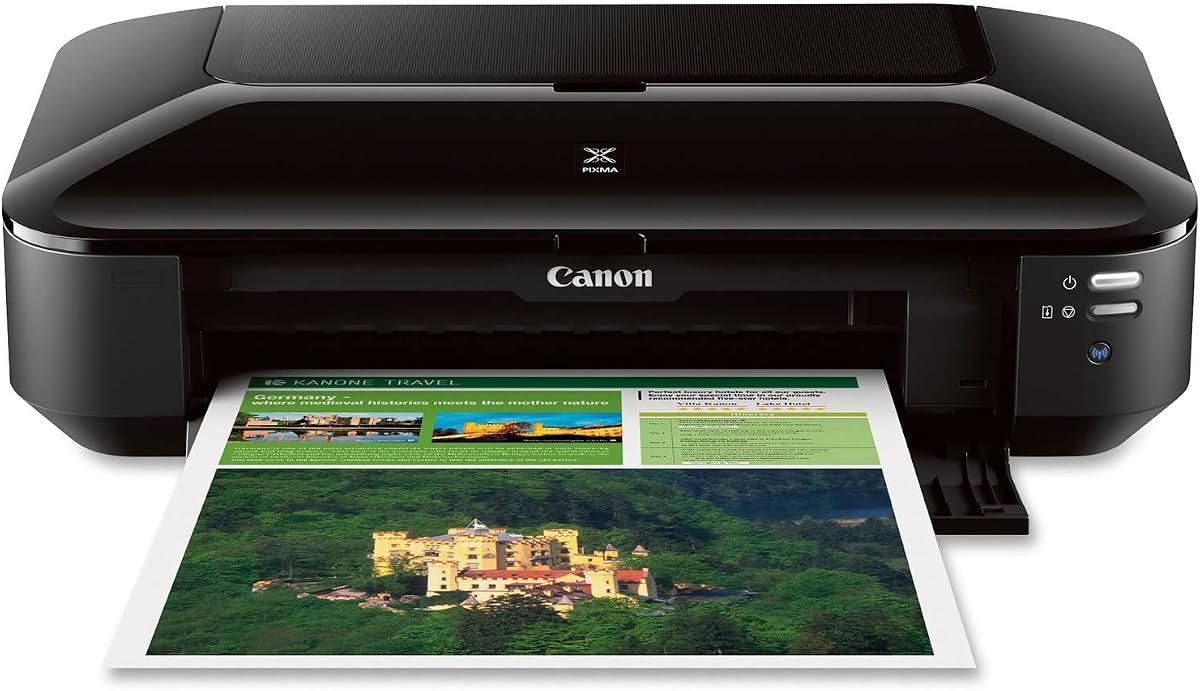
The Canon Pixma iX6820 is a business-oriented printer delivering high resolution outputs with its Fine print head technology. It supports AirPrint and Google Cloud Print for seamless connectivity across devices. The five individual ink tanks allow users to replace only depleted colors reducing waste.
We may earn a commission when you buy through this link, at no additional cost to you.
With a maximum resolution of 9600 by 2400 dpi it produces sharp text and vibrant images for professional documents. The 150-sheet feeder provides adequate capacity for moderate workloads. It is designed for reliable performance in small business environments.
As an older model it may lack some modern features like large touchscreens found on newer competitors. The paper capacity is lower than some dedicated office models which might require more frequent reloading. Still its image quality remains impressive.
This printer is best for users needing high quality color prints without a massive paper capacity. Its cloud compatibility supports flexible printing from various devices. We suggest it for home offices or small businesses valuing print resolution.
Five separate ink tanks ensure you only replace colors that run out saving money and reducing waste.
AirPrint and Google Cloud Print integration enable easy wireless printing from mobile devices and tablets.
We may earn a commission when you buy through this link, at no additional cost to you.
The Epson EcoTank ET-15000 brings the cost-effective Supertank system to wide format printing. It delivers high resolution prints up to 4800 by 2400 dpi for excellent readability and quality. The monthly duty cycle of 33000 pages supports high volume office environments effectively.
We may earn a commission when you buy through this link, at no additional cost to you.
Its all-in-one design includes faxing copying and scanning capabilities for versatile workflow management. Connectivity options like USB LAN and Wi-Fi ensure flexible integration into various network setups. Ink costs remain low compared to traditional cartridge models.
Due to its size and weight it requires a dedicated space in your office or workspace. Users need to ensure sufficient clearance around the unit for optimal operation and maintenance. Performance remains consistent even during extended high volume printing sessions.
This model is ideal for businesses needing large format output with minimal ink costs. Its robust duty cycle supports demanding workloads without overheating or errors. We recommend it for offices prioritizing long-term savings and reliability.
The refillable tank design provides thousands of pages per set significantly reducing the frequency of ink changes.
Built for heavy usage the printer handles thousands of pages monthly without performance degradation.
We may earn a commission when you buy through this link, at no additional cost to you.
The Epson Workforce Pro WF-7840 combines print fax scan and copy functions into one efficient machine. It supports wide format prints up to 13 by 19 inches for diverse document needs. The PrecisionCore Heat-Free technology helps produce printouts quickly for high productivity.
We may earn a commission when you buy through this link, at no additional cost to you.
Its 500-sheet capacity is built to meet the demands of busy offices requiring minimal paper reloads. The DURABrite Ultra ink ensures quick drying to avoid smudges on professional documents. Wireless connectivity and mobile apps allow printing from almost anywhere.
Initial setup might take some time to configure network settings correctly for optimal performance. Regular maintenance is required to keep the printer running smoothly and avoid clogs. The overall experience remains positive for business environments.
This printer suits offices needing a comprehensive all-in-one wide format solution. Its large capacity ensures uninterrupted workflow during busy periods. We suggest it for teams requiring versatility and consistent print quality.
Epson Connect Solutions enable secure printing from mobile devices enhancing flexibility and efficiency for remote workers.
The DURABrite Ultra ink dries instantly ensuring clean smudge-free outputs for professional presentations.
We may earn a commission when you buy through this link, at no additional cost to you.
The HP OfficeJet Pro 9135 is designed for offices needing professional quality color documents and fast printing speeds. It features HP AI capabilities to optimize print formatting automatically reducing wasted pages. Security features protect sensitive data effectively from cyber threats.
We may earn a commission when you buy through this link, at no additional cost to you.
Dual band Wi-Fi ensures reliable connectivity and resolves issues automatically for minimal downtime. The printer includes a generous Instant Ink trial to help manage costs initially. Sustainable design elements use recycled materials aligning with eco-friendly goals.
It works exclusively with original HP chips which may limit cartridge choices and increase costs over time. Regular firmware updates are necessary to maintain this restriction and security measures. Performance remains robust for daily office needs.
This model is ideal for businesses prioritizing speed security and smart features. Its AI tools simplify workflow by automating formatting tasks efficiently. We recommend it for offices wanting modern convenience and strong security.
AI tools automatically remove unwanted content from emails and web pages ensuring precise clean layouts.
Advanced security features protect your network and data from cyber threats effectively.
We may earn a commission when you buy through this link, at no additional cost to you.
The Brother INKvestment MFC-J6960DW delivers high-speed printing with speeds up to 31 pages per minute in black. It supports 11 by 17 inch printing suitable for business documents and reports. The MAXIDRIVE Technology ensures reliable performance even during heavy workloads.
We may earn a commission when you buy through this link, at no additional cost to you.
Its PerfectPrint Auto Detection System helps support consistent quality without manual adjustments. Connectivity includes Wi-Fi Direct and cloud apps for flexible printing options. The touchscreen interface makes navigation and operation simple for all users.
The included refresh subscription trial offers convenience but costs may increase after the initial period. Users should consider ongoing costs before committing to long term use. Overall it remains a strong business performer.
This printer suits small businesses needing speed and reliability for daily tasks. Its mobile connectivity and app support enhance productivity for remote workers. We suggest it for offices prioritizing efficiency and modern features.
Advanced technology drives fast reliable speeds ensuring consistent output for high volume tasks.
Auto detection technology ensures reliable quality helping produce professional prints with minimal effort.
We may earn a commission when you buy through this link, at no additional cost to you.
The Epson Workforce WF-7710 creates borderless prints up to 13 by 19 inches for professional quality photos and documents. PrecisionCore technology enables accurate placement for sharp text and vibrant colors. It supports automatic two-sided printing which helps reduce paper usage effectively.
We may earn a commission when you buy through this link, at no additional cost to you.
Its 250-sheet paper tray can hold photo paper and envelopes making it versatile for creative projects. Connectivity options include Wi-Fi Direct and Ethernet for seamless network integration. The printer is also ready for Amazon Dash Replenishment for easy ink ordering.
Duplex print speeds are slower compared to single-sided modes which may affect large document workflows. Users must stick to genuine cartridges to avoid voiding the warranty. Overall performance remains robust for wide format needs.
This printer is best for users needing borderless wide format prints for creative work. Its reliability and versatility make it a solid choice for home offices. We recommend it for those prioritizing photo quality and creative flexibility.
Create stunning edge to edge prints for professional photos and marketing materials without borders.
Automatic replenishment ensures you never run out of ink by ordering new supplies when levels get low.
We may earn a commission when you buy through this link, at no additional cost to you.
Selecting the right A3 printer involves balancing speed, quality, and cost to match your specific operational needs effectively.
Print speed is measured in pages per minute (ppm) and determines how quickly your printer can complete tasks. Business environments often require faster speeds to keep up with high workloads without delays.
Look for models offering at least 20 ppm black speed to ensure efficiency during busy workdays.
The choice between cartridges and tank systems significantly impacts long-term operating costs. Tank systems offer lower costs per page but higher upfront prices compared to traditional cartridges.
Consider your monthly print volume to decide if investing in a tank system will save money over time.
Resolution measured in dots per inch (dpi) affects text sharpness and image clarity. High resolution is essential for creative professionals needing vibrant colors and detailed graphics.
Opt for printers with at least 4800 dpi for professional quality outputs.
Larger paper trays reduce the frequency of reloading which helps maintain workflow efficiency. Some models offer multiple trays for handling different paper sizes simultaneously.
Choose a printer with 500 sheet capacity for heavy duty office environments.
Wireless connectivity like Wi-Fi and Ethernet allows multiple users to print from various devices. Mobile printing support enables convenience for remote workers.
Ensure the printer supports modern protocols like AirPrint or Mopria for easy mobile integration.
Many A3 printers include scanning copying and faxing capabilities to consolidate office equipment. These features reduce clutter and improve operational efficiency significantly.
Look for auto document feeders to simplify multi-page scanning tasks.
Monthly duty cycles indicate how many pages a printer can handle without overheating. Higher duty cycles are necessary for businesses with heavy printing demands.
Select a model with a duty cycle that matches your expected monthly usage.
Reliable customer support and comprehensive warranties provide peace of mind for business investments. Ensure the brand offers accessible technical assistance for troubleshooting issues.
Check for warranty terms covering parts and labor for at least one year.
Begin by installing the printer drivers and software on your computer to enable communication. Ensure the printer is connected to your network via Wi-Fi or Ethernet as preferred. Follow the on-screen setup prompts to configure initial settings correctly.
Load paper into the designated trays ensuring you adjust the guides to match the paper size. This prevents jams and ensures smooth feeding during print jobs. Use high quality paper for best results to maintain print clarity.
Perform regular maintenance like head cleaning and nozzle checks to prevent clogs. Print a test page weekly to ensure the print heads are functioning correctly. Keep the printer in a dust-free environment to extend its lifespan and reliability.
An A3 printer is used to print documents and images up to 11 by 17 inches which is larger than standard letter paper. It is ideal for architectural plans marketing materials and detailed spreadsheets. Users benefit from its ability to handle larger formats without compromising quality or detail.
Maintenance costs vary depending on whether you choose a tank or cartridge system. Tank printers have higher upfront costs but lower expenses per page compared to cartridges. Regular maintenance like cleaning prevents clogs which can be costly to repair later.
Yes many A3 printers offer high resolution color printing suitable for professional quality photos. Look for models with multiple ink colors like six to ensure vibrant and accurate images. Paper handling trays also support specific photo media for best results.
Standard A3 paper is compatible with most printers but photo paper requires specific trays. Some models have adjustable guides to handle different thicknesses without jamming. Using high quality paper ensures sharper text and brighter image outputs.
Speed varies by model with some printing up to 30 pages per minute in black. Color printing is usually slower but still efficient for office use. High speed models are best for heavy duty workflows needing quick turnaround.
Most A3 printers are all-in-one devices that include scanning and copying features. This consolidation reduces the need for separate scanners in an office. Some models offer auto document feeders to simplify multi-page scanning efficiently.
We reviewed ten top-rated A3 printers each offering unique features for different needs and budgets. Models like the Epson EcoTank Photo ET-8550 and HP OfficeJet Pro 9730 stand out for quality and innovation.
Consider your primary use case whether it is photo printing or general office tasks before deciding. Speed ink costs and connectivity options are key factors that influence long term satisfaction.
Always check current prices and availability before purchasing to ensure you get the best value. These printers represent significant investments that can transform your workflow efficiency significantly.