
HP OmniBook X 14 inch
4.3Editor score
3K OLED Touchscreen
27 Hour Battery Life
Intel Core Ultra 7
AI laptops are redefining how we work and create by integrating dedicated neural processing units directly into the system architecture. These machines handle complex tasks like real-time translation and image generation without slowing down your workflow.
We evaluated ten top models based on processor efficiency, display quality, and battery endurance. Our analysis focuses on how well each device leverages its AI capabilities to simplify daily tasks for professionals and students.
Each pick highlights key strengths and ideal use cases so you can find the right fit. Please note that availability and pricing fluctuate frequently based on demand and seasonal promotions across retailers.
4.3Editor score

4.5Editor score

4.4Editor score
As an Amazon Associate we earn from qualifying purchases.
The following table provides a quick side-by-side look at the core specifications and key differentiators for each model in our selection.
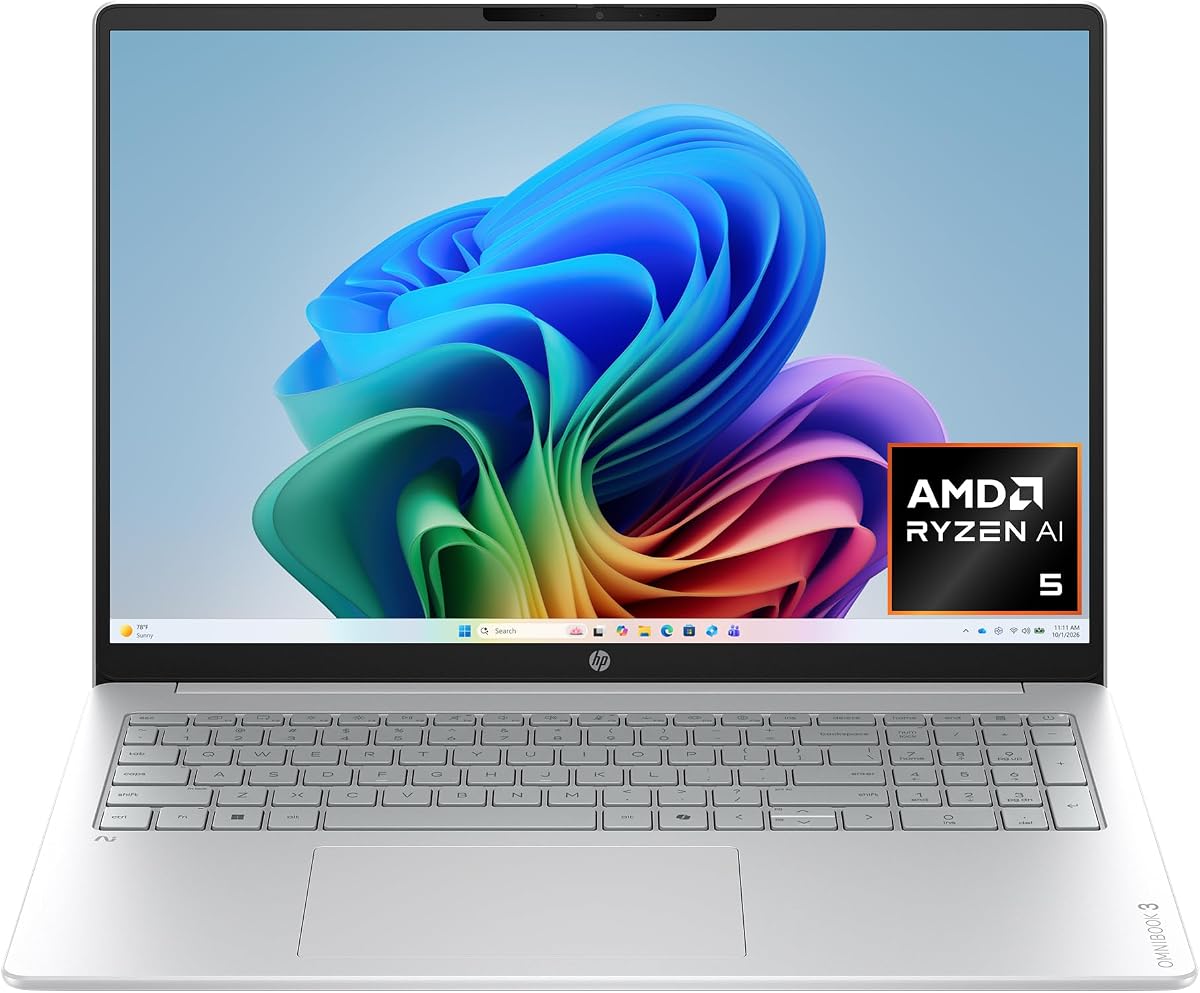


The HP OmniBook 3 16 inch offers a compelling entry point into the world of next-generation AI computing. With a strong rating of 4.8 stars, this laptop is designed for users who want powerful AI features without breaking the bank. Its AMD Ryzen AI 5 processor ensures that you can run intelligent tasks smoothly.
We may earn a commission when you buy through this link, at no additional cost to you.
This device excels in providing a balanced experience for everyday tasks. The 2K touchscreen delivers vibrant colors and sharp text which makes working on spreadsheets or browsing enjoyable. Additionally, the battery life supports up to 19 hours and 30 minutes meaning you can work through a full day without needing a charger. The Fast Charge feature restores half the battery in about 45 minutes which is incredibly convenient.
While it does not have the massive storage of some competitors, the 512 GB SSD is sufficient for most users. The integrated AMD Radeon 840M GPU handles light gaming and media tasks well. The only notable trade-off is that the camera lacks some advanced features found on premium models but it still provides clear video calls.
This laptop is ideal for students and home users who need reliability and efficiency. It brings the Copilot+ PC experience to a lower price point making advanced AI tools accessible. If you want a solid all-rounder that handles daily workloads with ease this is a top recommendation.
The ability to run for nearly 20 hours ensures you stay productive during long flights or study sessions without hunting for an outlet.
Advanced Personal Mode tracks only your voice during calls filtering out background noise so you sound clearer to colleagues and friends.
We may earn a commission when you buy through this link, at no additional cost to you.
The Lenovo ThinkBook 16 Gen 8 is engineered for professionals who demand robust performance and security. Rated at 4.6 stars this laptop features an Intel 16-Core Ultra 7 processor that handles complex spreadsheets and enterprise applications with ease. It is a powerful choice for those who prioritize speed and multitasking.
We may earn a commission when you buy through this link, at no additional cost to you.
This machine stands out due to its massive 32GB of DDR5 RAM and 1TB PCIe SSD. These specifications eliminate lag when running multiple business applications simultaneously ensuring a smooth workflow. The Fingerprint Reader and Windows 11 Professional add layers of security to protect sensitive business data. Connectivity is also top-notch with WiFi 6E and Bluetooth 5.3 ensuring stable connections during critical video conferencing.
One trade-off is that this laptop is heavily tailored towards business environments which may make it feel less playful for casual users. The display is a FHD+ screen which is functional but not as vibrant as OLED alternatives. However for data analysis and presentations the ample screen real estate is highly effective.
If you are a business professional or IT manager looking for a reliable mobile workstation this model is excellent. It combines high-end specs with the security needed for enterprise use. This laptop ensures you can handle heavy workloads efficiently while staying secure.
With 32GB of RAM you can keep dozens of browser tabs and heavy apps open without any slowdown in performance or responsiveness.
Windows 11 Professional and a fingerprint reader provide enterprise-grade protection for your files and login credentials.
We may earn a commission when you buy through this link, at no additional cost to you.
The HP OmniBook X 14 inch is a premium laptop that shines with its exceptional display and battery performance. With a rating of 4.3 stars this model features a 3K OLED touchscreen that offers deeper blacks and richer contrast. It is a visual feast for creators and media consumers alike.
We may earn a commission when you buy through this link, at no additional cost to you.
Its Intel Core Ultra 7 processor powers a host of AI features that streamline your daily tasks. The standout feature is the battery life offering up to 27 hours and 30 minutes which is impressive for a device this size. The Smart Sense technology automatically adjusts performance based on your activity ensuring optimal comfort and efficiency.
While the price is higher than other options on this list the quality justifies the investment for those seeking the best screen. The storage is generous at 1TB which allows for large media files. The trade-off is that it uses Intel Graphics which while capable for everyday tasks may not match discrete GPUs for heavy rendering.
This laptop is perfect for users who value screen quality and portability. If you are a creative professional or a student who wants a device that looks and feels premium this is the right choice. The long battery life ensures you stay productive anywhere without anxiety.
The 3K OLED panel lights each pixel separately delivering true blacks and vibrant colors for a immersive viewing experience.
Smart Sense optimizes fan noise and temperature automatically adapting to your usage to keep the laptop cool and quiet.
We may earn a commission when you buy through this link, at no additional cost to you.
The HP OmniBook 5 16 inch strikes a balance between power and practicality. With a 4.5 rating this laptop uses an Intel Core Ultra 7 processor to deliver fast intelligent performance for multitasking. It is designed to be a reliable companion for work and everyday use.
We may earn a commission when you buy through this link, at no additional cost to you.
The 16 inch touchscreen provides a large workspace for presentations and creative tasks. The 1TB SSD ensures you have plenty of space for files and applications while 16GB of RAM handles daily loads smoothly. Windows 11 with Copilot AI support helps you work smarter with intelligent suggestions and faster workflows.
One limitation is that it does not offer the extreme battery life of the Snapdragon models but it is still suitable for most days. The backlit keyboard and sleek design add to its usability in low-light environments. It is a solid mid-range option that does not compromise on essential features.
This laptop is suitable for business professionals and home users who want a versatile machine. It offers the benefits of AI computing without the premium price tag. If you need a spacious screen and reliable performance this model meets your needs effectively.
The 16 inch touchscreen gives you ample room to view multiple windows side by side for efficient multitasking.
Integrated Copilot AI offers quick access to helpful tools and automation features directly within the operating system.
We may earn a commission when you buy through this link, at no additional cost to you.
The HP OmniBook 5 16 inch with Snapdragon X is designed for exceptional on-the-go productivity. Rated at 4.2 stars it offers a massive battery life of up to 34 hours and 45 minutes which is ideal for travelers. The Snapdragon processor ensures efficiency without draining power quickly.
We may earn a commission when you buy through this link, at no additional cost to you.
This model includes unique AI features like integrated Otter.ai to transcribe meetings and generate summaries automatically. The 2K OLED display provides crisp visuals for everyday productivity. Security is enhanced with a 5MP IR camera that supports Windows Hello for secure logins.
While the storage is 512 GB which is decent users needing more space might find it limited. There can sometimes be minor compatibility nuances with older x86 software on ARM processors but most modern apps are now optimized. The battery life and fast charging more than make up for these trade-offs.
This laptop is perfect for frequent travelers and mobile workers who prioritize battery endurance. If you are always on the move and need a laptop that keeps up with your schedule this is a strong contender. It brings powerful AI capabilities to a portable form factor.
Integrated Otter.ai automatically records audio and generates meeting summaries saving you time and helping you stay organized.
Fast Charge restores battery to 50 percent in 30 minutes keeping your device ready when you need it most.
We may earn a commission when you buy through this link, at no additional cost to you.
The HP OmniBook 3 14 inch is an excellent choice for those seeking value and extreme battery endurance. With a 4.4 rating it stands out for its 41 hour battery life making it a true companion for long days. The Snapdragon processor delivers essential performance and AI capabilities efficiently.
We may earn a commission when you buy through this link, at no additional cost to you.
It features a 2K OLED display with rich colors and crisp visuals for productivity. The 16 GB of LPDDR5x RAM ensures smooth operation for multitasking. Additionally the Otter.ai assistant helps record and transcribe meetings so you can stay organized. The compact 14 inch form factor makes it highly portable.
The 256 GB SSD is smaller than other options on this list which might require external storage for large projects. The camera lacks some advanced HDR features found on higher-end models. However for basic web conferencing it is still functional and clear.
This laptop is ideal for students and budget-conscious buyers who prioritize battery life. If you need a laptop that can last multiple days without charging this is unmatched. It brings powerful AI features to an affordable price point.
With up to 41 hours of battery life you can go days without worrying about finding a power outlet during your travels.
Otter.ai is built in to transcribe audio and capture slides so you never miss important details in a call.
We may earn a commission when you buy through this link, at no additional cost to you.
The Dell 16 Plus Touchscreen is a powerhouse designed for those who want the latest connectivity and performance. Rated at 4.5 stars it features the Intel Core Ultra 9 processor and 32GB of LPDDR5X RAM which handles demanding professional tasks effortlessly. It also supports Wi-Fi 7 for lightning-fast wireless speeds.
We may earn a commission when you buy through this link, at no additional cost to you.
This laptop includes an on-Device AI chip that supports up to 48 TOPS for running features like Microsoft Studio Effects. The 16 inch FHD+ display is expansive and perfect for detailed work. Noise cancellation ensures clear calls and recordings making it a great choice for remote professionals.
The higher price point reflects the premium specs and connectivity but it is a worthy investment for power users. It lacks the Windows 11 Pro security features of some business models which might be a consideration for enterprise users. However for most the Home version is sufficient.
If you need a laptop that is future-proof with Wi-Fi 7 and top-tier processing this is the best choice. It offers unmatched performance for video editing and data work. This machine ensures you stay ahead of the technology curve.
Wi-Fi 7 support ensures you have the fastest possible wireless speeds for large file transfers and streaming.
AI noise cancellation filters out background noise during calls so your voice comes through clearly and professionally.
We may earn a commission when you buy through this link, at no additional cost to you.
The ASUS Vivobook S16 has achieved a perfect 5.0 rating making it a standout in this list. It features an AMD Ryzen AI 9 465 processor and up to 50 NPU TOPS which delivers fast on-device AI. The 16 inch OLED display provides stunning visuals for creators and enthusiasts.
We may earn a commission when you buy through this link, at no additional cost to you.
This laptop is incredibly portable at just 3.75 lbs and 0.7 inches thin without sacrificing power. The 32 GB of RAM and 1TB SSD handle large project files and media libraries with ease. Dolby Atmos sound adds richness and immersion to your media consumption and calls.
The only minor trade-off is the lack of Wi-Fi 7 but Wi-Fi 6 is still very fast and reliable. The matte gray finish is stylish but might show fingerprints slightly more than other colors. However the build quality and aesthetic are top-tier.
This is the perfect laptop for creatives who need both performance and portability. If you work with large files and want a beautiful screen this model excels. Its perfect rating reflects its ability to meet high user expectations consistently.
The OLED display delivers deep contrast and vivid detail which makes your creative projects pop with color.
Weighing only 3.75 lbs this laptop is easy to carry anywhere making it perfect for commuters and travelers.
We may earn a commission when you buy through this link, at no additional cost to you.
The acer Aspire 16 AI offers a smooth and vibrant user experience with its 120Hz multi-touch display. Rated at 4.2 stars it is powered by the Snapdragon X processor which delivers optimized processing and power efficiency. The NPU provides 45 TOPS for advanced AI features like Recall and Click to Do.
We may earn a commission when you buy through this link, at no additional cost to you.
The display features 100% sRGB colors and sharp detail which is great for media and creative work. Wi-Fi 7 ensures you have the latest high-speed wireless capabilities. The design is modern and serves as a panoramic playground for entertainment and AI experiences.
The 120Hz refresh rate is a standout feature that makes scrolling and motion look incredibly smooth but it may drain battery faster than standard screens. The 16 GB of RAM is good but not as high as the 32 GB options. Still for most users it is a solid amount.
This laptop is best for users who want a fluid visual experience and fast connectivity. If you prioritize display smoothness and Wi-Fi speed this is a great pick. It brings advanced AI tools to a competitive price point.
The 120Hz display makes all movements on screen look incredibly smooth and responsive for a fluid experience.
Features like Recall and Click to Do allow you to interact with text and images naturally for better productivity.
We may earn a commission when you buy through this link, at no additional cost to you.
The HP Omnibook 16 is a premium workstation designed for elite performance and productivity. With a rating of 4.6 stars it features the AMD Ryzen AI 7 processor built on the Zen 5 architecture. The 50 TOPS NPU ensures seamless AI workloads for creative and enterprise tasks.
We may earn a commission when you buy through this link, at no additional cost to you.
This laptop includes 32GB of DDR5 RAM which handles heavy multitasking and large media files with ease. Windows 11 Pro provides enterprise-grade security and advanced hardware support. The 2K IPS touchscreen offers crystal-clear detail and 300 nits brightness for immersive navigation.
The trade-off is that this machine is built for professional work which means it may be heavier than consumer ultrabooks. It does not have the extreme battery life of the Snapdragon models but it offers consistent power. The connectivity is versatile with HDMI 2.1 and USB Type-C ports.
This is the ideal laptop for users who need reliable high-end performance and security. If you are a professional handling sensitive data or large projects this machine is built for you. It combines speed and security in a cohesive package.
Windows 11 Pro ensures your data is protected with advanced security features suitable for business environments.
With 32GB of DDR5 RAM you can run multiple heavy applications and browser tabs without any performance lag.
We may earn a commission when you buy through this link, at no additional cost to you.
Selecting the right AI laptop requires understanding key components that affect performance and longevity.
Look for the latest Intel Core Ultra or AMD Ryzen AI processors which include dedicated Neural Processing Units. These NPUs handle AI tasks efficiently without draining the battery.
A strong NPU ensures you get the full Copilot+ PC experience locally on your device.
For seamless multitasking aim for at least 16GB of RAM while professionals should consider 32GB. This allows you to run multiple applications without slowdowns.
Storage should ideally be 512GB or 1TB to accommodate large files and applications comfortably.
A good display is crucial for productivity and creative work. Look for resolutions like 2K or 3K and consider OLED panels for better contrast.
Touchscreens add an extra layer of interaction which is helpful for AI tools and note-taking.
Battery life varies significantly between models with Snapdragon chips often lasting longer than Intel or AMD ones. Consider your typical workday length when choosing.
Fast charge capabilities are also a valuable feature to get power quickly when you are in a rush.
Ensure the laptop supports modern wireless standards like Wi-Fi 6E or Wi-Fi 7 for faster internet speeds. This is vital for cloud-based AI tools.
Check the ports available to make sure you can connect your peripherals and monitors without extra adapters.
Windows 11 Home is common but some models offer Windows 11 Pro which adds advanced security and business features. Choose based on your professional needs.
The OS will host your AI assistant so ensure you have the latest version installed for optimal functionality.
If you travel often the weight and thickness of the laptop matter. Ultra-portable models are easier to carry but may have smaller screens.
Balance the size of the display with the weight to find a device that fits your lifestyle.
Prices vary widely based on specs so determine your budget before shopping. Higher-end models offer better longevity and performance.
Focus on what features you actually need to avoid paying for capabilities you will not use.
To maximize performance keep your system updated and ensure the AI assistant features are enabled in settings. This allows the device to learn your habits and optimize resources accordingly.
Use a protective case when traveling to prevent physical damage to the screen and body. Avoid placing heavy objects on the laptop while it is in your bag.
Regularly clean the screen with a soft microfiber cloth and avoid using harsh chemicals. Keep the device in a cool dry place to maintain battery health and prevent overheating.
An AI laptop includes a dedicated Neural Processing Unit or NPU designed to handle artificial intelligence tasks locally. This allows for features like real-time video effects and smart assistants without relying on the cloud.
Most AI features are built into Windows 11 with the Copilot+ PC update. You may need to enable them in the settings but no extra software is required for basic functions.
AI helps optimize power usage by managing background tasks and adjusting performance based on your needs. This efficiency allows the laptop to run longer on a single charge compared to older models.
Many of these laptops have soldered RAM which means it cannot be upgraded after purchase. Check the specific model details before buying to ensure the RAM capacity fits your needs.
They are capable of casual gaming and light tasks but are not designed for high-end AAA gaming. For serious gaming look for models with discrete graphics cards instead.
Both Intel and AMD offer strong AI capabilities with their latest processors. Intel often excels in specific optimization for Office and creative apps while AMD offers strong overall value and performance.
The HP OmniBook 3 16 inch and Dell 16 Plus represent excellent choices for budget and premium users respectively. Each model brings unique strengths whether you prioritize battery life or processing power.
Focus on what matters most to your workflow such as display quality or connectivity. The right laptop will make your daily tasks more efficient and enjoyable.
Remember to check current availability and prices before purchasing as these details can change rapidly. This ensures you get the best deal for your specific needs.