
Thrustmaster T-Flight Hotas X
4.4Editor score
Detachable throttle design
Adjustable resistance dial
Plug and play setup
This guide compares the top ten airplane controllers for PC including joysticks throttles and yokes to help you choose the best flight simulator setup for your
Finding the right airplane controllers for PC can transform your flight simulator experience from a casual hobby into a realistic training tool. Whether you are a seasoned pilot or a curious newcomer, the right hardware brings the cockpit to life with precision feedback and intuitive controls.
We evaluated ten top-rated flight sticks and yokes based on build quality, button programmability, and compatibility with major simulators like Microsoft Flight Simulator and X Plane. Our analysis focuses on how each device handles complex maneuvers and integrates into your desktop setup for long sessions.
Each pick below highlights specific strengths such as magnetic sensors or detachable throttles to match different flying styles. Please note that stock levels and availability may shift quickly so checking current product pages ensures you get the latest features and support options available today.
4.4Editor score

4.0Editor score
4.6Editor score
The following table provides a side-by-side comparison of the ten selected flight controllers highlighting their core specifications and unique features to help you make an informed decision based on your specific simulation needs.





The Logitech G X56 H.O.T.A.S stands out as a top-tier choice for serious flight simulator enthusiasts seeking a comprehensive control solution. With a solid user rating reflecting its performance capabilities it offers an impressive array of controls designed to mimic the complexity of modern aircraft systems.
We may earn a commission when you buy through this link, at no additional cost to you.
Its standout feature lies in the sheer volume of programmable controls totaling over 180 options that allow pilots to map every essential function to a physical button. The use of hall-effect sensors ensures smooth and precise axis movement while the adjustable spring system lets you customize the stick resistance to match your flying style.
While the device excels in functionality the learning curve can be steep for casual users due to the extensive configuration required through the accompanying software. Additionally the size of the twin throttle and joystick setup demands a dedicated desk area which might not suit smaller gaming rooms or travel setups.
Ultimately this controller is ideal for dedicated flight simmers who prioritize realism and customization over simplicity. If you have the space and patience to configure it properly the X56 delivers a professional grade experience that few other PC controllers can match.
The hall-effect sensors and adjustable springs provide a level of tactile feedback essential for complex aerodynamic maneuvers.
With 189 programmable controls it handles demanding scenarios in combat sims or commercial aviation with ease.
We may earn a commission when you buy through this link, at no additional cost to you.
The Logitech G PRO Flight Yoke System offers a compelling alternative for those interested in commercial aviation simulation rather than fighter jets. Its design prioritizes the classic round yoke interface which is essential for pilots simulating airliners and general aviation aircraft with authentic feedback.
We may earn a commission when you buy through this link, at no additional cost to you.
Constructed with a stainless steel shaft this controller delivers a robust and smooth operation that feels sturdy during intense maneuvers. The inclusion of a POV hat and multiple programmable buttons gives you significant flexibility while the desk clamp ensures the yoke stays firmly in place during use.
One limitation is the throttle quadrant connection which often requires a PS/2 adapter depending on your system setup potentially complicating installation for some users. Additionally the yoke is specifically optimized for commercial flight paths which may limit its utility for military or arcade style flight games.
This system is best suited for pilots who want to focus on passenger transport and cargo logistics within their home cockpit. If you seek a traditional feel that mirrors real world airline equipment this yoke provides a reliable and professional foundation for your PC setup.
The steel shaft and smooth rotation provide the exact resistance needed for realistic flight path adjustments.
The two desk clamps ensure stability so you can focus on flying without worrying about shifting hardware.
We may earn a commission when you buy through this link, at no additional cost to you.
The Thrustmaster T-Flight Hotas X is a fantastic entry point for new pilots looking to upgrade from a keyboard and mouse. Its balanced combination of performance and cost makes it accessible while still delivering the core features necessary for an engaging flight simulator experience.
We may earn a commission when you buy through this link, at no additional cost to you.
One of its strongest selling points is the detachable throttle which allows you to configure the device as a single stick or separate the components for a more spacious cockpit layout. The adjustable resistance dial lets you fine tune the stick tension ensuring comfort during extended flight sessions without fatigue.
While the build quality is solid it relies more on plastic components compared to premium metal alternatives which may affect long term durability in high intensity use. The axis count is also lower than high end models so advanced users might find the customization options somewhat limited for complex aircraft.
For beginners or casual gamers this controller offers the best bang for your buck in the flight simulation market. It is easy to set up and provides enough functionality to enjoy a wide range of flight titles without breaking the bank.
Detaching the throttle gives you freedom to choose between compact or spread out layouts.
Plug and play compatibility means you can start flying immediately without complex driver installations.
We may earn a commission when you buy through this link, at no additional cost to you.
The Logitech G Saitek X52 Pro distinguishes itself with an integrated LCD multi-function display that provides visual feedback directly on the controller. This feature helps pilots track their configurations and settings without needing to switch back to the keyboard or computer screen.
We may earn a commission when you buy through this link, at no additional cost to you.
The progressive throttle includes resistance adjustment and detents for specific engine settings like afterburner which adds a layer of tactile realism. The five position handle adjustment ensures that the controller fits comfortably in various hand sizes making it accessible for a wide range of users.
Despite its innovative features the device has received a mixed user rating which may indicate issues with long term reliability or software compatibility compared to newer models. The design is also somewhat dated which could be a drawback for those seeking the latest in flight control technology.
This controller remains a strong contender for pilots who value visual feedback on the stick itself. If you prefer a setup where you can see your mode status without looking away from your monitor it offers a unique functional advantage.
The LCD display lets you verify command mappings instantly for efficient mission planning.
Progressive resistance and detents help you manage engine power with precise physical cues.
We may earn a commission when you buy through this link, at no additional cost to you.
The PXN 2113PRO is designed for users seeking a no fuss flight stick that works effectively with common PC flight games. Its compact design fits easily on smaller desks while still offering a respectable number of buttons for essential flight controls.
We may earn a commission when you buy through this link, at no additional cost to you.
A key feature is the vibration function which provides sensory feedback during turbulence or weapon firing adding to the immersion. The eight way hat switch and programmable buttons allow for decent customization and the suction cup base helps keep the device stable during vigorous maneuvers.
However users should be aware that the driver setup can sometimes require specific steps to activate vibration fully which may confuse casual users. The build quality is adequate but not premium meaning it is best suited for moderate usage rather than intensive daily flight training.
This stick is a practical choice for hobbyists who want to try flight simulation without a large financial commitment. It covers the basics well and provides a functional introduction to using a dedicated controller for virtual aviation.
Vibration adds a physical layer to your flight experience when flying through stormy conditions.
Its small profile makes it ideal for dual monitor setups where desk space is limited.
We may earn a commission when you buy through this link, at no additional cost to you.
The Logitech G X52 offers a highly flexible control system with support for multiple profiles and a massive number of programmable commands. This makes it exceptionally versatile for gamers who switch between different flight sim titles or genres frequently.
We may earn a commission when you buy through this link, at no additional cost to you.
Its magnetic non contact sensors ensure long term accuracy and reliability by eliminating mechanical wear on the axes. The three dimensional twist with rudder lock provides essential control for coordinated turns without needing additional pedals which simplifies the cockpit layout.
One minor drawback is that the throttle is a separate unit requiring an additional cable and desk real estate to operate fully with the stick. While the controller itself is robust users may need to manage software profiles carefully to maximize the utility of all available buttons.
This system is recommended for intermediate to advanced users who need a robust command set for complex simulations. The balance of features and usability makes it a reliable choice for serious flight sim enthusiasts.
Switch between different aircraft setups instantly using the onboard memory modes.
Magnetic sensors maintain precision over years of use without degrading sensitivity.
We may earn a commission when you buy through this link, at no additional cost to you.
The Thrustmaster TCA Yoke and Quadrant Boeing Edition brings an authentic commercial aviation experience to your PC setup with official licensing from Boeing. This hardware replicates the iconic controls of the Boeing 787 providing a highly immersive environment for airliner simulation.
We may earn a commission when you buy through this link, at no additional cost to you.
Its pendulum mechanism mimics the natural movement of a real airliner yoke delivering smooth and responsive control that enhances realism. The internal metal structure ensures durability and a premium feel while the included quadrant allows for precise management of thrust and autopilot settings.
While the quality is exceptional the price is on the higher end which may be a barrier for casual gamers. Additionally the physical footprint of the yoke and quadrant combined requires a deep desk to ensure comfortable reach without arm strain.
For those dedicated to commercial flight simulation this package is unmatched in its fidelity and detail. If you aim to build a realistic cockpit for airlines this set provides the foundation you need.
The pendulum swing gives a realistic resistance that matches the behavior of heavy aircraft.
The quadrant integrates throttle and flight management controls for seamless operation.
We may earn a commission when you buy through this link, at no additional cost to you.
The Thrustmaster TCA Sidestick is designed for pilots who prefer the Airbus control philosophy over traditional yokes. It offers a compact yet feature rich solution that brings the feel of a real A320 cockpit directly to your desktop.
We may earn a commission when you buy through this link, at no additional cost to you.
Magnetic sensor technology ensures that the stick maintains high precision without the risk of wear from mechanical contact. The integrated throttle axis simplifies the setup by combining flight path and power controls into one unit which saves valuable desk space.
Users should note that switching from a yoke to a sidestick requires an adjustment period due to the different movement dynamics. While the software allows for extensive customization setting up the correct bindings may take some time to perfect for specific aircraft.
This controller is ideal for fans of the Airbus platform or those with limited space who still want high quality feedback. It delivers a professional level of performance that matches the quality expected from a licensed commercial aircraft product.
The sidestick layout mirrors the ergonomics of the A320 for authentic handling.
Combining throttle and stick in one unit reduces clutter on your desk surface.
We may earn a commission when you buy through this link, at no additional cost to you.
The Turtle Beach VelocityOne Flightstick stands out for its universal compatibility across both Xbox and PC platforms which broadens its appeal to multi system gamers. It also features an integrated OLED display that provides flight management information directly on the controller.
We may earn a commission when you buy through this link, at no additional cost to you.
The inclusion of a touchpad for navigation simplifies in game menu adjustments without needing to use your keyboard or mouse. RGB lighting adds a customizable visual element to your setup while the twenty seven programmable buttons offer ample control for most flight scenarios.
Some users may find the stick feel slightly lighter than industrial grade alternatives which might not satisfy those looking for heavy duty resistance. The software ecosystem is also relatively new meaning advanced features might still be evolving compared to established brands.
This stick is perfect for players who want a versatile controller that works seamlessly across different gaming environments. If you value convenience and cross platform support this model delivers a modern and efficient flight control experience.
Seamlessly switch between PC and console flight games with one single device.
The OLED screen displays critical flight metrics without looking at your main monitor.
We may earn a commission when you buy through this link, at no additional cost to you.
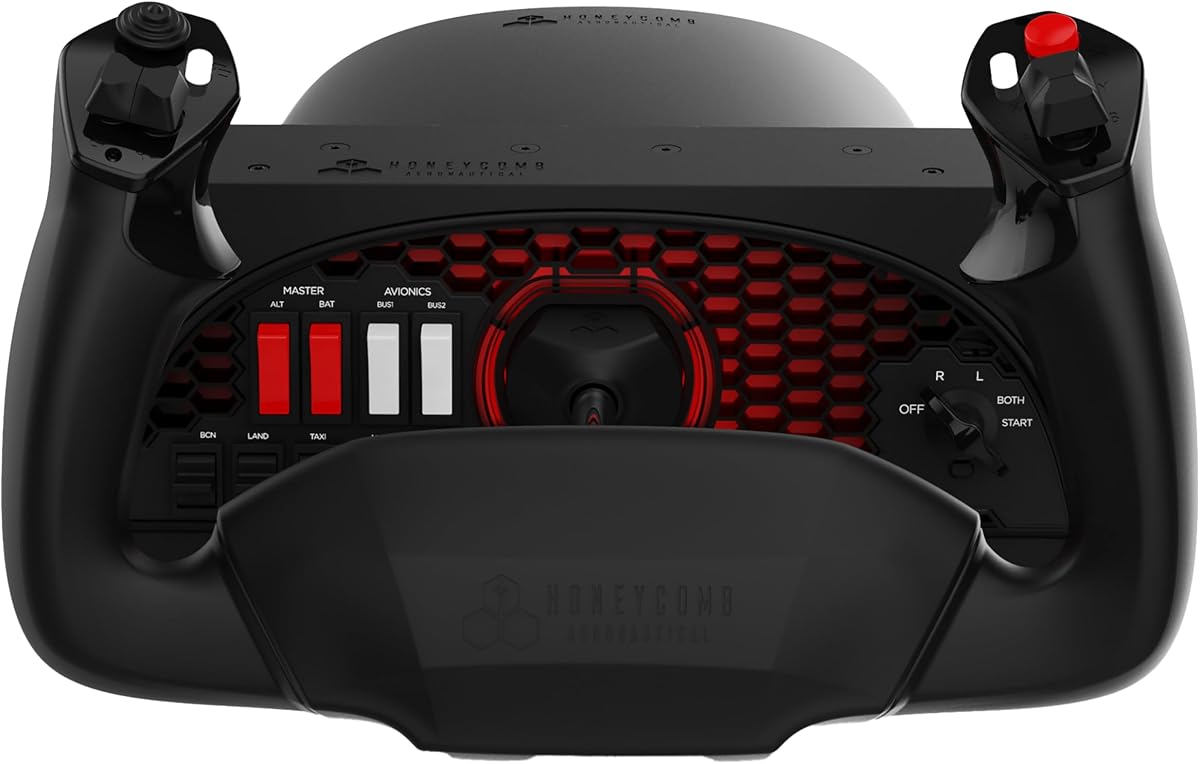
The Honeycomb Alpha Flight Controls Yoke and Switch Panel is widely recognized for its high quality construction and realistic flight dynamics. It is engineered by aviation enthusiasts to provide a premium experience that rivals more expensive professional simulation hardware.
We may earn a commission when you buy through this link, at no additional cost to you.
Its solid steel shaft and dampened self centering mechanism ensure smooth and accurate control inputs without dead zones. The integrated switch panel includes essential avionics and power switches adding a layer of authenticity that enhances the immersion of your virtual cockpit.
While the cost is higher than average controllers the durability and attention to detail justify the investment for serious simmers. The dual mounting options give you flexibility to choose between clamps or suction pads based on your desk thickness.
This system is ideal for those seeking a top tier commercial flight simulation experience. The combination of reliability and realistic features makes it a standout choice for dedicated flight simulation enthusiasts.
The steel shaft ensures long term stability and precision during extended sessions.
The switch panel lets you manage power and avionics without reaching for other keys.
We may earn a commission when you buy through this link, at no additional cost to you.
Selecting the right airplane controller for your PC involves considering several key factors that influence performance comfort and compatibility. This guide outlines the most important aspects to evaluate before making your purchase.
Flight controllers come in various formats including joysticks throttle sticks and yokes. Joysticks are versatile and suit a wide range of games while yokes offer specific realism for commercial aviation. Choose a format that matches your preferred flying style.
A good controller should allow you to map multiple functions to its buttons. Look for devices with at least ten to fifteen programmable buttons to ensure you can access essential commands without switching to your keyboard.
The accuracy of the movement is determined by the sensors used. Magnetic or hall-effect sensors provide longer life and smoother tracking compared to mechanical potentiometers which may wear out over time.
Since flight sessions can last for hours the controller must fit comfortably in your hands. Adjustable grips and lightweight designs help reduce fatigue and ensure you remain focused on your flying tasks.
Metal components generally offer better durability and a premium feel compared to plastic ones. If you plan to use the controller frequently investing in a model with a solid shaft or metal base will pay off in longevity.
Ensure the controller works well with your chosen flight simulator software. Most modern devices support titles like Microsoft Flight Simulator and X Plane but checking specific driver requirements can prevent setup issues later.
Some controllers like yokes or twin throttle setups require significant desk space. Measure your available area before buying to ensure the device fits comfortably alongside your monitor and keyboard.
A stable base is critical for precise control. Look for controllers with clamp mounts or suction cups that secure the device firmly to your desk to prevent unwanted movement during flight.
Start by installing the latest drivers from the manufacturer website to ensure full functionality. Calibrate the device using the system settings to verify that all axes and buttons register correctly before launching your game.
Customize your control bindings to match the specific aircraft you fly most often. Save your profiles to the controller memory so you can quickly switch between different flight sims without reconfiguration.
Clean the stick and buttons regularly with a soft cloth to remove dust and oils. Store the device in a dry place away from direct sunlight to maintain the integrity of the materials and electronics.
Most of the controllers listed are designed primarily for Windows PCs and may not have drivers for macOS. Some models support Linux but you should check the manufacturer website for Mac specific software before purchasing.
Many modern sticks include a built in throttle axis which is sufficient for casual flying. However for a more realistic experience especially in commercial sims a separate throttle quadrant adds significant value.
Yes many of the controllers are optimized for VR flight simulators to enhance immersion. Ensure your PC can handle both the VR headset and the controller input simultaneously for the best performance.
A stick is typically used for fighter jets and general aviation while a yoke mimics the circular controls found in airliners. Choose based on the types of aircraft you want to simulate most frequently.
High quality controllers with metal components and magnetic sensors can last for many years. Proper care and avoiding excessive force on the axes will help maximize the lifespan of your device.
Most USB powered controllers draw enough energy directly from your computer. Some complex setups with multiple units may require a USB hub with external power to function correctly.
Choosing the right airplane controller for PC can significantly enhance your flight simulation journey. The top picks highlighted here offer a range of options from budget friendly entry level sticks to high end yoke systems.
Prioritize build quality and button programmability to ensure your controller meets your needs as your skills grow. A device that balances realism with usability will keep you engaged and ready for the next flight.
Always check current stock and compatibility details on the product pages before purchasing. Prices and availability can change quickly so acting fast ensures you secure the best model for your home cockpit setup.