
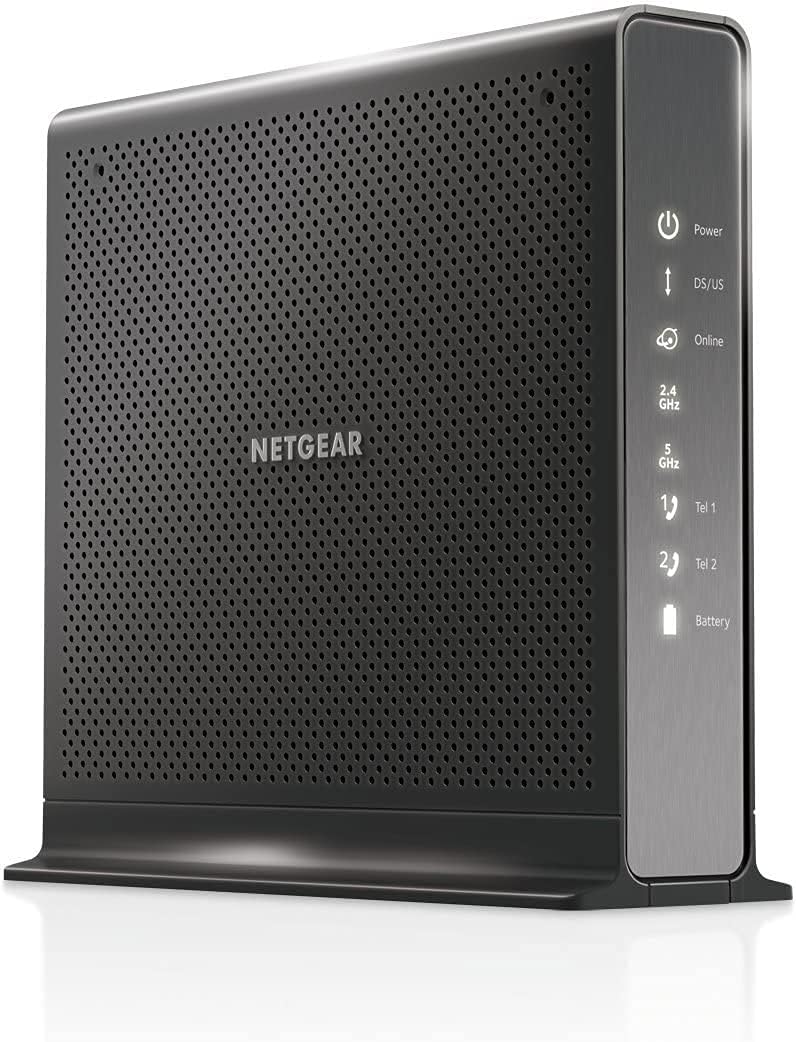
NETGEAR CM500V
4.2Editor score
DOCSIS 3.0 with 16×4 channels
Supports up to 300 Mbps plans
Two phone lines with enhanced features
This guide compares the best cable modem with phone options for 2026, evaluating compatibility, speed, voice features, and value to help you find the right
Finding a reliable cable modem with phone capabilities is essential for households that still depend on landline voice services alongside high-speed internet. These devices combine DOCSIS technology with voice ports, allowing you to manage both data and calling through a single piece of hardware.
We evaluated ten top-rated modems based on their compatibility with major providers, supported internet speeds, voice line capacity, and overall build quality. Our analysis focuses on models that offer genuine savings over rental fees while maintaining stable connections for voice and data traffic.
Each pick in this list highlights key specifications, pros, and cons to help you match a device to your specific internet plan and household requirements. Please note that prices and availability change frequently, so verify details before making your final purchase decision.
4.2Editor score

4.0Editor score

4.0Editor score
The following comparison table provides a side-by-side look at all ten products evaluated in this guide. It highlights key specifications like DOCSIS version, maximum supported speed, voice line capacity, and whether the device includes built-in Wi-Fi routing capabilities.



The NETGEAR CM2050V stands out as a top choice for households needing both fast internet and reliable voice service. It is certified for Xfinity and supports plans up to 2.5Gbps, making it future-proof for bandwidth-heavy families.
We may earn a commission when you buy through this link, at no additional cost to you.
It features two telephone lines with enhanced call features like caller ID and conference calling. The built-in 2.5Gbps Ethernet port ensures your wired devices can take full advantage of gigabit or multi-gig speeds.
While it is limited to Xfinity service, this restriction ensures optimal compatibility and performance. The higher price point is justified by its ability to handle the fastest available cable tiers without bottlenecking.
If you need a modem that grows with your internet plan, this model is an excellent investment. It balances speed, voice quality, and reliability better than most competitors in its category.
The 2.5Gbps Ethernet port allows you to connect directly to a high-performance router or NAS for maximum throughput.
Certified for Xfinity Voice, this modem delivers clear audio and supports multiple lines for a household or small office.
We may earn a commission when you buy through this link, at no additional cost to you.
The NETGEAR CM500V offers a cost-effective solution for users who need voice service without paying for unnecessary speed. It supports Xfinity plans up to 300 Mbps, which covers most streaming and browsing needs.
We may earn a commission when you buy through this link, at no additional cost to you.
It includes two voice lines with standard features, allowing you to replace a monthly rental with a one-time purchase. The compact design fits easily on a shelf or desk without taking up much space.
While it lacks the speed headroom of newer DOCSIS 3.1 models, it remains stable and reliable. The lower cost makes it ideal for budget-conscious buyers who do not require multi-gigabit performance.
This modem is a practical choice for small households or secondary locations where high speed is not the primary concern. It delivers solid value for money while ensuring clear voice communication.
At a lower price, this modem saves on rental fees quickly, making it a smart financial move for most users.
Even as a budget model, it supports essential voice features like caller ID and forwarding for everyday convenience.
We may earn a commission when you buy through this link, at no additional cost to you.
The Motorola MT7711 combines a modem, router, and voice ports into a single unit, simplifying your home network setup. It supports Xfinity plans up to 400 Mbps and offers AC1900 Wi-Fi speeds for wireless devices.
We may earn a commission when you buy through this link, at no additional cost to you.
Its two phone lines support enhanced features, and the four Gigabit Ethernet ports ensure wired devices get full speed. This combo approach reduces cable clutter and simplifies configuration for most households.
While it lacks a backup battery option, which limits power outage voice functionality, the unit remains reliable under normal conditions. The renewed option provides significant savings while maintaining quality.
This model is ideal for those seeking an all-in-one solution with voice capabilities. It balances Wi-Fi performance with voice support, making it a versatile choice for typical home internet needs.
The AC1900 Dual Band Wi-Fi provides strong coverage for typical home sizes, supporting multiple devices simultaneously.
By integrating modem and router functions, this device reduces setup time and potential connection issues for users.
We may earn a commission when you buy through this link, at no additional cost to you.
The ARRIS T25 is a robust modem for Xfinity Voice users seeking solid performance without the cost of a flagship model. It supports DOCSIS 3.1 technology and offers two telephone lines for household calling needs.
We may earn a commission when you buy through this link, at no additional cost to you.
It supports internet speeds up to 800 Mbps, which covers most modern plans. The simple setup process allows you to get online quickly, and the built-in security helps protect your connection from threats.
This modem is strictly for Xfinity, ensuring compatibility but limiting flexibility. It does not include Wi-Fi, so you will need a separate router for wireless access.
For households with moderate to high-speed needs, this model provides a reliable backbone. It is a solid choice if you prioritize voice service and fast wired connections over extra features.
Built-in security helps protect your connection from Denial of Service attacks, providing peace of mind for users.
The 3.1 standard offers better efficiency and future-proofing compared to older 3.0 modems in the same price range.
We may earn a commission when you buy through this link, at no additional cost to you.
The NETGEAR C7000 is a versatile combo unit that works with Xfinity and Cox internet plans. It offers AC1900 Wi-Fi speeds, which are sufficient for most streaming and gaming needs.
We may earn a commission when you buy through this link, at no additional cost to you.
While it does not include voice ports, its wide provider compatibility makes it a flexible choice for renters or those who may switch providers. The included app makes managing your network simple and intuitive.
This model features a USB 2.0 port for sharing storage or printers over the network. It provides reliable performance for general home use, though it is less future-proof than 3.1 modems.
If you do not need landline voice, this unit delivers strong value for its price. It balances speed, coverage, and ease of use for most cable subscribers.
Beamforming+ helps improve range and reduce dead spots, ensuring better wireless coverage throughout your home.
The Nighthawk app allows you to manage your network remotely, pause devices, and run speed tests easily.
We may earn a commission when you buy through this link, at no additional cost to you.
The NETGEAR CM1150V is designed for Xfinity users on plans up to 800 Mbps who also need voice service. It offers two telephone lines and four Gigabit Ethernet ports for flexible connectivity.
We may earn a commission when you buy through this link, at no additional cost to you.
Link aggregation allows you to combine two ports for a 2Gbps connection, which is great for NAS users or high-throughput tasks. The DOCSIS 3.1 technology ensures efficient data transfer and future readiness.
This modem is limited to Xfinity, which guarantees performance but restricts provider choice. The higher cost is offset by the savings on rental fees and the value of reliable voice and data service.
If you are an Xfinity subscriber needing both fast internet and voice lines, this modem is a strong contender. It balances performance and connectivity options effectively for its target audience.
The ability to combine ports allows for faster wired speeds on compatible devices, ideal for power users.
Certified for Xfinity Voice, this modem ensures consistent quality for landline calls even during heavy internet usage.
We may earn a commission when you buy through this link, at no additional cost to you.
The NETGEAR CM3000 is built for speed and flexibility, working with Xfinity, Cox, and Spectrum. It delivers up to 2.5Gbps download speeds, making it suitable for the fastest cable plans.
We may earn a commission when you buy through this link, at no additional cost to you.
With link aggregation, you can achieve up to 2Gbps wired throughput. This modem is future-proofed with mid/high-split technology that unlocks faster upstream speeds than standard cable modems.
While it lacks voice ports, its multi-provider compatibility makes it versatile. It is a great choice if you want a high-performance modem and prefer a separate router for Wi-Fi.
If you need maximum speed and the option to switch providers without buying new hardware, this model is an excellent investment. It is one of the most powerful modems available today.
This modem's ability to work with multiple ISPs offers freedom to switch providers without hardware limitations.
Advanced upstream capabilities ensure smoother video calls and uploads, even during peak usage hours.
We may earn a commission when you buy through this link, at no additional cost to you.
The NETGEAR C7100V is an all-in-one unit that provides voice, internet, and Wi-Fi in a single device. It supports Xfinity plans up to 600 Mbps, making it a strong option for moderate-speed needs.
We may earn a commission when you buy through this link, at no additional cost to you.
It includes two voice ports and AC1900 Wi-Fi, allowing you to connect many devices wirelessly. The included USB ports provide additional connectivity for shared devices like printers.
Although it uses DOCSIS 3.0, it remains stable and reliable for typical usage. The higher price point includes the router functionality, which simplifies setup for many users.
This modem is a good fit for households that need voice service and do not plan to upgrade to multi-gigabit plans soon. It delivers a complete solution with strong performance for its category.
Combining modem, router, and voice into one unit saves space and simplifies your home network setup.
USB ports allow you to connect external storage or printers, expanding the modem's functionality for your home.
We may earn a commission when you buy through this link, at no additional cost to you.
The NETGEAR CM500V is listed again due to its strong budget performance. It supports Xfinity plans up to 300 Mbps and includes two phone lines for voice communication needs.
We may earn a commission when you buy through this link, at no additional cost to you.
Its compact design and low cost make it accessible for many households. It delivers solid reliability for basic internet usage and clear voice quality for calls.
This modem is best for small homes or renters who do not need high speeds. It offers a practical way to avoid rental fees while maintaining stable connectivity.
If you need a reliable, affordable modem with voice capabilities, this model remains a top choice. It delivers essential features without unnecessary complexity or cost.
As a budget option, this modem offers a quick return on investment by replacing rental fees effectively.
Despite the lower price, it delivers clear voice communication and essential features for everyday household use.
We may earn a commission when you buy through this link, at no additional cost to you.
The ARRIS SVG2482AC is a compact all-in-one modem that handles voice, internet, and Wi-Fi for Xfinity users. It supports plans up to 600 Mbps and offers AC1750 Wi-Fi speeds for wireless connectivity.
We may earn a commission when you buy through this link, at no additional cost to you.
It features two phone lines for calls and four Gigabit Ethernet ports for wired devices. The renewed option provides cost savings while maintaining functional performance for typical home use.
While it does not support certain home security services without additional hardware, it serves well for basic internet needs. The combo design reduces equipment clutter and simplifies your setup process.
This model is a good choice for those wanting a simple, affordable solution for voice and internet. It delivers reliable performance for most households without requiring multiple devices.
The all-in-one design combines modem, router, and voice features to reduce clutter and simplify your network.
AC1750 Wi-Fi provides sufficient bandwidth for streaming and browsing on multiple devices simultaneously.
We may earn a commission when you buy through this link, at no additional cost to you.
Selecting the right cable modem with phone requires considering several factors to ensure compatibility and performance. Below are the key aspects to evaluate before making a purchase.
Not all modems work with every cable provider. Models certified for Xfinity will not work with Comcast, AT&T, or Verizon services. Always check the product listing to confirm it supports your specific provider and plan.
Verify that your ISP supports the modem's DOCSIS version and voice capabilities. Incompatibility can lead to activation issues or poor performance.
Choose a modem that supports the maximum speed of your current plan. If you have a 1Gbps plan, a DOCSIS 3.0 modem may bottleneck your connection. A DOCSIS 3.1 model ensures you can utilize future upgrades.
For households with heavy usage, select a modem with high channel bonding counts to maintain stability during peak hours.
If you use landline services, confirm the modem supports the number of phone lines you need. Most voice-capable modems support two lines, which is sufficient for most households.
Check that the modem supports features like caller ID, call forwarding, or conference calling if you require them for your calls.
DOCSIS 3.1 offers better efficiency, security, and speed compared to DOCSIS 3.0. It is future-proofed for upcoming speed tiers and generally provides better performance on modern networks.
Older 3.0 modems may suffice for lower-speed plans but could become obsolete as providers upgrade infrastructure.
A modem-only unit requires a separate router for Wi-Fi, allowing you to upgrade each component independently. A combo unit integrates both functions, simplifying setup but limiting upgrade flexibility.
Combo units with voice ports are rare; ensure the combined device meets your voice requirements if you choose this path.
Multiple Gigabit Ethernet ports allow you to connect wired devices directly without needing an extra switch. This is helpful for PCs, gaming consoles, or smart TVs that require stable connections.
Consider a model with link aggregation if you need faster than 1Gbps wired connections for specific use cases.
Owning a modem can save you $100 to $200 per year in rental fees. Calculate the total cost of ownership to determine how quickly the device pays for itself.
Avoid models that require monthly service fees for security features unless you find value in them.
Look for modems from reputable brands that offer firmware updates and customer support. Good build quality ensures longevity and stability under continuous operation.
Check warranty terms and whether the manufacturer offers easy access to technical assistance for setup issues.
To set up your modem, connect the coaxial cable from your wall outlet to the modem's input port. Attach the power adapter and wait for the status lights to stabilize. You will need to activate the device with your provider using the provided instructions.
For voice service, plug your telephone handset into the Phone 1 or Phone 2 port on the modem. Ensure the cord is secure and test a call to confirm audio quality. If issues arise, restart the modem and check provider settings.
Keep your modem in a cool, well-ventilated area to prevent overheating. Dust it occasionally and avoid blocking vents with books or furniture. Regular restarts every few months can help maintain optimal performance and resolve minor glitches.
Many voice-capable modems do not include Wi-Fi, so you will need a separate router for wireless devices. Some combo models like the Motorola MT7711 include built-in Wi-Fi, which can simplify your setup but may limit upgrade flexibility.
No, most voice modems are certified for specific providers like Xfinity. Using a modem with an unsupported provider will result in activation failure. Always verify compatibility before purchasing.
Most cable modems with voice support two phone lines. This allows you to have a main line and a secondary line for a different room or device.
Yes, standard modems lose connection when power is out. Some models support a backup battery, but many do not. Check the product details if uninterrupted voice service during power loss is important to you.
Yes, DOCSIS 3.1 modems are backward compatible and will work on slower plans. They provide headroom for future speed upgrades and improved network efficiency.
Yes, owning a modem usually pays for itself within a year due to rental fee savings. It also gives you more control over your equipment and performance.
Your phone should work with VoIP standards. Most modern corded or cordless phones are compatible. If you use specialized equipment like fax machines, confirm compatibility with your provider.
Firmware updates can sometimes cause issues. Resetting the modem or checking for updates on the manufacturer's website often resolves problems. Contact your provider for support if needed.
Choosing the right modem depends on your internet speed, voice requirements, and preferred provider. Models like the NETGEAR CM2050V excel for high-speed users, while the CM500V offers affordable value for basic plans.
If you need an all-in-one solution, consider combo units like the Motorola MT7711. For flexibility, separate modems like the ARRIS T25 provide strong performance with minimal constraints.
Always verify current pricing and availability before purchase. The market changes frequently, and the best deal today may differ next month. Take your time to match the modem to your specific needs for long-term satisfaction.