
15.6 Laptop Computer 12GB RAM
5.0Editor score
Pentium Gold 6500Y processor
12GB RAM for multitasking
USB C and HDMI ports
Finding the right machine to capture your sound is crucial for any aspiring producer. Budget constraints often limit options but modern hardware delivers surprisingly capable audio processing power for home studios.
We analyzed ten affordable laptops focusing on processor speed, memory capacity, and connectivity options essential for digital audio workstations. Each model offers a unique balance of performance and portability.
Every selection highlights specific strengths for music creation tasks like multitrack recording and mixing. Prices fluctuate regularly so verify current availability before making your final purchase decision today.
5.0Editor score
4.3Editor score

4.4Editor score
As an Amazon Associate we earn from qualifying purchases.
This side by side comparison evaluates all ten selected laptops based on their core specifications and suitability for audio production workflows.


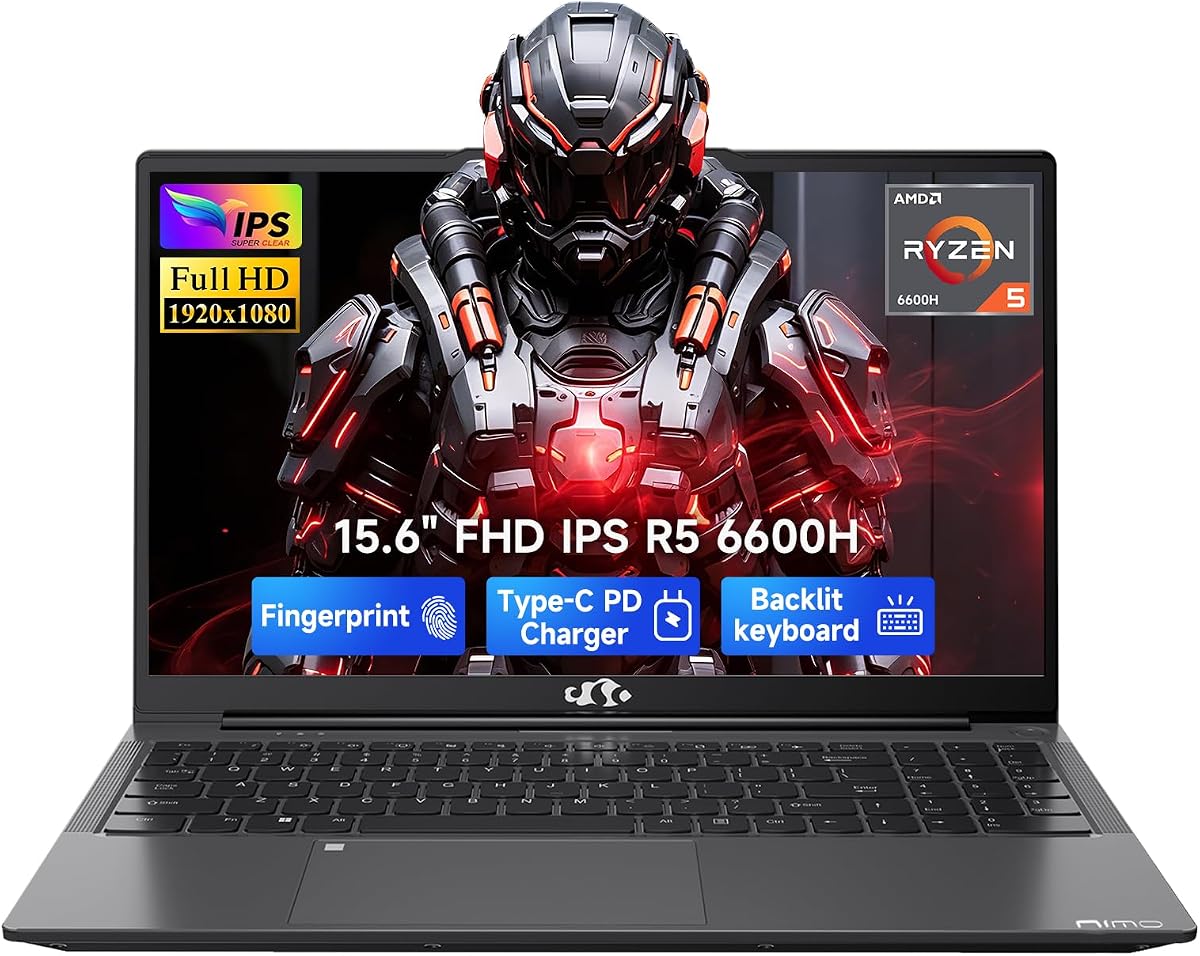
This NIMO laptop stands out as a top contender for budget conscious music producers needing solid performance. It receives a 4.3 rating from users who appreciate its robust multitasking capabilities for home studio environments.
We may earn a commission when you buy through this link, at no additional cost to you.
The AMD Ryzen 5 6600H processor provides six cores and twelve threads which handle digital audio workstation tasks efficiently. With 16GB of DDR5 memory you can run multiple virtual instruments and effects plugins without significant lag or slowdown during recording sessions.
While the build quality is practical for its price point the fan noise may be noticeable during quiet recording takes if not managed properly. The lack of a dedicated GPU is not a major issue for audio work but limits video production potential for multimedia creators.
If you need a reliable machine to run complex projects like Reason or Ableton Live on a budget this model delivers excellent value. Its combination of memory and processing power makes it ideal for producers starting their journey into professional sounding home recordings.
The six core design ensures smooth handling of large audio tracks and real time effects processing.
512GB SSD provides ample space for project files and sample libraries while DDR5 RAM boosts speed.
We may earn a commission when you buy through this link, at no additional cost to you.
This entry level laptop receives a perfect 5 star rating for its value proposition in basic music creation tasks. It is designed for users who need a portable device for simple recording and editing without breaking the bank.
We may earn a commission when you buy through this link, at no additional cost to you.
The Pentium Gold 6500Y processor handles lightweight audio software like Audacity or basic DAW modes effectively. 12GB of RAM allows for smooth browser usage alongside recording apps ensuring you can research sounds while producing tracks.
Storage is limited to 128GB which may fill up quickly with large sample packs or video files. Users will likely need an external drive for long term project storage but the M.2 slot allows for internal upgrades if needed.
For beginners learning to produce music this machine offers a solid foundation to learn the basics of recording and mixing. Its connectivity options support external audio interfaces making it a practical choice for hobbyists starting their home studio.
12GB RAM exceeds typical entry level standards providing headroom for multitasking during audio sessions.
The Full HD IPS display ensures accurate visuals for waveforms and plugin interfaces.
We may earn a commission when you buy through this link, at no additional cost to you.
The HP Chromebook 14 earns a 4.4 rating for its versatility as a lightweight device that can handle web based audio tools and media consumption. It is unique for including dual array microphones which are useful for basic voice capture.
We may earn a commission when you buy through this link, at no additional cost to you.
While Chrome OS restricts traditional desktop DAW installation you can use browser based DAWs like BandLab or Soundtrap effectively. The Celeron N4000 processor supports these cloud based applications well making it suitable for learning music production concepts.
The 32GB storage is very limited so reliance on cloud storage or SD cards is necessary for project files. Battery life is a strong point allowing you to work on ideas during commutes or travel without hunting for power outlets.
This laptop is ideal for music enthusiasts who want a portable device for lyric writing idea sketching or cloud based collaboration. While not a replacement for a full workstation it offers a convenient entry point for mobile creativity.
Dual array digital microphones provide clearer voice capture compared to standard laptop mics.
Long lasting battery ensures productivity away from power sources for extended periods.
We may earn a commission when you buy through this link, at no additional cost to you.
This model is rated 4.2 by users who value portability and performance balance for student workloads. It features a robust 12GB of RAM which stands out in this price range allowing for comfortable multitasking during class and music production.
We may earn a commission when you buy through this link, at no additional cost to you.
The anti-glare IPS screen reduces eye strain during long editing sessions which is beneficial for detailed audio work. The physical camera privacy slider adds a layer of security useful for remote learning or video calls without software toggles.
Performance is adequate for entry level audio editing software but may struggle with heavy virtual instrument loads. The 128GB SSD boots quickly and offers fast file access but users should plan for external storage or cloud solutions.
For students balancing online classes and music hobbies this laptop provides a reliable platform without excessive cost. The connectivity options ensure you can connect audio interfaces and monitors easily for a flexible setup at home or dorm.
Anti-glare coating and wide viewing angles improve comfort during extended screen time.
Physical camera slider provides immediate privacy control without software dependency.
We may earn a commission when you buy through this link, at no additional cost to you.
Rated 4.3 this BLUEING laptop offers a sleek design that suits users needing a portable device for light music tasks. It supports Bluetooth 5.2 which ensures stable connections for wireless headphones and speakers during playback or mixing.
We may earn a commission when you buy through this link, at no additional cost to you.
The Pentium Gold processor handles daily productivity and simple audio software well providing a smooth experience for basic workflows. USB-C charging adds convenience allowing you to use a single charger for phone and laptop reducing cable clutter.
With 8GB of RAM it manages moderate workloads but heavy DAW projects might cause slowdowns during rendering. The privacy slider adds value for security conscious users but the 128GB storage fills up quickly with modern media files.
This unit is best suited for casual users or students needing a laptop for general use with occasional audio editing. Its connectivity and build quality offer a dependable experience for those prioritizing mobility over raw power.
Bluetooth 5.2 ensures reliable wireless audio device connections for monitoring.
Thin chassis and light weight make it easy to carry for mobile ideas.
We may earn a commission when you buy through this link, at no additional cost to you.
This laptop shares the same high-performance NIMO base as the top pick and earns a 4.3 rating for consistent performance. It emphasizes workflow efficiency with features like fingerprint login that speed up access to your audio workstation.
We may earn a commission when you buy through this link, at no additional cost to you.
The 512GB SSD provides significant space for storing samples and recordings without immediate need for external drives. DDR5 memory ensures that data transfer rates are high allowing for quick loading of large projects and plugins.
While the performance is strong the cooling system may generate fan noise that could interfere with quiet recording takes. Users should consider using headphones or isolating the machine from the recording area for best results.
It remains a strong option for hobbyists who need reliable speed and storage for growing music collections. The warranty support adds peace of mind for long term use in a home studio environment.
Fingerprint login reduces wait time when accessing your creative software.
512GB SSD allows for extensive local project storage without clutter.
We may earn a commission when you buy through this link, at no additional cost to you.
Rated 4.2 this BLUEING model offers an upgrade in storage with 256GB SSD alongside 12GB RAM for better capacity management. This balance supports users who need room for audio files without immediate upgrade steps.
We may earn a commission when you buy through this link, at no additional cost to you.
The ergonomic keyboard enhances typing comfort which helps when entering notes or lyrics during songwriting sessions. The 1080p IPS display offers clear visuals for mixing interfaces and detailed waveform analysis.
Battery capacity is a consideration for long mobile sessions so carrying the charger is advised for extended use. Bluetooth 5.0 provides stable connectivity for peripherals although newer models offer 5.2 for slightly better range.
It is a solid choice for users prioritizing RAM and storage over raw CPU power. For music tasks that rely more on memory than processing this machine delivers reliable performance for home studio basics.
256GB SSD provides double the space for files compared to 128GB models.
Ergonomic layout supports comfortable typing for long creative sessions.
We may earn a commission when you buy through this link, at no additional cost to you.
This unit receives a 4.2 rating for offering a compact form factor with strong specs for daily tasks and recording. The 170 degree hinge allows for flexible viewing angles which helps when connecting to external monitors for production.
We may earn a commission when you buy through this link, at no additional cost to you.
Quiet operation is a highlighted feature ensuring that the fan noise does not interfere with audio monitoring. This makes it suitable for small home studios where sound isolation is difficult to achieve.
Battery life is rated up to 6 hours which covers typical work sessions but may need charging for all day use. The 256GB SSD offers enough space for several projects though larger libraries may still need external drives.
For home users needing a reliable desktop replacement this laptop combines portability with enough power for music basics. Its design and storage capacity make it a pragmatic choice for students and hobbyists.
170 degree hinge facilitates better positioning for dual monitor setups.
Quiet operation ensures minimal background noise during recording sessions.
We may earn a commission when you buy through this link, at no additional cost to you.
With a 4.0 rating this model focuses on essential features like 256GB SSD and reliable connectivity for daily use. It supports a wide color gamut which helps in visual accuracy when editing video for music videos.
We may earn a commission when you buy through this link, at no additional cost to you.
The 100% sRGB color gamut ensures colors are represented accurately on the screen for multimedia work. HDMI output allows you to connect to external speakers or monitors for better audio and video monitoring.
8GB RAM is sufficient for basic DAWs but might be tight for large orchestral templates. The privacy slider offers a simple way to secure your webcam during breaks from recording or video calls.
This laptop is a practical choice for those who need a straightforward device for general computing and light music tasks. Its visual specs and storage capacity make it a viable option for multimedia producers.
100% sRGB ensures true color representation for multimedia production.
HDMI port enables external monitor setup for expanded workspace.
We may earn a commission when you buy through this link, at no additional cost to you.
This laptop earns a high 4.8 rating for being incredibly lightweight and fanless making it extremely quiet for recording environments. The lack of fans means no noise interference when capturing audio nearby.
We may earn a commission when you buy through this link, at no additional cost to you.
Windows 11 is pre-installed providing a modern OS experience that supports many current audio plugins and apps. The compact Type-C PD charger makes it easy to travel with power without bulky adapters.
While 4GB RAM limits heavy multitasking it can handle basic web recording and lightweight apps efficiently. The TF card slot allows for easy expansion of storage which is helpful for storing large media files.
For users needing a whisper-quiet device for voice recording or basic editing this laptop offers unique value. Its portability and silent operation make it a niche choice for vocalists or field recordists.
Fanless design ensures zero noise interference during quiet audio recording.
Windows 11 provides a robust platform for modern software support.
We may earn a commission when you buy through this link, at no additional cost to you.
Selecting the right laptop involves balancing budget constraints with the specific technical needs of your digital audio workstation and plugins.
The processor determines how many tracks and effects you can run simultaneously. Look for multi-core processors like AMD Ryzen or Intel Core to handle complex projects without audio dropouts.
Prioritize chips with high clock speeds for real-time processing to ensure your audio stays stable during playback.
RAM is critical for loading samples and running multiple applications. 8GB is the minimum but 16GB offers better longevity for growing production needs.
More RAM allows you to open virtual instruments and sample libraries without freezing the system.
Solid State Drives load faster than hard drives which reduces lag when opening projects. Aim for at least 256GB to store your operating system and active project files.
Ensure there is room for expansion via SD or external drives for archiving old tracks.
You need ports to connect audio interfaces and headphones. USB 3.0 or Type-C ports are essential for data transfer and power.
Check for a 3.5mm audio jack for direct headphone monitoring during recording sessions.
A clear screen helps you see waveforms and plugin details accurately. Look for Full HD IPS panels for better viewing angles.
Good color accuracy helps if you also work on video for music videos.
If you record in different locations a lightweight laptop with decent battery life is useful. Consider models under 4 pounds for easy carrying.
Long battery life ensures you can write and record without hunting for outlets.
Choose an OS compatible with your preferred software. Windows offers the widest compatibility with audio plugins.
Ensure the version supports the drivers needed for your external audio equipment.
Check if the laptop allows RAM or storage upgrades later. This extends the life of your device as needs grow.
Future upgrades help keep the machine relevant without buying a new one.
Connect your audio interface via USB and install the latest drivers to ensure optimal sound quality and low latency.
Use headphones for monitoring to prevent microphone feedback and keep your workspace quiet during recording.
Keep the device in a cool area to avoid overheating during long rendering sessions and clean the vents regularly.
Yes many affordable laptops can run software like Audacity or basic versions of Ableton. The key is ensuring the processor and RAM meet the software requirements.
Modern laptops often have decent built-in audio. However for professional recording an external audio interface is recommended for better input and output quality.
Start with at least 256GB SSD. If you use many large sample libraries plan for external storage or cloud backups.
Windows offers more hardware choices at lower price points while Mac has specific industry software. Both work well depending on your workflow.
Yes most models have USB ports that allow connection to MIDI keyboards via USB cables or USB hubs.
Use a cooling pad to improve airflow and keep the device in a well-ventilated area to maintain performance.
These ten laptops offer diverse options for home producers ranging from basic entry-level devices to more powerful machines.
Prioritize RAM and processor speed to ensure your music production software runs smoothly without interruptions.
Verify current pricing and specs before buying to ensure the model meets your specific creative needs today.