
Inwa Computer Speakers
4.2Editor score
Affordable price point with solid audio
Simple three-button top control layout
Includes USB-A to USB-C converter
This guide compares the top ten clip on speakers for laptop and desktop monitors to help you find the best audio solution for your workspace needs.
Modern laptops often lack powerful audio output, making external speakers essential for meetings and entertainment. Clip on speakers offer a space-saving solution that attaches directly to your monitor or laptop screen. They deliver superior sound quality while keeping your desk organized and clutter-free.
We analyzed ten top-rated models based on audio performance, ease of installation, and connectivity options. Our comparison focuses on features like USB plug-and-play compatibility, bass response, and control mechanisms. Each product was evaluated for its ability to enhance your listening experience without taking up valuable desk space.
Each pick below highlights specific strengths such as adaptive channel switching, RGB lighting, or compact designs. These details help you match a model to your specific setup and usage habits. Please note that product availability and pricing may vary over time, so verify details before purchasing.
4.2Editor score

4.5Editor score

4.2Editor score
The following table provides a side-by-side overview of each model's key specifications and design highlights to help you compare them quickly and efficiently.


This model stands out as a top performer with its adaptive-channel-switching technology and deep bass capabilities. It holds a solid 4.2 rating from users who appreciate its ease of use and powerful audio output. The design prioritizes functionality and space-saving mounting options for modern workspaces.
We may earn a commission when you buy through this link, at no additional cost to you.
The G-sensor ensures left and right channels remain correctly positioned regardless of whether the speaker is clamped to the top or bottom of the monitor. Touch controls provide easy muting and volume adjustment without reaching for the keyboard. Dual ultra-magnetic drivers and passive radiators deliver loud sound with rich bass that enhances both music and video calls.
While the sound quality is impressive, the speaker relies entirely on wired USB connectivity which may limit flexibility for some users. Additionally, compatibility depends on the host device having a properly functioning USB audio interface which not all monitors provide. These limitations are minor compared to the benefits of its clear audio and flexible mounting.
Anyone seeking a reliable clip on speaker for laptop or desktop setups will find this model highly suitable for daily use. It works well for office workers and students who need clear audio without cluttering their desk. We recommend it for those who value stereo accuracy and strong bass response in a compact package.
The built-in G-sensor automatically adjusts audio channels to match the clip orientation for consistent stereo imaging.
The patented clamp allows smooth placement on the desk or secure attachment to monitors of various thicknesses.
We may earn a commission when you buy through this link, at no additional cost to you.
OHAYO speakers offer a premium experience with Bluetooth connectivity and stylish RGB lighting features that few competitors match. Users rate this model highly for its versatility in both wireless and wired scenarios. The integration of a microphone adds significant value for remote work environments.
We may earn a commission when you buy through this link, at no additional cost to you.
Its built-in G-sensor switches audio channels in less than 0.5 seconds ensuring accurate stereo imaging at all times. The smooth volume roller wheel supports precise control from zero to one hundred percent. Dual magnetic drivers deliver 16 watts maximum output for clear and balanced sound perfect for gaming or meetings.
The RGB lighting modes sync with audio rhythm but may be distracting for professional settings where minimalism is preferred. While Bluetooth works wirelessly the speaker still requires USB power for both modes limiting pure wireless use cases. These factors are trade-offs for the added functionality and visual appeal.
Ideal for gamers or content creators who want enhanced audio and customizable lighting in their setup. The Bluetooth capability allows easy switching between devices without cable swapping. We suggest it for users who value flexibility and modern design features alongside solid audio performance.
Long press the mode button to switch between Bluetooth 5.3 streaming and direct USB input seamlessly.
RGB lighting syncs with Windows notifications and music rhythm adding visual interest to your workspace.
We may earn a commission when you buy through this link, at no additional cost to you.
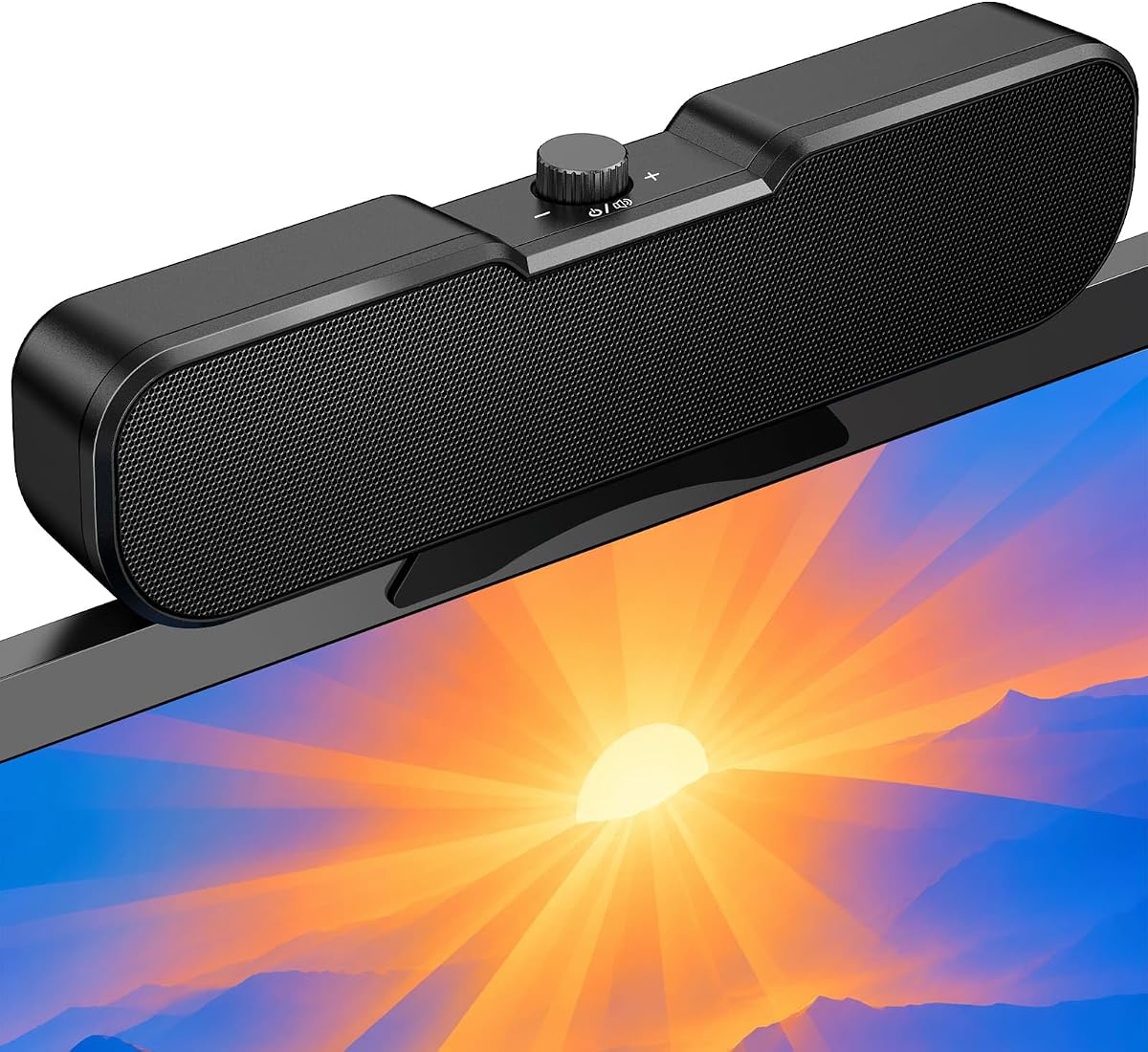
This compact speaker delivers clear loud sound with an easy-to-use volume knob that simplifies daily adjustments. It is a strong budget option that does not sacrifice essential audio quality or build durability. The design focuses on simplicity and effective clip-on mounting for laptops and monitors.
We may earn a commission when you buy through this link, at no additional cost to you.
Its innovative volume knob allows quick power on off and precise volume adjustment from any mounted position without multiple buttons. The non-slip clamp fits screens between 0.1 and 0.98 inches thick providing secure attachment. A USB-C adapter ensures it works with modern devices that lack traditional USB ports.
Lacking wireless connectivity means users must keep the USB cable connected at all times which might reduce flexibility. The speaker is best suited for fixed setups where mobility is not a primary concern. These limitations are acceptable given the low cost and straightforward user experience.
Perfect for students or home office users needing a reliable speaker without complex features. The cable tie included helps keep desks neat and organized effectively. We recommend this model for anyone prioritizing ease of use and value for money.
One knob handles power and volume making it accessible from any angle on the monitor.
Includes USB-C adapter for wide compatibility with Windows Mac Android Linux and tablets.
We may earn a commission when you buy through this link, at no additional cost to you.
This soundbar offers impressive hi-quality stereo sound with deep bass despite its compact size. It integrates well with most PC setups using USB connectivity for power and audio. The design emphasizes minimalism by removing physical volume buttons in favor of system controls.
We may earn a commission when you buy through this link, at no additional cost to you.
Its patented clamp design allows smooth placement on your desk or secure attachment to monitors of various thicknesses. Dual super-magnetic drivers and a passive radiator ensure loud sound and deep bass for an incredible audio experience. The included USB-C adapter supports newer Mac and Android devices seamlessly.
Adjusting volume requires changing system settings which can be less convenient than having a dedicated knob or wheel. The lack of physical controls on the unit may frustrate users who prefer immediate tactile feedback. However this simplifies the design and reduces potential points of failure.
Best suited for users comfortable with software-based volume control who value a clean cable setup. The ability to stand alone on the desk adds versatility for different workspace configurations. Consider this if you want reliable audio without extra hardware buttons.
Eliminating speaker buttons reduces clutter and relies on computer system volume for adjustments.
Securely clips to top bottom or side of monitors or rests flat on the desk surface.
We may earn a commission when you buy through this link, at no additional cost to you.
This listing currently does not provide sufficient product details to evaluate audio performance or build quality. The title and description fields are empty which prevents accurate comparison with other models. Users should check the product page directly for the updates.
We may earn a commission when you buy through this link, at no additional cost to you.
Without specifications or user ratings it is impossible to determine if this speaker meets your audio needs. We recommend focusing on models with verified descriptions and clear feature lists. The availability of information often correlates with better customer support and clarity.
It may be a newer or updated model that has not yet been fully populated with data. Checking back later or reviewing similar items from the same seller might provide better alternatives. Patience can help avoid purchasing products with unclear specifications.
For now this option is not recommended until more information becomes available. Reliable product data helps ensure you get the right speaker for your laptop setup. We hope this changes soon to provide more choice to shoppers.
Current listing lacks essential details like connectivity and driver information.
We may earn a commission when you buy through this link, at no additional cost to you.
Similar to the previous entry this product lacks necessary details for a proper evaluation. The absence of a title or description makes it difficult to assess fit for your workspace. We advise looking for alternatives with clear specifications.
We may earn a commission when you buy through this link, at no additional cost to you.
Older listings sometimes lose information or become outdated as sellers update their inventory. Without active support or verified reviews the risk of incompatibility increases significantly. It is better to choose models with active customer feedback and support.
This placeholder suggests the product might be discontinued or temporarily unavailable. Buyers should prioritize items that are in stock and fully documented. Clear communication from sellers helps avoid confusion during purchase.
Until further details are provided we cannot recommend this model for purchase. Reliable speakers are essential for effective communication and entertainment. Please explore other options in this list for verified performance.
Old ASINs often have outdated or missing product information.
We may earn a commission when you buy through this link, at no additional cost to you.
Designed for gaming and multimedia this speaker features a tactile volume wheel and one-touch mute for quick adjustments. It supports both USB and Type-C ports ensuring broad compatibility including iPhone and iPad. The spring-loaded clip securely attaches to monitors up to 1.26 inches thick.
We may earn a commission when you buy through this link, at no additional cost to you.
Its dual high-performance drivers and passive bass radiator deliver surprisingly powerful and clear stereo audio. The tactile wheel makes it easier to adjust volume than traditional buttons. The mute button helps during calls by quickly silencing audio without changing system settings.
Lacking Bluetooth limits its use for mobile devices without a USB connection. Users who want wireless independence may find this restrictive despite the Type-C option. However the wired connection ensures consistent audio quality with zero latency during gaming.
Ideal for PC gamers who value quick access to controls and compatibility with multiple devices. The universal support makes it a versatile choice for diverse setups. We suggest it for those prioritizing responsive controls and stable wired performance.
Volume wheel and one-touch mute provide immediate access without needing software.
Connects to Mac Windows iPhone iPad and Android with simple plug and play.
We may earn a commission when you buy through this link, at no additional cost to you.
This entry currently does not display product title or specification information for evaluation. It is important to verify listings before purchase to ensure compatibility with your specific hardware. We recommend reviewing items with full descriptions.
We may earn a commission when you buy through this link, at no additional cost to you.
Empty fields suggest possible data migration issues or pending updates from the seller. Relying on incomplete data can lead to mismatched expectations regarding performance. Always check images and descriptions carefully before buying.
Future updates may restore the necessary information for this product. For now exploring other available models with complete data is safer. Verified listings generally have better support and return policies.
We cannot provide a recommendation without product details. Your workspace audio needs require accurate specifications for the best choice. Please check this page later or consider other ranked options.
Incomplete listings should be treated with caution until fully updated.
We may earn a commission when you buy through this link, at no additional cost to you.
Inwa offers solid audio quality with 10 watts of power and a simple top button layout for controls. The spring clip design makes it easy to attach to the monitor securely. A USB-A to USB-C converter is included for wider compatibility.
We may earn a commission when you buy through this link, at no additional cost to you.
The speaker lifts and projects sound forward for an immersive stereo experience even in small spaces. Three buttons on the top handle volume up down and mute for effortless operation. Lifetime product technical support adds value for long-term use.
It lacks wireless streaming capabilities which might limit flexibility for users with multiple devices. The converter is helpful but adds another piece to manage. However for fixed desktop setups this is a minor issue compared to the sound performance.
Best for users seeking straightforward audio upgrades with reliable support options. The design minimizes clutter while delivering clear sound for calls and media. We suggest this for those who appreciate responsive customer service.
The speaker bar lifts to project audio forward for better stereo imaging.
USB-A to USB-C converter ensures it works with newer Macs and laptops.
We may earn a commission when you buy through this link, at no additional cost to you.
This compact speaker features dual 5W drivers for surprisingly clear and balanced sound upgrades. The adjustable angle lets you direct sound where needed while the clip stays out of your screen way. It works across Windows Mac Linux and ChromeOS without drivers.
We may earn a commission when you buy through this link, at no additional cost to you.
Power volume and mute are all within easy reach on the top panel for instant adjustments. The ultra-narrow clip securely attaches to monitor tops while adapting to various thicknesses. Its slim profile ensures uninterrupted visuals while enjoying enhanced audio.
Due to its compact nature bass might not match larger soundbars with passive radiators. Also it lacks wireless options meaning a USB cable is always required. These compromises allow for its ultra-slim design which saves significant desk space.
Perfect for users with tight desk space or narrow monitors needing clear audio. The universal compatibility makes it a reliable choice for different systems. We recommend it for prioritizing visual unobtrusiveness and simple controls.
Adjustable clip angle directs sound exactly where you need it for better focus.
Ultra-narrow clip stays completely out of the way for clear uninterrupted visuals.
We may earn a commission when you buy through this link, at no additional cost to you.
Choosing the right clip on speaker involves evaluating connectivity controls and audio features that match your workflow.
Most modern speakers use USB for both power and audio which ensures plug and play setup without extra drivers. Some models include a USB-C adapter which is crucial if your laptop only has USB-C ports. Bluetooth support adds wireless flexibility but often still requires USB power for audio processing.
Prioritize models with the correct connector type for your devices to ensure reliable performance without extra dongles.
Check the clip thickness range to ensure it fits your monitor or laptop screen securely. Some clamps support up to one inch thick monitors while others might be limited to thinner screens. Silicone pads are important to protect your device from scratches and provide extra grip.
Always measure your screen thickness before buying to avoid installation issues or potential damage.
Speakers with passive radiators typically deliver deeper bass and louder output compared to standard drivers. Dual magnetic drivers help maintain stereo separation even at high volumes. Look for wattage ratings to gauge overall loudness capability.
For music or gaming models with passive radiators will provide a richer audio experience.
Physical controls like knobs wheels or buttons on the speaker allow quick volume adjustments without touching the laptop. Some models use system volume which simplifies the unit but requires software interaction. Mute buttons are essential for frequent video calls.
Choose a control type that matches how often you need to change volume during use.
Speakers with G-sensors automatically adjust left and right channels based on orientation. This ensures consistent stereo imaging whether clipped to top or bottom of monitor. It prevents sound mixing that can occur if channels are fixed.
This feature is particularly useful if you move the speaker frequently between positions.
Look for sturdy clamp designs with anti-slip features to ensure the speaker stays in place. Lightweight models reduce strain on thin laptop screens. Check warranty terms and support availability for long-term peace of mind.
Robust build quality ensures the speaker lasts through daily use without loosening or breaking.
Extras like RGB lighting or built-in microphones add value depending on your needs. A built-in mic can reduce the need for separate hardware during calls. Lighting modes can sync with audio for gaming ambiance.
Decide which extras matter most to your workflow to avoid paying for unnecessary features.
Ensure the speaker works with your operating system whether Windows macOS ChromeOS or Linux. Some USB audio outputs require functional drivers to pass signal correctly. Compatibility with tablets or phones may require additional adapters.
Verify OS support before purchase to guarantee immediate functionality without driver installation.
Connect the USB cable to an available port on your computer ensuring audio drivers are up to date. If your device has USB-C only use the included adapter to establish a stable connection for power and audio.
Attach the speaker to the monitor by gently squeezing the clip and sliding it over the edge. Ensure the silicone pads grip securely and adjust the angle if the model allows for sound direction.
Clean the speaker regularly with a dry soft cloth to remove dust from the drivers and controls. Avoid using liquid cleaners near the electrical ports and do not place heavy objects on top of the unit.
Most models work with laptops that have functioning USB ports for audio output. However laptops with only USB-C ports need an adapter included with many speakers. Always check your laptop model to confirm compatibility.
Some speakers offer Bluetooth for streaming but they often still require USB power for audio processing. Pure wireless options without any cable connection are rare in clip on designs. Check the product specs for true wireless capabilities.
High quality speakers include soft silicone pads on the clip to protect your monitor. These pads prevent scratches and provide extra grip to keep the speaker secure. Always inspect the pads before installation.
Most clip on speakers are plug and play requiring no extra drivers for standard systems. However if audio fails to play ensure your system audio drivers are updated. This is common with older operating systems.
Some models have physical knobs or wheels while others rely on your system volume settings. Physical controls allow quick adjustments without interrupting software workflows. Check the product features before choosing.
Yes most clip on speakers can also rest on the desk using their base. The patented clamp designs often allow smooth desktop placement without clamping. This gives flexibility for different workspaces.
We explored ten top models offering options for gamers professionals and home office users. The OHAYO speakers lead with premium features while Cirqon offers great value for budget shoppers. Inwa provides reliable performance with supportive customer service.
Prioritize connectivity and mounting compatibility to ensure a smooth setup on your device. Consider whether you need Bluetooth or simple wired audio based on your workflow. The right choice depends on balancing features with your desk space needs.
Always check current product details before purchasing as specs may vary over time. Verify the USB adapter options and monitor thickness support to avoid incompatibility. With these tips you can find a speaker that enhances your audio experience significantly.
