
Crenova Laminator Machine with 10 Laminating Sheets, A4 Laminating Machine
4.6Editor score
Fast warm-up time
Hot and cold modes
Jam prevention lever
Finding the right cold laminator machine ensures your delicate materials stay protected without heat damage. Whether you work with photos or documents, choosing the right tool matters for quality results.
We evaluated ten top models based on speed, capacity, and ease of use to help you find the perfect fit. Each option offers unique features designed to meet various professional and home needs effectively.
Every pick highlights key strengths and ideal use cases so you can decide with confidence. Please note that prices and availability change frequently, so verify current details before purchasing your preferred model.
4.6Editor score

4.7Editor score

4.5Editor score
As an Amazon Associate we earn from qualifying purchases.
The following table provides a side-by-side comparison of all ten reviewed models to highlight their unique specifications and capabilities for your specific laminating needs.


This robust machine stands out for users needing heavy duty manual cold laminating without relying on electricity. Its solid metal construction ensures stability during operation while the wide roll capacity handles large projects efficiently.
We may earn a commission when you buy through this link, at no additional cost to you.
The adjustable roller position allows you to work with various material thicknesses ranging from thin films to thicker mounting media. The non-slip rubber feet keep the unit secure on your workspace table during active use.
While the hand crank mechanism requires more physical effort than electric models it provides total control over pressure and speed for delicate materials. Some users might find the manual operation slower for high volume daily tasks.
This model is ideal for workshops and studios where power access is limited or precision manual control is preferred for large format projects requiring consistent pressure.
The all metal build ensures the machine lasts through years of demanding commercial use without bending or warping.
From wedding photos to advertising posters this laminator supports a wide range of creative and professional tasks effectively.
We may earn a commission when you buy through this link, at no additional cost to you.
This compact laminator offers excellent value for home and office users needing reliable protection for standard documents and photos. The dual mode capability allows you to switch between thermal and cold settings based on material sensitivity.
We may earn a commission when you buy through this link, at no additional cost to you.
Its quick warm-up time means you spend less waiting and more working on your projects. The jam prevention feature helps protect important documents from getting stuck or damaged during the laminating process.
While it is designed for A4 size materials which limits large format work it excels in everyday tasks like ID cards and certificates. The compact footprint fits easily on small desks without taking up much space.
Students and teachers will appreciate its portability and ease of use for classroom materials or personal photo preservation needs quickly and affordably.
Switching between hot and cold modes lets you laminate heat-sensitive items without risking damage from high temperatures.
Its lightweight design allows you to move it easily between rooms or take it to different workspaces when needed.
We may earn a commission when you buy through this link, at no additional cost to you.
This small laminator is perfect for users who need a quiet workspace while laminating documents at home or in class. Its compact design fits neatly on any desk while still delivering professional looking results for your projects.
We may earn a commission when you buy through this link, at no additional cost to you.
The three minute warm-up ensures you are ready quickly without long delays. The ABS jam release lever helps you resolve paper jams safely without tearing your valuable documents during the extraction process.
While it only supports up to nine inch wide materials it is ideal for standard letter size documents and photos. The quiet motor ensures it does not disrupt your concentration or disturb others nearby.
Parents and students who need a noise free laminating solution for late night work will find this model particularly useful for its unobtrusive performance.
The quiet motor ensures your focus remains on your work rather than the machine humming loudly during operation.
The ABS button allows quick removal of stuck paper so you can continue your project without frustration or delay.
We may earn a commission when you buy through this link, at no additional cost to you.
This comprehensive laminator kit stands out by combining laminating cutting corner rounding and binding tools into one organized system. It provides everything you need to process documents from start to finish without needing separate devices.
We may earn a commission when you buy through this link, at no additional cost to you.
The intelligent temperature control ensures bubble free results that protect your documents effectively. The dual modes allow you to switch between thermal for durability and cold for heat-sensitive materials like old photos.
While it includes many accessories that may seem complex at first the internal storage keeps your workspace tidy and tools easy to find. The sixty second warm-up saves valuable time during busy work sessions.
Teachers and office professionals managing large volumes of documents will appreciate the efficiency and completeness of this all-in-one solution for their daily tasks.
Having a cutter rounder and punch inside the main unit keeps your desk organized and ready for any finishing task.
The auto shut-off and intelligent temperature controls reduce risks during operation while ensuring consistent quality results.
We may earn a commission when you buy through this link, at no additional cost to you.
This kit provides an affordable entry point for users needing large format laminating capabilities with A3 and 11×17 inch support. The included cutter and corner rounder make it a complete package for professional finishing touch needs.
We may earn a commission when you buy through this link, at no additional cost to you.
It supports both thermal and cold modes so you can protect sensitive items without heat damage. The fifty laminating sheets included allow you to start working immediately without buying extra consumables right away.
The laminating speed is moderate compared to some premium models but it is sufficient for most small business and school applications. The jam release button helps resolve common issues quickly without damaging the machine.
Anyone needing to laminate posters or large documents on a budget will find this kit offers excellent versatility and capacity for the price.
The paper cutter and corner rounder let you trim and finish documents neatly without needing additional tools.
Dual modes allow flexibility for various projects ranging from durable certificates to fragile photographs.
We may earn a commission when you buy through this link, at no additional cost to you.
This high speed laminator is built for busy offices or schools needing to process many documents quickly. The rapid warm-up time and high feed rate mean you spend less time waiting and more time completing tasks.
We may earn a commission when you buy through this link, at no additional cost to you.
The built-in storage for accessories keeps your workspace organized while the smart temperature protection extends the life of the device. It supports both standard and thick pouches for different durability requirements.
While the unit is larger than desktop models it fits well in dedicated workspaces where efficiency is key. The jam resistant design minimizes interruptions during high volume work sessions.
Administrators and teachers handling large batches of materials will benefit from the speed and robust build quality of this professional grade machine.
Processing documents at high speed reduces wait times significantly when you have many items to finish.
Automatic temperature regulation protects both your documents and the machine from overheating during prolonged use.
We may earn a commission when you buy through this link, at no additional cost to you.
This model from a trusted brand offers consistent performance for standard document laminating tasks in schools or homes. The two roller system ensures even heat distribution for professional looking results that are bubble and wrinkle free.
We may earn a commission when you buy through this link, at no additional cost to you.
It heats up quickly and processes one letter size page per minute which is efficient for small to medium workloads. The release lever allows you to quickly remove pouches when needed after laminating.
While it lacks cold laminating capability its thermal performance is reliable for protecting frequently handled documents. The compact size fits comfortably in tight spaces without taking up much desk real estate.
Users seeking a dependable machine for basic laminating needs who prefer a trusted brand will find this model offers consistent quality and ease of use.
Known for reliability this brand delivers consistent performance that users can depend on for daily tasks.
No complex settings are needed making it easy for anyone to start laminating immediately after setup.
We may earn a commission when you buy through this link, at no additional cost to you.
This machine supports large formats including A3 while maintaining low noise levels ideal for quiet environments like libraries or homes. The integrated paper trimmer allows you to cut pouches precisely without needing separate tools.
We may earn a commission when you buy through this link, at no additional cost to you.
It offers both thermal and cold modes to protect a wide variety of materials without heat damage. The ABS button helps you resolve jams quickly so you can continue working with minimal downtime.
While it is not the fastest model available its steady performance and low noise make it suitable for focused work settings. The included pouches let you start using it right away upon purchase.
Users prioritizing a calm working environment while needing large format capability will appreciate this balance of size and quiet performance.
The built-in trimmer lets you customize pouch sizes easily without leaving your laminating station for cutting tasks.
Quiet operation ensures you can work during evening hours without disturbing others in your home or office.
We may earn a commission when you buy through this link, at no additional cost to you.
This system offers a unique approach to cold laminating that requires no electricity making it perfect for remote or outdoor work. It uses a cartridge system that simplifies the loading process and ensures consistent pressure application.
We may earn a commission when you buy through this link, at no additional cost to you.
The heat-free process protects delicate materials like photos and receipts that might be damaged by thermal laminators. You can carry it anywhere without worrying about power outlets or cords limiting your workspace.
While it requires manual effort to operate which might be slower than electric units it provides total control and safety for sensitive items. The price is higher than standard electric models but the utility is unique.
Photographers and field workers needing to laminate on the go without power sources will find this system invaluable for protecting their materials.
Since no power is needed you can use it anywhere from construction sites to camping trips without hassle.
The lack of heating elements eliminates burn risks and ensures safety even when working around children or pets.
We may earn a commission when you buy through this link, at no additional cost to you.
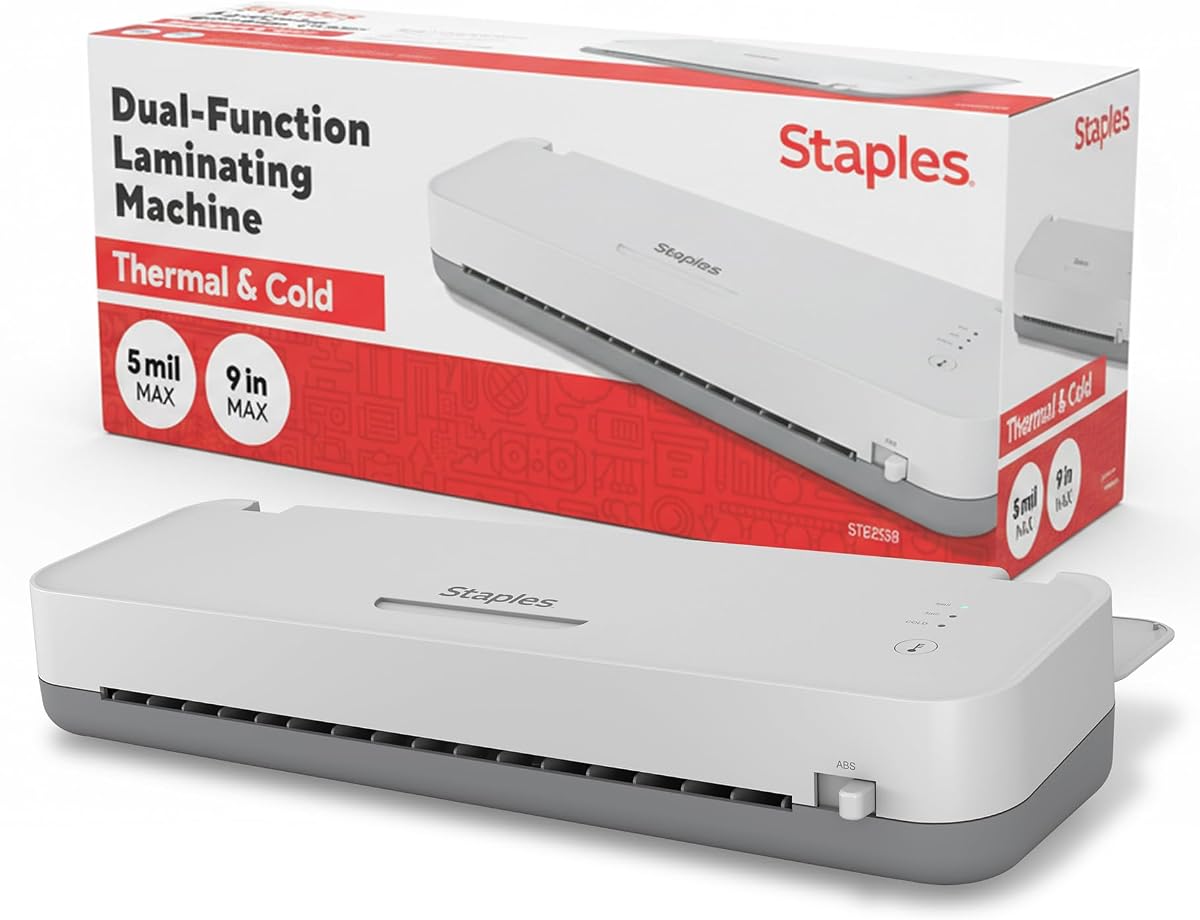
This model from a major office supply brand provides reliable performance for general business and school use. The dual function allows you to choose between thermal and cold modes depending on the material you are processing.
We may earn a commission when you buy through this link, at no additional cost to you.
It warms up quickly so you can start laminating right away when time is critical for office tasks. The jam-free technology helps prevent paper from getting stuck which protects your important documents from damage.
While the design is simple it handles common document sizes well and fits nicely on most office desks. The reverse jam prevention ensures smooth operation even if a sheet gets fed incorrectly.
Business owners and educators seeking a trusted brand with solid performance for routine laminating will find this machine meets their daily operational needs.
Advanced design minimizes the risk of jams so your workflow stays smooth and uninterrupted during work.
Rapid preheat times reduce downtime and let you get back to your projects quickly without waiting.
We may earn a commission when you buy through this link, at no additional cost to you.
Selecting the right laminator requires understanding your specific needs and material types to ensure optimal results.
Consider the maximum width your machine supports to ensure it can handle documents ranging from small cards to large posters without trimming. A 13 inch width is versatile for most office needs while wider options like 29.5 inches are better for professional large format work.
Choose a width that matches your typical project sizes to avoid wasting time cutting materials before laminating.
Dual mode machines allow you to switch between thermal lamination for durability and cold lamination for heat-sensitive materials. If you often work with old photos or receipts prioritize a model that offers effective cold laminating capabilities.
Check if the machine includes cold sheets or if you need to buy them separately as this affects the total cost of ownership.
Fast warm-up times reduce waiting periods and improve workflow efficiency especially in busy environments like schools or offices. Machines ready in sixty seconds or less allow you to start tasks immediately without significant downtime.
Look for higher laminating speeds measured in millimeters per minute if you need to process large volumes of documents quickly.
A reliable jam release mechanism such as an ABS button helps you remove stuck paper without damaging the document or the machine. This feature is crucial for protecting valuable materials from being ruined during operation.
Prioritize models with dedicated jam release levers to ensure smooth operation and reduce frustration during use.
Heavy duty machines with metal construction are more stable and durable for commercial use compared to those made mainly from plastic. A sturdy build ensures the machine remains level during operation which is vital for consistent lamination results.
Consider the weight and stability of the unit especially if you plan to use it frequently in a high traffic workspace.
Many models come with bundled accessories like paper cutters corner rounders and pouches which can save you from buying tools separately. These kits offer a complete solution for document preparation and finishing without additional purchases.
Check what is included in the box to determine if you need extra tools for trimming or finishing your laminated items.
Most electric laminators need a power outlet but manual or cartridge based systems can work without electricity for remote use. Decide whether portability is important for your workflow before choosing a power dependent or battery free option.
If you need to laminate in various locations check if the machine is compact enough to transport safely without damage.
Higher priced models often include more features like dual modes and metal builds but budget options can still perform well for basic tasks. Evaluate the cost against the features you truly need to avoid overspending on unnecessary capabilities.
Balance the initial investment with long-term usability to ensure you get the best value for your specific laminating needs.
Start by inserting the laminating sheet into the machine with the sealed edge first to prevent jams and ensure proper alignment. Adjust the roller width if your machine allows it to fit the thickness of your pouch comfortably.
If using a cold laminator apply even pressure by cranking the handle smoothly across the document to remove any air bubbles effectively. For electric models let the machine warm up fully before inserting the material for best results.
Clean the rollers regularly with a dry cloth to remove dust or residue that could affect lamination quality over time. Store the machine in a cool dry place and cover it when not in use to extend its lifespan.
Thermal laminating uses heat to melt adhesive on pouches while cold laminating uses self-adhesive sheets without heat. Cold is safer for heat-sensitive items like photos or receipts whereas thermal offers more durability for daily use.
Most machines work with standard 3 mil or 5 mil pouches but you should check the manufacturer specifications. Some models support wider ranges so verify the mil thickness before buying pouches to ensure proper fit.
Turn off the machine and use the ABS release lever or button to pull the stuck paper out gently. Never force the paper as this can damage the rollers and the document inside the pouch.
Bubbles often form when the pouch is fed at an angle or when the machine is too cold. Ensure you feed the sheet straight and allow the machine to warm up fully before use to avoid this.
Yes but only if you use thermal pouches and avoid direct heat exposure to the photo surface. Cold laminating is better for preserving original photos without heat risks.
With proper care a quality laminator can last several years depending on usage frequency. Avoid overheating and clean the rollers regularly to maximize its operational life and prevent breakdowns.
Some kits include built-in cutters but you may need a separate tool if your model does not. Check if your machine comes with trimmer accessories before purchasing additional cutting tools.
Cold laminating provides some water resistance but thermal laminating generally offers a stronger waterproof seal. For items needing high water protection choose thermal pouches unless heat is a concern.
We reviewed ten models offering a range of capabilities from compact budget options to heavy duty professional machines for your needs. The best choice depends on your required width mode flexibility and speed for efficient document processing.
Prioritize features like jam prevention and dual modes if you handle a variety of materials in your daily work tasks. Investing in a durable build will ensure consistent results and longevity for your laminating equipment.
Always verify current pricing and availability before purchasing since these details can change frequently in the market. Choose the model that aligns with your workspace requirements to enjoy seamless and reliable laminating.