
Digital Calendar 10.1" Touchscreen
4.4Editor score
No subscription fees
Weekly meal manager
Easy setup process
Modern families need efficient tools to manage busy schedules and household responsibilities. A digital chore chart offers a smart solution by combining calendar management with task tracking in one sleek device that keeps everyone organized and accountable without paper clutter.
We evaluated ten leading digital chore chart devices based on screen quality, integration with popular calendar apps, ease of use for children, and overall value. Our analysis focuses on how well each product supports family coordination and encourages positive habits through interactive features and clear displays.
Each pick highlights unique strengths such as budget-friendly pricing, premium build quality, or advanced syncing options. Remember that product availability and pricing can change frequently, so verify current details before making your final purchase decision for your home management needs.
4.4Editor score

4.4Editor score

4.4Editor score
As an Amazon Associate we earn from qualifying purchases.
The following table provides a side-by-side comparison of all ten digital chore chart models reviewed in this guide. Use this overview to quickly identify key specifications and features that matter most to your household organization needs.
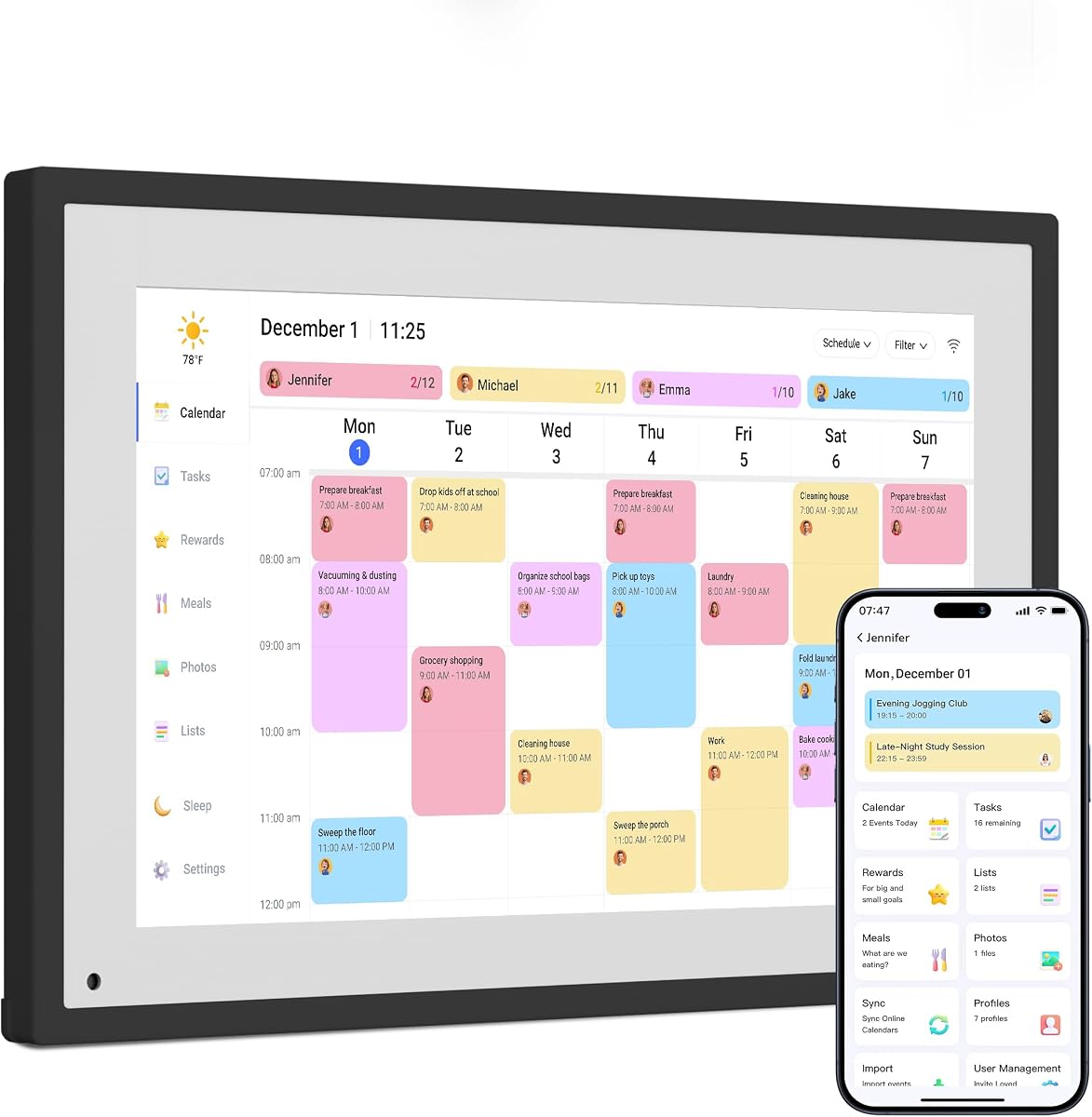




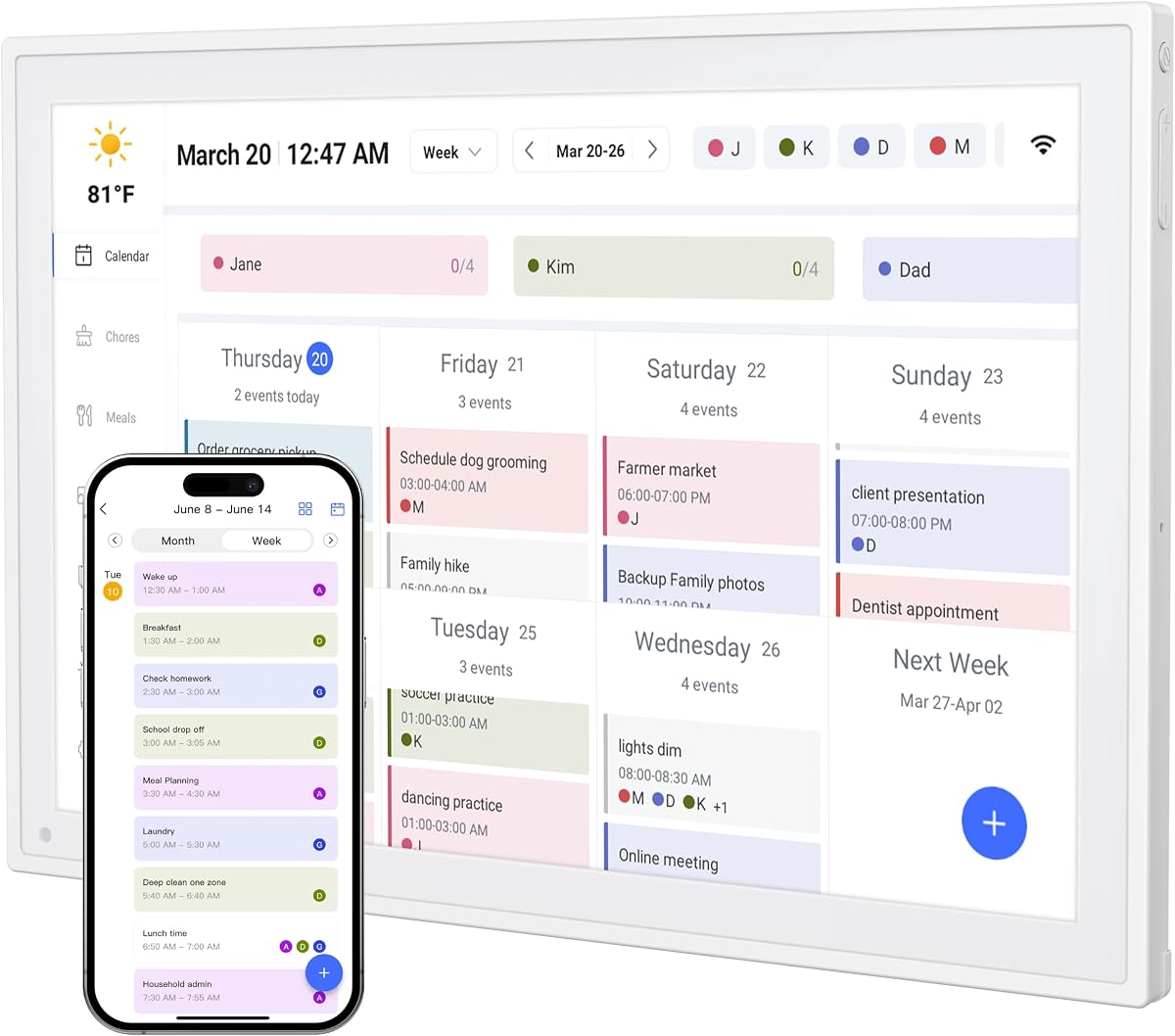

This 15.6 inch digital calendar stands out as the top choice for families seeking a comprehensive command center. With a 4.4 rating, it balances size, functionality, and ease of use effectively for household organization needs.
We may earn a commission when you buy through this link, at no additional cost to you.
The real-time sync feature ensures all family members stay updated without manual entry. The interactive chore chart uses a reward system that motivates children to complete tasks independently while parents monitor progress remotely.
While the price is higher than smaller models, the investment pays off through robust features and durable construction. The lack of subscription fees is a significant advantage over competitors that charge monthly for full access.
Families needing a central hub for schedules, meals, and chores will find this model invaluable. Its versatility as both a planner and photo frame adds aesthetic value to any room in your home.
Integrates calendars, meal planning, and chore charts into one device for streamlined household management and reduced clutter.
Built-in points and stars encourage children to take ownership of responsibilities without parental nagging or conflict.
We may earn a commission when you buy through this link, at no additional cost to you.
This Dragon Touch model offers an excellent entry point into digital chore management with a solid 4.5 rating. Its all-in-one approach organizes family schedules and tasks efficiently without demanding a premium price.
We may earn a commission when you buy through this link, at no additional cost to you.
The ability to assign different colors and tasks to each member simplifies daily coordination. The crystal-clear touchscreen ensures readability, making it easy for everyone from toddlers to grandparents to interact with the device.
Although wall mounting is not supported, the design works well on desks or countertops. The dual function as a photo frame adds home decor value when the calendar is not actively being used.
Ideal for smaller households or those new to digital planners, this unit delivers reliability and style. It serves as a practical tool for maintaining order without complicating your existing routine.
Combines scheduling and task tracking seamlessly to reduce reliance on separate physical planners and sticky notes.
Switches to photo display mode to enhance room aesthetics while keeping family memories visible throughout the day.
We may earn a commission when you buy through this link, at no additional cost to you.
The Dragon Touch Interactive model excels in connectivity, allowing users to manage calendars from anywhere via a mobile app. Its 4.5 rating reflects strong performance in syncing and user satisfaction for daily family logistics.
We may earn a commission when you buy through this link, at no additional cost to you.
Setup is straightforward, requiring only a Wi-Fi connection to link existing personal calendars. The interactive chore chart helps children build habits, while the dinner planner resolves the common question of meal decisions each evening.
Some features require paid functions for advanced needs, but core utilities remain free. The device doubles as an elegant picture frame, ensuring it looks good even when not displaying active schedules or tasks.
Families who rely heavily on Google or Apple ecosystems will appreciate the seamless integration. This model is a smart gift choice for parents seeking a balance of tech and simplicity.
Access and edit schedules from smartphones or tablets, ensuring updates are visible immediately on the main display.
Dinner planning and chore lists work together to smooth out evening routines and reduce household stress.
We may earn a commission when you buy through this link, at no additional cost to you.
This model ensures reliable connectivity through dual-band Wi-Fi, keeping family schedules updated instantly without lag. It earns a 4.4 rating for its robust synchronization and user-friendly interface suitable for all ages.
We may earn a commission when you buy through this link, at no additional cost to you.
Interactive chore tracking turns tasks into a game, fostering independence in children. The integration of meal planning and to-do lists centralizes essential household info, reducing the need for multiple organizational tools.
The compact 10.1 inch design fits comfortably on counters or desks without overwhelming the space. While it requires a stable internet connection, the benefit of real-time syncing justifies this dependency for most modern homes.
As a practical gift, it offers lasting value for busy households. The versatility to mount on a wall or stand on a desk makes it adaptable to various home layouts and preferences.
Dual-band Wi-Fi ensures stable connection for immediate updates across all linked devices and user accounts.
Combines chores, meals, and to-dos in one view to simplify daily decision-making and planning processes.
We may earn a commission when you buy through this link, at no additional cost to you.
The Skylight Calendar positions itself as a premium solution with a 15.4 inch screen that delivers crisp visuals and easy interaction. Its 4.4 rating reflects satisfaction with its robust features and premium build quality.
We may earn a commission when you buy through this link, at no additional cost to you.
It connects effortlessly with major calendar apps to ensure everyone stays on the same page. The optional Disney Mode adds a playful element that engages children, making routine tasks more appealing and less of a chore.
While the device is expensive, it justifies the cost through superior design and specialized features not found elsewhere. Users can choose a basic plan or upgrade for advanced tools like Magic Import and photo screensavers.
Families looking for a stylish command center that doubles as home decor will appreciate this model. Its flexibility to mount on walls or sit on countertops ensures it fits naturally into modern living spaces.
Features 16 iconic characters to animate tasks and rewards, adding a fun interactive layer for children.
High-definition display ensures clear visibility of schedules and photos from various angles and distances.
We may earn a commission when you buy through this link, at no additional cost to you.
This budget-friendly option delivers essential features without charging monthly subscriptions, earning it a solid 4.4 rating. It syncs with major calendar apps and provides interactive chore tools that encourage children to stay productive.
We may earn a commission when you buy through this link, at no additional cost to you.
The meal manager generates grocery lists automatically to reduce last-minute shopping trips. Kids enjoy earning stars and unlocking rewards, which turns daily routines into a positive game rather than a list of demands from parents.
While it lacks some advanced customization, it covers all the basics effectively. The screen turns into a slideshow of memories when idle, adding visual value to the device beyond its organizational utility.
For families on a tight budget, this model offers excellent value. It serves as a practical tool to streamline home management without the ongoing costs associated with premium services or features.
All features including meal planning and chore tracking are unlocked permanently without any recurring payments or subscriptions.
Reward systems and stars help build self-discipline in kids by making task completion feel like a rewarding game.
We may earn a commission when you buy through this link, at no additional cost to you.
With 64GB of storage and a 1080P screen, this model handles extensive media and schedules with ease. Its 4.4 rating highlights the satisfaction users feel with its smooth operation and detailed display capabilities.
We may earn a commission when you buy through this link, at no additional cost to you.
The operating system delivers snappier response times and optimized sync performance for better daily management. Customizable widgets allow users to tailor the interface, placing essential tools like weather and meals front and center.
Automatic rotation and dimming ensure the device is comfortable to view at any time of day. The 1-year warranty provides peace of mind, ensuring support if any technical issues arise during regular use.
Families wanting to store thousands of photos and videos without needing external storage will benefit here. Its ability to switch seamlessly between planning and media display makes it a versatile centerpiece for any room.
Built-in 64GB storage holds thousands of HD files, removing the need for external drives or cloud fees.
Auto-rotation and dimming sensors ensure the screen is always readable and comfortable for eyes at any angle.
We may earn a commission when you buy through this link, at no additional cost to you.
This model boasts a perfect 5.0 rating for its straightforward approach to digital planning. It connects instantly to Wi-Fi and syncs calendars immediately, making it one of the easiest options to set up and start using.
We may earn a commission when you buy through this link, at no additional cost to you.
Interactive rewards turn tasks into engaging activities for children, building responsibility without constant parental input. The device also tracks weather and activities, ensuring all daily details are visible in one centralized location.
Although it lacks flashy features, its reliability and high user satisfaction make it a strong contender. The plug-and-play design means even non-tech-savvy users can manage family schedules with minimal learning curve or confusion.
Ideal for households prioritizing simplicity and dependability, this unit delivers on its promises. Whether mounted on a wall or set on a desk, it keeps everyone aligned and organized efficiently every single day.
Plug-and-play design allows users to connect and sync calendars within minutes of unboxing the device.
Includes weather, task rewards, and school timetables to provide a holistic view of family schedules.
We may earn a commission when you buy through this link, at no additional cost to you.
This model stands out for its silent vibration alert system, perfect for early morning reminders without waking partners. Its 4.2 rating reflects solid performance in basic task management and scheduling features.
We may earn a commission when you buy through this link, at no additional cost to you.
The full HD touchscreen ensures visibility from different angles, making it easy for anyone to read plans. It also includes a recipe keeper, helping families maintain consistent meal routines and avoid last-minute decision stress.
While it may lack some of the flashy features found in other models, it focuses on core reliability. The zero subscription model ensures that every feature included in the box remains accessible permanently without extra charges.
Families needing a discreet and functional planner will find this device suitable. Its flexibility to rotate between portrait and landscape modes allows it to fit on desks, nightstands, or kitchen counters seamlessly.
Silent vibration motor wakes users for appointments without audible noise or disturbing others in the home.
Recipe keeper feature simplifies meal prep and aligns well with the calendar's broader family management tools.
We may earn a commission when you buy through this link, at no additional cost to you.
For those preferring a minimal aesthetic, this unit offers an ultra-thin design that blends into modern decor seamlessly. Its 4.2 rating supports its reliability for basic organizational tasks without unnecessary complications.
We may earn a commission when you buy through this link, at no additional cost to you.
The display focuses on simple menu titles rather than detailed recipes to keep the screen clean and readable. Sleep mode ensures no light pollution at night, making it safe to leave on in bedrooms or living areas.
All core functions including daily routines and rewards are available for free, avoiding ongoing subscription costs. This makes it a cost-effective choice for users who need straightforward planning without complex customization options.
Ideal for gift-giving or small households, it balances function with form. Whether mounted on a wall or displayed on a desk, it provides essential organization tools that are easy for any family member to use.
Displays menu titles simply to maintain a clean interface that is easy to read from across the room.
Sleep mode disables display light to ensure the device does not disrupt sleep cycles or cause light pollution.
We may earn a commission when you buy through this link, at no additional cost to you.
Selecting the right digital chore chart involves evaluating several key factors to ensure it meets your family's specific needs and lifestyle habits.
The size of the display determines how much information can be seen at once. Larger screens like 15.6 inches offer better visibility for multiple schedules, while 10.1 inch models fit better on smaller counters. Resolution impacts clarity, ensuring text is readable even from a distance.
Choose a size that fits your space but allows everyone to read the display comfortably.
Some models charge monthly fees for advanced features or syncing capabilities. Others offer all core functions for free. Assess whether you need premium tools or if basic planning is sufficient to avoid unnecessary ongoing costs.
Prioritize devices with no subscription requirements for long-term savings and full access.
Look for support for Google, iCloud, and Outlook to ensure all family members can share schedules seamlessly. Dual-band Wi-Fi ensures stable connections for instant updates. Without reliable sync, the device becomes isolated and less useful.
Ensure the device supports the calendar apps you already use to maximize utility and reduce duplicate entry work.
Gamification features like points or stars can motivate children to complete tasks independently. Check if the device allows customization of tasks and rewards to match your household's specific goals and parenting style.
Interactive elements turn chores into games, reducing friction and building better habits over time.
Many models include tools for meal planning and grocery lists to reduce kitchen stress. Verify if these features allow saving recipes or generating shopping lists automatically for convenience.
Integrated meal planning simplifies weekly preparation and saves time during busy evenings.
Some devices come with wall mounts for permanent installation, while others are designed for desks or shelves. Ensure the unit fits your intended location whether you want it visible on a wall or portable on a counter.
Choose a mounting option that ensures the device is always visible and accessible to every family member.
Devices often double as digital photo frames to display memories when not in use. Larger storage capacity allows you to keep more photos and videos without needing external drives or cloud subscriptions.
A photo frame mode adds aesthetic value and ensures the device remains useful even when tasks are completed.
Consider how easy it is to connect to Wi-Fi and link accounts. User-friendly interfaces are essential for all family members, including older adults or young children, to use the device effectively.
Simpler setup ensures the device is adopted quickly and becomes part of the daily routine without frustration.
Start by connecting your device to your home Wi-Fi network and downloading the companion app on your smartphone. Link your existing calendar accounts such as Google or iCloud to sync existing appointments automatically.
Assign each family member a unique color and name to keep their schedules organized. Create recurring tasks like chores or school events and set reminders to ensure everyone stays on track without confusion.
Clean the touchscreen regularly with a soft microfiber cloth to avoid scratches or smudges. Keep the device away from direct sunlight and heat sources to maintain screen quality and extend its overall lifespan.
Most modern digital chore charts do not require a subscription for core features. Many models provide all planning tools, syncing, and reward systems for free. However, some premium features may be locked behind optional monthly plans for advanced users.
Yes, most digital chore charts support multiple user profiles or allow editing from connected mobile devices. This ensures everyone can view updates and complete tasks independently. It creates a shared environment for household management.
Top devices support major platforms like Google Calendar, iCloud, Outlook, and sometimes Cozi. Always verify specific compatibility before purchasing to ensure seamless integration. Most offer real-time syncing across all linked accounts.
Children can check off tasks directly on the touchscreen to mark completion. Many models include visual rewards like stars or points to motivate them. This interactive approach makes routine tasks more engaging for kids.
Yes, most digital chore charts have a built-in photo frame mode. When idle, the screen cycles through family photos or videos. This adds decorative value to your home while keeping memories visible throughout the day.
Wall mounting is optional and depends on your preference and available space. Some units come with stands for desk or counter placement. Check the product specs to see if wall hardware is included in the box.
Meal planners allow you to input weekly menus and often generate grocery lists. Some devices link recipes to the schedule to streamline cooking. This helps reduce the stress of deciding meals daily.
Most devices display cached data or previously synced schedules offline. However, real-time updates require an internet connection to function fully. Some models may limit advanced features like remote syncing during downtime.
We reviewed ten top models to help you find the perfect digital chore chart for your household. Each option offers distinct benefits ranging from budget-friendly designs to premium large screens.
Prioritize features that match your specific needs, such as subscription-free operation, robust syncing, or interactive rewards for kids. The right choice will streamline your family's schedule and reduce daily organizational stress.
Remember to check current prices and availability before making a purchase since these details can change frequently. Investing in the right tool will keep your home running smoothly and everyone accountable for their tasks.