Numark M6 USB 4-Channel
4.4Editor score
Four-channel mixing layout
Multiple input output options
USB recording capability
Explore our expert comparison of the top 10 Dj CD Mixer options for 2026 to find the perfect standalone or controller setup for your next gig or home studio
Finding the right Dj CD Mixer can transform your performance capabilities significantly. Whether you are spinning at a local club or managing a mobile setup, having reliable hardware ensures your set flows smoothly without technical interruptions or connectivity issues.
We compared ten top-rated models based on their features, connectivity options, and user reviews. This list covers standalone players, traditional mixers, and modern controllers that support CD and digital playback methods for various skill levels and budgets.
Each pick highlights key strengths and potential trade-offs to help you decide. Prices and availability change frequently so check current listings before purchasing to ensure you get the best deal on your chosen audio equipment today.
4.4Editor score

4.7Editor score

4.4Editor score
This side-by-side comparison highlights the core specifications and strengths of each model to help you identify which system fits your specific mixing style and performance needs best.


The Gemini CDM-4000BT bundle offers a comprehensive standalone DJ solution that eliminates the need for a laptop. With a high rating, it stands out for its dual CD and USB playback combined with Bluetooth streaming capabilities. This setup is ideal for mobile DJs who want reliability without carrying a computer.
We may earn a commission when you buy through this link, at no additional cost to you.
Its key strengths include intuitive jog wheels that allow for searching and scratching with precision. The central mixer section provides gain control and a robust crossfader, making beatmatching straightforward. The inclusion of a microphone and cables in the bundle adds significant value for beginners.
While the build quality is solid, some users note the plastic construction feels lighter than premium gear. Additionally, mastering the onboard software requires some study time. However, these trade-offs are acceptable given the price point and all-in-one convenience.
Mobile DJs and bedroom studio enthusiasts will find this unit perfect for starting out or upgrading their rig. It delivers professional features at an accessible price, making it our top recommendation for standalone CD USB mixing needs.
The embedded system allows you to play directly from USB or CD without relying on external software or a laptop computer.
Bluetooth input lets you mix tracks from your phone or tablet into the set for seamless transitions across different media formats.
We may earn a commission when you buy through this link, at no additional cost to you.
This Gemini MDJ-600 offers a solid portable solution for mobile DJs needing reliable backup options during performances. It supports both CD and USB formats to ensure your set plays even if one source fails. The built-in MIDI controller mode adds versatility for those using software at home.
We may earn a commission when you buy through this link, at no additional cost to you.
Its performance features like auto looping and hot cue pads make creative mixing accessible. The visual feedback from LED pads helps you stay locked in during live sets. The included V-Case software helps prepare playlists and set beatgrids before heading out to a gig.
Despite its utility, the menu system can feel complex for beginners. It takes time to learn how to navigate settings quickly. Also, the rating reflects some users finding it less intuitive than expected compared to competitors with similar price points.
If you prioritize portability and backup reliability, this unit is a strong contender. It bridges the gap between standalone play and controller functionality. Just be prepared to spend time learning its specific workflow before using it in a live environment.
Playing from both CD and USB ensures you have redundancy for critical gigs where internet access or laptop power might be unavailable.
Connecting via USB to Serato or VirtualDJ turns this player into a fully mappable controller, extending its use beyond standalone play.
We may earn a commission when you buy through this link, at no additional cost to you.
This bundle combines the Gemini CDM-4000BT player with a Rockville portable speaker, making it an attractive choice for mobile DJs. The 5.0 rating suggests high satisfaction among users who appreciate the complete kit approach. It simplifies setup by removing the need to source separate speakers.
We may earn a commission when you buy through this link, at no additional cost to you.
The Rockville speaker supports TWS stereo linking, allowing you to connect two units for wider sound coverage. The player itself retains the dual CD USB playback and Bluetooth features found in the standard bundle. This setup is convenient for smaller events or practice sessions.
However, relying on a portable Bluetooth speaker limits audio fidelity compared to professional PA systems. Bass response is typical for compact units and may not fill large venues. Additionally, the mixer section remains basic, offering limited control over advanced sound shaping.
For DJs needing an all-in-one travel kit, this bundle is highly recommended. It works well for private parties or small gatherings. Just ensure your venue size matches the speaker output capabilities for the best listening experience.
Getting the mixer and speaker together saves time and ensures compatibility for a quick setup at any event location.
Linking two speakers wirelessly creates a wider stereo field, improving sound distribution for outdoor or larger spaces.
We may earn a commission when you buy through this link, at no additional cost to you.
The Pioneer DJ DDJ-FLX4 is designed to be the perfect all-ounder for beginners looking to enter the world of DJing. With a solid 4.6 rating, it is praised for its user-friendly layout inherited from professional gear. It connects easily to PCs, Macs, and even iPhones or iPads.
We may earn a commission when you buy through this link, at no additional cost to you.
One of its standout features is the Smart Fader, which automatically adjusts volume and bass when you move the fader. This removes the pressure of manual beatmatching while you learn. The 16 performance pads offer hot cues and samplers to add creativity to your sets.
While the design is sleek and portable, it is a controller that requires software to run. It does not play audio on its own. Some users might find the plastic build less durable than older models, but it is robust enough for regular practice.
If you want to start mixing without a huge upfront investment, this controller is the ideal starting point. It grows with your skills and supports streaming services. It bridges the gap between casual learning and professional performance standards.
The auto-adjusting fader simplifies mixing for beginners by handling volume and bass transitions automatically as you move.
Whether you use Android, iOS, or Windows, this controller connects via USB or Bluetooth for flexible setup options.
We may earn a commission when you buy through this link, at no additional cost to you.
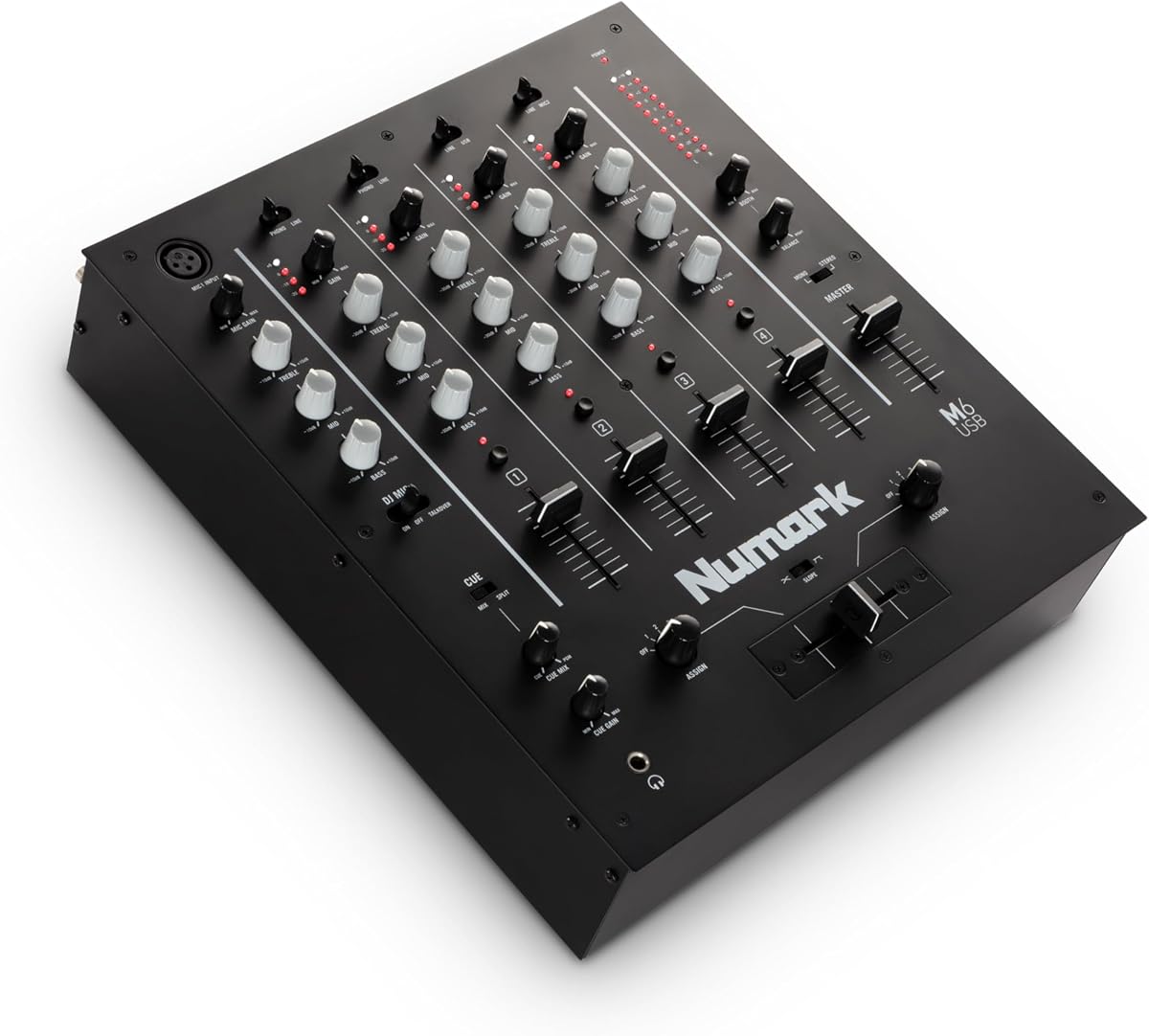
The Numark M6 USB is a versatile 4-channel DJ mixer that delivers essential mix features for any setup from weddings to clubs. With a 4.4 rating, it is known for its robust design and seamless plug-and-play USB connectivity. It allows you to mix from laptops or record sets easily.
We may earn a commission when you buy through this link, at no additional cost to you.
Each channel features dedicated level faders and three-band EQs, giving you precise control over your audio. The replaceable crossfader ensures long-term use without degradation. Multiple inputs for phono and line sources mean you can connect turntables or players without adapters.
As a standalone mixer, it requires separate media players to function, which can add to the setup weight and cost. It is heavier than portable controllers, making it less ideal for backpack travel. However, this weight contributes to its stable presence on the table.
For DJs needing a reliable central hub for their rig, this unit offers great value. It is perfect for home studios or fixed installations where you already own players. The recording feature adds a professional touch for sharing mixes online.
Connect via USB to Mac or PC to record your sets directly into audio software without extra hardware.
With support for phono and line inputs, you can mix signals from turntables, CD players, or digital sources simultaneously.
We may earn a commission when you buy through this link, at no additional cost to you.
This Gemini CDX-2250i is designed for permanent installations like bars or restaurants where stability is key. With a 4.0 rating, it offers a professional-grade solution for setups needing reliable dual CD playback. The anti-shock buffer ensures your music keeps playing even in high-vibration environments.
We may earn a commission when you buy through this link, at no additional cost to you.
The unit features precision jog wheels and programmable playback controls, allowing you to fine-tune your tracks. Its rackmount-ready design integrates cleanly into standard audio racks. The separate control panel and deck configuration simplifies workflow in fixed environments.
It lacks modern Bluetooth connectivity which might limit media options for some users. Also, the fixed rack design means it is not portable like handheld units. However, for stationary setups, this reliability is often more valuable than flexibility.
If you are outfitting a venue or building a home studio rack, this player is a strong choice. It ensures your audio plays smoothly without skips or dropouts. The user-friendly features make it accessible for staff without DJ training.
RAM buffer memory protects against vibration interruptions, ensuring continuous playback in busy venues or high-traffic areas.
The standard 19-inch rack design allows you to mount the unit securely alongside other audio equipment for a clean setup.
We may earn a commission when you buy through this link, at no additional cost to you.
The Numark Mixtrack Platinum FX offers a visual advantage with its large 6-inch jog wheels featuring high-resolution color displays. With a 4.6 rating, users appreciate the ability to see BPM and beats remaining directly on the deck. It comes with Serato DJ Lite included for a complete system.
We may earn a commission when you buy through this link, at no additional cost to you.
These displays allow you to track your mix progress without needing to look at a laptop screen constantly. The controller supports streaming services like Apple Music and Spotify, giving you access to millions of tracks. The performance pads provide quick access to loops and samples.
While the screens are a great feature, you still need a computer to operate the controller fully. It is not standalone, so if your laptop fails, your set stops. Also, the software requirements mean you must stay updated to keep everything working smoothly.
For visual learners or those who want quick track insights, this controller is a top pick. The tactile feel of the touch jog wheels enhances performance. It strikes a great balance between affordability and professional-level features.
The displays on the jog wheels show critical data like pitch and time, letting you mix more intuitively.
Access your streaming subscriptions directly through Serato DJ Lite to play tracks without downloading files first.
We may earn a commission when you buy through this link, at no additional cost to you.
The Pioneer DJ DJM-250MK2 brings the standard booth workflow into your home with its 2-channel layout. With a 4.6 rating, it is praised for teaching the skills needed for professional environments. The Magvel Fader offers smooth cuts ideal for both blending and scratching.
We may earn a commission when you buy through this link, at no additional cost to you.
Each channel includes a dedicated Sound Color FX filter, adding character to your tracks with a single knob. This simplifies effect usage while learning. It also unlocks Rekordbox DVS, allowing you to use turntables with digital files seamlessly.
This mixer does not have built-in media players so you will need external sources to play music. It is a standalone unit that focuses purely on mixing. The price might be higher than beginner mixers but the durability justifies the cost.
If you dream of playing in clubs, starting with this mixer builds the right muscle memory. It is reliable and durable for practice sessions. The filter knobs help you experiment with sound shaping without complicating the mixer.
The layout matches standard club gear so you learn the industry standard controls from day one.
Unlock Rekordbox DVS to mix digital files using turntables or media players for a flexible setup.
We may earn a commission when you buy through this link, at no additional cost to you.
The Numark Mixstream Pro+ offers true laptop-free performances with its standalone Engine DJ OS. With a 4.3 rating, it is valued for its ability to play and mix directly from the unit. It includes built-in speakers and supports Wi-Fi streaming for endless music options.
We may earn a commission when you buy through this link, at no additional cost to you.
The 7-inch touchscreen makes navigation intuitive for your track library. You can access services like TIDAL and Apple Music without needing a subscription on a separate device. Additionally, it allows you to control DJ lights wirelessly for a complete show experience.
The cost is higher than controllers that rely on computers. Learning the OS takes time compared to familiar software interfaces. However, the convenience of having everything in one unit is a significant benefit for performers on the go.
If you want a professional standalone rig for gigs without hauling a laptop, this is the top choice. It combines modern tech with traditional control elements. The touchscreen ensures you stay connected to your track metadata efficiently.
This standalone system lets you load tracks via USB or streaming and perform without a computer attached.
Wirelessly manage lights like Philips Hue or DMX directly from the controller to sync visuals with your mix.
We may earn a commission when you buy through this link, at no additional cost to you.
This Behringer DDM4000 offers a 5-channel digital DJ mixer with advanced features like beat-synchronized sampling and digital BPM counters. With a 4.4 rating, it is known for its comprehensive set of controls. The parametric EQ on channels allows precise sound shaping for any track.
We may earn a commission when you buy through this link, at no additional cost to you.
Its built-in sampler lets you play loops and triggers directly on the mixer. This adds a layer of creativity without needing extra gear. The MIDI integration means it can also act as a controller for external software setups.
The interface can feel dense compared to simpler analog mixers. There are many buttons and settings to learn. It is also a heavier unit which makes it less ideal for mobile DJs. However, for fixed setups, these features are powerful.
For DJs who love digital control and sampling, this mixer offers extensive options. The parametric EQ gives you studio-like control. It is a robust choice for those who want to push the boundaries of their mixes.
The sampler syncs with your track BPM to ensure loops and samples play in perfect time.
Precise EQ controls let you cut or boost specific frequencies to get the exact sound you want.
We may earn a commission when you buy through this link, at no additional cost to you.
Choosing the right DJ CD mixer involves understanding your performance needs, budget, and desired features to ensure you invest wisely.
Standalone mixers like the Gemini units allow you to play without a laptop, which is great for reliability on the go. Controllers like the Pioneer DDJ-FLX4 require a computer but offer more detailed software integration and lower upfront costs.
If you value convenience and mobility, choose standalone. If you want deep software features and are okay carrying a laptop, a controller is better.
Check if the mixer supports the media formats you own. Most models support USB and CD playback. Some also have phono inputs for turntables if you want to mix vinyl with digital tracks.
Ensure the mixer has the inputs you need to avoid buying extra adapters later.
Bluetooth allows you to stream audio directly from your phone or tablet into the mixer. This is useful for taking requests on the fly without plugging in cables. Check which channels support Bluetooth to ensure flexibility.
Prioritize mixers with Bluetooth if you want to mix smartphone audio into your sets easily.
Consider how often you will transport your gear. Lightweight controllers are easier to carry. Heavy standalone mixers like the Numark M6 are sturdier but harder to move. Rackmount units are best for permanent installations.
Choose a build quality that matches your travel frequency. A durable unit is worth it if you play gigs regularly.
Look for essential features like EQ bands, gain control, and a smooth crossfader. Advanced units offer BPM counters and filters. More knobs might mean more control but also a steeper learning curve for beginners.
Focus on mixers that have clear controls and basic EQ if you are just starting out.
If you plan to use software like Serato or Rekordbox, ensure the mixer supports it. Some units unlock DVS features for turntables. Others come with Lite versions included to get you started immediately.
Check the software requirements before buying to ensure your laptop can run the DJ apps.
Prices vary significantly between entry-level and pro models. Bundles often include accessories like microphones or speakers which add value. Ensure you factor in cables and software costs when calculating the total price.
Look for bundles if you need a complete setup. Otherwise, buying components separately gives more flexibility.
Check the output options like RCA or XLR to ensure they match your speakers. USB recording capability is also useful for saving your sets. Having multiple outputs gives you flexibility for different setups.
Make sure the mixer has the right outputs for your sound system to avoid connection issues during performances.
Start by connecting your audio sources properly. Plug your CD players or USB drives into the correct channels and ensure the master volume is turned down to avoid sudden loud noises. Always check your cables for secure connections before powering on the unit.
Learn the EQ and gain structure of your mixer. Adjust the gain knob so your tracks are loud but not clipping. Use the EQ knobs to cut bass on one track when bringing in another to avoid muddy sound. Keep your crossfader smooth and avoid forcing it when scratching.
Regularly clean your mixer with a soft cloth to remove dust from faders and knobs. Store it in a protective case when transporting to prevent damage. Update any software drivers or firmware as recommended to maintain performance and avoid glitches.
No, standalone mixers like the Gemini CDM-4000BT have built-in systems that allow playback without a computer. They read files directly from CDs or USB drives. This makes them ideal for mobile setups where carrying a laptop is inconvenient.
Most mixers feature RCA inputs that connect to standard CD players. Ensure your players output line level audio to match the mixer inputs. Some standalone units have built-in CD decks so you do not need external players.
A mixer combines audio signals from various sources like CD players. A controller sends signals to a computer to run DJ software. Mixers work independently while controllers rely on a laptop to produce sound.
Bluetooth is convenient for streaming from phones but may have slight latency. It is great for transitions or requests but not for precise beatmatching. Use wired connections for main tracks and Bluetooth for supplementary audio.
Yes, many mixers like the Numark M6 USB support direct recording to a computer via USB. This allows you to save your sets without extra hardware. Check the mixer specs for recording features before buying.
Some controllers like the Pioneer DDJ-FLX4 come with free DJ software included. Standalone mixers usually do not need software. Check the product details to see what software is bundled with your choice.
Jog wheels are durable but can wear with heavy use. Look for models with replaceable parts or rubberized pads. Proper handling and cleaning extend the life of these components significantly.
A smooth crossfader is essential for transitions. Look for one with adjustable tension or a Magvel fader which is designed for longevity. A fader that feels sticky may indicate quality issues.
We have reviewed ten diverse options ranging from standalone units to versatile controllers. The Gemini CDM-4000BT bundle stands out for its complete feature set without a laptop. The Numark M6 USB offers great value for those needing a robust mixer.
Prioritize your needs whether it is portability, sound quality, or software integration. A mixer that works with your workflow is better than the most expensive one. Take time to test the interface if possible before committing.
Prices and availability fluctuate frequently so always check the current listings. Use our guide to compare specs side by side for an informed decision. Your next great performance starts with the right gear selection.