
TP-Link ER605
4.4Editor score
Five Gigabit Ports
Mobile Broadband Support
Advanced Security Features
This guide compares the top ten Dual Wan Router models for reliable internet, load balancing, and failover to help you choose the right network hardware.
Finding a reliable network connection is critical for modern businesses and homes. A Dual Wan Router allows you to connect multiple internet sources, ensuring you stay online even if one line fails. This redundancy is essential for maintaining productivity and security across your devices.
We have evaluated the leading models on the market based on port configuration, security features, and management capabilities. Our analysis focuses on how each device handles load balancing and failover to keep your traffic flowing smoothly during outages or high demand periods.
Each pick in this list highlights specific strengths such as VPN support, speed, or ease of use. While prices and availability change frequently, these selections represent the best options currently available for various network sizes and requirements.
4.4Editor score

4.2Editor score

4.4Editor score
This side-by-side comparison highlights the key specifications of each top-rated model to help you make an informed decision for your specific network needs.


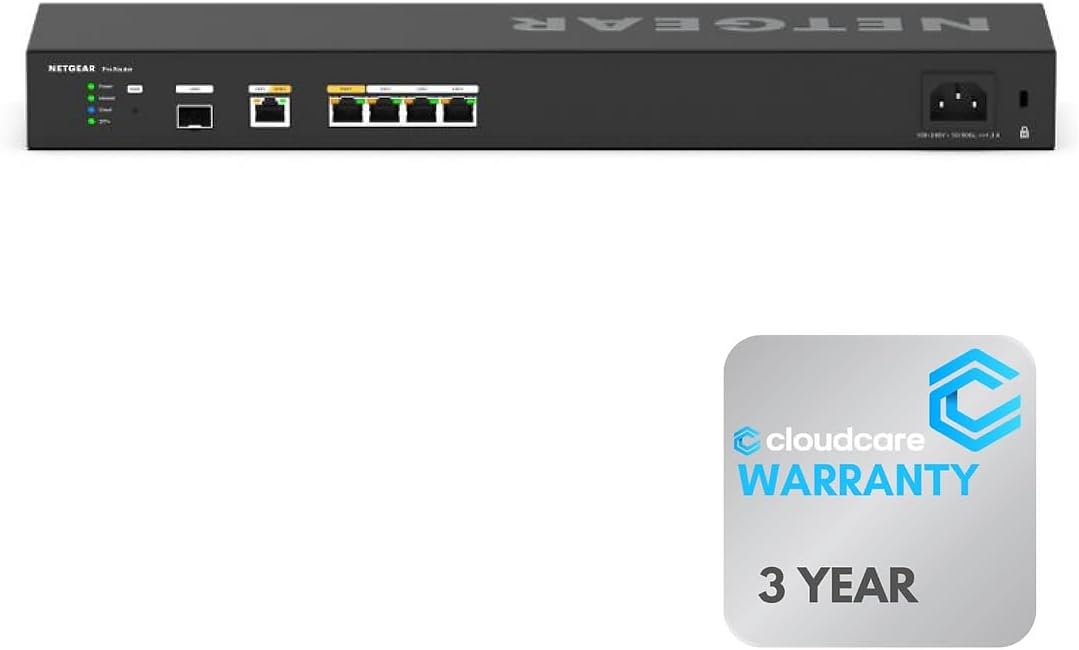

The NETGEAR PR60X stands out as a top contender for businesses needing robust dual WAN capabilities. It boasts impressive hardware with a 10G port and multi-gigabit speeds that ensure fast data transfer across your network.
We may earn a commission when you buy through this link, at no additional cost to you.
Its dual WAN ports support failover and load balancing to keep your connection stable even during outages. The integration with NETGEAR Insight allows for remote management, making it ideal for distributed teams.
While it lacks built-in WiFi, its wired focus and enterprise-grade security features make it a reliable choice for offices. The cost is higher than consumer models but justified by performance and scalability.
If you prioritize speed and manageability for a professional setup, this router delivers exceptional value. It is a strong investment for those needing high-throughput connectivity with minimal downtime.
The Insight platform lets you monitor traffic and configure settings from anywhere for streamlined operations.
Advanced firewall and VPN tunnel support protect sensitive data while enabling secure remote access.
We may earn a commission when you buy through this link, at no additional cost to you.
The Peplink B-One offers a premium solution for enterprises seeking uninterrupted connectivity. Its dual WAN architecture is designed to handle critical traffic with seamless failover capabilities.
We may earn a commission when you buy through this link, at no additional cost to you.
SpeedFusion technology ensures smooth video calls and data streaming even if one internet line fails. It integrates well with Starlink, making it a future-proof choice for hybrid internet setups.
Although the price is high, the reliability and stability reduce the need for frequent resets. The included USB WAN interface adds flexibility for mobile broadband connections as a backup.
Businesses that cannot afford downtime will appreciate its resilience and professional features. It is a top pick for those needing a robust and scalable network foundation.
This proprietary tech combines multiple connections for faster speeds and reliability during network stress.
Effortless compatibility with Starlink allows flexible backup options for remote and rural environments.
We may earn a commission when you buy through this link, at no additional cost to you.
The TP-Link ER605 provides an excellent entry point for small businesses needing dual WAN functionality. Its five gigabit ports offer great flexibility for connecting multiple ISPs and LAN devices.
We may earn a commission when you buy through this link, at no additional cost to you.
It includes a variety of security features like DoS defense and IP filtering to protect your data. The USB port allows for mobile broadband backup, adding a layer of redundancy at a low cost.
While the interface is functional but basic, it handles essential tasks like load balancing effectively. The lack of built-in WiFi means you will need separate access points for wireless coverage.
For those on a tight budget, this router delivers solid performance and reliability. It is a smart choice for small offices needing affordable internet redundancy without compromising on speed.
Three WAN ports allow diverse internet connections to optimize bandwidth and improve overall network health.
Built-in firewall and VPN pass-through ensure safety without requiring additional security hardware.
We may earn a commission when you buy through this link, at no additional cost to you.
The Cudy R700 is a unique option for tech-savvy users who want full control over their network. Its OpenWRT support allows for custom VLANs, firewall rules, and QoS policies.
We may earn a commission when you buy through this link, at no additional cost to you.
Connectivity is robust with five gigabit ports to handle multiple ISPs and local devices. The automatic failover ensures your business stays online if one line fails, improving reliability.
While the cloud management is helpful, the advanced features require some networking knowledge to use effectively. It is an ideal choice for home labs or small offices needing deep customization.
This router balances cost and capability for those willing to invest time in configuration. If you value flexibility and open-source control, this model offers excellent value for the price.
Unlock professional-grade network management with community packages and advanced configuration capabilities.
Instant traffic rerouting during outages minimizes downtime and keeps your operations running smoothly.
We may earn a commission when you buy through this link, at no additional cost to you.
The Omada ER707-M2 is designed for environments that demand high bandwidth and session limits. With 2.5G WAN ports and support for over 1000 clients, it handles heavy traffic with ease.
We may earn a commission when you buy through this link, at no additional cost to you.
Its cloud access features allow you to manage multiple sites from a single interface. This centralized approach simplifies network administration for businesses with several locations.
The 5-year warranty adds confidence to your investment in this device. While it lacks WiFi, its wired performance is excellent for linking access points and switches efficiently.
For growing businesses needing scalability and high performance, this router is a strong contender. It provides the reliability and throughput required for demanding network environments.
Support for 500,000 sessions ensures stability even with many connected devices and users.
The Omada app provides a unified dashboard for monitoring and managing your entire network infrastructure.
We may earn a commission when you buy through this link, at no additional cost to you.
The ASUS RT-BE88U brings cutting-edge WiFi 7 technology to dual WAN routing. Its quad-core processor and 10G ports ensure it can handle the highest speeds available today.
We may earn a commission when you buy through this link, at no additional cost to you.
AI WAN detection helps maintain a stable connection by switching to backups automatically. The built-in AiProtection Pro provides commercial-grade security without additional subscriptions.
Although the price is steep, the performance and future-proofing make it worth considering for power users. The wireless capabilities eliminate the need for separate access points in many setups.
Home offices and tech enthusiasts will appreciate its comprehensive feature set. If you want the fastest possible speeds and top-tier security, this router is a premium choice.
Multi-Link Operation and 4096-QAM boost throughput to unprecedented levels for demanding applications.
Automated failover keeps your connection active even during primary internet outages without manual input.
We may earn a commission when you buy through this link, at no additional cost to you.
The ASUS ExpertWiFi EBG15 offers a streamlined business solution for dual WAN needs. Its setup via Bluetooth makes it accessible for non-technical users needing quick deployment.
We may earn a commission when you buy through this link, at no additional cost to you.
Layer 7 firewall and intrusion prevention protect your network from advanced threats. The free subscription to AiProtection Pro adds significant value for securing your environment.
While the throughput is lower than premium models, it suits small offices needing essential security. The VLAN capability adds a layer of segmentation to improve internal network safety.
For businesses prioritizing ease of use and security, this router is a viable option. It provides a balance of protection and functionality without overwhelming complexity.
Deep packet inspection and virtual patching block malicious traffic and keep your network safe.
Easy configuration via the ExpertWiFi app simplifies deployment for small business environments.
We may earn a commission when you buy through this link, at no additional cost to you.
The D-Link DSR-250V2 is tailored for agencies and businesses requiring compliance certifications. It meets TAA and NDAA standards, which are critical for government and regulated sectors.
We may earn a commission when you buy through this link, at no additional cost to you.
With support for up to 75 VPN tunnels, it facilitates secure access for remote workers. The dual WAN failover ensures continuity during outages for essential file sharing.
While the performance is lower than newer models, its reliability and warranty offer peace of mind. The web-based management simplifies deployment for IT teams managing remote sites.
For organizations needing strict compliance and a dedicated VPN appliance, this router is a solid choice. It prioritizes security and trust over raw throughput for specialized environments.
Government-grade certifications ensure your hardware meets strict security and sourcing regulations.
Robust tunnel support allows safe access to corporate resources for remote teams and travelers.
We may earn a commission when you buy through this link, at no additional cost to you.
This variant of the NETGEAR PR60X is optimized for professional rack environments. Its six 10G ports offer massive throughput for data-intensive enterprise networks.
We may earn a commission when you buy through this link, at no additional cost to you.
The Insight cloud management allows remote monitoring and control for distributed teams. Rack-mountability saves space and improves organization in server rooms.
The high user rating reflects its reliability and performance in demanding scenarios. While it is a premium investment, it suits businesses needing robust and scalable infrastructure.
If you manage a large office or data center, this router delivers the power and control you need. It is a top-tier choice for environments prioritizing uptime and speed.
The rack-mount design keeps equipment organized and secure in standard server racks and cabinets.
Multiple 10G connections ensure data moves quickly across your network without bottlenecks.
We may earn a commission when you buy through this link, at no additional cost to you.
The Linksys LRT224 is a well-established option for small businesses needing basic dual WAN. It supports load balancing and failover to maintain reliable internet connectivity during outages.
We may earn a commission when you buy through this link, at no additional cost to you.
Its VPN capabilities allow up to 50 IPsec tunnels, suitable for connecting remote offices. The firewall throughput provides adequate protection for standard business traffic.
While newer models offer more speed, this router remains a reliable workhorse for many. It is straightforward to manage and fits well into existing business network setups.
For businesses looking for a proven and affordable solution, this model is worth considering. It offers essential features that ensure stable internet access without unnecessary complexity.
Support for IPsec tunnels helps secure connections for remote workers and branch offices.
Distributes traffic across multiple ISPs to optimize bandwidth and improve connection stability.
We may earn a commission when you buy through this link, at no additional cost to you.
Selecting the right Dual Wan Router involves evaluating port types, security features, and management tools to meet your specific business or home needs.
The number and speed of ports determine how many connections you can manage. Look for models with multiple WAN ports to support redundancy and LAN ports for your devices. Multi-gigabit ports ensure faster data transfer for high-demand environments.
Ensure the ports match your internet speed and internal traffic requirements.
Failover automatically switches to a backup internet source if the primary fails, minimizing downtime. Load balancing distributes traffic across both connections to optimize bandwidth usage. These features are critical for businesses that cannot afford interruptions.
Choose a router with automated switching and clear traffic distribution settings.
A robust router should include firewalls, intrusion prevention, and VPN support to protect your network. Check for features like DoS defense and encryption capabilities that safeguard data. Security is vital when connecting multiple ISPs and remote users.
Prioritize models with advanced threat detection and secure tunnel options.
Cloud management allows you to monitor and configure settings remotely, which is useful for distributed teams. A user-friendly interface simplifies setup and troubleshooting. Look for tools that provide clear traffic visibility and logs.
Select a router with intuitive management tools that match your IT expertise.
If you need remote access to corporate resources, ensure the router supports multiple VPN tunnels. Check for compatibility with protocols like OpenVPN or WireGuard. A high tunnel count is necessary for larger organizations.
Verify tunnel limits and protocol support before purchase for secure remote access.
A solid warranty provides peace of mind for your investment. Reliable technical support helps resolve issues quickly when they arise. Consider brands with a history of service and customer care.
Choose a model with a comprehensive warranty and accessible support options.
Consider routers that support future standards like WiFi 7 or multi-gigabit speeds. Upgradability ensures the device remains useful as your network grows. Features like SFP ports allow for flexible connectivity options.
Invest in hardware that can adapt to evolving technology demands.
Prices vary widely based on performance and features. Determine your budget while ensuring the router meets your minimum requirements. A higher cost often reflects better reliability and advanced capabilities.
Balance cost with the essential features your network needs to function.
Begin by connecting your internet sources to the designated WAN ports and your devices to LAN ports. Log in to the web interface to configure failover rules and load balancing settings. Ensure your ISP details are correct for seamless operation.
Regularly update the firmware to maintain security and performance. Use the diagnostic tools to check connection status and troubleshoot issues. Monitor traffic logs to identify any potential bottlenecks or security threats.
Keep the router in a well-ventilated area to prevent overheating. Clean dust from the vents periodically to ensure proper airflow. Follow the manufacturer's guidelines for proper shutdown and restart procedures.
The primary benefit is increased reliability through internet redundancy. If one connection fails, the router switches to another, ensuring continuous connectivity. This is essential for businesses and remote offices needing stable access.
Load balancing distributes outgoing traffic across multiple internet connections to optimize speed and bandwidth. It uses algorithms to send data through the least congested path. This improves overall performance and prevents a single line from getting overloaded.
Many models include a USB port to connect 4G or 5G modems for backup. This allows mobile networks to serve as a failover option. Always check compatibility with specific modems before buying to ensure seamless integration.
Most modern routers come with intuitive web interfaces and mobile apps for setup. Some even use Bluetooth for initial configuration. However, advanced features like VLANs may require networking knowledge to configure effectively.
Yes, you can use one at home to ensure stable connections for gaming or video calls. It helps prevent interruptions if one ISP goes down. Just ensure you have multiple distinct internet lines available for it to function.
Look for built-in firewalls, intrusion prevention systems, and VPN support. These protect your data from external threats and secure remote access. Features like content filtering and secure encryption add an extra layer of safety.
This guide highlights ten reliable options ranging from budget-friendly to premium enterprise models. Each provides distinct advantages in speed, security, and redundancy. Whether you need basic failover or advanced cloud management, there is a fit here.
Prioritize features like port speed and failover capabilities that align with your usage needs. Consider how easy it is to manage the device remotely and the quality of support. Balancing cost with performance ensures long-term value.
Remember that availability and pricing can fluctuate over time. Check current stock and terms before finalizing your purchase. With the right Dual Wan Router, you can secure a more stable and efficient internet connection.