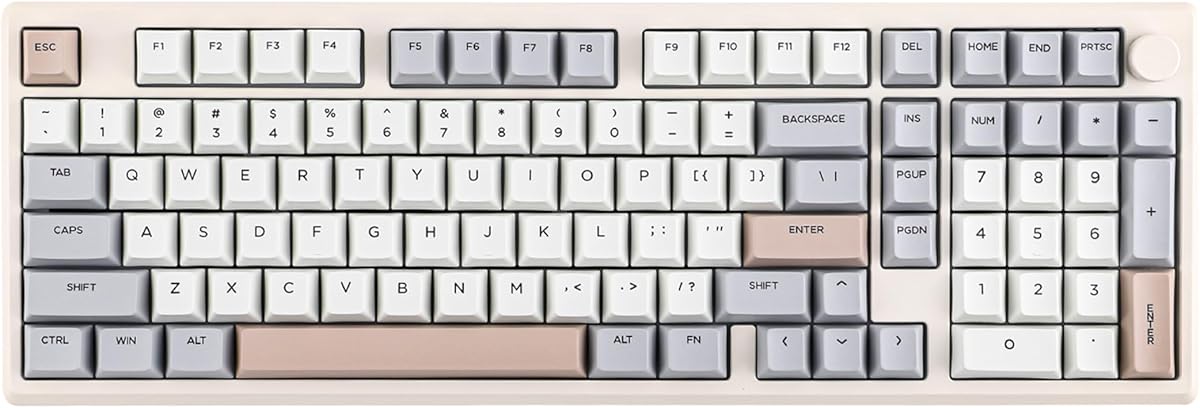
EPOMAKER Galaxy100 QMK
4.5Editor score
Full aluminum alloy shell
QMK VIA open-source support
Triple-mode wireless connectivity
This expert guide compares the top ten Epomaker keyboards for 2026, evaluating build quality, wireless performance, sound profiles, and customization options
Choosing the right mechanical keyboard can transform your daily computing experience significantly. Epomaker has emerged as a standout brand offering premium features like gasket mounts and hot-swappable switches at accessible price points for enthusiasts.
We have rigorously evaluated ten distinct models from the current lineup to identify the strongest contenders available right now. Our analysis focuses on wireless stability, battery life, typing feel, and the depth of customization software available to users.
Each selection highlights specific strengths such as screen integration, unique layouts, or specialized switches to suit different workflows. Please note that product availability and pricing fluctuate regularly so always verify details before making a final purchase decision.
4.5Editor score
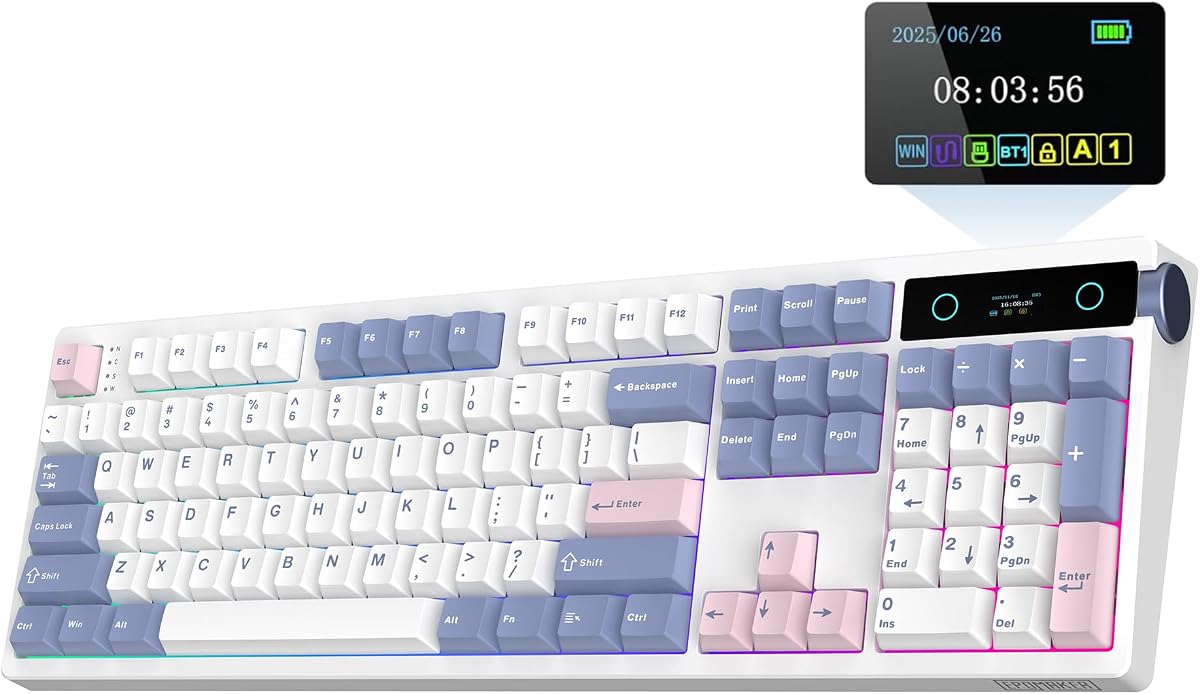
4.7Editor score

4.7Editor score
The following comparison table provides a side-by-side overview of the top ten models including their layout sizes, connectivity options, battery capacities, and unique features to help you make a quick informed decision.


The EPOMAKER TH108 PRO stands out as a premium full-size solution combining professional utility with enthusiast features. It holds an impressive rating due to its perfect balance of wireless performance, battery longevity, and high-quality tactile feedback.
We may earn a commission when you buy through this link, at no additional cost to you.
This keyboard excels with its massive 10000mAh battery which ensures weeks of usage between charges without frequent interruption. The integrated smart screen and knob provide quick access to settings and status updates without needing to open driver software.
While the heavy build offers stability it makes the unit less ideal for users who frequently transport their equipment between locations. The large footprint also requires a generous desk surface which might not suit smaller home office setups.
If you need a reliable workstation peripheral that supports multiple devices and offers deep customization this is an excellent choice. The combination of features justifies the investment for anyone seeking top-tier performance in a full-size layout.
The smart screen allows users to upload custom GIFs and monitor system stats like time and battery level instantly. It adds a layer of personalization rarely found in standard keyboards.
Tri-mode connectivity supports seamless switching between Bluetooth 2.4Ghz and wired modes ensuring you stay connected to up to five different devices effortlessly.
We may earn a commission when you buy through this link, at no additional cost to you.
The Galaxy100 QMK brings a level of build quality and software freedom that appeals to serious enthusiasts. Its aluminum construction and QMK VIA support allow for deep customization that most competitors cannot match easily.
We may earn a commission when you buy through this link, at no additional cost to you.
Featuring a gasket mount design and factory-lubed switches this keyboard delivers a creamy and consistent typing experience. The heavy aluminum case adds stability while the layered foam padding creates a rich sound profile ideal for long sessions.
The price is higher than plastic alternatives but the premium materials justify the cost for those valuing durability and advanced software features. Availability can sometimes be limited due to high demand for these specialized enthusiast peripherals.
For users who prioritize open-source software and premium materials this is a top-tier option. It offers a professional feel and robust customization that makes it a worthwhile investment for a dedicated workspace.
This keyboard supports QMK and VIA open-source firmware allowing users to remap keys and create macros without proprietary software dependencies.
The aluminum shell provides a solid and premium feel while adding weight that keeps the keyboard stable on the desk during intense typing.
We may earn a commission when you buy through this link, at no additional cost to you.
The AK820 Pro offers an impressive array of features at a very competitive price point making it accessible to a wider audience. Its compact layout and integrated screen make it a versatile choice for modern setups.
We may earn a commission when you buy through this link, at no additional cost to you.
Despite the lower cost it includes a TFT display for status updates and a rotary knob for volume control. The gasket mount design ensures a comfortable typing experience that exceeds expectations for this specific price range.
The battery capacity is smaller than full-size options which may require more frequent charging if used heavily without a cable. The plastic construction is sturdy but lacks the premium weight of aluminum alternatives found in higher-end models.
This model is perfect for users seeking modern features like a screen and wireless connectivity without breaking the bank. It delivers strong performance and style that fits well in both home and office environments.
The 75% layout saves significant desk space while retaining essential function keys and arrow keys for productivity and gaming tasks.
The built-in screen allows for visual feedback on battery life and connection status alongside customizable animations and graphics.
We may earn a commission when you buy through this link, at no additional cost to you.
The TH108 V2 PRO refines the original design with improved software accessibility and refined multimedia controls. It is designed for users who want a full-size keyboard that handles complex workflows efficiently.
We may earn a commission when you buy through this link, at no additional cost to you.
A key strength is the Chrome-based software which allows for easy configuration across different operating systems without needing heavy installations. The rotary knob and screen work together to provide intuitive control over volume and settings on the fly.
While the features are extensive the sheer size might be overwhelming for smaller desks. Users may also need time to learn the full potential of the software and the custom macro functions available.
This keyboard is ideal for power users who need a full layout and reliable wireless performance for both work and gaming. The refined software experience makes it a strong contender for those who prefer browser-based tools.
Configuration is done through a web browser making it compatible with Mac and Windows systems without installing bloatware or drivers.
The physical knob allows for quick volume adjustments and screen scrolling providing a tactile interface element that enhances usability.
We may earn a commission when you buy through this link, at no additional cost to you.
The TH99 PRO offers a unique 96% layout that balances space saving with functionality by including a full number pad. It is designed for professionals who need numeric input but want to minimize desk clutter.
We may earn a commission when you buy through this link, at no additional cost to you.
Its massive 10000mAh battery ensures long periods of use which is essential for those who work away from their desk frequently. The glass screen adds a sleek look and provides useful visual feedback for system status.
The heavy build provides stability but makes it less ideal for carrying in a backpack. The glass screen requires careful handling to avoid scratches or cracks during transport or cleaning.
This model suits users who value a compact design without sacrificing the number pad. The combination of battery life and screen features makes it a robust tool for office workflows and productivity.
This layout retains all arrow keys and a numpad while reducing overall width compared to a full-size keyboard for better space efficiency.
The glass screen offers a premium aesthetic and clear visibility for animations and data readouts without sacrificing readability.
We may earn a commission when you buy through this link, at no additional cost to you.
The TH108 focuses on delivering a classic full-size experience with modern acoustic features. It is a strong choice for those who prefer a traditional layout without the added complexity of digital screens.
We may earn a commission when you buy through this link, at no additional cost to you.
It features a 10000mAh battery and hot-swappable PCB allowing users to try different switches easily. The 5-layer gasket design ensures a consistent and pleasing sound that appeals to typing enthusiasts.
Lacking a screen means it may not appeal to users who want visual customization or quick status checks. The weight is also significant which keeps it stable but less portable than smaller models.
This keyboard is recommended for users who want a straightforward wireless typing experience. The focus on acoustic quality and battery life makes it a reliable daily driver for office and gaming use.
The 5-layer padding includes foam and silicone that reduce hollow sounds for a rich and consistent typing experience every time.
The hot-swap board allows users to change switches without soldering providing the flexibility to upgrade or customize feel easily.
We may earn a commission when you buy through this link, at no additional cost to you.
The G84 HE is specialized for competitive gaming with magnetic switches that offer rapid response times. It stands out for its adjustability and speed which are critical for high-level gameplay.
We may earn a commission when you buy through this link, at no additional cost to you.
Featuring an 8K polling rate and adjustable actuation points users can tailor the keyboard to their specific finger movements. This level of customization provides a distinct edge in fast-paced games requiring precise inputs.
This specialized focus means it might be less appealing to general office users seeking a standard typing experience. The premium price is justified by the advanced technology but is not necessary for casual use.
If you are a competitive gamer looking for speed and precision this is the top choice. The ability to fine-tune actuation offers a clear advantage over traditional mechanical switches.
Magnetic sensors detect key presses without physical contact reducing latency and wear for a durable and responsive experience.
The clean output feature prioritizes the last input entered ensuring smooth and fair movement control in gaming scenarios.
We may earn a commission when you buy through this link, at no additional cost to you.
The TH99 offers a balanced package of performance and value for daily users. Its 96% layout provides a compact footprint while keeping all essential keys for productivity and efficiency.
We may earn a commission when you buy through this link, at no additional cost to you.
With an 8000mAh battery it supports long work sessions without needing frequent charging. The gasket mount design delivers a comfortable and satisfying typing experience that reduces fatigue over time.
While it lacks the advanced screen features of other models it covers the basics well for a lower price. It is an excellent entry point into premium mechanical keyboards for those on a budget.
This keyboard is ideal for general office work and casual gaming. Its blend of comfort and reliability makes it a solid choice for everyday tasks.
The kickstand and layout are designed to reduce wrist strain during long typing sessions improving overall comfort.
The large battery capacity ensures weeks of use on a single charge keeping you productive without interruption.
We may earn a commission when you buy through this link, at no additional cost to you.
The F99 focuses on providing a customizable typing experience at an accessible price point. It is designed for users who want to experiment with different switches without a large financial commitment.
We may earn a commission when you buy through this link, at no additional cost to you.
Its hot-swappable PCB allows easy replacement of switches for a personalized feel. The five-layer sound dampening ensures a pleasing acoustic profile that enhances the overall user experience significantly.
Without a screen it misses out on the extra customization options found in higher-end models. However it delivers solid core performance that is difficult to beat in this price category.
This keyboard is perfect for enthusiasts who want to build a custom feel without overspending. The combination of features makes it a versatile tool for both typing and gaming.
Users can swap switches quickly without soldering allowing for endless experimentation with different tactile and linear options.
Five layers of foam and silicone reduce echo and sharpness for a smoother and more consistent sound profile.
We may earn a commission when you buy through this link, at no additional cost to you.
The F75 MAX brings premium features to a compact layout making it suitable for smaller desks. It combines the utility of a TFT screen with a convenient rotary knob for quick adjustments.
We may earn a commission when you buy through this link, at no additional cost to you.
Its gasket mount design provides a flexible and satisfying typing feel. The compact 75% layout retains essential keys like arrows and F-row while saving valuable workspace for mouse movement.
Users may need to adjust to the tighter layout if they are used to full-size keyboards. However the screen and knob add a level of control that compensates for the smaller size.
This model is best for users who want high-end features in a space-saving design. It is a strong choice for both gaming and work in smaller environments.
The 75% size keeps arrow keys and function rows accessible while freeing up space for a larger mouse pad or monitor setup.
The TFT display allows for battery monitoring and RGB control providing visual feedback without needing to open software.
We may earn a commission when you buy through this link, at no additional cost to you.
Selecting the right keyboard depends on understanding your specific needs for layout, connectivity, and customization. This guide breaks down the essential factors to help you find the perfect match.
Epomaker offers layouts ranging from compact 60% to full-size 100%. Full-size models include a dedicated numpad ideal for data entry. Compact models like 75% or 96% save space for more mouse movement and are better for travel.
Choose full-size if you need a numpad often. Select compact if desk space is limited or you prioritize mouse room.
Most models support tri-mode connectivity including Bluetooth, 2.4Ghz wireless, and wired USB-C. This allows seamless switching between multiple devices like laptops and desktops. Ensure the model supports your specific number of paired devices.
Look for tri-mode support if you use multiple computers. Wireless stability is key for uninterrupted workflow.
Hot-swappable PCBs allow you to change switches without soldering. This is crucial for customization. Linear switches are quiet and smooth while tactile switches provide a bump. Clicky switches are loud and audible.
Ensure the keyboard is hot-swappable if you want to upgrade switches later. Check compatibility with 3-pin or 5-pin switches for best flexibility.
Battery life varies significantly between models. Some offer 10000mAh while others offer 4000mAh. Larger batteries mean longer usage between charges especially with RGB lighting enabled. Consider your typical usage duration.
Prioritize larger battery capacity if you work away from power sources frequently. RGB usage will drain batteries faster so check estimates.
Some keyboards offer web-based software while others require local drivers. Look for macros, remapping, and RGB control. Open-source support like QMK/VIA offers unlimited customization but has a steeper learning curve.
Select models with software that fits your technical comfort. Web-based tools are easier to use while QMK offers deep control.
Aluminum shells are durable and premium but heavier. Plastic cases are lighter and cheaper. Weight impacts stability and portability. Look for features like gasket mounts for improved typing comfort.
Choose aluminum if you want a sturdy feel. Plastic is lighter and more portable. Gasket mounts improve comfort significantly.
Many models include screens and rotary knobs for status displays and volume control. Hall effect switches offer magnetic actuation for speed. RGB lighting adds visual flair. Determine which features add real value to your workflow.
Focus on features that solve specific needs. Screens add utility but might not be necessary for everyone.
Prices range from affordable to premium. Higher prices often bring aluminum, screens, or specialized switches. Determine how much you are willing to invest for a daily driver. Value-focused models still offer high-quality mechanical feel.
Balance your budget with required features. Often the best value lies in mid-range models that offer essential upgrades.
To maintain the best performance keep the keyboard clean by using compressed air to remove dust from keycaps regularly. Wipe the surface gently with a dry microfiber cloth to avoid damaging coatings or screens.
If you need to change switches use a switch puller to remove existing keys carefully. Insert new switches firmly into the socket ensuring they are seated correctly for a stable connection without forcing them.
For battery longevity avoid using the keyboard while it is charging whenever possible. Keep the battery between 20% and 80% charge cycles if you store it for long periods to preserve capacity over time.
Most modern Epomaker keyboards support both Windows and macOS natively. They include specific key legends for Mac modifiers. You can switch modes using a function key combo to adjust the layout for Apple operating systems effectively.
Yes many models feature hot-swappable PCBs allowing you to change switches without tools. Just use a standard puller to remove old switches and insert new ones. Always verify switch pin compatibility before purchasing replacements.
Battery life depends on usage and RGB settings. High capacity models can last up to 200 hours with RGB off. Using the screen and RGB lighting will reduce this time significantly so monitor your usage for best results.
Yes many models allow pairing with up to five devices simultaneously. You can switch between them instantly using function key combinations. This makes them ideal for users who switch between desktops laptops and tablets frequently.
Hall Effect switches offer faster response times and adjustable actuation points. They are ideal for competitive gaming. For general typing traditional mechanical switches may offer better tactile feedback at a lower price point.
Most use Chrome-based web tools for easy configuration across platforms. Some support QMK and VIA for advanced customization. Check specific model details to ensure the software meets your remapping and macro needs.
We have explored ten distinct models ranging from full-size powerhouses to compact gaming specialists. The TH108 PRO stands out for its balance of features while the Galaxy100 QMK offers premium build quality.
Prioritize the layout and battery life based on your primary use case. Gamers might prefer the speed of Hall Effect switches while office workers need the reliability of a full numpad.
Remember that product availability fluctuates so always check the latest offers before purchasing. This guide serves as a reliable starting point to find a keyboard that fits your needs perfectly.