
Nulea M501
4.4Editor score
Rechargeable battery included
3 device connectivity
Adjustable DPI levels
This guide compares the top ergonomic trackball mice for comfort and precision, reviewing features like tilt angles, battery life, and connectivity options for
Ergonomic trackball mice offer a unique solution for users seeking reduced wrist strain and improved posture during long work sessions. These devices allow precise cursor control through thumb movement rather than traditional hand dragging.
We evaluated ten leading models based on ergonomic design, build quality, battery performance, and connectivity options. Each product was analyzed for its ability to minimize muscle fatigue while maintaining high tracking accuracy across various surfaces.
Each selection highlights specific strengths such as silent operation, rechargeable batteries, or advanced customization software. Please note that product availability and pricing may vary over time, so check current listings before purchasing.
4.4Editor score
4.5Editor score

4.4Editor score
The following table provides a side by side comparison of all ten models, highlighting key specifications such as connection types, battery systems, and ergonomic angles to help you make an informed decision.




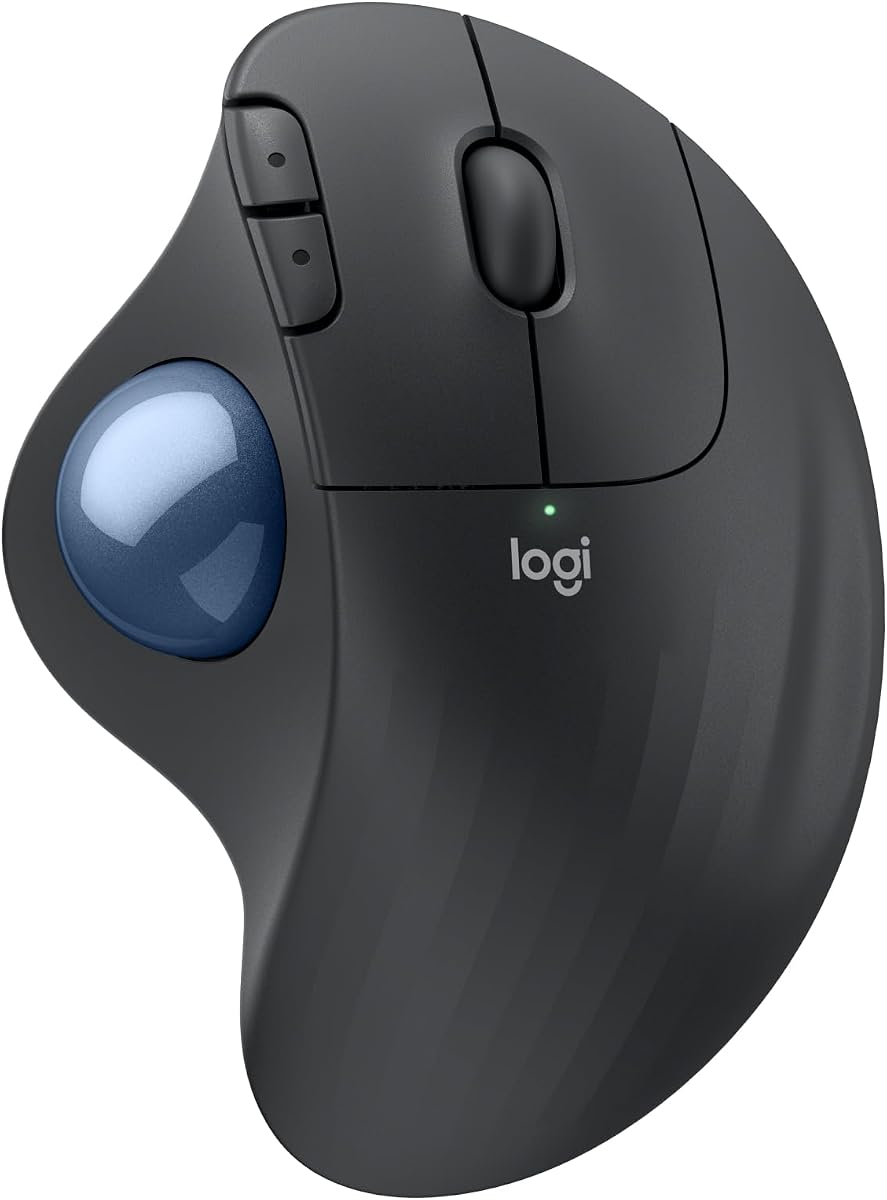
The Logitech Ergo M575S stands out as the top choice for users seeking a balance of comfort and performance. With a rating of 4.5 stars, it is designed to reduce muscle strain and improve forearm posture throughout the workday. Its sculpted shape supports the hand naturally while the thumb controlled trackball minimizes movement.
We may earn a commission when you buy through this link, at no additional cost to you.
Key strengths include its certification by ergonomists and the significant reduction in muscle strain reported by users. The device features quiet clicks that are ideal for shared workspaces, and it connects via Bluetooth or the included USB receiver. You can customize buttons and adjust cursor speed using the Logi Options Plus app for enhanced productivity.
While the buttons are not fully programmable, the included shortcuts and Smart Actions offer substantial utility for most workflows. The reliance on AA batteries might be a slight inconvenience compared to rechargeable models, but the eighteen month battery life makes up for it. Cleaning the trackball is simple as you can eject the ball easily.
This mouse is perfect for professionals who spend long hours at their desks and value ergonomic health. It pairs well with other Logitech ergonomic peripherals for a complete setup. If you prioritize comfort and reliability over advanced customization, the M575S is a highly recommended investment.
The sculpted design realigns your forearm into a better posture, reducing strain significantly compared to standard mice.
Enjoy wireless freedom with Bluetooth or USB receiver options, plus up to eighteen months of use on a single battery.
We may earn a commission when you buy through this link, at no additional cost to you.
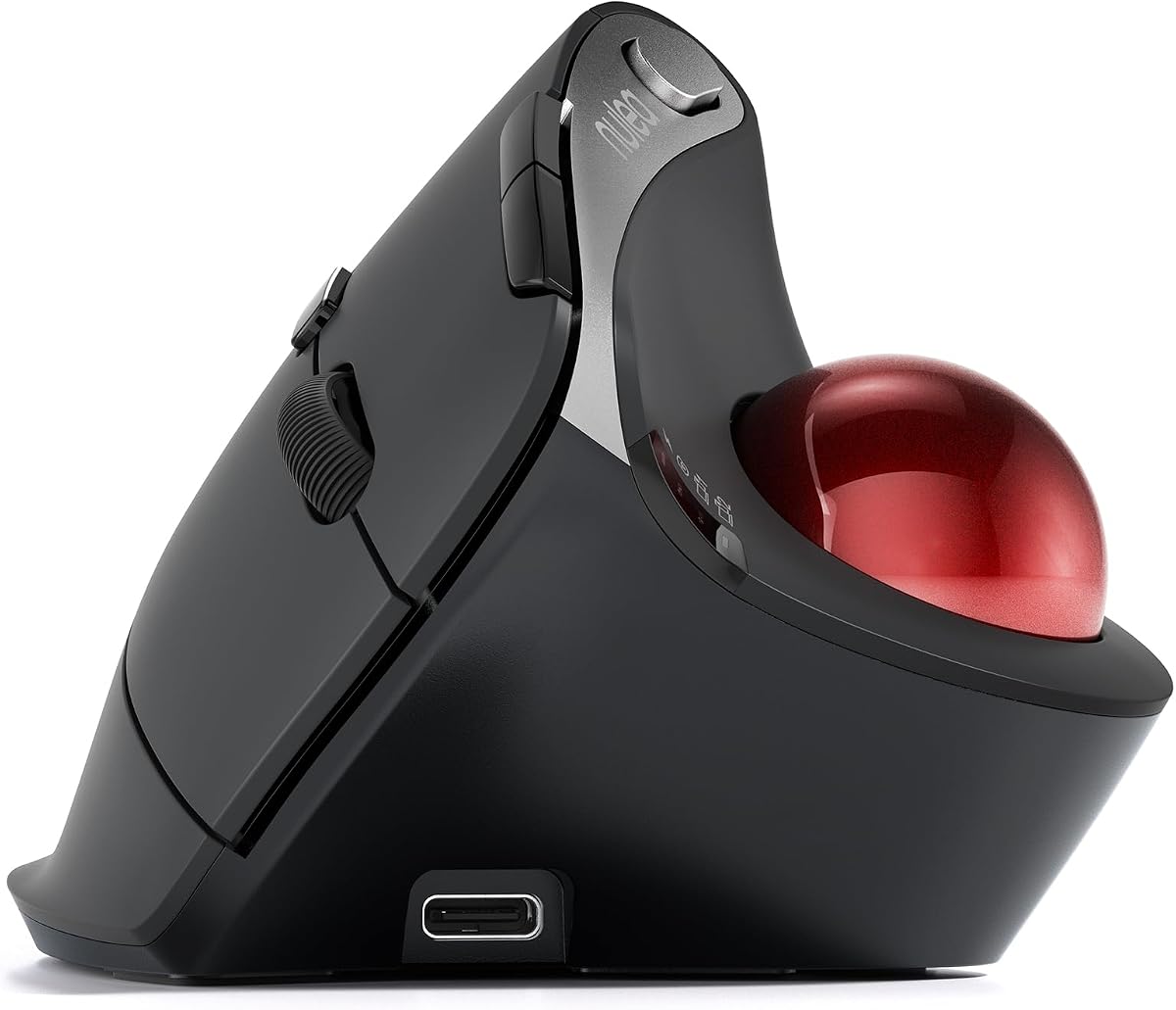
The Nulea M501 offers an excellent entry point into ergonomic trackball mice without breaking the bank. Rated 4.4 stars, it focuses on reducing wrist movement through smooth thumb control and a comfortable curved shape. Users appreciate the rechargeable battery which eliminates the need for disposable cells.
We may earn a commission when you buy through this link, at no additional cost to you.
This model supports connection to up to three devices via Bluetooth or USB dongle, making it versatile for multi setup users. The adjustable DPI allows you to fine tune sensitivity for different tasks, from browsing to design work. The trackball provides precise tracking even on surfaces where traditional mice struggle.
The main trade off is that the buttons are not programmable, limiting advanced workflow customization. However, for general productivity tasks like scrolling and navigation, the layout is intuitive and sufficient. The build quality feels solid for the price, and the included charging cable ensures you stay powered up easily.
If you are looking for a cost effective ergonomic solution that does not compromise on basic performance, the M501 is a smart choice. It is particularly suitable for students or home office users who need reliable connectivity and comfort without a high price tag.
Get essential ergonomic benefits like thumb control and reduced wrist strain at a fraction of the cost of premium brands.
Seamlessly switch between three devices with a single button press, enhancing your workflow across different computers.
We may earn a commission when you buy through this link, at no additional cost to you.
The Logitech Ergo M575S in Black shares the same robust features as the Graphite version but maintains a sleek professional appearance. With a rating of 4.6 stars, it is highly regarded for its ability to improve forearm posture and reduce strain during extended use. The sculpted shape ensures your hand remains relaxed throughout the day.
We may earn a commission when you buy through this link, at no additional cost to you.
Key features include long battery life that can last up to eighteen months on a single AA battery, reducing maintenance frequency. It supports both Bluetooth and USB receiver connections, providing flexibility for different computer setups. The thumb controlled trackball allows you to move the cursor without moving your hand, saving desk space.
While it lacks some advanced software features found in higher end models, the core ergonomic performance is excellent. The trackball is easy to clean, ensuring smooth operation over time. This model is particularly good for users who prioritize physical comfort and simplicity over complex customization options.
Ideal for office environments or home desks where space is limited, this mouse offers reliable performance and comfort. It pairs well with other ergonomic keyboards for a complete health focused setup. If you need a dependable trackball that just works, this is a strong contender.
The ergonomic shape is designed to realign your forearm, promoting a natural position that reduces long term strain.
Connect via Bluetooth for a clutter free desk or use the USB receiver for a stable direct connection.
We may earn a commission when you buy through this link, at no additional cost to you.
The Logitech MX Ergo S represents the pinnacle of trackball technology with advanced features for power users. Rated 4.4 stars, it offers a 20 degree tilt angle to further enhance forearm posture and reduce muscle strain by up to 27 percent. The design is certified by ergonomists for medium to large hands seeking ultimate comfort.
We may earn a commission when you buy through this link, at no additional cost to you.
Productivity is boosted with six customizable buttons that can be configured using the Logi Options Plus app. The USB C charging allows for fast top ups, providing up to 24 hours of use from just one minute of charging. It connects via Bluetooth or Logi Bolt USB receiver for seamless switching between devices.
The main drawback is the higher price compared to standard models, but the features justify the cost for professionals. The quiet clicks make it suitable for quiet offices or late night work sessions. The build quality is premium with soft rubber grips ensuring a secure hold during intense use.
This mouse is best for users who need precise control and customization options for complex workflows. Whether you are editing videos or managing large spreadsheets, the advanced tracking and tilt settings provide a significant edge. If budget is not a constraint, this is the top choice for ergonomic excellence.
The adjustable tilt angle lets you customize the hand position to match your natural resting posture perfectly.
With fast USB C charging, a brief plug in gives you hours of use, eliminating downtime from low battery.
We may earn a commission when you buy through this link, at no additional cost to you.
The TECKNET Wireless Trackball offers a distinctive vertical angle designed to reduce muscle strain significantly. With a rating of 4.5 stars, it features a 16 degree tilt that keeps the palm in a natural position. This design is especially beneficial for users experiencing wrist discomfort during long working hours.
We may earn a commission when you buy through this link, at no additional cost to you.
It supports connection to three devices via Bluetooth and USB, allowing instant switching for multitasking. The built in 500mAh battery charges quickly and provides long lasting power. Five adjustable DPI levels let you tailor sensitivity for precise control or fast movement depending on your task.
The mouse is slightly larger to accommodate the vertical angle, which might take a week or two to get used to. However, most users report significant comfort improvements once adapted. The silent operation makes it ideal for shared spaces where noise can be distracting to others.
If you need an ergonomic mouse with a vertical focus and reliable battery life, this model is a strong option. It balances price and features well, making it a good value. For those transitioning from traditional mice, the vertical design offers a clear path to reducing strain.
The 16 degree vertical angle promotes a handshake position that naturally reduces forearm torsion and strain.
Fast charging capabilities ensure you stay productive, with fifteen minutes of charge powering a full day.
We may earn a commission when you buy through this link, at no additional cost to you.
The Nulea M506 stands out with a 54 degree vertical design that maximizes wrist and forearm relaxation. Rated 4.7 stars, it offers an extreme ergonomic angle that keeps your hand in a natural resting position. The contoured shell with textured palm surface ensures a comfortable grip even during extended sessions.
We may earn a commission when you buy through this link, at no additional cost to you.
Battery life is impressive with up to 21 days of use on a single charge. The trackball is detachable for easy cleaning, which helps maintain smooth tracking over time. Four DPI levels provide flexibility for different tasks, from detailed design work to general browsing.
The steep angle might feel unusual initially but becomes comfortable quickly for most users. While buttons are not programmable, the layout is intuitive with all essential functions within easy reach of your fingers. It supports up to three device connections via Bluetooth and USB for seamless workflow switching.
This mouse is ideal for users with chronic wrist pain looking for maximum relief through vertical positioning. It combines comfort with practical features like long battery life and easy maintenance. If you prioritize posture correction above all else, the M506 is a compelling choice.
The 54 degree angle puts your forearm in the most natural position possible to minimize stress on tendons.
The trackball can be removed without tools for simple cleaning, ensuring consistent performance over years of use.
We may earn a commission when you buy through this link, at no additional cost to you.
The Nulea Wireless Ergonomic Vertical Trackball features a smart infinite scroll wheel that adapts to your speed. Rated 4.3 stars, it uses a 65 degree angle to keep your wrist and arm relaxed. The wave textured surface fits your palm seamlessly, offering comfort and control throughout the day.
We may earn a commission when you buy through this link, at no additional cost to you.
Infinite scrolling makes navigating long documents or web pages effortless with a gentle spin. It supports Bluetooth or USB receiver connections for up to three devices with instant switching. The silent control mode ensures noise free operation, perfect for quiet environments or late night tasks.
The scroll feature is a unique addition that enhances productivity for content heavy tasks. However, the buttons are not programmable, which limits advanced customization. The design is focused on comfort and ease of use rather than high end customization features.
Ideal for writers or researchers who deal with long text documents, the infinite scroll is a game changer. The ergonomic design ensures you can work for hours without fatigue. If you value smart navigation features and silence, this model is worth considering.
The wheel automatically switches between precise and fast modes, letting you browse quickly without losing control.
Enjoy noise free clicks and scroll actions, making it perfect for shared offices or late night work sessions.
We may earn a commission when you buy through this link, at no additional cost to you.
The Nulea Wireless Trackball Mouse includes a dedicated 21.7 degree tilt stand for enhanced wrist support. Rated 4.4 stars, it elevates the mouse to fit your palm precisely, reducing strain during use. The silent control mode ensures noise free operation for quiet environments.
We may earn a commission when you buy through this link, at no additional cost to you.
Four adjustable DPI levels allow you to customize sensitivity for precision or speed as needed. It connects via Bluetooth or USB receiver and supports up to three devices for easy switching. The six button layout includes navigation keys to boost productivity without programming.
The fixed tilt angle is designed to offer an optimal ergonomic position for most users without adjustment. While you cannot program the buttons, the defaults are well placed for common tasks. This model is a great middle ground for those wanting a tilt feature without premium pricing.
If you need a mouse that naturally lifts your wrist for comfort, this model is a practical choice. The silent operation and smooth tracking make it suitable for office work and browsing. For the price, it offers solid ergonomic benefits and reliable performance.
The integrated stand elevates the mouse to a natural angle, reducing wrist bend and promoting better posture.
Choose from four DPI levels to match your workspace needs, from detailed editing to fast navigation.
We may earn a commission when you buy through this link, at no additional cost to you.
The Logitech Ergo M575 for Business is tailored for enterprise deployment with remote management tools. Rated 4.4 stars, it offers the same comfort and ergonomic benefits as the consumer version but adds Logi Sync for IT monitoring. It is designed to reduce muscle activity by 25 percent for all day comfort.
We may earn a commission when you buy through this link, at no additional cost to you.
Smooth thumb control ensures precision on any surface, making it ideal for tight workspaces. Long battery life means less maintenance for IT teams managing large fleets of devices. The buttons can be personalized with shortcuts via the Logi Options Plus app for specific business workflows.
While designed for businesses, individual users can also benefit from the robust build and ergonomics. The focus on sustainability with recycled plastic aligns with modern corporate goals. It provides reliable performance for users who need consistent tools for daily operations.
This model is perfect for companies deploying ergonomic devices at scale or professionals who value durability. The remote monitoring capabilities offer peace of mind for administrators. For general office use, it remains a highly reliable and comfortable trackball option.
Logi Sync allows IT teams to deploy and monitor devices remotely, simplifying maintenance for large organizations.
Built with recycled plastic and designed for efficiency, it supports both ergonomic health and environmental goals.
We may earn a commission when you buy through this link, at no additional cost to you.
The Logitech MX Ergo S Pro offers high precision tracking with advanced features for power users. Rated 4.5 stars, it provides a 20 degree tilt for better posture and six programmable buttons for custom workflows. The USB C rechargeable design ensures you never run out of power unexpectedly.
We may earn a commission when you buy through this link, at no additional cost to you.
With the Logi Options Plus app, you can configure buttons for time saving shortcuts and smart actions. It includes an encrypted dongle for secure connections alongside Bluetooth support. The quiet clicks and contoured design make it comfortable for medium to large hands during extended use.
The premium price reflects the advanced features and build quality suitable for professional environments. While it requires software to unlock all potential, the functionality gained is worth the effort. This model delivers top tier performance for those who need maximum control and efficiency.
Ideal for designers or data analysts who need precise control and customization, this mouse stands out. The secure connection options make it suitable for sensitive work environments. If you want the best in trackball technology, this is the ultimate choice.
Customize six buttons to perform complex actions with a single press, speeding up your daily tasks.
Use the encrypted dongle for a secure wireless connection that keeps your data safe from interference.
We may earn a commission when you buy through this link, at no additional cost to you.
Selecting the right ergonomic trackball mouse requires understanding your specific needs regarding posture, connectivity, and budget. This guide breaks down the essential factors to consider before making a purchase.
The design angle is critical for reducing strain. Vertical designs range from 16 degrees to 65 degrees, each offering different levels of wrist relief. Higher angles generally provide better posture but may require more time to adapt to.
Look for a shape that supports your hand naturally and offers textured grips for stability. The tilt angle should match your comfortable resting position to maximize health benefits.
Trackballs can be controlled by the thumb or fingers. Thumb controlled models are more common and allow for precise movement with minimal hand shifting. Ensure the ball is easy to manipulate without excessive pressure.
Choose a size that fits your hand comfortably. Large trackballs offer smoother movement but may require more space on the desk. Small trackballs are compact but might feel less precise for some users.
Most models offer both Bluetooth and USB receiver options. Bluetooth allows for a cleaner desk setup while USB provides a stable connection that doesn't depend on computer battery power.
Check if the mouse supports multi device pairing. Being able to switch between two or three devices instantly enhances productivity if you use multiple computers.
Rechargeable batteries are convenient and reduce waste, but they require periodic charging via USB. AA battery models offer longer life without charging interruptions but generate more waste over time.
Consider how often you are willing to charge or replace batteries. Long life models can last up to eighteen months, while rechargeable ones may need weekly charging depending on usage.
Adjustable DPI allows you to change the sensitivity of the cursor movement. Higher DPI values make the cursor move faster with less ball movement, which is useful for large screens.
Ensure the mouse allows you to switch DPI levels easily. Precise tracking is essential for design work or detailed tasks, so look for models with smooth sensor performance.
Programmable buttons allow you to assign shortcuts to specific keys. This can significantly speed up workflows in applications like Photoshop or Excel.
Check if the mouse includes software for customization. Some budget models have fixed functions, so verify that the buttons match your workflow needs before purchasing.
Trackballs move frequently so durable construction is important. Look for models with solid rubber grips and sturdy plastics that can withstand daily use without cracking or wear.
Consider ease of cleaning. Detachable trackballs allow you to remove dust and debris easily, ensuring the mouse continues to perform smoothly over time.
Ensure the mouse is compatible with your operating system, whether Windows or macOS. Most modern mice support both but check for specific feature availability on your OS.
Some features require proprietary software to function fully. Verify that you can download and install the necessary apps to unlock all features like custom button mapping.
To use an ergonomic trackball mouse, position it close to your body so your arm stays relaxed. Move the cursor by rotating the trackball with your thumb rather than moving your hand. Let the mouse sit flat on the desk surface to ensure smooth operation.
Adjust the DPI settings to a level that feels natural for your daily tasks. Lower DPI values offer more precision for detailed work while higher values allow faster movement across large screens. Practice switching between DPI levels until you find your ideal balance.
Maintain your device by regularly cleaning the trackball and the surrounding cage. Most models allow you to eject the ball for easy access. Wipe it with a damp cloth and dry it thoroughly before reinserting to ensure smooth rolling and accurate tracking.
Yes, ergonomic trackball mice significantly reduce wrist movement by allowing cursor control through thumb motion. This design promotes better posture and reduces strain on tendons and muscles during long work sessions.
Most trackball mice allow you to eject the ball by pressing a release button or lifting a cage. Remove the ball, wipe it with a damp cloth, and clean the cavity to remove dust before replacing the ball.
Yes, trackball mice do not rely on a surface for movement so they work on virtually any surface including wood, glass, and uneven desks. This makes them ideal for small or cramped workspaces.
It depends on the model. High end models often allow button customization through software while budget options usually have fixed functions. Check product specifications before purchasing if customization is a priority for you.
Battery life varies from one week for rechargeable models to up to eighteen months for AA battery models depending on usage. Wireless efficiency and brightness settings also impact overall battery performance.
Most modern trackball mice are compatible with both Windows and Mac operating systems. However some advanced software features may require installation of specific apps provided by the manufacturer to function correctly.
There is usually a short learning curve of one to two weeks to get used to thumb control instead of hand movement. Many users find the transition quick and the ergonomic benefits worth the initial adjustment period.
We have reviewed ten top ergonomic trackball mice that offer excellent solutions for reducing wrist strain and improving comfort. The Logitech Ergo M575S stands out as the top choice for overall balance while budget friendly options like the Nulea M501 provide great value.
When choosing a model prioritize ergonomic features like tilt angles and battery type to match your workflow. Consider whether you need customizable buttons or multi device connectivity to ensure the mouse meets your daily productivity needs.
Please remember that product details and prices may change so always verify current listings before purchasing. Investing in a quality ergonomic mouse is a smart move for long term health and productivity at your desk.