
GIGABYTE B550 Gaming X V2
4.5Editor score
Affordable AM4 socket support
Reliable 10 plus3 power phase
Solid basic connectivity options
Compare the top Gigabyte Motherboard models for gaming and productivity. This guide reviews features, compatibility, and performance to help you choose the
Choosing the right motherboard is crucial for any PC build. A good Gigabyte Motherboard offers reliable power delivery, robust connectivity, and solid thermal management for your components.
We analyzed ten top models based on user ratings, technical specs, and real-world performance. This list covers AMD and Intel sockets, from budget-friendly to high-end enthusiast options.
Each pick highlights key strengths and trade-offs to guide your decision. Prices fluctuate often, so verify current deals before purchasing to ensure you get the best value available today.
4.5Editor score

4.4Editor score

4.2Editor score
The following table provides a side-by-side overview of all ten models, detailing their core specifications, socket types, and key features to facilitate easy comparison.


The GIGABYTE B650 AORUS Elite AX stands out as a top performer for modern AM5 builds. It offers a balanced mix of power, cooling, and features that appeal to a wide range of users.
We may earn a commission when you buy through this link, at no additional cost to you.
Its 14 plus2 plus1 phase design ensures stable power for high-end Ryzen processors. The dual-layer PCB and robust VRM cooling keep temperatures low even under heavy loads.
While the RGB Fusion software adds visual customization, it sometimes requires updates for full compatibility. The board is otherwise solid, with excellent M.2 protection and fast networking.
Ideal for gamers and creators who need future-proof DDR5 support without breaking the bank. It remains our top recommendation for building a new AM5 system in November 2026.
The board features fully covered MOSFET heatsinks and an M.2 Thermal Guard to prevent throttling during intense gaming sessions or rendering tasks.
With PCIe 5.0 support and USB-C ports on both front and rear panels, you can connect next-gen storage and peripherals with ease.
We may earn a commission when you buy through this link, at no additional cost to you.
The X870 AORUS Elite WIFI7 is a powerhouse for those who need the latest wireless and storage tech. It supports the newest Ryzen processors with exceptional efficiency and stability.
We may earn a commission when you buy through this link, at no additional cost to you.
Its 16 plus2 plus2 power design handles demanding workloads with ease. The four M.2 slots and dual USB4 ports make it ideal for high-capacity storage needs.
Although it is more expensive than other models, the premium features justify the cost. The Wi-Fi 7 ensures ultra-low latency for competitive gaming and large file transfers.
Choose this if you want cutting-edge connectivity and maximum storage flexibility. It represents the pinnacle of what Gigabyte offers in their X870 lineup currently.
Wi-Fi 7 offers significantly higher throughput and lower latency compared to previous standards, perfect for 8K streaming and cloud gaming.
With four full-speed M.2 slots, you can build a massive storage array without sacrificing performance or bandwidth for your primary drives.
We may earn a commission when you buy through this link, at no additional cost to you.
This model combines flagship performance with a distinctive all-white aesthetic that stands out in any build. It is designed for enthusiasts who value both looks and specs.
We may earn a commission when you buy through this link, at no additional cost to you.
The power design and cooling are identical to the Elite but with better component selection. It ensures maximum stability for overclocking and sustained high-performance tasks.
While the price is higher, the visual appeal and feature set justify it. It offers the same great connectivity but with a clean look that matches white PC cases perfectly.
Best for builders focused on aesthetics who still need top-tier performance. The PRO ICE series consistently delivers quality for premium custom PC builds in 2026.
The all-white PCB and shrouds offer a cohesive look that enhances the overall visual appeal of a themed PC build significantly.
Advanced VRM and M.2 thermal guards ensure the board stays cool even during extended periods of heavy usage and gaming.
We may earn a commission when you buy through this link, at no additional cost to you.
The Z890 AORUS Master is built for professionals who need maximum I/O and performance. It supports the newest Intel CPUs with advanced power and thermal designs.
We may earn a commission when you buy through this link, at no additional cost to you.
Its 18 plus1 plus2 phase design handles power-hungry tasks with ease. The 10GbE LAN and Thunderbolt 4 provide enterprise-grade speeds for data transfer and networking.
While the price is steep, the feature set is unmatched. It offers more storage slots and faster networking than most competing boards in this category.
Ideal for high-end workstations or enthusiast gaming rigs. If you need the fastest connections and best power delivery for Intel, this is the choice.
With 10GbE LAN, you can transfer large files quickly across your network, ideal for content creators and heavy data users.
Dual Thunderbolt 4 ports enable high-speed docking and external storage connections, making it versatile for professional workflows.
We may earn a commission when you buy through this link, at no additional cost to you.
The Eagle AX is an excellent entry point for AM5 users who want performance without overspending. It includes wireless connectivity and fast storage support right out of the box.
We may earn a commission when you buy through this link, at no additional cost to you.
Its 12 plus2 plus2 power phases are sufficient for most Ryzen 5 and 7 processors. The Wi-Fi 6E and fast M.2 slots ensure modern standards are met.
While rear ports are limited, the front USB-C adds versatility. It is one of the most affordable ways to get into the AM5 ecosystem with quality components.
Perfect for gamers looking to maximize GPU budget. This board delivers core performance and features you need without extra costs you don't.
By focusing on essential high-speed features like Wi-Fi 6E and M.2 support, this board offers great value for most users.
Support for DDR5 and PCIe 5.0 means your system remains relevant as new hardware releases, protecting your investment.
We may earn a commission when you buy through this link, at no additional cost to you.
For users with existing AM4 systems or budget constraints, this board offers reliable performance. It supports Ryzen 5000 series with a strong power design.
We may earn a commission when you buy through this link, at no additional cost to you.
The VRM cooling and digital power phases ensure stable operation for even high-end Ryzen CPUs. Wi-Fi 6 and RGB lighting add convenience and style.
While it uses DDR4, memory costs are lower. This is a smart choice for those upgrading older systems or building a cost-effective gaming PC.
Ideal for budget-conscious builders needing reliable performance. It remains a top pick for AM4 builds in 2026 due to its feature set.
AM4 platforms offer excellent value with affordable CPUs and RAM. This board makes the most of that legacy with modern features.
Features like Q-Flash Plus allow BIOS updates without a CPU, simplifying the upgrade process for users.
We may earn a commission when you buy through this link, at no additional cost to you.
This model brings the Z790 chipset to a wider audience with balanced features. It supports Intel Core 14th gen CPUs efficiently.
We may earn a commission when you buy through this link, at no additional cost to you.
The power design and thermal guards ensure stability. While it has fewer M.2 slots than premium models, it covers essential needs for gaming.
It is one of the most affordable ways to get DDR5 and Wi-Fi 6E with an Intel 1700 CPU. A great choice for balanced gaming builds.
Recommended for users upgrading from older Intel platforms. It offers modern features without the high price of flagship boards.
This board allows you to access the Z790 chipset features without overspending, offering great value for 13th and 14th gen CPUs.
With robust thermal armor and power phases, it maintains performance during long gaming sessions and heavy workloads.
We may earn a commission when you buy through this link, at no additional cost to you.
The AORUS Elite AX steps up with better power and cooling. It is ideal for users who plan to overclock or use high-end Intel processors.
We may earn a commission when you buy through this link, at no additional cost to you.
With 16 plus1 plus2 phases and advanced thermal guards, it handles heat efficiently. The four M.2 slots offer plenty of storage options for data.
It includes all necessary features for a high-end build. While more expensive, it delivers the stability and expandability serious users demand.
Perfect for high-performance gaming and creative work. This board ensures your Intel system runs smoothly under demanding conditions consistently.
The 16 plus1 plus2 phase design provides stable power delivery for overclocking and sustained high-performance computing tasks.
Full coverage heatsinks and thermal guards keep temperatures low, ensuring consistent performance even during intensive workloads.
We may earn a commission when you buy through this link, at no additional cost to you.
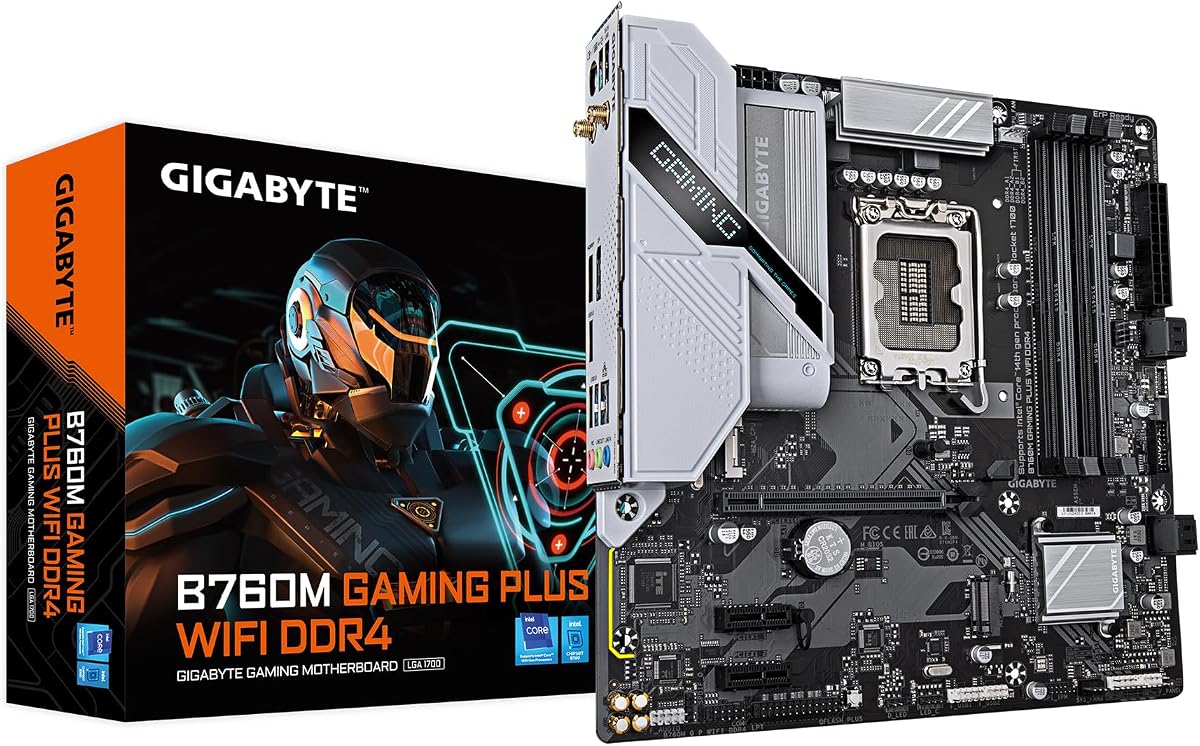
This compact board fits well in smaller cases while delivering solid performance. It supports 12th through 14th gen Intel CPUs efficiently.
We may earn a commission when you buy through this link, at no additional cost to you.
While it uses DDR4 memory to keep costs down, performance remains strong for gaming. The M-ATX size allows for flexible PC case choices.
It covers essential needs like M.2 storage and fast LAN. Ideal for budget builds where space or price are primary constraints for users.
Great for small form factor or budget builds. It offers a reliable platform for Intel users who need a compact and affordable solution.
The M-ATX size is perfect for compact cases, allowing you to build a small but capable gaming PC easily.
By utilizing DDR4 memory and essential features, this board delivers strong value for budget-conscious builders.
We may earn a commission when you buy through this link, at no additional cost to you.
This is the best starting point for AM4 builds. It provides all the essentials needed for a solid gaming rig without unnecessary costs.
We may earn a commission when you buy through this link, at no additional cost to you.
The 10 plus3 phase design handles most Ryzen processors well. It includes RGB lighting and an M.2 slot for fast storage and aesthetics.
While it lacks Wi-Fi and has basic ports, it does its job well. The Q-Flash Plus feature ensures BIOS updates are straightforward for users.
Perfect for budget gamers building a Ryzen system. It delivers reliable performance at a price that leaves room for better GPU or CPU.
Focusing on core performance and basic features keeps costs low while ensuring a smooth building experience for budget users.
Supports all Ryzen 5000 series, allowing users to upgrade CPUs without replacing the motherboard for better performance.
We may earn a commission when you buy through this link, at no additional cost to you.
Selecting the right motherboard involves considering compatibility, features, and budget. This guide breaks down key factors to help you make an informed decision.
The most critical factor is ensuring the motherboard socket matches your processor. Gigabyte offers boards for Intel LGA 1700, 1851, and AMD AM4, AM5 sockets. Always verify the specific model supports your CPU generation.
Choose a board with the correct socket to ensure your processor fits and functions correctly.
Chipsets determine capabilities like overclocking and PCIe lane availability. Z-series boards for Intel and X-series for AMD offer advanced features. B-series provides solid mainstream options without premium costs.
Identify whether you need overclocking or extra storage lanes to choose the right chipset level.
DDR4 vs DDR5 support affects system speed and upgrade path. Newer boards like AM5 support DDR5 which is faster but costs more. Older AM4 boards use DDR4 which is cheaper and widely available.
Consider future needs and budget when selecting memory type for your build.
VRM quality impacts CPU stability. Higher-end boards have more phases and better heatsinks. This ensures the CPU gets stable power under load, which is vital for gaming and productivity.
Opt for boards with robust VRM designs if using high-performance processors.
Look for enough USB ports, PCIe slots, and M.2 connectors. USB-C front and rear ports are convenient. PCIe 5.0 support ensures future GPU and SSD compatibility for high speed.
Ensure the board has enough slots and ports for your peripherals and future upgrades.
Modern motherboards often include Wi-Fi and LAN. Wi-Fi 6E and 7 offer faster speeds and lower latency. 2.5GbE or 10GbE LAN provides better wired network speeds.
Choose boards with integrated wireless if you do not have Ethernet access at your desk.
ATX boards offer more features, while M-ATX and Mini-ITX are smaller. Ensure the board fits your case. Smaller boards may have fewer slots but save space.
Select a form factor that matches your case size and feature needs.
Good VRM and M.2 heatsinks prevent thermal throttling. Look for boards with covered VRMs and dedicated M.2 thermal guards. This helps maintain performance during long sessions.
Prioritize cooling features to ensure stable performance under heavy usage.
When installing the board, always ground yourself to prevent static damage. Use the provided standoffs in the case to prevent shorts. Connect power and data cables carefully according to the manual.
After booting, update the BIOS to the latest version using Q-Flash. This ensures compatibility with newer CPUs and fixes potential bugs. Check Gigabyte support pages regularly for updates.
Regularly clean dust from fans and heatsinks using compressed air. Keep the case filters clean to maintain airflow. Proper cleaning extends the life of the motherboard and keeps temps low.
Yes, Gigabyte motherboards are highly regarded for gaming due to their reliable power delivery and thermal management. They offer features like fast M.2 storage slots and stable VRMs that support high-performance CPUs for smooth gameplay.
Yes, you must choose a motherboard with the correct socket type for your CPU. Intel processors require LGA sockets while AMD processors need AM sockets. Ensure the chipset supports your CPU generation for full compatibility.
AM4 motherboards use DDR4 memory and support older Ryzen processors. AM5 boards use DDR5 memory and support newer Ryzen 7000 series CPUs. AM5 offers better future-proofing but is generally more expensive.
Generally you can keep your OS if you use the same CPU brand like AMD or Intel. However it is safer to reinstall Windows to avoid driver conflicts. Always backup data before replacing hardware.
No, only models with AX in the name typically include Wi-Fi modules. Check the product title carefully if wireless connectivity is required. Many budget models require an Ethernet cable or USB adapter instead.
Use the Q-Flash utility in the BIOS menu if your system is running. For newer boards you can update without a CPU using the Q-Flash Plus button. Always use a USB drive formatted correctly with the BIOS file.
The GIGABYTE B650 AORUS Elite AX offers the best balance for most AM5 users today. It combines strong power, thermal management, and modern connectivity features.
If you need Intel support, the Z890 AORUS Master provides top performance. For budget builders, the B550 Gaming X V2 remains a solid affordable choice for AM4.
Remember to check current stock and deals before buying. Prices change often so verifying the latest offers ensures you get the best value for your system.