
NOYAFA NF-488 POE Cable Tester
4.5Editor score
Multifunctional POE and network testing
Large LCD backlit screen for clarity
Supports standard and non-standard POE
Compare the top 10 inline POE testers for accurate voltage, current, and wattage measurements across 802.3af/at/bt and passive standards in this expert guide.
Inline POE testers are essential tools for network technicians and IT professionals who need to verify power delivery over Ethernet cables. They ensure devices like cameras and phones receive stable power without disrupting data flow during installation or troubleshooting tasks.
This guide compares ten top-rated inline POE testers based on their testing modes, display clarity, power sourcing options, and compatibility with various IEEE standards. We evaluated each model for accuracy, portability, and ease of use in field environments.
Each pick highlights specific strengths such as OLED displays, battery-free operation, or advanced troubleshooting features. Note that prices and availability change frequently, so always verify current details before making your final purchasing decision for your specific network needs.
4.5Editor score

4.1Editor score

4.1Editor score
This comparison table outlines key specifications for all ten featured inline POE testers to help you quickly identify the right tool for your network testing requirements and budget constraints.
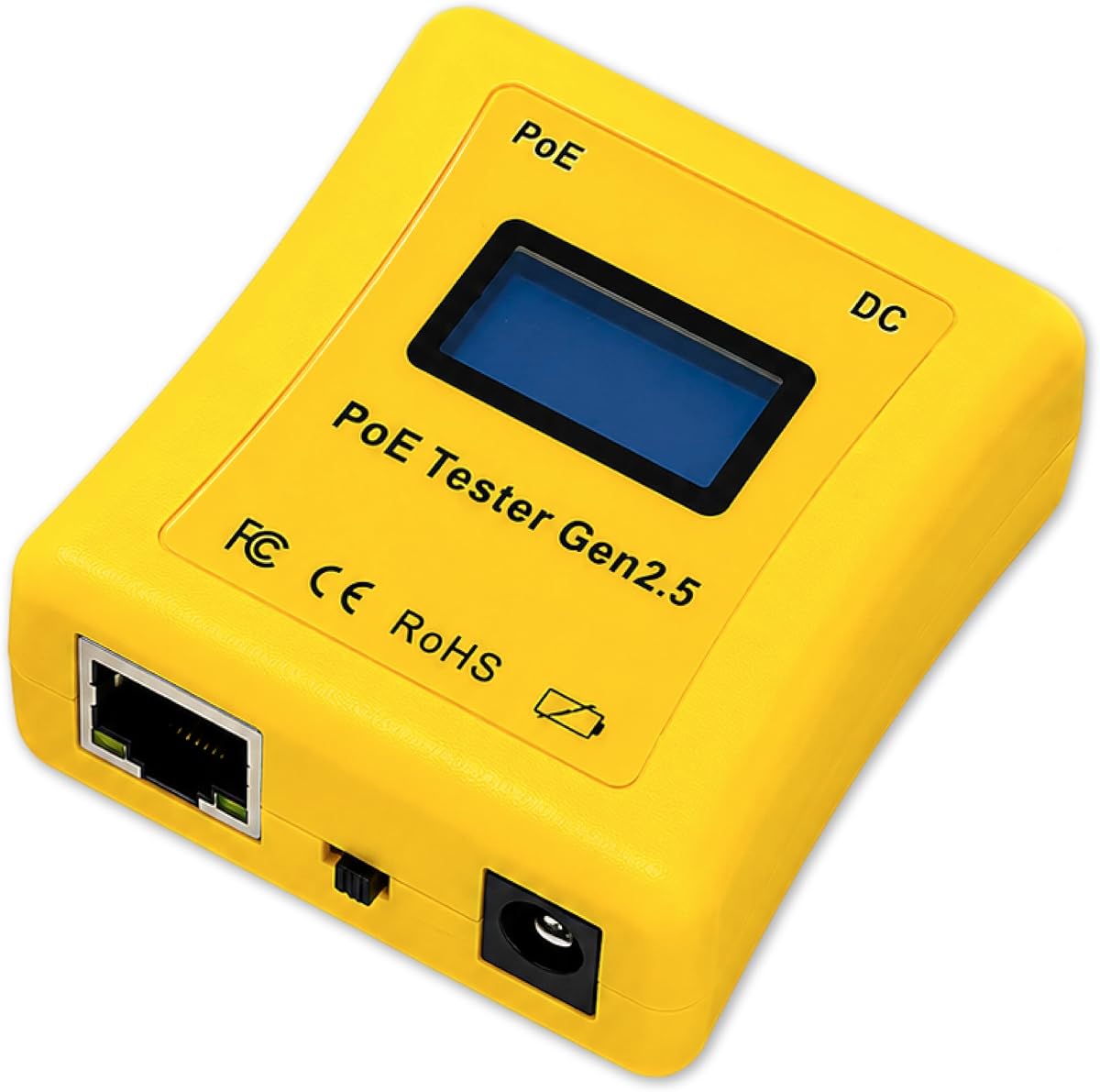
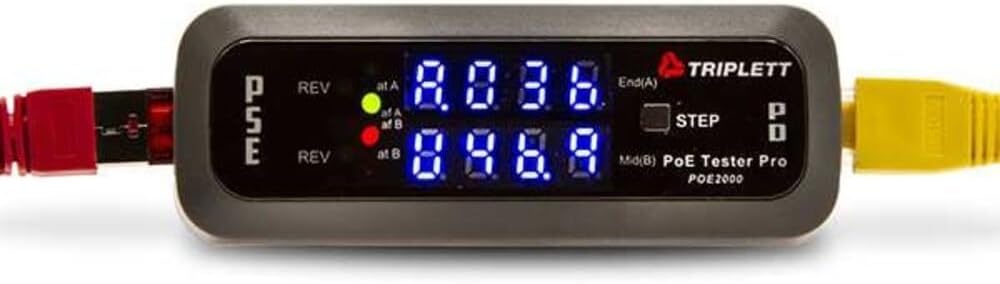


The TRENDnet Inline PoE Tester TC-NTP1 is a robust tool designed for network professionals requiring precise power verification. It holds a strong 4.1 rating for reliability and ease of use during installation workflows.
We may earn a commission when you buy through this link, at no additional cost to you.
Its standout quality lies in its compliance with NDAA standards, making it ideal for government projects. The device supports 4PPoE, PoE+, and standard PoE technologies ensuring compatibility with modern high-power network devices.
While the unit lacks an OLED screen, its step button allows efficient cycling through voltage, amperage, and wattage readouts. The battery-free operation is a major plus for field technicians needing immediate readiness without charging delays.
Network engineers and installers working on government or enterprise projects should prioritize this tester. It delivers accurate inline diagnostics to prevent downtime and ensure powered devices receive stable power.
Compliance with NDAA standards ensures the tester meets strict security requirements for U.S. government and Canadian federal projects.
Supporting 4PPoE allows testing of devices requiring higher wattage beyond traditional single pair PoE standards effectively.
We may earn a commission when you buy through this link, at no additional cost to you.
The PoE-T100 Inline DC & PoE Tester Tool stands out with its bright OLED display providing instant access to critical network data. It earns high marks for its versatility in testing both PoE and DC power supplies.
We may earn a commission when you buy through this link, at no additional cost to you.
Its key strength is self-powered operation which draws energy directly from the PoE or DC source ensuring uninterrupted testing sessions. The tool differentiates between standard IEEE standards and non-standard passive POE setups effectively.
One trade-off is the reliance on the display which may consume more power than simpler LED indicators. However this cost is offset by the clarity and speed of diagnosis offered during complex installations.
Installers and engineers seeking high visual clarity and modern features should choose this model. It accelerates troubleshooting by providing clear real-time data on power levels and polarity.
The OLED screen displays voltage current power and polarity on a single page enabling quick visual confirmation of network status.
Supports testing for both standard PoE and non-standard DC supplies making it adaptable for various legacy systems.
We may earn a commission when you buy through this link, at no additional cost to you.
The PoE Texas Power Over Ethernet Voltage Tester is designed for mobility and speed making it ideal for technicians on the move. It holds an excellent 4.3 rating for its ergonomic build and self-sufficient power source.
We may earn a commission when you buy through this link, at no additional cost to you.
Its standout feature is the ability to simulate a PoE device allowing effective testing of switches without attaching actual hardware. This saves significant time during initial network configuration and troubleshooting tasks.
While it is highly portable the reliance on PoE signals means it may not function in unpowered scenarios without additional accessories. However for standard POE tasks it provides comprehensive voltage and current data.
Field technicians who value portability and speed will find this tester invaluable. It offers essential data in a tiny footprint perfect for busy service calls and installations.
This feature allows testing of managed switches by simulating a powered device eliminating the need for physical attachment.
Supports testing for 802.3bt standards measuring up to 280 watts for high performance network equipment verification.
We may earn a commission when you buy through this link, at no additional cost to you.
The NOYAFA NF-488 POE Cable Tester offers an excellent balance of features and affordability for general network troubleshooting. It has received a high 4.5 rating for its versatility in detecting both power and data issues.
We may earn a commission when you buy through this link, at no additional cost to you.
Its primary strength is multifunctional capability combining POE detection with cable continuity testing. The remote wiring function allows checking for opens and shorts without needing a second person at the far end.
One limitation is the LCD screen which is clear but not as bright as OLED displays found on premium models. Additionally users will need to ensure batteries are charged for uninterrupted use.
Budget-conscious technicians needing a comprehensive tool for daily checks should consider this model. It reduces troubleshooting time by integrating multiple tests into one compact unit.
Combines POE testing with cable continuity checks providing a complete picture of network health in one device.
Features a clear backlit screen ensuring visibility in dim server rooms or dark outdoor installation sites.
We may earn a commission when you buy through this link, at no additional cost to you.
The Triplett POE2000 PoE Tester Pro Inline is a straightforward tool for detecting power and polarity in network cables. It provides essential data without complex interfaces making it suitable for quick checks.
We may earn a commission when you buy through this link, at no additional cost to you.
Its key strength lies in the dual seven-digit LEDs which clearly indicate whether power comes from an end span or mid span. The step button allows users to focus on specific metrics like voltage or current.
One trade-off is a lower overall rating which may suggest limitations in accuracy or long-term durability. The display also cycles through data rather than showing all values at once like modern models.
Users needing a simple and budget-friendly option for basic POE verification can consider this device. It works best for quick polarity checks and general power presence detection.
Clear dual LED indicators distinguish between end span and mid span power sources reducing setup confusion.
Allows users to toggle between voltage current and power readings for focused analysis on specific metrics.
We may earn a commission when you buy through this link, at no additional cost to you.
The Triplett POE3000 in-line Power Over Ethernet tester offers advanced visual indicators for verifying IEEE standards and power sources. It is designed for professionals who need quick identification of power configurations.
We may earn a commission when you buy through this link, at no additional cost to you.
Its standout feature is the set of LEDs that distinguish between IEEE 802.3af and bt standards helping users confirm compliance. The yellow LEDs provide immediate feedback on reversed polarity preventing connection errors.
One trade-off is the lack of active rating data which makes long-term reliability harder to assess. The device alternates voltage and current data which may slow down quick checks compared to simultaneous displays.
Technicians working with complex network standards needing visual confirmation of compatibility should consider this model. It provides essential data to ensure proper power delivery to connected devices.
LED indicators allow users to visually confirm if the network follows IEEE 802.3af at or bt standards.
Yellow LEDs indicate reversed polarity immediately helping prevent potential damage to powered devices.
We may earn a commission when you buy through this link, at no additional cost to you.
The Jonard Tools POE-1 provides a comprehensive testing approach covering power verification and cable continuity for various Ethernet standards. It is designed for professionals needing a versatile tool for field service.
We may earn a commission when you buy through this link, at no additional cost to you.
Its key strength is the inclusion of AA batteries allowing testing of unpowered cables which most other inline testers cannot do. This ensures continuity verification even when the network is not active.
One trade-off is the separation of functions between the main unit and remote device which can complicate quick single-hand tasks. Additionally active user ratings are unavailable making quality assessment difficult.
Field technicians requiring continuity testing alongside POE verification will find this unit useful. It ensures both data integrity and power delivery are confirmed before device installation.
Includes AA batteries to test cable continuity on unpowered lines ensuring thorough troubleshooting.
Measures resistance levels to verify cable integrity and detect faults before connecting powered devices.
We may earn a commission when you buy through this link, at no additional cost to you.
The PoE Cable Tester IEEE 802.3af/at/bt stands out with its impressive 4.6 rating and comprehensive testing features. It combines power verification with cable length measurement providing a complete network health check.
We may earn a commission when you buy through this link, at no additional cost to you.
Its standout feature is the ability to measure cable lengths up to 300 meters which is essential for verifying compliance during long-distance installations. The rechargeable battery ensures extended use without swapping cells.
One trade-off is the complexity of the interface compared to simpler LED testers. However this additional functionality justifies the effort for professional installers needing accurate cable diagnostics.
Network engineers prioritizing cable length verification alongside POE testing should choose this model. It provides a complete verification package for high-performance network environments.
Accurately measures cable lengths up to 300 meters ensuring installations meet distance standards.
Features a rechargeable battery with auto-shutoff reducing waste and ensuring readiness for field use.
We may earn a commission when you buy through this link, at no additional cost to you.
The Inline Cat5/6 Dvm and Network POE Tester is a specialized tool combining digital multimeter features with network testing capabilities. It is designed for technicians handling both power and data diagnostics.
We may earn a commission when you buy through this link, at no additional cost to you.
Its key strength is the integration of DVM functions which allows for precise voltage and current readings on network cables. This dual functionality reduces the need for multiple tools in a toolkit.
One trade-off is the limited available data regarding specific features and user ratings making it harder to assess suitability. Users should verify specific requirements before purchase.
Professionals needing DVM functionality integrated into network testing may find this unit useful. It provides essential data for verifying electrical and network integrity.
Combines digital multimeter capabilities with POE testing for a comprehensive diagnostic tool.
Supports both CAT5 and CAT6 testing making it suitable for mixed legacy and modern installations.
We may earn a commission when you buy through this link, at no additional cost to you.
The NF-488 Network Cable Tester & POE offers a budget-friendly solution with solid technical capabilities for everyday network needs. It holds a strong 4.4 rating for general utility and value.
We may earn a commission when you buy through this link, at no additional cost to you.
Its standout feature is the included LED lamp which is helpful for checking cables in dark server racks or outdoor cabinets. The current detection range supports most standard devices effectively.
One trade-off is the interface which may be less intuitive than higher-end models. However for basic continuity and POE checks it provides reliable performance.
Budget-conscious users needing a basic tool with added convenience features like a built-in lamp should consider this model. It covers essential testing requirements for home and small business networks.
Includes a helpful LED lamp for visibility in dark work environments during cable checks.
Supports current detection up to three Amps covering most standard powered devices effectively.
We may earn a commission when you buy through this link, at no additional cost to you.
Selecting the right inline POE tester requires understanding your specific testing needs including cable types power standards and portability requirements.
Ensure the tester supports the specific PoE standards you use such as IEEE 802.3af at or bt or non-standard passive PoE. Verify it can handle 4PPoE if you work with high-wattage devices like PTZ cameras or access points.
Choose a model that explicitly lists supported standards to avoid compatibility issues with your network equipment.
Look for testers with clear displays such as LCD or OLED screens that show voltage current and wattage readings simultaneously. In bright outdoor conditions a screen with high contrast or backlighting is essential for accurate diagnostics.
Prioritize displays that allow easy data cycling or locking for real-time monitoring during troubleshooting tasks.
Most professional testers operate without external batteries by drawing power from the PoE line itself. If you need to test unpowered cables or continuity consider models that include AA battery options for standalone use.
Battery-free designs offer instant readiness in the field while battery-assisted units provide flexibility for non-PoE testing scenarios.
Field technicians benefit from compact lightweight designs that fit easily in pockets or tool bags. Ergonomic shapes and anti-slip casings improve grip during frequent handling in various environments.
Select a tester with belt clips or durable casing if you work on ladders or in rugged outdoor conditions regularly.
Advanced testers combine POE verification with cable continuity checks to identify shorts opens or miswires. Look for remote wiring functions that allow you to test cables from a distance without assistance.
This dual functionality reduces troubleshooting time and ensures both power and data paths are intact.
For government or enterprise projects ensure the tester meets specific compliance standards like NDAA. Safety features such as reverse polarity detection protect connected devices from damage during installation.
Compliance ensures your tools meet regulatory requirements while safety features prevent costly equipment damage.
Reliable manufacturers provide manufacturer protection and technical support to assist with usage questions or defects. Check for warranty periods ranging from one to two years to guarantee long-term reliability.
Strong customer service ensures you can resolve issues quickly and minimize downtime in your workflow.
Entry-level testers offer basic voltage checks while premium models provide detailed wattage and advanced diagnostics. Assess your daily testing needs to avoid overspending on features you may not use regularly.
Invest in a model that balances affordability with the specific capabilities your network tasks require.
To begin use connect the inline POE tester between your Power Sourcing Equipment (PSE) and the Powered Device (PD). Ensure the Ethernet cables are firmly inserted into the ports to maintain stable contact during testing.
Once connected observe the display to verify voltage current and wattage readings. Use the step button if available to cycle through specific data points or lock the display for real-time monitoring of power delivery.
After testing unplug the device carefully to prevent port damage. Store the tester in a dry place and avoid dropping it to preserve internal components and display clarity for future field work.
An inline POE tester verifies that network cables deliver the correct voltage and wattage to devices like cameras and VoIP phones. It helps technicians troubleshoot power issues quickly without interrupting the data flow.
Most professional inline POE testers are battery-free and draw power directly from the PoE line. However some models include AA batteries to test unpowered cables or continuity without an active PoE signal.
Yes many modern testers support both standard IEEE 802.3af/at/bt and non-standard passive PoE. Check the product specifications to confirm compatibility with your specific network voltage requirements.
A reliable POE tester should display clear voltage current and wattage readings when connected to a powered switch. It should also detect polarity and confirm if the power source meets your device requirements.
Yes when used correctly inline POE testers are safe and designed to prevent overvoltage conditions. They allow you to verify power levels before connecting sensitive equipment to avoid damage from mismatched voltage.
End span refers to POE switches where power is injected directly into the data ports while mid span refers to separate POE injectors. The tester should detect and display which power source type is active.
We reviewed ten top-rated inline POE testers ranging from budget options like the NOYAFA NF-488 to premium choices like the PoE-T100. Each model offers unique strengths whether you need NDAA compliance OLED displays or advanced cable continuity checks.
When selecting a tester prioritize compatibility with your specific PoE standards and the clarity of your power readings. Ensure the tool is portable enough for your daily workflow and offers reliable support or warranty coverage.
Remember that prices and availability for these network tools change frequently so verify current details on product pages before purchasing. Investing in the right tester ensures your network projects run smoothly and safely.