
Harvopu Keyboard Case
4.4Editor score
7-color backlit keyboard
Detachable magnetic design
Three stable viewing angles
Finding the right keyboard case for your iPad Pro 13 M4 is essential for maximizing productivity and versatility. These accessories transform your tablet into a powerful workstation, offering typing comfort and built-in protection for your device.
We evaluated ten leading models based on typing experience, trackpad quality, portability, and overall build quality. Our analysis focuses on real-world usability, compatibility with the latest M4 chip models, and the range of features each case provides for diverse workflows.
Each selection in this list highlights unique strengths, from premium trackpads to versatile detachable designs. Keep in mind that availability and pricing may vary over time, so check current listings before making your final purchase decision today.
4.4Editor score

4.3Editor score

3.7Editor score
As an Amazon Associate we earn from qualifying purchases.
The following table provides a side-by-side comparison of the top ten keyboard cases evaluated for the iPad Pro 13 M4, highlighting key specifications and unique features for each model.



This official Magic Keyboard sets the standard for premium typing on the iPad Pro 13 M4. With its glass trackpad and scissor keys, it delivers a laptop-like feel that professionals demand for serious work.
We may earn a commission when you buy through this link, at no additional cost to you.
The two-cantilever hinge allows smooth angle adjustments, while the function row provides quick access to controls. The USB-C pass-through ensures your iPad stays charged while you type, making it ideal for long sessions.
While expensive, the build quality and seamless integration with iPadOS justify the cost for users who prioritize performance. The lack of pairing or charging requirements adds significant convenience to daily use.
Best for professionals seeking the highest typing experience on iPad Pro 13-inch models. If you want seamless control and durability, this is the top recommendation for power users and creatives.
The haptic feedback trackpad offers responsive cursor control and supports Multi-Touch gestures for seamless navigation.
Folds to protect both front and back, keeping your device safe during transit without adding excessive bulk.
We may earn a commission when you buy through this link, at no additional cost to you.
This ESR case delivers reliable magnetic attachment and a quick-set stand for easy position changes. It transforms the iPad into a portable workstation with a responsive multi-touch trackpad for precise navigation.
We may earn a commission when you buy through this link, at no additional cost to you.
The back case detaches for hands-on access, allowing flexibility between typing and creative tasks. Its raised screen view improves posture, while portrait mode supports vertical video calls effectively.
While the magnets are strong, users should ensure their model matches the specified range. The extended trackpad enhances usability, making this a solid choice for daily productivity needs.
Recommended for those wanting a balance of protection and functionality without premium pricing. The magnetic stand offers convenient versatility for work or leisure use anywhere.
Ultra-strong magnets seamlessly combine the case and tablet for effortless setup and secure attachment during use.
The extended trackpad supports full multi-touch gestures, enabling precise control without needing external peripherals.
We may earn a commission when you buy through this link, at no additional cost to you.
This ESR model emphasizes flexibility with a detachable magnetic design and multiple viewing modes. The larger trackpad provides precise control, while the pencil holder keeps your stylus secure and accessible.
We may earn a commission when you buy through this link, at no additional cost to you.
The adjustable landscape stand adapts to work or entertainment, offering low-angle support for writing. You can instantly switch between tablet and laptop modes without swapping accessories.
While it offers great value, ensure your model matches the supported list before purchasing. The detachable design is perfect for artists who need frequent screen access during creative work.
Ideal for users who need a versatile case with a spacious trackpad and drawing support. The balance of protection and adaptability makes it a strong contender in this category.
Adjustable landscape stand from 20 to 75 degrees adapts to your preferred viewing angle for any task.
The built-in stylus holder prevents your pencil from being scratched or falling off during daily use.
We may earn a commission when you buy through this link, at no additional cost to you.
The Typecase Edge stands out with its 11-color backlight options, allowing you to personalize your setup for any environment. Its floating cantilever design provides stable viewing angles while remaining lightweight.
We may earn a commission when you buy through this link, at no additional cost to you.
Full-area trackpad support enhances navigation, offering precise cursor control for multitasking. The magnetic closure secures the device effectively and keeps the pencil stored safely on the side.
While the aesthetic features are appealing, the focus remains on functional typing performance. Ensure your model is compatible before purchase, as it does not support other iPad variants.
A great option for users who value style alongside performance. The customizable backlight adds a unique touch that enhances productivity in low-light settings.
Adjust 11 backlight colors and three brightness levels to match your environment or personal style preferences.
Innovative floating cantilever design allows effortless adjustment to your preferred viewing angle for comfort.
We may earn a commission when you buy through this link, at no additional cost to you.
Logitech offers a robust solution with Smart Connector power, eliminating the need to charge the keyboard separately. The flexible kickstand and detachable keyboard let you switch modes instantly.
We may earn a commission when you buy through this link, at no additional cost to you.
Large multi-touch trackpad provides intuitive controls, while backlit keys support typing day or night. The sturdy case keeps your device safe from scratches and everyday wear.
Despite the solid features, user ratings are slightly lower than competitors due to weight and price. The recycled plastic material is an eco-friendly feature that appeals to sustainability-conscious buyers.
Suitable for professionals who prioritize seamless connectivity and protection over lightness. If you value brand reliability, this remains a strong choice for business users.
Seamless, instant connectivity via the iPad's Smart Connector means no pairing or extra batteries required.
Detach the keyboard to sketch or watch videos with total freedom while retaining full case protection.
We may earn a commission when you buy through this link, at no additional cost to you.
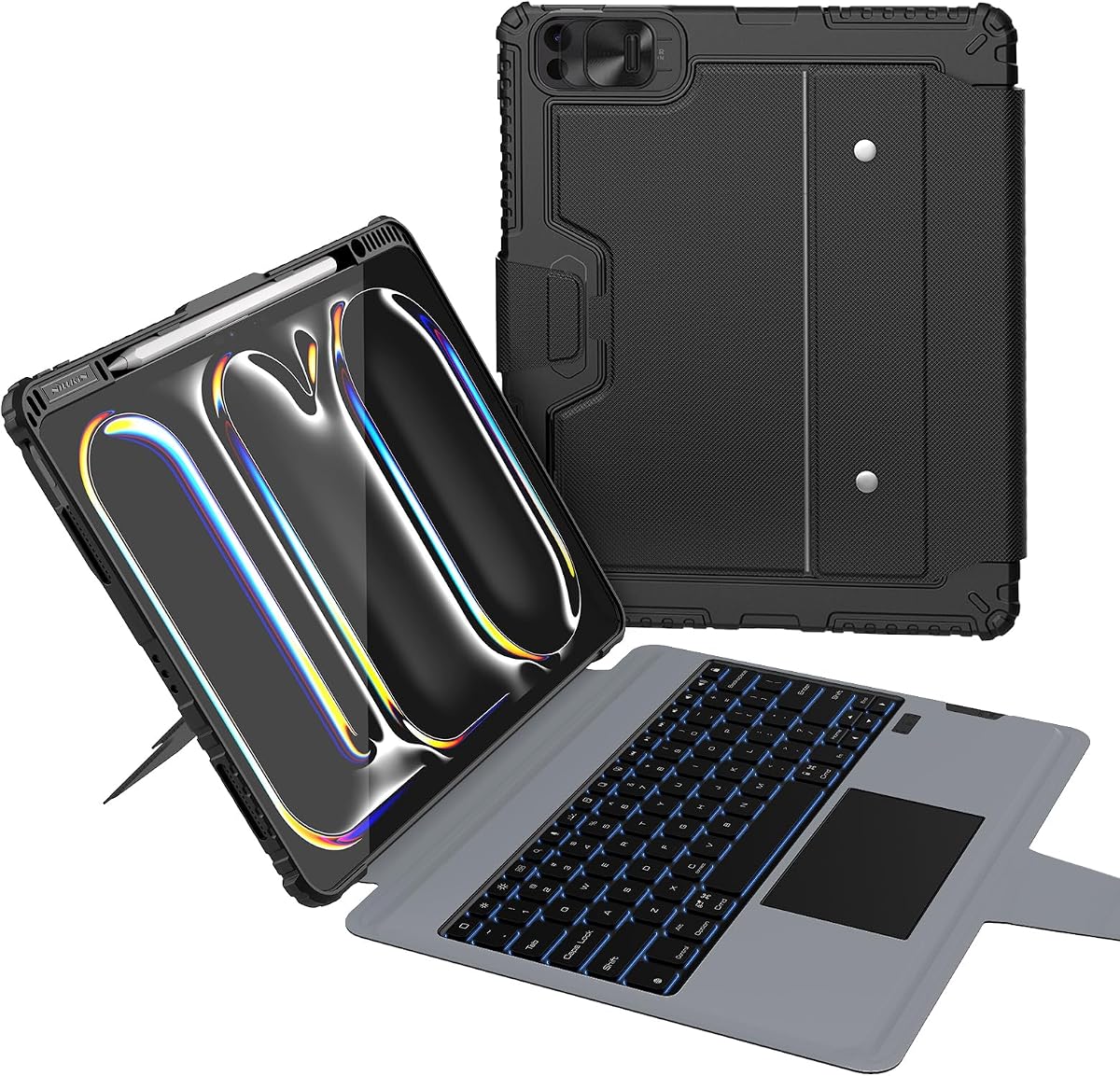
Harvopu delivers excellent value with a rechargeable keyboard and versatile backlight options. The stain-resistant PU material ensures easy cleaning while the honeycomb mesh aids in heat dissipation.
We may earn a commission when you buy through this link, at no additional cost to you.
Bluetooth pairing is straightforward, and the high-sensitivity trackpad supports common gestures for smooth navigation. Three non-slip grooves provide stable viewing angles for typing or video calls.
Battery life is solid but requires periodic charging, which is typical for this price range. The durable TPU shell effectively protects against drops and scratches during daily transport.
Ideal for budget-conscious buyers seeking core features without extra costs. If you want reliable typing and protection at an affordable price, this is the top economical choice.
Built-in 500mAh battery lasts weeks on a single charge and enters sleep mode for efficiency.
Stain-resistant PU material wipes clean easily, keeping the case looking new even after daily use.
We may earn a commission when you buy through this link, at no additional cost to you.
This model features an ultra-light detachable back, making it easy to switch between typing and reading modes. The strong magnets ensure a stable connection during intense work sessions.
We may earn a commission when you buy through this link, at no additional cost to you.
A 33% larger touchpad offers smooth navigation, while the dedicated shortcut row provides quick access to brightness and volume. The pencil slot keeps your stylus handy for creative tasks.
Although pricier than some alternatives, the convenience of a detachable design is worth it for frequent multitaskers. The sturdy hinge supports smooth adjustments up to 135 degrees.
Recommended for those needing flexibility between productivity and media consumption. The combination of design and functionality makes it a standout option in its category.
The detachable back case allows seamless switching between typing, sketching, and reading modes effortlessly.
Dedicated shortcut keys streamline operations by giving instant access to essential system controls.
We may earn a commission when you buy through this link, at no additional cost to you.
A standout feature is the 360-degree rotating stand, providing infinite viewing angles for any posture. The transparent design showcases your iPad while maintaining full port access and protection.
We may earn a commission when you buy through this link, at no additional cost to you.
Seven-color backlighting adds customization, and the responsive trackpad supports smooth navigation for work and play. High ratings suggest strong customer satisfaction with its stability and build.
The clear shell may accumulate fingerprints or scratches over time, but it remains stylish. The secure angle locks help maintain healthy posture during extended use.
Perfect for users who want modern aesthetics combined with functional versatility. If you value adjustable angles and a lightweight look, this case offers excellent value.
Built-in 360 omnidirectional stand allows smooth angle adjustments for typing, drawing, or presenting.
Premium hardshell design provides full defense while showcasing the iPad's original sleek style.
We may earn a commission when you buy through this link, at no additional cost to you.
Built for rugged conditions, this case features military-grade protection tested against drops up to 1.2 meters. The air-cushion bumpers shield corners from impact while keeping the device secure.
We may earn a commission when you buy through this link, at no additional cost to you.
Scissor-switch keys offer travel similar to laptops, and the 0-180 stand provides limitless positioning options. The sliding camera cover adds privacy when not in use for photos or video.
Despite its weight, the durability and typing comfort make it ideal for fieldwork or travel. The carbon-steel hinge ensures long-term reliability without losing stability.
Best for those prioritizing protection alongside comfort. If you work in demanding environments, this case delivers robust reliability and typing ease.
MILITARY-GRADE PROTECTION and drop-tested corners ensure safety for rough or outdoor usage scenarios.
1.4mm scissor-switch keys provide real travel and feedback for enjoyable typing sessions.
We may earn a commission when you buy through this link, at no additional cost to you.
TSQQST offers a crystal-clear case that highlights your iPad while protecting it with reinforced corners. The rotating base ensures effortless multitasking between typing and streaming.
We may earn a commission when you buy through this link, at no additional cost to you.
A futuristic acrylic panel reveals circuitry-inspired design, paired with a glowing keyboard for late-night inspiration. The wireless setup supports smooth navigation and creative workflows.
While clear materials can show dust easily, the shock-absorbent edges provide strong impact protection. It balances style with function for users who want a unique look.
Ideal for tech enthusiasts who want a stylish yet protective case. If you value design alongside functionality, this model provides an elegant workstation experience.
Crystal-clear hard case showcases your iPad design while reinforced corners guard against drops.
Luxe-inspired 7-color glow keyboard adds sophistication for low-light productivity sessions.
We may earn a commission when you buy through this link, at no additional cost to you.
Selecting the right keyboard case depends on balancing typing comfort, portability, and protective needs. This guide breaks down key factors to help you make an informed choice tailored to your workflow.
A quality trackpad with multi-touch support is essential for seamless navigation without relying on screen gestures. Look for larger surface areas and responsive feedback to ensure smooth cursor control during work.
Prioritize models with responsive multi-touch gestures to reduce reliance on screen taps and improve overall workflow efficiency.
Scissor switches or key mechanisms with adequate travel distance provide a tactile experience closer to traditional laptops. This reduces finger fatigue during long typing sessions.
Opt for scissor keys or similar mechanisms to ensure comfortable typing over extended periods without hand strain.
Cases powered by Smart Connector offer seamless connection without batteries, while Bluetooth models provide flexibility across devices. Evaluate which fits your charging needs.
Choose Smart Connector for convenience or Bluetooth for flexibility depending on your battery management preferences.
Rugged cases offer drop-tested durability for fieldwork, while slim designs protect against scratches for office environments. Consider where you use the iPad most.
Match protection levels to your environment, selecting rugged cases for travel or slim ones for desk use.
Stands that adjust across a wide range allow better ergonomics for typing or viewing. Look for multiple angles or rotating bases for versatile use.
Choose stands with adjustable or rotating features to maintain healthy posture and comfortable viewing angles.
Detachable keyboards enable instant transitions between typing and drawing or watching videos. This flexibility is vital for creative professionals and multitaskers.
Prioritize detachable designs if you frequently switch between writing, creative work, and media consumption.
For wireless models, long battery life reduces charging interruptions. Look for sleep modes and efficient power management to ensure reliability during travel.
Check battery specs and sleep features to avoid frequent recharging and maintain consistent usage.
Materials like reinforced plastic or metal affect durability and look. Transparent options show off your device, while solid ones offer a sleek profile.
Select materials that match your style and durability preferences, such as transparent or solid builds.
Start by matching the case to your iPad model number to ensure full compatibility. Verify the model on the back of your device before attaching or pairing the keyboard.
Regularly clean the keys and trackpad with a soft dry cloth to prevent dust buildup. For stain-resistant materials, use mild wipes for stubborn marks without scratching the surface.
Store the case in a cool place when not in use to maintain hinge integrity. If detachable, remove the keyboard to prevent accidental pressure on internal connectors.
Yes, the Apple Magic Keyboard is fully compatible with the iPad Pro 13-inch M4 and M5 models. It connects via Smart Connector and provides full support for iPadOS gestures.
Bluetooth models require separate charging via USB-C, while Smart Connector cases draw power from the iPad. Always check specifications before purchase to confirm power requirements.
Many models include dedicated pencil holders or magnetic slots for easy storage. Ensure the case doesn't interfere with the Pencil's magnetic charging or pairing features.
Most keyboard cases offer splash resistance but are not fully waterproof. Keep liquids away from the device and avoid submerging it in water to prevent damage.
Bluetooth keyboards typically last several weeks on a single charge with daily use. Models with sleep modes can extend standby time significantly for occasional usage.
High-quality cases support full multi-touch gestures including swiping and pinching. Verify gesture support in the product description to ensure seamless navigation.
We highlighted top options ranging from the premium Apple Magic Keyboard to budget-friendly alternatives like the Harvopu model. Each serves distinct needs, balancing performance, price, and portability effectively.
Focus on trackpad responsiveness and stand flexibility when choosing. Your ideal case should enhance productivity without adding unnecessary weight to your setup or daily carry.
Prices and availability can change frequently, so verify current listings before finalizing your purchase. Use this guide as a reference to find a model that suits your specific workflow.