
HDMI KVM Switch 3 Monitors 2 Computers 4K@60Hz
4.5Editor score
Supports 4K@60Hz resolution
Includes 4 USB 3.0 ports
Dual switching modes available
This guide compares the top ten KVM switches for triple monitors to help you select the right model for seamless multi computer workflows.
Finding the right KVM switch for triple monitors is essential for professionals who manage multiple systems without cluttering their desks with extra peripherals.
We evaluated ten top rated models based on video quality USB performance and ease of use to ensure you get a reliable solution for your setup.
Each pick highlights key strengths and trade-offs so you can choose wisely while keeping in mind that prices and availability can change over time.
4.5Editor score

4.9Editor score

3.9Editor score
Here is a side by side comparison of all ten products to help you quickly identify which model matches your specific technical requirements and budget.





This HDMI KVM switch is a budget friendly option that allows two computers to share three monitors and four USB devices seamlessly.
We may earn a commission when you buy through this link, at no additional cost to you.
It supports 4K@60Hz resolution and offers both panel button and wired controller switching for flexibility in how you manage your setup.
While it lacks hotkey support and requires external power for stability, it delivers reliable performance for users who prioritize value and simplicity.
Buyers seeking an affordable way to manage a triple monitor setup across two systems will find this switch a practical and effective solution.
The switch delivers up to 4K@60Hz resolution on HDMI connections for sharp visuals across all three displays.
Four USB 3.0 ports enable fast data transfer and support a variety of peripherals like keyboards and printers.
We may earn a commission when you buy through this link, at no additional cost to you.
The UGREEN KVM switch stands out with its premium aluminum design and support for ultra high resolutions including 8K@60Hz across DisplayPort and HDMI.
We may earn a commission when you buy through this link, at no additional cost to you.
It includes a desktop controller for easy switching and supports modern standards like HDR10+ and VRR for smooth performance on high refresh displays.
However it requires that both PCs have the correct port configuration and comes with a higher price point than basic alternatives.
Enthusiasts and professionals who demand top tier video quality and build quality will appreciate this robust and feature rich KVM solution.
Supports up to 8K@60Hz on DisplayPort and HDMI ensuring crystal clear visuals for professional workflows.
The aluminum enclosure provides durability and better heat dissipation for long term reliable operation.
We may earn a commission when you buy through this link, at no additional cost to you.
This AV Access KVM docking station combines switching and docking functionality allowing one USB-C laptop and one desktop to share three monitors and peripherals.
We may earn a commission when you buy through this link, at no additional cost to you.
It supports 100W Power Delivery to charge a laptop via a single cable and keeps both PCs connected to the network during switching for uninterrupted workflows.
The high speed USB ports and SD card reader add convenience though users need to confirm their laptop supports USB-C video output before purchasing.
Professionals and creators who want an all-in-one solution for managing multiple systems and peripherals will find this docking KVM incredibly powerful and versatile.
This device acts as both a KVM switch and docking station to reduce desk clutter with one cable connection.
A shared Gigabit Ethernet port ensures both computers stay online for downloads and updates during switching.
We may earn a commission when you buy through this link, at no additional cost to you.
This KVM switch enables four desktops to share three monitors and four USB 3.0 ports offering exceptional scalability for IT professionals or multi PC setups.
We may earn a commission when you buy through this link, at no additional cost to you.
It supports resolutions up to 8K@60Hz and 4K@144Hz and includes a wired remote to manage switching cleanly and efficiently without reaching for buttons.
Setup requires each computer to have the necessary DisplayPort and HDMI outputs which may be limiting for some older or budget systems.
Users who need to manage multiple systems while maintaining a clean and efficient workspace will find this versatile and powerful solution well worth the investment.
Four PC inputs allow you to switch between multiple systems without needing separate sets of monitors or peripherals.
USB 3.0 ports provide fast transfer speeds for peripherals like external drives and printers.
We may earn a commission when you buy through this link, at no additional cost to you.
This KVM switch is designed for users who want high resolution performance with support for up to 8K@30Hz on DisplayPort and 8K@60Hz on HDMI.
We may earn a commission when you buy through this link, at no additional cost to you.
It offers both physical buttons and a wired controller for switching and includes four USB 3.0 ports to share peripherals efficiently between two computers.
To achieve maximum performance users must use short high quality cables and ensure both systems have the required video outputs configured correctly.
Gamers and creatives who prioritize smooth visuals and reliable peripheral sharing across multiple systems will appreciate the performance and flexibility of this model.
Supports up to 8K resolution and high refresh rates for detailed work and smooth gaming.
A dedicated 12V power port ensures stable power for high draw USB devices like hard drives.
We may earn a commission when you buy through this link, at no additional cost to you.
This AV Access KVM docking station enables one USB-C laptop and one desktop to share three monitors and peripherals while keeping both connected to the network.
We may earn a commission when you buy through this link, at no additional cost to you.
It offers 100W Power Delivery for laptop charging and high speed data ports plus an SD card reader to replace multiple separate devices on your desk.
The requirement for USB-C video output on laptops and the higher price point are factors to consider when evaluating this against basic switching options.
Professionals who need a complete desk solution with minimal cabling and reliable connectivity across both systems will find this dock and switch combo invaluable.
Combines KVM switch with docking station features to streamline your dual computer workstation.
The shared Ethernet connection ensures background tasks continue on the unselected PC while switching.
We may earn a commission when you buy through this link, at no additional cost to you.
This HDMI KVM switch allows two PCs to share three monitors and four USB peripherals with support for up to 8K@60Hz and 4K@120Hz resolutions.
We may earn a commission when you buy through this link, at no additional cost to you.
It includes a wired controller for cleaner desk management and features USB 3.0 ports that offer fast data transfer speeds for connected devices.
Users must ensure their computers support multiple displays and provide adequate power via the included adapter to avoid performance issues.
Anyone seeking an affordable yet powerful HDMI focused KVM switch for a triple monitor setup will find this model delivers solid performance and flexibility.
Supports HDMI 2.1 for high resolution and refresh rates ideal for modern displays and gaming.
Four USB 3.0 ports allow you to share keyboards mice and storage across two systems efficiently.
We may earn a commission when you buy through this link, at no additional cost to you.
This KVM switch lets three computers share three monitors and four USB 3.0 ports making it ideal for shared workspaces or small office environments.
We may earn a commission when you buy through this link, at no additional cost to you.
It supports up to 8K@60Hz on HDMI and 4K@144Hz on DisplayPort and includes a wired remote and necessary cables for easy setup and use.
Setup requires each PC to have the right video outputs which can be complex but ensures maximum flexibility once configured properly.
Users who need to switch between three different systems while sharing monitors and peripherals will find this model a practical and feature rich solution.
Three PC inputs allow efficient switching between multiple workstations or user accounts.
Includes remote cables and power adapter so you can start using it right away.
We may earn a commission when you buy through this link, at no additional cost to you.
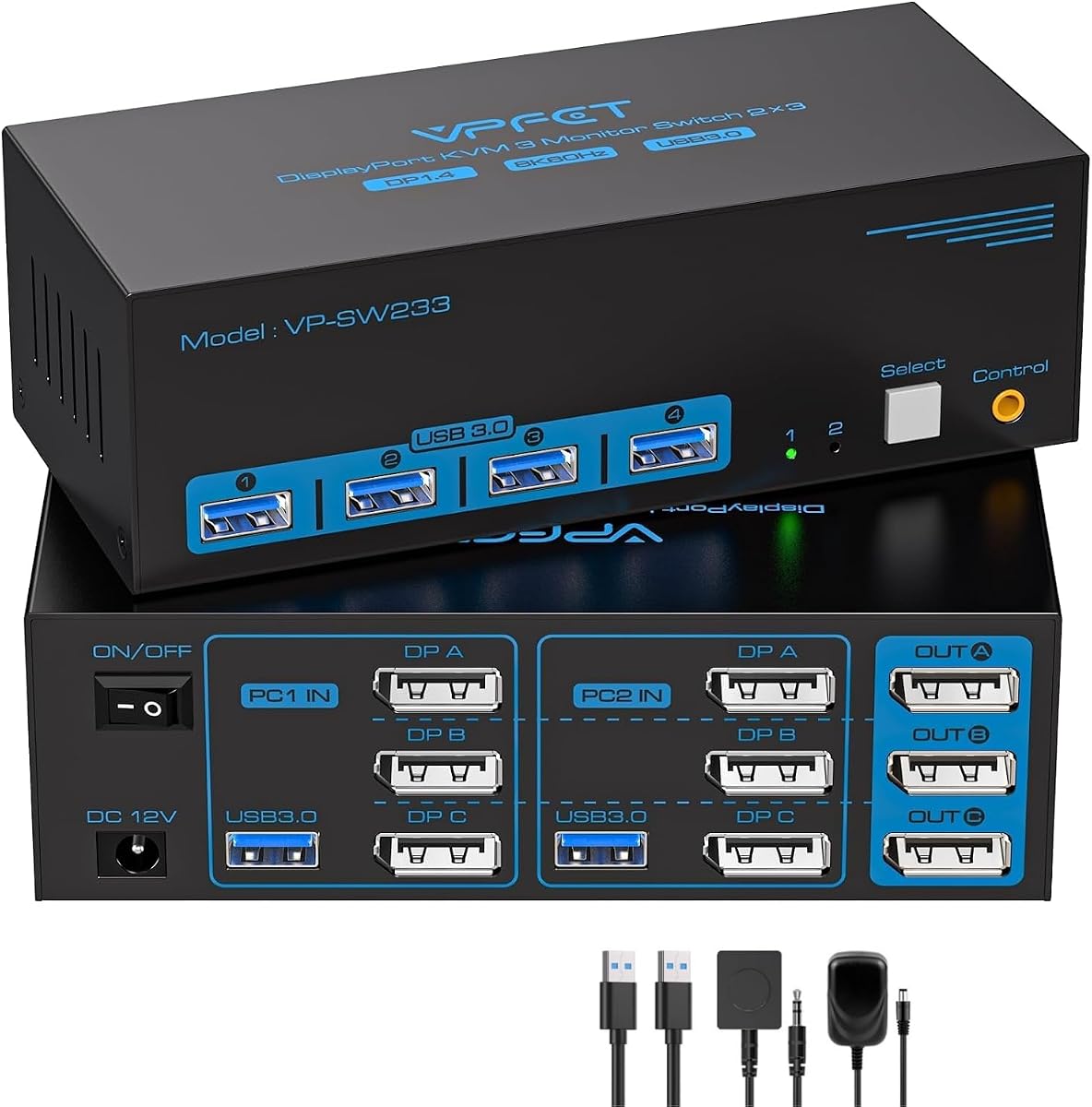
This DisplayPort KVM switch allows two computers to share three monitors and peripherals with support for up to 4K@144Hz and 8K@60Hz resolution.
We may earn a commission when you buy through this link, at no additional cost to you.
It provides stable DisplayPort connections and USB 3.0 sharing ensuring fluid motion and fast data transfer for video editing and professional work.
Each computer must have three DisplayPort outputs to use all monitors which may require specific hardware configurations before purchase.
Professionals and enthusiasts who rely on high refresh DisplayPort setups will find this switch delivers the stability and performance their workflows require.
Supports up to 144Hz at 4K ensuring fluid visuals for demanding professional applications.
Designed for stable DisplayPort connections to maintain consistent performance across all monitors.
We may earn a commission when you buy through this link, at no additional cost to you.
This KVM switch supports two computers sharing three monitors and four USB 3.0 ports with HDMI and DisplayPort inputs for maximum flexibility.
We may earn a commission when you buy through this link, at no additional cost to you.
It includes HDMI and DisplayPort cables a wired remote and supports up to 8K@60Hz and 4K@144Hz resolutions for high quality visuals.
Users must connect external power and ensure their PCs support triple monitor outputs to get the most out of this versatile switch.
Buyers seeking a well rounded and reliable switch with strong resolution support and good warranty coverage will find this model an excellent value choice.
Includes HDMI and DP cables and remote so setup is straightforward and convenient.
Comes with a one year warranty for added peace of mind during regular usage.
We may earn a commission when you buy through this link, at no additional cost to you.
Selecting the right KVM switch for triple monitors requires careful consideration of video support USB sharing and overall compatibility with your existing hardware and workflows.
Check that the KVM switch supports the resolution and refresh rate of your monitors. Many models support up to 4K@60Hz or higher with HDMI 2.1 and DisplayPort 1.4 ensuring crisp visuals without lag.
For professional work or gaming choose a model that supports high refresh rates and adaptive sync technologies like FreeSync or G-Sync.
Determine whether you need a 2 PC or 3 PC switch. Some models only allow two systems to share peripherals while others support three or even four inputs for more flexible setups.
Ensure your computers have the necessary video outputs to match the KVM switch inputs before purchasing.
Look for KVM switches with multiple USB 3.0 ports to share peripherals like keyboards mice and external drives without bottlenecks.
USB 3.0 provides faster data transfer than USB 2.0 which is important when using storage devices or high demand peripherals.
KVM switches typically offer panel buttons wired controllers or hotkeys for switching between computers. Choose one that fits your desk layout and workflow preferences.
Some models include remote controllers that can be placed conveniently outside your work area for a cleaner setup.
Most KVM switches require an external power adapter to ensure stable power delivery to connected USB devices like hard drives or webcams.
A dedicated power supply improves overall reliability and prevents intermittent connection issues during use.
Confirm that the KVM switch supports your operating system whether it is Windows macOS Linux or Unix.
Most modern switches are driver free and plug and play but some features may vary by OS.
Premium models often feature aluminum enclosures that offer better heat dissipation and durability compared to plastic alternatives.
Higher build quality typically translates to more reliable long term performance in demanding environments.
Some KVM switches come with HDMI and DisplayPort cables while others require you to purchase them separately.
Including cables in the package can save time and ensure you have the right connectors for setup.
Connect each computer to the KVM switch using the appropriate video cables and USB ports ensuring all three monitors are properly connected for multi screen setups.
Plug in the power adapter and connect your peripherals like keyboards and mice to the shared USB ports on the KVM switch.
Use the panel button or wired remote to switch between computers and check LED indicators to confirm which system is active.
Yes but your laptop must support video output via USB-C HDMI or DisplayPort. Some KVM docking stations work with USB-C laptops that support display output and charging while basic models require external video ports.
A high quality KVM switch designed for your resolution and refresh rate will not negatively impact performance. Ensure the switch supports your monitor specs to avoid resolution or refresh rate limitations.
An external power adapter ensures the KVM switch can provide enough power to connected USB devices like hard drives and webcams. Without it devices may not function reliably or connect at all.
HDMI KVM switches are widely compatible with most displays while DisplayPort KVM switches often support higher refresh rates and resolutions better suited for gaming and professional workflows.
Yes most KVM switches support extended and duplicate display modes. You may need to configure your computer display settings using keyboard shortcuts like Windows+P to select the desired mode.
No the KVM switches reviewed are designed for triple monitor setups. Connecting additional displays may not be supported depending on the model and computer capabilities.
Yes most KVM switches are compatible with macOS but some models may require specific video configurations. Check product documentation for macOS support and note that USB-C Macs may need adapters.
Ensure all cables are securely connected and your computers support multi monitor output. Check that the power adapter is plugged in and consider using high quality cables rated for your resolution and refresh rate.
The AV Access KVM docking station stands out as the top pick for its all in one docking and switching features while budget conscious buyers will appreciate the HDMI KVM switch for its affordability.
When choosing prioritize resolution support USB speed and compatibility with your computers to ensure a smooth and efficient multi system workflow.
Remember that prices and availability can change so check current listings and reviews before making your final purchase decision.