
HP 255 G10 Laptop
4.3Editor score
AMD Ryzen 3 7330U Processor
64GB High Bandwidth RAM
Up to 2TB PCIe SSD Storage
15.6 Full HD Display
This guide compares the top laptops with 64GB RAM for 2026, evaluating processors, storage, displays, and features to help you find the perfect high-performance
Finding a laptop with 64GB RAM ensures smooth multitasking for demanding workloads like video editing and data analysis. These machines handle heavy applications effortlessly without slowing down your workflow.
We compared ten top models based on processor power, storage capacity, display quality, and connectivity options. Our analysis focuses on real-world performance and value for business and creative professionals.
Each pick highlights unique strengths like OLED screens or military-grade durability. Prices fluctuate often, so check current deals before purchasing to ensure you get the best value for your investment today.
4.3Editor score
4.5Editor score

4.0Editor score
This side-by-side comparison details the specifications of all ten laptops to help you choose quickly. We highlight key differences in processors, memory speeds, screen sizes, and storage options across the lineup.




The HP 255 G10 stands out as a powerhouse for professionals needing immense multitasking power. With its 64GB RAM and Ryzen 7 processor, it handles complex tasks with ease and delivers a smooth user experience daily.
We may earn a commission when you buy through this link, at no additional cost to you.
Its 2TB PCIe SSD offers ample space for large files and fast boot times. The display provides clear visuals for extended work sessions, while the Windows 11 Pro OS adds enterprise-level security and management tools.
Though it lacks a touch interface, the traditional layout suits keyboard-focused tasks perfectly. The numeric keypad is a significant plus for data entry roles, ensuring productivity remains high throughout the workday without fatigue.
This model is ideal for office environments, students managing heavy loads, or home users wanting reliability. If you need a robust machine that balances price and performance, this HP laptop is a top recommendation today.
The 64GB RAM allows you to run dozens of browser tabs and heavy applications simultaneously without any lag or slowdown during critical workflows.
With 2TB of storage, you never need to worry about running out of space for projects, photos, or large data sets required for your work.
We may earn a commission when you buy through this link, at no additional cost to you.
The HP Essential 17t brings a large 17.3 touchscreen to the table, perfect for those who prefer visual navigation. Its Core i7 processor paired with 64GB RAM ensures that even demanding tasks feel seamless and responsive for any user.
We may earn a commission when you buy through this link, at no additional cost to you.
The HD+ resolution offers enough clarity for standard office work while keeping power usage reasonable. You will appreciate the fast storage speeds and the added security of a fingerprint reader for protecting sensitive data on the go.
Its size makes it less ideal for travel but great for home office desks. The upgrade process maintains manufacturer warranties on original parts while providing extended protection on upgraded memory and storage components for peace of mind.
Choose this if you need a desktop replacement with touch capabilities. It suits content consumers and professionals who prioritize screen real estate and interactive controls over extreme portability in their daily computing tasks.
The touchscreen lets you navigate files and apps directly, offering an intuitive way to interact with your content without relying solely on the mouse.
Built-in fingerprint readers allow you to quickly and securely log in, ensuring your personal and business data remains protected from unauthorized access easily.
We may earn a commission when you buy through this link, at no additional cost to you.
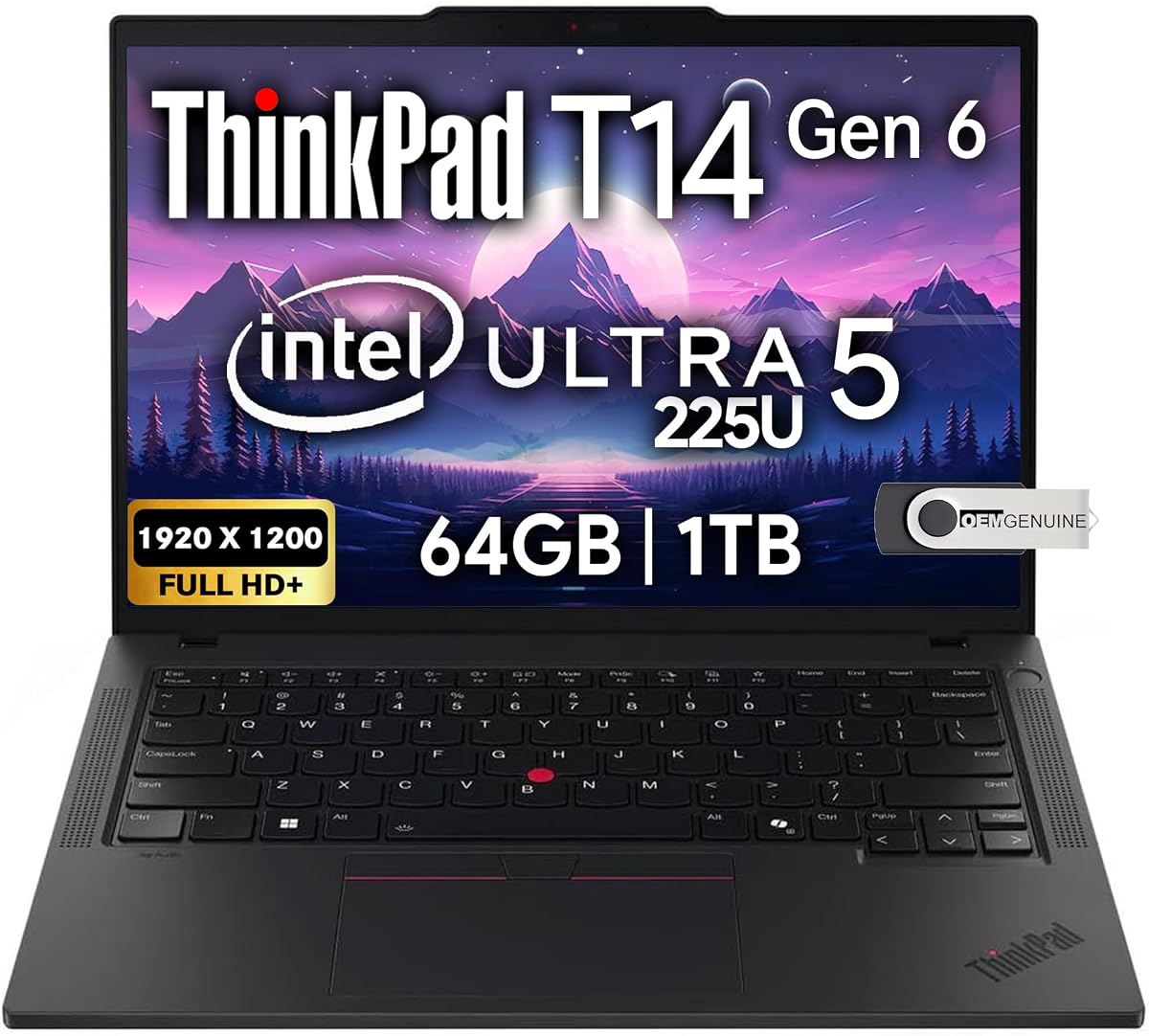
The Lenovo ThinkPad T14 Gen 6 is engineered for professionals who value resilience and modern performance. Its MIL-STD certification means it can withstand rough handling, making it perfect for fieldwork or constant travel environments.
We may earn a commission when you buy through this link, at no additional cost to you.
Equipped with DDR5 RAM and the latest Intel Ultra processor, this machine offers superior speed and efficiency. The Thunderbolt 4 ports provide fast data transfer and support for multiple external displays, enhancing your productivity setup significantly.
While storage is 1TB, the speed compensates for many users. The inclusion of advanced AI features helps automate tasks, and the 5MP webcam ensures you look professional during video calls with colleagues or clients globally.
This laptop is best for those prioritizing build quality and longevity. If you need a reliable companion for demanding business tasks and frequent movement, the ThinkPad T14 delivers on all fronts with its robust design.
Military-grade certification guarantees that the chassis can survive drops and extreme temperatures, ensuring your data and hardware remain safe anywhere you go.
Thunderbolt 4 ports allow you to connect high-speed storage and powerful monitors effortlessly, preparing your workflow for next-generation peripherals and accessories easily.
We may earn a commission when you buy through this link, at no additional cost to you.
This HP 17.3 Business laptop offers incredible value by including a docking station and Microsoft Office right out of the box. It simplifies setup for new users and provides essential tools needed to start working immediately without extra purchases.
We may earn a commission when you buy through this link, at no additional cost to you.
With 64GB of RAM and a spacious 2TB SSD, you can store vast amounts of data while keeping applications running smoothly. The 10-Core processor handles everyday tasks and light creative work without breaking a sweat during your daily routine.
The HD+ display is adequate for standard documents and web browsing but not ideal for high-end media. However, the added accessories and pre-installed software make it a compelling choice for small businesses or students on a budget.
Choose this model if you want a complete setup in one package. It eliminates the need to buy extra peripherals and software, saving you time and money while delivering strong performance for regular business applications easily.
Accessories like earphones and docking stations are included to give you a full desktop replacement experience without needing to buy additional items separately.
Having Windows 11 Pro and Microsoft Office pre-installed means you can start typing reports and managing spreadsheets immediately after powering up your device.
We may earn a commission when you buy through this link, at no additional cost to you.
The HP OmniBook 7 16 delivers a premium experience with its 2K OLED touchscreen and next-generation Wi-Fi 7. This combination ensures vibrant visuals and ultra-fast internet speeds, making it perfect for creatives and power users alike.
We may earn a commission when you buy through this link, at no additional cost to you.
Its Core 9 processor provides top-tier performance for demanding workflows like video editing or 3D rendering. The 120Hz refresh rate adds smoothness to motion, while the backlit keyboard ensures comfortable typing even in low-light environments at night.
The included docking station and ample 1TB storage add to its versatility as a desktop replacement. While the price is higher than others, the superior display quality and connectivity features justify the investment for professional creative work.
Select this if you need the best display and connectivity available. It shines for those who prioritize visual fidelity and speed in their work, offering a high-end experience that sets it apart from standard business laptops available.
The OLED screen provides true blacks and vibrant colors, making it ideal for editing photos or watching high-quality media on your laptop screen.
Wi-Fi 7 offers significantly faster speeds and lower latency than older standards, ensuring you stay connected efficiently even in crowded wireless environments.
We may earn a commission when you buy through this link, at no additional cost to you.
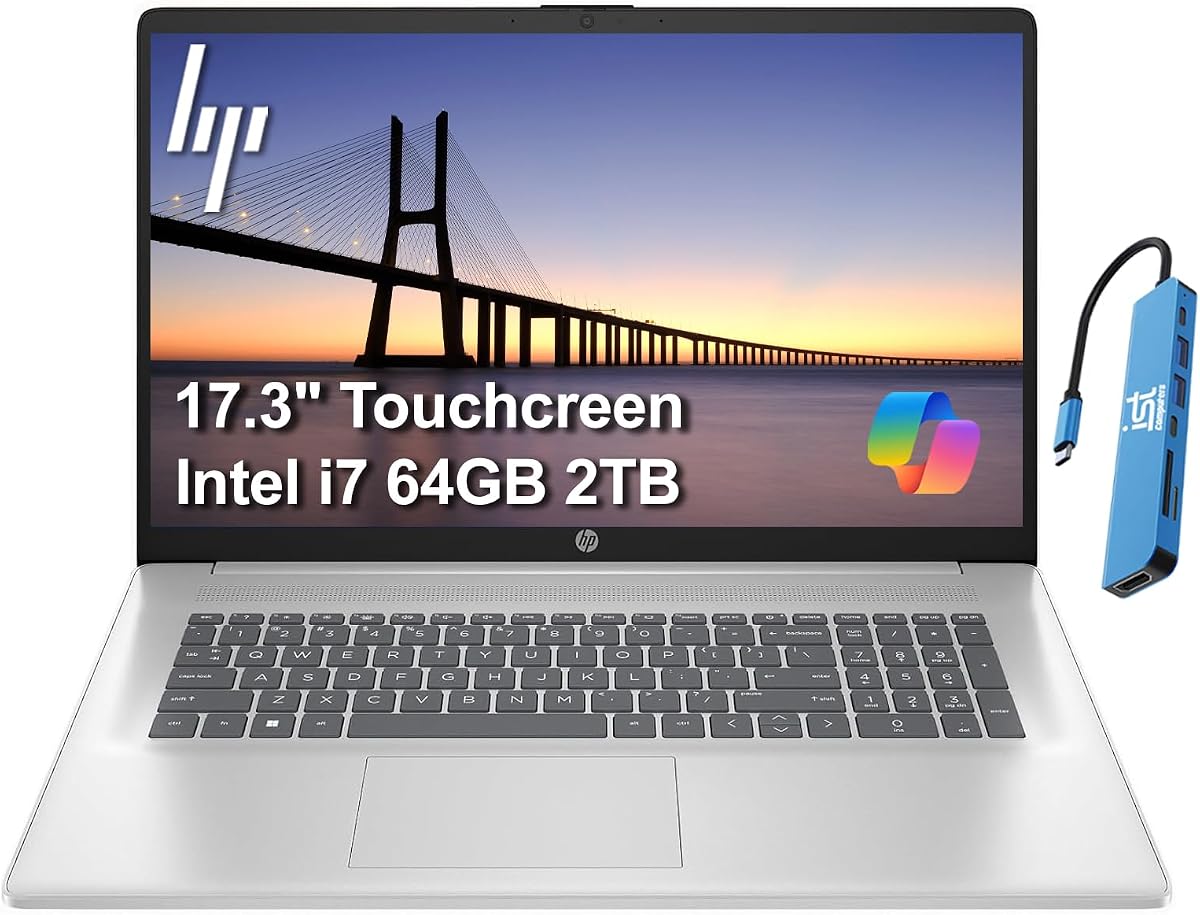
The HP 17 Laptop focuses on productivity with a 17.3 display and lift-hinge design that improves airflow. This thoughtful engineering keeps the system cool and quiet while you work on intensive tasks for hours without overheating issues.
We may earn a commission when you buy through this link, at no additional cost to you.
Its Intel Core 7 processor balances speed with energy efficiency, allowing for longer battery life during meetings. The 64GB RAM ensures you can keep all your project files open and accessible without your system slowing down unexpectedly.
The addition of an AI Copilot key makes accessing intelligent assistance quick and easy. This feature helps automate mundane tasks like drafting emails or summarizing reports, freeing up your time for more strategic and creative work activities.
This is a great choice for students and professionals needing a reliable daily driver. If you value comfort and smart features over raw graphical power, this laptop offers a balanced experience that supports long workdays effectively.
The dedicated Copilot key provides instant access to AI tools, helping you work smarter by automating common tasks like summarizing long documents quickly.
The lift hinge design not only improves typing comfort but also enhances airflow to keep internal components cool during extended periods of use.
We may earn a commission when you buy through this link, at no additional cost to you.
The HP 255 G10 Home version offers incredible value by pairing a budget price with 64GB of RAM. This unique combination allows students and casual users to handle multitasking tasks without paying premium prices for high-end models often.
We may earn a commission when you buy through this link, at no additional cost to you.
Its Ryzen 3 processor handles daily tasks like web browsing and document editing efficiently. The 1TB SSD provides ample space for personal files and ensures quick startup times, making it ready for use immediately after powering on.
While it lacks a mouse, the lightweight design makes it easy to carry to school or work. The Full HD display ensures text and images remain clear, offering a pleasant visual experience even for extended viewing sessions throughout the day.
This is the ideal pick for those on a tight budget who need raw memory power. If your priority is having enough RAM to keep multiple apps running open while minimizing cost, this laptop delivers unmatched value today.
Having 64GB of RAM at this price point is rare, allowing you to run virtual machines or heavy browsers without worrying about hitting memory limits easily.
The thin chassis makes it easy to slip into a backpack, ensuring you can take your work or studies with you anywhere you need to go daily.
We may earn a commission when you buy through this link, at no additional cost to you.
This HP 15.6 Touch laptop earns high marks for its responsive touchscreen and solid performance at a reasonable price point. It is designed for those who want an interactive experience without the complexity of higher-end premium devices available.
We may earn a commission when you buy through this link, at no additional cost to you.
Powered by a Ryzen 5 processor and 32GB of RAM, it manages multitasking well for standard office tasks. The Full HD IPS screen delivers good color accuracy and viewing angles, making it suitable for presentations and content consumption daily.
The numeric keypad is a valuable addition for data-heavy workflows. Its backlit keys and durable build quality ensure that typing remains comfortable and accurate even in dim lighting conditions where you might work after dark.
Ideal for students and home users needing a versatile machine. If you prefer interacting with your content directly and require a reliable setup for school or light business tasks, this model provides a balanced solution for your needs.
Touch support makes navigating educational software and marking up documents much easier, enhancing the learning experience for students and professionals alike.
IPS technology ensures that colors look accurate from any angle, which is crucial for presentations where you might share your screen with a group.
We may earn a commission when you buy through this link, at no additional cost to you.
The HP 15.6 Business laptop holds a perfect 5-star rating due to its exceptional balance of power and storage. The combination of Ryzen 7 processor, 64GB RAM, and 2TB SSD makes it a powerhouse capable of handling any professional task you throw at it.
We may earn a commission when you buy through this link, at no additional cost to you.
Its 2TB storage capacity means you can keep all your video projects and large datasets local. This reduces reliance on cloud storage and ensures rapid file access when you are working on tight deadlines in the office or home.
Fast charge capability gets you from zero to 80 percent in about an hour, keeping you productive when you are away from an outlet. The touchscreen interface adds convenience, allowing you to scroll and zoom through documents intuitively during reviews.
This model is highly recommended for those who need maximum local resources. If your workflow involves managing large amounts of data and requires high-speed memory, this laptop delivers exceptional performance that earns top marks from satisfied users today.
Fast charge technology ensures you spend less time plugged in and more time working, providing hours of use with just a brief charging session.
With 2TB of space, you can archive years of work locally, ensuring your files are always accessible and backed up on your own machine.
We may earn a commission when you buy through this link, at no additional cost to you.
The HP 17 Business laptop secures a perfect rating with its massive workspace and included wireless peripherals. It is designed to function like a desktop replacement, providing everything you need to work comfortably without purchasing extra accessories separately.
We may earn a commission when you buy through this link, at no additional cost to you.
Its 17.3-inch screen offers ample room for side-by-side windows, which is crucial for multitasking professionals. The 64GB RAM ensures that this large display feels responsive, allowing you to move between applications smoothly and efficiently throughout the day.
The wireless mouse adds immediate usability right out of the box. This attention to detail makes it a practical choice for professionals and students who want a complete setup ready for work or study tasks instantly upon receiving the machine.
Choose this if you want a comprehensive package without hidden costs. It serves as an excellent all-rounder for those who need a large screen and reliable performance for general business tasks, online classes, and creative hobbies alike.
Having a matching mouse included saves you time and money, ensuring you can start working immediately with a full input setup for precision control.
The anti-glare technology reduces eye strain in brightly lit rooms, making it comfortable to work for hours without needing to adjust your position constantly.
We may earn a commission when you buy through this link, at no additional cost to you.
Selecting a laptop with 64GB RAM requires balancing raw power with portability and budget. Use this guide to understand key factors that influence performance and longevity for your specific needs.
The processor acts as the brain of your laptop and dictates how well it handles the 64GB of memory. Look for modern AMD Ryzen 7 or Intel Core i7 processors to ensure they can fully utilize the high capacity RAM for smooth multitasking without bottlenecks.
Always verify that the CPU generation matches the RAM speed for optimal efficiency.
While 64GB is the volume, the type of RAM matters for speed. DDR5 RAM offers faster data transfer rates than DDR4, which is crucial for tasks like video editing or compiling large codebases where latency matters significantly.
Choose DDR5 if you can, as it future-proofs your investment against evolving software demands.
Large RAM often pairs with large storage needs. Ensure the SSD is at least 1TB or 2TB to store the files your applications manage. PCIe NVMe drives are essential for matching the speed of your high-performance system.
Prioritize SSDs with high read/write speeds to prevent storage from becoming a bottleneck.
With 64GB RAM you are likely doing heavy work, so a larger screen helps productivity. Look for 15-inch or 17-inch displays with Full HD or higher resolutions to view multiple windows clearly. Touchscreens add versatility for creative users.
OLED panels offer superior contrast for creative work but consume more battery life.
High-performance machines are often heavier. Decide if you need to travel daily or stay at a desk. A 17-inch model provides space but adds weight, while a 14-inch model is easier to carry but offers less screen real estate for multitasking.
Balance the weight with your need for a larger workspace and cooling performance.
Business users benefit from Windows 11 Pro which includes better security and remote management tools. Home users may be fine with Windows 11 Home. Ensure the OS version matches your organizational requirements for security and access.
Pro versions often offer better stability for professional environments.
Check for enough ports to connect your peripherals. Thunderbolt 4 or USB-C support is vital for fast charging and external displays. Wi-Fi 6 or 7 ensures your internet speeds keep up with your internal processing power.
More ports reduce the need for extra dongles and adapters.
Look for MIL-STD certification or sturdy chassis materials if you work in rough environments. High-quality build ensures the laptop survives daily transport and accidental bumps while protecting your valuable data inside.
Durable builds often lead to longer lifespans for your investment.
Keep your laptop in a cool environment to prevent overheating, as high-performance components generate heat. Clean the vents regularly to maintain airflow and extend the life of the internal cooling fans effectively.
Use sleep mode frequently to save energy without losing your work. Ensure your drivers and OS are updated regularly to maintain system stability and optimize performance for the 64GB RAM.
Avoid placing heavy objects on the closed lid to prevent screen pressure. A padded laptop case offers extra protection against bumps and drops during daily transport to your office or home.
Yes, if you edit 4K video, run virtual machines, or manage massive databases. For basic web browsing, 16GB is usually enough. However, having 64GB ensures your system stays fast for years as software demands increase significantly.
Some models allow upgrades, but many modern laptops solder the RAM directly to the motherboard. Always check the manufacturer specs before buying to confirm if you can add more memory later for future needs.
DDR5 offers higher bandwidth and efficiency than DDR4, which helps manage large datasets faster. While not mandatory, it is a valuable feature for high-performance workflows where speed and power efficiency matter.
Many business-oriented models include Windows 11 Pro for better security and management. Home versions may ship with Windows 11 Home. Verify the OS version in the product details before purchasing to ensure it meets your requirements.
They handle gaming well due to strong CPUs and RAM, but they lack dedicated GPUs. For casual gaming, they are great. For competitive gaming, check if a dedicated graphics card is included to ensure smooth frame rates.
Battery life varies by usage, but efficient processors can offer 8 to 12 hours on light tasks. Heavy workloads like video rendering will drain it faster. Always check reviews for real-world battery performance before committing.
We reviewed ten powerful laptops with 64GB RAM, highlighting the HP 255 G10 for business and the ThinkPad T14 for durability. Each offers unique strengths like OLED screens or massive storage for different professional needs.
Prioritize the processor and SSD speed alongside RAM to ensure your workflow remains smooth. A high-quality display and reliable build will make a huge difference in daily comfort and productivity.
Prices change often due to promotions and stock levels. Check current deals and specifications before purchasing to ensure you get the exact configuration you need for your specific work requirements today.