
SWISSVOICE Xtra TMAX10
4.5Editor score
Six Customizable Photo Memory Keys
Simple Familiar Operation
Adjustable Listening And Call Alerts
Discover the top 10 large button phones for seniors in October 2026. This guide compares features like volume, photo dialing, and ease of use to help you
Choosing the right phone for elderly family members can be challenging. Large button phones simplify communication by offering clear visuals and easy dialing. These devices ensure seniors stay connected with loved ones without frustration or confusion during daily calls.
We analyzed ten highly rated models based on user feedback and technical specifications. Our comparison focuses on accessibility features such as volume control, visual alerts, and memory functions. Each product offers unique benefits tailored to different needs and home environments.
Each pick highlights specific strengths like photo speed dial or amplified sound. Remember that product availability and pricing can change over time. We recommend checking current details before purchasing to ensure the best fit for your specific requirements.
4.5Editor score

4.1Editor score
4.2Editor score
This side-by-side comparison highlights the key specifications and features of each model. Reviewing these details helps you identify which phone matches your specific accessibility needs and home setup requirements effectively.


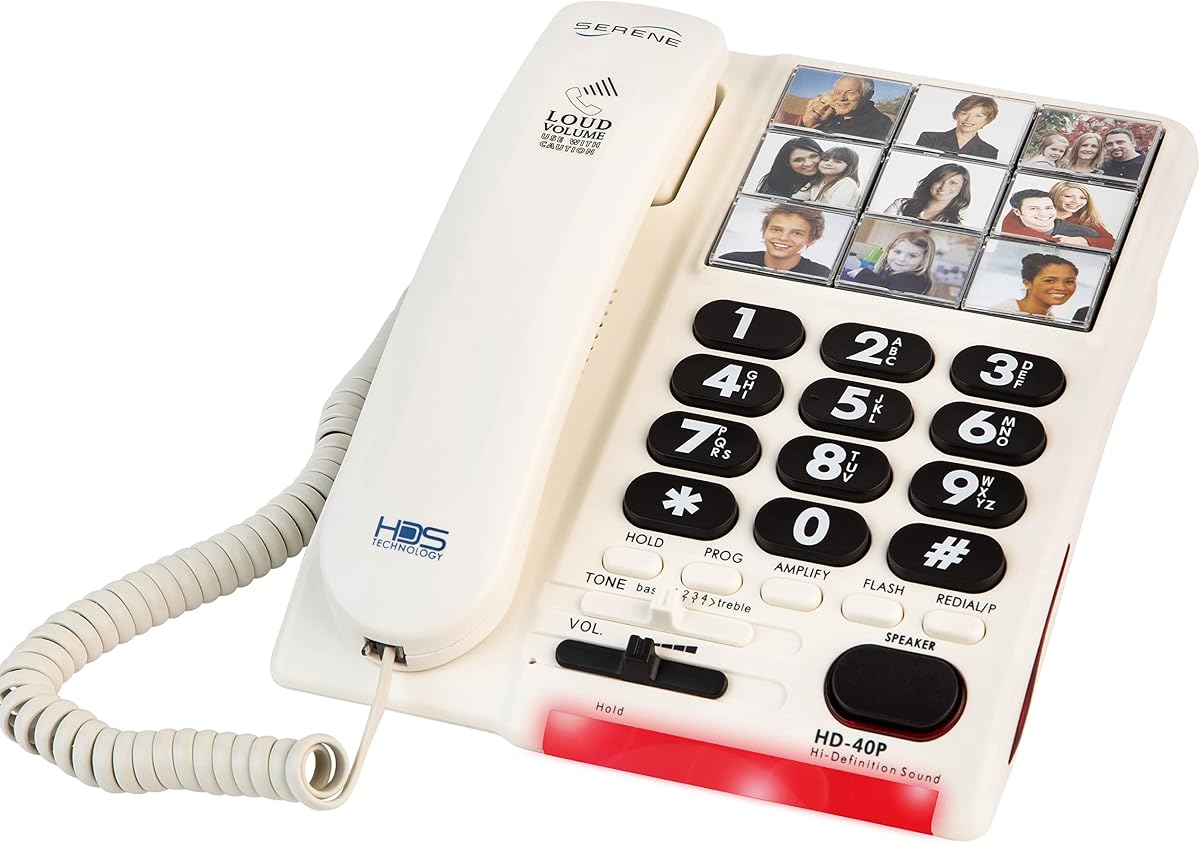


The Uvital Big Button Phone stands out as a top choice for seniors requiring simplified communication. With a solid 4.1 rating, it delivers reliability through its corded design and essential features like photo speed dialing.
We may earn a commission when you buy through this link, at no additional cost to you.
This device excels in accessibility by allowing users to assign photos to buttons. This visual cue reduces memory stress and ensures quick contact. The loud ringer up to 120dB helps those with hearing loss hear incoming calls clearly.
While it lacks modern features like caller ID or internet access, these omissions simplify the interface. The trade-off is a device focused purely on making and receiving calls without distractions or complex menus.
Ideal for seniors with memory loss or poor vision, this phone provides peace of mind. Its hands-free capability is particularly useful for individuals with limited mobility or those who cannot hold a handset for long periods.
Customizable photo buttons allow users to identify contacts by face rather than memorizing numbers. This feature is crucial for seniors with cognitive impairments or dementia who struggle with traditional dialing.
The combination of a 120dB ringer and flashing LED ensures incoming calls are never missed. This dual alert system is vital for users with hearing or visual sensitivities in noisy environments.
We may earn a commission when you buy through this link, at no additional cost to you.
The SWISSVOICE Xtra TMAX10 offers an excellent balance of affordability and functionality for elderly users. Its high 4.5 rating reflects strong customer satisfaction with its straightforward interface and reliable performance.
We may earn a commission when you buy through this link, at no additional cost to you.
Six photo memory keys allow immediate access to important contacts without remembering numbers. The oversized number keys are clearly separated to prevent accidental dialing. This design supports those with reduced eyesight or hand dexterity effectively.
While it does not include a speakerphone, the adjustable volume levels ensure comfortable listening. The visual ring indicator adds an extra layer of notification for users who might not hear the traditional ringer.
This model is perfect for families seeking a simple, reliable home phone. It removes unnecessary complexity while providing essential tools to stay connected. It is a cost-effective solution that prioritizes usability above all.
Users can save numbers for family and caregivers directly onto photo keys. This reduces the friction of daily calling and encourages more frequent communication with loved ones.
The layout prioritizes large, separated keys to minimize errors during dialing. This physical design helps users with arthritis or tremors press the correct button with confidence.
We may earn a commission when you buy through this link, at no additional cost to you.
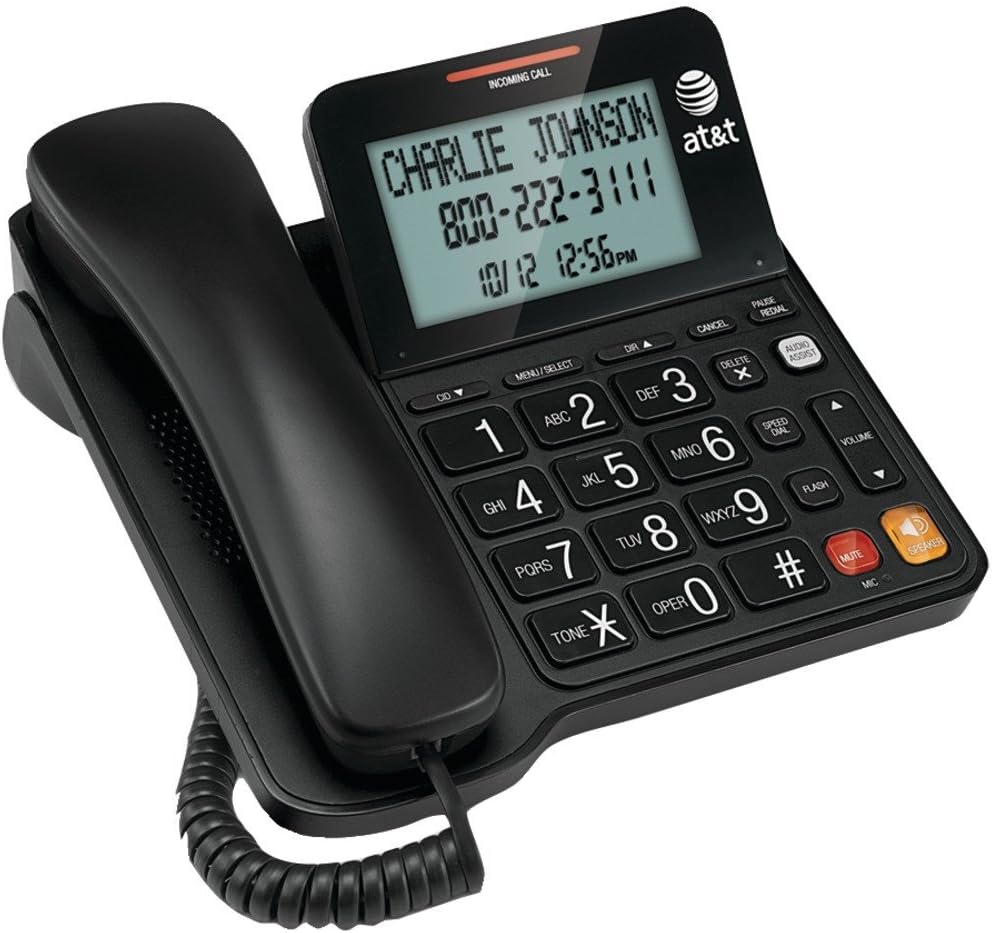
The AT&T CL2940 combines premium features like caller ID with accessibility needs. It is designed for seniors who want to know who is calling before answering. The tilt display makes viewing numbers easy from any angle.
We may earn a commission when you buy through this link, at no additional cost to you.
Audio Assist Volume Boost amplifies incoming sound significantly for hearing support. The speakerphone allows hands-free conversation which is helpful for multitasking. These features add convenience without sacrificing ease of use.
The need for batteries to power the caller ID is a minor trade-off for the added safety. Users can still make calls without power but may miss ID details during outages unless batteries are stocked.
Ideal for seniors who value screening calls for safety and clarity. This phone offers a robust set of tools that support independent living. It is a strong choice for those wanting extra features.
Caller ID allows seniors to identify callers and avoid potential scams or unwanted contact. This visual confirmation adds a layer of security to daily communication routines.
The Audio Assist feature boosts sound levels beyond standard settings. This ensures clear conversations even for those with significant hearing challenges who need extra amplification.
We may earn a commission when you buy through this link, at no additional cost to you.
This large key wired telephone focuses on basic usability with a classic design. The ABS body ensures durability and a comfortable hand feel. Its simplicity appeals to users who need a straightforward phone without extra menus.
We may earn a commission when you buy through this link, at no additional cost to you.
The oversized physical keys prevent wrong dials effectively for those with limited vision. Adjustable ring tone and earpiece volume allow customization to individual hearing needs. This ensures comfort during every conversation without frustration.
The lack of memory or ID features keeps the device uncomplicated and reliable. It relies entirely on the telephone line for power which means it works during outages. This reliability is crucial for emergency communication.
Best for seniors who prefer minimalism and physical reliability. It serves as a dependable tool for staying connected without technical complexities. Users appreciate its durability and ease of daily operation.
The ABS material resists impact and daily wear effectively. This build quality ensures the phone lasts for years even with frequent use or accidental drops.
The warning light alerts users when a call is incoming visually. This feature bridges the gap for those with hearing loss who might miss auditory rings.
We may earn a commission when you buy through this link, at no additional cost to you.
This landline phone is engineered for safety and speed with a dedicated SOS button. The high-contrast buttons make dialing easy for those with cataracts or fading vision. Its simple interface ensures quick access to help when needed.
We may earn a commission when you buy through this link, at no additional cost to you.
Memory keys can be programmed in just twenty seconds for speed dialing. This is essential for seniors with memory loss who need instant access to family. The loud ringer and flashing light ensure calls are never missed.
Without a speakerphone, the device remains focused on essential dialing tasks. This limitation ensures that the phone remains simple and easy to maintain over time. It prioritizes clarity and emergency access over complex features.
Ideal for seniors living alone who need a reliable safety link. The combination of speed dial and SOS offers peace of mind for families. It is a practical solution for daily communication needs.
The red SOS button provides instant access to emergency contacts. This feature is vital for individuals who may face medical issues alone at home.
Black numbers on a white background reduce eye strain significantly. This contrast helps users with poor vision see keys clearly without squinting.
We may earn a commission when you buy through this link, at no additional cost to you.
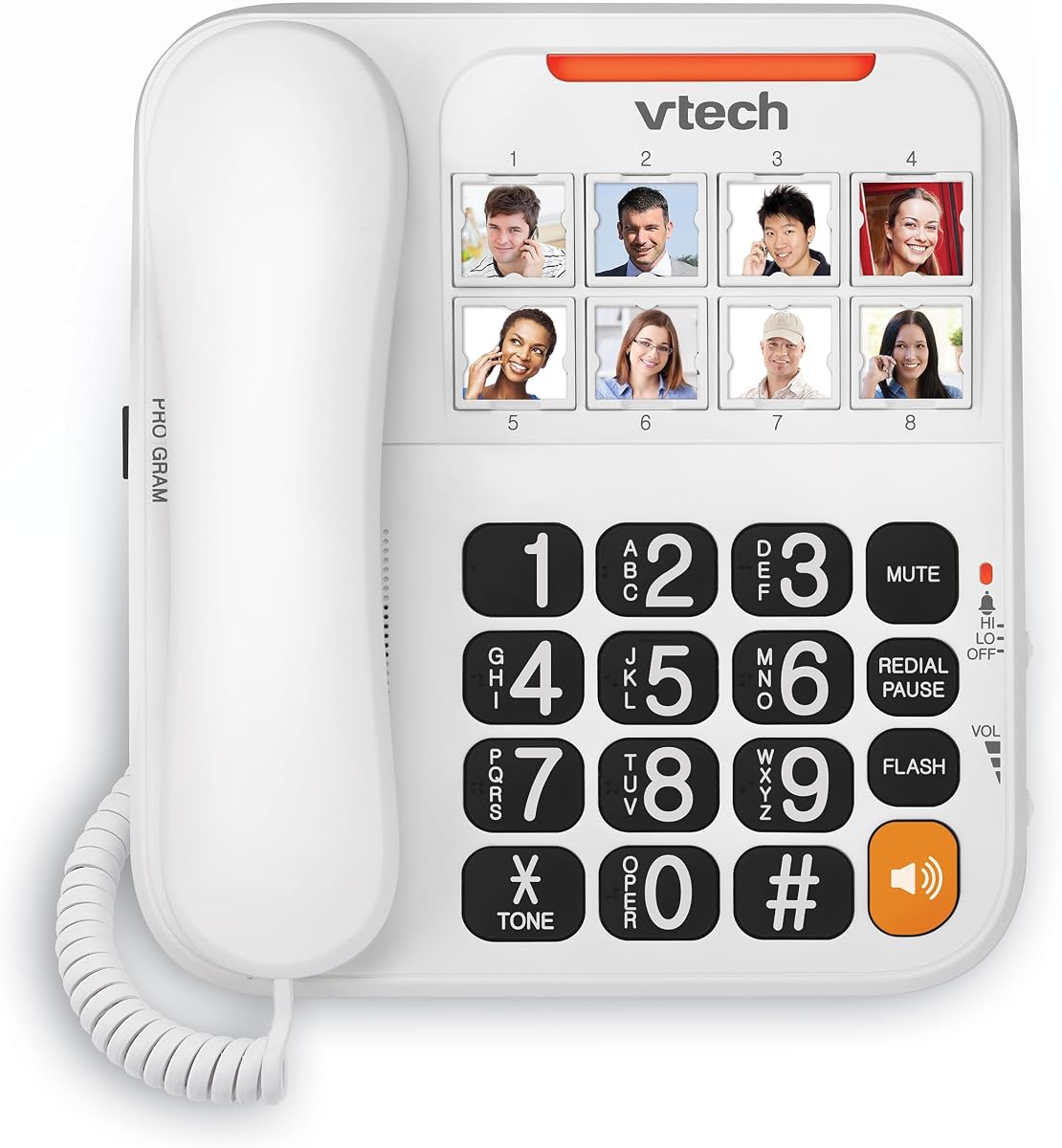
The VTech SN1117 offers unique audio help with talking digits during dialing. This feature helps users confirm they are pressing the right keys before connecting. With eight photo keys, it offers significant memory support for multiple contacts.
We may earn a commission when you buy through this link, at no additional cost to you.
The full-duplex speakerphone allows natural conversation without interrupting flow. Visual ringer alerts complement the sound for a comprehensive notification system. Volume controls are simple to adjust for both handset and speaker modes.
Users might find the setup of talking digits requires initial patience. However once configured it removes the need to read numbers aloud which helps those with vision issues. It is a supportive tool for independent use.
Best for seniors who benefit from auditory confirmation of inputs. It reduces errors and boosts confidence during dialing. This model supports those with both hearing and vision challenges.
Spoken number announcements ensure dialing accuracy without visual reliance. This audio feedback helps users with arthritis or low vision navigate the keypad.
Full duplex technology allows speaking and listening simultaneously. This makes group calls or hands-free conversations feel more natural and less interrupted.
We may earn a commission when you buy through this link, at no additional cost to you.
This phone is built specifically for seniors with dementia or severe hearing loss. The amplified ringer reaches 85 dB to cut through ambient noise effectively. It functions entirely on phone line power so it works during power outages.
We may earn a commission when you buy through this link, at no additional cost to you.
Photo buttons allow quick visual contact without memorizing numbers. The controls remain simple and persistent for easy learning and use. This design supports users who need assistance with memory and hearing simultaneously.
The higher price reflects its specialized assistive features for difficult needs. While it lacks modern digital features it excels in pure sound amplification. It is designed for those who need the loudest options available.
Ideal for households where hearing loss is a major barrier to communication. It brings security and connection to seniors who might otherwise be isolated. The focus on essential functions makes it highly reliable.
The ringer is designed to be as loud as a lawn mower. This ensures even those with significant hearing loss can detect incoming calls in any room.
Loading buttons with photos helps users recognize who they are contacting. This visual support reduces anxiety and confusion during the dialing process.
We may earn a commission when you buy through this link, at no additional cost to you.
This phone offers flexibility in placement with wall or desk mounting options. The large buttons and simple design make it accessible for visually impaired users. Ten memory slots provide ample space for storing family and emergency numbers.
We may earn a commission when you buy through this link, at no additional cost to you.
A hands-free speaker option allows comfortable conversations without holding a receiver. The LED indicator and switchable ring settings ensure calls are noticed easily. It relies on the landline for power so no batteries are needed.
The absence of a visual display keeps costs low and simplicity high. Users who need basic dialing and speaker support will find this sufficient. It serves as a reliable backup or primary phone in any room.
Best for caregivers who need a phone in common areas like hallways. The wall mounting saves space while keeping the device accessible. It is a practical choice for daily household communication needs.
Wall mounting allows placement at accessible heights or near beds. This ensures the phone is within reach even for bedridden individuals or limited mobility.
Two touch memory allows quick access to favorite contacts. This reduces the need to dial full numbers which helps users with memory lapses.
We may earn a commission when you buy through this link, at no additional cost to you.
This Excelltel model focuses on accessibility with photo dialing and SOS functions. It features nine one-touch slots for quick contact access. The LED light syncs with incoming calls to assist those with hearing loss effectively.
We may earn a commission when you buy through this link, at no additional cost to you.
Adjustable handset volume ensures comfortable listening for different hearing needs. The battery free operation means it works during storms or power outages. A redial and flash function help correct mistakes without complex menus.
While it lacks a speakerphone the simple design remains highly reliable. The absence of internet features reduces clutter and keeps usage straightforward. It is a sturdy option for seniors needing dependable daily communication.
Ideal for households seeking a balance of safety and usability. The combination of photo dial and SOS supports independence. It is a solid choice for those needing essential phone features.
The SOS button provides immediate peace of mind for seniors living alone. This feature ensures quick access to caregivers during unexpected situations.
Flashing LED lights match incoming calls to alert users visually. This helps those with hearing loss avoid missing important conversations in quiet spaces.
We may earn a commission when you buy through this link, at no additional cost to you.
This premium model includes an answering machine and an extra cordless handset for convenience. It is hearing aid compatible to support devices worn by seniors. The adjustable ringer reaches 90 dB to ensure alerts are noticed clearly.
We may earn a commission when you buy through this link, at no additional cost to you.
Call block features help prevent unwanted calls from disturbing daily routines. Four photo memory buttons simplify access to key contacts visually. The system supports up to three additional handsets for expanded reach.
Setup may be more complex due to the additional features. Lower ratings suggest some users find the system overwhelming. However the added hardware provides a complete communication package for the home.
Best for seniors who want to answer calls from any room. The cordless handset adds mobility while maintaining accessibility features. It suits households needing multiple devices for comprehensive coverage.
Adding a cordless handset allows answering calls in the kitchen or bedroom. This flexibility reduces movement needed to reach a single desk phone.
Compatibility ensures interference is minimized with medical devices. This feature supports users who rely on hearing aids for daily communication.
We may earn a commission when you buy through this link, at no additional cost to you.
Selecting the right phone requires considering specific accessibility needs and home setup. This guide outlines key factors to help you make an informed decision for your family member.
Look for buttons that are physically large with high-contrast colors. Buttons around one inch or larger are easier to see and press for those with arthritis or vision loss.
Prioritize models with white backgrounds and dark numbers to reduce eye strain.
Check if the phone offers adjustable volume levels for both ringing and hearing. Amplified models can reach up to 120dB which is crucial for those with hearing impairments.
Ensure the device supports hearing aid compatibility to prevent feedback.
Memory keys that accept photos help seniors identify contacts without memorizing numbers. This feature is especially useful for individuals with cognitive decline or dementia.
Look for models offering at least six to ten memory slots for essential contacts.
Corded phones powered by the landline work during power outages. This reliability is vital for emergency communication in areas prone to storms or blackouts.
Verify if additional features like caller ID require external power or batteries.
Flashing LED lights or bright indicators help users who cannot hear the ringer. Some models offer both loud rings and visual cues for maximum notification security.
Ensure these alerts are adjustable to suit the specific noise level of the home.
Choose a phone with straightforward installation that does not require technical expertise. Simple menus and clear labels reduce the time needed to get the phone running.
Avoid complex menus that may confuse seniors who are not tech-savvy.
A hands-free speakerphone allows seniors to talk without holding a handset. This is helpful for those with mobility issues or who need to multitask while calling.
Check if the speakerphone supports full-duplex for natural conversation flow.
Selecting a known brand ensures better customer service and warranty protection. Check reviews for reliability and support experiences before purchasing the device.
A solid warranty provides peace of mind for long-term use and repairs.
Start by connecting the phone to a standard wall phone jack to ensure basic functionality. Test the volume and ringer settings before handing the device to the senior to confirm it meets their hearing needs.
Take time to program the photo memory buttons with clear images of family members. Teach the senior how to press the photo button to make a call to establish comfort with the feature.
Regularly check that the handset cord is not frayed and the base is clean. Wipe the buttons gently with a dry cloth to keep them responsive and free from dust buildup.
Most corded landline phones work without external power because they draw energy from the telephone line. This means they remain functional during electrical outages. However features like caller ID might need batteries.
Yes these phones often have volume controls that amplify sound significantly. Many models are also hearing aid compatible to reduce feedback. Users with severe hearing loss may benefit from amplified ringers.
Locate the memory key section and follow the on screen prompts to assign a photo. Insert the photo into the designated slot or upload via settings depending on the model. Then dial to test functionality.
Yes landline phones can call mobile numbers just like any other telephone number. Simply dial the full mobile number including the area code. Some phones allow saving these numbers for speed dial.
Most models have a fixed number of memory keys that cannot be expanded physically. However you can reprogram them as needed to change the contacts stored. Check the manual for reprogramming instructions.
Some premium models include a call block feature that filters unknown numbers. You can add specific numbers to a block list via the phone settings. This helps protect seniors from telemarketing.
Use the photo speed dial feature to reduce reliance on memory. Assigning photos to buttons allows them to call by recognition. This visual support is designed specifically for this issue.
The top three picks offer distinct advantages ranging from budget-friendly simplicity to premium features. The Uvital, SWISSVOICE, and AT&T models lead in reliability and user satisfaction for accessibility.
Prioritize features that match the specific needs of your family member such as SOS keys or photo dialing. Balancing these needs with ease of use ensures the device will actually be utilized daily.
Prices and availability change often so verify current offers before making your final purchase. Checking stock status ensures you get the right model without delay.