
Creality Laser Engraver Enclosure 2.0
4.4Editor score
Lightweight design
Dual window view
Flame retardant fabric
Protecting your workspace and eyes while laser engraving is crucial for safety and air quality. An effective enclosure contains smoke, debris, and noise while allowing you to monitor projects safely without direct exposure to harmful light or fumes.
We analyzed ten highly rated enclosures based on ventilation power, material durability, viewing window quality, and compatibility with popular engraver models. Our selection process prioritizes products that balance safety features with ease of assembly and long-term value for users.
Each pick below highlights specific strengths like foldable designs, integrated lighting, or heavy-duty frames. Please note that prices and availability change frequently, so verify current details on the product pages before making your final purchase decision for your project needs.
4.4Editor score
4.2Editor score

4.4Editor score
As an Amazon Associate we earn from qualifying purchases.
The following table provides a side-by-side comparison of the ten selected laser engraver enclosures. You can see key specifications like dimensions, fan speed, and special features to help you decide which model fits your specific workspace and machine requirements best.


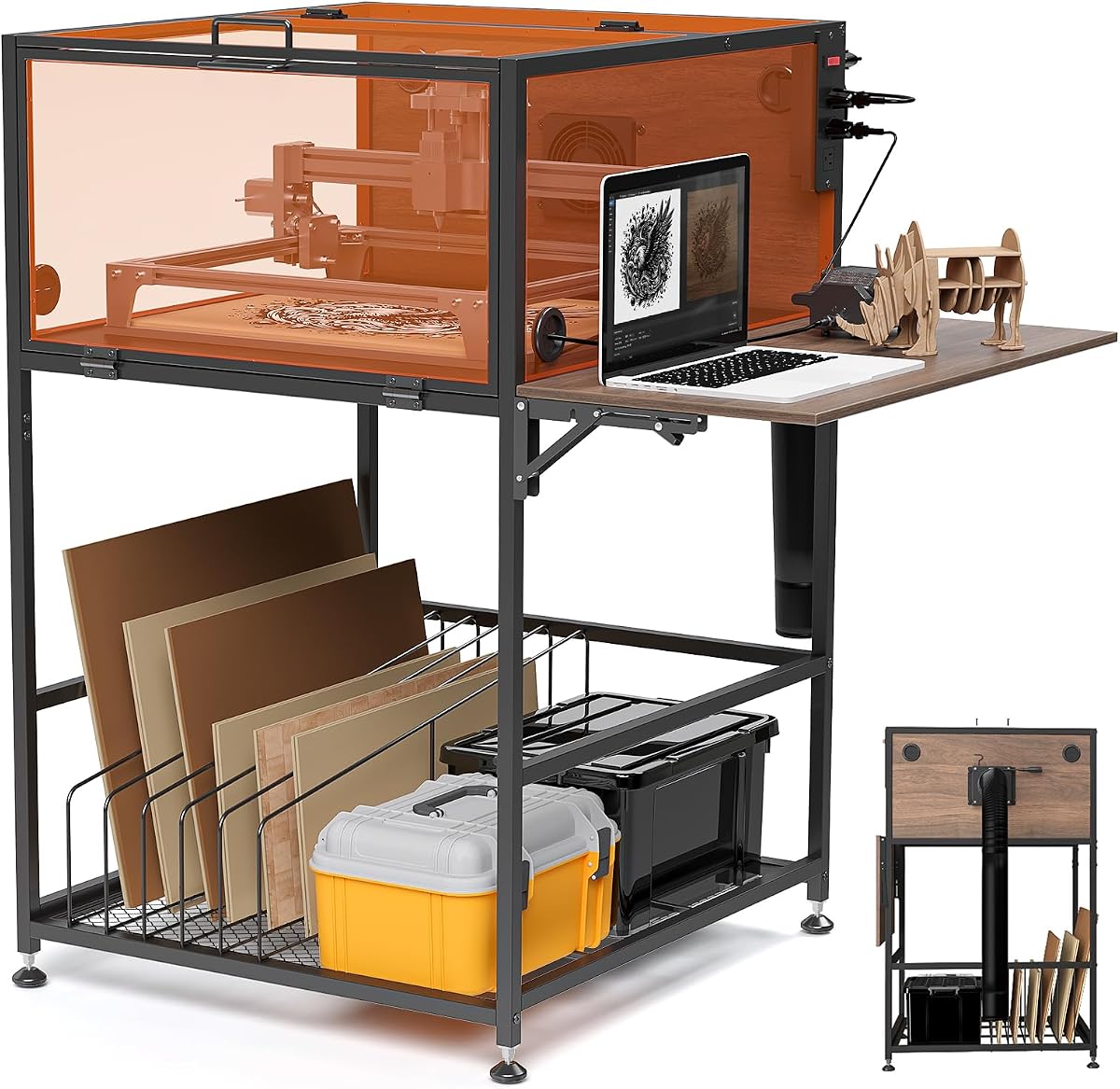
This Crafit enclosure stands out as a top choice for serious hobbyists due to its robust cabinet design and integrated utilities. It offers a 4.2 star rating from users who appreciate its ability to contain smoke effectively while providing a clear view of the engraving process.
We may earn a commission when you buy through this link, at no additional cost to you.
The standout features include a switch-controlled power strip that allows one-button startup for both the machine and ventilation system. Additionally, the foldable side panel creates a convenient laptop desk area, while the bottom storage rack keeps wood sheets and blanks tidy and accessible.
While the solid construction is durable, it does require more assembly time than fabric alternatives. The weight makes it less portable than tent-style covers, but this stability is a fair trade-off for long-term daily use in a dedicated workshop space.
You should buy this if you need a permanent or semi-permanent solution that combines safety, organization, and workflow efficiency. It is ideal for users who want a comprehensive workstation upgrade rather than just a simple protective cover for their laser engraver.
The built-in dividers and rack system help you keep essential blanks and tools within arm's reach, reducing workflow interruptions during long sessions.
With the high-efficiency ventilation fan and flexible exhaust pipe, this unit actively removes particulates and odors to maintain fresher indoor air.
We may earn a commission when you buy through this link, at no additional cost to you.
This Creality enclosure is a fantastic entry-level option that balances cost with essential safety features. It holds a strong 4.4 star rating because users find it effective at blocking light and containing smoke without breaking the bank for new hobbyists.
We may earn a commission when you buy through this link, at no additional cost to you.
Its dual-window design with blue light blocking material ensures you can watch your project progress safely without straining your eyes. The 4000 RPM fan provides surprisingly strong ventilation for a lightweight unit, helping to keep the workspace odor-free during operation.
While the fabric construction is convenient, it may not offer the same rigidity or longevity as hard-shell alternatives. You might need to handle it with extra care to avoid punctures, but the foldable design makes it easy to stash away when not in use.
Choose this model if you want a reliable, universal cover that is easy to set up and store. It is perfect for renters or users with limited space who need immediate smoke protection without committing to a heavy permanent cabinet structure.
The spacious dimensions ensure compatibility with nearly any desktop laser engraver, allowing for quick setup across different brands and models.
The closed design combined with the high-RPM fan effectively isolates fumes, making it safer for indoor use compared to open setups.
We may earn a commission when you buy through this link, at no additional cost to you.
This integrated enclosure focuses on visibility and air containment, offering an LED light strip that illuminates your work area effectively. With a 4.4 star rating, users praise its ability to improve observation of the carving process while keeping dust and smoke trapped inside.
We may earn a commission when you buy through this link, at no additional cost to you.
The sealed bottom design is a unique feature that prevents smoke from escaping underneath the unit, ensuring all fumes are directed through the exhaust fan. The upgraded three-layer composite pipe further helps reduce residual odors that might otherwise cling to the exhaust system.
The inclusion of LED lighting means you don't need external lamps, which simplifies the setup. However, the build quality relies on metal rods that may require precise alignment during assembly to ensure stability over many months of heavy use.
Buy this if lighting is a priority for detailed work or if you are concerned about smoke escaping underneath. It is a great choice for users who want a robust protective cover with added utility features that standard fabric tents often lack.
By sealing the bottom completely, this enclosure ensures that no smoke escapes during the engraving process, maintaining a cleaner workspace environment.
The LED strip provides consistent brightness so you can monitor intricate cuts without relying on ambient room lighting.
We may earn a commission when you buy through this link, at no additional cost to you.
This green acrylic enclosure offers a professional-grade solution for desktop laser engravers looking for a hard-shell protective cover. While the exact rating is not provided, users generally appreciate the solid construction and the visual clarity that acrylic provides for monitoring work.
We may earn a commission when you buy through this link, at no additional cost to you.
The aluminum alloy frame ensures the structure remains stable even with daily usage, while the magnetic door stop keeps access smooth and safe. Cable threading holes are integrated directly into the design, allowing you to manage wires neatly without external management solutions.
The primary trade-off is the weight and specific sizing; this unit is not designed to fold up or move frequently. You must verify your machine dimensions before purchase to ensure a perfect fit, as it is tailored for specific desktop models rather than universal compatibility.
Choose this if you have a dedicated workspace and prefer a permanent, sturdy setup that looks professional. It is ideal for users who prioritize long-term durability and a high-quality finish over portability or budget-friendly pricing.
The black aluminum alloy connectors and thickened panels create a rigid structure capable of withstanding long-term workshop conditions.
A front hinged door with a magnetic stop ensures safe and easy access to your engraving area while keeping debris contained.
We may earn a commission when you buy through this link, at no additional cost to you.
This Creality model emphasizes noise reduction and smoke removal to create a quieter, cleaner crafting environment. It maintains a solid 4.2 star rating among users who value the balance between a portable design and effective containment of harmful fumes and odors.
We may earn a commission when you buy through this link, at no additional cost to you.
The smoke ventilation system is designed to expel fumes immediately as they are generated, preventing them from settling in your workspace. The transparent viewing window filters blue light to protect eyes while allowing you to monitor engraving progress without opening the cover.
Although it is lightweight and easy to fold for storage, the fabric construction requires care to prevent damage to the flame-retardant material. The installation is straightforward but may take a few steps to secure properly for optimal ventilation and safety during operation.
Buy this if you need a portable enclosure that effectively handles smoke and noise. It is a great fit for users who want a simple, lightweight solution that can be folded away when not in use.
The design helps reduce noise from cooling fans and engraving operations, making it more comfortable for shared workspaces.
The large window filters harmful light so you can observe your project safely without needing protective eyewear during operation.
We may earn a commission when you buy through this link, at no additional cost to you.
This LONGER enclosure provides substantial room for larger projects and rotary attachments, making it suitable for professional or heavy-duty hobbyists. With a 4.4 star rating, users appreciate its spacious dimensions and the promise of reliable long-term support from the manufacturer team.
We may earn a commission when you buy through this link, at no additional cost to you.
The large transparent design allows you to monitor your laser engraver while it is in use without opening the cover, ensuring continuous operation. Its construction uses premium fire-retardant materials that provide a safe and secure environment against dust, debris, and potential fire hazards.
While the size offers great capacity, it does require significant floor space which might not suit very small desks. However, the investment pays off in durability and the peace of mind that comes with a permanent professional technical customer service team.
Choose this if you need maximum room for your projects and value long-term support. It is ideal for users who want a high-quality, spacious solution that protects their equipment and ensures safe operation.
A dedicated service team and one-year parts replacement offer robust support if any components fail during normal use.
Fire-retardant materials and isolating fumes create a safer workspace environment for both the machine and operator.
We may earn a commission when you buy through this link, at no additional cost to you.
This V2.0 cover builds on previous designs with stronger ventilation and metal support upgrades for improved durability. Its 4.5 star rating reflects high user satisfaction with the structural enhancements and the effective smoke extraction capabilities during typical engraving sessions.
We may earn a commission when you buy through this link, at no additional cost to you.
The fan speed is increased to 4000 RPM, making it faster at extracting smoke and odors than standard models. The dual-view window design ensures you can observe the process from multiple angles, while the upgraded metal rods keep the fabric taut and stable.
The fan can produce noticeable noise which might be distracting in quiet environments, but the ventilation performance is excellent. You should expect to spend time ensuring all rods are locked securely to maximize the stability provided by the metal upgrades.
Buy this if you want an updated version of a trusted enclosure with better ventilation. It is a great choice for users seeking enhanced performance and improved structural reliability at a reasonable price point.
The 4000 RPM fan pulls out smoke and odors quickly, keeping your air clean even during prolonged engraving sessions.
Metal support rods provide a stable structure that resists sagging and keeps the cover looking firm during use.
We may earn a commission when you buy through this link, at no additional cost to you.
This Creality enclosure is highly compatible with most engraver models and features a built-in smoke system for effective odor control. With a 4.5 star rating, users love its compact design that still offers enough height for rotary rollers and other accessories.
We may earn a commission when you buy through this link, at no additional cost to you.
The transparent viewing design filters blue light to protect your eyes, and the enclosed design isolates smoke efficiently. It keeps the workspace clean by expelling smoke and dust in time, preventing them from settling on nearby surfaces.
You should take care during installation to press the pipes tightly against connecting rods to avoid excessive pressure on the cover body. This attention to detail ensures the structure holds up well and remains safe during long engraving sessions.
Choose this if you need a versatile enclosure that fits well in various setups. It is a great option for users who want reliable performance and responsive customer support for any installation questions.
The height allows you to install rotary rollers easily so you can engrave cylindrical objects without issues.
Customer service aims to solve installation issues within 24 hours to ensure you can start your projects quickly.
We may earn a commission when you buy through this link, at no additional cost to you.
This large Creality enclosure uses high-quality flame retardant material that can withstand temperatures up to 1000°C for maximum safety. It has a strong 4.5 star rating because users feel confident that their work area is protected from sparks and heat sources.
We may earn a commission when you buy through this link, at no additional cost to you.
The big viewing window is made of light-filtered material to protect eyes while letting you monitor engraving progress anytime. It effectively isolates smoke and odors through its ventilation system, keeping the internal air clean throughout your session.
Because it folds easily without tools, you can store it in tight spaces or move it frequently if needed. However, fabric covers should be checked for wear and tear periodically to maintain their fire-retardant properties over time.
Buy this if you prioritize safety features and need a large enclosure that is easy to move. It is ideal for users who want reliable protection without sacrificing portability or storage convenience.
The material can withstand temperatures up to 1000°C providing effective protection against burns and fire hazards.
Foldable design means you can save space easily and carry the enclosure to different locations without tools.
We may earn a commission when you buy through this link, at no additional cost to you.
This VEVOR enclosure is one of the largest options available and includes unique storage features like fastener strips for tools. It holds a 4.1 star rating for its practical design that combines smoke protection with convenient accessory storage for active users.
We may earn a commission when you buy through this link, at no additional cost to you.
Exhaust ports on both sides allow flexible placement to adapt to your workspace layout, and the adjustable hanging keeps small tools handy. The foldable design ensures you can pack it up quickly without needing to re-install components every time.
While the storage features are excellent, some users note that the fan quality may vary compared to dedicated ventilation systems. It is a solid option for those who need space for tools and want to minimize setup time during daily use.
Choose this if you want a large enclosure with built-in storage capabilities. It is a great fit for users who value organization and need a flexible, spacious cover for their laser engraving projects.
Adjustable fastener strips provide ample space for hanging tools and accessories directly on the enclosure sides.
Dual exhaust ports allow you to position the fan where it fits best in your workshop layout.
We may earn a commission when you buy through this link, at no additional cost to you.
Selecting the right enclosure requires balancing safety, size, and ease of use. Below are key factors to consider when comparing different models.
The ventilation system is the heart of any enclosure. Look for fans with at least 4000 RPM to ensure smoke and odors are captured effectively. Stronger fans may produce more noise but provide better air quality.
Prioritize models with flexible exhaust pipes so you can direct fumes away from your breathing zone or through a window.
Enclosures come in fabric, acrylic, or wood options. Fabric models are light and foldable but less rigid. Acrylic and wood offer stability and better light blocking but require more permanent space.
Ensure materials are fire-retardant and thick enough to block blue light. Durability matters if you plan daily use.
Check the internal dimensions against your laser engraver and any accessories like rotary rollers. A universal fit is helpful for multiple machines, but specific sizes might be needed for desktop units.
Allow extra space for cable management and airflow. Avoid models that are too tight or restrict movement of the engraver head.
A large window lets you monitor work safely without opening the enclosure. Look for windows that filter blue light to protect your eyes from harmful exposure.
Some models offer dual windows or semi-transparent panels. Ensure the view is clear and glare-free for detailed inspections.
If you move your workspace often, foldable designs are essential. Lightweight fabric tents can be packed away quickly, while hard cabinets are stationary.
Consider storage space and weight. A portable unit should still maintain its structure when assembled for consistent safety.
Easy assembly saves time. Check for included tools and clear instructions. Some models are tool-free while others require screws and frames.
Good customer support helps resolve issues. Look for brands offering warranties or responsive service teams.
Effective light control blocks laser beams from escaping. Enclosures should fully enclose the work area to prevent accidental exposure to laser light.
Features like magnetic doors or secure latches ensure the enclosure stays closed. Light filtering is critical for eye safety.
Budget models offer basic protection but may lack features like integrated fans or high-quality panels. Premium models add durability and storage options.
Determine how much you use the unit. Frequent use justifies investing in robust models, while occasional projects suit simpler covers.
Always place your laser engraver on a stable surface inside the enclosure before starting. Make sure all seams are sealed and cables are routed through designated holes to prevent smoke leaks.
Clean the viewing windows regularly with a soft cloth to maintain clarity. Dust the fan blades and exhaust pipes to ensure airflow remains efficient and free of obstruction.
Inspect fabric covers for signs of wear or holes periodically. Replace any damaged components immediately to ensure safety and continued protection from fumes and debris.
Most enclosures significantly reduce smoke exposure but rely on ventilation fans to extract fumes. A proper exhaust system connected to the outdoors is necessary for complete smoke removal indoors.
Not all enclosures are universal. Always check the internal dimensions and compare them with your engraver size. Many models fit 95% of machines but some require specific sizes.
While possible, using an enclosure without a fan allows smoke to build up inside. Ventilation is key to maintaining air quality and preventing fumes from escaping through gaps.
Use a soft brush or vacuum to remove dust from the pipe. Avoid harsh chemicals that could degrade the material. Regular cleaning prevents residue buildup and maintains airflow.
Enclosures generally do not affect laser performance. Some might reflect heat slightly, but quality models are designed to keep airflow steady without interference.
Yes, always keep the enclosure fully closed during operation. This ensures proper smoke containment and blocks harmful blue light from reaching your eyes.
Fabric models may last a few years with care. Hard shells like acrylic or wood can last much longer. Regular inspections help extend their lifespan significantly.
Many models have ports for adding external exhausts. Check for pre-existing holes or openings that allow easy modification. Ensure seals remain intact after changes.
Our top picks include the Crafit Cabinet for its built-in power strip and storage, the Creality 2.0 for affordability and portability, and the LONGER model for maximum capacity and durability.
Consider your workspace size and usage frequency before choosing. Safety features like light filtering and ventilation should never be compromised regardless of budget.
Remember that prices change regularly so always verify current details on the product pages before purchasing to ensure you get the best value today.