
Redragon K618 PRO Wireless Ultra-Thin Gaming Keyboard, Macro & Media Scroll
4.1Editor score
Tri-Mode Connectivity
Macro Keys Included
Slim Design
This guide compares the top low profile mechanical keyboards for speed and comfort, covering wireless options, switch types, and build quality for gamers and
Low profile mechanical keyboards offer a unique blend of traditional tactile feedback and modern slim design. They are perfect for users seeking a sleeker desk setup without sacrificing the precision of mechanical switches. These devices reduce finger strain and improve typing speed significantly.
We evaluated ten top models based on connectivity, build quality, and switch performance. Our analysis focuses on real-world usability for both work and gaming scenarios. Each product was assessed for battery life, customization options, and overall typing comfort.
Every pick highlights specific strengths like wireless flexibility or ergonomic design. Prices and availability may vary over time so check current listings before buying. This guide helps you find the ideal keyboard for your specific workflow needs today.
4.1Editor score

4.7Editor score

4.3Editor score
Here is a detailed side-by-side comparison of all ten low profile mechanical keyboards we reviewed. This table helps you quickly identify key specifications and features for each model to find your best match.




The Redragon K618 PRO delivers an impressive low profile mechanical experience at a very accessible entry level. With a 4.1 rating, it stands out for its ability to support multiple devices without lag. Users appreciate the immediate macro recording capability without needing extra software installation.
We may earn a commission when you buy through this link, at no additional cost to you.
Its tri-mode connectivity allows seamless transitions between desktop, laptop, and tablet environments. The slim profile reduces travel distance for faster actuation which benefits both gaming and fast typing sessions. Dedicated media controls let you manage audio instantly while the system remains responsive.
The stock switches offer smooth linear feedback suitable for gamers who prefer consistent keystrokes. However the build quality is more utilitarian compared to higher end models and some users may notice a lighter feel. The lack of deep customization in software limits advanced keybinding options significantly.
This keyboard is ideal for students or budget conscious professionals needing reliable multi-device support. Its ease of use and quick setup make it a strong recommendation for casual users. If you want premium materials you might look elsewhere but for value this is excellent.
Dedicated macro zones allow you to record complex key combinations on the fly.
Switch between PC and tablet instantly without re-pairing for seamless workflow.
We may earn a commission when you buy through this link, at no additional cost to you.
The Keychron K3 V2 is a compact powerhouse for users who value open-source customization. With a 4.3 rating it brings QMK firmware to a low-profile wireless format. This allows deep key remapping and macro creation through a simple web app interface.
We may earn a commission when you buy through this link, at no additional cost to you.
Its unique Mac layout ensures full multimedia support for Apple users while maintaining Windows compatibility. The Broadcom Bluetooth 5.1 chipset ensures stable connections across up to three devices. The aluminum body adds durability without adding significant weight to your bag.
While the keyboard is robust the plastic bottom frame may feel less premium than all-metal alternatives. Firmware updates might be necessary if initial key mappings do not match your exact device layout. However the community support ensures these issues are quickly resolved.
Ideal for developers and power users this keyboard offers endless possibilities for personalization. The AI assistant feature simplifies complex setups by accepting plain language commands. If you want control over every key this is a top choice for productivity.
Open-source firmware allows for unlimited remapping and automation scripts.
Includes specific keycaps and layout for seamless integration with Apple devices.
We may earn a commission when you buy through this link, at no additional cost to you.
The Cherry MX 10.0N stands out for its premium aluminum housing and ultra-slim profile. It features genuine Cherry MX Low Profile Speed switches that are linear and quiet. This combination makes it perfect for professional environments where noise levels matter.
We may earn a commission when you buy through this link, at no additional cost to you.
At just 0.87 inches thick this keyboard maintains a sleek aesthetic while providing sturdy construction. The integrated stand offers ergonomic flexibility which helps reduce wrist strain during long workdays. RGB backlighting adds a customizable visual touch to your desk setup.
While the build quality is exceptional the keyboard is not hot-swappable which limits future switch customization. The higher price point reflects the premium materials but may not fit every budget. However the durability ensures this unit will last for years of daily use.
This keyboard is recommended for office professionals who want a reliable and sleek typing tool. The combination of speed switches and low noise makes it ideal for shared workspaces. If you prioritize build quality over customizability this is a strong contender.
Full aluminum housing ensures longevity and a rigid typing feel.
Low Profile Speed switches provide quick actuation for responsive input.
We may earn a commission when you buy through this link, at no additional cost to you.
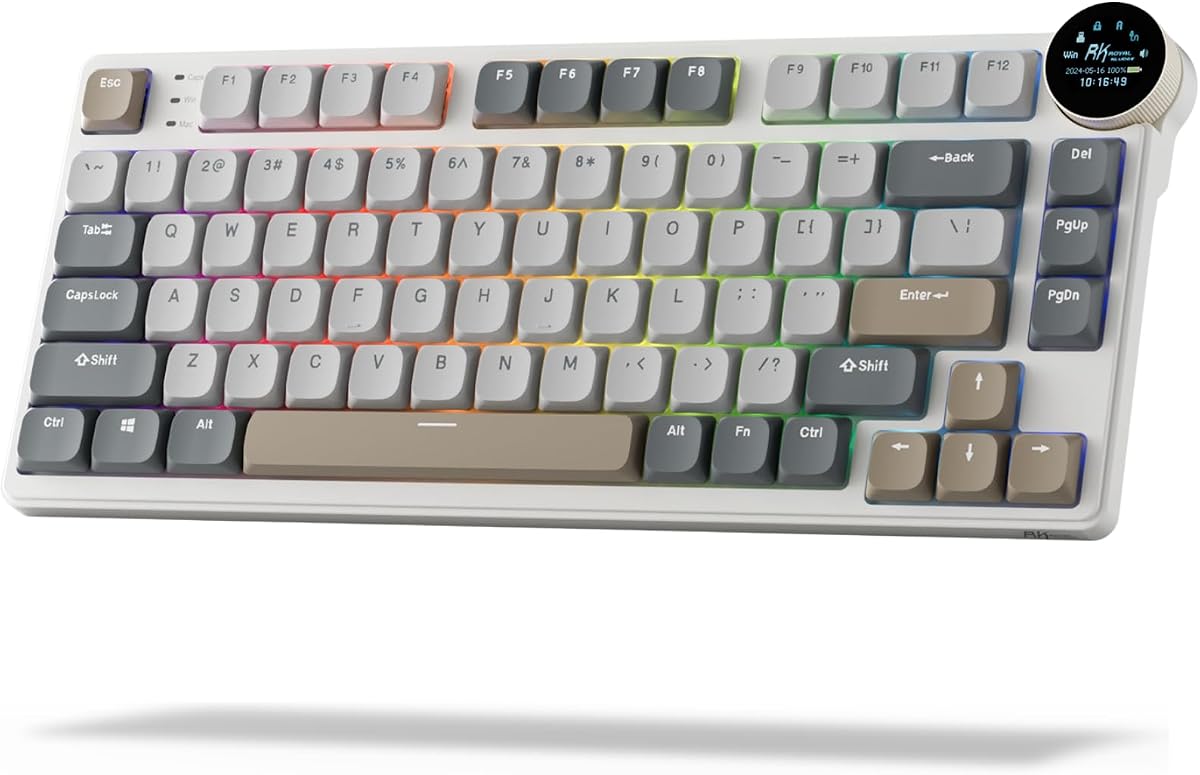
The RK N80 introduces a unique smart display screen for connectivity and settings status. This feature lets you see custom GIFs and connection modes directly on the keyboard. Combined with sound-absorbing layers it delivers a quiet and stable typing experience.
We may earn a commission when you buy through this link, at no additional cost to you.
Its top-mounted structure provides increased feedback and stability for intense gaming sessions. The heavy duty base solves the wobbling issue common in thin low-profile keyboards. Tri-mode connectivity ensures you can switch between wireless and wired setups seamlessly.
While the screen adds flair it might distract some users during focused work or gaming. There is a slight learning curve to mastering the display controls and knob usage. However the visual feedback for battery and connection status is highly practical for daily use.
This keyboard is perfect for tech enthusiasts who want a unique and functional setup. The sound dampening ensures a smooth feel which improves typing comfort over long periods. If you value visual features alongside performance this model is a standout choice.
Screen shows battery status and connection mode for easy monitoring.
Triple layer foam and silicone pad reduce hollow sounds significantly.
We may earn a commission when you buy through this link, at no additional cost to you.
The Flow Lite 84 focuses on comfort with a lower front height and soft gasket design. It features Specter Full POM linear switches that require only 40 grams of force. This reduction helps minimize finger joint fatigue during extended typing sessions significantly.
We may earn a commission when you buy through this link, at no additional cost to you.
PBT double shot keycaps ensure durability and a matte texture that resists shine over time. The gasket mount enriches the sound and feel of every keystroke for a premium experience. Wireless connectivity includes 2.4GHz support for a responsive 1000Hz polling rate.
While the aluminum body was replaced with ABS to reduce costs the tactile feel remains soothing. The two-tone keycap design looks modern but the backlighting options are somewhat limited compared to RGB rivals. However the focus on ergonomics makes up for these trade-offs.
Ideal for users with wrist strain this keyboard prioritizes long-term physical comfort. The lightweight design makes it excellent for travelers who need a reliable companion on the go. If you value typing comfort above all else this is highly recommended.
40gf switches reduce strain and fatigue for natural finger movement.
Flexible mounting system enhances typing sound and overall softness.
We may earn a commission when you buy through this link, at no additional cost to you.
The Keychron K1 Ultra 8K leads the market with an impressive 8K wired polling rate. This ensures minimal latency for competitive gaming while maintaining a slim profile. The inclusion of ZMK firmware allows advanced customization through a web app.
We may earn a commission when you buy through this link, at no additional cost to you.
Hot-swappable POM switches let you change typing characteristics without soldering. The keyboard features sound-dampening layers and wax-oil treated hardwood side panels for a premium feel. A programmable knob adds utility for volume control or other tasks quickly.
The price is higher than many rivals but the performance justifies the cost for enthusiasts. Setup requires some technical knowledge especially when using ZMK customization which might deter casual users. However the flexibility it offers is unmatched in the current low-profile category.
This model is perfect for gamers and developers who demand the highest response speeds. The build quality ensures it remains stable and durable over years of heavy use. If you want top-tier performance this is the best option available.
Wired 8K polling provides instant response for competitive gaming.
Change switches easily to find your preferred feel and sound.
We may earn a commission when you buy through this link, at no additional cost to you.
The Keychron K17 Max features a popular 96% layout which keeps all keys in a compact space. It uses Gateron low-profile switches that are significantly thinner than standard options. This design maximizes desk real estate while retaining all essential keys including the numpad.
We may earn a commission when you buy through this link, at no additional cost to you.
Powered by QMK firmware it ensures transparency and security for your custom settings. The aluminum frame adds structural integrity while keeping the unit one of the thinnest on the market. Double-shot PBT keycaps resist shine and maintain legends over long periods of use.
The dense layout requires a slight adjustment period for users coming from full-size boards. While the polling rate is standard at 1000Hz it is sufficient for most gaming and work tasks. The combination of utility and thinness makes it a strong choice for office work.
Ideal for professionals who need a numpad without the bulk of a full keyboard. The ultra-slim body fits well in laptop bags for mobile workers. If you value space saving without losing functionality this keyboard is highly practical.
Retains full functionality including numpad in a compact footprint.
PBT material prevents shine and keeps legends sharp over time.
We may earn a commission when you buy through this link, at no additional cost to you.
The Flow Lite 100 offers a large 3000mAh battery that provides up to 100 hours of use. This makes it ideal for users who travel frequently and cannot charge daily. It shares the same comfortable gasket mount and low force switches as the 84 model.
We may earn a commission when you buy through this link, at no additional cost to you.
With 100 keys it provides a full layout without the bulk of traditional full-size boards. The PBT keycaps ensure a textured and durable feel that resists oil and wear. Triple-mode connectivity ensures you can connect to all devices easily and securely.
While the larger size adds weight the battery life outweighs this for many mobile users. The lighter ABS body helps keep it portable but feels less premium than metal alternatives. However the comfort features ensure it remains a top tier productivity tool.
This keyboard is perfect for power users who need endurance and comfort on the road. The design prioritizes typing ease with reduced force and a relaxed wrist position. If battery longevity is a priority this is the best option in the lineup.
3000mAh capacity supports up to 100 hours of usage on one charge.
Includes all standard keys for complete productivity without extra bulk.
We may earn a commission when you buy through this link, at no additional cost to you.
The Keychron K3 Max SE enhances acoustics with advanced EPDM and bottom case acoustic foam. This combination results in a quieter and more cushioned typing experience. The redesigned stabilizers reduce wobble on larger keys for a consistent feel across the board.
We may earn a commission when you buy through this link, at no additional cost to you.
Hot-swappable support lets you change switches without soldering to find your perfect fit. It includes premium double-shot PBT keycaps that resist shine and offer excellent durability. The 2.4 GHz wireless connection ensures competitive gaming speeds with a 1000Hz polling rate.
While the layout is compact the multimedia and function keys match Apple standards for Mac users. The price is premium but the sound engineering justifies it for users sensitive to noise. If you value a clean sound and smooth keys this is highly recommended.
Ideal for office environments where noise control is important for productivity. The QMK firmware support allows deep customization for power users. If you want a refined tactile experience this model delivers a premium feel.
Foam layers reduce resonance for a muted and polished typing sound.
New design reduces wobble for smoother larger keypresses.
We may earn a commission when you buy through this link, at no additional cost to you.
The Razer Ornata V3 fuses mechanical feedback with a membrane-like feel for a unique experience. This design offers a natural hand positioning that allows for long gaming sessions with little strain. Dedicated media keys let you control playback and volume instantly without complex combos.
We may earn a commission when you buy through this link, at no additional cost to you.
UV-coated keycaps ensure legends stay sharp and resist wear from frequent use. The magnetic soft-touch wrist rest snaps onto the keyboard for seamless comfort during long periods. The slimmer keycaps and shorter switches help reduce finger travel for faster inputs.
While it uses a mecha-membrane system some mechanical purists may prefer true switches. It is not wireless which limits flexibility compared to modern competitors. However the ergonomics and build quality make it a strong option for console or PC gaming.
This keyboard is perfect for casual gamers who value comfort and durability over customization. The included wrist rest adds value and support for long sessions. If you want a reliable gaming keyboard with a unique feel this is a great pick.
Low profile keys reduce wrist strain during long gaming sessions.
Soft-touch rest snaps on magnetically for added comfort.
We may earn a commission when you buy through this link, at no additional cost to you.
Choosing the right low profile mechanical keyboard depends on understanding several key factors. This guide helps you identify what matters most for your specific needs.
Low profile switches come in linear and tactile options. Linear switches offer smooth action while tactile ones provide a bump. Consider which feel matches your typing style best.
Linear switches are generally better for gaming whereas tactile suits writers.
Wireless keyboards offer flexibility while wired options ensure zero latency. Most models support Bluetooth and 2.4GHz wireless. Choose based on your device environment.
Gamers often prefer wired but Bluetooth is great for multi-device setups.
Layouts range from 60% to full-size. Compact layouts save space while full layouts include numpads. Decide if you need specific keys like arrow keys.
A 75% layout often offers the best balance for most users.
Materials like aluminum add durability and weight. Plastic is lighter but less premium. Look for features like gasket mounting for comfort.
Heavier boards usually stay stable on the desk during intense use.
Wireless keyboards vary significantly in battery duration. Some last weeks while others need weekly charging. Check capacity ratings before buying.
Higher mAh ratings ensure less frequent charging interruptions.
Software support varies widely. QMK firmware offers open source control. RGB lighting and macros enhance personalization options.
Hot-swappable boards let you change switches without tools.
Wrist rests and adjustable feet matter for comfort. A lower profile reduces finger travel significantly. Look for models with ergonomic designs.
Comfort is key if you type for many hours daily.
Budget options are available but premium models offer better features. Set a limit based on your needs. Value often comes from build quality.
Mid-range boards often provide the best balance of features.
To get the best performance from your keyboard ensure all firmware is updated. Use the manufacturer app to remap keys and set macros for efficiency. This ensures your device operates at peak potential.
Regular cleaning is vital for longevity. Use compressed air to remove debris from under keys. Avoid harsh chemicals that could damage keycap legends or plastics.
Store your keyboard in a dry place when not in use. Protect it from direct sunlight to prevent discoloration. This ensures your keyboard stays looking and performing great.
Low profile keyboards offer faster actuation which can benefit gaming. They also reduce hand movement. However high-speed polling wired connections are still preferred for competitive play.
Only hot-swappable models allow switch replacement. Always check product specs before buying. Some models require soldering which limits customization options significantly.
Most models support both operating systems. Many include physical keycaps for both. However layout mapping may require a system switch button.
They generally last 5 to 10 years with proper care. The low profile switches are durable. Build quality plays a major role in overall lifespan.
Yes if you value tactile feedback and durability. They provide a premium typing experience. The investment is worthwhile for frequent users.
Some wireless models connect to phones and tablets. Bluetooth connectivity enables this feature. Always verify compatibility with mobile devices.
Most models include LED backlighting options. RGB versions offer multiple colors and effects. Some premium models have limited lighting to save power.
Restart the device and check battery levels. Re-pair the Bluetooth connection. Ensure firmware is updated for stability.
We reviewed ten top low profile mechanical keyboards offering various features and benefits. Models like the K1 Ultra 8K and Flow Lite 84 offer excellent balance for performance.
Prioritize your needs such as battery life or layout size. A keyboard with QMK firmware offers flexibility. Choose based on your daily workflow.
Check current prices and availability as offers change. We recommend comparing features carefully before buying. This ensures you get the best value for your budget.