
VSD Mini Macro Pad Shortcut Keypad
4.1Editor score
6 custom LCD programmable keys
Dual side RGB light bars
Compact portable size design
Discover the top macro pads for streaming in October 2026. We compare customizable keys, LCD screens, RGB lighting, and software compatibility to find your
Streaming has evolved into a highly competitive field where every second counts. A quality macro pad for streaming allows creators to manage scenes, alerts, and audio with a single tap. This gear transforms complex workflows into simple actions, keeping your focus on the content rather than the software.
We analyzed ten leading models based on customization options, build quality, and software ecosystems. Our comparison covers devices ranging from compact keypads to full-featured decks with knobs and touch interfaces. Each entry offers unique strengths for different budgets and operational needs.
Each pick highlights specific advantages like LCD visuals, RGB effects, or plugin support. These details help you match the device to your specific streaming setup. Keep in mind that availability and pricing may fluctuate, so checking current listings is always recommended before purchasing.
4.1Editor score

4.4Editor score

4.8Editor score
This side-by-side comparison outlines the core specifications and unique features of each selected macro pad. From key counts to software compatibility, these details help you understand how each device performs in a real streaming environment.



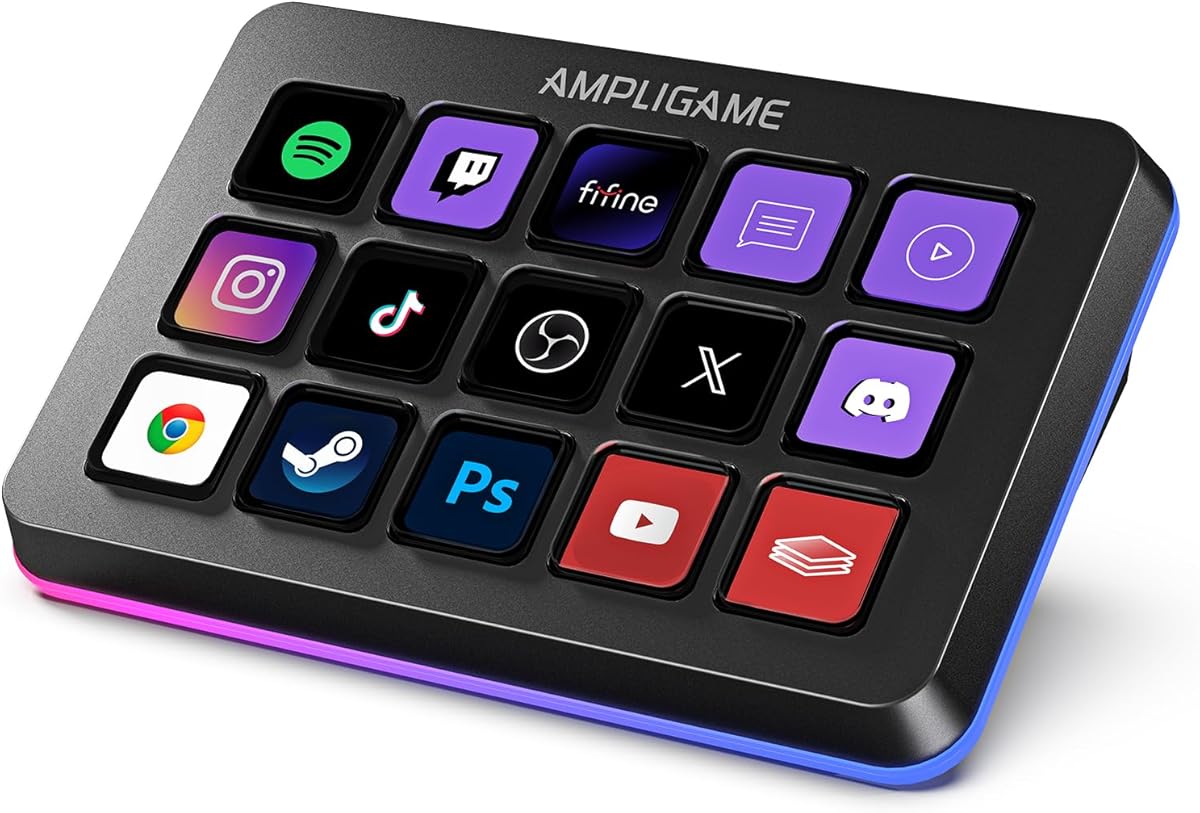


The VSD M18 Macro Pad is a robust stream controller that balances features and usability for content creators. With an overall rating of 4.4 stars, it appeals to users needing a high number of programmable keys for daily tasks. Its standout quality lies in the 18 keys, which combine 15 LCD visuals with 3 physical buttons for tactile feedback.
We may earn a commission when you buy through this link, at no additional cost to you.
This device shines when you need to execute complex sequences quickly. You can program single actions or multi-step macros for game combos, app launches, or OBS scene switching. The LCD keys accept images and animations, making it easy to identify functions at a glance. The adjustable RGB light ring adds a stylish touch that enhances your desk setup during night streams.
A trade-off is the dependency on specific software for full configuration. While plug-and-play works for basic keys, advanced plugins and SDK development require using the VSD Craft tool. Linux users may find limited native support compared to Windows or macOS. However, the solid construction and built-in plugins like weather and clock modules offset these minor limitations.
Streamers and gamers who need a dense layout without breaking the bank will find this model ideal. It is highly recommended for those who value visual cues and need a versatile tool for both work and play. The flexibility to customize icons and the RGB lighting makes it a strong contender for a primary control deck.
Programmable macros allow you to perform multiple tasks with a single press, saving valuable time during live broadcasts.
LCD keys displaying animations or images help you instantly recognize commands without looking away from your content.
We may earn a commission when you buy through this link, at no additional cost to you.
The Stream Dock N1 stands out with its unique vertical layout, which is perfect for desks with limited horizontal space. Rated 4.7 stars by users, it delivers high reliability and versatility. This device is not just a macro pad but also functions as a calculator and numeric keypad, adding value beyond typical streaming gear.
We may earn a commission when you buy through this link, at no additional cost to you.
Its three modes allow you to switch between left-hand shortcut control, calculator functions, and numeric entry seamlessly. You can drag files or apps directly to the LCD keys for quick access. The Space Station plugin market provides ready-made tools for apps like Discord and Photoshop, streamlining your workflow without coding knowledge.
One consideration is the learning curve for setup. Users may need to watch tutorial videos to fully grasp the three modes and plugin installation. The left-hand ergonomics might also take time to get used to if you prefer traditional layouts. However, these hurdles are minor given the device's functional breadth.
This model is ideal for creators with tight desk spaces who still need extensive shortcut control. Its versatility makes it suitable for office tasks, gaming, and streaming alike. If you value efficiency and space optimization, the N1 offers a unique solution that blends productivity tools with stream control.
The vertical orientation reduces desk clutter, leaving more room for mouse movement and other peripherals.
Using calculator and numeric modes ensures the device remains useful even when you are not streaming or gaming.
We may earn a commission when you buy through this link, at no additional cost to you.
The VSD M18 Stream Controller is designed for users who want extensive visual control over their workflow. With a 4.5 rating, it balances performance and customization effectively. Its 18 keys include 15 LCD screens that allow you to upload custom images or animations for instant recognition.
We may earn a commission when you buy through this link, at no additional cost to you.
This model excels at one-touch multi-hotkey operations, allowing you to trigger complex sequences instantly. Whether you are switching OBS scenes or launching a game combo, the process is streamlined. The surrounding RGB light ring adds a layer of immersion, making it great for night streams or gaming sessions where lighting matters.
A limitation is the lack of native Linux plug-and-play support. You may need to rely on SDK documents if you are on a Linux system. Additionally, full functionality requires installing the VSD Craft software. Despite this, the high-quality construction and versatile plugins like weather and calendar add to its value.
Content creators who prioritize visual feedback will appreciate the LCD customization options. It is a solid choice for those who want a device that looks as good as it performs. If you need a reliable tool for gaming and productivity with strong visual aids, this deck fits the bill.
Custom icons and animations on LCD keys help you identify functions quickly during high-pressure moments.
The RGB light ring creates a visually stunning atmosphere that enhances your setup aesthetics.
We may earn a commission when you buy through this link, at no additional cost to you.
The VSD Mini Macro Pad is perfect for those seeking a budget-friendly entry into stream control. With a 4.1 rating, it offers essential features in a tiny package. Its 6 LCD keys are fully customizable, making it easy to manage tasks without needing a bulky device.
We may earn a commission when you buy through this link, at no additional cost to you.
This deck is built for portability, allowing you to set up your streaming station quickly. The dual side RGB light bars provide a modern look that fits well with gaming setups. You can execute multi-step tasks with a single tap, reducing repetitive work during streams or office tasks.
A trade-off is the need to install specific software for full function setup. Plug-and-play is not available, which might require a bit of initial configuration. However, the compact build and continuous USB power supply ensure stable performance without battery worries.
Beginners and streamers with limited desk space will find this model excellent. It delivers value without compromising on core macro functionality. If you need a simple, stylish tool to handle basic commands, this mini pad is a practical and accessible choice.
Its small footprint leaves ample room for other essentials like microphones or notebooks.
RGB light bars on both sides add a touch of style to your desk setup.
We may earn a commission when you buy through this link, at no additional cost to you.
The VSD N4 Pro is a powerhouse for streamers who need precise audio and studio control. Rated 4.4 stars, it combines LCD keys with interactive RGB knobs for dynamic adjustments. This setup is ideal for those managing background audio, sound effects, or music during broadcasts.
We may earn a commission when you buy through this link, at no additional cost to you.
Its USB sound deck feature allows you to trigger sound effects or switch audio sources instantly. The 500+ plugin ecosystem unlocks a wide range of productivity tools, enhancing your daily workflow. Additionally, the foldable ergonomic stand ensures comfortable viewing angles during long sessions.
You may need an active account for certain integrations like Spotify, which could be a limitation for free users. The higher price reflects its premium features compared to basic pads. However, the carbon-fiber panels and haptic feedback provide a tactile experience that justifies the cost.
Creators looking for an all-in-one audio and macro solution should consider this device. It is particularly useful for podcasters and video editors who need quick access to sound controls. The robust feature set makes it a reliable choice for professional use.
Programmable knobs give you precise control over volume and levels without navigating menus.
The foldable stand adapts to your viewing angle, reducing neck strain during extended use.
We may earn a commission when you buy through this link, at no additional cost to you.
The fifine D6 RGB Macro Keyboard is designed to simplify complex workflows with visual feedback. Rated 4.6 stars, it offers 15 customizable keys that let you see the application directly on the touchscreen. This visual operation ensures you know exactly what command you are sending.
We may earn a commission when you buy through this link, at no additional cost to you.
It works seamlessly with OBS, Twitch, and YouTube, making it a strong choice for content creators. The vivid RGB lighting ring offers 9 different controllable modes, allowing you to match your setup's aesthetic. You can also create folders for different programs to keep your scenes organized.
Before first use, you must ensure your firmware and software are updated to the latest versions. This requirement adds a step to the initial setup process. However, once configured, the device provides smooth operation and a high level of control over your streaming environment.
Streamers who prefer clear visual confirmation of their commands will appreciate this deck. Its ability to manage multiple tasks efficiently makes it suitable for busy production environments. If you want a device that combines style with practical functionality, the fifine D6 is a great option.
Seeing the application directly on keys reduces errors during live broadcasts.
Multiple RGB modes let you customize the lighting to suit your mood or branding.
We may earn a commission when you buy through this link, at no additional cost to you.
The TreasLin VSDinside N1 Deck stands out by supporting dynamic animated icons on its LCD keys. Rated 4.4 stars, this feature transforms the interface from static to vibrant. It allows you to use custom animations, making it easier to distinguish between different functions during high-stress moments.
We may earn a commission when you buy through this link, at no additional cost to you.
This device offers three modes: shortcut key, calculator, and numeric keypad, adding versatility for daily tasks. The extensive plugin marketplace provides thousands of options to enhance your workflow. It works seamlessly with major apps like Photoshop and OBS, making it a great all-in-one tool.
You must install VSD Craft software to unlock full functionality. Also, Spotify integration requires a premium account, which may not be ideal for everyone. Despite these minor constraints, the build quality and support team ensure a reliable experience for users.
Creators who value animation and dynamic visuals will love this model. It is suitable for those who want a highly personalized interface. If you need a flexible deck that evolves with your needs, the N1 delivers excellent performance and aesthetic customization.
Animated icons make your control deck unique and visually engaging.
Switching to calculator or numeric mode adds productivity features beyond streaming.
We may earn a commission when you buy through this link, at no additional cost to you.
The Streonor S15 offers a unique feature with three non-touch status display panels for real-time info. Rated 4.6 stars, it shows data like CPU temperature and memory usage without switching windows. This functionality keeps you informed of your system state during intense gaming or streaming sessions.
We may earn a commission when you buy through this link, at no additional cost to you.
You can create dedicated layouts for streaming, editing, or office work. The software supports action flows that trigger multiple commands with a single key. This capability simplifies repetitive tasks and enhances efficiency across different workflows.
Linux users should note that this device is not supported, which limits accessibility. Additionally, you must connect the device directly to the computer for stable use. Despite this, the rich software ecosystem makes it a powerful tool for Windows and macOS users.
Streamers and multitaskers needing system monitoring will find this deck highly useful. It bridges the gap between macro control and system stats. If you want a streamlined way to track performance while managing streams, the S15 is a compelling choice.
Status panels display critical system data at a glance.
Trigger multiple commands with a single press to save time.
We may earn a commission when you buy through this link, at no additional cost to you.
The Streonor S10 Pro boasts an impressive 4.9 rating for its premium build and extensive controls. It features 10 LCD keys, a touchscreen, and 4 rotary knobs. This combination allows for both instant commands and precise adjustments to volume or timeline settings.
We may earn a commission when you buy through this link, at no additional cost to you.
This device serves as a central stream controller, reducing the need for window switching. You can assign knobs to tasks like media playback or scrolling, keeping critical tools within reach. The workflow design makes it ideal for editors and streamers who multitask constantly.
While it lacks Linux support, the Windows and Mac compatibility is robust. You will need to install specific software to enable full features. However, the high user satisfaction suggests the setup is straightforward and the device performs reliably over time.
Creators seeking a high-end console with both touch and knob controls should look here. It balances aesthetics with practical functionality. If you want a reliable tool that grows with your needs, this deck is a top recommendation for professionals.
Direct access to settings via the touchscreen adds a layer of convenience.
Knobs offer smooth control over audio and media settings.
We may earn a commission when you buy through this link, at no additional cost to you.
The Elgato Stream Deck MK.2 is the standard for stream control, with a 4.8 rating reflecting its reliability. It offers 15 customizable LCD keys that allow you to control apps and platforms instantly. Its visual feedback ensures you know a command has been executed.
We may earn a commission when you buy through this link, at no additional cost to you.
What makes this model stand out is its powerful plugin ecosystem. You can find plugins for OBS, Twitch, Philips Hue, and more. This extensive support means the device adapts to almost any workflow you might have, from gaming to office work.
One trade-off is the higher price compared to other options. Additionally, hardware customization is limited to the provided interface. However, the brand reputation and continuous updates ensure long-term support and stability for your setup.
If you want a device that works out of the box with industry standards, this is the choice. It is perfect for creators who value stability and community support. For those seeking the gold standard in macro pads, the Elgato Stream Deck is unmatched.
Reliable performance and wide software support make it the benchmark for controllers.
Immediate confirmation of actions reduces mistakes during live broadcasts.
We may earn a commission when you buy through this link, at no additional cost to you.
Choosing the right macro pad depends on your specific workflow and desk needs. Consider these factors to find the perfect device for your setup.
The number of keys determines how many functions you can access instantly. A pad with 15 to 18 keys offers more flexibility for complex scenarios. However, ensure the layout fits your hand size and desk space.
Opt for a layout that feels comfortable during long sessions. If space is limited, vertical designs may be more practical.
LCD keys allow you to customize icons and animations, making it easier to identify functions. Physical keys provide tactile feedback which some users prefer. Look for devices that support custom images if you need visual clarity.
LCD options are versatile and reduce clutter on screen. Physical keys are great for muscle memory.
Software compatibility is crucial for unlocking the full potential of a macro pad. Check if the device supports your preferred streaming tools like OBS or Discord. A rich plugin marketplace adds value by extending functionality without coding.
Choose software that is easy to install and update. Compatibility with your operating system is a must.
RGB lighting adds aesthetic value to your setup. While not functional for streaming, it enhances the visual appeal of your desk. Look for customizable modes to match your stream branding.
Decide if lighting is a priority for you. It is a nice bonus but not essential for productivity.
Most macro pads use USB connections. Ensure the cable length fits your desk setup. Some models offer USB-C for faster data transfer and durability.
Check if the device requires a direct connection. Hub compatibility varies between models.
Since these devices are used frequently, build quality matters. Look for sturdy materials that can withstand constant tapping. A high rating often indicates better construction quality.
Investing in a durable pad saves money in the long run. Read user reviews for reliability insights.
Some pads include knobs for audio control or status panels for system stats. These features can replace the need for extra hardware. Decide which extras align with your workflow needs.
Extra features add versatility but may increase the cost. Prioritize based on utility.
To get started, download the official software for your device from the manufacturer's website. Install it before connecting the macro pad to ensure the drivers recognize the hardware correctly.
Next, assign functions to each key based on your common tasks. Use the software to map hotkeys, launch apps, or control media playback. You can also upload custom icons for better visual organization.
For care, keep the device clean with a soft, dry cloth. Avoid exposure to liquids and direct sunlight. Regular software updates will keep the device running smoothly and securely.
A macro pad is a programmable keypad that lets you trigger multiple commands with one press. It simplifies complex workflows like switching OBS scenes or launching apps. This tool improves efficiency by reducing repetitive typing.
Yes, most macro pads require specific software for configuration. This tool allows you to program keys and update firmware. Without it, you can only use basic plug-and-play functions if available.
LCD keys offer visual customization that physical keys lack. You can display icons or animations to identify commands easily. However, physical keys provide tactile feedback that some users prefer.
Many macro pads support macOS but check compatibility before buying. Most modern devices work with both Windows and Mac systems. Always download the correct software version for your OS.
You can usually reset a pad through its management software. Look for a reset option or reinstall the drivers. If hardware reset is needed, check the user manual for the specific button combination.
Premium models offer better build quality and more features like knobs or better support. If you stream professionally, the extra cost is justified. Beginners may find budget options sufficient for their needs.
We explored ten top macro pads ranging from compact budget picks to premium controllers. The VSD M18 and Elgato Stream Deck stand out for their balance of features and reliability. Each device offers unique strengths tailored to different streaming setups.
Prioritize software compatibility and key count when making your decision. A device that integrates well with your existing tools will save time and frustration. Visual feedback and durability are also key factors for long-term use.
Prices and availability can change over time. Always check the current listings to ensure you get the best deal. Investing in the right tool will enhance your content creation workflow significantly.