
BESIGN LS03 Aluminum Laptop Stand
4.8Editor score
Detachable assembly
Open aluminum design
Protective rubber hands
This guide compares the top ten ergonomic laptop stands for 2026. We evaluate build quality, adjustability, cooling, and portability to help you choose the
Finding the right ergonomic laptop stand can transform your daily workflow. A good riser elevates your screen to eye level, reducing neck strain and improving posture. Whether you work from home or travel frequently, stability and adjustability are key.
We compared ten top-rated models based on user feedback, build materials, and design features. Our analysis focuses on heat dissipation, weight capacity, and ease of setup. This list covers options for every budget and workspace size.
Each pick highlights specific strengths like 360 rotation, telescopic height, or ultra-compact folding. We include detailed pros and cons to help you decide. Note that availability and pricing may change without prior notice.
4.8Editor score

4.7Editor score
4.7Editor score
The following table provides a quick side-by-side comparison of all ten models. Check the specs to see which stand matches your laptop size and height requirements.



The Nulaxy Ergonomic Adjustable Laptop Stand earns the Editor's Choice for its unmatched stability and cooling. It supports devices up to 22 pounds without wobble.
We may earn a commission when you buy through this link, at no additional cost to you.
Its dual-rod mechanism distributes weight perfectly for heavy typing. The advanced heat-vent panel keeps laptops cool during intensive tasks. This stand helps reduce neck strain by elevating screens to eye level.
The stand is slightly heavier than basic options but offers better security. It does not have 360 rotation which some collaborative work might need. These are minor trade-offs for a secure daily workstation.
Buy this if you want a reliable, high-capacity desk riser. It is ideal for long work sessions and protects heavy gaming or business laptops from overheating and instability.
The unique geometric heat-vent design provides better airflow than solid stands. This prevents thermal throttling during long gaming or rendering sessions.
The dual-support rod mechanism ensures 100 percent stability. You can type vigorously without the laptop sliding or shaking.
We may earn a commission when you buy through this link, at no additional cost to you.
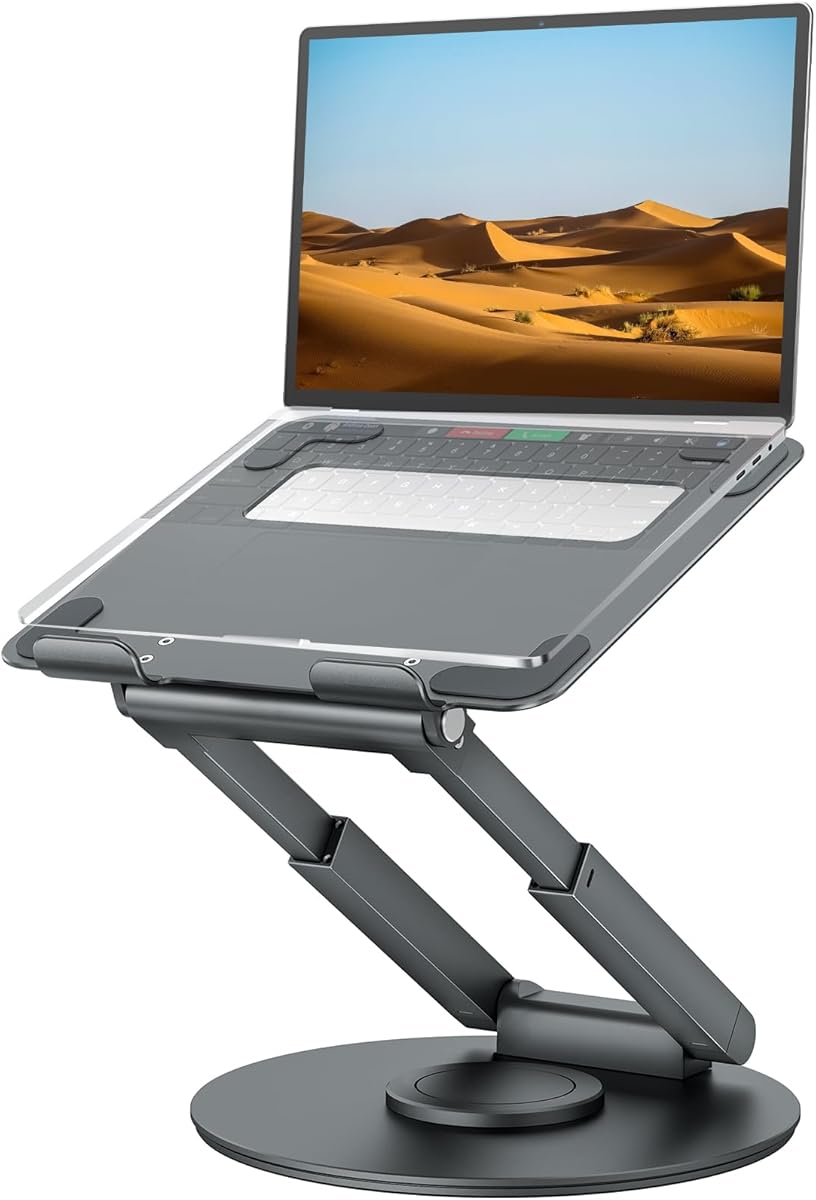
The LOXP Adjustable Laptop Stand offers excellent rotation and durability for mobile professionals. It features a 360-degree base for flexible viewing.
We may earn a commission when you buy through this link, at no additional cost to you.
The fiber metal construction is more durable than standard aluminum. The rotating base allows you to share screens easily during meetings. It folds flat for easy transport in backpacks.
The stand is slightly bulkier due to the rotation mechanism. The weight limit is standard but not as high as premium models. This is acceptable for general office work.
Choose this if you need to pivot your laptop often. It is great for collaborative offices or hybrid setups where sharing screens is common.
The 360-degree rotating base connects smoothly to the stand. You can rotate the laptop to any angle without moving your body.
Made of one-piece fiber metal for enhanced stability. The anti-slip silicone protects your device from sliding.
We may earn a commission when you buy through this link, at no additional cost to you.
The Lamicall Aluminum Laptop Stand supports larger devices up to 17.3 inches. It features a heavy base for maximum stability.
We may earn a commission when you buy through this link, at no additional cost to you.
Its wide base ensures the stand never shakes or slides. The ventilation holes keep devices cool. It is compatible with most MacBook and PC models.
The base takes up more desk space than compact models. It is not as foldable as dual-hinge stands. This is a trade-off for stability.
Buy this if you use a large gaming or business laptop. It offers secure support for devices that might tip on lighter stands.
Fits laptops from 10 to 17.3 inches including Surface and Alienware. This makes it ideal for mixed-device offices.
The larger heavier base prevents movement while typing. Anti-skid silicone protects your laptop surface.
We may earn a commission when you buy through this link, at no additional cost to you.
The Amazon Basics Ergonomic Stand provides practical height adjustment and portability. It supports laptops up to 15.6 inches.
We may earn a commission when you buy through this link, at no additional cost to you.
It features up to 7 inches of height adjustment for proper ergonomics. The open hollow design promotes airflow. It weighs only 1.7 lbs for easy travel.
The capacity is limited to 11 lbs which may not fit gaming laptops. It is not as sturdy as aluminum models. This is fine for standard office work.
Choose this for a simple and light travel solution. It fits easily into bags and provides decent ergonomic relief.
Achieve personalized comfort with up to 7 inches of height adjustment. Helps improve posture during extended use.
Open hollow design promotes airflow. Keeps your laptop cool during intensive tasks.
We may earn a commission when you buy through this link, at no additional cost to you.
The BESIGN LS03 Aluminum Stand is the best budget option with 4.8 rating. It offers detachable design and rubber hands.
We may earn a commission when you buy through this link, at no additional cost to you.
It elevates laptops by 6 inches to eye level. The aluminum design ensures cooling and protection. It fits 10 to 15.6 inch laptops perfectly.
Assembly requires three steps which might be tricky for some. It is not height adjustable like telescopic models. This is acceptable for a fixed desk setup.
Buy this for a reliable and affordable desktop riser. It is perfect for home offices where assembly is a one-time task.
Easy to assemble in three steps and detach for storage. Saves space when not in use.
Rubber on the holder hands sticks tightly. Prevents scratches and sliding.
We may earn a commission when you buy through this link, at no additional cost to you.
The JOYEKY Laptop Stand offers smooth rotation and high stability. It supports laptops up to 11 lbs.
We may earn a commission when you buy through this link, at no additional cost to you.
It features a smooth dual-axis base for effortless screen sharing. The heavy base prevents shaking. It folds to 9.45 inches for easy storage.
The price is higher than basic stands. The capacity is good but not the highest. This is acceptable for collaboration use.
Choose this if you collaborate frequently in meetings. The rotation feature makes presentations and brainstorming much easier.
Effortlessly rotate your laptop 360 degrees with the smooth dual-axis base. Perfect for sharing screens.
Folds to compact 9.45 inches. Easy to slip into backpacks.
We may earn a commission when you buy through this link, at no additional cost to you.
The Nulaxy 360 Rotating Stand combines rotation with high weight capacity. It supports up to 22 lbs.
We may earn a commission when you buy through this link, at no additional cost to you.
It passes 6000 rotation tests for strong fixation. The dual hinges prevent jitter. Non-slip pads and reinforced baffle hooks secure your device.
It is heavier than fixed stands due to rotation. The dual folding adds stability but size. This is acceptable for premium performance.
Buy this for heavy laptops needing rotation. It offers strong protection and a premium rotating experience.
Built with high-precision dual hinges that pass 6000 rotation tests. Delivers steady support for daily work.
Reinforced baffle hooks and non-slip pads protect your device. Prevents sliding and scratching.
We may earn a commission when you buy through this link, at no additional cost to you.
The Adjustable Metal Laptop Stand offers strong capacity and durability. It supports up to 17.6 lbs.
We may earn a commission when you buy through this link, at no additional cost to you.
It features 2 rubber mats and anti-skid silicone. The top has multiple ventilation holes. It fits 10 to 15.6 inch laptops.
The adjustability is less than telescopic models. It is not height adjustable for sitting and standing. This is acceptable for fixed desks.
Choose this for a sturdy and secure metal stand. It is ideal for heavier laptops that need firm support.
Made of sturdy metal and supports up to 17.6 lbs. Anti-skid pads secure your laptop.
Top designed with multiple holes for greater ventilation. Keeps devices cool.
We may earn a commission when you buy through this link, at no additional cost to you.
The tounee Telescopic Stand supports active standing and rotating. It elevates up to 21 inches.
We may earn a commission when you buy through this link, at no additional cost to you.
It offers on-demand standing to relieve muscle tension. The large base supports 22 lbs. The turntable rotates smoothly for chats.
The price is higher than basic stands. Setup might require calibration. This is acceptable for health benefits.
Buy this if you want to switch between sitting and standing. It helps develop healthy postures throughout the work day.
Easily switch sitting and standing posture by a simple telescoping button. Relieves neck and shoulder pain.
The large heavier base makes it super sturdy. Two pivot joints make it twice as strong.
We may earn a commission when you buy through this link, at no additional cost to you.
The Nulaxy 18 Height Stand offers max height and rotation. It supports 22 pounds of load.
We may earn a commission when you buy through this link, at no additional cost to you.
It allows comfortable standing or sitting work. You can adjust the angle as needed. It fits up to 17 inch laptops.
It is heavier due to robust build. Remove laptop before adjusting height. This is a minor inconvenience.
Choose this for high standing desk needs. It is perfect for active offices that share screens.
Adjust the height to 18 inches for standing or sitting. Boosts your productivity.
Supports as much as 22 pounds. Prevents laptop from tipping.
We may earn a commission when you buy through this link, at no additional cost to you.
Choosing the right stand involves balancing build quality, weight capacity, and adjustability. We break down the key factors to help you make a confident decision.
Ensure the stand supports your laptop's weight. Models like Nulaxy offer 22 lbs which fits gaming laptops. Others support around 11 lbs. Check your device specs before buying.
Always choose a stand with a higher weight rating than your device for stability.
Telescopic stands allow sitting and standing transitions. Fixed stands usually offer one height. Choose adjustable if you want flexibility.
Adjustable models help maintain healthy posture throughout the day.
Look for heavy or dual-rod bases. Some stands use anti-slip silicone pads. Stability ensures your laptop does not wobble while typing.
A stable stand protects your device and reduces fatigue.
Foldable designs fit in backpacks. Some collapse completely flat. If you travel, prioritize lightweight and compact models.
Portable stands are essential for remote work or travel.
Open designs with ventilation holes improve cooling. Some models use aluminum for better heat transfer. Good airflow prevents thermal throttling.
Proper cooling maintains your laptop's performance over time.
Check the size range. Most support 10 to 17 inch laptops. Some have larger bases for gaming laptops. Ensure your device fits securely.
Universal compatibility ensures the stand works with most devices.
360 rotation helps with sharing screens. Dual-axis bases offer smoother movement. Rotation is useful for collaborative offices.
Rotation features add versatility for meetings and brainstorming.
Aluminum alloy and metal are durable. Some use fiber metal for extra stability. Material impacts both weight and longevity.
Quality materials ensure the stand lasts through daily use.
Place the stand on a flat and solid surface. Ensure it is stable before putting your laptop on. This prevents tipping and protects your device.
Adjust the height and tilt angle to your comfort. Your screen should be at eye level. Keep your back straight and shoulders relaxed.
Clean the stand with a soft cloth. Remove dust from ventilation holes to ensure cooling. Follow manufacturer instructions for assembly and storage.
Yes, using an external keyboard and mouse is recommended. It prevents wrist strain and allows you to type comfortably while the screen is elevated. This setup ensures your hands stay in a natural position.
Most stands in this guide support up to 17 inch laptops. Always check the product specs to confirm compatibility. The Nulaxy and Lamicall models fit this size easily.
Some stands support laptops up to 17.3 inches. However, check the weight capacity as well. Heavier gaming laptops may need higher-rated models for stability.
Many stands support tablets if they fit within the width range. Ensure the tablet has enough weight or use accessories for grip. Check the manufacturer guidelines for tablet compatibility.
Wipe the pads with a damp cloth to remove dust. Avoid harsh chemicals that might degrade the rubber. Keeping them clean ensures your laptop stays secure.
Do not adjust height while using your laptop for safety. Some models allow height adjustment. Remove the device before changing settings to avoid tipping.
Rotating bases allow easy screen sharing with others. They help pivot your laptop for better angles. This feature is useful in collaborative offices.
The Nulaxy Ergonomic Adjustable Stand leads for stability and cooling. The BESIGN LS03 offers a great budget option. The tounee Telescopic Stand excels at active standing.
Prioritize stands that match your device weight and size. Look for ventilation to keep your laptop cool. Ensure adjustability fits your daily needs.
Always verify current availability and pricing before buying. Prices and stock may change without notice. Check the links for the latest details.