
LGA 1155 Motherboard H61
5.0Editor score
Supports 2nd and 3rd Gen Core
M.2 NVMe SSD Interface
VGA and HDMI Video Output
This guide compares the top Lga 1155 Motherboard options for budget gaming and legacy system builds, analyzing features and compatibility.
Finding a reliable Lga 1155 Motherboard is essential for maintaining or upgrading older Intel systems. These boards support second and third generation Core processors, offering a cost-effective path for budget gaming or office workstations without needing new hardware.
We analyzed ten distinct models ranging from modern budget imports to classic OEM boards. Our comparison focuses on chipset features, memory support, expansion slots, and connectivity options to help you choose the right platform for your specific upgrade needs.
Each pick below highlights unique strengths and potential limitations. Note that product availability and pricing fluctuate frequently on online marketplaces. Always verify current stock and compatibility before purchasing to ensure a smooth installation process.
5.0Editor score

4.3Editor score

4.1Editor score
The following table provides a side-by-side comparison of all ten models evaluated in this guide. Review the key specifications to determine which board best fits your processor and peripheral requirements.



This H61 motherboard offers a remarkably affordable entry into the Lga 1155 ecosystem. With a perfect rating, it appeals to users seeking basic functionality without breaking the bank. The board supports a wide range of Intel processors including Xeon options.
We may earn a commission when you buy through this link, at no additional cost to you.
Its standout feature is the inclusion of an M.2 SSD interface, which is rare at this price point. Users can install modern NVMe storage for faster boot times. Dual-channel DDR3 slots allow up to 16GB of memory for smooth multitasking.
The absence of a printed manual and battery may inconvenience some users. Drivers must be downloaded separately. However, these omissions help keep the cost low for budget-conscious builders upgrading older systems.
Buyers should verify their CPU supports integrated graphics if using onboard video outputs. For general office use or light gaming, this board provides excellent value for the cost.
The M.2 slot supports NVMe protocols allowing faster data transfers than traditional SATA drives.
Compatible with 2nd and 3rd generation Core i3 i5 i7 processors as well as Xeon E3 v2.
We may earn a commission when you buy through this link, at no additional cost to you.
The MACHINIST H61 board is designed with a Flex-ATX form factor suitable for smaller cases. It provides essential connectivity for budget builds. The product page offers extensive troubleshooting tips to assist users during setup.
We may earn a commission when you buy through this link, at no additional cost to you.
Support for NVMe M.2 SSDs via the PCIe channel offers decent performance for this chipset. The board handles up to 16GB of DDR3 memory. It supports a variety of Intel processors including Celeron and Pentium series.
Users note the lack of integrated graphics on many Xeon CPUs require a discrete card. The package does not include a battery or manual. Troubleshooting steps are provided online to mitigate these issues.
This board is ideal for users comfortable with basic hardware troubleshooting. Ensure your CPU supports integrated graphics or plan to use a dedicated GPU for video output.
The Flex-ATX design allows installation in compact cases not fitting standard ATX boards.
Detailed setup instructions and troubleshooting tips are available on the product details page.
We may earn a commission when you buy through this link, at no additional cost to you.
The Gigabyte Z77-DS3H represents a classic choice for Lga 1155 systems. Its Z77 chipset offers better feature sets than H61 boards including PCIe 3.0 support. This makes it suitable for users seeking reliable performance for legacy platforms.
We may earn a commission when you buy through this link, at no additional cost to you.
It supports standard ATX cases with ample expansion slots. The board includes Gigabit LAN and supports RAID configurations for storage redundancy. Users appreciate the build quality associated with major manufacturers like Gigabyte.
Being an older model, it may lack modern connectivity options like USB 3.1. Availability can vary as it is often a used or refurb market item. Verify condition before purchase.
Recommended for users needing a sturdy platform for workstations or light gaming. Ensure your CPU is compatible with the Z77 chipset for optimal performance.
The Z77 chipset provides enhanced overclocking capabilities and PCIe 3.0 support compared to H61.
Supports RAID configurations allowing users to combine drives for speed or redundancy.
We may earn a commission when you buy through this link, at no additional cost to you.
The ASUS P8Z77-V brings premium features to the Lga 1155 platform. Its USB BIOS Flashback function allows BIOS updates without a CPU installed. This is crucial for resolving compatibility issues with newer processors.
We may earn a commission when you buy through this link, at no additional cost to you.
Fan Xpert 2 provides optimized speed control for system fans. The board includes a TPM header for enhanced data security. Wi-Fi GO! offers multimedia management and remote control features for home environments.
These advanced features come at a higher price than basic H61 boards. Users interested in system stability and security will find the TPM and power controls valuable. It is a robust choice for enthusiasts.
Ideal for users who need specific features like USB BIOS Flashback. Consider the cost versus budget options if you do not need these advanced capabilities.
USB BIOS Flashback allows updating firmware using a USB drive without a CPU installed.
TPM header supports Trusted Platform Module for enhanced hardware security.
We may earn a commission when you buy through this link, at no additional cost to you.
This H61 board is marketed for gaming on a budget. It features 3-phase power and solidstate capacitors to ensure stability during use. The M.2 NVMe slot offers speed advantages for storage on older platforms.
We may earn a commission when you buy through this link, at no additional cost to you.
The board supports up to 16GB of DDR3 memory. VGA and HDMI outputs allow for flexible display connections. It is compatible with a wide range of Intel processors including Celeron series.
While affordable, the power design is basic compared to premium boards. It may not suit heavy overclocking. However, it provides a stable base for standard gaming builds with dedicated graphics cards.
Recommended for budget gamers needing M.2 support. Check the manual online for drivers since physical documentation is often missing.
Solidstate capacitors help maintain stable power delivery for consistent performance.
With a dedicated GPU the board supports modern gaming titles effectively.
We may earn a commission when you buy through this link, at no additional cost to you.
The P8H77-V LE focuses on energy efficiency and speed. Its EPU system saves energy during low load times. DIGI+ VRM ensures high power efficiency and system stability for daily tasks.
We may earn a commission when you buy through this link, at no additional cost to you.
USB 3.0 Boost allows devices to run in Turbo mode for faster transfers. GPU Boost offers quick upgrades for graphics performance. The board supports HDMI and SATA 6Gb/s ports for modern peripherals.
These features make it suitable for users prioritizing efficiency. The LE version offers many flagship features at a lower cost. It remains a solid choice for H77 chipsets.
Ideal for office PCs or media centers. Ensure your power supply is compatible with the board's requirements.
EPU technology manages power real-time to save energy without sacrificing performance.
USB 3.0 Boost modes improve read and write speeds for external drives.
We may earn a commission when you buy through this link, at no additional cost to you.
This full-featured H77 board supports up to 32GB of DDR3 memory. The PCIe 3.0 x16 slot provides sufficient bandwidth for modern graphics cards. It is built for users needing maximum capacity and expansion.
We may earn a commission when you buy through this link, at no additional cost to you.
The board offers multiple PCIe slots for additional cards. RAID support is included for data redundancy. SATA 3 and USB 3.0 ports are present for legacy device support.
It is priced higher than basic boards. Users requiring high RAM capacity or multiple expansion cards will find it valuable. It is a premium option for the Lga 1155 platform.
Best for workstation builds. Verify the motherboard condition as many listings are for older stock.
Supports up to 32GB of DDR3 RAM for heavy multitasking and virtualization.
Multiple PCIe slots allow adding multiple capture or network cards.
We may earn a commission when you buy through this link, at no additional cost to you.
The P8Z77-V LK leverages the Z77 chipset for overclocking potential. It supports 3rd and 2nd gen processors effectively. The four DDR3 slots allow for ample memory expansion up to 32GB.
We may earn a commission when you buy through this link, at no additional cost to you.
Dual x8 PCIe slots are available for multi-GPU configurations. This makes it a viable option for high-performance graphics setups on legacy platforms. It includes SATA 3 ports for fast SSD support.
The price is higher than H61 boards. Users interested in overclocking or multi-GPU setups will appreciate the features. It is a strong contender for enthusiast builds.
Ideal for overclockers. Ensure cooling is adequate for higher power draw during overclocking.
Dual x8 slots allow running multiple graphics cards for increased performance.
Z77 chipset provides the necessary voltage controls for safe overclocking.
We may earn a commission when you buy through this link, at no additional cost to you.
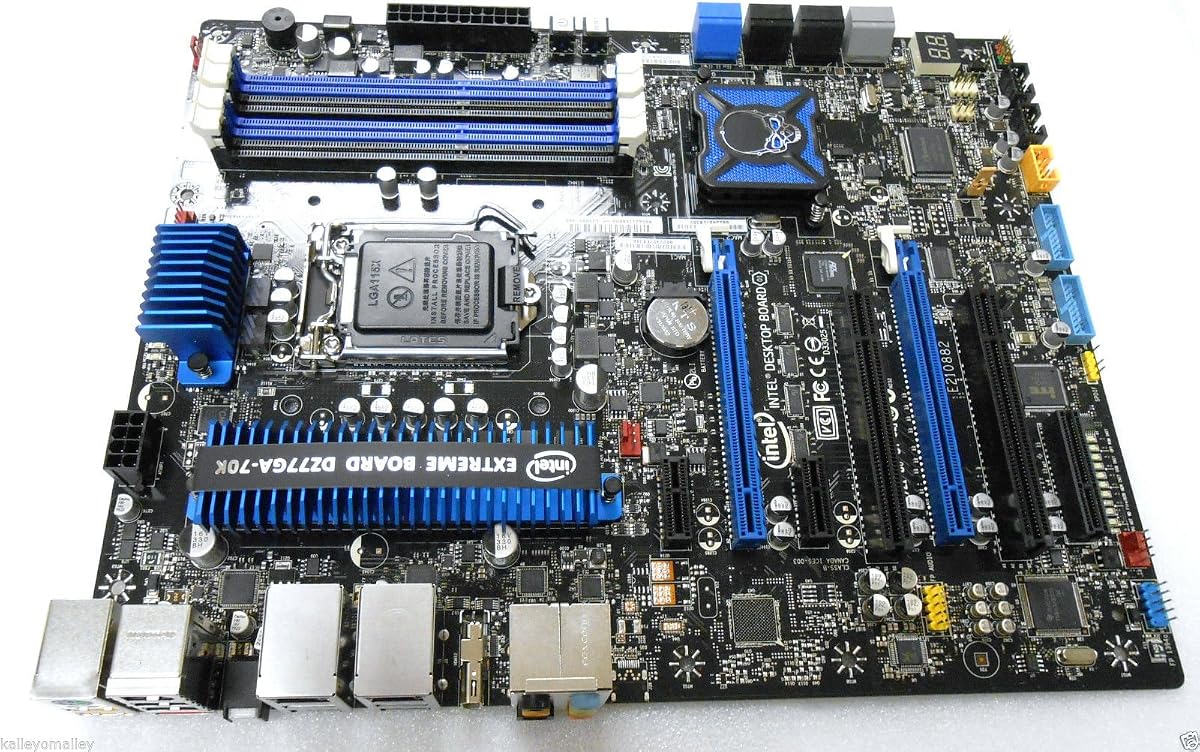
The Intel Z77 Extreme series represents official Intel quality. It features dual Gigabit LAN ports for network redundancy. This makes it ideal for professional workstations or servers requiring stable connections.
We may earn a commission when you buy through this link, at no additional cost to you.
Firewire ports are included which is rare in modern boards. This is useful for legacy video editing hardware. HDMI and e-SATA ports provide diverse connectivity options.
Finding a new unit is extremely difficult. Prices on the secondary market are high. It is best for specific legacy professional needs where Firewire is required.
Recommended for users needing Firewire or dual LAN. Verify stock availability carefully before purchasing.
Dual Gigabit LAN ports allow failover or aggregated bandwidth for critical tasks.
Firewire support is essential for users maintaining legacy professional video hardware.
We may earn a commission when you buy through this link, at no additional cost to you.
The P8B75-M/CSM is a business class board focused on stability. Its CSM support allows for legacy system compatibility. Users benefit from UEFI BIOS and easy GPU access.
We may earn a commission when you buy through this link, at no additional cost to you.
EPU provides energy saving capabilities for daily use. The board offers USB 3.0 Boost for faster transfers. It is designed to handle 24/7 operation without failure.
It is pricier than consumer models. The lack of aggressive overclocking features suits office environments better. It offers peace of mind for critical workstation use.
Recommended for office environments. The CSM feature ensures compatibility with older OS options if needed.
CSM support allows for legacy compatibility and stable daily operation.
UEFI BIOS provides a modern interface for easier system configuration.
We may earn a commission when you buy through this link, at no additional cost to you.
Selecting the right motherboard requires evaluating several technical factors. This guide breaks down the critical elements to ensure your purchase meets your specific upgrade needs.
The chipset determines the features and capabilities of your system. Z77 chipsets offer the most features including overclocking and PCIe 3.0. H77 and H61 are more basic but sufficient for standard tasks.
Always choose a chipset that aligns with your performance goals. Z77 is best for enthusiasts while H61 suits strict budgets.
DDR3 memory slots vary in count and maximum capacity. Some boards support 16GB while others support 32GB. Ensure your board matches your RAM requirements for modern applications.
Check the number of DIMM slots available. More slots allow for future expansion without replacing existing memory modules.
Modern M.2 NVMe support is a major upgrade over legacy SATA. Boards like the H61 from certain brands include this feature. This significantly improves boot and load times.
Prioritize boards with M.2 slots if you plan to install SSDs. It offers faster speeds and better cable management.
Most Lga 1155 boards are ATX standard size. However, Flex-ATX options exist for smaller cases. Ensure your case supports the chosen board size before purchasing.
ATX offers the best connectivity options. Flex-ATX saves space but may limit port count and expansion slots.
Onboard video support depends on the CPU. Most boards have VGA and HDMI ports. Ensure the CPU supports integrated graphics if you plan to use them.
If using a Xeon CPU without graphics you must add a GPU. Check processor specs before relying on onboard video.
PCIe slots determine your ability to add graphics cards or other peripherals. Z77 boards often support dual x8 modes. Basic H61 boards may have limited slots.
Evaluate how many cards you need to install. Multiple PCIe slots offer greater flexibility for networking or sound cards.
Major brands like ASUS and Gigabyte offer better support. Generic brands may lack manuals or warranties. Check user reviews for reliability feedback.
Consider the warranty status carefully. Older boards may be out of warranty so check the seller policy.
Ensure your power supply provides adequate power for the board and CPU. High-end boards require stable 24-pin connections. Basic boards have lower power requirements.
Check the connectors match your power supply. Standard ATX connections are common but verify details for high-end models.
When installing the board ensure you ground yourself to avoid static discharge. Place the motherboard on its box before connecting any components. Secure it with standoffs to prevent short circuits.
Connect the CPU power and 24-pin power connectors first. Insert RAM into the slots marked for dual channel mode. Ensure the CPU is seated firmly before attaching the cooler.
Keep the board clean by dusting it occasionally. Avoid touching components with wet hands. Proper airflow is crucial for longevity so ensure your case has working fans.
Lga 1155 supports 2nd and 3rd generation Intel Core i3 i5 i7 processors. It also supports Xeon E3 V2 series and Pentium/Celeron. Ensure the BIOS supports the specific CPU model.
No Lga 1155 motherboards only support DDR3 memory. DDR4 modules will not fit or work physically. You must purchase DDR3 RAM for these systems.
Not all boards support M.2. Many budget H61 models lack this feature. Only newer or specific boards offer M.2 NVMe slots for SSD support.
Some processors like Xeon E3 V1 lack integrated graphics. In such cases a dedicated GPU is required for video output. Check CPU specs for integrated graphics support.
Most H61 boards support up to 16GB. Z77 boards can support up to 32GB. Always check the specific model specs for maximum limits.
Officially no since TPM 2.0 is often missing. However some users have bypassed requirements. For stability stick to Windows 10 or Linux.
Many boards support BIOS Flashback via USB. Download the latest file and place it on a USB drive. Follow manufacturer instructions to flash safely.
We have reviewed ten distinct Lga 1155 Motherboard options suitable for various needs. The H61 models offer value while Z77 boards provide enhanced features for enthusiasts.
Prioritize your needs such as M.2 support or memory capacity. A board that matches your specific use case ensures better performance and longevity.
Prices and availability fluctuate frequently. Always verify current stock and conditions before purchasing to ensure you get the best deal.